Internal Revenue Manual § 3.12.106 - Estate Tax Returns - Paper Correction Processing
3.12.106 Estate Tax Returns - Paper Correction Processing
Manual Transmittal
September 05, 2025
Purpose
(1) This transmits revised IRM 3.12.106, Error Resolution - Estate Tax Returns - Paper Correction Processing.
Material Changes
(1) IRM 3.12.106.3.1(1) - Updated table with changed field locations for 202501 and Later.
(2) IRM 3.12.106.3.2(1) - Updated line numbers for 2025.
(3) IRM 3.12.106.3.3(2) - Added 202501 and Later line references to table.
(4) IRM 3.12.106.3.3.10(1) - Updated line numbers for 202501 and later.
(5) IRM 3.12.106.3.4 - Added Section 60 Error Record Format for Form 706-GS(D), 202501 and Later.
(6) IRM 3.12.106.3.4.1(1) - Added Field 60-A for Form 706-GS(D), 202501 and Later.
(7) IRM 3.12.106.3.4.2(1) and (2) - Added invalid conditions for field 60-A for Form 706-GS(D), 202501 and Later.
(8) IRM 3.12.106.3.4.3(1) and (2) - Added correction procedures for field 60-A for Form 706-GS(D), 202501 and Later.
(9) IRM 3.12.106.3.5 - Added Field 60-B for Form 706-GS(D), 202501 and Later.
(10) IRM 3.12.106.3.5.1(1) and (2) - Added invalid conditions for field 60-B for Form 706-GS(D), 202501 and Later.
(11) IRM 3.12.106.3.5.2(1) and (2) - Added correction procedures for field 60-B for Form 706-GS(D), 202501 and Later.
(12) IRM 3.12.106.3.6 - Added Field 60-C for Form 706-GS(D), 202501 and Later.
(13) IRM 3.12.106.3.6.1(1) and (2) - Added invalid conditions for field 60-C for Form 706-GS(D), 202501 and Later.
(14) IRM 3.12.106.3.6.2 (1) and (2) - Added correction procedures for field 60-C for Form 706-GS(D), 202501 and Later.
(15) IRM 3.12.106.4.1 - Updated line information for section 01 for Form 706-GS(T).
(16) IRM 3.12.106.4.2 - Updated line locations for fields in section 02 for 202501 and Later for Form 706-GS(T).
(17) IRM 3.12.106.4.3 - Updated line locations for fields in section 03 for 202501 and Later for Form 706-GS(T).
(18) IRM 3.12.106.4.3.1(1) and (2) - Updated line numbers to match Prior and current Form 706-GS(T) returns.
(19) IRM 3.12.106.4.3.2(1) - Added field locations for 202501 and Later for Form 706-GS(T).
(20) IRM 3.12.106.4.3.3(1), (1a) 1(b) 1(c) and 1(d) - Added field locations for 202501 and Later for Form 706-GS(T).
(21) IRM 3.12.106.4.4 - Added Section 60 Error Record Format for Form 706-GS(T).
(22) IRM 3.12.106.4.4.1(1) - Added Field 60-A for Form 706-GS(T).
(23) IRM 3.12.106.4.4.2(1) and (2) - Added invalid conditions for field 60-A for Form 706-GS(T).
(24) IRM 3.12.106.4.4.3(1) and (2) - Added correction procedures for field 60-A for Form 706-GS(T).
(25) IRM 3.12.106.4.5(1) - Added Field 60-B for Form 706-GS(T).
(26) IRM 3.12.106.4.5.1(1) and (2) - Added invalid conditions for field 60-B for Form 706-GS(T).
(27) IRM 3.12.106.4.5.2(1) and (2) - Added correction procedures for field 60-B for Form 706-GS(T).
(28) IRM 3.12.106.4.6(1) - Added Field 60-C for Form 706-GS(T).
(29) IRM 3.12.106.4.6.1(1) and (2) - Added invalid conditions for field 60-C for Form 706-GS(T).
(30) IRM 3.12.106.4.6.2(1) and (2) - Added correction procedures for field 60-C for Form 706-GS(T).
(31) Exhibit 3.12.106-1 - Added new Exhibit 1 for 2025 Form 706-GS(D).
(32) Exhibit 3.12.106-3 - Added new Exhibit 3 for 2025 Form 706-GS(T).
(33) Revise the Internal Revenue Manual (IRM), where necessary, for the following type of changes:
-
Plain language, simpler words
-
Spelling, grammar, and formatting
-
IRM references, citations, and links
-
Form titles
-
IRM graphics and alternative text
-
Updated dates to Current year processing
Effect on Other Documents
IRM 3.12.106, dated June 12 (effective June 12, 2025) is superseded. No IRM Procedural Updates (IPUs) issued since June 12, 2025.
Audience
Taxpayer Services (TS), Submission Processing - Input Correction Operation, Error Resolution employees
Effective Date
(01-01-2026)
Scott Wallace
Director Submission Processing
Taxpayer Services
3.12.106.1 (06-12-2025)
Program Scope and Objectives
-
Error Resolution System for, Form 706-GS(D), Generation-Skipping Transfer Tax for Distributions and, Form 706-GS(T), Generation-Skipping Transfer Tax Returns for Terminations corrects errors made by taxpayers as well as those made by submission processing campus operations.
-
Purpose: This section provides instructions for perfecting Form 706-GS(D), and Form 706-GS(T), error and reject registers for estate, gift, and generation-skipping tax returns. Records appear on registers because of validity, consistency, math, and/or input errors. These instructions apply to Submission Processing Pipeline, Input Correction Branch, Error Resolution (ERS) Department.
-
Audience: These procedures apply to Taxpayer Services (TS) Submission Processing Error Resolution System (ERS) personnel:
-
Error Resolution: Supervisory Tax Examining Assistant
-
Lead Tax Examining Technician
-
Tax Examining Technician
-
Rejects: Supervisory Tax Examining Technician
-
Lead Tax Examining Technician
-
Tax Examining Technician
-
-
Policy Owner: Director Submission Processing
-
Program Owner: Return Processing Branch (RPB), Business Master File (BMF) Section
-
Primary Stakeholders: Other areas that may be affected by these procedures include (but not limited to):
-
Accounts Management (AM)
-
Small Business Self-Employed (SB/SE)
-
Large Business and International (LB & I)
-
Chief Financial Officer (CFO)
-
Taxpayer Advocate Service (TAS)
-
Statistics of Income (SOI)
-
Tax Exempts/Government Entities (TEGE)
-
Compliance, Modernized E-File (MEF)
-
Submission Processing (SP)
-
3.12.106.1.1 (01-01-2018)
Background
-
Error Resolution is to resolve validity errors, field errors, consistency errors, and math errors in returns and other documents for posting to the Master File. Records fall out in Error Resolution System (ERS) due to the Generalized Mainline Framework (GMF). The entries from transcription are transferred to ERS fields. The GMF programming causes a record to fall out to ERS if it fails to meet certain criteria, including:
-
Invalid characters in a field (e.g., numeric instead of alpha)
-
Invalid length of field (e.g., EIN with 8 digits instead of 9)
-
Invalid codes in field (valid Action Codes, Audit Codes, etc. are programmed in GMF)
-
Consistency errors - any valid field used in any computation where the result is inconsistent with (or contradictory to) any other valid field
-
Math errors - computer does math computation and it differs from the taxpayer’s amount, and invalid tax periods and eligibility for certain credits
Employees use the ERS system and the return to correct these conditions and when necessary use Integrated Data Retrieval System (IDRS) to research.
-
3.12.106.1.2 (01-01-2020)
Authority
-
Authority for procedures is found in the following sections of the Internal Revenue Code (IRC) and their corresponding Treasury Regulations IRC Section 6201(a):
-
Foreign Account Tax Compliance Act (FATCA)
-
Internal Revenue Service Restructuring and Reform Act of 1998 (RRA 98)
-
Technical and Miscellaneous Revenue Act of 1988 (TAMRA)
Note:
The above list may not be all inclusive of the various updates to the IRC.
-
-
All Policy Statements for Submission Processing are contained in IRM 1.2.1, Servicewide Policies and Authorities - Policy Statements for Submission Processing Activities.
3.12.106.1.3 (01-01-2025)
Roles and Responsibilities
-
The Campus Director is responsible for monitoring operational performance for the Submission Processing campus.
-
The Operations Manager is responsible for monitoring operational performance for their operation.
-
The Team Manager/Lead is responsible for performance monitoring and ensuring employees have the tools to perform their duties.
-
The Team Employees are responsible for following the instructions contained in this IRM and maintain updated IRM procedures.
3.12.106.1.4 (01-01-2018)
Program Management and Review
-
Program Goals: Enter corrections on the paper error registers for any errors falling out through Service Center Replacement System (SCRS) in Error Resolution.
-
Program Reports: System control reports are on the Control-D Web-Access (CTDWA) and a general listing of the reports are located in IRM 3.12.38, Error Resolution, BMF General Instructions.
-
Program Effectiveness: The program goals are measured by using the following tools:
-
Embedded Quality Submission Processing (EQSP)
-
Balanced Measures
-
Managerial Reviews
-
-
Annual Review: The process outlined in this IRM should be reviewed annually to ensure accuracy and promote consistent tax administration.
-
Federal Managers Financial Integrity Act (FMFIA).
3.12.106.1.5 (01-01-2018)
Program Controls
- Quality Review conducts a statistical valid sample size review of completed work to ensure IRM guidelines are followed.
3.12.106.1.6 (01-01-2025)
Terms/Definitions/Acronyms
-
Acronyms and Abbreviations listed below are used to process gift and generation-skipping tax returns:
Abbreviation Definition AIMS Audit Information Management System ADP Automatic Data Processing BMF Business Master File CAF Centralized Authorization File CII Correspondence Imaging Inventory DLN Document Locator Number DSSN Donor's Social Security Number DOD Date of Death EIF Entity Index File EIN Employer Identification Number IDRS Integrated Data Retrieval System IDT Identity (ID)Theft IRC Internal Revenue Code IRM Internal Revenue Manual ISRP Integrated Submission and Remittance Processing NAP National Accounts Profile POA Power of Attorney PSPC Philadelphia Submission Processing Center PSSN Primary Social Security Number SPC Submission Processing Center SSN Social Security Number SSSN Secondary Social Security Number TAS Taxpayer Advocate Service TIA Tax Information Authorization TIN Taxpayer Identification Number TPNC Taxpayer Notice Code TRS Transcript Research System TS Taxpayer Services
3.12.106.1.7 (01-01-2018)
Interpretation Words
-
The table lists Interpretation Words and their definitions.
Word Definition Example of using a word that is open to interpretation ### Note: This column is for illustration purposes only. Error Register When the computer finds an error (consistency, math verification or validity) in the data input for a return. It generates an error register A printed document which shows sections and fields corresponding to the information entered into the computer. Section A portion of the return Each section is numbered with a two-digit code beginning with 01. Field An item in a section on the return Usually a line on the return. Alpha Field Designator The first field of each section is designated the A field. Subsequent fields are designated B, C, D, etc. Field Breakers A symbol that shows the end of a field. By itself, it means there's no data entered into that field * Sometimes, a “+” (plus) or “-” (minus) is used for the field breaker to show that an amount is positive or negative. If it is necessary to change a field from a positive to a negative, enter a pound sign (#) at the end of the amount to tell ISRP to input the amount as negative. To change a field from negative to positive, use a comma (,) to alert Integrated Submission and Remittance Process. * A fixed length field does not have a field breaker. All spaces must be accounted for. When correcting a fixed length field, show the number of blanks to be used by writing and circling the number above the field. Document Locator Number (DLN) A DLN is given to each document processed in the Automatic Data Processing System and is used to find the document. As an organization, we distinguish between different types of returns by giving them specific tax classes and document codes.
3.12.106.1.8 (01-01-2025)
Related Resources
-
The following resources may assist in performing the work as outlined in this IRM:
-
Servicewide Electronic Research Program (SERP)
-
Integrated Data Retrieval System (IDRS)
-
Integrated Automation Technologies (IAT)
-
Instructor’s Corner for Submission Processing
-
3.12.106.2 (01-01-2025)
General
-
It may be necessary to refer to instructions in the following IRMs:
-
IRM 3.11.106, Returns and Document Analysis, Estate and Gift Tax Returns.
-
IRM 3.12.38, Error Resolution, BMF General Instructions.
-
IRM 3.24.106, ISRP System, Estate Tax Returns.
-
-
Refer to IRM 3.12.263, Error Resolution, Estate and Gift Tax Returns, for correction information regarding the following Forms:
-
Form 706, United States Estate (and Generation-Skipping Transfer) Tax Return.
-
Form 706-NA, United States Estate (and Generation-Skipping Transfer) Tax Return Estate of Nonresident Not a Citizen of the United States
-
Form 709, United States Gift (and Generation-Skipping Transfer) Tax Return.
-
Form 709-NA, United States Gift (and Generation-Skipping Transfer) Tax Return of Nonresident Not a Citizen of the United States.
-
3.12.106.2.1 (01-01-2026)
General Requirements - Forms 706 series
-
Instructions provided in the following are to be used in conjunction with the IRM:
Form Title Form 706-GS(D), Generation-Skipping Transfer Tax Return for Distributions IRM 3.11.106.25, Processing Form 706-GS(D) Generation-Skipping Transfer Tax for Distribution Form 706-GS(D-1), Notification of Distribution From a Generation-Skipping Trust (Information Return Only) IRM 3.11.106.27, Processing Form 706-GS(D-1) Notification of Distribution From a Generation-Skipping Trust (INFORMATION ONLY) Form 706-GS(T), Generation-Skipping Transfer Tax Return for Terminations IRM 3.11.106.26, Processing Form 706-GS(T) Generation-Skipping Transfer Tax Return for Terminations Caution:
If one of the following returns listed below are mailed on or after August 28, 2020 a digital signature is acceptable:
-
706-GS(D), Generation-Skipping Transfer Tax Return for Distributions
-
706-GS(D-1), Notification of Distribution from a Generation-Skipping Trust
-
706-GS (T), Generation-Skipping Transfer Tax Return for Terminations
-
3.12.106.2.2 (01-01-2022)
Customer Account Data Engine (CADE) 2
-
The Customer Account Data Engine (CADE) 2 Program Office in headquarters is charged with the primary goal to implement a single, modernized programming solution which gives daily processing of taxpayer accounts.
-
The CADE 2 solution is comprised of several components, to modernize the to a daily processing environment with several transition states.
-
The new Business Master File (BMF) campus cycles are:
-
Campus Cycle: Thursday - Wednesday
-
Master File Processing: Friday - Thursday
-
Notice Review Saturday: Monday (8+ days)
-
Unpostables: New available Tuesday; Closing Tuesday
-
-
BMF transaction posting timeframes are:
-
Transactions will be viewable using CFOL (Corporate Files On-line) command codes on Saturday following the weekly Master File processing run on Thursday.
-
Transactions will be viewable as posted transactions using IDRS (Integrated Data Retrieval System) command codes on Monday following the weekly Master File processing run on Thursday.
Note:
Implementation of CADE 2 accelerated weekly IDRS analysis. Previously, transactions such as this would have been pending on IDRS and not shown in the CFOL command code displays.
-
-
Transaction posting dates show a format of YYYYCCDD. YYYY is the year. CC is the posting cycle. Individual Master File (IMF) transactions values for DD are:
-
01 = Friday
-
02 = Monday
-
03 = Tuesday
-
04 = Wednesday
-
05 = Thursday
Note:
BMF cycle posting dates on BMFOL will continue to show YYYYCC. YYYY is the year. CC is the posting cycle. BMF posting cycles in TXMOD will show a format of YYYYCCDD. The DD value is 08.
-
3.12.106.2.3 (01-01-2026)
Action Code (AC)
-
An Action Code (AC) tells the computer what to do next. Every correction made on the error register has a corresponding AC edited to the left of a particular section that needs to be corrected. AC’s 0, 1, 3 and 7 may not be used at the same time as any other AC.
-
Enter AC’s 0, 1, 2, 3 and 7 on the register to the left of Section 01. See Figure 3.12.106-1, Editing AC 3 to the left of Section 01 on the register.
Figure 3.12.106-1

Figure 3.12.106-1, Editing AC 3 to the left of Section 01. The name control underprint in Field 01B denotes the presence of incorrect information. The AC is entered by the examiner on the register to the left of the correct section (in this case, Section 01). ACs 0, 1, 3 and 7 may not be used at the same time as any other AC. The following list provides a description of the data contained in the following individual fields, respectively:Field 01-A, Remittance Amount, is blank.Field 01-B, Name Control/Name Control Underprint from Line 1a on Form 706-GS(D), have the name control WET. The underprint of Field 01-B shows the name control as WHEA, denoting that Field 01-B might be in error. However, since no line is drawn through the entry in Field 01-B and no corrected entry is edited above the entry in Field 01-B, the examiner cannot determine whether an error exists without performing name/TIN research.Field 01-C, Line 1b or 1c Taxpayer Identification Number (TIN), have 000008715.Field 01-D, TIN Type (from the right margin of Line 1b on the return), is blank.Field 01-E, Tax Period (from the top margin of the return), have 201512, and have an asterisk, denoting that Field 01-E is in error.Field 01-F, Received Date (from the tax computation area of the return near the middle of the page of the return), have 20250415.Field 01-G, Computer Condition Code (CCC) , Field 01-H Penalty and Interest (P&I) Code.Field 01-I CAF Indicator).Field 01-J Correspondence Received Date.Field 01-K Entity Underprint Code.Field 01-L Taxpayer Notice Code are all blank.
Please click here for the text description of the image.
-
Enter AC’s 4, 5 and 6 to the left of the correct section number. See Figure 3.12.106-2, Provided an example of Correction of Field 01-E.
Figure 3.12.106-2

Figure 3.12.106-2 provides an example of the correction of Field E (Tax Period) with editing of the AC 6 onto the error register to the left of Section 01. The asterisk (*) preceding Field E denotes the presence of incorrect information. Field 01-E shows the tax period is 202511. However, the underprint beneath Field 01-E shows that the Fiscal Year Month is 12, not 11. A line is drawn through the error (i.e., 202511) and the corrected entry (202512) is edited above the incorrect entry in Field E. The AC is entered by the examiner on the register to the left of the proper section (in this case, Section 01).
Please click here for the text description of the image.
3.12.106.2.3.1 (01-01-2016)
AC 0
-
AC 0 - Accept taxpayer's or examiner's figures.
-
Use only when data on the register is correct.
-
Use when computer's computation is to be disregarded because the taxpayer's or examiner's figures were correct.
-
3.12.106.2.3.2 (01-01-2024)
AC 1
-
AC 1 - Taxpayer math error above tolerance.
-
Correct validity errors before using this code.
-
Use when the data in a record has been transcribed correctly, but the taxpayer made an error on the return and the computer's tax computation should be accepted.
-
Use a Taxpayer Notice Code (TPNC) when a math error is present which affects the tax liability or settlement amounts. Enter the TPNC to the right of AC 1, preceded by a dash (-). Use a maximum of three TPNCs per return. The codes are covered in the specific subsections of this Section for each return being processed. See IRM 3.12.106.3.1.13, Taxpayer Notice Codes, for Form 706-GS(D), Generation-Skipping Transfer Tax Return for Distributions and IRM 3.12.106.4.1.13, for Form 706-GS(T), Generation-Skipping Transfer Tax Return for Terminations. Also see Figure 3.12.106-3, provided an example of literal "1-55" .
Figure 3.12.106-3
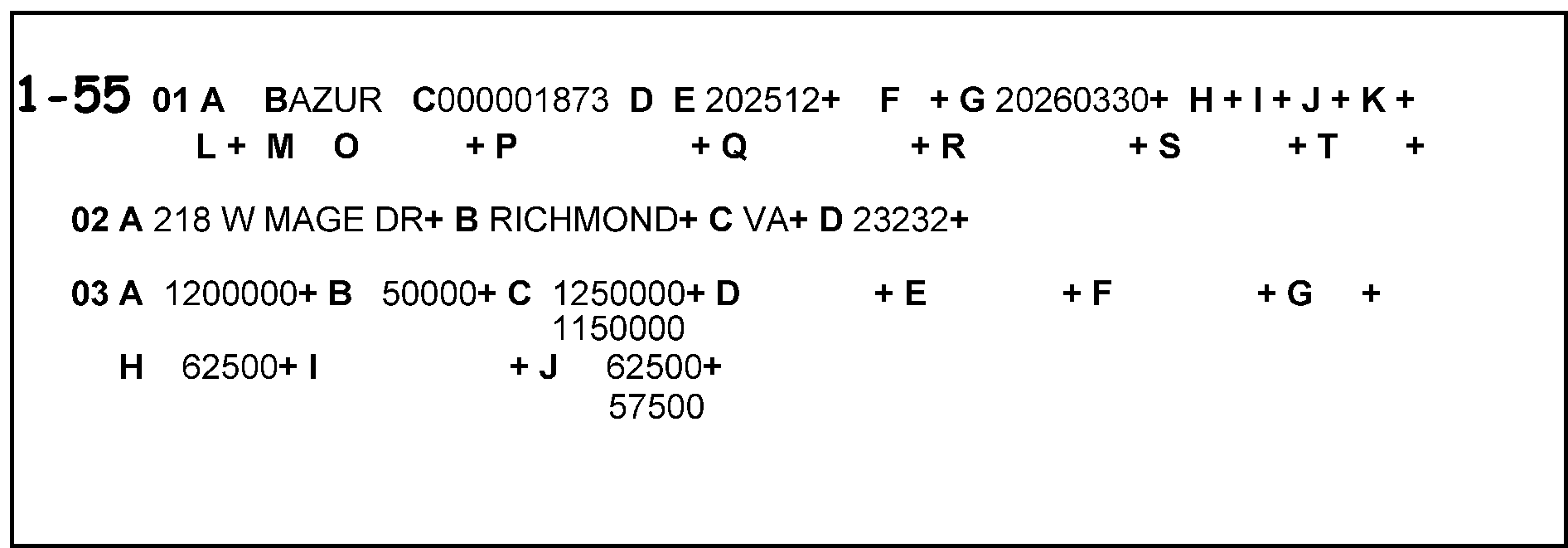
Figure 3.12.106-3 provides an example of the literal '1-55' is (denoting AC one followed by a dash and Taxpayer Notice Code 55) edited on the error register to the left of Field 01-A to indicate that a math error is present which affects the tax liability or settlement amount.
Please click here for the text description of the image.
-
3.12.106.2.3.3 (01-01-2018)
AC 2 (Information Only)
-
AC 2 - Delete document from campus processing (Rejects Only).
-
Used by Rejects to delete a record from campus processing.
Note:
AC 2 is NOT used in the Form 706-GS(D), Generation-Skipping Transfer Tax Return for Distributions, or Form 706-GS(T), Generation-Skipping Transfer for Terminations, correction programs.
-
3.12.106.2.3.4 (02-07-2025)
AC 3
-
AC 3- Document is unprocessable.
-
Use to transfer record from error register to reject register so Reject function can resolve the unprocessable condition.
-
When AC 3, is used, attach Form 3696, Correspondence Action Sheet or Form 4227, Intra-SC Reject or Routing Slip, to the return, noting the reason for the action taken.
-
3.12.106.2.3.5 (01-01-2018)
AC 4
-
AC 4 - Delete any section except section 01.
-
Use to delete section from record on the register.
Reminder:
Section 01 cannot be deleted.
-
A generated missing section (present but no entries) cannot be deleted by using AC 4. See IRM 3.12.106.2.5.4, Missing Section.
-
3.12.106.2.3.6 (01-01-2017)
AC 5
-
AC 5 - Add sections other than 01.
-
Use to add section to record on the register or to correct a section on the record that are computer generated.
-
Enter alpha field designator followed by field data and field breaker for all significant fields.
-
If field has no data, do not enter alpha field designator, field data, or field breaker.
-
3.12.106.2.3.7 (01-01-2017)
AC 6
-
AC 6 - Change field(s) in any section.
-
Use to correct any field except remittance and TPNCs. line out incorrect data and enter correct data above.
-
Correct any number of fields during one correction cycle.
-
When blanking or correcting a fixed length field, always enter the encircled number of characters prescribed for the field which does not have significant data.
Example:
If the prescribed number of characters for the field is 7 and only 3 significant characters will be input, encircle four to show number of blanks. If the entire field will be blank, circle 7.
-
3.12.106.2.3.8 (01-01-2017)
AC 7
-
AC 7 - No change required.
-
Use to clear a record which has been sent to the register for one-time review.
-
Use to clear a record which will be re-validated as it currently exists.
-
3.12.106.2.4 (01-01-2018)
Error Correction Rules
-
Error Resolution tax examiners make corrections on the returns and registers. Make certain all entries are legible.
-
Returns Secured or Prepared by Examination Division. To audit a taxpayer who has not filed an original return, Examination Division occasionally prepares returns or secures an unsigned copy from the taxpayer. The return is submitted for computer processing as an original. It will precede an AIMS (Audit Information Management System) adjustment to the BMF. It is marked SUBSTITUTE or COPY SECURED BY EXAMINATION DIVISION and may have audit papers attached. Forms you may see attached are: Form 3198, Special Handling Notice for Examination Case Processing, and Form 3233, Report of Gift Tax Examination.
-
If there is a math error and taxpayer correspondence is required, AC 3 to Rejects for unprocessable conditions. Rejects will void the document from the system and send it to Examination Division for further processing.
-
“DO NOT” correspond with the taxpayer or executor for clarification or more information.
-
3.12.106.2.5 (01-01-2016)
Validity Errors
-
There are three general types of errors that will cause a record to print on the error register:
-
Field Validity Error
-
Section Validity Error
-
Math Error
-
3.12.106.2.5.1 (01-01-2024)
Integrated Submission and Remittance Processing (ISRP) Error
-
The Error Indicator prints to the left of the section number and appears on the register as follows:
-
"#1" - Split screen transmission. Key Verifier attempted to change the check digit or four or more digits in the TIN or Original Entry Operator entered required section as "missing" .
-
"#3" - Invalid Section ending point.
-
"#4" - Invalid field length (e.g., too many digits entered for field). See Figure 3.12.106-4, Submission Processing System Error.
-
"#5" - Operator inputs the same section more than once. Computer program drops all duplicate sections and displays on the error register the first section encountered.
Figure 3.12.106-4

Figure 3.12.106-4 provides an example of an ISRP error. This shows a generated #4 (denoting Invalid Field Length Error) to the left of Section 01, meaning there were too many digits entered in a field. This example shows Field 01-C with 10 characters but only 9 are valid.
Please click here for the text description of the image.
-
-
To correct this error, perform the following steps:
-
Compare the return data with the register fields.
-
Line- out each incorrect field and enter the correct data immediately above the lined- out data.
-
Enter AC 6.
-
-
If no error is found, use AC 7 to clear the register.
3.12.106.2.5.2 (01-01-2017)
Extraneous Section
-
A pound sign (#) indicator prints to the left of the section number if unnecessary section appears.
-
To fix this error, delete section using AC 4.
3.12.106.2.5.3 (01-01-2024)
Terminus Error
-
Double asterisk (**) indicator prints to the left of the section number if alpha data is entered in numeric field or vice versa.
-
To correct this error:
-
Look at all fields of the section.
-
Line- out each incorrect field and enter the correct data immediately above the lined- out data.
-
Enter AC 6.
Figure 3.12.106-5

Figure 3.12.106-5 provides an example of a terminus error. The illustration shows there were double asterisks (**) to the left of Section 01, denoting either that alpha data were entered in a numeric field, or vice versa. An O is in the 01-C field that is all numeric.
Please click here for the text description of the image.
-
3.12.106.2.5.4 (01-01-2018)
Missing Section
-
An asterisk (*) indicator prints to the left of the section number when a required section is not transcribed.
-
To correct this error:
-
Enter the necessary information.
-
Enter AC 6. See Figure 3.12.106-6, is an illustration showing as asterisk to the left of Section 02.
Figure 3.12.106-6
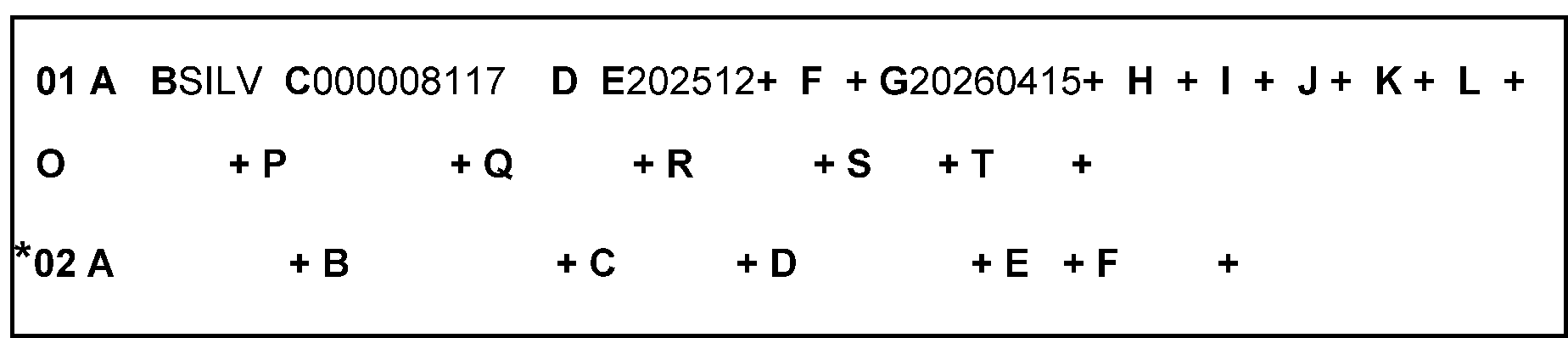
Figure 3.12.106-6 is an illustration showing an asterisk to the left of Section 02, which is, in this case, a required section. Note there were no entries in either of the fields (e.g., Fields A, B, C, D, E, and F were all blank) for Section 02.
Please click here for the text description of the image.
-
A generated missing section (present with no entries) cannot be deleted by using AC 4. If no corrections to the register are necessary, use AC 7 to clear it.
-
3.12.106.2.6 (01-01-2016)
Re-entry Documents
- This sub-section defines re-entry documents and provides instructions for their control and processing.
3.12.106.2.6.1 (01-01-2016)
Definitions of Re-entry Documents
-
The following definitions describe re-entry documents:
-
A document unprocessable after blocking and numbering, but which becomes processable after making corrections or additions.
Note:
A document discovered to be unprocessable before they are blocked and numbered but will not be considered to be a re-entry document when it is input after correction.
-
Document did not post to Master File on input, but now is processable if re-entered.
-
Document posted to wrong account or module on input and will post to correct account or module if re-entered.
-
3.12.106.2.6.2 (02-07-2025)
Identification of Re-entry Documents
- Re-entry documents can be identified by the presence of Computer Condition Codes (CCC) "U" , and/or Form 4227, Inter-SC Reject or Routing Slip on the document when it is received in Document Perfection, or by the presence of a Re-entry Document Control, Form 3893, Re-Entry Document Control. Since June 2007, documents processed previously at Philadelphia Submission Processing Campus (PSPC) are processed at the Kansas City Submission Processing Center (KCSPC).
3.12.106.2.6.3 (02-07-2025)
Processing of Re-entry Documents
- If a re-entry return is unprocessable, use AC 3 and route to the originating area on Form 4227, Intra-SC Reject or Routing Slip, following local procedures. See IRM 3.12.106.2.3.4, AC 3, for unprocessable conditions.
3.12.106.2.7 (01-01-2017)
Correction of Invalid Correction Attempt
-
"AA" will print to the right of the batch number on the loop register when the computer indicates an invalid correction attempt.
-
Correct register as if no attempt has been made to correct it before. You should examine the prior correction.
-
If all fields are correct as transcribed, use AC 7.
-
3.12.106.2.8 (02-20-2025)
Statute Control
-
Any return with a received date that is two years and nine months or more after the return due date is a potential statute control return.
Note:
Any return that is a 2021 and Prior year original. Due to the COVID-19 pandemic and subsequent Submission Processing (SP) and Accounts Management (AM) site closures, SP and AM developed procedures to bypass AM statute clearance and be processed. In addition, any 2021 and Prior year returns previously cleared by AM statute will not be returned by SP to AM to be cleared again if the 90 calendar day statute stamp has expired.
-
Treat all statute control documents as unprocessable.
-
Reject documents by using AC 3.
-
Prepare Form 4227 Intra-SC Reject or Routing Slip, and route return to Statute Control Unit. See Figure 3.12.106-7, Barred Stature Preparations.
Figure 3.12.106-7
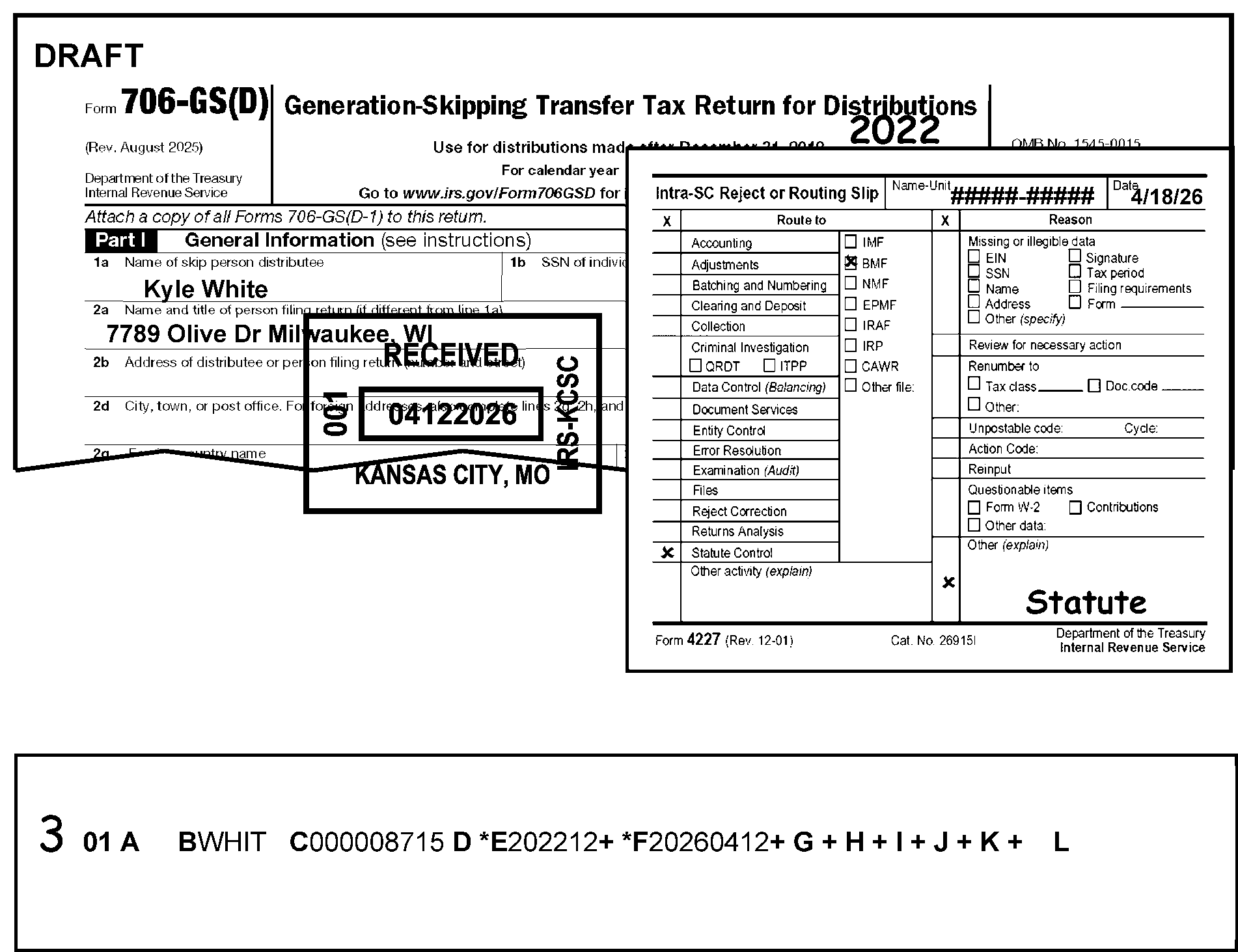
Figure 3.12.106-7 displays examples of documents used with barred statute preparations: a paper Form 706-GS(D) for the barred tax period, a Reject or Routing Slip prepared for submission to Statute Control, and an error register showing the editing of the AC 3 to the left of Section 01 to reject the return as unprocessable. Note also Error Register Field 01-E (Tax Period) is asterisks (*). Also note that Error Register Field 01-F (Received Date) should also be asterisks (although in this figure Field 01 F is not shown with an asterisk).
Please click here for the text description of the image.
-
-
Enter CCC "W" if the return is stamped "Cleared by Statute" , so checks will not be made on returns already cleared.
-
If it appears that a rejected document will not reach the Statute Control Unit in time for clearance, photocopy page one of the returns, stamp "Photocopy-Do Not Process" , and expedite, forwarding to the Statute Control Unit using local procedures.
-
If the document was received timely, and the return is being processed within 34 months of the due date of the original return, delete CCC "W" whether or not Statute Control has cleared the document.
3.12.106.2.8.1 (02-20-2025)
Non "G" Coded Returns
-
If there is a return that has not cleared the Statute Control Unit with a current processing date that is two years and nine months or more after the later of the original due date or the received date, reject the return, using AC 3. Prepare Form 4227, Intra-SC Reject or Routing Slip and route the return to the Statute Control Unit.
Note:
Any return that is a 2021 and Prior year original. Due to the COVID-19 pandemic and subsequent Submission Processing (SP) and Accounts Management (AM) site closures, SP and AM developed procedures to bypass AM statute clearance and be processed. In addition, any 2021 and Prior year returns previously cleared by AM statute will not be returned by SP to AM to be cleared again if the 90 - Calendar day statute stamp has expired.
-
The tax period (Field 01-E) will asterisk for Statute. Check if the processing date is two years and nine months after the return due date or received date, whichever is later, and CCC "W" is not present.
3.12.106.2.8.2 (02-20-2025)
CCC "G" Returns
-
If there is a return that has not cleared the Statute Control Unit with a current processing date that is two years and nine months or more after the later of the original due date or the received date, reject the return, using AC3. Prepare Form 4227, Intra-SC Reject or Routing Slip and route the return to the Statute Control Unit.
Note:
Any return that is a 2021 and Prior year original. Due to the COVID-19 pandemic and subsequent Submission Processing (SP) and Accounts Management (AM) site closures, SP and AM developed procedures to bypass AM statute clearance and be processed. In addition, any 2021 and Prior year returns previously cleared by AM statute will not be returned by SP to AM to be cleared again if the 90 - Calendar day statute stamp has expired.
-
On both non-CCC "G" and CCC "G" coded returns, both the tax period (Field 01-E) and CCC field (Field 01-F) will asterisk if the processing date is less than two years after the return due date and a CCC "W" is present.
3.12.106.2.8.3 (01-01-2018)
Returns Secured or Prepared by Examination Division
- Examination Division may prepare dummy returns or secure unsigned copies from taxpayers to use as a source document to complete an examination case. The return is submitted for computer processing as an original. It will precede an AIMS adjustment to the BMF. It is marked "SUBSTITUTE OR COPY SECURED BY EXAMINATION DIVISION" , and may have audit papers attached. Forms you may see attached are: Form 3198, Special Handling Notice for Examination Case Processing, and Form 3233, Report of Gift Tax Examination. "DO NOT" correspond with taxpayer or executor for clarification or more information. Send to Examination for further instructions. If Statute Control Date has expired, do not send to Statute Control Unit. Enter CCC "W" .
3.12.106.2.9 (01-10-2025)
Accounts Receivable Guidelines
-
To keep the amount owed, we must minimize the number of unresolved large dollar debit and credit modules/issues in inventory. Therefore, consistent with prevailing guidelines and other processing timeliness requirements (i.e., first-in, first-out), resolve all modules/issues with balances or refunds of $25,000 or more as soon as possible.
-
Each region annually identifies complex BMF entities such as large dollar accounts, federal agencies, or entities which have a history of complex issues. A "Large Complex Corporation" indicator will be set on the BMF to alert the Submission Processing Centers when a notice has been generated on these accounts. This replaces the previous "L" Coded Corporate Processing activity.
-
A "Large Corp. CD" indicator will appear on IDRS, and all applicable Master File transcripts, under ENMOD and TXMOD. The CD field will be overlaid by the campus location code (i.e., LARGE CORP. 17). These notices will be routed to the Technical Unit (or designated function) for review before being sent to the taxpayer. When this indicator is identified, employees should coordinate their case with the Technical Unit (or designated function) prior to taking any action.
-
They are also monitoring large dollar cases identified on the Accounts Receivable "Large Dollar Trend Record" (LDTR) report. Cases listed on the LDTR report may include the Large Complex Corporation code, so the region may contact the Technical Unit (or designated function) to determine the current status of the account/module.
3.12.106.2.10 (01-01-2017)
Business Master File On-Line (BMFOL) and Business Return View (BRTVU)
-
You can research Master File accounts and return data with Business Master File On-Line (BMFOL) and Business Return View (BRTVU).
-
Since Master File does not carry all information available on the IDRS screen displays (IDRS notice status, case control information, pending transactions, etc.), you must research IDRS using BMFOL or BRTVU. Also, if you cannot use BMFOL or BRTVU, then use IDRS input command codes that will cause a change to Master File.
-
Use these command codes to research entity and/or tax data which may not be available on IDRS.
-
BMFOL provides screen displays from BMF data based on an input definer code. For more information on screen displays and applicable definer codes, see IRM 2.3, IDRS Terminal Responses.
-
BRTVU gets data from the Return Transaction File (RTF). It will give you all edited, transcribed, and error corrected data from data entry lines of related forms and schedules filed in the current processing year including late filed returns and two prior years. BRTVU needs a definer to get a particular screen and has a summary screen for each return.
3.12.106.2.10.1 (01-01-2017)
CFOL (Corporate Files On-Line) Command Codes
-
IRPTR (Information Returns Program Transcript File On-Line) - provides two payee addresses if present, filing status, one payer name and address, cross reference information, and a summary of up to 36 Information Returns Program (IRP) money amounts by income type.
-
RTVUE (Return View) - provides on-line access to the Return Transaction File. The file consists of original input return data, including schedules. This return information has Code and Edit, Error Resolution System (ERS), and computer-generated fields.
-
IMFOL (Individual Master File On-Line) - provides nationwide IMF entity and tax data information on-line for tax accounts that were in credit or debit status, have freeze conditions or open Integrated Data Retrieval System (IDRS) control bases. It also displays a list of accounts moved to the retention register. Other accounts that were not on the retention register will be available on-line within 24 hours upon request.
-
BRTVU (Business Return View) - provides business return transaction information. The file consists of original input return data, including schedules. This return information includes Code and Edit, Error Resolution (ERS), and computer-generated fields.
-
BMFOL (Business Master File On-Line) - provides nationwide Business Master File entity and tax data information on-line for tax accounts that are in credit or debit status, have freeze conditions or open Integrated Data Retrieval System control bases. It also displays a list of accounts moved to the retention register. Other accounts that are not on the retention register will be available on-line within 24 hours upon request.
-
NAMEI is used to research for missing or invalid SSNs, names and addresses.
-
NAMEB is used to research for missing or invalid EINs, business names and addresses.
-
PMFOL (Payer Master File On-Line) - is a research tool which provides information from the Payer Master File (PMF). The summary screen displays all dollar amounts, withholding of income tax, number of documents filed by payer and by document type (i.e., Form 1099 series). It has the Annual Summary and Transmittal of Information returns (Form 1096), Annual Summary and Transmittal of U.S. Information Return, filed, and the civil penalties associated with each document type. CC PMFOL provides access to Form W-3, Transmittal of Wage and Tax Statements, data (Unpostable data only) beginning with tax year 1990 submissions.
3.12.106.2.11 (02-07-2025)
Forms List
-
Forms listed below are used or referred to in estate, gift, and generation-skipping tax return processing:
Form Title Form 56 Notice Concerning Fiduciary Relationship Form 706-GS(D) Generation-Skipping Transfer Tax Return for Distributions Form 706-GS(D-1) Notification of Distribution from a Generation-Skipping Trust Form 706-GS(T) Generation-Skipping Transfer Tax Return for Terminations Form 706-QDT U.S. Estate Tax Return for Qualified Domestic Trust Form 712 Life Insurance Statement Form 813 813 Document Register Form 843 Claim for Refund and Request for Abatement Form 1310 Statement of Person Claiming Refund Due a Deceased Taxpayer Form 1332 Block and Selection Record Form 2350 Application for Extension of Time to File U.S. Income Tax Return Form 2848 Power of Attorney and Declaration of Representative Form 3465 Adjustment Request Form 3696 Correspondence Action Sheet Form 3696A IDRS Correspondence Action Sheet Form 3753 Manual Refund Posting Voucher Form 3893 Re-Entry Document Control Form 4227 Intra-SC Reject or Routing Slip Form 4868 Application for Automatic Extension of Time to File U.S. Individual Tax Return Form 5495 Request for Discharge From Personal Liability Under Internal Revenue Code Section 2204 or 6905 Form 5792 request for IDRS Generated Refund (IGR) Form 6800 Request for Missing Information or Papers To Complete Your Tax Return or Form 8038-CP Credit for Qualified Bonds Allowed to User. Form 6882 IDRS/Masterfile Information Request Form 8821 Tax Information Authorization
3.12.106.2.12 (01-22-2024)
BMF Consistency
-
The purpose of this initiative is to achieve consistency in the Business Master File Error Resolution System (ERS) processing IRMs.
-
Topics for the Business Master File consistency have been identified and developed as a coordinated effort between Kansas City, Ogden and Return Processing Branch BMF Code & Edit/ERS Section.
-
IRM 3.12.106 is exempt from BMF Consistency Guidelines, (for example indicating diamonds) as shown in other sections of IRM 3.12, Error Resolution.
-
Text in normal print is the common process for Business Master File returns. The text in BOLD print is Form specific and applies to this IRM only.
3.12.106.2.13 (01-01-2025)
Taxpayer Advocate Service (TAS)
-
The Taxpayer Advocate Service is an independent organization within the Internal Revenue Service (IRS), led by the National Taxpayer Advocate, that helps taxpayers and protects taxpayer rights. TAS offers free help to taxpayers when a tax problem is causing a financial difficulty, when they’ve tried and been unable to resolve their issue with the IRS, or when they believe an IRS system, process, or procedure just isn't working as it should. TAS strives to ensure that every taxpayer is treated fairly and knows and understands their rights under the Taxpayer Bill of Rights. TAS has at least one taxpayer advocate office located in every state, the District of Columbia, and Puerto Rico.
-
TAS uses Form 12412 Operations Assistance Request (OAR) to start the OAR process of referring a case to the Taxpayer Services (TS) Division to effect the resolution of the taxpayer’s problem. For more information refer to IRM 13.1.19, Taxpayer Advocate Service, Taxpayer Advocate Case Procedures, Advocating. With Operations Assistance Request (OARs).
-
Refer taxpayers to TAS when the contact meets TAS criteria or when Form 911, Request for Taxpayer Advocate Service Assistance (and Application for Taxpayer Assistance Order), is attached and steps cannot be taken to resolve the taxpayer's issue the same day.
-
The definition of "same day resolution" is within 24 hours. The following two situations meet the definition of "same day resolution" :
-
The issue can be resolved within 24 hours.
-
Take steps within 24 hours to resolve the taxpayer’s issue.
-
-
When making a TAS referral, use Form 911 and forward to TAS in following your local procedures.
-
See IRM 13.1.7.6, Taxpayer Advocate Service (TAS) Case Criteria for same day resolution, for more information.
3.12.106.2.13.1 (01-01-2025)
Taxpayer Advocate Service - Service Level Agreements (SLAs)
-
The National Taxpayer Advocate reached agreements with the Commissioners of the Taxpayer Services (TS) Division, Small Business/Self Employed (SB/SE), Tax Exempt Government Entities (TEGE) Division, Criminal Investigation (CI), Appeals, and Large Business and International (LB&I) Division, that outline the procedures and responsibilities for the processing of Taxpayer Advocate Service (TAS) casework when either the statutory or delegated authority to complete case transactions rests outside of TAS. These agreements were known as Service Level Agreements (SLAs).
-
The SLAs are found at TAS Service Level Agreements.
3.12.106.2.14 (01-03-2024)
Employee Contacts
-
The Internal Revenue Service () Restructuring and Reform Act of 1998 (RRA 98), Section 3705(a) gives identification requirements for all employees working tax-related matters.
-
All employees who communicate by telephone, face-to-face, or any other method of correspondence with taxpayers or their personal representatives on tax-related matters must give (at a minimum) the following information:
-
Telephone Contact - Their title (e.g., Mr., Mrs., Ms., Miss), last name and badge identification (ID Card) number. Toll-free employees may also give their location for identification purposes. Treat faxes to taxpayers on tax-related matters as correspondence and include the required information.
-
Face-to-Face Contact - Their title (e.g., Mr., Mrs., Ms., Miss), give as appropriate during the conversation, their last name and badge identification (ID Card) number.
-
Correspondence (sent to the taxpayer and authorized representatives) - A telephone number that taxpayers can call for answers to questions. In addition, manually generated correspondence must have the employee's title (e.g., Mr., Mrs., Ms., Miss), last name, Integrated Data Retrieval System (IDRS) number, and letter system number, which are systemically generated by IDRS. Treat faxes to taxpayers on tax-related matters as correspondence and include the required information.
-
Correspondex letters - Specific employee name and telephone number if the employee initiating the correspondence is in the best position to respond to any questions the taxpayer may have or if the taxpayer is being asked to give more case-related information. If the taxpayer does not need to contact a specific employee, the correspondence needs only an telephone number and standard signature.
-
-
When a taxpayer requests to speak with a specific employee who previously worked their inquiry or request, or complains about the level of service previously given, make every attempt to resolve the taxpayer's inquiry. If unable to resolve the issue, refer the inquiry using established procedures to the manager.
-
Secretaries, receptionists, or other people who answer the telephone in functional offices need to identify themselves. They should provide their badge identification (ID Card) number only if they are answering telephones which are routinely used to give tax or account information.
-
It is not necessary to repeat the badge identification (ID Card) number on a subsequent contact, when the nature of an employee's work involves multiple contacts with the same taxpayer and the employee has given the taxpayer (either by telephone or in-person) their badge identification (ID Card) number on the first contact.
3.12.106.2.15 (01-01-2022)
Criminal Investigation (CI) Referral
-
Criminal Investigation (CI) investigates potential criminal violations of the Internal Revenue Code (IRC) and related financial crimes. Criminal violations of the IRC are willful attempts to evade or defeat the income tax. Criminal tax violations also include the willful failure to pay taxes due and/or taxes collected or withheld and false claims for refunds based on bogus return information.
-
If CI has stamped the return, do not send for further CI action.
-
For returns with refund claims, do the following:
Caution:
If there is no sign Code and Edit (C&E) made a copy and sent to Criminal Investigation Referral, then see below.
≡ ≡ ≡ ≡ ≡ ≡ ≡ ≡ ≡ ≡ ≡ ≡ ≡ ≡ ≡ ≡ ≡ ≡ ≡ ≡ ≡ ≡ ≡ ≡ ≡ ≡ ≡ ≡ ≡ ≡ ≡ ≡ ≡ ≡ 1. ≡ ≡ ≡ ≡ ≡ ≡ ≡ ≡ ≡ ≡ ≡ ≡ ≡ ≡ ≡ ≡ ≡ ≡ ≡ ≡ ≡ ≡ ≡ ≡ ≡ ≡ ≡ ≡ ≡ ≡ ≡ ≡ ≡ ≡ ≡ ≡ ≡ ≡ ≡ ≡ ≡ ≡ ≡ ≡ ≡ ≡ ≡ ≡ ≡ ≡ ≡ ≡ ≡ ≡ ≡ ≡ ≡ ≡ ≡ 2. ≡ ≡ ≡ ≡ ≡ ≡≡ ≡ ≡ ≡ ≡ ≡≡ ≡ ≡ ≡ ≡ ≡ ≡ ≡ ≡ ≡ ≡ ≡ ≡ ≡ ≡ ≡ ≡ ≡ ≡ ≡ ≡ ≡ ≡ ≡ ≡ ≡ 3. ≡ ≡ ≡ ≡ ≡ ≡ ≡ ≡ ≡ ≡ ≡ ≡ ≡ ≡ ≡ ≡ ≡ ≡ ≡ ≡ ≡ ≡ ≡ ≡ ≡ ≡ ≡ ≡ ≡ ≡ ≡ ≡ ≡ ≡ ≡ ≡ ≡ 4. ≡ ≡ ≡ ≡ ≡ ≡ ≡ ≡ ≡ ≡ ≡ ≡ ≡"≡ ≡ ≡ ≡ ≡ ≡ ≡ ≡" ≡ ≡ ≡ ≡ ≡"≡ ≡ ≡ ≡ ≡ ≡ ≡ ≡" ≡ ≡ ≡ ≡ ≡ ≡ ≡ ≡ ≡ ≡ ≡ ≡ ≡ ≡ ≡ ≡ ≡ ≡ ≡ ≡ ≡ ≡ ≡ ≡ ≡ ≡ ≡ ≡ ≡ ≡ ≡ ≡ ≡ ≡ ≡ ≡ ≡ ≡ ≡ ≡ ≡ ≡ ≡ ≡ ≡ ≡ 5. ≡ ≡ ≡ ≡ ≡ ≡ ≡ ≡ ≡ ≡ ≡ ≡ ≡ ≡ ≡ ≡ ≡ -
Because of the repetitive nature of the ERS/Rejects function, ERS/Rejects Tax Examining Technicians often recognize income tax return data which is outside of the norm for data found on similar returns for each income tax return type. If ERS finds return characteristics not meeting Audit Code or Exam referral criteria it deems suspicious, CI is available to review the referral.
-
If a suspicious return is found, and there is no sign Code and Edit (C&E) made a copy and sent to CI Referral, then, do the following:
-
Make a copy of the first two pages of the tax return along with any page of the return that appears suspicious.
-
Attach Form 4227 Intra-SC Reject or Routing Slip to the copy.
-
Route the copy as shown in the table below.
CI Referral Routing
Ogden Kansas City Mail Stop 9001, Criminal Investigation (CI) Mail Stop S2 9000, Criminal Investigation (CI) -
Edit an action trail "Copy to CI" , or "CI Referral" , or similar language in the lower left corner going vertically up the side of the return.
-
Continue processing the return
-
-
If the return fits other criteria (e.g., Frivolous Argument), take proper action.
3.12.106.2.16 (01-01-2022)
Examination (Exam) "Funny Box"
- The primary goal in identifying tax returns for examination is to promote the highest degree of voluntary compliance. Examination gives support and helps Submission Processing (SP) with any questionable return found during processing. Exam has a vast multitude of programs and tolerance criteria already found in several IRM sections. SP can refer any questionable return to Exam, unless prohibited by instructions currently found in several IRM’s.
3.12.106.2.17 (01-01-2024)
Business Master File (BMF) Identity (ID) Theft
-
BMF (ID) Theft is increasing. If a case is found with attachments or correspondence showing the taxpayer is a victim of "ID Theft" :
-
Enter Action Code 3 and reject the record.
-
Attach Form 4227, Intra-SC Reject or Routing Slip, (or other proper routing slips) and give the entire case to the lead/manager.
-
-
The lead/manager will expedite the case to the Planning and Analysis (P & A) staff for referral to one of the Submission Processing ID Theft liaisons. The taxpayer must show that they were a victim of "ID Theft" ; do "not" send cases that are subject to Criminal Investigation (CI), Examination (Exam) or Fraud review.
3.12.106.2.18 (01-01-2025)
Use of Fax for Taxpayer Submissions
-
Taxpayers may send tax return information via fax as part of return perfection even when submitting a signature. In circumstances where contact with the taxpayer was made and documented, "faxed signatures are acceptable" . For more information about accepting signed taxpayer documents by fax, see the most recent revision of the Policy for Use of Fax.
-
Contact with the taxpayer may be by telephone or correspondence. Follow local procedures to decide which method of contact to use.
-
Indicate the fax paragraph on the “approved” Correspondence Action Sheet to inform the taxpayer of the fax options.
-
Use the following resources to make sure you are speaking with the taxpayer or authorized representative before disclosing any tax information:
-
IRM 21.1.3.2.3, Required Taxpayer Authentication
-
IRM 21.1.3.2.4, Additional Taxpayer Authentication
-
-
Before leaving any messages on a taxpayer's answering machine, review:
-
IRM 10.5.1.6.7.2, Answering Machine or Voice mail
-
IRM 10.8.1, Information Technology (IT) Security, Policy and Guidance
-
IRM 10.8.1.4.18.6.2.2, Facsimile and Facsimile device.
-
3.12.106.2.19 (01-01-2025)
IRM Deviation Procedures
- IRM deviations must be submitted in writing following instructions from IRM 1.11.2.2.3, Internal Management Documents System - Internal Revenue Manual (IRM) Process, When Procedures deviate from the IRM and elevated through proper channels for executive approval.
3.12.106.2.20 (01-01-2023)
Frivolous Arguments
-
Businesses use frivolous arguments for expressing dissatisfaction with the substance, form or administration of the tax laws by trying to illegally avoid or reduce tax liabilities. IRM 25.25.10, Frivolous Return Program. For a list of recognized frivolous arguments made by businesses see chart below in (2).
-
Review the return to decide whether it appears to be a frivolous return.
If Then The return meets any of the conditions in the table below ### Exception: If the return shows Action Code 331 and has a Form 4227, Intra-SC Reject or Routing Slip, attached with the remarks: "Refer to Exam Frivolous Return Program (FRP) for audit after processing" , continue to next procedure. Remove return from the batch and place the return in the locally designated basket for Examination, Frivolous Return Program (FRP) for review. Examination has selected the return as frivolous, e.g. shown by an Action Code 331 and a Form 4227, Intra-SC Reject or Routing Slip, with the remarks: "Refer to Exam Frivolous Return Program (FRP) for audit after processing" , but sends the return for processing. Continue processing the return using procedures in IRM 3.12.106.2.6.3, Processing of Re-Entry Documents. However, do not circle or void the Action Code indicating a frivolous return. -
Do not consider the following returns as frivolous, unless there is other evidence of a frivolous argument:
-
Returns that have only zeros, blank or no entries
-
Returns showing "None" , "Not Liable" , etc.
:
-
3.12.106.3 (01-01-2018)
Processing Form 706-GS(D), Generation-Skipping Transfer Tax Return For Distributions
-
This subsection includes instructions for correcting Sections 01 through 03 of Form 706-GS(D), Generation-Skipping Transfer Tax Return for Distributions.
Note:
When the Schedule D-1 is entered as a Form 706-GS(D-1), Generation-Skipping Transfer Tax Return for Distributions, the document must be deleted and be associated with the Form 706-GS(D), Generation-Skipping Transfer Tax Return for Distributions. Reject with AC 3 for deletion.
3.12.106.3.1 (01-01-2026)
Section 01- Form 706-GS(D), Generation-Skipping Transfer Tax Return for Distributions
-
Section 01 alpha field designators, field lengths and titles are listed below. Section 01 are fixed length fields.
Alpha Field Designator Line Number Field Length Title A Right margin of Line 9 11 Remittance Amount B Line 1a 4 Name Control Name Control Underprint C Line 1b SSN of Individual or 1c TIN of trust distributee 9 TIN D Right margin of Part I 1 TIN Type E Top of the return 6 Tax Period F Dotted portion of Part II Line 6 tax computation area 8 Received Date G Upper left margin of the return 10 Computer Condition Code H Left OMB (Office of Management and Budget) number on upper portion of return 1 Penalty and Interest Code I Right margin of Line 2b 1 CAF Indicator J Left margin of Line 6 8 Correspondence Received Date K 1 Entity Underprint Code L Upper left margin of return 6 Taxpayer Notice Code M Refund Code one 1 Refund Code N Bottom Portion of Part III (Tax Computation) -"Paid Preparer's Use Only" Box (to the right of preparer's signature) 9 Preparer's SSN or PTIN O Bottom Portion of Part III (Tax Computation) -"Paid Preparer's Use Only" Box (to the right of preparer firm's name and address) 9 Preparer's EIN P Bottom Portion of Part III (Tax Computation) -"Paid Preparer's Use Only" Box (to the right of preparer firm's name and address) 10 Preparer's Phone Number
3.12.106.3.1.1 (01-01-2018)
Due Date
- Form 706-GS(D), Generation-Skipping Transfer Tax Return for Distributions, is due on April 15th following the calendar year when the distributions were made. If the due date falls on a Saturday, Sunday, or legal holiday, file on the next business day.
3.12.106.3.1.2 (01-01-2018)
Field 01-A, Remittance Amount
-
You cannot change this field. If the amount is incorrect, treat the return and related error record as unprocessable. Reject with AC 3 and prepare Form 4227, Intra-SC Reject or Routing Slip, to explain the error. The Reject function will prepare Form 3893, Re-Entry Document Control, for re-entry.
-
The Remittance Amount is located on the Balance Due line of a full paid return and is designated by a green rocker.
-
If a remittance amount is shown on an apparent nontaxable return, but an examination reveals that it should be taxable, enter the missing data in the proper fields and sections of the register and enter AC 6.
-
Field 01-A (Remittance Amount) will asterisk if an amount is present in Field 01-A and there is no entry in Field 03-H (Net GST Tax), or Net GST Tax Computer. If the return is a true nontaxable, (i.e., taxpayer shows "none" , "not liable" , tax is zero due to a math error, or just signs the return) and no other non-math errors are involved, treat return as "unprocessable" . Bring up the underprint for Field 03-H. Reject with AC 3. Indicate excess remittance on Form 4227, Intra-SC Reject or Routing Slip. If non-tax status is due to a math error, note on Form 4227, Intra-SC Reject or Routing Slip, Zero tax due to math error. Refund if no other tax due.
3.12.106.3.1.3 (01-01-2016)
Field 01-B, Name Control
-
This field cannot be blank. Must be the first four alpha characters of the last name in Line 1a (name control of the trust). First position must be alpha. Valid characters after the first position may be alpha, hyphen or blank. The name control is invalid if there are intervening blanks between significant characters.
-
Check for transcription errors in the name control field.
-
If the name control on the return and Field 01-B (Name Control) do not agree or are transcribed incorrectly, change Field 01-B.
-
If it is not an obvious error, research through INOLE/ENMOD for the SSN/EIN and NAMEI/NAMEB for the name line.
-
If the correction entry is less than four characters, enter and circle the number of the remaining positions.
-
Check Field 01-D (TIN Type) to ensure the correct TIN type were entered. Correct the field if necessary.
-
3.12.106.3.1.3.1 (01-01-2016)
Check Digits
-
The name control is being cross-checked against the Entity Index File (EIF). When there is a match against the EIF, you will get check digits in this field. If there is no match, the name control will be shown in this field.
-
Check digits will be invalid if the first two positions are not blank and if the third and fourth positions are not alpha characters. The computer will do more checks for the validity of these letters.
-
If the check digits are invalid, enter the name control (first four letters of the taxpayer's surname) in Field 01-B.
-
3.12.106.3.1.3.2 (01-01-2024)
Name Control Underprint
-
If the transcribed name control does not match the name control for the transcribed SSN on the Entity Index File (EIF), there will be an underprint to Field 01-B.
-
This field will underprint with "XXXX" when there is no match to the NAP.
-
The name control underprint will be removed when the following occurs:
-
The name control underprint and the entry in Field 01-B agree.
-
The entity underprint field "“K”" has a "1" .
-
-
When the name control on the return does not match the name control on the EIF:
-
Compare the entries in Field 01-B and Field 01-C to the name control, the taxpayer's last name, and the SSN/EIN on the return.
-
If the name control is edited or transcribed incorrectly, correct Field 01-B and/or return.
-
If the SSN/EIN is edited or transcribed incorrectly, correct Field 01-C and/or return.
-
If the SSN/EIN is transcribed correctly and the name control is invalid, research, using INOLE/ENMOD for the SSN/EIN and NAMEI/NAMEB for the name line.
-
-
If the SSN/EIN is correct, and the reason why the name control is invalid is obvious (misspelling), correct Field 01-B and the return. If the reason is not obvious, see below.
-
If the SSN/EIN is not correct, but a correct SSN/EIN is found through NAMEI/NAMEB, check INOLE/ENMOD, using definer V and/or W if SSN, for an established (or pending) account. If none, reject with AC 3. If an account is established on INOLES or pending on ENMOD, correct Field 01-C on the register and the return.
-
If a correct SSN/EIN is not found through NAMEI/NAMEB, use AC 3 and Form 4227, Intra-SC Reject or Routing Slip to send to Entity for valid EIN/SSN.
-
If Field 01-B under prints with "XXXX" , or the taxpayer's last name has changed for whatever reason, reject using AC 3 to Entity. If TIN is an SSN, send to Entity so they can input a TC 000 to establish the account or a TC 013 to change the taxpayer's name.
-
Once a name change is returned from Entity, enter "1" in Field 01-K (Entity Underprint Code).
-
If, after research, the name control (Field 01-B) and the month of the tax period (Field 01-E) were correct and the under prints differ, enter a "3" in Field 01-K (Entity Underprint Code) to clear both underprint’s.
-
-
Suspense Correction:
-
If the register returns on loop as having an invalid SSN/EIN, use AC 9 to re-establish the account as a raw register.
-
After the account is reestablished, forward to Entity using Form 4227, Intra-SC Reject or Routing Slip.
-
3.12.106.3.1.4 (01-04-2023)
Field 01-C, Employer Identification Number (EIN)/Social Security Number (SSN)
-
This field may carry an EIN or SSN for Form 706-GS(D), Generation-Skipping Transfer Tax Return for Distributions.
-
Nine numeric characters must be present, all "9s" or "0’s" will be invalid.
-
If this field is in the EIN format (nn-nnnnnnn), it must not begin with 00, 07, 08, 09, 17, 18, 19, 28, 29, 49, 78, 79, or 89.
-
If Field 01-C is invalid, examine the return and attachments.
-
If found, enter correct number in Field 01-C.
-
If correct EIN or SSN cannot be found, research IDRS for valid numbers.
-
If a valid number cannot be found, use AC 3 to send to Entity Control to secure an EIN or a temporary SSN.
-
When returned from Entity, enter the corrected or temporary number assigned by Entity in Field 01-C using AC 6.
-
If the return has been to Entity (i.e., SSN is written in a color used by Entity), do not reject back to Entity.
-
3.12.106.3.1.5 (01-01-2018)
Field 01-D, TIN Type
-
Form 706-GS(D), Generation-Skipping Transfer Tax Return for Distributions, may carry an EIN or SSN.
-
Those returns using an EIN, TIN TYPE must be "2" .
-
Those returns using an SSN, TIN TYPE must be a "0" .
-
-
Correct the identifying number on the return and enter the correct TIN Type with AC 6.
-
Check 01-D (TIN TYPE) to ensure the correct TIN TYPE was entered. Correct the field if necessary.
3.12.106.3.1.6 (01-01-2017)
Field 01-E, Tax Period
-
The tax period cannot be greater than the current processing date or earlier than 198612. (“The tax are instituted” as part of the Tax Reform Act of 1986.) The tax period month digit will always be 12.
-
All characters must be numeric in YYYYMM format.
-
If invalid, check return and attachments for correct tax period and make necessary change using AC 6.
3.12.106.3.1.6.1 (01-01-2024)
Tax Period Underprint (generated)
-
The tax period underprint is from the Entity Index File (EIF).
-
The tax period underprint occurs when the transcribed month does not agree with the month (prior or current) for the TIN on the EIF. Field 01-E will underprint with the current month when neither matches.
-
Compare the TIN on the return with Field 01-C.
-
If the TINs do not agree, change Field 01-C to agree with the return and enter the correct code in the Entity Underprint Field (Field 01-K).
-
If the TINs agree, compare the tax period on the return with Field 01-E. If the tax period on the return does not agree with Field 01-E, change Field 01-E to agree with the return.
-
-
If the TIN type changes (the SSN is changed to an EIN, or an EIN is changed to an SSN), Field 01-D (Tin Type) also needs to be changed. A ("0" for SSN and "2" for EIN)
3.12.106.3.1.7 (01-01-2025)
Field 01-F, Received Date
-
This date must be present on all Form 706-GS(D), Generation -Skipping Transfer Tax Return for Distributions, in YYYYMMDD format. It cannot be later than the processing date or earlier than the tax period (Field 01-E).
-
The received date field is invalid if:
-
The month (fifth and sixth digits) is other than 01 through 12, or
-
The day (seventh and eighth digits) is other than 01 through 31 for the months 01, 03, 05, 07, 08, 10, or 12; 01-30 for the months 04, 06, 09, or 11; 01-28 for the month 02; 01-29 for the month 02 during leap year.
-
Other than a numeric is present in the field.
-
-
If the received date is missing or illegible, enter a date using the following order or priority:
-
Earliest legible postmark date of the U. S. Post Office or a Private Delivery Service (i.e., Federal Express), or a foreign postmark date.
Note:
If an envelope is not attached, use the postmark date stamped on the face of the return
.
-
Service Center Automated Mail Processing System (SCAMPS) digital date.
-
Revenue officer's or other IRS official's Signature Date.
-
Signature Date, if within the current year (unless other information indicates signature date is invalid).
Exception:
Do not use the Signature Date on Prior Year Returns.
-
Julian Date (DLN) minus 10 days.
Note:
Any references to current date and/or minus 10 days only pertain to Code and Edit instructions when determining the received date.
-
Current date minus 10 days.
-
-
If a return is identified as unprocessable and the taxpayer have been contacted for more information, and the taxpayer replies, do not change original received date, but also enter the correspondence received date (Field 01-M).
-
If Field 01-F is invalid, Field 01-H (Penalty and Interest (P&I) Code) has a "1" , ≡ ≡ ≡ ≡ ≡ ≡ ≡ ≡ ≡ ≡ ≡ ≡ ≡ ≡ ≡ ≡ ≡ ≡ ≡ ≡ ≡ ≡ ≡ ≡ ≡ ≡ ≡ ≡ ≡ ≡ Field 01-H.
-
If more than one date is stamped, use only the earliest date. Circle out all others. If the date is incorrect, enter the correct date with AC 6.
-
When processing an early-filed return, change the received date to the first date after the tax period.
-
If a return has been faxed to another area of the IRS and then sent to Submission Processing for processing, do not enter the Enterprise Electronic Fax (E-Fax) Date as the IRS Received Date. Enter a Received Date according to normal procedures.
Caution:
The E-Fax Date "cannot" legally be used as an IRS Received Date.
3.12.106.3.1.8 (01-01-2018)
Field 01-G, Computer Condition Codes (CCC’s)
-
The valid condition codes for Form 706-GS(D), Generation-Skipping Transfer Tax Return for Distributions, are D, F, G, O, R, W, X, 3 and 7. If other than these, Field 01-G will asterisk.
-
Enter the CCC’s in the upper left corner of the return.
-
If there is a transcription error, correct it by lining out Field 01-G and inserting the correct code above it. Use AC 6.
-
If the return is coded incorrectly, determine the correct code and enter it on the return and error register. Correct with an AC 6.
3.12.106.3.1.8.1 (01-04-2023)
CCC "D" , Reasonable Cause for Failure to Pay Taxes Timely
-
CCC "D" is no longer edited by Code & Edit or ERS when a reason is given for failure to pay taxes timely, see exception. Issue a Letter 1382C (if Code and Edit has not done so) and continue processing the return.
Note:
Exception: Secured internally prepared returns. For secured returns (e.g., returns notated with "Process as Original" with an attached Form 13133) or Prepared returns (e.g., returns notated "6020(b)" or "SFR" (Substitute for Return), enter the applicable CCC as indicated on the return and/or attached form.
-
Returns must have a received date. If not present, enter the received date in the middle of the return.
3.12.106.3.1.8.2 (01-01-2016)
CCC "F" - Final Return
- Edit CCC "F" when the return or attachment(s) indicate this is the final return from the taxpayer by such statements as "final" etc.
3.12.106.3.1.8.3 (01-01-2017)
CCC "G" - Amended Return
-
Edit CCC "G" on returns marked "Amended" , "Superseding" , "Duplicate" , "Corrected" , "Supplemental" , etc. Computer condition codes "W" and "3" are used with a "G" code.
-
If the return is an amended return, delete all sections beyond received date (Field 01-F), except correspondence received date (Field 01-J), and the entity underprint code (Field 01-K), with AC 6. Delete all other sections with AC 4.
-
If the return is not an amended return, delete "G" code from Field 01-G with AC 6. Check remaining fields and enter correct data with AC 6. Enter more sections with AC 5.
3.12.106.3.1.8.4 (01-01-2018)
CCC "O" - Module Freeze
- Enter CCC "O" if a completed Form 3753, Manual Refund Posting Voucher, or Form 5792, Request for IDRS Generated Refund (IGR), is attached to the return. These indicate that a pre-settlement manual refund was made.
3.12.106.3.1.8.5 (01-04-2023)
CCC "R" - Reasonable Cause for Delinquency
-
CCC "R" is no longer edited by Code & Edit or ERS when a reasonable cause for delay in filing a return is given, see exception. Issue Letter 1382C (if Code and Edit has not done so) and continue processing the return.
-
Exception: Secured internally prepared returns. For secured returns (e.g.), returns notated with "Process as Original" with an attached Form 13133 or Prepared returns (e.g.), returns notated "6020(b)" or "SFR" , (Substitute for Return), enter the applicable CCC as indicated on the return and/or attached form and continue to process.
3.12.106.3.1.8.6 (01-01-2016)
CCC "U" - Unprocessable Document
- When CCC "U" is entered by Code and Edit, it will cause the return to print on the reject register for proper action. This code will not appear on the register.
3.12.106.3.1.8.7 (01-01-2017)
CCC "W" - Cleared by Statute
- Edit CCC "W" when the return has been stamped "Cleared by Statute" and enter it in Field 01-G with AC 6.
3.12.106.3.1.8.8 (02-14-2025)
CCC "X" - Return Settlement Frozen
-
Edit CCC "X" when taxpayer indicates that excess remittance with return or overpayment be applied to another account.
-
Enter "X" in Field 01-G with AC 6.
-
Edit CCC "X" on No Reply Signature Refund Returns.
3.12.106.3.1.8.9 (01-01-2024)
CCC "3" - No Reply Received/Suppress Credit Interest
- Edit CCC "3" when no reply is received or insufficient reply is received to correspondence. The CCC "3" , when posted to the Master file with a TC-150, suppresses credit interest. Enter "3" in Field 01-G Form 706-GS(D), Generation-Skipping Transfer Tax Return for Distributions, with AC 6.
3.12.106.3.1.8.10 (01-04-2023)
CCC "7" - Reasonable Cause Statement Denied
-
CCC "7" is no longer edited by Code & Edit or ERS when a reasonable cause statement failing to file or failing to pay timely is attached, see exception. Issue Letter 1382C, (if Code and Edit has not done so) and continue processing the return.
Note:
Exception: Secured internally prepared returns. For secured returns (e.g.), returns notated with "Process as Original" with an attached Form 13133 or Prepared returns (e.g.), returns notated "6020(b)" or "SFR" , (Substitute for Return), enter the applicable CCC as indicated on the return and/or attached form.
-
CCC "7" cannot be used with CCC "D" or CCC "R" .
3.12.106.3.1.9 (01-01-2024)
Field 01-H, Penalty and Interest (P&I) Code
-
Code and Edit will enter P&I code "1" at the top right corner of the form, if prepaid penalty is present and the received date ≡ ≡ ≡ ≡ ≡ ≡ ≡ ≡ ≡ ≡ ≡ ≡ ≡ ≡ ≡ ≡ ≡ ≡ ≡ ≡ ≡. Valid entries are "1" and/or blank.
-
Field 01-H must be blank or "1" . If "1" is present, the received date (Field 01-F) must be ≡ ≡ ≡ ≡ ≡ ≡ ≡ ≡ ≡ ≡ ≡ ≡ ≡ ≡ ≡ ≡ ≡ ≡ ≡ ≡ ≡ ≡ ≡ ≡ ≡ ≡ ≡ ≡ ≡ asterisk. See Figure 3.12.106-8, shows timely-filed Form 706-GS(D),Generation-Skipping Transfer Tax Return for Distributions with prepaid penalty and interest of $50.00.
Figure 3.12.106-8
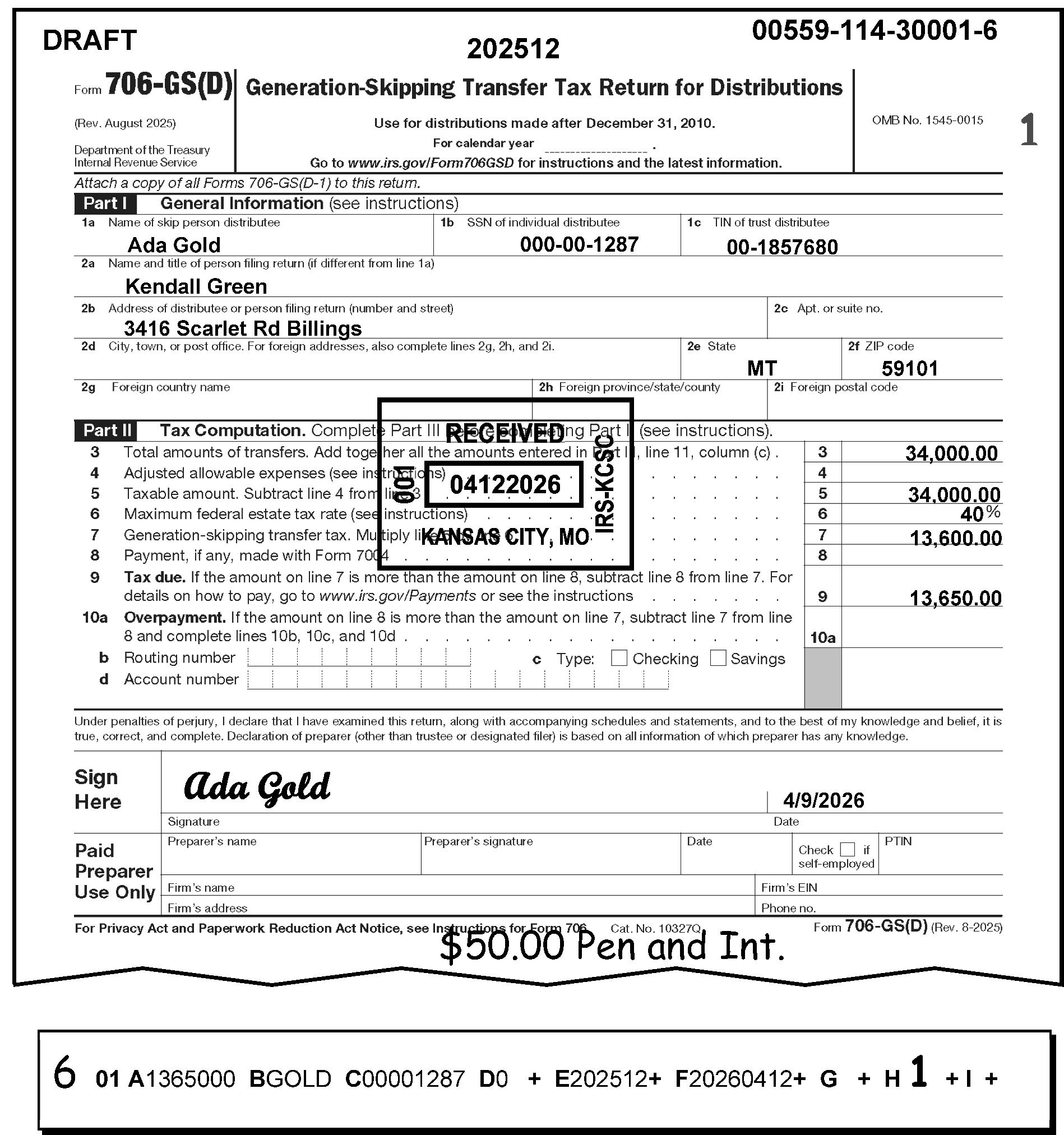
Figure 3.12.106-8 shows a timely-filed Form 706-GS(D) with prepaid penalty and interest of $50.00. AC 6 is edited on the error register to the left of Section 01 to input the correction shown with the addition of the P&I code in Field 01-H. The received date shown is April 12.
Please click here for the text description of the image.
3.12.106.3.1.10 (01-01-2017)
Field 01-I, CAF Indicator
-
Valid indicator must be blank or numeric (one through four and seven). Only one indicator can be used.
-
Check the field with the return. If the data has been transcribed incorrectly, enter the correct data with AC 6. The correct CAF codes are:
-
"1" One person receives a notice, but no one receives a refund.
-
"2" Two people receive notices, but no one receives a refund.
-
"3" One person receives a notice, and one person receives a refund.
-
"4" Two people receive notices and one person receives a refund.
-
"5" and "6" were not used.
-
"7" One person receives a refund, but no one receives notices.
-
-
If the Power or Attorney does not authorize refunds or notices, a numeric code is not necessary on the return.
3.12.106.3.1.11 (01-01-2017)
Field 01-J, Correspondence Received Date
-
Must be in YYYYMMDD format, or blank.
-
This field will asterisk if the following conditions exist:
-
Is not all numeric;
-
Date check is not met (i.e., The month (fifth and sixth digits) is other than 01 through 12, "OR" the day (seventh and eighth digits) is other than 01-31 for the months 01, 03, 05, 07, 08, 10, or 12; 01-30 for the months 04, 06, 09, or 11; 01-28 for the month 02; 01-29 for the month 02 during a leap year);
-
The date is earlier than or equal to the return due date;
-
The date is equal to or earlier than the received date (Field 01-F);
-
The date is later than the processing date.
-
The field has all 9’s.
-
-
When a return is identified as unprocessable and the taxpayer has been contacted, the date the reply is received with the necessary information is the correspondence received date.
-
Both the original received date (Field 01-F) and the correspondence received date must be shown.
-
The correspondence received date is shown in left margin.
-
DO NOT enter a correspondence received date in the following situations:
-
The correspondence reply is received prior to due date of the return.
-
The correspondence is required because of a processing error.
-
-
If no response is received, enter CCC "3" in Field 01-G.
-
If CCC "R" is applicable, edit CCC "R" on the return and enter in this field using AC 6.
3.12.106.3.1.12 (01-01-2017)
Field 01-K, Entity Underprint Code
-
This field will be used to clear the name control underprint and tax period underprint, when the underprint and the error register field do not agree.
-
After the procedures in IRM 3.12.106.3.1.3, Field 01-B Name Control through IRM 3.12.106.4.1.6.1, Tax Period underprint (generated), were followed and the error register field and the underprint do not agree, enter the correct code as follows:
-
Code 1- Clear name control underprint
-
Code 2- Clear tax period underprint
-
Code 3- Clear both underprint fields
-
-
If an invalid code or the correct code is not used, the record will loop with no change to the underprint fields. This field will never asterisk.
3.12.106.3.1.13 (01-01-2025)
Field 01-L, Taxpayer Notice Codes (TPNCs)
-
Taxpayer Notice Codes (TPNCs) can be input only as correction data using AC 1. Enter correct tax amount to left of taxpayer's figures and the TPNC in upper left corner of return.
-
The codes will appear in this field on the loop (correction run) when entered on raw and another error existed. When this occurs, correct all existing errors before using a TPNC, but not this field. The use of another AC will cause this field to be blanked on the next loop.
-
Correct by using AC 1 and the proper TPNC.
-
TPNC 55 - States ”We found an error made in the computation of the taxable amount on Line 5.”
-
TPNC 56 - States “We found an error made in the computation of the gross GST Tax on Line 7.”
-
TPNC 57 - States “We found an error in the computation of the Overpayment on Form 706-GS(D).”
-
TPNC 65 - States “ We found an error made in the computation of Line 11, "Net GST Tax" ” (2003 and Prior returns).”
-
TPNC 66 - States “We found an error made in the computation of the balance due or the overpayment amount.”
-
TPNC 83 - States “ We found an error made in the computation of your total tax amount.”
-
TPNC 90 - More than three math errors are made on the return or there is no math error code that meets the error condition on the return. Error Resolution will prepare the exact wording of the error and attach it to the return. Notice Review will type math error explanations on the notice before mailing to taxpayer.
-
-
A maximum of three (3) codes may be entered.
3.12.106.3.1.14 (01-10-2025)
Field 01-M, Refund Code
-
Manual Refund of $100,000,000.00 or more.
-
The only valid code is "1" . The field must be otherwise, blank.
-
When a refund code of "1" is both present and correct for Field 01-M, CCC "O" must be present in Field 01-G.
-
When an overpayment of $100,000,000.00 or more is present on a Reject Register, follow the procedures in IRM 3.12.38, BMF General Instructions.
-
If an overpayment of $100,000,000.00 or more is present on an Error Register, the return is rejected using AC "3" and routed to Rejects for processing. If a manual refund for any amount is issued, and CCC "O" is present, enter code "1" even if the refund is less than $100,000,000.00. Route to Rejects using Form 4227, Intra-SC Reject or Routing Slip.
-
If refund is $100,000,000.00 or more rejects should follow IRM 3.12.38.5.5.2. for refunds $100,000,000.00 or more.
-
If refund amount is $25,000 or more and in "interest jeopardy" (when the processing date is more than 20 days after the received date or return due date), then the return is rejected using AC "3" and routed to Rejects for processing. If a manual refund for any amount is issued, and CCC "O" is present, enter code "1" even if the refund is less than $100,000,000.00. Route to Rejects using Form 4227, Intra-SC Reject or Routing Slip.
3.12.106.3.1.15 (01-01-2025)
Field 01-N, Preparer's SSN or PTIN (Preparer's Tax Identification Number)
-
The Preparer's Social Security Number (SSN) (2008 and Prior revisions) or Preparer Tax Identification Number (PTIN) is located to the right of the Preparer's signature in the PTIN box (Preparer's SSN or PTIN box for 2008 and Prior revisions) at the bottom right corner of Form 706-GS(D), Generation-Skipping Transfer Tax Return for Distributions and Form 706-GS(T), Generation-Skipping Transfer Tax Return for Terminations.
-
Data may or may not be present in Field 01-N.
-
Field 01-N is invalid if any of the following conditions are present:
-
The field is other than 9 numeric digits
Exception:
If Field 01-N has a PTIN, the first character in the PTIN must begin with the alpha "P" . The range for a valid PTIN is "P00000001" through "P99999998" A "P" followed by all 0’s or all 9’s is not valid.
-
The field is not all blank
-
The field is all 0
-
The field is all 9
-
-
Correction Procedures:
-
Correct all misplaced entries, coding and transcription errors.
-
If invalid and unable to determine a valid entry, delete Field 01-N and continue processing.
-
If the return has both an SSN and a PTIN, accept the SSN and continue processing.
-
3.12.106.3.1.16 (01-01-2018)
Field 01-O, Firm's EIN
-
The Firm's EIN (EIN for 2008 and Prior revisions) is located below the Preparer's PTIN box (Preparer's SSN or PTIN box for 2008 and Prior revisions) at the bottom right corner of Form 706-GS(D), Generation-Skipping Transfer Tax Return for Distributions, and Form 706-GS(T), Generation-Skipping Transfer Tax Return for Terminations.
-
Data may or may not be present in Field 01-O.
-
Field 01-O is invalid if any of the following conditions are present:
-
The field has less than nine numeric digits
-
The field is not all blank
-
The field has all 0’s
-
The field has all 9’s
-
The field must not begin with 00, 07, 08, 09, 17, 18, 19, 28, 29, 49, 78, 79, or 89 if it is in the EIN format (nn-nnnnnnn).
-
-
Correction Procedures:
-
Correct all misplaced entries, coding and transcription errors.
-
If invalid and unable to determine a valid entry, delete Field 01-O and continue processing.
-
3.12.106.3.1.17 (01-01-2024)
Field 01-P, Preparer's Phone Number
-
The Paid Preparer's Phone Number is located below the Firm's EIN at the bottom right corner of Form 706-GS(D), Generation -Skipping Transfer Tax Return for Distributions, and Form 706-GS(T), Generation-Skipping Transfer Tax Return for Terminations.
-
Field 01-P is invalid if other than alpha, numeric, or blanks are present.
-
Correction Procedures:
-
Correct all misplaced entries, coding and transcription errors.
-
If invalid, delete Field 01-P and continue processing.
-
3.12.106.3.2 (01-01-2026)
Section 02 - Form 706-GS (D)
-
Section 02 alpha field designators, line numbers, field lengths and titles are provided below. Section 02 has variable length fields.
Note:
All Forms 706-GS(D) with a foreign address are processed at Kansas City Submission Processing Center.
Alpha Field Designator Line Number Field Length Title B Line 2b 35 Foreign Address A Line 1a 35 In Care of Name C Line 2b 35 Street Address D Line 2b 202412 and Prior, Line 2d 202501 and Later 22 City/Major City Code E Line 2b 202412 and Prior, Line 2e 202501 and Later 2 State Code F Line 2b 202412 and Prior. Line 2f 202501 and Later 12 ZIP Code
3.12.106.3.2.1 (01-01-2017)
Field 02-A, "In Care of" Name
-
Field 02- A is in the Entity Section of the return.
-
Field 02-A has 35 positions and the valid characters were alpha, numeric, ampersand, dash, slash or percent (%).
Note:
The first character of the "in-care-of" name must be alpha or numeric.
-
Field 02- A is invalid if any of the following conditions are present:
-
The first position is % (percent) and the second position is not blank, or
-
The first position is blank, or
-
The first character of the "in-care-of" name is not alpha or numeric, or
-
There are two consecutive blanks between significant characters.
-
-
Correction Procedures:
- Correct all misplaced entries, coding and transcription errors. Using the If/Then Chart below.
If Then A % (percent) is in the first position 1. Compare the information on the register against the information on the return to ensure whether there is a blank in the second position. 2. If not blank, enter the In care of name beginning with an alpha or numeric in Field 02-A, using AC 6. A blank is in the first position 1. Compare the information on the register against the information on the return. 2. If the information on the return is different from that of the register, draw a line through the information in Field 02 - A and edit the In care of name beginning with an alpha or numeric in above the lined out entry in Field 02-A, using AC 6. 3. If the information is correct as written, edit an AC 7 to the left of the section. The first character of the “In care of” name is not alpha or numeric 1. Compare the information on the register with the information on the return. 2. If the information is different, draw a line through the information in Field 02 -A, and write the “In care of” name in Field 02- A, using AC 6. 3. If the information on the return is correct as written on the return, edit AC 7 to the left of the section. Two consecutive blanks were present between significant characters, 1. Compare the register against the information on the return. 2. If the information on the return is different from the information on the register, draw a line through the entry in Field 02-A and write the correct information immediately above it. 3. If the information on the register is the same as the information on the return, use AC 7.
3.12.106.3.2.2 (01-01-2018)
Field 02-B, Foreign Address
-
Field 02-B is located in the Entity Address Section of the return.
-
The computer will check for a presence in this field if the state code field (Field 02-E) has a period/space.
-
Field 02-B should not be present on "G" coded short-length returns.
-
-
“Valid Condition” - Field 02-B (Foreign Address) has 35 characters and the valid characters were alpha, numeric and special characters.
-
“Invalid Condition” - Field 02-B generates as an error when the Field 02-E (State code) has a period/space and any of the following conditions are present:
-
The first position is blank
-
There are two consecutive blanks followed by valid characters.
-
There were more than 35 characters present in the field.
Note:
Integrated Submission and Remittance Processing, transcribers are instructed to input a pound sign (#) as the 35th character if there were more than 35 characters present for this field on the return.
-
-
Correction Procedures:
-
Correct all misplaced entries, coding and transcription errors. If/Then chart below to assist in perfecting.
If Then A foreign address is present in Field 02-B (Foreign Address) Check the register against the return to ensure the address is truly a foreign address. It is confirmed the address on the return is a foreign address, 1. A valid Foreign Country Code must be present in Field 02-D (City). If missing, correct Field 02-D, with an AC "6" . ### Note: See Exhibit 3.12.106-6, Foreign Country Codes. 2. Delete Field 02-F (Zip code), if present, using AC 6. A foreign address" is " present in Field 02-B (Foreign Address) 1. Enter the street address information in Field 02-C. 2. Also enter the City (Field 02- D) and State (Field 02- E), and Zip code (Field 02- F) using AC 6. ### Reminder: \*The period/space in Field 02-E (State) must be deleted if this is NOT a foreign address. Correct using AC 6. A foreign address is “NOT” present in Field 02-B (Foreign Address). Check the register against the return to ensure whether the address is a domestic address. ### Caution: Do not use Field 02-B for domestic street addresses. The period/space in Field 02-E (State) will alert the computer to search for a foreign address in Field 02- B and the Foreign Country Code in Field 02- D (City). A foreign address is “NOT” present in Field 02-B (Foreign Address) 1. Draw a line through the period/space (. entry in Field 02-E (State) and enter the correct state code, using AC 6. 2. Enter the correct information in Fields 02-C (Street), 02- D (City), and 02-F (Zip code), using AC 6. A foreign address is “NOT” present in Field 02-B (Foreign Address) 1. Enter the foreign street address in Field 02-B, using AC “6”. ### Reminder: Integrated Submission and Remittance System is instructed to use the Street Address Line (Field 02-C) as a second address line, if needed. 2. Also enter the valid Foreign Country Code in Field 02-D (City), using AC “6”. ### Note: See Exhibit 3.12.106-6, Foreign Country Codes. The Foreign Country Code is “missing or incorrect” 1. Compare the information on the register to the information on the return. 2. See Exhibit 3.12.106-6, Foreign Country Codes. 3. Add the Foreign Country Code in Field 02-D (City), if missing, using AC "6" 6. 4. To correct, draw a line through the information in Field 02-D and write the correct information above the lined-out entry, using AC "6" . A foreign address “is” present in Field 02-B and a Zip code is present in Field 02-F 1. Verify the information on the register against the return. 2. If the return truly has a foreign address, line through the entry on Field 02-F (Zip code) of the register. 3. Write the Foreign Country Code in Field 02-D (City). 4. Use AC "6" . Note:
See Exhibit 3.12.106-6, Foreign Country Codes for a list of the valid Foreign Country Codes or Document 7475, State and Address Abbreviation Major City Codes (MCCs), Zip Codes and Countries.
-
-
This field will asterisk (*) if other than specified above.
-
If Form 8822, Change of Address or Form 8822- B, Change of Address or Responsible Party-Business is attached to the return, compare the name and address information on the Form 8822, Changed of Address or Form 8822- B, Change of Address or Responsible Party-Business, to the return. For more information, see Exhibit 3.12.106-5, U.S. Possessions State Abbreviations and Zip Codes.
Note:
A business may have two addresses. One is mailing address and the other is the location address or physical location of the business.
Note:
These instructions will apply to Error Resolution only if Document Perfection has not detached and sent the Form 8822 or Form 8822- B to Entity Control
If And Then Form 8822, Change of Address or Form 8822- B, Change of Address or Responsible Party, Business is attached. All of the following applies: * Mailing address information is the same * No location address is on Form 8822/ Form 8822- B, Line 7 * No entry on Form 8822- B, Line 8 or Line 9 Take no action and continue processing. Form 8822, Change of Address Or Form 8822- B, Change of Address or Responsible Party-Business, is attached. * Mailing address information is different * Location address is on Form 8822 / Form 8822- B Line 7 * An entry is indicated on Form 8822- B, Line 8 or Line 9 1. Enter address shown of Form 8822 (or Form 8822- B) in Field 03-C (Street Address). 2. Notate "Form 8822 (or Form 8822- B) detached" on tax return. 3. Detach Form 8822, Change of Address, (or Form 8822- B, Change of Address or Responsible Party-Business, and route to Entity Control using Form 4227, Intra-SC Reject or Routing Slip (or other routing slip). 4. Notate Form 4227, Intra-SC Reject or Routing Slip, Change of Address per Form 8822 (or Form 8822- B) Note:
The lead tax examiner must batch all Form 8822 (or Form 8822- B) daily and hand carry to Entity Control for expedite processing.
3.12.106.3.2.3 (02-07-2025)
Field 02-C, Street Address
-
First position must not be blank. The first position can only be alpha or numeric characters.
-
Valid characters are alpha, numeric, blank, hyphen, and slash.
-
There cannot be two consecutive blanks followed by valid characters.
-
If Field 02-D, City, has a Major City Code (MCC), a street address must be present. (If an MCC is used and no address is present, enter the city in "city format" , not in MCC format.) Check returns and attachments if the address is not present.
-
If address is not found, research using INOLE/ENMOD.
-
If an address is still not found, reject using AC 3 and attach research. Indicate "No address" on Form 4227, Intra-SC Reject or Routing Slip and route to Entity.
-
-
This field will asterisk if other than specified above. Correct this field.
Reminder:
If inputting a foreign address, this field may be used as a second address line for entering the foreign city, province, and postal code.
-
For more information, see Exhibit 3.12.106-6, Foreign Country Codes, and Exhibit 3.12.106-7, Province, State and Territory Abbreviations.
3.12.106.3.2.4 (01-01-2018)
Field 02-D, City/Major City Code
-
The invalid conditions for Field 02-D are as follows:
-
First position cannot be blank.
-
Second and third positions cannot both be blank.
-
There cannot be two consecutive blanks within significant data.
-
Valid characters are alpha, and blank.
-
-
When a Major City Code are used:
-
Field 02-E (State code) must not be present;
-
Field 02-C (Street Address) must be present; and,
-
Field 02-F (Zip code) must be compatible with Major City Code.
-
-
If a valid MCC cannot be used, then the entire city must be input with AC 6 When the entire city name is used, Field 02-E (State) must be present.
-
This field will asterisk if the MCC does not agree with the first three digits of the ZIP code. Field 02-F (Zip code) will also asterisk.
-
The Zip code will require ZIP code look-up if the Major City has multiple ZIP codes. Correct Field 02-F.
-
See Document 7475, State and Address Abbreviations, Major City Codes (MCCs), Zip Codes and Countries, for valid MCC and ZIP codes. Refer to Exhibit 3.12.106-5, U.S. Possessions State Abbreviations and Zip Codes, for use with address corrections.
-
IMPORTANT: If there is a foreign address, the country must be present in this field. Do not abbreviate the name of the country. Refer to Exhibit 3.12.106-6, Foreign Country Codes, for a list of the valid foreign country codes.
3.12.106.3.2.4.1 (01-01-2016)
City - Special to Foreign Address
-
If the Foreign Address is present, the City Error Indicator will error for the following reasons:
-
The Foreign Country Code is blank.
-
The Foreign Country Code is invalid.
-
The Foreign Country Code is present, but the remaining positions in Field 02-D (City) were not blank.
-
The City field is blank.
-
3.12.106.3.2.5 (01-01-2017)
Field 02-E, State
-
If present, this field must have a state code of two alpha characters.
-
This field will asterisk if the state is not valid. Enter correct state code in Field 02-E.
-
If a state is present as well as a MCC in Field 02-D, this field will asterisk.
-
If the MCC is correct, delete Field 02-E.
-
If it is incorrect or cannot be determined, enter the complete city name in Field 02-D.
-
-
If the state code does not agree with the first three (3) digits of a ZIP code, Field 02-F will asterisk.
-
If the state code is not correct, draw a line through that entry and enter the correct state code above Field 02-E.
-
If Field 02 E is correct, enter ZIP code in Field 02-F.
-
-
IMPORTANT: Field 02-E must be period/space (. if address is foreign.
3.12.106.3.2.6 (01-01-2017)
Field 02-F, ZIP Code
-
The valid characters for ZIP codes are numeric and must be present if Section 02 is present.
-
This field must be present and have 5, 9 or 12 numeric. This field will asterisk if other than specified above. Correct field.
-
If valid ZIP code is not shown on return, refer to Document 7475, (State and Address Abbreviations), Major City Codes (MCC’s), Zip Codes and Countries, or ZIP code directory.
-
If the first three digits of the ZIP code do not agree with the major city code or state code, Field 02-F will asterisk, as well as Field 02-D or Field 02-E. Correct the proper fields using AC 6.
-
If only the first three digits of the ZIP code can be determined, enter "01" for the fourth and fifth digits.
-
IMPORTANT: Field 02-F must be blank if the address is foreign.
3.12.106.3.3 (01-01-2026)
Section 03 - Form 706-GS (D), Generation-Skipping Transfer Tax Return for Distributions
-
Section 03 alpha field designators, line numbers, field lengths, and titles are listed below. This section is entered in dollars and cents and all fields were positive, except for Fields 03-C, Field 03-D, and Field 03-J which can be positive or negative. All fields are transcribed from Page one, Part II. Section 03 must be present, except for a "G" coded return.
Note:
The error register remained unchanged to accommodate prior year versions of the form. This is to permit additions/corrections of the information from prior year versions of the forms.
-
Check for transcription errors. The computer-checked fields in this section will underprint if the taxpayer and computer figures differ ≡ ≡ ≡ ≡ ≡ ≡ ≡ ≡ ≡ ≡ ≡ ≡ ≡ ≡ ≡ ≡ ≡ ≡ ≡ ≡ ≡ ≡ ≡ ≡ ≡ ≡ figures ≡ ≡ ≡ ≡ ≡ ≡ ≡ ≡ ≡ ≡ ≡ ≡ ≡ ≡ ≡ ≡ ≡ ≡ ≡ ≡ ≡ ≡ ≡ ≡ ≡ ≡ ≡ ≡ ≡ ≡ ≡ ≡ ≡ ≡ ≡ ≡ ≡ ≡ ≡ ≡ ≡ ≡ ≡ ≡ ≡ ≡ ≡ ≡ ≡ ≡ ≡ ≡ ≡ ≡ ≡ ≡ ≡ ≡ ≡ ≡ ≡ ≡ ≡ ≡ ≡ ≡ ≡ ≡ ≡ ≡ ≡ ≡ ≡"≡ ≡ ≡ ≡ ≡ ≡ ≡ ≡ ≡ ≡ ≡ ≡ ≡ ≡ ≡ ≡ ≡ ≡ ≡ ≡ ≡ ≡ ≡ ≡ ≡ ≡ ≡ ≡ ≡"
Alpha Field Designator Line Number Field Length Title A Line 3 15 Total Transfers, (add amounts in column c), (previously "Tentative Total Transfer Amt)." B Line 4 15 Adjusted Allowable Expenses (see instructions) (previously "Adjusted Allowable Expense Amt." ) C Line 5 15 Taxable Amount (subtract Line 4 from Line 3) (previously "Taxable Amt.)" Taxable Amt. Computer D Line 7 15 Line 7 "Generation-Skipping Transfer Tax (multiply Line 5 by Line 6)" E \----- 15 Creditable State GST Amt. (valid through December 31, 2004, only). (This was previously the Line 8 amount on January 2003 and Prior Form 706-GS (D) revisions.) F \----- 15 Generation-Skipping Transfer tax (previously "GST Limitation Amt." ) Generation-Skipping Transfer tax (Computer) (previously "GST Limitation Amt.)" Computer (valid through December 31, 2004, only). (This was previously the Line 9 amount on January 2003 and Prior Form 706-GS (D) revisions.) G \----- 15 Allowable Credit Amt. Allowable Credit Computer (valid through December 31, 2004, only) ### Note: This was previously the Line 10 amount on January 2003 and Prior Form 706-GS (D) revisions. H Line 7 15 Multiply Line 5 by Line 6 (Tax Years 2010 and 2011) ### Note: Previously was ("Generation-Skipping Transfer Tax" ) or "Net GST Tax" ) Net GST Tax Computer (valid through December 31, 2004, only). This used to be the Line 11 amount on January 2003 and Prior 706-GS(D) revisions. I Line 8 15 Payment, if any, made with Form 7004, Application for Automatic Extension of Time to File Certain Business Income Tax, Information, and Other Returns J Line 9/10 202412 and Prior Line 9/ 10a for 202501 and Later 15 Tax Due/Overpayment (also referred to as "Balance Due/Overpayment" ). J Line 9/10 202412 and Prior Line 9/ 10a for 202501 and Later 15 Balance Due/Overpayment Computer -
If the Form 706-GS(D), Generation-Skipping Transfer Tax Return for Distributions, has no entries or $0.00 amounts in Part III (Tax Computation), check to determine whether a copy of Form 706-GS(D-1), Notification of Distribution From a Generation-Skipping Trust, is attached to the return.
-
If attached, compare the General and Distributions Information in Parts I and II of the Form 706-GS(D-1), Notification of Distribution from a Generation-Skipping Trust, against the corresponding information on the Form 706-GS(D), Generation-Skipping Transfer Tax Return for Distributions. If the amounts are different, perfect and continue processing the Form 706-GS(D), Generation-Skipping Transfer Tax Return for Distributions.
-
If, after comparing the two forms, there are no changes to the original entries or $0.00 amounts in Part III, treat as an unprocessable document.
-
Reject the Form 706-GS(D), Generation-Skipping Transfer Tax Return for Distributions, with AC 3.
-
Attach Form 4227, Intra-SC Reject or Routing Slip to the return, explaining that the Form 706-GS(D), Generation-Skipping Transfer Tax Return for Distributions, is unpronounceable because it has zeros for “ALL” distributions.
Note:
Trustees were required to report taxable distributions on Form 706-GS(D-1) Notification of Distribution from a Generation-Skipping Trust. The law requires that anyone who receives a taxable distribution from a trust must file Form 706-GS(D), Generation-Skipping Transfer Tax Return for Distributions. Taxpayers are not required to file Form 706-GS(D), Generation-Skipping Transfer Tax Return for Distributions, if the inclusion ratio found in Part II, Line 3, is zero ($0.00) for ALL distributions reported to them.
-
-
If Form 706-GS(D-1), Notification of Distribution from a Generation-Skipping Trust, is not attached to Form 706-GS(D), Generation-Skipping Transfer Tax Return for Distributions, continue processing the return with the available information. Do Not process if there are no money amounts, use AC 3 send to Rejects for deletion.
-
If the return is unprocessable (or the information submitted is insufficient for processing) because it was reported on an obsolete version of Form 706-GS(D),Generation-Skipping Transfer Tax Return for Distributions, treat the return as "unprocessable" and reject with an AC 3.
Note:
A current version of this Form should include Part I (General Information), Part II (Distributions), and Part III (Tax Computation).
3.12.106.3.3.1 (01-01-2017)
Field 03-A, Total Transfers
-
This field is transcribed from Line 3 Part II (Distributions). This is the total amount from Line 3, Column f, of all attached Copy(s) A Form 706-GS (D-1), Notification of Distribution from a Generation-Skipping Trust.
Note:
If there is a transcription error, verify or bring over correct total(s) from Copy(s) A (Form 706-GS (D-1), Notification of Distribution from a Generation-Skipping Trust, to Field 03-A.
3.12.106.3.3.2 (01-01-2016)
Field 03-B, Adjusted Allowable Expenses
-
This field is transcribed from Line 4. This amount is calculated by using the Adjusted Allowable expenses which were equal to the total allowable expenses, Copy(s) A (Form 706-GS (D-1), Notification of Distribution from a Generation -Skipping Trust) Column C multiplied by the inclusion ratio, Schedule B, Column B.
-
If there is more than one inclusion ratio to report on Schedule A, prorate the total expenses among the inclusion ratios based on the value of each distribution made at the various inclusion ratios.
3.12.106.3.3.3 (01-01-2017)
Field 03-C, Taxable Amount
-
This field is transcribed from Line 5. This field is computed by subtracting Line 4 (Field 03-B) from Line 3 (Field 03-A).
-
If this field underprint’s, check for Taxable Amount transcription errors in Field 03-A, Field 03-B, and Field 03-C. ≡ ≡ ≡ ≡ ≡ ≡ ≡ ≡ ≡ ≡ ≡ ≡ ≡ ≡ ≡ ≡ ≡ ≡ ≡ ≡ ≡ ≡ ≡ ≡ ≡ ≡ ≡ ≡ ≡ ≡ ≡ ≡ ≡ ≡ ≡ ≡ ≡ ≡ ≡ ≡ ≡ ≡ ≡ ≡ ≡ ≡ ≡ ≡ ≡ ≡ ≡ ≡ ≡
-
If entered correctly, use AC 1 and send TPNC 55.
3.12.106.3.3.4 (01-01-2024)
Field 03-D, Generation-Skipping Transfer Tax
-
This field is transcribed from Line 7. It is computed by multiplying Field 03-C (Line 5), (Taxable Amount) by the percentage shown on Line 6 (Maximum federal estate tax rate).
Note:
On prior revisions of Form 706-GS(D), Generation - Skipping Transfer Tax Return for Distributions this line is referred to as "Gross GST tax (multiply Line 5 by Line 6)" . Form 706-GS(D), Generation-Skipping Transfer Tax Return for Distributions.
-
Check for transcription errors. If the transcribed amount is correct and an underprint is present, use AC 1 and send 56.
Reminder:
GST taxes were repealed for tax year 2010.
3.12.106.3.3.5 (01-01-2018)
Field 03-E, Creditable State GST Tax Line Eight From Prior Forms (valid through December 31, 2004, only)
-
This field is transcribed from the former Line 8t January 2003 and Prior revisions.
Caution:
This line item is valid only for any Form 706-GS(D), Generation-Skipping Transfer Tax Return for Distributions, with tax periods ending December 31, 2004, and Prior. It is not valid for any returns submitted for tax periods ending after December 31, 2004.
-
IMPORTANT: If this amount is present on any returns with tax periods ending after December 31, 2004, draw a line through the amount shown on the register to disallow it, using AC 6. Issue 90 to explain to the taxpayer that this amount (tax) is no longer valid for tax periods ending after December 31, 2004.
-
≡ ≡ ≡ ≡ ≡ ≡ ≡ ≡ ≡ ≡ ≡ ≡ ≡ ≡ ≡ ≡ ≡ ≡ ≡ ≡ ≡ ≡ ≡ ≡ ≡ ≡ ≡ ≡ ≡ ≡ ≡
3.12.106.3.3.6 (01-01-2018)
Field 03-F, GST Limitation Amount Line Nine From Prior Forms (valid through December 31, 2004, only)
-
This field is transcribed from the former Line 9 January 2003 and Prior revisions. It’s computed by multiplying Line 7 Field 03-D (Generation-Skipping Transfer Tax) by 5 percent or (.05).
Caution:
This line item is valid only for any Forms 706-GS(D) with tax periods ending December 31, 2004, and Prior. It is not valid for any returns with tax periods ending after December 31, 2004. (Refer to paragraph (three) below.)
-
Check for transcription errors. If the transcribed amount is correct and an underprint is present, issue TPNC 90, stating, "An error was made in computing 5% of Gross GST Tax."
-
IMPORTANT: If this amount is present on any returns with tax periods ending after December 31, 2004, draw a line through the amount shown on the register to disallow it, using AC 6. Issue 90 to explain to the taxpayer that this amount (tax) is no longer valid for tax periods ending after December 31, 2004.
3.12.106.3.3.7 (01-01-2017)
Field 03-G, Allowable Credit Amount Line 10 From Prior Forms (valid through December 31, 2004, only)
-
This field is transcribed from the former Line 10 January 2003 and Prior revisions. The computer used the lesser amount on Line 7 Field 03-E (Creditable State GST Amount) or Line 8 Field 03-F (GST Limitation Amount).
Caution:
This line item is valid only for any Forms 706-GS(D) with tax periods ending December 31, 2004, and Prior. It is not valid for any returns with tax periods ending after December 31, 2004. (Refer to paragraph (three) below.)
-
Check for transcription errors or misplaced entries. If the transcribed amount is correct and underprint is present, use AC 1 and send 57.
-
“IMPORTANT”: If this amount is present on any returns with tax periods ending after December 31, 2004, draw a line through the amount shown on the register to disallow it, using AC 6. Issue 90 to explain to the taxpayer that this amount (tax) is no longer valid for tax periods ending after December 31, 2004.
3.12.106.3.3.8 (01-01-2025)
Field 03-H, Generation Skipping Transfer Tax Line 11 From Prior Forms (valid through December 31, 2004, only)
-
This field is transcribed from Generation-Skipping Transfer tax found on Line 11 January 2003 and Prior revision forms, and Line 7 of subsequent revisions. This field is only valid for tax periods 200412 and Prior.
-
Check for transcription errors. If entered correctly, use AC 1 65.
-
This field will underprint if it exceeds≡ ≡ ≡ ≡ ≡ ≡ ≡ ≡ ≡ ≡ ≡ ≡ ≡ ≡
-
The Table of Maximum Tax Rates is provided below.
Table of Maximum Tax Rates
If the generation-skipping transfer occurred The maximum tax rate is Tax Year 2013 and subsequent 40% Tax Year 2011 and 2012 (i.e., After December 31, 2010, but before January 1, 2013) 35% Tax Year 2010 (i.e., After December 31, 2009, but before January 1, 2011) 0% Tax Year 2009 (i.e., After December 31, 2008, but before January 1, 2010) 45% Tax Year 2008 (i.e., After December 31, 2007, but before January 1, 2009) 45% Tax Year 2007 (i.e., After December 31, 2006, but before January 1, 2008) 45% Tax Year 2006 (i.e., After December 31, 2005, but before January 1, 2007) 46% Tax Year 2005 (i.e., After December 31, 2004, but before January 1, 2006) 47% Tax Year 2004 (i.e., After December 31, 2003, but before January 1, 2005) 48% Tax Year 2003 (i.e., After December 31, 2002, but before January 1, 2004) 49%
3.12.106.3.3.9 (01-01-2024)
Field 03-I, Payment
-
This field is transcribed from Line 8 (Payment, if any made with Form 7004) of Form 706-GS(D), Generation-Skipping Transfer Tax Return for Distributions.
Note:
On prior-year versions, January 2003 and Prior revisions of Form 706-GS(D), Generation-Skipping Transfer Tax Return for Distributions, this amount is transcribed from Line 12. The extension Form used by taxpayers at that time is Form 2758, Application for Extension of Time to File Certain Excise Income, Information and Other Returns.
-
≡ ≡ ≡ ≡ ≡ ≡ ≡ ≡ ≡ ≡ ≡ ≡ ≡ ≡ ≡ ≡ ≡ ≡ ≡ ≡ ≡ ≡ ≡ ≡ ≡ ≡ ≡ ≡ ≡ ≡
3.12.106.3.3.10 (01-01-2026)
Field 03-J, Tax Due/Overpayment
-
This amount is transcribed either from Line 9 (Tax (Balance) Due) or Line 10 (Overpayment) for 20412 and prior or Line 9 (Tax (Balance) Due) or Line 10a (Overpayment), 202501 and later.
-
The Tax Due amount is the result if Line 7 (Net GST tax) is larger than Line 8 (Form 7004), Extension of Time to File Certain BMF Tax Returns.
-
The Overpayment amount is the result if Line 8 is larger than Line 7.
-
Correct all editing, transcribing and transferring errors.
-
Any penalties and interest included in Field 03-J should be subtracted using AC 6.
-
This field will underprint if it exceeds ≡ ≡ ≡ ≡ ≡ ≡ ≡ ≡ ≡ ≡ ≡ ≡ ≡ ≡ ≡ If an error is present, use AC 1 and send 66.
3.12.106.3.4 (01-01-2026)
Section 60 - Form 706-GS (D), Generation-Skipping Transfer Tax Return for Distributions
-
Section 60 field designators, Line numbers and titles are listed in table below:
Alpha Field Designator Line Number Field Length Title A Part II Line 10b 9 Routing Transit Number B Part II Line 10c 1 Type of Depositor Account C Part II Line 10d 17 Depositor Account Number
3.12.106.3.4.1 (01-01-2026)
Field 60-A Routing Transit Number
- Field 60 - A is transcribed from Part II Line 10b. Field 60-A is a 9 digit numeric field.
3.12.106.3.4.2 (01-01-2026)
Invalid Conditions
-
Field 60-A is invalid if present, and the first two digits are not:
-
Between 01 through 12.
-
Between 21 through 32.
-
-
Other than numeric.
3.12.106.3.4.3 (01-01-2026)
Correction Procedures
-
Correct coding and transcription errors and misplaced entries.
-
If the information on the return is not valid, delete Field 60-A
3.12.106.3.5 (01-01-2026)
Field 60-B Type of Depositor Account
- Field 60-B is transcribed from Part II Line 10c. Field 60-B may be blank or a one-digit alpha code ("C" or "S" ).
3.12.106.3.5.1 (01-01-2026)
Invalid Conditions
- It is present, and the entry is not a "C" for Checking or "S" for Savings.
3.12.106.3.5.2 (01-01-2026)
Correction Procedures
-
Correct coding and transcription errors and misplaced entries.
-
If both or neither box (Checking or Savings) is marked, enter "C" for checking in Field 60-B.
3.12.106.3.6 (01-01-2026)
Field 60-C Depositor Account Number
- Field 60-C is transcribed from Part II Line 10d. Field 60-C may be up to 17 characters and can be alpha, numeric, hyphen or space.
3.12.106.3.6.1 (01-01-2026)
Invalid Conditions
-
Field 60-C is invalid if a Depositor Account Number is present, and a character is not numeric, alpha, hyphen or space.
-
Field 60-C is present, but Field 60-B is not present.
3.12.106.3.6.2 (01-01-2026)
Correction Procedures
-
Correct coding and transcription errors and misplaced entries.
-
Check Line 10d and do the following:
If (Form 706-GS(D) Then The account number is valid (the entry has only numeric, alpha, hyphen or space), 1. GTSEC 60. 2. Enter a valid code for 60-B 60-C account number is not valid or missing, Delete Field 60-C.
3.12.106.4 (01-01-2018)
Processing Form 706-GS(T), Generation-Skipping Transfer Tax Return for Terminations
-
This subsection includes instructions for correcting Form 706-GS(T), Generation-Skipping Transfer Tax Return for Terminations.
-
Please note that two (2) revisions of Form 706-GS(T), Generation-Skipping Transfer Tax Return, for 2010 Termination (Rev. February 2011) were issued in Calendar Year 2011:
-
Form 706-GS(T), Generation-Skipping Transfer Tax Return for 2010 Terminations (Rev. February 2011);
-
Form 706-GS(T), Generation-Skipping Transfer Tax Return for Terminations Use for Terminations made after December 31, 2010, For Calendar Year (Rev November 2011).
-
3.12.106.4.1 (01-01-2026)
Section 01 - Form 706-GS(T), Generation Skipping Transfer Tax Return for Termination
-
Section 01 alpha field designators, line numbers, field lengths and titles are listed in the table below.
Alpha Field Designator Line Number Field Length Title A Right margin of tax computation area, Line 12 201312 thru 202412 or Line 9 202501 and Later 15 Remittance Amount B Line 1a 4 Name Control Name Control Underprint C Line 1b 9 TIN D 1 TIN TYPE E Top of the return 6 Tax Period F Middle dotted portion of tax computation area 8 Received Date G Upper left margin of the return 10 Computer Condition Code H Left OMB number on upper part of return 1 Penalty and Interest Code I Right margin of Line 2b 1 CAF Indicator J Left margin of tax computation area 8 Correspondence Received Date K N/A 1 Entity Underprint Code L Upper left margin of return 6 Taxpayer Notice Code M 1 Refund Code N Bottom right corner of page 1 "Paid Preparer's Use Only" section in the box (to the far right of the Preparer's signature line) 9 Preparer's SSN or PTIN O Bottom right corner of page 1 "Paid Preparer's Use Only" section, in the area (to the right of the Preparer firm's name and address) 9 Preparer's EIN P Bottom right corner of page 1 "Paid Preparer's Use Only" section, in the area (to the right of the Preparer firm's name and address) 10 Preparer Phone Number
3.12.106.4.1.1 (01-03-2024)
Due Date
- Generally, Form 706-GS(T), Generation-Skipping Transfer Tax Return for Terminations, filed by April 15th of the year following the calendar year in which the termination occurs. If the due date falls on a Saturday, Sunday, or legal holiday, file on the next business day. If the taxpayer is unable to file the return by the due date, they may request an extension of time to file by filing Form 7004, Application for Automatic Extension of Time to File Certain Business Income Tax, Information, and Other Returns.
3.12.106.4.1.2 (02-07-2025)
Field 01-A, Remittance Amount
-
This field cannot be changed by Error Resolution. If the amount is incorrect, treat the return and related error record as unprocessable.
-
Reject with AC 3 and prepare Form 4227, Intra-SC Reject or Routing Slip to explain the error. The Reject function will prepare Form 3893, Re-entry Document Control.
-
The remittance amount is located on the Overpayment Line of a full paid return and is designated by a green rocker.
-
If a remittance amount is shown on an apparent nontaxable return, but an examination reveals that it should be taxable, enter the missing data and section of the register.
-
Field 01-A will asterisk if an amount is present in Field 01-A and there is no entry in Total GST Tax, (Field 03-H). If the return is a true nontaxable, (i.e., taxpayer shows "none" , "not liable" tax is zero due to math error, or just signs the return) and no other non-math errors were involved, treat return as unprocessable.
-
Correction Procedures:
-
Check for transcription. Correct as needed.
-
If this correction attempt is on Raw, bring up the underprint for Field 03-H, using AC 6.
-
If this correction attempt is on Loop, reject with AC 3. Indicate excess remittance on Form 7004, Application for Automatic Extension of time to file Certain Business Income Tax Information and Other Returns. If non-tax status is due to a math error, note on Form 4227, Intra-SC Reject or Routing Slip, "Zero tax due to math error. Refund if no other tax due" .
-
3.12.106.4.1.3 (01-01-2024)
Field 01-B, Name Control
-
This field cannot be blank. Must be the first four alpha characters in Line 1a (name control of the trust). First position must be alpha. Valid characters after the first position may be alpha, hyphen or blank. The name control is invalid if there are intervening blanks between significant characters.
-
Check for transcription errors in the name control field.
-
If the name control on the return and Field 01-B do not agree or has been transcribed incorrectly, change Field 01-B.
-
If it is not an obvious error, research through Command Code (CC) INOLE/ENMOD for EIN and CC NAMEE/NAMEB for the correct name control.
-
If found enter in Field 01-B with Action Code 6. If entry is less than four characters, enter and circle the number of the remaining positions.
3.12.106.4.1.3.1 (01-01-2016)
Check Digits
-
The name control is being cross-checked against the Entity Index File (EIF). When there is a match against the EIF, you will get check digits in this field. If there is no match, the name control will show in this field.
-
Check digits will be invalid if the first two positions are not blank and if the third and fourth positions are not alpha characters. The computer will do other checks for the validity of these letters.
-
If the check digits are invalid, enter the name control (first four letters of the taxpayer's surname) in Field 01-B.
3.12.106.4.1.3.2 (02-07-2025)
Name Control Underprint
-
If the transcribed name control does not match the name control for the transcribed EIN on the EIF, there will be an underprint to Field 01-B. This field will underprint with "XXXX" if there is no match to the Name Control Underprint.
-
The name control underprint will be removed when the following occurs:
-
The name control underprint and the entry in Field 01-B agree.
-
The entity underprint field 01-K has a "1" .
-
-
When the name control on the return does not match the name control on the EIF, compare the entries in Field 01-B and Field 01-C to the name control, the taxpayer's last name, and the EIN on the return.
-
If the name control is edited or transcribed incorrectly, correct Field 01-B and/or return.
-
If the SSN/EIN is edited or transcribed incorrectly, correct Field 01-C and/or return.
-
-
If the SSN/EIN is transcribed correctly and the name control is invalid, research using INOLE/ENMOD for the EIN and NAMEE/NAMEB for the name line.
-
If the EIN is correct and the reason why the name control is invalid is obvious (misspelling), correct Field 01-B and the return.
-
If the SSN/EIN is not correct, but a SSN/EIN is found through NAMEB/NAMEE, check INOLE/ENMOD, using definer V, for an established (or pending) account. If an account is established or pending, correct Field 01-B and/or Field 01-C on the register and the return.
-
If a correct SSN/EIN is not found through NAMEB/NAMEE, use AC 3 to send to Entity for further research using Form 4227, Intra-SC Reject or Routing Slip for additional research.
-
If Entity finds or establishes an EIN enter the EIN and/or name control in correct fields on the register.
-
If a new EIN/SSN is found in research that is different from the original EIN/SSN filed on the Form 706, United States Estate and (Generation-Skipping Transfer) Tax Return, (or, if the return has no TIN originally), issue Letter 3875, Missing or Incorrect EIN or Return - BMF/EPMF, to inform the taxpayer of their TIN assignment or correction.
Note:
Do not send Letter 3875-C, Missing or Incorrect EIN or Return, Form 8832, Entity Classification Election Denied, if three or fewer digits of the EIN were transposed, different or missing, or when INOLES indicates the account has been "merged to" or "merged from".
-
-
If Field 01-B under prints with "XXXX" , or the taxpayer's last name has changed for whatever reason, use AC 3 to send to Entity, using Form 4227, Intra-SC Reject or Routing Slip for a name change.
-
Once a name change is returned from Entity, enter "1" in Field 01-K (Entity Underprint Code).
Note:
Make sure the name control will be correct, if not then correct accordingly
-
If after research, the name control (Field 01-B) and the month of the tax period (Field 01-E) were correct and the underprint’s differ, enter a "3" in Field 01-K (Entity Underprint Code) to clear both underprint’s.
-
Suspense Correction:
- If the register returns on loop as having an invalid EIN, use AC 9 to reestablish the account as a raw register.
3.12.106.4.1.4 (01-03-2024)
Field 01-C, Employer Identification Number (EIN)
-
This field must carry an EIN for Form 706-GS(T), Generation-Skipping Transfer Tax Return for Terminations.
-
9 numeric characters must be present. All 9’s or 0’s will be invalid.
-
This field must not begin with 00, 07, 08, 09, 17, 18, 19, 28, 29, 49, 78, 79, and 89.
-
If Field 01-C is invalid, examine the return and attachments.
-
If found, enter correct number in Field 01-C.
-
If correct EIN cannot be found, research IDRS for valid numbers.
-
If a valid number cannot be found, reject using AC 3 to Entity Control to assign a number. Use Form 4227, Intra-SC Reject or Routing Slip and route to Entity Control
-
If Entity find a good EIN then enter the correct number, using AC 6.
-
If a new EIN is found in research that is different from the original EIN/SSN filed on the Form 706, United States Estate and (Generation-Skipping Transfer) Tax Return, (or, if the return has no TIN originally), issue Letter 3875C, Missing or Incorrect EIN on Return-BMF/EPMF, to inform the taxpayer of their TIN assignment or correction.
Note:
Do not send Letter 3875C, Missing or Incorrect EIN on Return-BMF/EPMF Form 8832, Entity Classification Election, Denied, if three or fewer digits of the EIN are transposed, different or missing or when INOLES indicates the account has been "merged to" or "merged from".
-
3.12.106.4.1.5 (01-01-2023)
Field 01-D, TIN Type Indicator
- Field 01-D, TIN Type Indicator, is a "2" for an EIN. If blank, or other than a "2" , correct the field to show a "2" .
3.12.106.4.1.6 (01-01-2024)
Field 01-E, Tax Period
-
This field has the ending month and year.
-
The tax period month digit will always be 12 (i.e., YYYYMM format).
-
If invalid, check return and attachments for correct tax period and make necessary change using AC 6.
Note:
Also see instructions under IRM 3.12.106.3.1.6, Field 01-E, Tax Period.
3.12.106.4.1.6.1 (01-01-2018)
Tax Period Underprint (generated)
- Corrections for Form 706-GS(T), Generation-Skipping Transfer Tax Returns for Terminations for this field were handled in the same manner as is performed for Form 706-GS(D), Generation-Skipping Transfer Tax for Distributions. See instructions in IRM 3.12.106.3.1.6.1, Tax Period Underprint (generated), for details.
3.12.106.4.1.7 (01-01-2018)
Field 01-F, Received Date
-
This date must be present on Form 706-GS(T), Generation-Skipping Transfer Tax Return for Terminations, YYYYMMDD format. It cannot be after the processing date or before the tax period (Field 01-E).
-
The received date field is invalid if:
-
The month (fifth and sixth digits) is other than 01 through 12, or
-
The day (seventh and eighth digits) is other than 01 through 31 for the months 01, 03, 05, 07, 08, 10 or 12; 01-30 for the months 04, 06, 09, or 11; 01-28 for the month 02; or 01-29 for the month 02 during leap year,
-
Other than numeric are present in the field.
-
-
If the received date is missing or illegible, enter a date using the following order or priority:
-
Earliest legible postmark date of the U. S. Post Office or a Private Delivery Service (i.e., Federal Express), or a foreign postmark date.
Note:
If an envelope is not attached, use the postmark date stamped on the face of the return.
-
Service Center Automated Mail Processing System (SCAMPS) digital date.
-
Revenue officer's or other official's signature date
-
Signature date, if within the current year (unless other information indicates signature date is invalid).
Exception:
Do not use the Signature date on prior year returns.
-
Julian Date (DLN) minus 10 days.
-
-
If a return is identified as unprocessable and/or the taxpayer has been contacted for more information, do not change original received date, but also enter correspondence received date (Field 01-J).
-
If Field 01-F is invalid, check Field 01-H (P&I Code). If 01-H has a "1" ≡ ≡ ≡ ≡ ≡ ≡ ≡ ≡ ≡ ≡ ≡ ≡ ≡ ≡ ≡ ≡ ≡ ≡ ≡ ≡ ≡ ≡ ≡ ≡ ≡ ≡ ≡ ≡ ≡ ≡ ≡ ≡ 01-H.
-
If more than one date is stamped, use only the earliest date. Circle out all others. If date is incorrect, enter correct date with AC 6.
-
When processing an early-filed return, change the received date to the first date after the tax period.
3.12.106.4.1.8 (01-04-2023)
Field 01-G, CCC Field
-
The valid condition codes are D, F, G, O, R, U, W, X, 3 and 7. If any code other than those listed is used, this field will asterisk on the error register.
-
If there is a transcription error, correct it by lining out Field 01-G and inserting the correct information using AC 6.
-
If Form 706-GS(T), Generation-Skipping Transfer Tax Return for Terminations, is coded incorrectly, determine the correct code and enter it on the return and error register. Correct with AC 6.
3.12.106.4.1.8.1 (01-04-2023)
CCC "D" - Reasonable Cause for Failure to Pay Taxes Timely
-
CCC D is no longer edited by Code & Edit or ERS when a reason is given for paying taxes timely, see exception below. Issue a Letter 1382C (if Code and Edit has not done so) and continue processing the return.
-
Exception: Secured internally prepared returns. For secured returns (e.g.), returns notated with “Process as Original” with an attached Form 13133 or prepared returns (e.g.), returns notated “6020(b)” or “SFR” (Substitute for Return), enter a CCC as indicated on the return and/or attached form.
3.12.106.4.1.8.2 (01-01-2016)
CCC "F" - Final Return
- Enter CCC "F" when the filer shows that this is a final return by notating "Final" .
3.12.106.4.1.8.3 (01-04-2023)
CCC "G" - Amended Return
-
Enter CCC "G" on return marked "Amended" , "Superseding" , "Duplicate" , "Corrected" , etc.
-
CCC’s "W" and "3" can be used with a CCC "G" .
-
If the return is not an amended return, delete CCC "G" (Field 01-G), check remaining fields and enter with AC 6. Enter other sections with AC 5.
-
If the return truly is an amended return, delete all sections beyond section 01 using AC 4 and delete all fields after the received date (Field 01-F) in section 01, except correspondence received date (Field 01-J), and the entity underprint code (Field 01-K), with AC 6.
3.12.106.4.1.8.4 (01-01-2018)
CCC "O" - Module Freeze
- Enter CCC "O" if a completed Form 3753, Manual Refund Posting Voucher, or Form 5792, Request for IDRS Generated Refund (IGR), is attached to the return. These indicate that a pre-settlement manual refund is made.
3.12.106.4.1.8.5 (01-04-2023)
CCC "R" - Reasonable Cause
-
CCC “R” is no longer edited by Code and Edit when a reason is given for the delay in filing a return timely, see exception.
-
Issue a Letter 1382C (if Code and Edit has not done so) and continue processing the return.
-
Exception: Secured internally prepared returns. For secured returns (e.g.), returns notated with "Process as Original" with an attached Form 13133 or prepared returns (e.g.), returns notated "6020(b)" or "SFR" (Substitute for Return), enter a CCC as indicated on the return and/or attached form.
3.12.106.4.1.8.6 (01-01-2016)
CCC "U" - Unprocessable Document
- CCC "U" , when entered by Code and Edit, will always cause the return to print on the reject register for proper action. This code will not appear on the register.
3.12.106.4.1.8.7 (01-01-2016)
CCC "W" - Cleared by Statute
- CCC "W" is entered when the return has been cleared by Statute Control function.
3.12.106.4.1.8.8 (02-14-2025)
CCC "X" - Credit Freeze
-
CCC "X" is used when it has been determined that an excess remittance should be applied to a different tax class or module. The CCC "X" will freeze the tax module from refunding or offsetting by generating a Transaction Code 570.
-
Edit CCC X on No Reply Refund Returns.
3.12.106.4.1.8.9 (01-01-2024)
CCC "3" - No Reply Received/Insufficient Reply
-
Edit CCC "3" when no reply or insufficient reply is received to correspondence. The CCC "3" , when posted to the Master File with a TC-150, suppresses credit interest.
-
Enter CCC "3" in Field 01-G Form 706-GS(T) with AC 6.
3.12.106.4.1.8.10 (01-04-2023)
CCC "7" - Reasonable Cause Denied
-
Use CCC "7" is no longer edited by Code and Edit or ERS when a reason is given for a delay in filing timely or failure to file, see exceptions. Issue Letter 1382C, (if Code and Edit has not done so) and continue processing the return.
-
Exception: Secured internally prepared returns. For secured returns (e.g.), returns notated with "Process as Original" with an attached Form 13133 or Prepared returns (e.g.), returns notated "6020(b)" or "SFR" (Substitute for Return), enter the applicable CCC as indicated on the return and/or attached form.
-
CCC "7" can be present with either CCC "D" or CCC "R" , but not both at the same time. Determine which CCC is incorrect and correct Field 01-G.
3.12.106.4.1.9 (01-04-2023)
Field 01-H, P&I Code
-
Code and Edit will enter P&I Code "1" if prepaid ≡ ≡ ≡ ≡ ≡ ≡ ≡ ≡ ≡ ≡ ≡ ≡ ≡ ≡ ≡ ≡ ≡ ≡ ≡ ≡ ≡ ≡ ≡ ≡ ≡ ≡ ≡ ≡ ≡ ≡ ≡ ≡ ≡ ≡ ≡ ≡ ≡ ≡
-
Valid entries for this field are "1" or blank.
-
If only precomputed interest is shown, enter CCC "R" (Field 01-G). CCC "R" , if present, will override P&I Code "1" with regard to delinquency penalty only.
-
If P&I Code "1" is present, the received date, ≡ ≡ ≡ ≡ ≡ ≡ ≡ ≡ ≡ ≡ ≡ ≡ ≡ ≡ ≡ ≡ ≡ ≡ ≡ ≡ ≡ ≡ ≡ ≡ ≡ ≡ ≡ ≡ ≡ ≡ ≡ ≡ both fields will asterisk. See Figure 3.12.106-9, Shows a timely file Form 706-GS(T), Generation-Skipping Transfer Tax Return for Terminations.
Figure 3.12.106-9
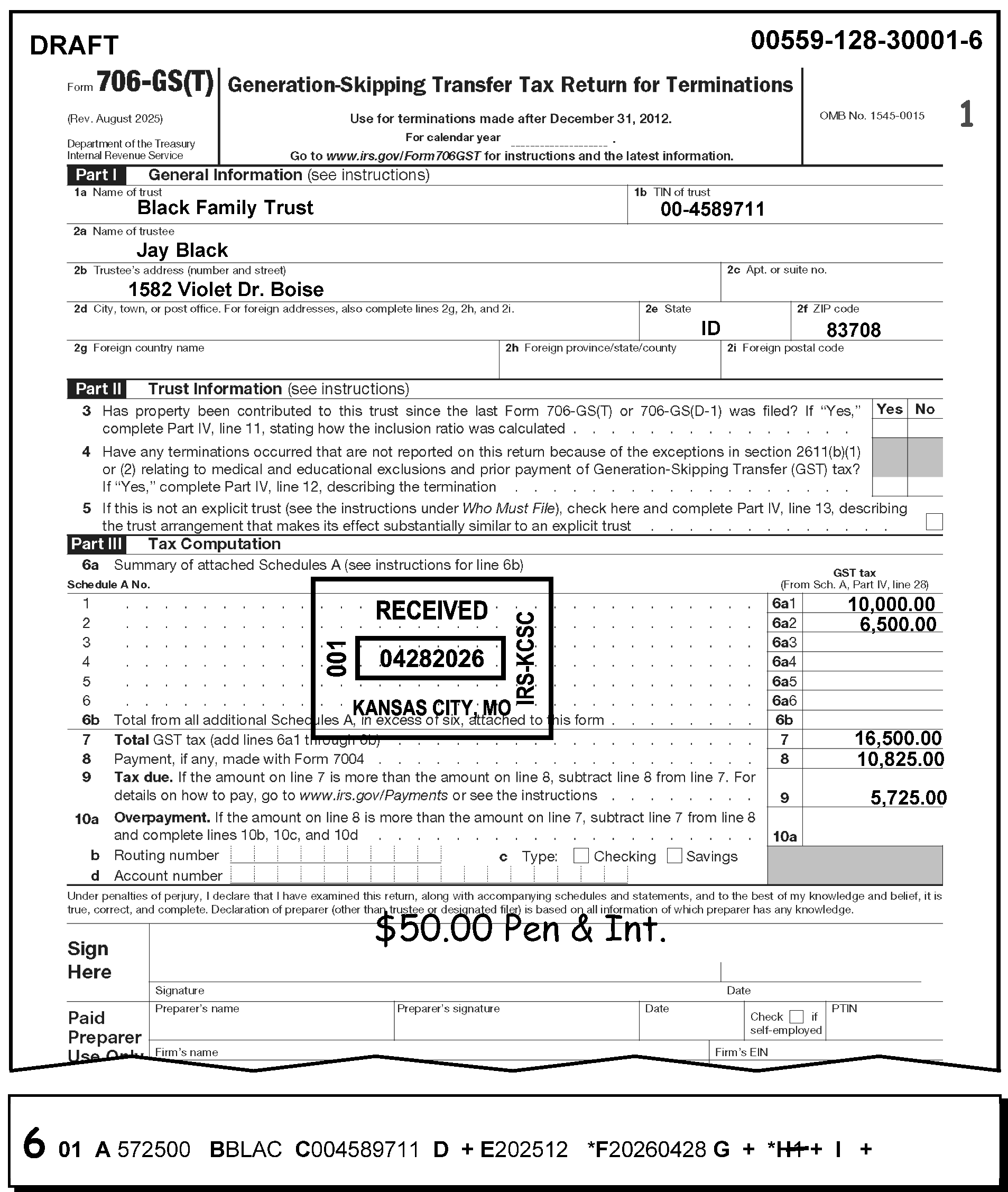
Figure 3.12.106-9 shows a late filed Form 706-GS(T) with prepaid penalty and interest of $50.00. AC 6 is edited on the corrected error register to the left of Section 01 showing a deletion of the P&I Code from Field 01-H(note a P&I Code is only needed if it is a timely return with return showing Penalty and interest). The received date of the return is April 28th to demonstrate a late filed return.
Please click here for the text description of the image.
3.12.106.4.1.10 (01-01-2018)
Field 01-I, CAF Indicator
-
Corrections for this are handled in the same manner as those performed for Form 706-GS(D),. See IRM 3.12.106.3.1.10, Field 01-1, CAF Indicator, for details.
-
Valid indicator must be numeric (1 through 4 and 7) or blank. Only one indicator can be used. Check for transcription errors. Correct the field with AC 6.
3.12.106.4.1.11 (01-01-2024)
Field 01-J, Correspondence Received Date
-
Must be in YYYYMMDD format or blank.
-
This field will asterisk if the following conditions exist.
-
Is not all numeric;
-
Date check is not met (i.e., the month (fifth and sixth digits) is other than 01 through 12), “OR” the day (seventh and eighth digits) is other than 01-31 for the months 01, 03, 05, 07, 08, 10, or 12; 01-30 for the months 04, 06, 09, or 11; 01-28 for the month 02; 01-29 for the month 02 during leap year.
-
The date is earlier than or equal to the return due date.
-
The date is equal to or earlier than the received date (Field 01-F).
-
The date is later than the processing date.
-
-
When a return is identified as unprocessable and the taxpayer has been contacted, the date the reply is received with the necessary information is the correspondence received date.
-
Both the original received date (Field 01-F) and the correspondence received date must be shown.
-
The correspondence received date is in the left margin.
-
Do not enter correspondence received date in the following situations:
-
The correspondence reply received prior to due date of the return.
-
The correspondence required because of an processing error.
-
The reply is insufficient.
Note:
If an insufficient reply, treat as a no reply and enter a CCC "3" in 01-G.
-
-
If no response is received, enter CCC "3" in Field 01-G.
-
If CCC "R" is applicable, edit CCC "R" on the return and enter in Field 01-G.
3.12.106.4.1.12 (01-01-2018)
Field 01-K, Entity Underprint Code
- Corrections for Form 706-GS(T), Generation-Skipping Transfer Tax Return for Terminations for this field are handled in the same manner as were performed for Form 706-GS(D), Generation-Skipping Tax Return for Distributions. See IRM 3.12.106.3.1.12, Field 01-K, Entity Underprint Code, for details.
3.12.106.4.1.13 (01-01-2018)
Field 01-L, Taxpayer Notice Codes
-
Taxpayer Notice Codes (TPNC) can be input only as correction data using AC 1. Enter correct tax amount to left of taxpayer's figures and TPNC in upper left corner of return.
-
The codes will appear in this field on the correction run when entered on raw and another error existed. When this occurs, correct any other invalid condition, but not this field. The use of another AC will cause this field to be blanked on the next loop.
-
Correct by using AC 1 and the proper TPNC.
-
TPNC 63 - We found an error made in the computation of the total GST tax on Line 10, Form 706-GS(T) Generation-Skipping Transfer Tax for Terminations.
-
TPNC 66 - We found an error made in the computation of the balance due or overpayment amount.
-
TPNC 83 - We found an error made in the computation of your total tax amount.
-
TPNC 90 - More than three math errors were made on the return or there is no math error code that meets the error condition on the return. Error Resolution will prepare the exact wording of the error and attach it to the return. Notice Review will type math error explanations on the notice before mailing to taxpayer.
-
-
A maximum of three (3) codes may be entered.
3.12.106.4.1.14 (01-10-2025)
Field 01-M, Refund Code
-
This represents a Manual Refund of $100,000,000.00 or more.
-
The only valid code is "1" . The field must be otherwise blank.
-
When a Refund Code of "1" is both present and correct for Field 01-M, CCC "O" must be present in Field 01-G.
-
When an overpayment of $100,000,000.00 or more is present on a reject register, follow the procedures in IRM 3.12.38, Error Resolution-General Instructions.
-
If an overpayment of $100,000,000.00 or more is present on an error register, the return is to be rejected using AC "3" and routed to Rejects for processing. If a manual refund for any amount is issued, and CCC "O" is present, enter code "1" even if the refund is less than $100,000,000.00.
-
When refund is $25,000 or more and in interest jeopardy, (when the processing date is more than 20 days after the received date or return due date), then the return is to be rejected using AC 3 and routed to Rejects for processing. If a manual refund for any amount is issued, and CCC “O” is present, enter code “1” even if the refund is less than $100,000,000.00.
3.12.106.4.1.15 (01-01-2025)
Field 01-N, Preparer's SSN or PTIN
-
The Preparer's Social Security Number (SSN), 2008 and Prior revisions or Preparer Tax Identification Number (PTIN) is located to the right of the Preparer's signature in the PTIN box at the bottom right corner of Form 706-GS(T), Generation-Skipping Transfer Tax Return for Terminations.
-
Data may or may not be present in Field 01-N.
-
Field 01-N is invalid if any of the following conditions are present:
-
The field is other than nine numeric digits
Exception:
If Field 01 N has a PTIN, the first character in the PTIN must begin with the alpha "P" . The range for a valid PTIN is "P00000001" through "P99999998" . A "P" followed by all 0’s or all 9’s is not valid.
-
The field is not all blank
-
The field is all 0’s
-
The field is all 9’s
-
-
Correction Procedures:
-
Correct all misplaced entries, coding and transcription errors.
-
If invalid and unable to determine a valid entry, delete Field 01-N and continue processing.
-
If the return has both an SSN and a PTIN, accept the PTIN and continue processing.
-
3.12.106.4.1.16 (01-01-2024)
Field 01-O, Firm's EIN
-
The Firm's EIN for 2008 and Prior revisions is located below the Preparer's PTIN box at the bottom right corner of Form 706-GS(D), Generation-Skipping Transfer for Distributions, and Form 706-GS(T), Generation-Skipping Transfer Tax Return for Terminations.
-
Data may or may not be present in Field 01-O.
-
Field 01-O is invalid if any of the following conditions are present:
-
The field is less than nine numeric digits
-
The field is not all blank
-
The field is all 0’s
-
The field is all 9’s
-
The field must not begin with 00, 07, 08, 09, 17, 18, 19, 28, 29, 49, 78, 79, or 89 if it is in the EIN format (nn-nnnnnnn).
-
-
Correction Procedures:
-
Correct all coding and transcription errors and/or misplaced entries.
-
If invalid and unable to determine a valid entry, delete Field 01-O and continue processing.
-
3.12.106.4.1.17 (01-01-2024)
Field 01-P, Preparer's Phone Number
-
The Paid Preparer's Phone Number is located below the Firm's EIN at the bottom right corner of Form 706-GS(D), Generation-Skipping Transfer Tax for Distributions, and Form 706-GS(T), Generation-Skipping Transfer Tax Return for Terminations.
-
Field 01-P is invalid if other than alpha, numeric, or blanks.
-
Correction Procedures:
-
Correct all misplaced entries, coding errors, and transcription errors.
-
If invalid, delete Field 01-P and continue processing.
-
3.12.106.4.2 (01-01-2026)
Section 02 - Form 706-GS(T)
-
Section 02 alpha field designators, line numbers, field lengths and titles. Section 02 has variable length fields. All Forms 706-GS(T) with a foreign address are processed at KCSPC.
Alpha Field Designator Line Number Field Length Title A Line 2a 35 “In care of” Name B Line 2b 35 Foreign Address C Line 2b 35 Street Address D Line 2b 201312 thru 202412 or Line 2d for 202501 and Later 22 City/Major City Code E Line 2b 201312 thru 202412 or Line 2e for 202501 and Later 2 State Code F Line 2b 201312 thru 202412 or Line 2f for 202501 and Later 12 ZIP code
3.12.106.4.2.1 (01-01-2017)
Field 02-A, "In Care of" Name
-
Field 02-A is located in the Entity Section of the return.
-
Field 02-A has 35 positions and the valid characters are alpha, numeric, ampersand, dash, slash or percent (%).
Note:
The first character of the "in-care-of" name must be alpha or numeric.
-
Field 02-A is invalid if any of the following conditions are present:
-
The first position is % (percent) and the second position is not blank, or
-
The first position is blank, or
-
The first character of the "in-care-of" name is not alpha or numeric, or
-
There are two consecutive blanks between significant characters.
-
-
Correction Procedures: Correct coding and transcription errors using If/Then below.
If Then A % (percent) is in the first position 1. Compare the register against the information on the return to ensure whether there is a blank in the second position. 2. If not blank, enter the "in-care -of" name beginning with an alpha or numeric in Field 02-A, using AC 6. A blank is in the first position 1. Compare the register against the information on the return. 2. If the information on the return is different, draw a line through the information in Field 02-A and edit the "in-care-of" name beginning with an alpha or numeric above the lined out entry in Field 02-A, using AC 6. 3. If the information is correct as written, edit an AC 7 to the left of the section. The first character of the "in-care-of" name is not alpha or numeric 1. Compare the register against the information on the return. 2. If the information is different, draw a line through the information in Field 02-A and write the "in-care-of" name in Field 02-A, using AC 6. 3. If the information on the return is correct as written on the return, edit AC 7 to the left of the section. Two consecutive blanks are present between significant characters 1. Compare the register against the information on the return. 2. If the information on the return is different, draw a line through the entry in Field 02-A and write the correct information immediately above it. 3. If the information on the register is the same as the information on the return, use AC 7.
3.12.106.4.2.2 (01-01-2019)
Field 02-B, Foreign Address
-
“Field 02-B” is located in the Entity Address Section of the return.
-
The computer will check for a presence in this field if the state code field (Field 02-E) has a period/space.
-
Field “02-B” should not be present on CCC "G" short-length returns.
-
-
“Valid Condition” are alpha, numeric and special characters.
-
“Field 02-B” generates as an error when any of the following conditions are present:
-
The state code field has a period/space (.)
-
The first position is blank
-
Any character follows two consecutive blanks.
-
There’s more than 35 characters present in the field.
Note:
Integrated Submission and Remittance System (ISRP) is instructed to input a pound sign (#) as the 35th character if there are more than 35 characters present for this field on the return.
-
-
Correction Procedures:
- Correct all coding and transcription errors
.
If Then A foreign address is present in**“ Field 02-B”** (Foreign Address) Check the register against the return to ensure the address is truly a foreign address. 1. A valid Foreign Country Code must be present in “Field 02-D (City)”. If missing, correct**“ Field 02- D”**, with an AC 6. ### Note: See Exhibit 3.12.106-6, Foreign Country Codes. 2. Delete “Field 02-F” (Zip code), if present, using AC 6. 1. Enter the street address in “Field 02-C”. 2. Also enter the City (“Field 02-D”) and State (“Field 02-E”), and Zip code (“Field 02 F”), using AC 6. ### Reminder: \*The period/space (in “Field 02-E”). the State must be deleted if this is NOT a foreign address, Correct using AC 6. A foreign address is NOT present in “Field 02-B” (Foreign Address) Check the register against the return to ensure whether the address is a domestic address. ### Caution: Do not use “Field 02-B” for domestic street addresses. The period/space in “Field 02-E”, (State) will alert the computer to search for a foreign address in “Field 02-B” and the Foreign Country Code in “Field 02-D” (City). 1. Draw a line through the period/space entry in “Field 02-E” (State) and enter the correct state code using AC 6. 2. Enter the correct information in Fields “02-C” (Street), “02-D” (City), and “02-F” (Zip code) using AC 6. 1. Enter the foreign street address in “Field 02-B” using AC 6. ### Reminder: Integrated Submission and Remittance Processing System is instructed to use the street address line (“Field 02-C”) as a second address line, if needed. 2. Also enter the valid Foreign Country Code in “Field 02-D” (City), using AC 6. (See Exhibit 3.12.106-6, Foreign Country Codes.) The Foreign Country Code is missing or incorrect 1. Check the register against the return. 2. See Exhibit 3.12.106-6, Foreign Country Codes. 3. Add the Foreign Country Code in “Field 02-D” (City), if missing, using AC 6. 4. To correct, draw a line through the information in “Field 02-D” and write the correct information above the lined-out entry using AC 6. A foreign address is present in “Field 02-B” and a Zip code is present in “Field 02-F” 1. Check the register against the return. 2. If the return truly has a foreign address, line through the entry on “Field 02-F” (Zip code) of the register. 3. Write the Foreign Country Code in “Field 02-D” (City). 4. Use AC 6. -
This field will asterisk (*) if other than specified above.
-
For more information, also see Exhibit 3.12.106-5, U.S. Possessions State Abbreviations and Zip Codes.
3.12.106.4.2.3 (01-04-2023)
Field 02-C, Street Address
-
First position must not be blank.
-
First position must be either alpha or numeric characters.
-
Valid characters are alpha, numeric, blank, hyphen, and slash.
-
There cannot be two consecutive blanks followed by valid characters.
-
If Field 02-D (City) has a Major City Code (MCC), a street address must be present. (If a MCC is used and no address is present, enter the city in "city format" , not in MCC format.) Check returns and attachments if the address is not present.
-
If an address is not found, research using INOLE/ENMOD.
-
If an address is still not found, use AC 3 and route to Entity. Indicate "No address" on Form 4227, Intra-SC Reject or Routing Slip, and route to Entity.
-
-
This field will asterisk if other than specified above. Correct this field.
Note:
If inputting a foreign address, this field may be used as a second address line for entering the foreign city, province, and postal code.
3.12.106.4.2.4 (01-01-2018)
Field 02-D, City/Major City Code
-
The invalid conditions for Field 02-D are as follows:
-
First position cannot be blank.
-
Second and third positions cannot both be blank.
-
There cannot be two consecutive blanks within significant data.
-
-
Valid characters are alpha, and blank.
-
When a Major City Code is used:
-
Field 02-E (State code) cannot be present;
-
Field 02-C (Street Address) must be present; and,
-
Field 02-F (Zip code) must be compatible with Major City Code.
-
-
If a valid MCC cannot be used, then the entire City must be input with AC 6. When the entire city name is used Field 02-E (State) must be present.
-
Field 02-D will asterisk if the MCC does not agree with the first three digits of the ZIP code. Field 02-F will also asterisk.
-
See Document Code 7475 (State and Address Abbreviations, Major City Codes (MCC’s), Zip Codes and Countries) for valid MCC and ZIP codes.
-
If there is a foreign address, the valid country code must be present in Field 02-D. Do not abbreviate the name of the country. Refer to Exhibit 3.12.106-6, Foreign Country Codes.
3.12.106.4.2.4.1 (01-01-2016)
City - Special to Foreign Address
-
If the Foreign Address is present, the City Error Indicator will error for the following reasons:
-
The foreign country code is blank.
-
The foreign country code is invalid.
-
The foreign country code is present, but the remaining positions in Field 02-D (City) are not blank.
-
The city field is blank.
-
3.12.106.4.2.5 (01-01-2016)
Field 02-E, State
-
If present, this field must have a state code of two alpha characters.
-
Field 02-E will asterisk if the state is not valid. Enter correct state code in Field 02-E.
-
If a state is present as well as a MCC in Field 02-D, this field will asterisk. If a MCC is correct, delete Field 02-E. If an MCC is incorrect or cannot be determined, enter the complete city name in Field 02-D.
-
If the state code does not agree with the first three (3) digits of a ZIP code, Field 02-F will asterisk. If the state code is not correct, draw a line through the error and edit the correct state code above it to correct Field 02-E. If Field 02-E is correct, look up the ZIP code.
-
IMPORTANT: Field 02-E must have a period/space (. if the address is foreign.
3.12.106.4.2.6 (01-01-2018)
Field 02-F, ZIP Code
-
The valid characters for ZIP codes are numeric and must be present if Section 02 is present.
-
Field 02-F must be present and must 5, 9 or 12 numeric.
-
Field 02-F will asterisk (*) if other than specified above. Correct field.
-
If a valid ZIP code is not shown on return, refer to Document 7475, (State and Address Abbreviations), Major City Codes (MCC’s), ZIP Codes and Countries or the ZIP code directory.
-
If the first three digits of the ZIP code do not agree with the major city code or state code, Field 02-F will asterisk as well as Field 02-D or Field 02-E.
-
If only the first three digits of the ZIP code can be determined, enter "01" for the fourth and fifth digits.
-
IMPORTANT: Field 02- F must be blank if the address is foreign.
3.12.106.4.3 (01-01-2026)
Section 03 - Form 706-GS(T), Generation-Skipping Transfer Tax Return for Terminations
-
Section 03 alpha field designators, line have numbers, field lengths and titles are listed below. All fields in this section are transcribed from Page 1, Part III. This section is entered in dollars and cents, and all fields are positive, except Field 03-J, which is positive or negative. Chart below will provide the required information.
Alpha Field Designator Line Number Field Length Title A NA NA NA B NA NA NA C NA NA NA D NA NA NA E NA NA NA F NA NA NA G NA NA NA H Line 10 201312 thru 202412 or Line 7 for 202501 and Later 15 Total GST Tax (previously "Net GST Tax" ) I Line 11 201312 thru 202412 or Line 8 for 202501 and Later 15 Payment, if any, made with Form 7004, Extension to File.(also referred to as 7004 Payment Amount) J Line 12/13 201312 thru 202412 or Line 8 for 202501 and Later Line 9 (Tax Due) Line 10 (Overpayment) for 202501 and Later 15 Balance Due/Overpayment Balance Due/Overpayment Computer Note:
Fields 03-A through Field 03-G are blank and not applicable (NA) at this time.
3.12.106.4.3.1 (01-01-2026)
Field 03-H, Total GST Tax
-
(201312 thru 202412 and Prior) Field 03-H is transcribed from Line 10 and is computed by adding the total amounts of all attached Schedule As (Part III, Line 10). (The total of Schedule As were entered into Lines 9a1 thru 9b. The taxpayer is instructed to enter the total from all other Schedules A on Line 9b if they have more than six Schedules A attached to the form.)
-
(202501 and Later) Field 03-H is transcribed from Line 7 and is computed by adding the total amounts of all attached Schedule As (Part IV, Line 28). (The total of Schedule As were entered into Lines 6a 1 thru 6b. The taxpayer is instructed to enter the total from all other Schedules A on Line 6b if they have more than six Schedules A attached to the form.)
Reminder:
“Tax Year 2010 only”: The tax rate for the period after December 31, 2009, and before January 1, 2011, is zero percent (0%). See Table of Maximum Tax Rates below for more information.
Note:
On January 2003 and Prior revisions, this line is referred to as "Net GST Tax" .
-
Check for transcription errors and correct with AC 6. If transcribed correctly and the field is still in error, use AC 1 and send TPNC 63.
-
The Table of Maximum Tax Rates is provided below.
If the generation-skipping transfer occurred The maximum tax rate is Tax Year 2013 and subsequent 40% Tax Year 2011 and 2012 (i.e., After December 31, 2010, but before January 1, 2013) 35% Tax Year 2010 (i.e., After December 31, 2009, but before January 1, 2011) 0% Tax Year 2009 (i.e., After December 31, 2008, but before January 1, 2010) 45% Tax Year 2008 (i.e., After December 31, 2007, but before January 1, 2009) 45% Tax Year 2007 (i.e., After December 31, 2006, but before January 1, 2008) 45% Tax Year 2006 (i.e., After December 31, 2005, but before January 1, 2007) 46% Tax Year 2005 (i.e., After December 31, 2004, but before January 1, 2006) 47% Tax Year 2004 (i.e., After December 31, 2003, but before January 1, 2005) 48% Tax Year 2003 (i.e., After December 31, 2002, but before January 1, 2004) 49%
3.12.106.4.3.2 (01-01-2026)
Field 03-I, Payment (if any) made with Form 7004
-
Field 03-I is transcribed from Line 11 (2013 thru 202412) or Line 8 (202501 and Later).
-
Check for transcription errors. ≡ ≡ ≡ ≡ ≡ ≡ ≡ ≡ ≡ ≡ ≡ ≡ ≡ ≡.
3.12.106.4.3.3 (01-01-2026)
Field 03-J, Tax Due/Overpayment
-
Field 03-J is transcribed from Lines 12 (Tax Due) or 13 (Overpayment) for (2013 thru 202412) or Line 9 (Tax Due) or Line 10a (Overpayment) 202501 and Later respectively and will underprint if it exceeds ≡ ≡ ≡ ≡ ≡ ≡ ≡ ≡ ≡ ≡ ≡ ≡
-
(202412 and Prior) The Tax Due is determined if Line 10 (Total GST Tax) is larger than Line 11 (Payment, if any, made with Form 7004).
Exception:
For Tax Year 2010, the tax rate is zero percent (0%).
-
(202501 and Later) The Tax Due is determined if Line 7 (Total GST Tax) is larger than Line 8 (Payment, if any, made with Form 7004).
-
(202412 and Prior) The Overpayment (Line 13) is determined if Line 11 is larger than Line 10.
-
(202501 and Later) The Overpayment (Line 10a) is determined if Line 8 is larger than Line 7.
-
-
Correct all editing, transcription and transferring errors. Any penalties and interest included in Field 03-J should be deleted.
-
If an error is present, use AC one and send 66. 66 “States, We found an error in the computation of balance due or the over payment”.
3.12.106.4.4 (01-01-2026)
Section 60 - Form 706-GS(T), Generation-Skipping Transfer Tax Return for Terminations
-
Section 60 field designators, Line numbers and titles are listed in table below:
Field Field Title Field Length Location 60-A Routing Transit Number 9 Part III Line 10b 60-B Type of Depositor Account 1 Part III Line 10c 60-C Depositor Account Number 17 Part III Line 10d
3.12.106.4.4.1 (01-01-2026)
Field 60-A Routing Transit Number
- Field 60-A is transcribed from Part III Line 10b. Field 60-A is a nine-digit numeric field.
3.12.106.4.4.2 (01-01-2026)
Invalid Conditions
-
Field 60-A is invalid if present, and the first two digits are not:
-
Between 01 through 12.
-
Between 21 through 32.
-
-
Other than numeric.
3.12.106.4.4.3 (01-01-2026)
Correction Procedures
-
Correct coding and transcription errors and misplaced entries.
-
If the information on the return is not valid, delete Field 60-A.
3.12.106.4.5 (01-01-2026)
Field 60-B Type of Depositor Account
- Field 60-B is transcribed from Part III Line 10c. Field 60-B may be blank or a one-digit alpha code ("C" or "S" ).
3.12.106.4.5.1 (01-01-2026)
Invalid Conditions
- Field 60-B is invalid if the entry present is not a C for Checking or S for Savings.
3.12.106.4.5.2 (01-01-2026)
Correction Procedures
-
Correct coding and transcription errors and misplaced entries.
-
If both or neither box (Checking or Savings) is marked, enter "C" in Field 60-B.
3.12.106.4.6 (01-01-2026)
Field 60-C Depositor Account Number
- Field 60-C is transcribed from Part II Line 10d. Field 60-C may be up to 17 characters and can be alpha, numeric, hyphen or space.
3.12.106.4.6.1 (01-01-2026)
Invalid Conditions
-
Field 60-C Depositor Account Number is invalid if present and a character is not numeric, alpha, hyphen or space.
-
Field 60-C is present, but Field 60-B is not present.
3.12.106.4.6.2 (01-01-2026)
Correction Procedures
-
Correct coding and transcription errors and misplaced entries.
-
Check Line 10d and do the following:
If Then The account number is valid (the entry has only numeric, alpha, hyphen or space), 1. GTSEC 60. 2. Enter a valid code in Field 60TDA. The account number is not valid or missing, Delete Field 60-C
Exhibit 3.12.106-1
Form 706-GS(D), Generation-Skipping Transfer Tax Return for Distributions (2025 and Later)
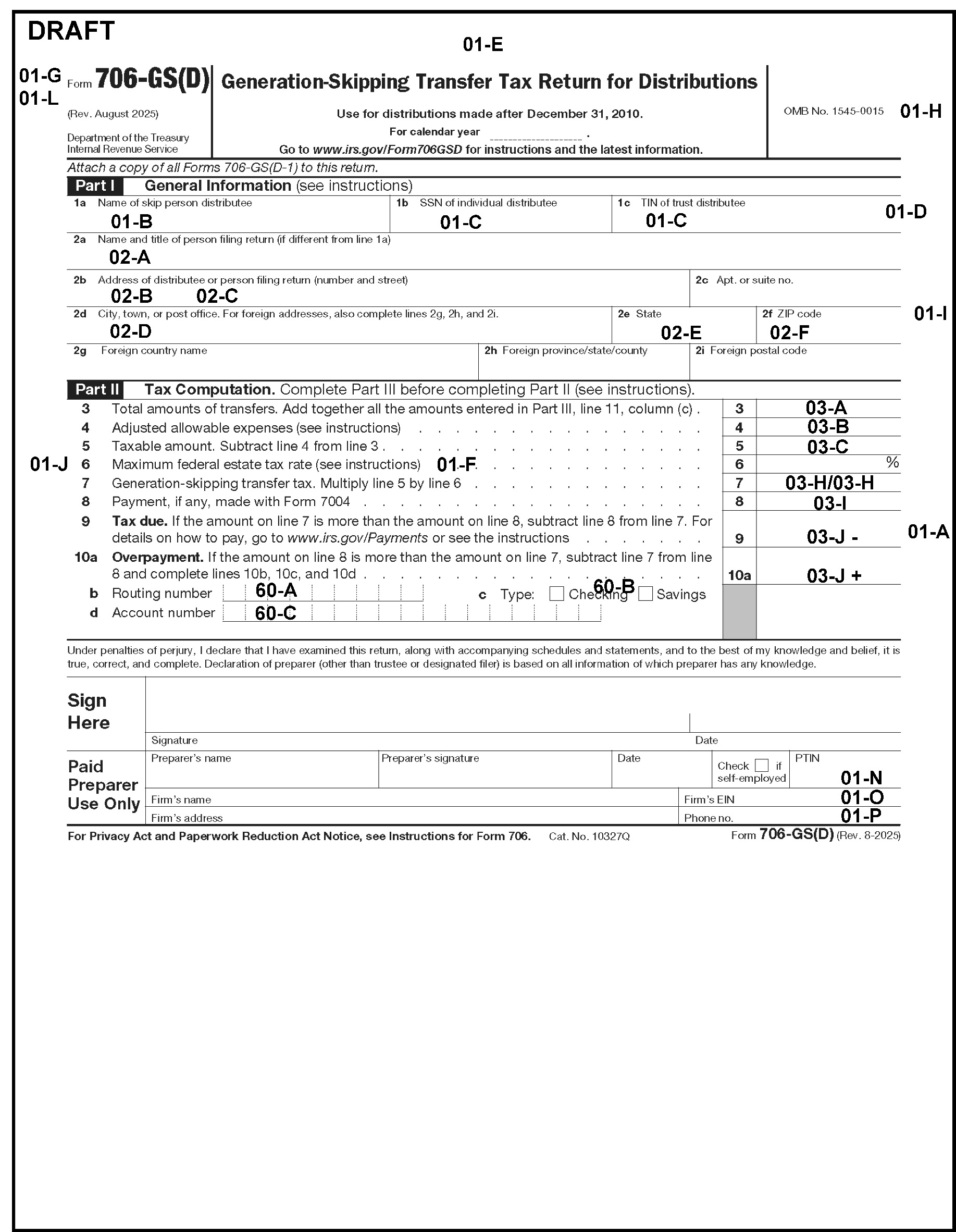
Exhibit 3.12.106-1 has a Form 706-GS(D) showing the Section and Field Designations of the transcription lines (T-Lines) found on Page one. The descriptions are provided in a reading order, from top to bottom, left to right, line by line.Field 01-G, CCC, located in the left top margin of the Form 706-GS(D)Field 01-H, Penalty and Interest Code, located to center right beneath title line of the form, to left of the OMB NumberField 01-H, Penalty and Interest Code, located to center right beneath title line of the form, to left of the OMB NumberField 01-E, Tax Period, located at top of return (center)Field 01-L, Taxpayer Notice Code, located in upper left margin of the form, directly beneath Field 01-G (CCC)Field 01-B, Name Control/Name Line, entity area of Part I, (General Information), Line 1aField 01-C, TIN, entity area of Part I, (General Information), Line 1b or 1c of Form 706-GS(D) (first of two such named lines; Form line entitled, SSN of Individual Distributee) Field 01-D, TIN Type, upper right margin of the form, to right of SSN box, the entity area of formNext LineField 02-A, Care of Name, entity area of form, Line 2aField 02-B, Foreign Address, entity area of form, Line 2bField 02-C, Street Address, entity area of form, Line 2bField 02-D, City/Major City Code, entity area of form, Line 2dField 02-E, State code, entity area of form, Line 2eField 02-F, ZIP code, entity area of form, Line 2fField 01-I, CAF Indicator, in right margin, to right of the entity area, following Fields 02- B through 02- FField 03-A, Total amounts of Transfers, (Part II, Tax Computation), Line 3Field 03-B, Adjusted allowable expenses, Line 4Field 01-J, Correspondence Received Date, located to the left of Line 6Field 03-C, Taxable amount,(subtract Line 4 from Line 3) equals Line 5Field 01-F, Received Date, located in the middle part of the form to the right of Field 01-JField 03-H/03- H, Generation-Skipping Transfer tax (Part II, Tax Computation), Line 7Field 03-I, Payment, if any, made with Form 7004, Line 8Field 03-J, Tax Due, Line 9Field 01-A, Remittance amount, to the right of Line 9Field 03-J, Overpayment, Line 10aField 60-A (Routing Transit Number) Line 10bField 60-B Type of Depositor Account), Line 10cField 60-C (Depositor Account Number), Line 10dField 01-N, PTIN, Paid Preparer Use Only area, bottom rightField 01-O, Firm's EIN, beneath the PTIN lineField 01-P, Phone Number, beneath the Firm's EIN
Please click here for the text description of the image.
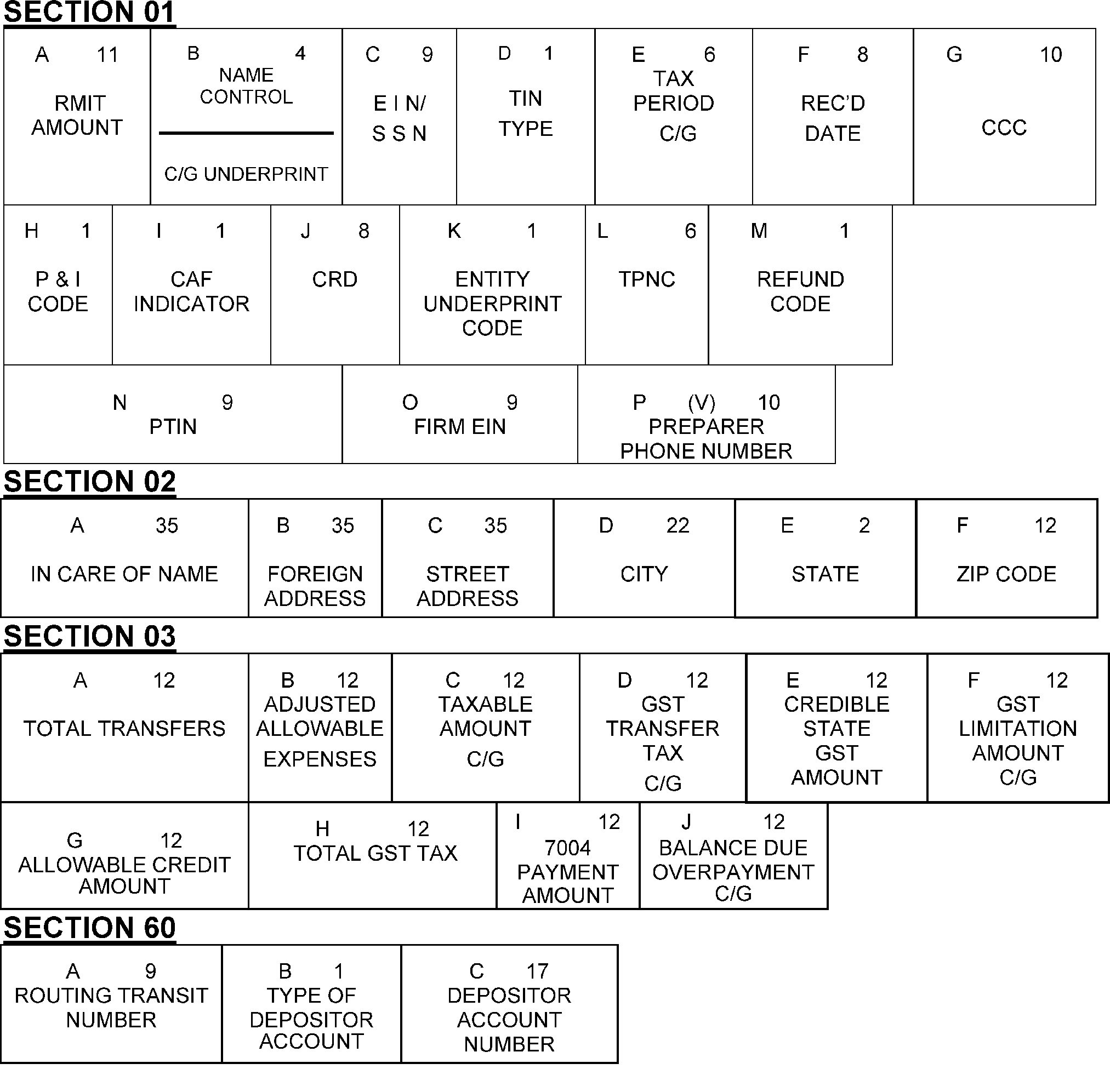
Exhibit 3.12.106-1 Cont. 1 has the layout of the error register displaying the locations of the Section and Field Designations of the 706-GS(D) transcription lines (T-lines). The Error Resolution diagram is shown here (landscape view, turned on its end), with Sections 01, 02, 03 and 60 having separate tables in reading order, left to right, by alpha designators, respectively, as follows:First Line - Section 01A, RMITB, Name Control C/GC, TIND, TIN TypeE, Tax Period, C/GF, Received DateG, CCCNext LineH, P&I CodeI, CAF IndicatorJ, CRD (Correspondence Received Date)K, Entity Underprint CodeL, (Taxpayer Notice Code)M, Refund CodeNext Line - Section 01 (Continued)N, Preparer's PTINO, Preparer's EINP, Preparer's Phone NumberNext Line - Section 02A, In Care of NameB, Foreign AddressC, Street AddressD, City/MCCE, StateF, ZIP codeNext Line - Section 03 (Please Note: Fields 03-A, through Field 03-G, although listed with field names and designations on Error Record layout, were all blank for Form 706-GS(T)A, Tentative Total Transfer AmountB, Adjusted Allowable Expenses AmountC, Taxable Amount/Taxable Amount (C/G)D/H, Gross GST Tax/Gross GST Tax (C/G)E, Creditable State GST AmountF, Gross GST Limitation Amount/Gross GST Limitation Amount (C / G)Next Line - Section 03 (Continued)G, Allowable Credit AmountH, Net GST TaxI, 7004 Payment AmountJ, Balance Due/Overpayment/ C / GNext Line - Section 60A, Routing Transit NumberB, Type of Depositor AccountC, Depositor Account Number
Please click here for the text description of the image.
Exhibit 3.12.106-2
Form 706-GS(D), Generation-Skipping Transfer Tax Return For Distributions (Prior)
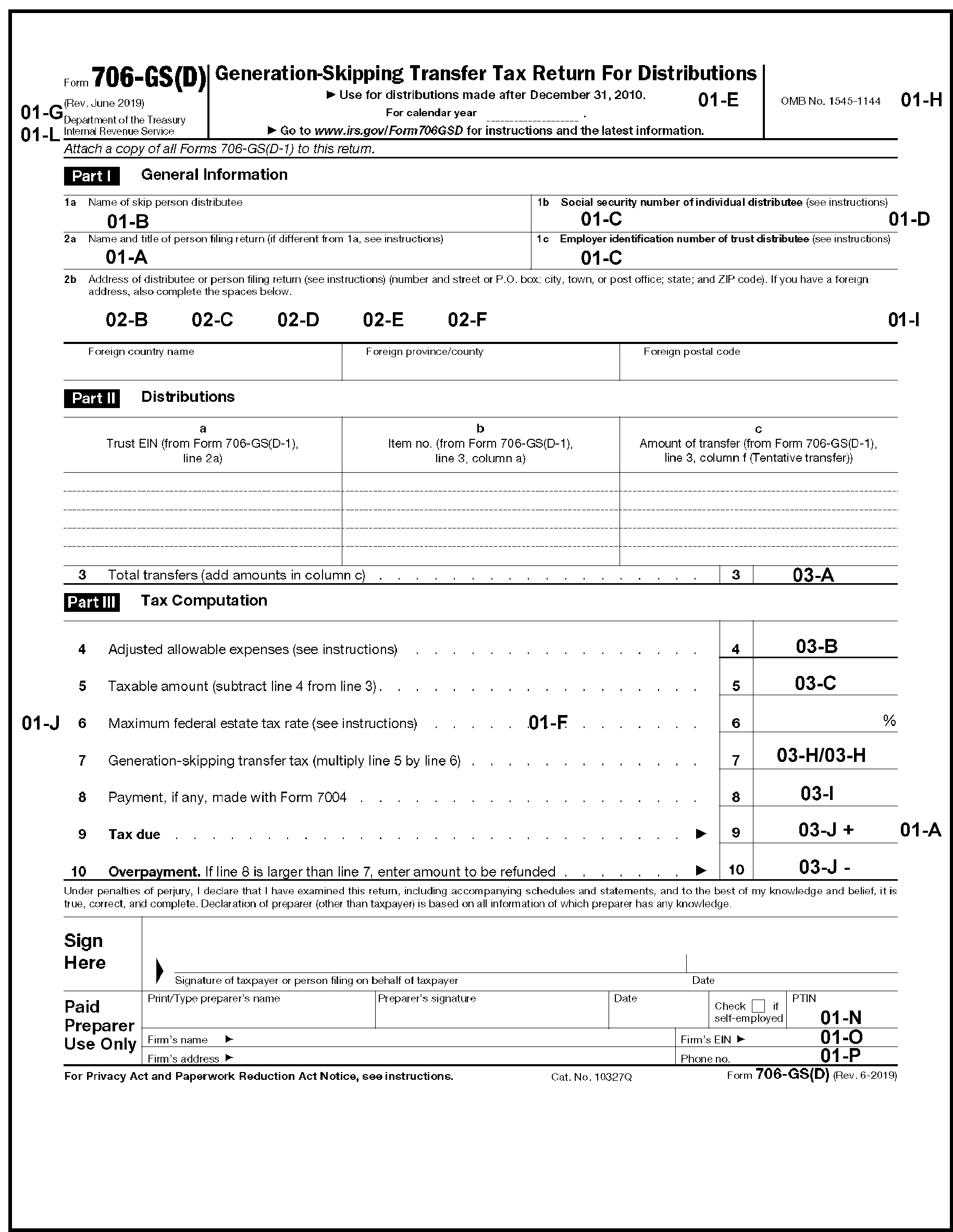
Exhibit 3.12.106-2 has a Form 706-GS(D) showing the Section and Field Designations of the transcription lines (T-Lines) found on Page one. The descriptions are provided in a reading order, from top to bottom, left to right, line by line.Field 01-E, Tax Period, located at top of return (center)Field 01-H, Penalty and Interest Code, located to center right beneath title line of the form, to left of the OMB NumberField 01-G, CCC, located in the left top margin of the Form 706-GS(D)Field 01-L, Taxpayer Notice Code, located in upper left margin of the form, directly beneath Field 01-G (CCC)Field 01-B, Name Control/Name Line, entity area of Form (Part I, General Information), Line 1aField 01-C, TIN, entity area of Form (Part I, General Information), Line 1b or 1c of Form 706-GS(D) (first of two such named lines; Form line entitled, SSN of Individual Distributee) Field 01-D, TIN Type, upper right margin of the form, to right of SSN box, the entity area of formNext LineField 01-A, Care of Name, entity area of form, Line 2aField 01-C, TIN, entity area of form, Line 1b or 1c of Form 706-GS(D) (second of two such named lines)Field 02-B, Foreign Address, entity area of form, Line 2aField 02-C, Street Address, entity area of form, Line 2aField 02-D, City/Major City Code, entity area of form, Line 2bField 02-E, State code, entity area of form, Line 2bField 02-F, ZIP code, entity area of form, Line 2bField 01-I, CAF Indicator, in right margin, to right of the entity area, following Fields 02- B through 02- FField 03-A, Total Transfer Amount, (Part II, Distributions), Line 3Field 03-B, Adjusted allowable expenses, Line 4Field 01-J, Correspondence Received Date, located to the left of Line 6Field 03-C, Taxable amount, Line 5Field 01-F, Received Date, located in the middle part of the Form to the right of Field 01-JField 03-H/03- H, Generation-Skipping Transfer tax (Part III, Tax Computation), Line 7Field 03-I, Payment Amount, if any, made with Form 7004, Line 8Field 03-J, Tax Due, Line 9Field 01-A, Remittance amountField 03-J, Overpayment, Line 10Field 01-N, PTIN, Paid Preparer Use Only area, bottom rightField 01-O, Firm's EIN, beneath the PTIN lineField 01-P, Phone Number, beneath the Firm's EIN
Please click here for the text description of the image.
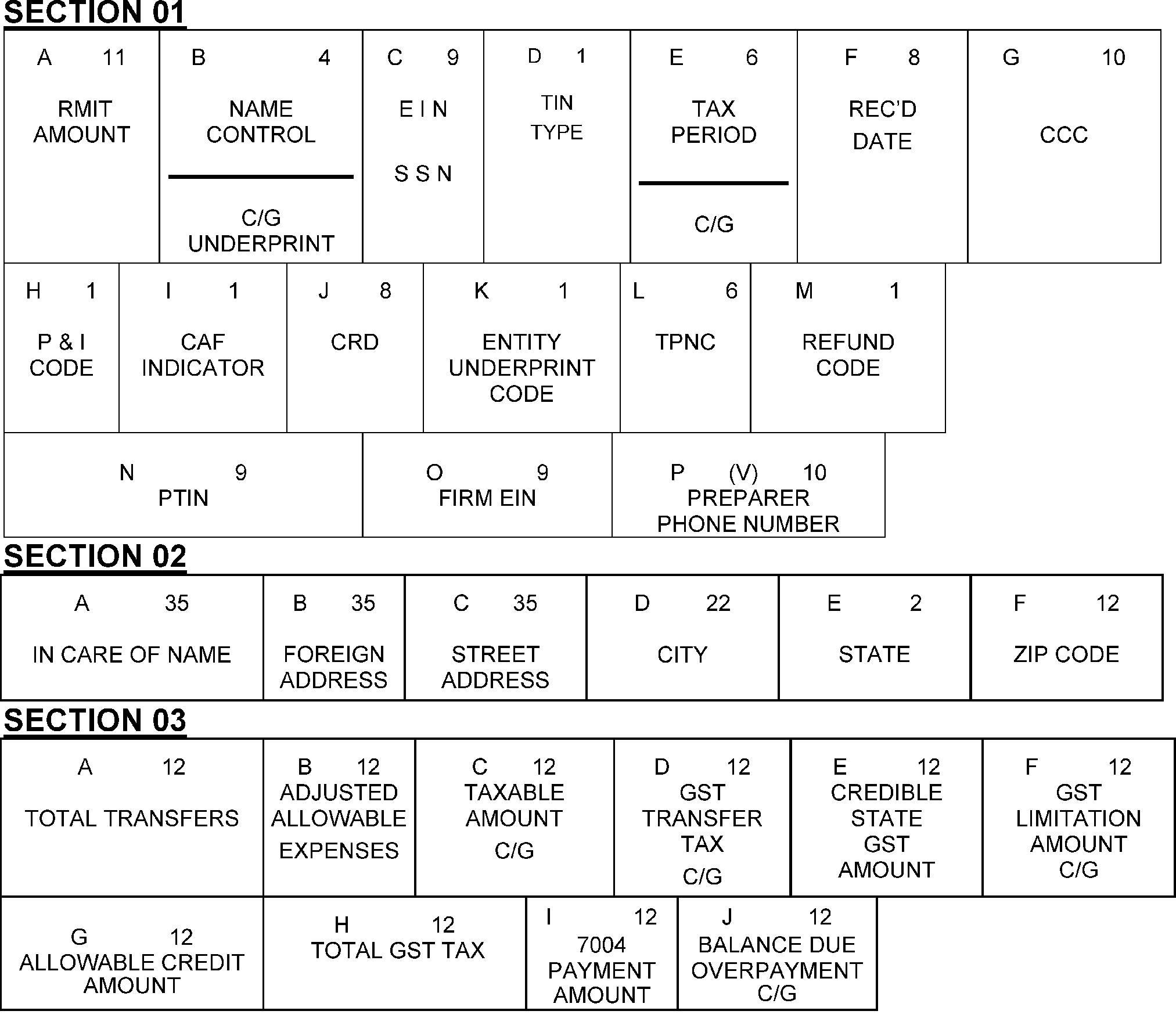
Exhibit 3.12.106-2 Cont. 1 has the layout of the error register displaying the locations of the Section and Field Designations of the 706-GS(D) transcription lines (T-lines). The Error Resolution diagram is shown here (landscape view, turned on its end), with Sections 01, 02, and 03 having separate tables in reading order, left to right, by alpha designators, respectively, as followsFirst Line - Section 01A, RMITB, Name Control / C / GC, TIND, TIN TypeE, Tax Period, C / GF, Received DateG, CCCNext LineH, P&I CodeI, CAF IndicatorJ, CRD (Correspondence Received Date)K, Entity Underprint CodeL, (Taxpayer Notice Code)M, Refund CodeNext Line - Section 01 (Continued)N, Preparer's PTINO, Preparer's EINP, Preparer's Phone NumberNext Line - Section 02A, In Care of NameB, Foreign AddressC, Street AddressD, City/MCCE, StateF, ZIP codeNext Line - Section 03 (Please Note: Fields 03-A, through Field 03-G although listed with field names and designations on Error Record layout, were all blank for Form 706-GS(T)A, Tentative Total Transfer AmountB, Adjusted Allowable Expenses AmountC, Taxable Amount/Taxable Amount (C / G)D, Gross GST Tax/Gross GST Tax (C / G)E, Creditable State GST AmountF, Gross GST Limitation Amount/Gross GST Limitation Amount (C / G)Next Line - Section 03 (Continued)G, Allowable Credit AmountH, Net GST TaxI, 7004 Payment AmountJ, Balance Due/Overpayment/ C / G
Please click here for the text description of the image.
Exhibit 3.12.106-3
Form 706-GS(T), Generation-Skipping Transfer Tax Return for Terminations (2025 and Later)
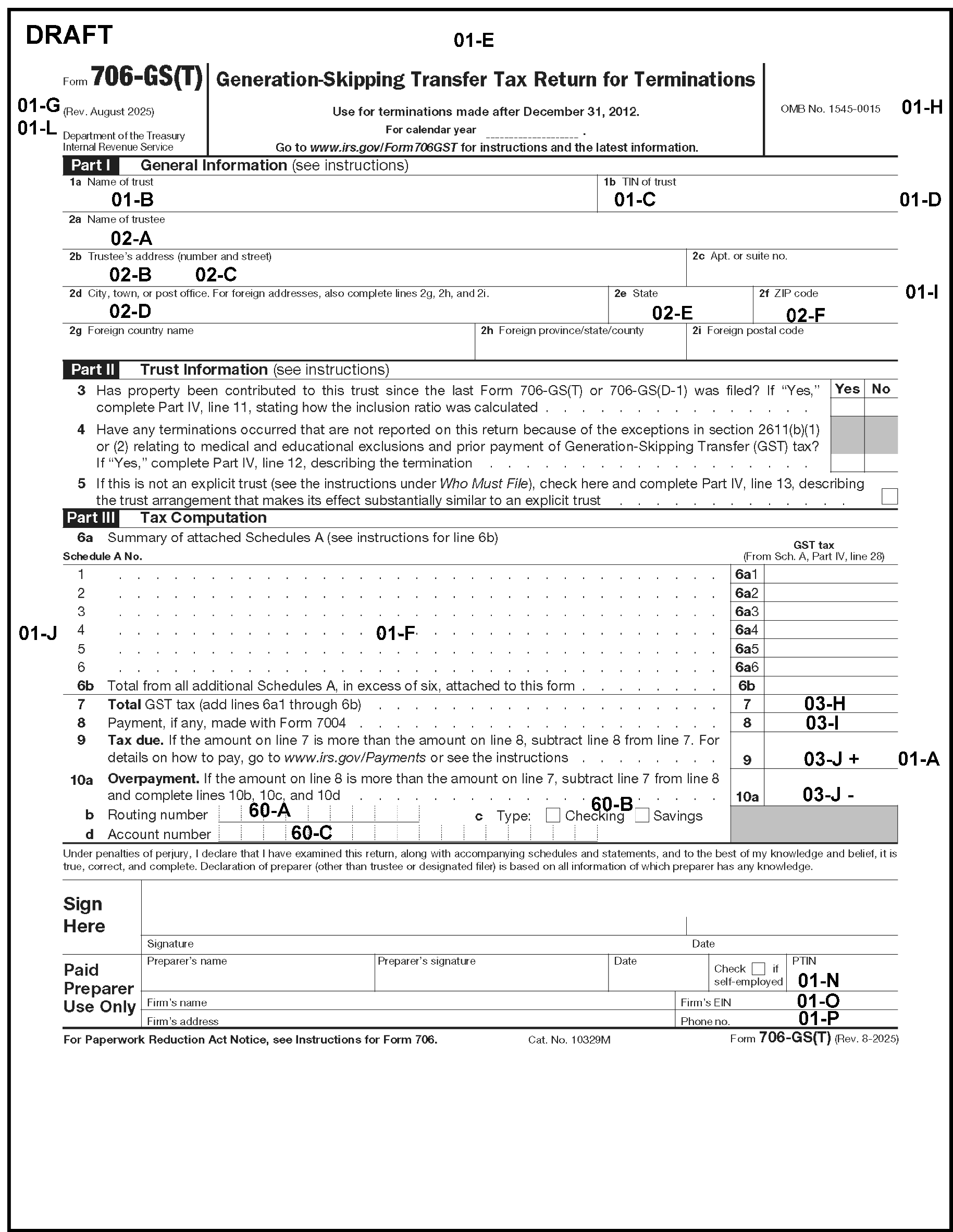
Exhibit 3.12.106-3 has a Form 706-GS(T) showing the Section and Field Designations of the transcription lines (T-line’s) found on Page 1. The descriptions are provided in a reading order, from top to bottom, left to right, line by line.Field 01-G, CCC, located in the left top margin of the Form 706-GS(T)Field 01-E, Tax Period, located at top of return (center)Field 01-H, Penalty and Interest Code, located to center right beneath title line of the form, to left of the OMB NumberField 01-L, Taxpayer Notice Code, located in upper left margin of the form, beneath Field 01-GField 01-B, Name Control/Name Line, entity area of Form (Part I, General Information), Line 1aField 01-C, TIN, entity area of form, Line 1bField 01-D, TIN Type, upper right margin of the Form to right of the EINField 02-A, Name of Trustee, Line 2aField 02-B, Trustee's Address, Line 2bField 02-C, Trustee's Street Address, Line 2bField 02-D, Trustee's City/Major City Code, Line 2dField 02-E, Trustee's State Code, Line 2eField 02-F, Trustee's ZIP code, Line 2fField 01-I, CAF Indicator, in right margin, to right of the entity area following Fields 02 -B through 02 -FField 01-J, Correspondence Received Date, located in the middle left margin of the formField 01-F, Received Date, located in the middle part of the Form across from Field 01-JField 03 H, Total GST Tax, Line 7Field 03 -I, Payment, if any made with Form 7004, Line 8Field 03 J, Tax Due, Line 9Field 03 J, Overpayment, Line 10aField 60-A, Routing Transit NumberField 60-B, Type of Depositor AccountField 60-C, Depositor Account NumberField 01-A, Remittance Amount in the right margin to the right of Line 09Field 01-N, PTIN, Paid Preparer Use Only area (bottom right of form)Field 01 O, Firm's EIN, beneath the Preparer's PTINField 01 P, Phone Number, beneath the Firm's EIN
Please click here for the text description of the image.
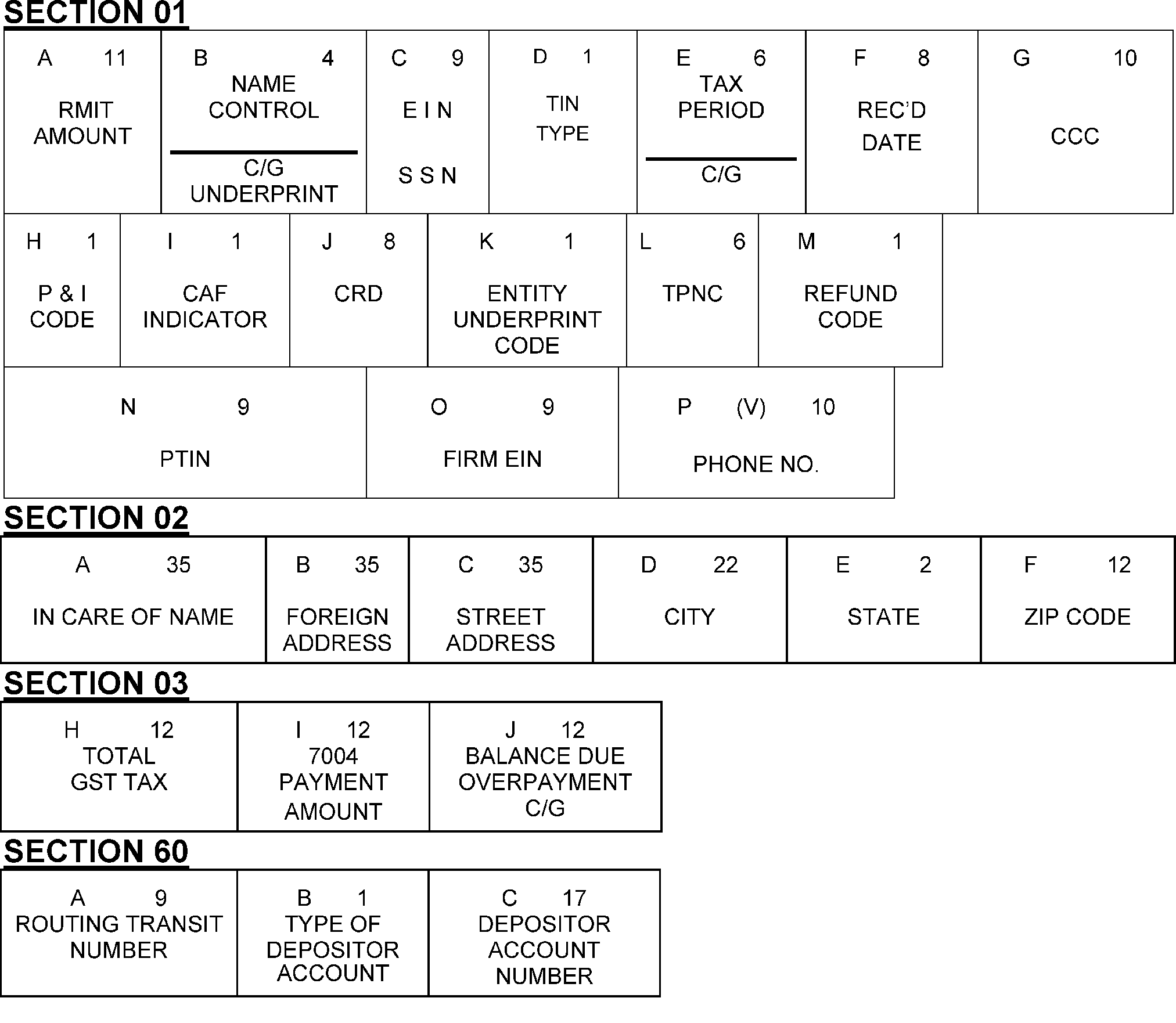
Exhibit 3.12.106-3 Cont. one has a layout of the error register displaying the locations of the Section and Field Designations of the 706-GS(T) transcription lines (T-line’s).First Line - Section 01A, RMITB, Name Control C/GC, TIN/EIND, TIN TypeE, Tax Period, C/GF, Received DateG, CCCNext LineH, P&I CodeI, CAF IndicatorJ, CRD (Correspondence Received Date)K, Entity Underprint CodeL, (Taxpayer Notice Code)M, Refund CodeNext Line - Section 02A, In-Care of NameB, Foreign AddressC, Street AddressD, City/MCCE, StateF, ZIP codeNext Line - Section 03H, Total GST Tax C/GI, 7004 Payment AmountJ, Balance Due Overpayment /C/GNext Line Section 60A, Routing Transit NumberB, Type of Depositor AccountC, Depositor Account Number
Please click here for the text description of the image.
Exhibit 3.12.106-4
Form 706-GS(T), Generation-Skipping Transfer Tax Return for Terminations Prior
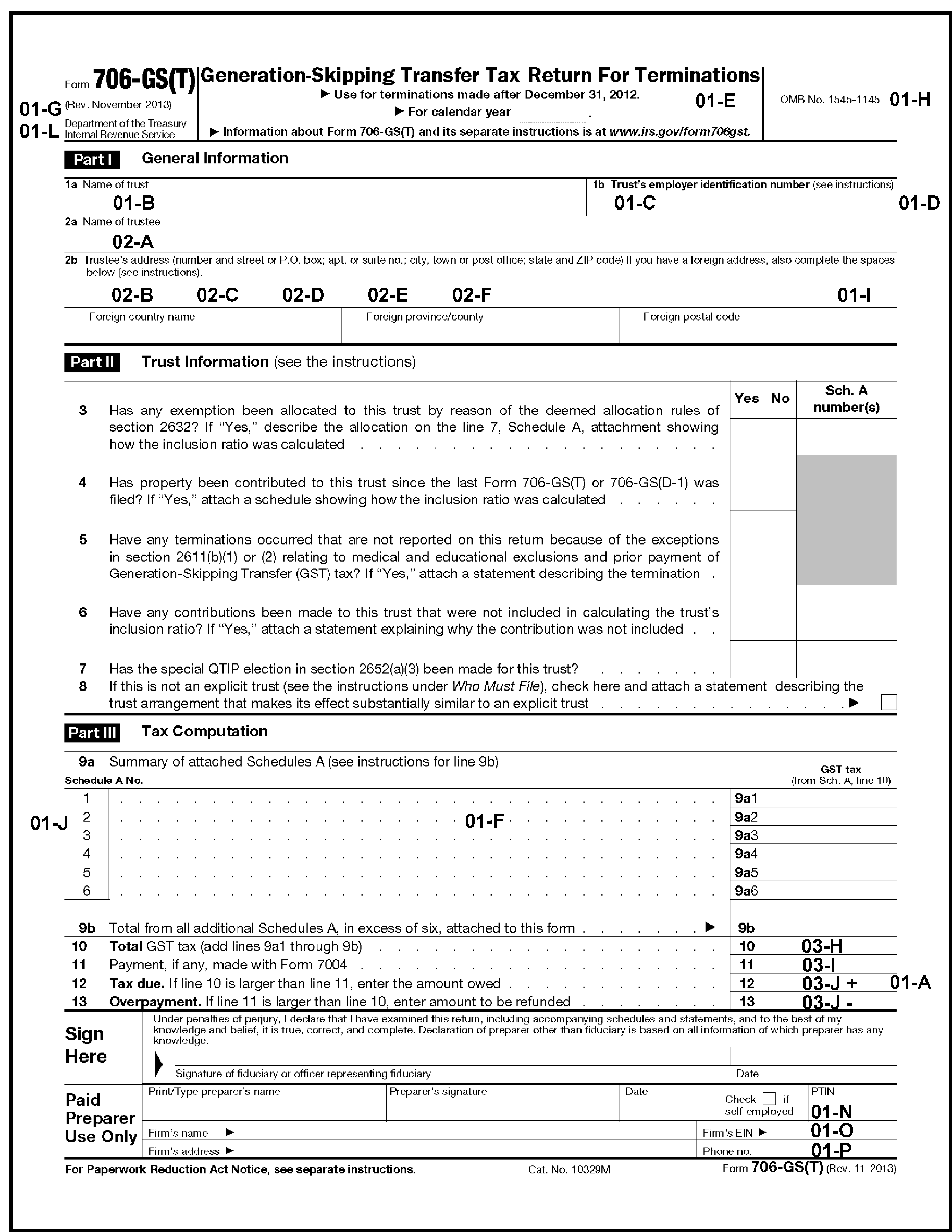
Exhibit 3.12.106-4 has a Form 706-GS(T) showing the Section and Field Designations of the transcription lines (T-line’s) found on Page 1. The descriptions are provided in a reading order, from top to bottom, left to right, line by line.Field 01- E, Tax Period, located at top of return (center)Field 01- H, Penalty and Interest Code, located to center right beneath title line of the form, to left of the OMB NumberField 01- G, CCC, located in the left top margin of the Form 706-GS(T)Field 01- L, Taxpayer Notice Code, located in upper left margin of the form, directly beneath Field 01-GField 01- B, Name Control/Name Line, entity area of Form (Part I, General Information), Line 1aField 01- C, TIN, entity area of form, Line 1bField 01- D, TIN Type, upper right margin of the form to right of the EINField 02- A, Name of Trustee, Line 2aNext LineField 02- B, Trustee's Address, Line 2aField 02- C, Trustee's Street Address, Line 2bField 02- D, Trustee's City/Major City Code, Line 2bField 02- E, Trustee's State Code, Line 2bField 02 F, Trustee's ZIP code, Line 2bField 01-I, CAF Indicator, in right margin, to right of the entity area following Fields 02 -B through 02 -FField 01-F, Received Date, lower center part of formField 01-J, Correspondence Received Date, located in the middle left margin of the formField 01-F, Received Date, located in the middle part of the Form across from Field 01-JField 03 H, Total GST Tax, Line 7Field 03 -I, Payment Amount, if any made with Form 7004, Line 8Field 03 J, Tax Due, Line 9Field 03 J, Overpayment, Line 10Field 01-A, Remittance Amount in the right margin to the right of Line 12Field 01-N, PTIN, Paid Preparer Use Only area (bottom right of form)Field 01 O, Firm's EIN, beneath the Preparer's PTINField 01 P, Phone Number, beneath the Firm's EIN
Please click here for the text description of the image.
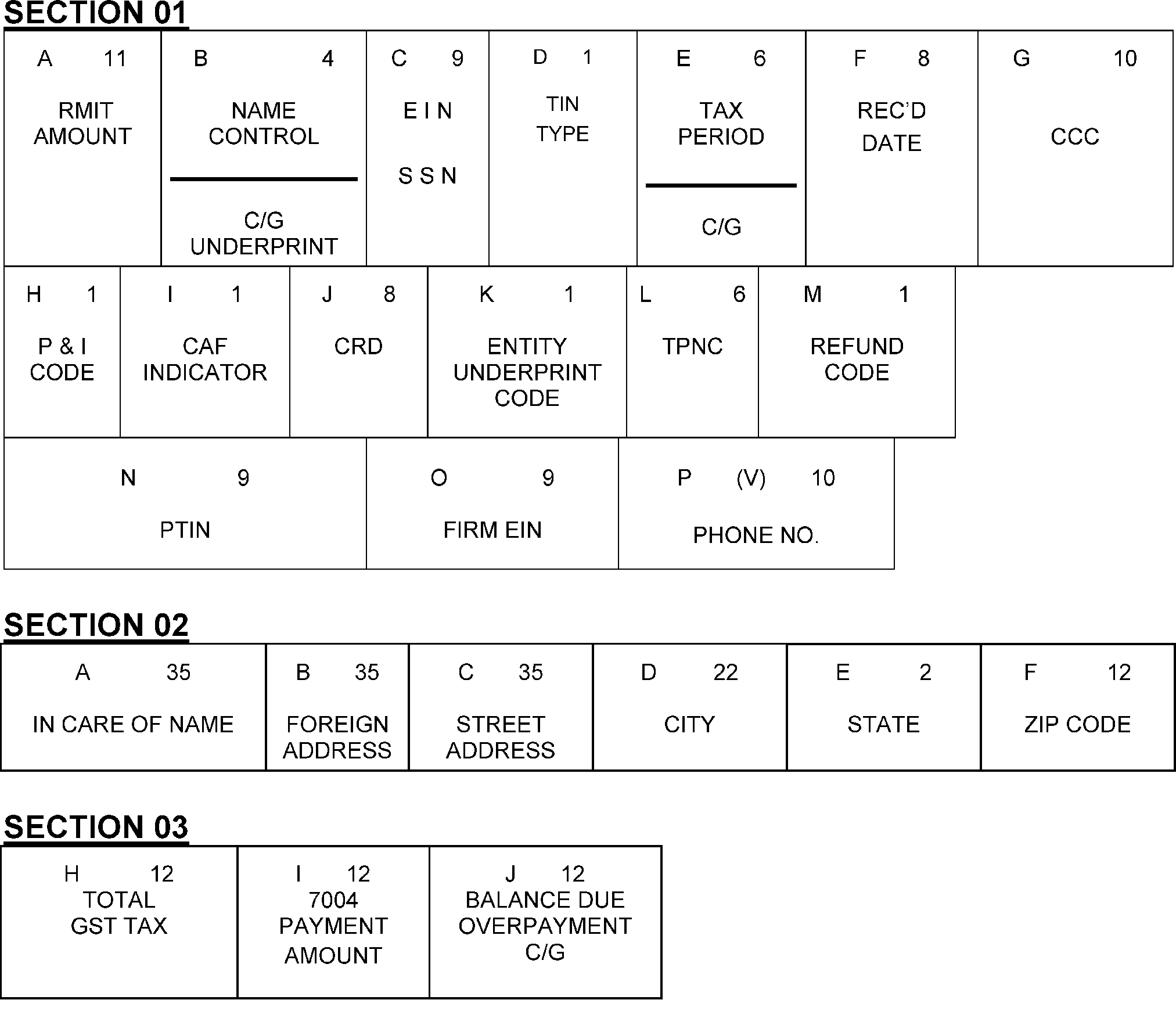
Exhibit 3.12.106-4 Cont. one has a layout of the error register displaying the locations of the Section and Field Designations of the 706-GS(T) transcription lines (T-line’s).First Line - Section 01A, RMITB, Name Control/C / GC, TIN/EIND, TIN TypeE, Tax Period, C / GF, Received DateG, CCCNext LineH, P&I CodeI, CAF IndicatorJ, CRD (Correspondence Received Date)K, Entity Underprint CodeL, (Taxpayer Notice Code)M, Refund CodeNext Line - Section 02A, In-Care of NameB, Foreign AddressC, Street AddressD, City/MCCE, StateF, ZIP codeNext Line - Section 03Next LineH, GST Tax C / GI, 7004 Payment AmountJ, Balance Due/Overpayment / C / G
Please click here for the text description of the image.
Exhibit 3.12.106-5
♦U.S. Possessions State Abbreviations and ZIP Codes♦
American Samoa (AS)
| American Samoa (AS) City | American Samoa (AS) ZIP Code |
|---|---|
| Faga'itua | 96799 |
| Leone | 96799 |
| Olosega Manua' | 96799 |
| PagoPago | 96799 |
Federated States of Micronesia (FM)
| Federated States of Micronesia (FM) City | Federated States of Micronesia (FM) ZIP Code |
|---|---|
| Chuuk | 96942 |
| Kosrae | 96944 |
| Pohnpei | 96941 |
| Yap | 96943 |
Guam (GU)
| Guam (GU) City | Guam (GU) ZIP Code |
|---|---|
| Agana | 96910 |
| Inarajan | 96917 |
| Merizo | 96916 |
| Tamuning | 96931 |
| Umatac | 96915 |
| Yona | 96915 |
Marshall Islands (MH)
| Marshall Islands (MH) City | Marshall Islands (MH) ZIP Code |
|---|---|
| Ebeye | 96970 |
| Majuro | 96960 |
Northern Marianna Islands (MP)
| Northern Marianna Islands (MP) City | Northern Marianna Islands (MP) ZIP Code |
|---|---|
| Capitol Hill | 96950 |
| Rota | 96951 |
| Saipan | 96950 |
| Tinian | 96952 |
Palau (PW)
| Palau (PW) City | Palau (PW) ZIP Code |
|---|---|
| Koror | 96940 |
| Palau | 96940 |
Puerto Rico (PR)
| Puerto Rico (PR) City | Puerto Rico (PR) ZIP Code |
|---|---|
| Adjuntas | 00601 |
| Aquada | 00602 |
| Aquadilla | 00603 |
| Agnes Buenas | 00703 |
| Aguirre | 00704 |
| Aibonito | 00705 |
| Anasco | 00610 |
| Angeles | 00611 |
| Arecibo | 00612 |
| Arroyo | 00714 |
| Bajadero | 00616 |
| Barceloneta | 00617 |
| Barraquitas | 00794 |
| Barrio Obrero Station | 00935 |
| Bayamon | 00956 |
| Boqueron | 00622 |
| Cabo Rojo | 00623 |
| Caguas | 00725 |
| Camuy | 00627 |
| Canovanas | 00729 |
| Caparra Heights | 00920 |
| Carolina | 00982 |
| Catano | 00962 |
| Cayey | 00736 |
| Ceiba | 00735 |
| Cero Gordon | 00754 |
| Ciales | 00638 |
| Cidra | 00739 |
| Coamo | 00769 |
| Comerio | 00782 |
| Condado | 00907 |
| Corozal | 00783 |
| Coto Laurel | 00780 |
| Culebra | 00775 |
| Dorado | 00646 |
| Ensenada | 00647 |
| Esperanza | 00765 |
| Fajardo | 00738 |
| Fernandez Juncos | 00936 |
| Florida | 00650 |
| Fort Buchanan | 00934 |
| Garrachales | 00652 |
| Guanica | 00653 |
| Guayama | 00784 |
| Guayanilla | 00656 |
| Guaynabo | 00965 |
| Gurabo | 00778 |
| Hatillo | 00659 |
| Hato Rey | 00936 |
| Harmingueros | 00660 |
| Humacao | 00791 |
| Isabela | 00662 |
| Juyaya | 00664 |
| Juana Diaz | 00795 |
| Juncos | 00777 |
| La Cumbre | 00926 |
| Lajas | 00667 |
| Laplata | 00786 |
| Lares | 00669 |
| Las Marias | 00670 |
| Las Piedras | 00771 |
| Levittown | 00949 |
| Loiza | 00772 |
| Loiza Street Station | 00936 |
| Loquillo | 00773 |
| Manati | 00674 |
| Maricao | 00606 |
| Maunabo | 00707 |
| Mayaquez | 00680 |
| Mercedita | 00715 |
| Minillas Center | 00936 |
| Moca | 00676 |
| Morovis | 00687 |
| Naguabo | 00718 |
| Narajito | 00719 |
| Orocovis | 00720 |
| Palmer | 00721 |
| Patillas | 00723 |
| Penuelas | 00624 |
| Ponce | 00731 |
| Puerta de Tierra | 00936 |
| Puerta Real | 00740 |
| Punta Santiago | 00741 |
| Quebradillas | 00678 |
| Ramey | 00603 |
| Rincon | 00677 |
| Rio Blanco | 00744 |
| Rio Grande | 00721 |
| Rio Piedras | 00927 |
| Rosario | 00636 |
| Sabana Grande | 00637 |
| Sabana Hoyos | 00688 |
| Sabana Seca | 00952 |
| Saint Just | 00978 |
| Salinas | 00751 |
| San Antonio | 00690 |
| San Francisco | 00927 |
| San German | 00683 |
| San Juan | 00936 |
| San Lorenzo | 00754 |
| San Sebastian | 00685 |
| Santa Isabel | 00757 |
| Sanrurce | 00936 |
| Toa Alta | 00953 |
| Toa Boa | 00949 |
| Trujillo Alto | 00976 |
| University | 00936 |
| Utuado | 00641 |
| Vega Alta | 00692 |
| Vega Baja (Box 1 - 9049) | 00694 |
| Vieques | 00765 |
| Villalba | 00766 |
| Yabucoa | 00767 |
| Yauco | 00698 |
Virgin Islands - U.S. (VI)
| Virgin Islands - U.S. (VI) City | Virgin Islands - U.S. (VI) ZIP Code |
|---|---|
| Charlotte Amalie | 00802 |
| Christiansted | 00820 |
| Cruz Bay | 00830 |
| Downtown | 00840 |
| Frederiksted | 00840 |
| Kingshill | 00850 |
| Saint Croix | 00820 |
| Saint John | 00830 |
| Saint Thomas | 00805 |
| Sunny Isle | 00850 |
| Veterans Annes | 00820 |
Exhibit 3.12.106-6
♦Foreign Country Codes♦
| Foreign Country | Country Code |
|---|---|
| Afghanistan | AF |
| Aland Island | CI |
| Albania | AL |
| Algeria | AG |
| Andorra | AN |
| Angola | AO |
| Anguilla | AV |
| Antarctic Lands | FS |
| Antarctica | AY |
| Antigua | AC |
| Antigua & Barbuda | AC |
| Argentina | AR |
| Armenia | AM |
| Aruba | AA |
| Ascension | XA |
| Ashmore Island | AT |
| Ashmore & Cartier Islands | AT |
| Australia | AS |
| Austria | AU |
| Azerbaijan | AJ |
| Azores | XZ |
| Bahamas | BF |
| Bahrain | BA |
| Baker Island | FQ |
| Bangladesh | BG |
| Barbados | BB |
| Barbuda | AC |
| Belarus | BP |
| Belgium | BE |
| Belize | BH |
| Benin | BN |
| Bermuda | BD |
| Bhutan | BT |
| Bolivia | BL |
| Bonaire | NT |
| Bosnia-Herzegovina | BK |
| Botswana | BC |
| Bouvet Island | BV |
| Brazil | BR |
| British Indian Ocean Territory | IO |
| British Virgin Islands | VI |
| Brunei | BX |
| Bulgaria | BU |
| Burkina Faso | UV |
| Burma | BM |
| Burundi | BY |
| Caicos Islands | TK |
| Cambodia | CB |
| Cameroon | CM |
| Canada | CA |
| Cape Verde | CV |
| Cartier Island | AT |
| Cayman Islands | CJ |
| Central Africa Republic | CT |
| Chad | CD |
| Chile | CI |
| China | CH |
| Christmas Island | KT |
| Clipperton Islands | IP |
| Cocos Island | CK |
| Colombia | CO |
| Comoros | CN |
| Congo | CF |
| Cook Islands | CW |
| Coral Sea Islands Territory | CR |
| Costa Rica | CS |
| Cote d'Ivoire | IV |
| Croatia | HR |
| Cuba | CU |
| Cyprus | CY |
| Czech Republic | EZ |
| Dem. People's Rep. of Korea (North) | KN |
| Dem. Rep. of Congo | CG |
| Denmark | DA |
| Djibouti | DJ |
| Dominica | DO |
| Dominican Republic | DR |
| East Timor | TT |
| Ecuador | EC |
| Egypt | EG |
| El Salvador | ES |
| Equatorial Guinea | EK |
| Eritrea | ER |
| Estonia | EN |
| Ethiopia | ET |
| Falkland Islands | FK |
| Faroe Islands | FO |
| Fiji | FJ |
| Finland | FI |
| French Southern & Antarctic Lands | FS |
| France | FR |
| French Polynesia | FP |
| Futuna | WF |
| Gabon | GB |
| Gambia | GA |
| Georgia | GG |
| Germany | GM |
| Ghana | GH |
| Gibraltar | GI |
| Great Britain | UK |
| Greece | GR |
| Greenland | GL |
| Grenada | GJ |
| Grenadines | VC |
| Guatemala | GT |
| Guernsey | GK |
| Guinea | GV |
| Guinea-Bissau | PU |
| Guyana | GY |
| Haiti | HA |
| Heard Island & McDonald Island | HM |
| Honduras | HO |
| Hong Kong | HK |
| Howland Island | HQ |
| Hungary | HU |
| Iceland | IC |
| India | IN |
| Indonesia | ID |
| Iran | IR |
| Iraq | IZ |
| Ireland | EI |
| Isle of Man | IM |
| Israel | IS |
| Italy | IT |
| Jamaica | JM |
| Jan Mayen | JN |
| Japan | JA |
| Jarvis Island | DQ |
| Jersey | JE |
| Johnston Atoll | JQ |
| Jordan | JO |
| Kazakhstan | KZ |
| Kenya | KE |
| Kingman Reef | KQ |
| Kiribati | KR |
| Korea (North) | KN |
| Korea (South) | KS |
| Kuwait | KU |
| Kyrgyzstan | KG |
| Laos | LA |
| Latvia | LG |
| Lebanon | LE |
| Lesotho | LT |
| Liberia | LI |
| Libya | LY |
| Liechtenstein | LS |
| Lithuania | LH |
| Luxembourg | LU |
| Macau | MC |
| Macedonia | MK |
| Madagascar | MA |
| Malawi | MI |
| Malaysia | MY |
| Maldives | MV |
| Mali | ML |
| Malta | MT |
| Mauritania | MR |
| Mauritus | MP |
| Mayotte | MF |
| McDonald Island | HM |
| Mexico | MX |
| Midway Islands | MQ |
| Miquelon | SB |
| Moldova | MD |
| Monaco | MN |
| Mongolia | MG |
| Montenegro | YI |
| Montserrat | MH |
| Morocco | MO |
| Mozambique | MZ |
| Namibia | WA |
| Nauru | NR |
| Navassa Island | BQ |
| Nepal | NP |
| Netherlands | NL |
| Netherlands Antilles | NT |
| Nevis | SC |
| New Caledonia | NC |
| New Zealand | NZ |
| Nicaragua | NU |
| Niger | NG |
| Nigeria | NI |
| Niue | NE |
| Norfolk Island | NF |
| North Korea | KN |
| Norway | NO |
| Oman | MU |
| Other (country not identified elsewhere) | XX |
| Pakistan | PK |
| Palmyra Atoll | LQ |
| Panama | PM |
| Papua New Guinea | PP |
| Paracel Islands | PF |
| Paraguay | PA |
| Peru | PE |
| Philippines | RP |
| Pitcairn Islands | PC |
| Poland | PL |
| Portugal | PO |
| Qatar | QA |
| Republic of Korea (South) | KS |
| Republic of Singapore | SN |
| Romania | RO |
| Russia | RS |
| Rwanda | RW |
| S Georgia Island | SX |
| S Georgia Island & S Sandwich Island | SX |
| S Sandwich Island | SX |
| San Marino | SM |
| Sao Tome and Principe | TP |
| Saudi Arabia | SA |
| Senegal | SG |
| Serbia & Montenegro | YI |
| Seychelles | SE |
| Sierra Leone | SL |
| Singapore | SN |
| Slovakia | LO |
| Slovenia | SI |
| Solomon Islands | BP |
| Somalia | SO |
| South Africa | SF |
| South Georgia Island | SX |
| South Georgia Island & South Sandwich Island | SX |
| South Korea | KS |
| South Sandwich Island | SX |
| Spain | SP |
| Spratly Islands | PG |
| Sri Lanka | CE |
| St. Helena | SH |
| St. Kitts & Nevis | SC |
| St. Lucia | ST |
| St. Miquelon | SB |
| St. Pierre | SB |
| St. Pierre & Miquelon | SB |
| St. Vincent & Grenadines | VC |
| Sudan | SU |
| Suriname | NS |
| Svalbard | SV |
| Swaziland | WZ |
| Sweden | SW |
| Switzerland | SZ |
| Syria | SY |
| Taiwan | TW |
| Tajikistan | TI |
| Tanzania | TZ |
| Thailand | TH |
| The Bahamas | BF |
| The Gambia | GA |
| The Netherlands | NL |
| Togo | TO |
| Tokelau | TL |
| Tonga | TN |
| Trinidad and Tobago | TD |
| Tunisia | TS |
| Turkey | TU |
| Turkmenistan | TX |
| Turks & Caicos Islands | TK |
| Tuvalu | TV |
| Uganda | UG |
| Ukraine | UP |
| United Arab Emirates | TC |
| Uruguay | UY |
| Uzbekistan | UZ |
| Vanuatu | NH |
| Vatican City (Holy See) | VT |
| Venezuela | VE |
| Vietnam | VM |
| Wake Island | WQ |
| Wallis & Futuna | WF |
| Western Sahara | WI |
| Yemen | YM |
| Yugoslavia | YI |
| Zambia | ZA |
| Zimbabwe | ZI |
Exhibit 3.12.106-7
♦Province, State and Territory Abbreviations♦
Australia State
| Australia State | Abbreviation |
|---|---|
| Australian Capital Territory | ACT |
| New South Wales | NSW |
| Northern Territory | NT |
| Queensland | QLD |
| South Australia | SA |
| Tasmania | TAS |
| Victoria | VIC |
| Western Australia | WA |
Brazil State
| Brazil State | Abbreviation |
|---|---|
| Acre | AC |
| Alagoas | AL |
| Amapa | AP |
| Amazonas | AM |
| Bahia | BA |
| Ceara | CE |
| Distrito Federal | DF |
| Espirito Santo | ES |
| Goias | GO |
| Maranhao | MA |
| Mato Grasso | MT |
| Mato Grosso do Sul | MS |
| Minas Gerais | MG |
| Para | PA |
| Paraiba | PB |
| Parana | PR |
| Pernambuco | PE |
| Piaui | PI |
| Rio de Janeiro | RJ |
| Rio Grande do Norte | RN |
| Rio Grande do Sul | RS |
| Rondonia | RO |
| Roraima | RR |
| Santa Catarina | SC |
| Sao Paulo | SP |
| Sergipe | SE |
| Tocantins | TO |
Canada Province/Territory
| Canada Province/Territory | Abbreviation |
|---|---|
| Alberta | AB |
| British Columbia | BC |
| Manitoba | MB |
| New Brunswick | NB |
| Newfoundland and Labrador | NL |
| Northwest Territories | NT |
| Nova Scotia | NS |
| Nunavut | NU |
| Ontario | ON |
| Prince Edward Island | PE |
| Quebec | QC |
| Saskatchewan | SK |
| Yukon | YT |
Cuba Province
| Cuba Province | Abbreviation |
|---|---|
| Camaguey | CG |
| Ciego de Avila | CA |
| Cienfuegos | CF |
| Ciudad de La Habana | CH |
| Gramma (Bayamo) | GR |
| Guantanamo | GT |
| Holguin | HO |
| La Habana | HA |
| Matanzas | MT |
| Municipio Especial Isla de La Juventud | IJ |
| Pinar del Rio | PR |
| Sancti Spiritus | SS |
| Santiago de Cuba | SC |
| (Victoria de) Las Tunas | LT |
| Villa Clara | VC |
Italy Province
| Italy Province | Abbreviation |
|---|---|
| Agrigento | AG |
| Alessandria | AL |
| Ancona | AN |
| Aosta/Aoste | AO |
| Arezzo | AR |
| Ascoli Piceno | AP |
| Asti | AT |
| Bari | BA |
| Belluna | BL |
| Beneveto | BN |
| Bergamo | BG |
| Biella | BI |
| Bologna | BO |
| Bolzano Bozen | BZ |
| Brescia | BS |
| Brindisi | BR |
| Cagliari | CA |
| Caltanissetta | CL |
| Campobasso | CB |
| Caserta | CE |
| Catania | CT |
| Catanzaro | CZ |
| Chieti | CH |
| Como | CO |
| Cosenza | CS |
| Cremona | CZ |
| Crotone | KR |
| Cuneo | CV |
| Enna | EN |
| Ferrara | FE |
| Firenze | FI |
| Foggia | FG |
| Forli | FO |
| Frosinone | FR |
| Genova | GE |
| Gorizia | GO |
| Grosseto | GR |
| Imperia | IM |
| Isernia | IS |
| L'Aquila | AQ |
| La Spezia | SP |
| Latina | LT |
| Lecce | LE |
| Livorno | LI |
| Lodi | LO |
| Lucca | LU |
| Macerata | MC |
| Mantova | MN |
| Massa-Carrara | MS |
| Matera | MT |
| Messina | ME |
| Milano | MI |
| Modena | MO |
| Napoli | NA |
| Novara | NO |
| Nuoro | NU |
| Oristano | OR |
| Padova | PD |
| Palermo | PA |
| Parma | PR |
| Pavia | PV |
| Perugia | PG |
| Pesaro-Urbino | PS |
| Pescara | PE |
| Piacenza | PC |
| Pisa | PI |
| Pistoia | PT |
| Pordenone | PN |
| Potenza | PZ |
| Prato | PO |
| Ragusa | RG |
| Ravenna | RA |
| Reggio de Calabria | RC |
| Reggio nell'Emilia | RE |
| Rieti | RI |
| Rimini | RN |
| Roma | RM |
| Rovigo | RO |
| Salerno | SA |
| Sassari | SS |
| Savona | SV |
| Siena | SI |
| Siracusa | SR |
| Sondrio | SO |
| Taranto | TA |
| Teramo | TE |
| Terni | TR |
| Torino | TO |
| Trapani | TP |
| Trento | TN |
| Treviso | TV |
| Trieste | TS |
| Udine | UD |
| Varese | VA |
| Venezia | VE |
| Verbania | VB |
| Vercelli | VC |
| Verona | VR |
| Vibo Valentia | VV |
| Vincenza | VI |
| Viterbo | VT |
Mexico State
| Mexico State | Abbreviation |
|---|---|
| Aquascalientes | AGS |
| Baja California Norte | BCN |
| Baja California Sur | BCS |
| Campeche | CAM |
| Chiapas | CHIS |
| Chihuahua | CHIH |
| Coahuila | COAH |
| Colima | COL |
| Distrito Federal | DF |
| Durango | DGO |
| Guanajuato | GTO |
| Guerrero | GRO |
| Hidalgo | HGO |
| Jalisco | JAL |
| Mexico | MEX |
| Michoacan | MICH |
| Morelos | MOR |
| Nayarit | NAY |
| Nuevo Leon | NL |
| Oaxaca | OAX |
| Puebla | PUE |
| Queretaro | QRO |
| Quintana Roo | QROO |
| San Luis Potosi | SLP |
| Sinaloa | SIN |
| Sonora | SON |
| Tabasco | TAB |
| Tamaulipas | TAMPS |
| Tlaxcala | TLAX |
| Veracruz | VER |
| Yucatan | YUC |
| Zacatecas | ZAC |
The Netherlands Province
| The Netherlands Province | Abbreviation |
|---|---|
| Drenthe | DR |
| Flevoland | FLD |
| Friesland | FR |
| Gelderland | GLD |
| Groningen | GN |
| Lemburg | LB |
| North Brabant | NB |
| North Holland | NH |
| Overijssel | OV |
| South Holland | ZH |
| Utrecht | UT |
| Zeeland | SLD |