Internal Revenue Manual § 3.12.21 - Credit and Account Transfers
3.12.21 Credit and Account Transfers
Manual Transmittal
October 16, 2025
Purpose
(1) This transmits revised IRM 3.12.21, Error Resolution, Credit and Account Transfers.
Material Changes
(1) IRM 3.12.21.1 - Revised text entitled, Program Scope and Objectives. Modified text changes based on the reviewer’s bullet-format observations.
(2) IRM 3.12.21.1.1 - Revised text entitled, Background. Added text change (based on the reviewer’s comment) that Kansas City (KCSPC) processes both BMF and IMF Forms 3413 and 3552 documents.
(3) IRM 3.12.21.1.3 - Revised text entitled, Roles and Responsibilities. At the request of the reviewer, changed the title from "Responsibilities" to "Roles and Responsibilities" (in accordance with procedures outlined in IRM 1.11.2, Internal Managements Documents System, Internal Revenue Manual (IRM) Process).
(4) IRM 3.12.21.1.6 - Revised text entitled, Terms and Acronyms. At the request of the reviewer, changed the title from "Terms/Definitions/Acronyms" to "Terms and Acronyms" (in accordance with procedures outlined in IRM 1.11.2, Internal Managements Documents System, Internal Revenue Manual (IRM) Process).
(5) IRM 3.12.21.4.2.4 - Revised text entitled, Field 01-B - EIN or SSN and TIN Type - Correction Procedures.
-
Since January 2026, MFT 50 is one of six (6) MFTs which uses SSNs and EINs. The other MFTs are MFT 13, MFT 17, MFT 58, MFT 76, and MFT 78.
-
Added table and text procedures to prepare the Form 4227 to identify (and contact) the originator for research and correction.
(6) IRM 3.12.21.4.2.8 - Revised text entitled, Field 01-D - Tax Period (Correction Procedures). Added table and text procedures to prepare the Form 4227 to identify (and contact) the originator for research and correction.
(7) IRM 3.12.21.4.2.12 - Revised text entitled, Field 01-F - 23-C--Date of Assessment (also known as Transaction Date) (Correction Procedures). Added table and text procedures to prepare the Form 4227 for contact with the originator for research and correction.
(8) IRM 3.12.21.4.2.13 - Revised text entitled, ****Field 01-G - Original Assessment Transaction Code (or, Transaction Code of Original Assessment). Added table and text procedures to prepare the Form 4227 for contact with the originator for research and correction.
(9) IRM 3.12.21.4.2.14 - Revised text entitled, Field 01-H - Original Assessment Transaction Amount (or, Transaction Amount). Added procedures to prepare the Form 4227 for contact with the originator for research and correction.
(10) IRM 3.12.21.4.2.15 - Revised text entitled, Field 01-I - Transfer-in Amount (also known as Balance Transferred-In or Primary-Trans-PJ (pre-journalized) - Amount). Added procedures to prepare the Form 4227 for contact with the originator for research and correction.
(11) IRM 3.12.21.4.2.16 - Revised text entitled, Field 01-J - Agreement Date (also known as, 870 Agreement Date)-DOC Code 51 only. Added procedures to prepare the Form 4227 for contact with the originator for research and correction.
(12) IRM 3.12.21.4.2.17 - Revised text entitled, Field 01-K, TIN Type..
-
This field must contain a 0 (Zero) when the MFT (Field 01-C) contains an SSN (Social Security Number) or be blank when it contains an EIN (Employer Identification Number).
-
MFT 50 now joins the list of MFTs using SSNs and/or EINs. The other MFTs are listed as follows: MFT 13, MFT 17, MFT 58, MFT 76, and MFT 78.
-
Source: Unified Work Request (UWR) 1002082, entitled, "Credit and Account Transfers (CY 2026): Change Program to Add MFT 50 to list of MFTs Using SSNs and/or EINs" .
-
The program validates all MFTs, whether using Social Security Numbers (SSNs) or Employee Identification Numbers (EINs).
-
Source: FSP No.: 1:35:04:06(JGMF); Process 3.1.2.8.1.1.1.5.7.2.1.1.4; Procedures 1.1, AND,
-
Source: FSP No.: 1:35:04:06(JGMF); Process 3.1.2.8.1.1.1.5.7.2.1.1.5, AND,
-
Source: FSP No.: 1:35:04:06(JGMF); Process 3.1.2.8.2.5.7.3; Procedures 1.,1.1., and 1.1.1.
(13) IRM 3.12.21.4.2.18 - Revised text entitled, Field 01-L - Correspondence Received Date. Added procedure to prepare the Form 4227 for contact with the originator for research and correction.
(14) IRM 3.12.21.4.2.19 - Revised text entitled, Fields 01-M and 01-N - Reference Number and Reference Number Amount.
-
Correction for Calendar Year 2026: Although this (MFT 06) change was scheduled initially for January 2024 implementation, the Information Technology Specialists announced it was not valid officially until July 1, 2024.
-
Added MFT 06 to the list of valid MFTs in the Reference Number Table for the following current Reference Numbers: 680, 681, and 686.
-
If the Reference Number is 680 or 681 or 686 or 780 or 781 or 786 or 787 or 788 or 789 or 790 or 792 AND
-
MFT equals MFT 06 , AND
-
Transaction Code in Section 01 is 290, 294, 298, 300, 304, and/or 308, AND,
-
Transaction Code in Section 02-19 is blank, 240, 241, 246, 247, 290, 291, 294, 295, 298, 299, 300, 301, 302, 304, 305, 308 and/or 309.
-
If ALL of the above conditions are NOT met, then Reference Code (Field 01-M), MFT Code (Field 01-C), and Transaction Code will appear invalid (such as set to "error" ).
-
Source: FSP No.: 1:35:04:06(JGMF); Process 3.1.2.8.1.1.1.5.7.2.1.3.4; Procedures 1.1.1,, AND,
-
Source: FSP No.: 1:35:04:06 Source: FSP No.: 1:35:04:06 (JGMF); Process 3.1.2.8.1.1.1.5.7.3.2.11; Procedures 5 through 5.1, AND,
-
Source: Unified Work Request (UWR) 974687.
-
Added table and text procedures for preparing the Form 4227 to identify (and contact) the originator for research and correction.
(15) IRM 3.12.21.4.2.20 - Revised text entitled, Field 01-O - 2% Interest Date. Added table and text procedures to prepare the Form 4227 for contact with the originator for research and correction.
(16) IRM 3.12.21.4.2.21 - Revised text entitled, Field 01-P - Interest-To-Date (Form 3552 only). Added procedures to prepare the Form 4227 for contact with the originator for research and correction.
(17) IRM 3.12.21.4.2.22 - Revised text entitled, Field 01-Q - Interest Computation Date (Form 3552) BMF/IMF. Added procedures to prepare the Form 4227 for contact with the originator for research and correction.
(18) IRM 3.12.21.5.2.1 - Revised text entitled, Section 02-19 - Fields A, D, and G - Transaction Date. Added procedures to prepare the Form 4227 for contact with Accounting (or the originator) for research and correction.
(19) IRM 3.12.21.5.2.2 - Revised text entitled, Section 02-19 - Fields B, E, and H - Transaction Codes. Added procedures to prepare the Form 4227 for contact with Accounting (or the originator) for research and correction.
(20) IRM 3.12.21.5.2.3 - Revised text entitled, Section 02-19 - Fields C, F, and I - Transaction Amount. Added procedures to prepare the Form 4227 for contact with Accounting (or the originator) for research and correction.
(21) IRM 3.12.21.6.2.1 - Revised text entitled, Section 20 Through 23 - Fields A, E, and I - Transaction Codes. Added table and text procedures to prepare the Form 4227 for contact with Accounting (or the originator) for research and correction.
(22) IRM 3.12.21.6.2.4 - Revised text entitled, Sections 20 Through 23 - Fields D, H, and L - Transaction Amounts. Added procedures to prepare the Form 4227 for contact with Accounting (or the originator) for research and correction.
(23) IRM 3.12.21.7.2.1 - Revised text entitled, Sections 30 Through 33 - Fields A, D, and G - Status/Interest-To-Dates. Added table and text procedures to prepare the Form 4227 for contact with Accounting (or the originator) for research and correction.
(24) IRM 3.12.21.7.2.2 - Revised text entitled, Sections 30 Through 33 - Fields B, E, and H - Status Transaction Codes. Added procedures to prepare the Form 4227 for contact with Accounting (or the originator) for research and correction.
(25) IRM 3.12.21.7.2.3 - Revised text entitled, Form 3413, Sections 30 Through 33 - Fields C, F, and I - Statute Extension Dates (BMF and IMF only). Added the following procedures (in accordance with IRM 3.17.21.8.4 (entitled, Form 3413, Sections 30-33), to conform with procedures contained in IRM 3.17.21, Accounting and Data Control, Credit and Account Transfers.
-
The Statute Extension Date must be later than the Status Transaction Date. Enter the date associated with TC 550, TC 560, TC 564, or TC 460. For all other transaction codes, this field will be blank.
-
EXCEPTION: Retention Register cases with TC 460 (Doc Code 52) must leave the Statute Extension Date blank. The system will automatically fill in with the correct Statute Extension Date.
-
CAUTION: Account Transfer cases with TC 460 (Doc Code 51) must include the Statute Extension Date.
-
Source: FSP 1.35.04.06; Process 3.1.2.8.1.1.1.5.7.3.2.4; Procedures 1., 1.1, 1.1.1, 1.1.1.1, and 1.1.2.
-
Added procedures to prepare the Form 4227 for contact with Accounting (or the originator) for research and correction.
(26) IRM 3.12.21.8.2.1 - Revised text entitled, Sections 36 Through 39 - Fields A, C, E, and G - Abstract/IRS Numbers. Added procedures to prepare the Form 4227 for contact with Accounting (or the originator) for research and correction.
(27) IRM 3.12.21.8.2.2 - Revised text entitled, Sections 36 Through 39 - Fields B, D, F, and H - Abstract Amount. Added procedures to prepare the Form 4227 for contact with Accounting (or the originator) for research and correction.
(28) IRM 3.12.21.9.2.1 - Revised text entitled, Section 40 - Field Requirements - Fields A Through Z. Revised the sub-section to address reviewers’ comments, and include the following programming changes:
-
Beginning in January 2026 (for Field 40-B only), this field will accept as valid entries blanks and zeroes (in addition to amounts greater than zero).
-
This information is found under Item B (Section 40), Page 2, Form 3413; also, Line 2, Page 1, Form 3552.).
-
This field is valid for MFT 01, 11, 14, and 16.
-
If, after checking, there are NO invalid or Math Error conditions, Clear with Action Code 7.
-
Source: IR Works Incident Ticket INC02673192 (issued 07242025), AND,
-
Source: FSP 1.35.04.06; Process 3.1.2.8.1.1.1.5.7.2.2.6; Procedures 1. and 1.1.
(29) IRM 3.12.21.10.1 - Revised text entitled, Section 41 - Fields A Through H Description. Added table and text procedures to prepare the Form 4227 for contact with the originator for research and correction.
(30) IRM 3.12.21.10.2 - Revised text entitled, Correction Procedures - Section 41. Added table and text procedures to prepare the Form 4227 for contact with the originator for research and correction.
(31) IRM 3.12.21.11.2.1 - Revised text entitled, Sections 42 Through 46 - State Code Fields. Added table and text procedures to prepare the Form 4227 for contact with the originator for research and correction.
(32) IRM 3.12.21.11.3 - Revised text entitled, Sections 42 Through 46 - Credit Reduction Wages Fields. Added table and text procedures to prepare the Form 4227 for contact with the originator for research and correction.
(33) IRM 3.12.21.12.1 - Revised text entitled, Balance Transferred-In - Field 01-I - Underprint Amount. Added table and text procedures to prepare the Form 4227 for contact with the originator for research and correction.
(34) IRM 3.12.21.12.3 - Revised text entitled, Abstract Math Error Net Assessment - Sections 36-39 (Correction Procedures). Added table and text procedures to prepare the Form 4227 for contact with the originator for research and correction.
(35) Exhibit 3.12.21-9 - Revised table and text entitled, Credit Reduction Chart. Added Credit Reduction information for the following states and territories for Calendar Year (CY) 2024:
-
California (CA) - 0.9%.
-
New York (NY) - 0.9%, and,
-
Virgin Islands (VI) - 4.2%.
-
Deleted the naked link and replaced with the following text: "For more information (update the data for 2023 and subsequent), which are available at IRM 21.7.3.4.10, entitled, Credit Reduction States, in IRM 21.7.3, Business Tax Returns and Non-Master File Accounts, Unemployment Taxes" .
-
Source: FSP 1.35.04.06; Pages 4.3-ACTRFR-11 through Page 4.3-ACTRFR-14 (By year and by state).
-
Source: Unified Work Request (UWR) 996860 (late 2024 UWR).
(36) Revised the Internal Revenue Manual (IRM), where necessary, for the following types of editorial changes:
-
Spelling, grammar, formatting, and plain language
-
IRM references, citations, and links
-
IRM graphics and alternative text
-
Italics, removed per IRM Style Guide
-
Included modifications throughout the text to Verbal Descriptive Narratives (VDNs)
Other significant changes to IRM 3.12.21, Error Resolution - Credit and Account Transfers, are shown above.
Effect on Other Documents
IRM 3.12.21, Error Resolution - Credit and Account Transfers, dated November 22, 2024 (effective January 01, 2025, is superseded. No new IRM Procedural Updates (IPUs) were issued (to date) during Calendar Year 2025.
Audience
Taxpayer Services (TS) Submission Processing Employees
Effective Date
(01-01-2026)
Scott Wallace
Director, Submission Processing
Taxpayer Services
3.12.21.1 (01-01-2026)
Program Scope and Objectives
-
PURPOSE/PROGRAM OBJECTIVES: This IRM provides campus Error Resolution and Rejects personnel procedures for correcting paper registers with Credit and Account Transfer transaction record errors identified in campus operations. These records contain payment transaction data (such as for Jeopardy, Prompt and Quick assessments, account adjustments and reactivation of retention register accounts).
-
Credit and Account Transfers are payment transaction documents and forms prepared by campus Accounting and/or Accounts Management employees, based on information received from Examination field personnel.
-
After Accounting and/or Accounts Management receives this transaction information from Examination, they prepare payment transaction forms referred to as "Credit and Account Transfers" documents (see Paragraph (2) below).
-
Integrated Submissions and Remittance Processing (ISRP) transcription operators perform data entry of these records.
-
The Generalized Mainline Framework (GMF) computer runs receive these transcribed records from ISRP and sends them through a series of consistency and validity checks to establish data integrity and validity.
-
Records passing GMF validation post to the correct taxpayer Master File accounts (such as, Individual Master File (IMF), the Business Master File (BMF), and/or the Individual Retirement Account (IRAF)).
-
Error Resolution (Function 270) receives transaction records failing the GMF validity runs and performs research and correction to perfect these records for re-entry through ISRP and the GMF.
Note:
ERS and Rejects examiners are the campus personnel performing the research and correction on these records.
-
Documents which are not fully correctable (by ERS/Rejects examiners) are returned to the originators for research, perfection and/or revision before returning them to ERS for resolution.
-
ERS and Rejects send the corrected records through ISRP (for data input) and through GMF validation until the records pass GMF validity checks and post to the appropriate Master File account.
-
-
Submission Processing (SP) campus Accounting Function personnel prepare the following forms used for processing Credit and Account Transfers:
-
Form 3413, Transcription List (Account Transfer-In).
-
Form 3552, Prompt Assessment Billing Assembly.
-
-
AUDIENCE: Taxpayer Services (TS) Submission Processing (SP) employees. This IRM is created for Error Resolution and Rejects personnel as follows:
-
ERROR RESOLUTION:
-
Supervisory Tax Examining Technician oversees correction of the Error Resolution System (ERS) program and reports to the Campus Chief of Input Corrections.
-
Lead Tax Examining Technicians review and approve subordinate employees’ work and report to the Supervisory Tax Examining Technician.
-
Tax Examining Technicians are campus tax examiners manning program Function 270 (Error Resolution) who correct payment records and report to the Lead Tax Examining Technician.
-
REJECTS:
-
Supervisory Tax Examining Technicians manage the Rejects department and report to the Campus Chief of Input Corrections.
-
Lead Tax Examining Technicians manage, review and approve subordinate employees work and report to the Supervisory Tax Examining Technician.
-
Tax Examining Technicians are campus examiners manning the Rejects program function and report to the Lead Tax Examining Technician.
-
-
POLICY OWNER: The Director, Submission Processing, Taxpayer Services Division, oversees and monitors all Submission Processing (SP) Headquarters and campus functions and operations processing wage and investment income (and related) documents. This includes the production and operations of those internal organizations described in Paragraph (5) below.
-
PROGRAM OWNERS: The following Submission Processing organizations share administrative and procedural responsibility for the Credit and Account Transfers program:
-
Accounting and Tax Payments Branch oversees related Headquarters personnel and campus Accounting and Data Control personnel preparing the Form 3413 and Form 3552.
-
Paper Processing Branch oversees related Headquarters personnel and campus Integrated Submissions and Remittance Processing (ISRP), Error Resolution System (ERS) and Rejects personnel who provide payment record transcription input and corrections, respectively.
-
-
Primary Stakeholders: are Headquarters areas impacted by these procedures and/or those that may influence the project, impacting a change in workflow, other duties, change in established time frames, and similar issues. They are as follows:
- Small Business/Self-Employed (SBSE); Large Business and International (LB&I); Chief Financial Officer (CFO); Custodial Detail Database (CDDB); Statistics of Income (SOI); Tax Exempt/Government Entities (TE/GE); and Compliance.
3.12.21.1.1 (01-01-2026)
Background
-
Error Resolution System (ERS) functions resolve validity errors, field errors, consistency errors, and math errors in returns and other documents for posting to the Master File. Records fall out in ERS due to the Generalized Mainline Framework (GMF). The entries from Integrated Submissions and Remittance Processing (ISRP) transcription records are transferred to ERS fields.
-
The GMF programming causes records to fall out to the Error Resolution paper registers if they fail to meet certain criteria, including (but NOT limited to):
-
Invalid characters in a field (such as, numeric instead of alpha characters)
-
Invalid length of field (such as, EIN (or SSN) with 8 digits instead of 9)
-
Invalid codes in field (such as, AC 009)
-
Consistency errors - Any valid field used in any computation where the result is inconsistent with (or contradictory to) any other valid field
-
Math errors - computer does math computation and it differs from the taxpayer’s amount
-
Invalid tax periods and eligibility for certain credits
-
-
Process Flow After Accounting Prepares Form 3413 and Form 3552:
-
The ISRP system operators transcribe this information.
-
The transcribed records are validated through the GMF programming runs.
-
Campus ERS examiners correct records failing GMF validation on printed paper error registers.
-
ISRP transcribers and GMF validation runs re-input corrected records.
-
Validated records post to the correct Master Files.
-
-
The following Submission Processing (SP) campuses process Credit and Account Transfers:
-
Austin (AUSPC) processes domestic and international Individual Master File (IMF) documents.
-
Kansas City (KCSPC) processes both BMF and IMF Forms 3413 and 3552 documents.
-
Ogden (OSPC) processes domestic and international Business Master File (BMF) documents.
-
All Non-Master File (NMF) are processed in the Kansas City Submission Processing Campus (KCSPC).
Note:
As of September 30, 2021, the Fresno Submission Processing Center (FSPC) no longer processes these documents.
-
-
Program Goals: The program goals are to process cases correctly in a timely manner.
3.12.21.1.2 (01-01-2020)
Authority
-
Authority for these procedures is found in sources including IRC 6302 and the United States Code Title 31, Subtitle III, Financial Management:
-
IRC 6302, Mode or time of collection (Title 26)
-
USC Section 321, General Authority of the Secretary (Title 31)
-
USC Section 3301, General Duties of the Secretary of the Treasury (Title 31)
-
USC Section 3302, Custodians of Money (Title 31)
-
USC Section 3303, Designation of Depositories (Title 31)
-
USC Section 3702, Authority to Settle Claims (Title 31)
-
3.12.21.1.3 (01-01-2026)
Roles and Responsibilities
-
The Director, Submission Processing (Taxpayer Services Division), is the executive responsible for overseeing and monitoring campus operations, processing performance, and production trends set with Taxpayer Services (TS) returns and related documents. This executive is also responsible for overseeing Headquarters and Submission Processing (SP) personnel, including campus employees, and for the effectiveness and efficiency of their operations.
-
The Operations Manager oversees and monitors operational and production performance for their operation.
-
The team manager/lead oversees, monitors campus production performance, and ensures employees have the tools to perform their duties.
-
The team employees follow instructions contained in this IRM and maintain updated IRM procedures.
3.12.21.1.4 (01-01-2018)
Program Management and Review
-
Program Goals: First line managers of personnel working Credit and Account Transfer transactions will conduct reviews of cases assigned to all employees to ensure effective operational internal controls.
-
Program Reports: Below are a list of reports used to show receipts, production and inventory for the paper return process. These reports are used to report and monitor the daily and weekly status of the program to completeness:
-
PCC 6040, SC WP&C Performance and Cost Report
-
PCC 6240, SC WP&C Program Analysis Report
-
-
Program Effectiveness: is measured by the following:
-
Embedded Quality Submission Processing (EQSP)
-
Balanced Measures
-
Managerial Reviews
-
-
Annual Review: Federal Manager Financial Integrity Act (FMFIA).
3.12.21.1.5 (01-01-2021)
Program Controls
-
Accounting reports as determined by the Accounting and Data Controls Internal Revenue Manuals (IRMs) listed below:
-
IRM 3.17.30, SC Data Controls
-
IRM 3.17.41, Accounting and Data Control, Excise Reporting
-
IRM 3.17.41.5.1, Operating Reports
-
IRM 3.17.46, Automated Non-Master File Accounting
-
IRM 3.17.64, Accounting Control General Ledger Policies and Procedures
-
-
The reports for the Control Data Analysis are on the Control-D/Web Access services, which has a login program control. The following reports are used to show receipts, production and inventory for the paper return process and monitor daily and weekly status of the program to completeness:
-
PCC 6040, SC WP&C Performance and Cost Report
-
PCC 6240, SC WP&C Program Analysis Report
-
3.12.21.1.6 (01-01-2026)
Terms and Acronyms
-
The following table contains a list of terms, acronyms, and/or abbreviations used throughout this IRM.
Acronyms and Abbreviations
Acronyms and Abbreviations Definition AC Action Code ADP Automated Data Processing AFD Alpha-Numeric Field Designator AM Accounts Management AMA Automated Manual Assessment APO Army Post Office BMF Business Master File C&E Code and Edit CC Command Code C/GEN Computer Generated CR Credit Reduction DLN Document Locator Number Doc Code Document Code E-File Electronically File e.g. For Example EIN Employer Identification Number EOCU EO Compliance Unit etc. Et Cetera ID Identification or Identity IDRS Integrated Data Retrieval System ISRP Integrated Submission and Remittance Processing IMF Individual Master File IRC Internal Revenue Code IRS Internal Revenue Service LB&I Large Business and International LCU Large Corporate Underpayment MeF Modernized Electronic Filing MFT Master File Tax MMDDYY Month Month Day Day Year Year NAICS North American Industry Classification System N/A Not Applicable OSPC Ogden Submission Processing Center P.O. Post Office RRA 98 Internal Revenue Service Restructuring and Reform Act of 1998 SB/SE Small Business/Self-Employed SP Submission Processing SSN Social Security Number TAS Taxpayer Advocate Service TBOR Taxpayer Bill of Rights TC Transaction Code TE Tax Examiner TE/GE Tax Exempt/Government Entities TETR Telephone Excise Tax Refund TIN Taxpayer Identification Number TPE Tax Period Ending TS Taxpayer Services TY Tax Year U.S. United States USPS United States Postal Service ZIP Zone Improvement Plan
3.12.21.1.7 (01-01-2018)
Related Resources
-
Initial processing of the requests for these transfers and preparation of the input documents is described in the following Internal Revenue Manuals (IRMS):
-
IRM 3.17.243, Miscellaneous Accounting
-
IRM 3.17.244, Manual Assessments
-
IRM 3.17.10, Dishonored Check File (DCF) and Unidentified Remittance File (URF)
-
IRM 3.17.21, Credit and Account Transfers
-
IRM 3.17.46, Automated Non-Master File Accounting
-
IRM 3.17.220, Excess Collections File (XSF)
-
IRM 3.24.21, Credit and Account Transfers
-
Learning and Education materials (i.e., coursebooks and job aids)
-
-
This IRM provides instructions for correcting the following input documents:
-
Form 3413, Transcription List (Account Transfer-In); and,
-
Form 3552, Prompt Assessment Billing Assembly.
-
3.12.21.2 (01-01-2019)
General Error Correction Procedures
- This section describes the various error conditions, how they are identified on the registers, the action codes, and how they are used to resolve these conditions.
3.12.21.2.1 (01-01-2019)
Error Register
-
General descriptions of the contents, format and correction method of the error register are provided in IRM 3.12.37, IMF General Instructions or IRM 3.12.38, BMF General Instructions.
-
Action Codes- every action taken on the error register requires the use of an action code. The Action Code is entered to the left of the section number being worked. The valid action codes for the error register are as follows:
-
Action Code 3- (See Figure 3.12.21-1.)
Note:
Issue a Form 4227, Intra-SC Reject or Routing Slip, and notate on the form the error you need corrected.
Figure 3.12.21-1

Figure 3.12.21-1 displays a part of the error register. In this case, the figure provides an example regarding the use of Action Code 3, which rejects the record. This document is unprocessable. An edited 3 is entered to the left of Section 01. An arrow is pointing to the Document Locator Number 00251-165-12900-6. A second arrow is pointing to Field C (MFT Code) 01, which has an asterisk to the left of it, identifying it is in error. The third digit (Tax Class) in the Document Locator Number, 2 (i.e., Individual Income Tax, Fiduciary Income Tax, or Partnership Income Tax), is the error, since Field 01-C on the error register contains an 01 (i.e., Withholding and Social Security - Form 941). The record must be rejected from the register and reinput. The Action Code 3 is used to reject the record as unprocessable.
Please click here for the text description of the image.
-
Action Code 4- (See Figure 3.12.21-2.)
Note:
Action Code 4 is not valid for Section 01.
Figure 3.12.21-2
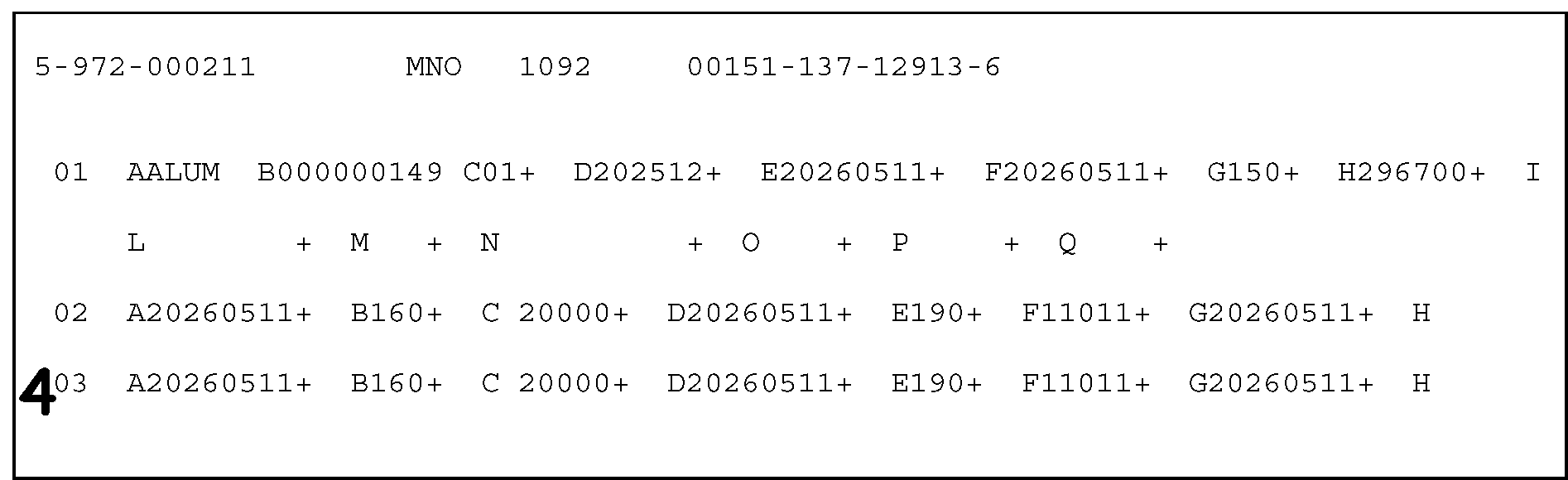
Figure 3.12.21-2 displays a part of the error register. This illustration is used to demonstrate the application of Action Code 4, which is used to delete a section from the register. The illustration provides a layout of the fields for Sections 01, 02 and 03. Figure 3.12.21-2 displays an edited 4 (for Action Code 4) is entered to the left of Section 03 to instruct the ISRP operator that this is the section which is to be deleted from the error register. In this case, the Action Code 4 is entered to inform ISRP operators to delete Section 03 because the information contained in each of the fields in Section 03 are identical to the information contained in similar fields in Section 02.
Please click here for the text description of the image.
-
Action Code 5- (See Figure 3.12.21-3.)
Figure 3.12.21-3
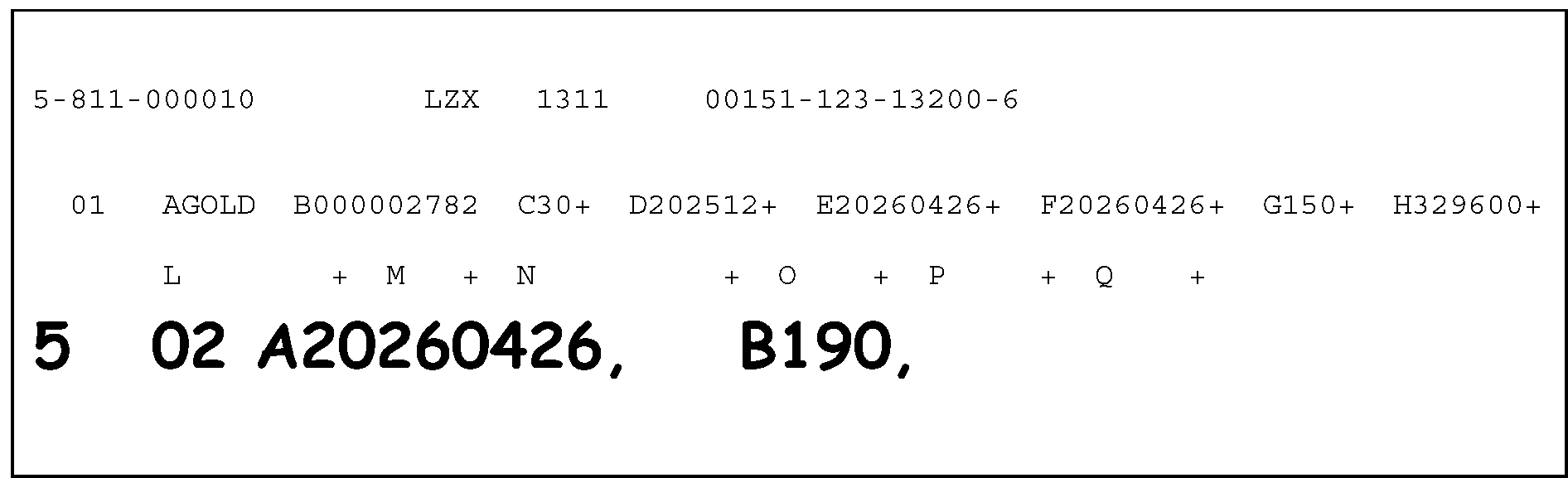
Figure 3.12.21-3 displays the use of Action Code 5, which is used to add a section to the record. Action Code 5 is entered to the left of the section being added. In this illustration:This illustration displays a part of the error register with Section 01, Fields A through X.The illustration displays the following to demonstrate that this information must be edited on the register.The display shows an edited 5, 02, A20260426, B190 are edited to the register, directly beneath the Section 01 information, beginning from the left margin of the register.The 02 is used to identify that Section 02 must be added to the record. In this illustration, two fields in Section 02 (Field A and Field B) must be added to the record.The edited 5 (representing Action Code 5), edited in the left margin of the register to the left of the 02, beneath the last line of the Section 01 field designations, where the Section 02 information is added.The literals 20260426 are edited to the right of the 02, followed by a comma (,).to inform the ISRP operator that the first field in Section 02, Field A (Transaction Date), must be added to this record. The literals 20260426 (representing the Transaction Date) are the information to be entered in Field A.The literals B190 are edited to the right of the Field A information, followed by a comma (,), to inform the ISRP operator that Field B (Transaction Code) information must also be added to this record. The 190 is the transaction code which must be transcribed by ISRP operators for Field B. No other fields or field designations are shown in this illustration to be added for Section 02.
Please click here for the text description of the image.
-
Action Code 6- (See Figure 3.12.21-4.)
Figure 3.12.21-4
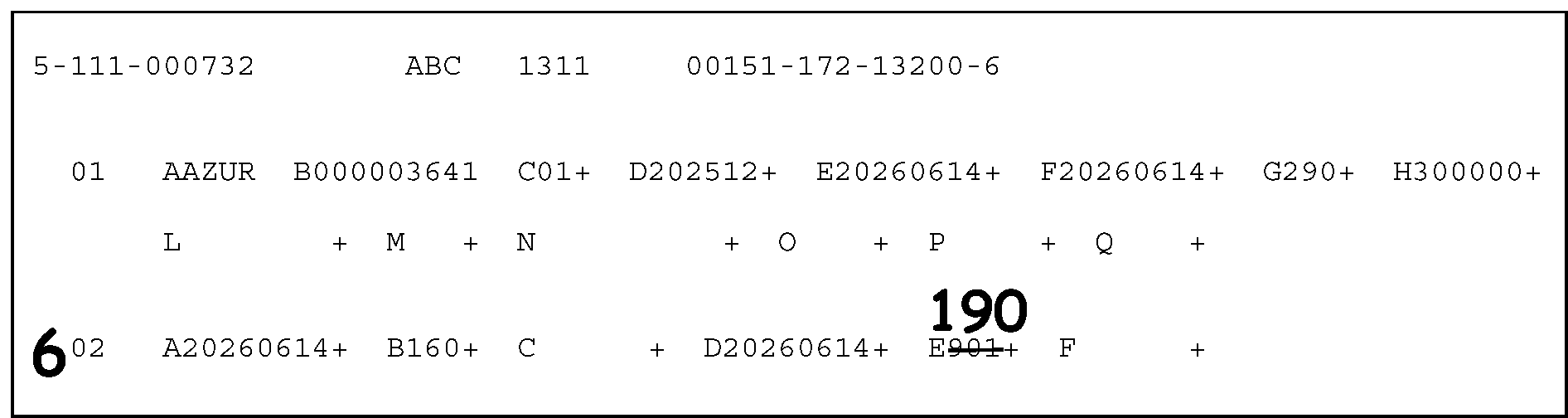
Figure 3.12.21-4 displays the use of Action Code 6, which is used to indicate that this section must be corrected or updated. Action Code 6 is entered to the left of the section being changed. In this illustration:This illustration displays a part of the error register with Section 01, Fields A through Q, and Section 02, Fields A through F.A 6 is edited on the left margin of the register to the left of 02 (representing Section 02), to inform the ISRP operator that information in this section must be corrected.Field A (Transaction Date), displays 20260614 (Transaction Date is June 14, 2026).On the register, to the right of Field A is Field B (Transaction Code), with 160.Field C (Transaction Amount), located to the right of Field B, is blank (i.e., contains no entry).To the right of Field C on the register is Field D (Transaction Date), with the literals 20260614 (June 14, 2026).To the right of Field D is Field E (Transaction Code), with 901 with a line drawn through the current entry, to inform the ISRP operator that this information is in error. Directly above the lined-through 901 is the literal 190 edited directly above it. This informs the ISRP operator that Field E must be changed from 901 to 190.
Please click here for the text description of the image.
-
Action Code 7- (See Figure 3.12.21-5.)
Figure 3.12.21-5
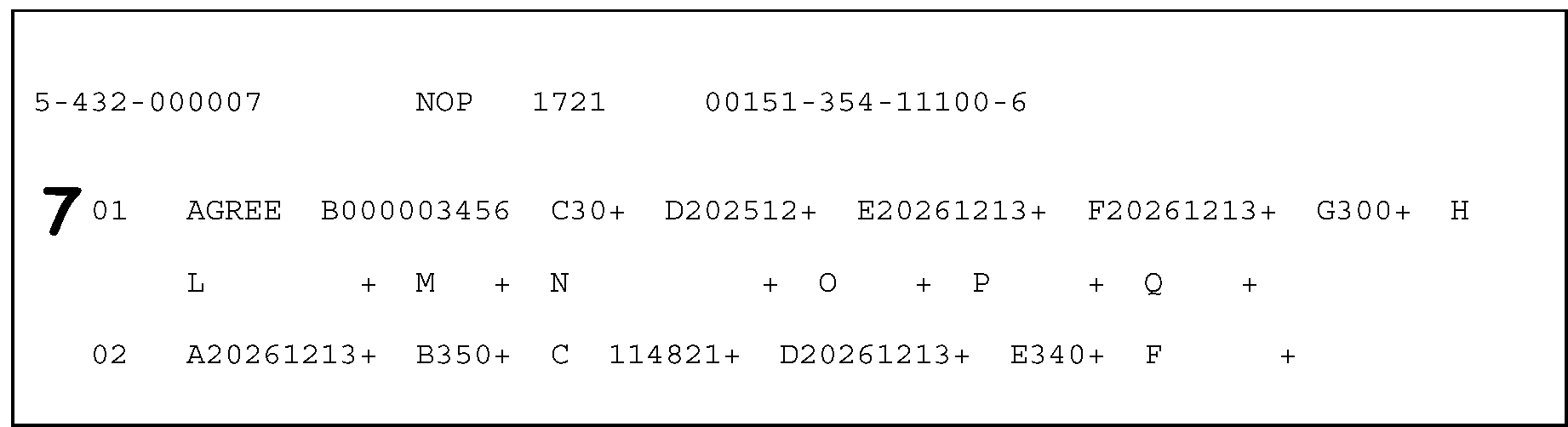
Figure 3.12.21-5 displays the use of Action Code 7, which indicates a dummy correction and requires no change. Action Code 7 is entered to the left of Section 01. For purposes of this illustration:This illustration displays a part of the error register with Section 01, Fields A through Q, and Section 02, Fields A through F.An edited 7 is displayed to the left of the 01 (Section 01), informing the ISRP operator that the present information is correct and no change needs to be made to Section 01. To the left of the 01 are the following (Section 01) fields and entries.An A (for Field A), displays the name control GREETo the right of Field A is a B (for Field B, EIN or SSN and TIN Type), which displays the TIN 000003456To the right of Field B is a C (for Field C, Master File Tax Account Code---MFT), which displays the MFT Code 30To the right of Field C is a D (for Field D, Tax Period), which displays the tax period of 202512 (for December 2025)To the right of Field D is an E (for Field E, Date of Transfer), which displays 20251213 (for December 13, 2025) as the Date of Transfer. To the right of Field E is an F (for Field F, Date of Assessment), also known as the 23-C Date) which is blank and displays no entries.No other fields are displayed for Section 02 after Field F.
Please click here for the text description of the image.
-
3.12.21.2.2 (01-01-2016)
Types of Error Conditions
- The types of error conditions you will encounter include validity, terminus, extraneous section, and missing section. This section will provide descriptions of and resolution instructions for each condition.
3.12.21.2.2.1 (01-01-2016)
Validity Errors
-
Validity errors are identified either because a field, which must have data, is blank, or because the computer identified invalid characters within that field. Fields are validity checked to ensure correct data before transmittal to the master file. Each field that is found invalid is identified on the register with an asterisk (*) before the alpha-field designator.
-
Correct as follows:
-
Compare the data on the register with the document being processed.
-
Correct any transcription errors.
-
If no corrections are necessary, use Action Code 7.
-
3.12.21.2.2.2 (01-01-2023)
Terminus Errors
-
A terminus error results when there is a non-numeric character in a numeric field, or when the format of the section is incorrect.
-
Terminus errors are identified by two asterisks (**) to the left of the section number. (See Figure 3.12.21-6.)
Figure 3.12.21-6
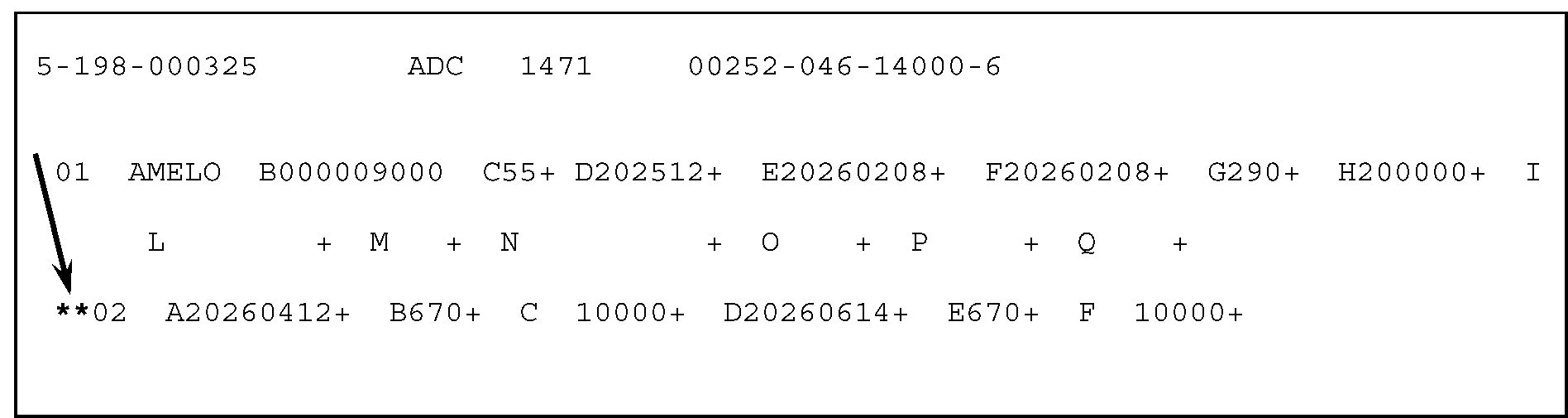
Figure 3.12.21-6 provides an example showing how a Terminus error is displayed on the error register.This illustration displays a part of the error register having Section 01, Fields A through Q, and Section 02, Fields A through F.Terminus errors are identified by two asterisks (**) to the left of the section number. In this example, two asterisks are to the left of Section 02.A downward arrow points to the double asterisks (**) to the left of the 02 (for Section 02), indicating a terminus error, or that the section is incorrect.
Please click here for the text description of the image.
-
Correct as follows:
-
Compare the data on the register with the document being processed.
-
Correct any transcription errors.
-
If no corrections are necessary, use Action Code 7.
-
3.12.21.2.2.3 (01-01-2023)
Extraneous Sections
-
Extraneous sections are identified by a single pound (#) sign in front of the section. (See Figure 3.12.21-7.)
Figure 3.12.21-7
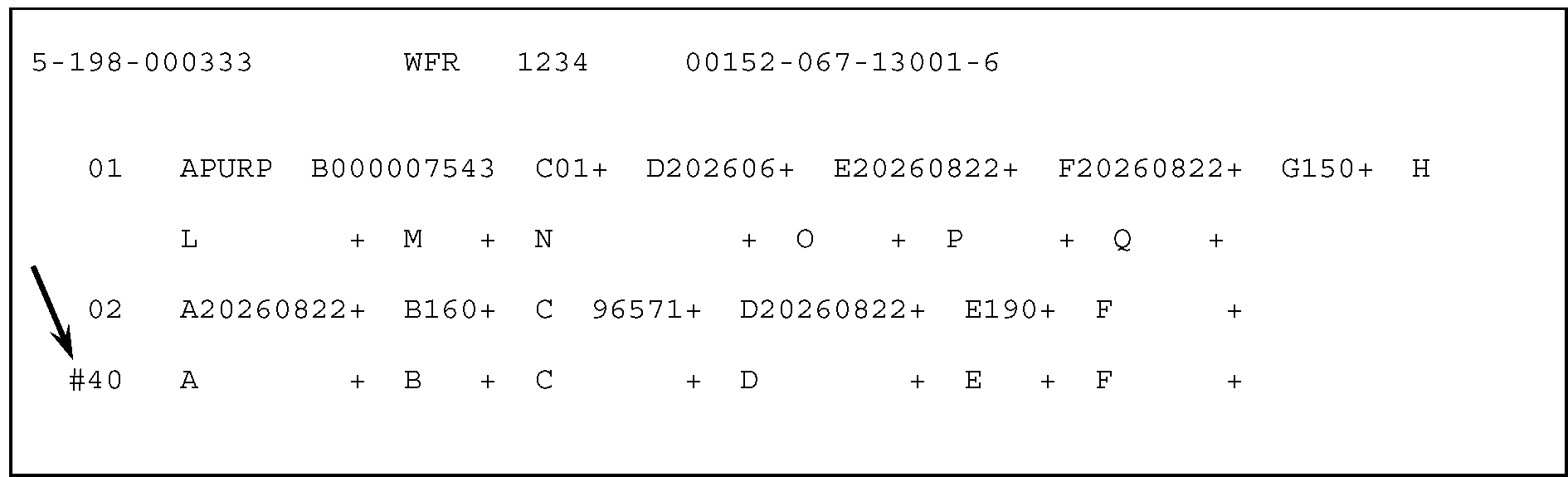
Figure 3.12.21-7 shows an Extraneous section identified by a single pound (#) sign in front of the section.This illustration displays a part of the error register with Section 01, Fields A through Q; Section 02, Fields A through F; and Section 40, Fields A through F.The illustration shows a downward arrow points to the single pound sign (#) in front of the number 40 (for Section 40) on the register.This display shows also that Fields A, B, C, D, E, and F of Section 40 are all blank, defining an Extraneous section (i.e., the Section, although present, is NOT needed). If Section 40 is not needed to process the record, delete the section with Action Code 4.
Please click here for the text description of the image.
-
Correct as follows:
-
Compare the data on the register with the document being processed.
-
Correct any transcription errors.
-
If the section is truly not needed to process the record, delete the section with Action Code 4.
Note:
SECTION 01 IS A REQUIRED SECTION AT ALL TIMES. DO NOT ATTEMPT TO DELETE SECTION 01 WITH ACTION CODE 4.
-
3.12.21.2.2.4 (01-01-2023)
Missing Sections
-
Missing sections are identified by an asterisk to the left of the section number with the alpha-field designator for the section printed on the error register. See Figure 3.12.21-8.
Figure 3.12.21-8
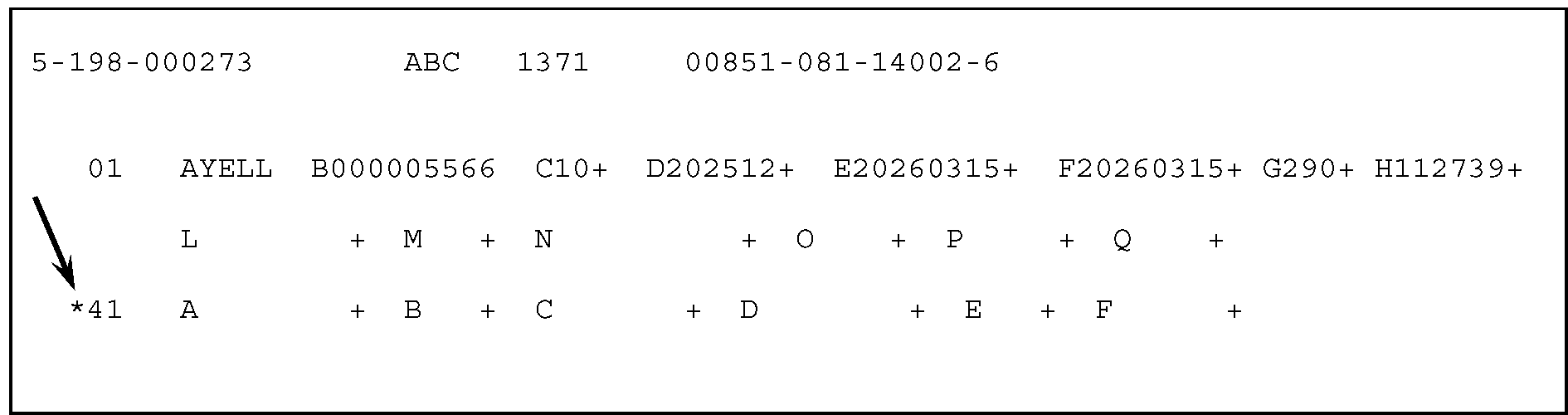
Figure 3.12.21-8 shows Missing sections are identified by an asterisk to the left of the section number with the alpha-field designator for the section printed on the error register.This illustration displays a part of the error register with Section 01, Fields A through Q; and Section 41, Fields A through F.The illustration shows an asterisk(*) to the left of the number 41 (for Section 41)A downward arrow points to the asterisk (*) to the left of the 41 (for Section 41), indicating the section is missing. A missing section must be present if the MFT requires that Section to be present (when it isn’t).This display also shows that Fields A, B, C, D, E, and F of Section 41 are all blank. If, after comparing the document against the register, the examiner determines that the Section 41 must be added, edit an Action Code 5, informing ISRP the Section 41 must be transcribed from the document into the record.
Please click here for the text description of the image.
-
Correct as follows:
-
Compare the data on the register with the document being processed.
-
Correct any transcription errors.
-
-
If a section not identified as a missing section must be added, use Action Code 5.
-
Enter on the register only the fields which will contain data.
-
The fields must be entered on the register in alphabetical order by alpha-field designator.
-
3.12.21.2.2.5 (01-01-2016)
Invalid Correction Attempt
-
An invalid correction attempt is indicated by a "AA" printed to the right of the DLN (Document Locator Number) in the title line of the error register. For a complete description of invalid correction attempts, see IRM 3.12.37, IMF General Instructions, or IRM 3.12.38, BMF General Instructions.
-
Correct as follows:
-
Correct all errors identified on the error register as if no attempt had been made to correct it before. If necessary, examine the corrections on the prior error register.
-
If all the fields are correct on the error register, enter an Action Code 7 to the left of section 01 on the error register.
-
3.12.21.3 (01-01-2016)
Input Documents - General Explanation
- This section describes the concept of non-ADP as it relates to the various files’ document: Individual Master File (IMF), Business Master File (BMF), and Individual Retirement Account File (IRAF). Also described are the input documents (i.e., Form 3413, Transcription List (Account Transfer-in), and Form 3552, Prompt Assessment Billing Assembly, used to re-establish accounts to or transfer assessments to or between these files.
3.12.21.3.1 (01-01-2020)
Non-ADP (Automated Data Processing) Document
-
A non-ADP (Automated DATA Processing) document is a document processed for a tax period which ended before the Automated Data Processing (ADP) system was in place for a particular document.
-
When a document is for a non-ADP period, reject, using Action Code 3. Prepare Form 4227, Intra-SC Reject or Routing Slip, and process as Non-Master File (NMF).
3.12.21.3.2 (05-15-2023)
Form 3413 - Transcription List
-
Form 3413, Transcription List (Account Transfer-In), with Doc Code 51 or 52 is used to transfer a list of all transaction codes, dates and amounts on a single record into the Master File. All money amounts are entered in dollars and cents.
-
These documents are prepared for accounts which have been either on Non-Master File (NMF) or had been previously on the master file and were transferred out using Transaction Code (TC) 400 (Account Transfer-Out). (See Figure 3.12.21-9a) See IRM 3.12.37, IMF General Instructions or IRM 3.12.38, BMF General Instructions.
Figure 3.12.21-9a
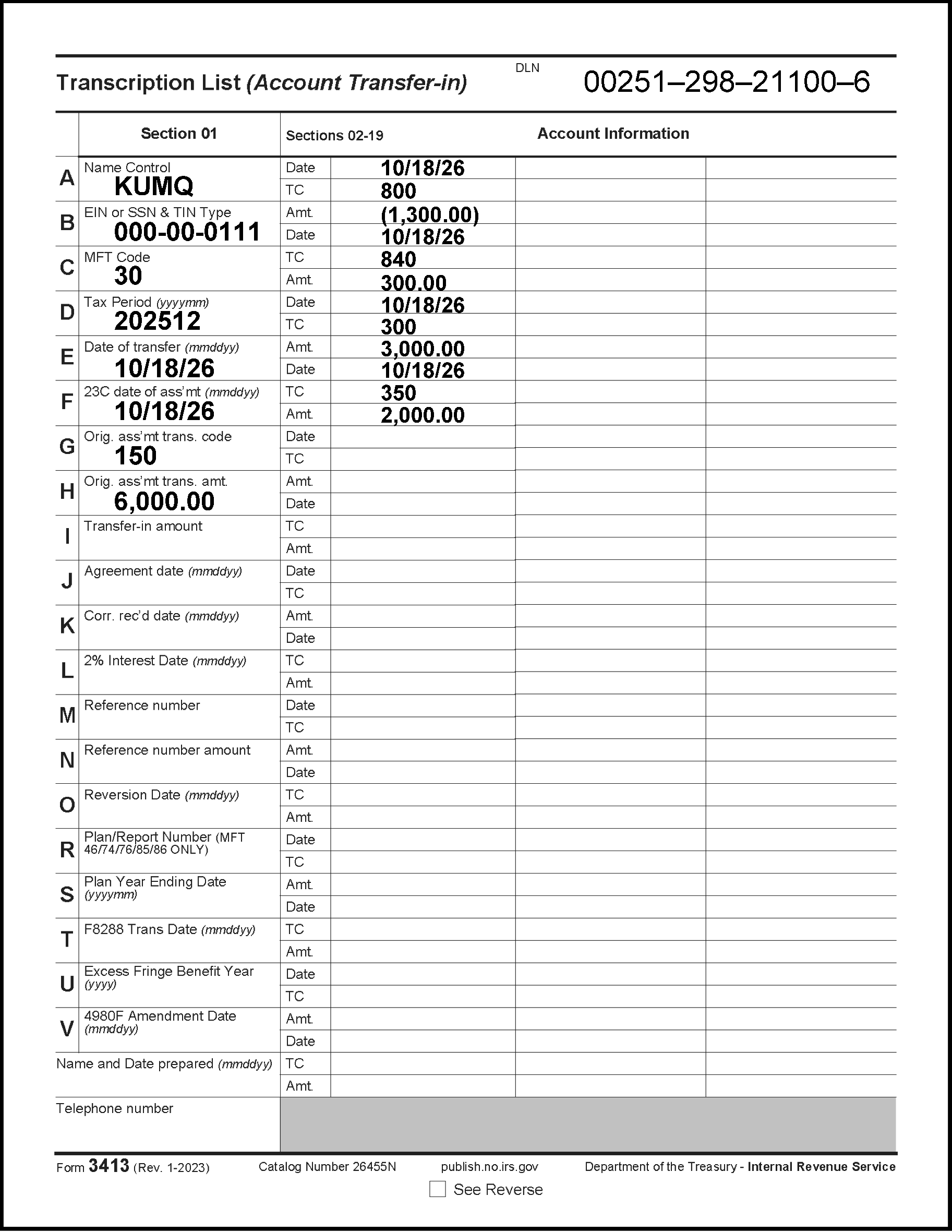
Figure 3.12.21-9a and Figure 3.12.21-9b display the two-page Form 3413 Transcription List (Account Transfer-in). Figure 3.12.21-9a displays Page 1 of the Form 3413, which contains four columns: Section 01, Sections 02 through 19, and two columns under the Account Information heading. The title of the Form 3413 (Page 1) is in the upper left corner of the form, Transcription List (Account Transfer-in). To the right of the form title is the DLN. The DLN on this figure is 00251-298-21100-6.Page 1 of Form 3413, Transcription List (Account Transfer-in)The first line beneath the form title and the DLN information display the column headings Section 01, Sections 02 - 19, and Account Information. Account Information title heads the third column, and the fourth column, to the right of Account Information, displays no header. The fourth column appears to be a second column for Account Information. The first column Section 01, displays the following rows with the alpha designations A through V, displayed in vertical order as follows:A) Name Control, shows the Name Control KUMQ. To the right of the Name Control information in the second column marked as Sections 02 - 19 are the Date10/18/26 and the TC row, with an 800 directly beneath the Date in the previous row.B) EIN or SSN and TIN Type, displays the EIN 000-00-0111. To the right of the EIN or SSN and TIN Type information, in the Sections 02 - 19 column, directly beneath the TC 800 in the previous row, are the Amt (i.e., Amount Field), with (1,300.00) (for a negative 1,300.00) and the Date of 10/18/26 directly beneath the amount field.C) MFT Code, displays the MFT 30. To the right of the MFT Code information, in the Sections 02 - 19 column, directly beneath the Date of 10/18/26 in the previous row, are the TC field (i.e., Transaction Code field), with 840 and the Amt (i.e., Amount) of 300.0055 (three hundred dollars) directly beneath the TC field.D) Tax Period, displays tax period 202512. To the right of the Tax Period information in the Sections 02 - 19 column, are the Date10/18/26 and the TC, with code 300 directly beneath the Date.E) Date of Transfer, shows 10/18/26 as the date of transfer. To the right of the Date of Transfer information, in the Sections 02 - 19 column, directly beneath the TC 300 in the previous row, are the Amt (i.e., Amount Field), with 3,000.00 (i.e., three thousand dollars) and the Date of 10/18/26 directly beneath that amount.F) 23C Date of Assessment), shows 10/18/26 as date of assessment. To the right of the MFT Code information, in the Sections 02 - 19 column, directly beneath the Date of 10/18/26 in the previous row, are the TC field (i.e., Transaction Code field), with 350 (i.e., three hundred fifty) and the Amt (i.e., Amount) of 2,000.00 (two-thousand dollars) directly beneath the TC field.G) Original Assessment Transaction Code, shows 150 as the Original Assessment Code. (No other columns or rows to the left of this row contain taxpayer information.)H) Original Assessment Transaction Amount, shows 6,000.00 (six-thousand dollars) as the Original Assessment Amount. (No other columns or rows to the left of (or beneath) this row contain taxpayer information.)I) Transfer-in AmtJ) Agreement DateK) Correspondence Received DateL) 2% Interest DateM) Reference NumberN) Reference Number AmountO) Reversion DateR) Plan/Report Number (MFT 46/74/76/85/86 ONLY)S) Plan Year Ending DateT) F8288 Trans DateU) Excess Fringe Benefit YearV) 4980F Amendment DateThe column with Section 01 takes only about one quarter of the Page 1 length wise. Directly to the right of Section 01 is a section identified as Sections 02 - 19 - Account Information. Sections 02 - 19 contain fourteen sets of rows of three. The rows of three are alternately listed in the following vertical order:DateTC (i.e., Transaction Code)Amt. (i.e., Amount)Beneath the fourteen (triplicated) sets of rows is a grey bar/row to the right of the Telephone Number bordering beneath the three columns horizontallyBeneath Row V (Section 01) is the Name and Date preparedBeneath the Name and Date prepared is the Telephone NumberBeneath the Telephone Number row is the bottom margin of the Form 3413 with the captions (left to right) Form 3413 (Rev. 01-2023), Catalog Number 26455N, See Reverse, and Department of the Treasury - Internal Revenue ServicePrinted directly beneath the Department of the Treasury - Internal Revenue Service caption is publish.no.irs.govBeneath the column header marked Sections 02 - 19 are fourteen sets of rows alternately marked Date, TC, Amt (such as, Date, Transaction Code and Amount)The third and fourth column are blank, run parallel to each other and contain forty-two blank rows (perhaps corresponding to the Date TC and Amt rows in the second column (marked Sections 02 - 19A greyed-out row runs beneath the second through fourth columns and to the left of the Telephone Number rowThis concludes the description of Page 1 (Form 3413) for Figure 3.12.21-9a.
Please click here for the text description of the image.
Figure 3.12.21-9b
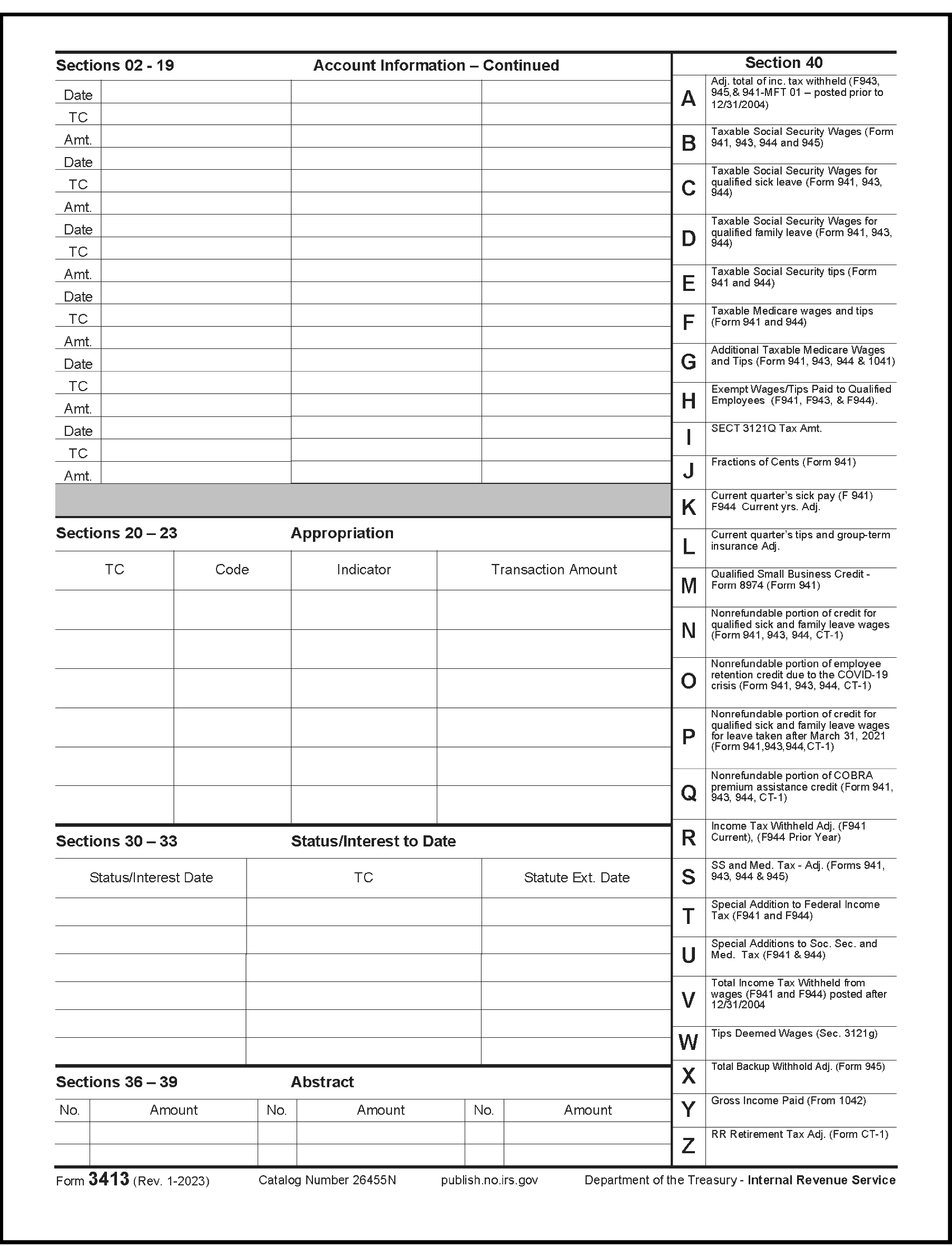
Figure 3.12.21-9b displays Page 2 of Form 3413, Transcription List (Account Transfer-in). Page 2 contains five sections: the continuation of Section 02 through 19. The top part of the page begins with four columns, identified as Section 02, Account Information - Continued; to the right of that section is another section identified as Sections 36 - 39 Abstract. The section beneath the Section 02 is identified as Sections 20 - 23 Appropriation. Beneath Section 20 is another section identified as Sections 30 - 33 Status/Interest to Date. Directly to the right of those three sections are Sections 36 - 39 Abstract and the Section 40 column. I provided a description of each of these section's contents as follows:Page 2 of Form 3413, Transcription List (Account Transfer-in)Beneath the column header identified as Sections 02 - 19 are six sets of rows of three. The rows of three are alternately marked Date, TC, Amt (such as, Date, Transaction Code and Amount). The contents of Section 02 - 19 (Account Information) is listed in the following vertical order:DateTC (i.e., Transaction Code)Amt. (i.e., Amount)Beneath the six sets of rows is a grey row bordering the three columns horizontallyBeneath the column header identified as Sections 20 - 23 Appropriation are four conjoined columns with eight (8) blank rows each. The common denominator (or key word) here is Appropriation The four columns are identified, respectively, as follows: TC (i.e., Transaction Code)CodeIndicatorTransaction AmountDirectly beneath the section identified as Sections 30 - 33 Status/Interest to Date are six conjoined columns with five (5) blank rows each. The four columns are alternately marked as follows:.Status/Interest Date;TC;Statute Expiration Date;Status/Interest Date;TC; and,Statute Expiration Date.Directly to the right of the sections identified as Sections 02 - 19 and Sections 20 - 23 are two sections identified as Sections 36 - 39 Abstract and Section 40. Section 40 is directly beneath Section 36 - 39, but it is above Section 30- 33 (Status/Interest to Date), which covers the bottom part of the Page 2 (Form 3413)Sections 36 - 39 Abstract displays two conjoined columns, identified as No. (i.e., number) and Amount sharing four (4) blank rows.Section 40 is located directly beneath Sections 36 - 39 Abstract and contains nineteen rows of information, Items A through S, respectively, and marked as follows:A) Adj. total of inc. tax withheld (Form 943, Form 945, and Form 941 - MFT 01- posted prior to 12/31/2004)B) Taxable Social Security Wages (Form 941, Form 943, Form 944 and Form 945)C) Taxable Social Security Tips (Form 941 and Form 944)D) Taxable Medicare Wages and Tips (Form 941 and Form 944)E) Additional Taxable Medicare Wages and Tips (Form 941)F) Exempt Wages/Tips Paid to Qualified Employees (Form 941, Form 943, and Form 944)G) Section 3121Q Taxable AmountH) Fractions of Cents (Form 941)I) Current Quarter's Sick Pay (F. 941) 944 Current Year's AdjustmentJ) Current Quarter's Tips and Group-Term Life Insurance AdjustmentK) Qualified Small Business Credit Form 8974 (Form 941)L) Income Tax Withheld Adj. (Form 941 Current), (Form 944 Prior Year)M) SS and Med. Tax - Adj. (Form 941, Form 943, Form 944 and Form 945)N) Special Addition to Federal Income Tax (Form 941 and Form 944)O) Special Additions to Social Security and Medicare Tax (Form 941 and Form 944)P) Total Income Tax Withheld from wages (Form 941 and Form 944) posted after 12/31/2004Q) Tips Deemed Wages (Sec. 3121g)R) Total Backup Withhold Adj. (Form 945)S) Gross Income Paid (Form 1042)T) RR Retirement Tax Adj. (Form CT-1)In the bottom area of Page 2 (Form 3413), located beneath Sections 20 - 23 Appropriation and Section 40 is the section marked Section 30 - 33 Status/Interest to DateThe Section 30 - 33 Status/Interest to Date displays six columns with sub-headers alternating as Status/Interest Date, TC, Statute Ext. Date, Status/Interest Date, TC, Statute Ext. Date, respectively, with each having five blank rowsBeneath the Section 30 - 33 Status/Interest to Date part in the bottom margin of Page 2 (Form 3413) with the captions (left to right) Form 3413 (Rev. 01-2023), Catalog Number 26455N, and Department of the Treasury - Internal Revenue ServiceThis concludes the description of Page 2 (Form 3413) for Figure 3.12.21-9b.
Please click here for the text description of the image.
3.12.21.3.3 (05-15-2023)
Form 3552 - Prompt Assessment Billing Assembly
-
Form 3552, Prompt Assessment Billing Assembly, is used to transfer Quick, Prompt, and Jeopardy Assessments to the BMF, IMF, or IRAF. All money amounts are entered in dollars and cents. See Figure 3.12.21-10.
Figure 3.12.21-10
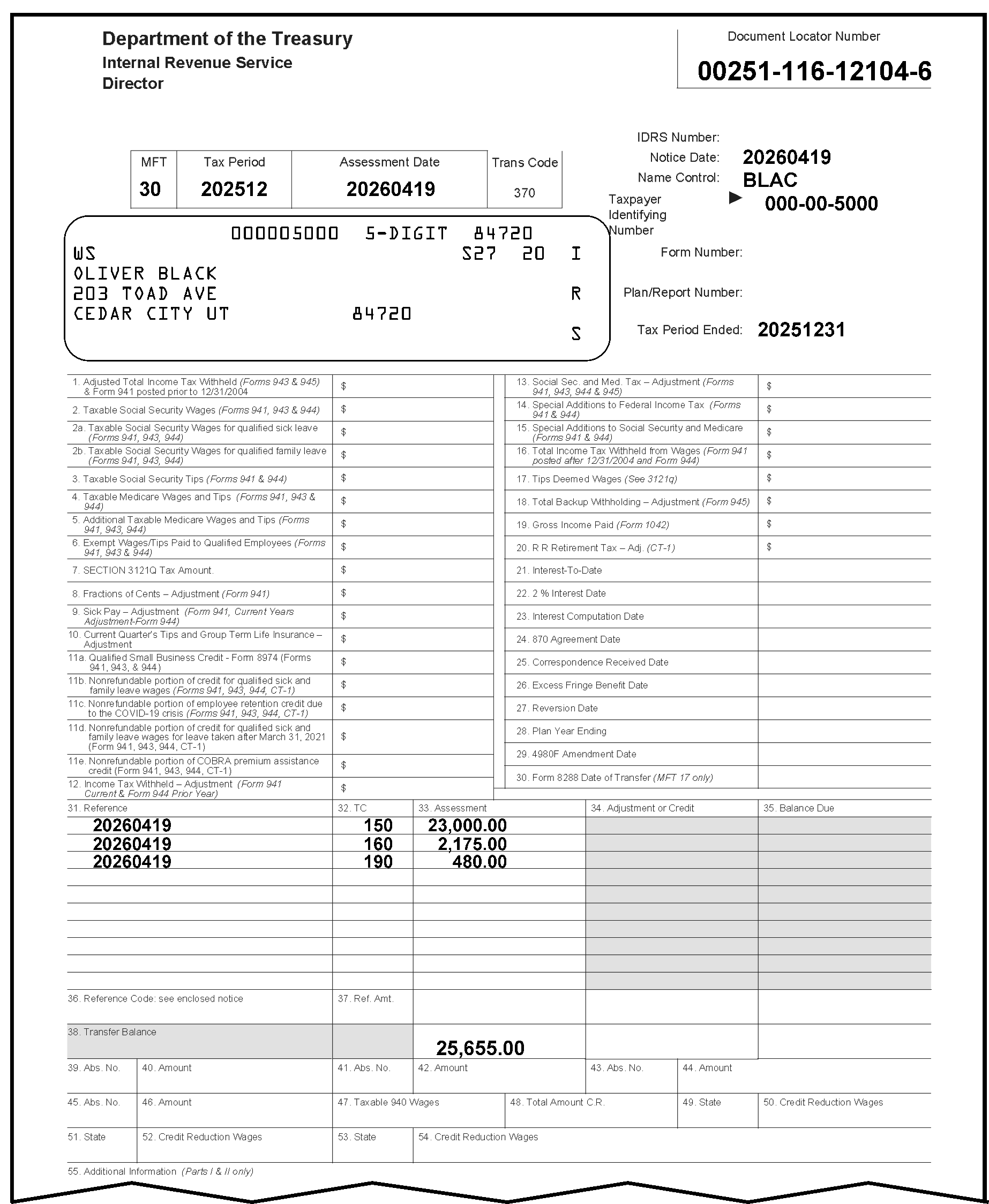
This Figure shows Form 3552, Prompt Assessment Billing Assembly, a five-page form used to transfer Quick, Prompt and Jeopardy Assessments to the BMF, IMF or IRAF. Page 1 (Part 1 - ISRP Copy) and a lot of information. We will attempt to describe the form as follows:The top part, or header of the Form 3552, displays the document locator number, MFT, Tax Period and taxpayer information. The top part of this form contains the following items:In the upper left corner of the Form 3552 are three organization headings listed vertically: Department of the Treasury, Internal Revenue Service and Director, respectivelyIn the upper right corner opposite those three headings is the Document Locator Number box, with the document locator number, 00251-116-12104-6.About two lines beneath that information is a single box with four conjoined boxes marked as MFT, Tax Period, Assessment Date and Trans Code. Immediately to the right of this four-part box are three rows, in vertical order, marked Notice Date, Name Control and Taxpayer Identifying Number respectively. The MFT is 30, the Tax Period is 202512, the Assessment Date is 20260419, the Trans Code is 370, the Notice Date is 20260419, the Name Control is BLAC, and the Taxpayer Identifying Number is 000-00-5000, respectively.Beneath the four-part box is a taxpayer information box with five lines of printed text; the first line displays, in label format, the TIN (000005000), 5-digit 84720The second line of the taxpayer information box displays the check digit, WS (flushed with left margin of the label), S27 and 20The third line of the taxpayer information box displays the taxpayer's name: Oliver BlackThe fourth line of the taxpayer information box displays the taxpayer's street address: 203 Toad AveThe fifth line of the taxpayer information box displays the taxpayer's city, state and zip code: Cedar City UT 84720Flushed with the right margin of the taxpayer information box on the pre-printed label are the letters, IRS, displayed vertically (alternating with spaces between the letters)To the right of the taxpayer information box are three more items: Form Number, Plan/Report Number and Tax Period EndedOf the three, only the Tax Period Ended displays an entry: 20251231The second part of the Form 3552 displays four (4) columns and 29 tax and information items straddling 15 lines in two of them. The first column contains 15 tax items, the third column contains 15, and the second and fourth columns display blank rows used for capturing the correct taxpayer entries in response to those money amounts and tax data entries. The fifteen (15) tax information items in the first column are displayed on the form in the following order:1) Adjusted Total of Income Tax Withheld (Forms 943 and 945) and Form 941 posted prior to 12/31/20042) Taxable Social Security Wages (Form 941, 943, 944 and 945)3) Taxable Social Security Tips (Forms 941 and 944)4) Taxable Medicare Wages and Tips (Forms 941 and 944)5) Additional Taxable Medicare Wages and Tips (Form 941, 943, 944)6) Exempt Wages/Tips Paid to Qualified Employees (F941, F943 and F944)7) SECTION 3121Q Tax Amount8) Fractions of Cents - Adjustment (Form 941)9) Sick Pay - Adjustment (Form 941, Current Years Adjustment-Form 944)10) Current Quarter's Tips and Group Term Life Insurance - Adjustment11) Qualified Small Business Credit - Form 8974 (Form 941, 943, and 944)12) Income Tax Withheld - Adjustment (Form 941 Current and Form 944 Prior Year)13) Social Sec. and Med. Tax - Adjustment (Forms 941, 943, 944 and 945)14) Special Additions to Federal Income Tax (Forms 941 and 944)15) Special Additions to Social Security and Medicare (Forms 941 and 944)The second and fourth columns are used by Accounting examiners to list the correct money amounts and date entries corresponding to the line items posted in the first and third columns, respectively.The fifteen (15) tax information items and related data in the third column are displayed on the form in the following order:16) Total Income Tax Withheld from Wages (Form 941 posted after 12/31/2004 and Form 944)17) Tips Deemed Wages (Section 3121q)18) Total Backup Withholding - Adjustment (Form 945)19) Gross Income Paid (Form 1042)20) R R (Railroad) Retirement Tax - Adjustment (Form CT-1)21) Interest-To-Date22) 2% Interest Date23) Interest Computation Date24) 870 Agreement Date25) Correspondence Received Date26) Excess Fringe Benefit Date27) Reversion Date28) Plan Year Ending29) 4980F Amendment Date30) Form 8288 Date of Transfer (MFT 17 only)The third part of Form 3552 displays the following five (5) adjoining columns, identified with the following headings: 31) Reference, 32) TC (i.e., transaction code), 33) Assessment, 34) Adjustment or Credit, and 35) Balance Due each with 12 rows each for entries.The first three lines of Items 31, 32, and 33 contain entries, each in vertical order: the 31) Reference column contains the date 20260419 (three times); the 32) TC (i.e., transaction code) contains (also in vertical order, TCs 150, 160, and 190, and the 33) Assessment contains (also in vertical order) the amounts $23,000.00 (twenty-three thousand dollars and zero cents), $2,175.00 (two-thousand one hundred seventy-five dollars and zero cents), and $480.00 (four-hundred eighty dollars and zero cents). The 34) Adjustment or Credit and 35) Balance Due each contain 12 rows of shaded lines with no entries. Line 36, , contains a total amount under the Assessment column of $25,655.00 (twenty-five thousand, six hundred fifty-five dollars and zero cents).Items 37 through 55 follow Line 36, are all blank and contain no entries.This concludes the description of the Form 3552 (ISRP Copy, Part 1) in Figure 3.12.21-10.(NOTE: The revision date of this form is 10-2024, and its OMB Catalog Number is 49356T.)
Please click here for the text description of the image.
3.12.21.3.4 (01-01-2021)
IRM Deviation Procedures
- IRM deviations must be submitted in writing following instructions from IRM 1.11.2.2, Internal Management Documents System - Internal Revenue Manual (IRM) Process, IRM Standards, and elevated through correct channels for executive approval.
3.12.21.4 (01-01-2016)
Section 01
- This section provides descriptions of the fields and correction procedures for Section 01 of the register.
3.12.21.4.1 (01-01-2016)
Section Fields A Through X Description
-
The alpha-field designators, field lengths (maximum length for variable fields), and the field titles are shown below:
Field Field Length (+/−) Field Title 01-A 4 Name Control 01-B 9 EIN or SSN and TIN Type ### Exception: The TIN Type is corrected in Field 01-K. 01-C 2 MFT Code (Master File Tax Account Code) 01-D 6 Tax Period 01-E 8 Date of Transfer (or, Transfer in Date) 01-F 8 23C Date of Assessment 01-G 3 Original Assessment Transaction Code 01-H 12 +/− Original Assessment Transaction Amount 01-I 15 + Transfer-in Amount (or Balance Transferred-in) 01-J 8 Agreement Date 01-K 1 TIN Type is located on Form 3413 under Item B, Section 01 ("EIN or SSN and TIN Type" ) 01-L 8 Correspondence Received Date (located on Form 3413 as Item K, Section 01) 01-M 3 Reference Number 01-N 13 + Reference Number Amount 01-O 8 2% Interest Date (located on Form 3413 as Item L, Section 01) 01-P 8 Interest To Date 01-Q 8 Interest Computation Date 01-R 3 Plan/Report Number (MFT 46/74/76/85/86 Only) 01-S 8 Excess Fringe Benefit Year (located on Form 3413 as Item U, Section 01) 01-T 8 Reversion Date (located on Form 3413 as Item O, Section 01) 01-U 6 Plan Year Ending Date (located on Form 3413 as Item S, Section 01) 01-V 8 4980f Amendment Date (located on Form 3413 as Item V, Section 01) 01-W 8 Form 8288 Trans Date (located on Form 3413 as Item T, Section 01) 01-X 9 BMF TIN Note:
Refer to the individual text instructions for the most current names/designations of Section 01, Fields A through X.
3.12.21.4.2 (01-01-2016)
Correction Procedures - Section 01
- This section describes field validity criteria and correction procedures for Fields A through X in Section 01.
3.12.21.4.2.1 (01-01-2016)
Field 01-A - Name Control (Validity Checks)
-
The Name Control (Field 01-A) is found on the following forms as follows:
-
Form 3413, Transcription List (Account Transfer-in): "Item A" (Section 01) displays the "Name Control" .
-
Form 3552, Prompt Assessment Billing Assembly: The "Name Control" is found in the upper right corner of this form, beneath the "Notice Date" , OR it may be determined from the first line (name line) of the "Taxpayer" box on the upper left portion of the form.
-
-
This field MUST always be present and can contain up to four characters.
-
For BMF documents with a Social Security Number (SSN) (MFT 51, 52, 58, and 78), the first position must be alphabetic. The remaining characters can be alphabetic, hyphen or blank. No character may follow a blank.
-
For BMF documents with an Employer Identification Number (EIN), the first character must be alphabetic or numeric. The remaining characters can be alphabetic, numeric, hyphen, ampersand, or blank. No character may follow a blank.
-
For IMF and IRAF documents, the first character must be alphabetic. The remaining characters can be alphabetic, hyphen, or blank. No character may follow a blank.
3.12.21.4.2.2 (01-01-2023)
Field 01-A - Name Control (Correction Procedures)
-
Compare the document with Field 01-A. Correct any transcription errors using Action Code 6.
-
Research Integrated Data Retrieval System (IDRS) for a valid name control, using correct Command Codes.
-
If a valid name control is found, correct the name control on the document and on the register. See Figure 3.12.21-11.
Figure 3.12.21-11
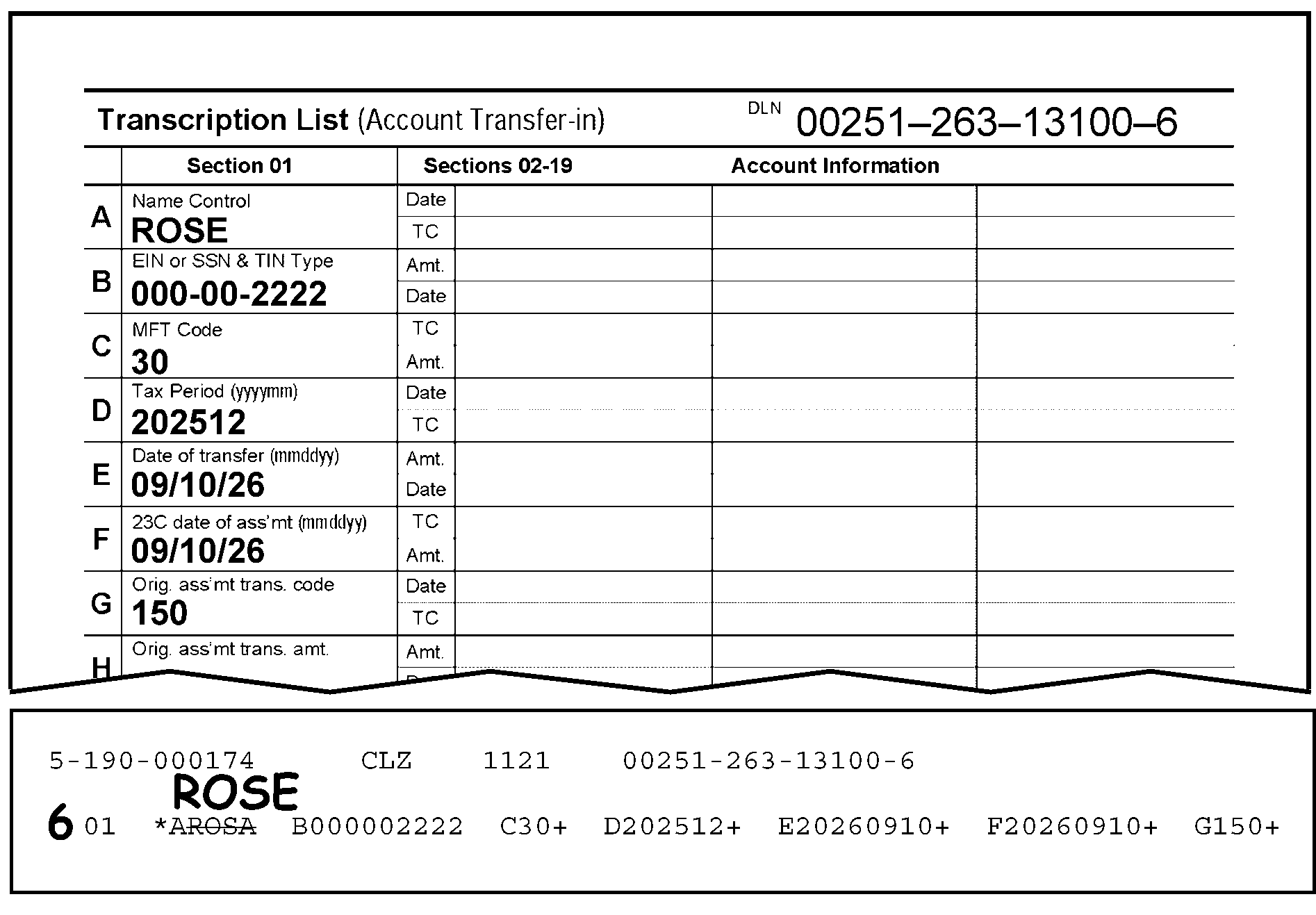
Figure 3.12.21-11 provides an example displaying a correction of the name control. This figure displays both a part of the Form 3413, Transcription List (Account Transfer-in) and a corresponding part of the error register. The display of Figure 3.12.21-11 provides information from both Section 01 on the document and Section 01 on the register, described as follows:The DLN on the Form 3413 is 00251-263-13100-6Under Section 01 (Form 3413), the Name Control (Field A) is ROSEField B (EIN or SSN and TIN Type) is 000-00-2222Field C (MFT Code) is 30Field D (Tax Period) is 202512Field E (Date of Transfer) is 09/10/26Field F (23C Date of Assessment) also is 09/10/26Field G (Original Assessment Code) is 150The error register displays Section 01, Field A through Field GA 6 is edited to the left of Section 01, informing the ISRP transcriber that a change must be made to Section 01.Field A on the error register displays a line drawn through the name control, ROSAImmediately above the lined-out entry is the new edited name control ROSEField A must be changed on the transcribed record from ROSA to ROSEFields B through G on the register correctly contain the same data displayed on Section 01 of the Form 3413The Form 3413 columns marked as Sections 02 - 19 (with Date, TC, and Amount) and the two columns for Account Information are all blank and contain no entries.No other changes are displayed for this recordThis Figure 3.12.21-11 shows how to correct transcription errors using Action Code 6.
Please click here for the text description of the image.
-
If a valid name control is not found, reject the document with Action Code 3.
-
3.12.21.4.2.3 (01-01-2023)
Field 01-B - EIN (Employer Identification Number) or SSN (Social Security Number) and TIN Type (Taxpayer Identification Number Type) (Validity Checks)
-
The Taxpayer Identification Number (TIN) MUST always be present and MUST contain 9 digits.
Note:
Form 3413 ONLY: The "EIN or SSN and TIN Type" information is found in Item B (Section 01). The "EIN or SSN and TIN Type" field is not contained on the Form 3552. Form 3552 Only: The Taxpayer Identification Number is located in the upper right part of the Form 3552, beneath the Name Control information.
-
It can't be all zeroes (0) or all nines (9).
-
IMF (Individual Master File) and IRAF (Individual Retirement Account File) documents will contain social security numbers (SSNs).
Note:
The IRAF (as a separate Master File) was retired in 2004. All references to "MFT 29" are what were previously referred to as IRAF.
-
BMF documents will have a 9-digit taxpayer identification number which can be a Social Security Number (SSN) or an Employer Identification Number (EIN).
-
SSNVs-MFTs 51 (Form 709, United States Gift (and Generation-Skipping Transfer) Tax Return), and 52 (Form 706, U.S. Estate Tax Return), will always have an SSNV.
-
MFTs 46, 58, and 78 with a TIN Type (Field 01-K) of "0" will have an SSNV. (See Figure 3.12.21-12.) If the TIN Type is blank, the TIN is an EIN.
Note:
The SSNV is used to identify the TIN of a Business Master File (BMF) entity posting to the BMF with a Social Security Number (SSN) as its TIN. If given an SSN, adding the “V” to the end (i.e., XXX-SS-XXXXV) will pull up the BMF account associated with that MFT.
Figure 3.12.21-12
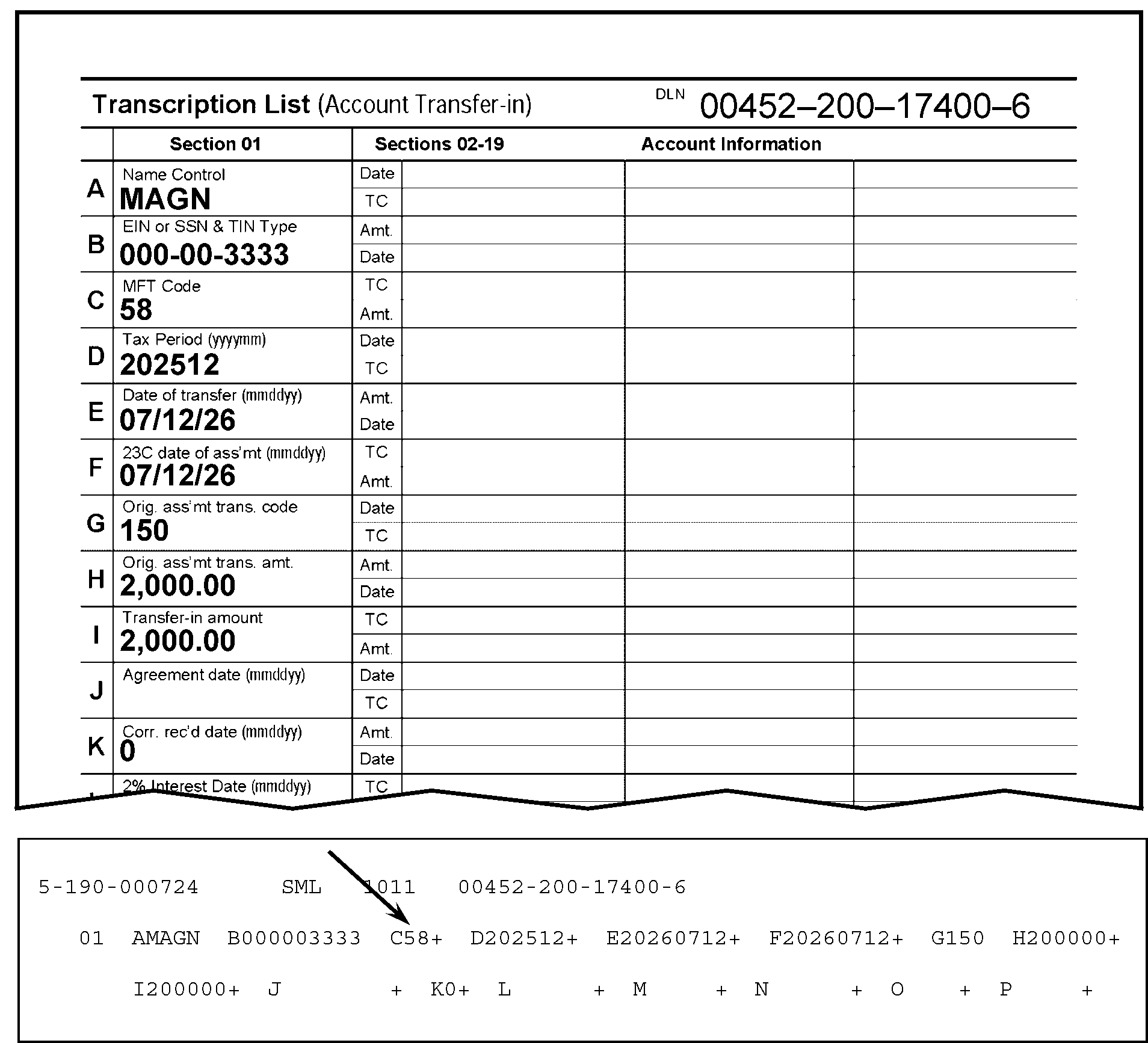
Figure 3.12.21-12 displays a part of the Form 3413, Transcription List (Account Transfer-in), and a part of the error register. This figure provides an example of an MFT 58 with a TIN Type of 0 (zero). The items displayed in this figure are as follows:The DLN on the Form 3413 is 00452-200-17400-6Under Section 01 (Form 3413), the Name Control (Field A) is MAGNField B (EIN or SSN and TIN Type) is 000-00-3333Field C (MFT Code) is 58 (Form 4638, Federal Use Tax Return on Civil Aircraft)Field D (Tax Period) is 202512Field E (Date of Transfer) is 07/12/26Field F (23C Date of Assessment) also is 07/12/26Field G (Original Assessment Code) is 150Field H (Original Assessment Transaction Amount) is 2,000.00Field I (Transfer-in Amount) also is 2,000.00Field J (Agreement Date) is blankField K (TIN Type) contains a 0 (zero)The error register displays Section 01, Field A through Field GA downward arrow points to the Field C entry on the register, showing the 58All other error register fields correctly match the data displayed on the Form 3413No other changes are displayed for this record
Please click here for the text description of the image.
-
EINs-must be all numeric and the first two digits may not be 00, 07 through 09, 17 through 19, 28, 29, 49, 78, 79, or 89.
-
3.12.21.4.2.4 (01-01-2026)
Field 01-B - EIN or SSN and TIN Type - Correction Procedures
-
Compare Field 01-B with the document. Correct any transcription errors.
Exception:
Only the EIN (Employer Identification Number) or SSN (Social Security Number) are corrected in Field 01-B. The TIN Type must be corrected in Field 01-K. see IRM 3.12.21.4.2.17.
Reminder:
Since January 2026, MFT 50 is one of six (6) MFTs which use SSNs (Social Security Numbers) and EINs (Employer Identification Numbers). The other MFTs are MFT 13, MFT 17, MFT 58, MFT 76, and MFT 78.
-
If the document was transcribed correctly and the taxpayer identification number contains other than 9 digits, research via IDRS, using Command Codes NAMEI and NAMES (SSNs) and NAMEB and NAMEE (EINs). If you are unable to locate a valid TIN, reject the document with Action Code 3.
Reminder:
Use the procedures in Paragraph (3) below to identify the originator (to whom the Form 4227 (and document) should be sent for research and correction).
-
IMPORTANT: Use the procedures in the table below to identify the originator (to whom the Form 4227 (and document) should be sent for research and correction).
If Originator Prepared Form 3413 (Transcription List (Account Transfer-In)): If Originator Prepared Form 3552 (Prompt Assessment Billing Assembly): If Originator Prepared Form 12810 (Account Transfer Request Checklist): 1. Go to Page 1 (Form 3413): 2. Find the following (originator’s) information in the lower-left corner of the Form 3413. 3. "Name and Date Prepared (mmddyy)." 4. "Telephone Number" . 5. Prepare the Form 4227, Intra-SC Reject or Routing Slip with the notation Unable to locate a valid TIN or Document was numbered incorrectly, as described in IRM 3.12.21.4.2.4(1) through (5). 6. Attach Form 4227 to the (transaction) document, and send them to the originator for missing information, research and/or correction. 7. Send them to the originator for missing information, research and/or correction. 1. Go to Page 1 (Form 3552): 2. Find the following (originator’s) “IDRS Number” in the upper-right portion of the Form 3552 (under the Document Locator Number). 3. Prepare the Form 4227, Intra-SC Reject or Routing Slip with the notation Unable to locate a valid TIN or Document was numbered incorrectly, as described in IRM 3.12.21.4.2.4(1) through (5). 4. Attach Form 4227 to the (transaction) document. 5. Send them to the originator for missing information, research and/or correction. 1. Go to top of page (Form 12810): 2. Find (originator’s) “IDRS Number” in the upper-right portion of the Form 12810 (under the "DLN" , "Unit" , and "Stop Number" ). 3. Use the "Unit" or "Stop Number" if IDRS Number not there. 4. Prepare the Form 4227, Intra-SC Reject or Routing Slip with the notation Unable to locate a valid TIN or Document was numbered incorrectly, as described in IRM 3.12.21.4.2.4(1) through (5). 5. Attach Form 4227 to the (transaction) document. 6. Send them to the originator for missing information, research and/or correction. -
If the document is correct as transcribed, compare the document with the MFT code (Field 01-C) and the TIN Type (Field 01-K), i.e., SSN for IMF (Individual Master File), IRAF and MFT 51, 52, 58, and 78 and EIN for BMF.
-
If the document has been numbered incorrectly, reject with Action Code 3 for renumbering, and follow instructions in IRM 3.12.37.29.1.2 (entitled, Unprocessable IRS Prepared Documents), in IRM 3.12.37, entitled Error Resolution, IMF General Instructions. See Figure 3.12.21-13
Reminder:
If contact with the originator is necessary, use the procedures in Paragraph (3), above, to identify the originator (to whom the Form 4227 (and document) should be sent for research and correction).
.
Figure 3.12.21-13
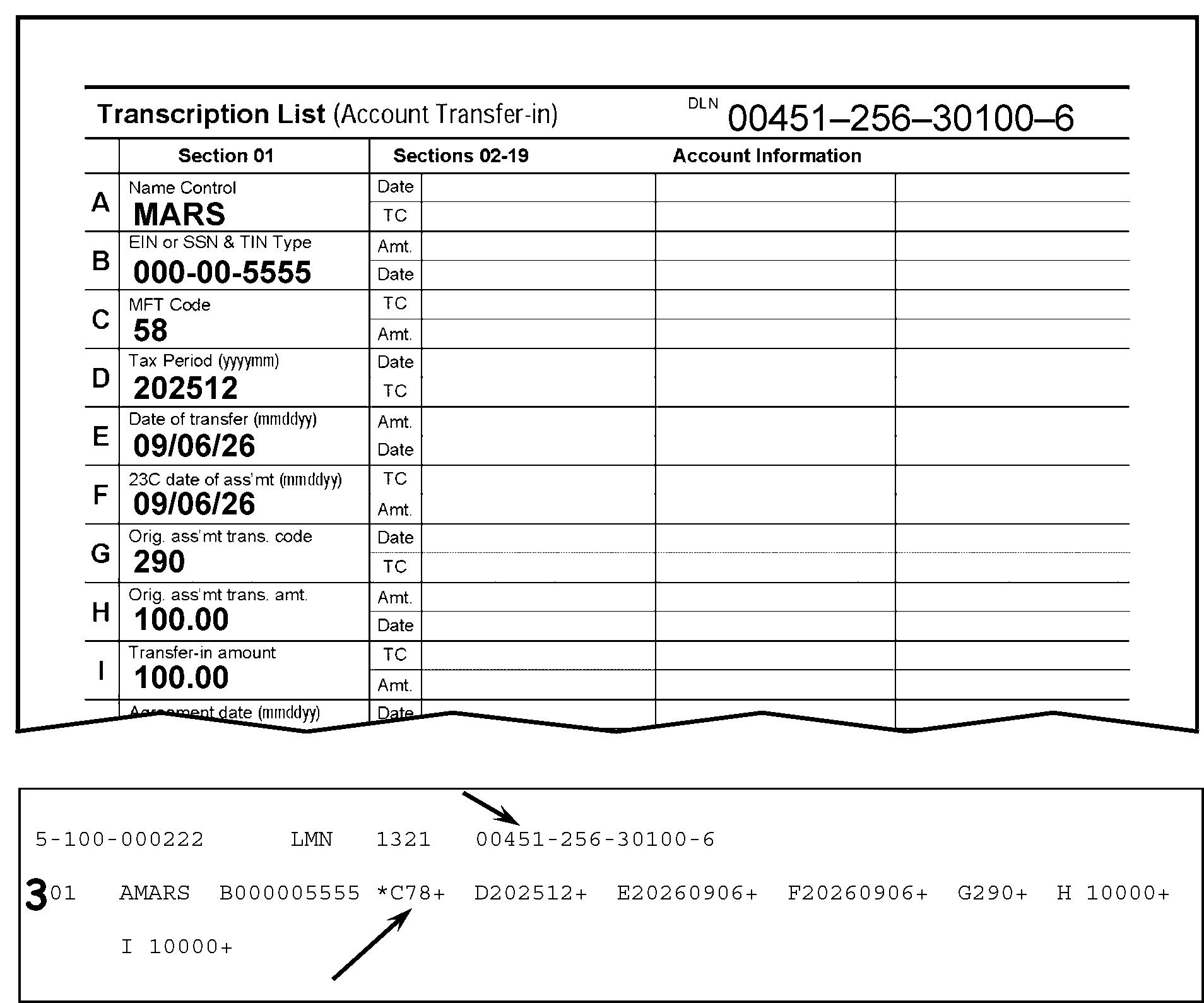
Figure 3.12.21-13 displays a Form 3413, Transcription List (Account Transfer-in), and a part of the error register. The figure shows that Field 01-C - MFT Code, was transcribed incorrectly. Compare the MFT (Field C, Section 01) on the Form 3413 against Field 01-C on the Error Register. Field C on the Form 3413 displays the correct MFT Code 58, while Field 01-C on the error register displays the incorrect MFT Code 78. A downward arrow points to the DLN on the register to show it is the same DLN on the Form 3413. An upward arrow points to the Field 01-C (MFT Code) on the error register to show it is not the same as Field C (Section 01) on the Form 3413. Change the data on the error register to be consistent with Field C on the Form 3413. Other Form 3413 and error register information are provided as follows:The DLN on the Form 3413 is 00451-256-30100-6Under Section 01 (Form 3413), the Name Control (Field A) is MARSField B (EIN or SSN and TIN Type) is 000-00-5555Field C (MFT Code) is 58Field D (Tax Period) is 202512Field E (Date of Transfer) is 09/06/26Field F (23C Date of Assessment) also is 09/06/26Field G (Original Assessment Code) is 290Field H (Original Assessment Transaction Amount) is 100.00Field I (Transfer-in Amount) also is 100.00The error register displays Section 01, Fields A through IAn edited 3 is written to the left of the Section 01 on the register.A downward arrow points to the DLN on the register, showing the 00451-256-30100-6A upward arrow points to the Field C entry on the register, displaying the 78, which contains an asterisk (*)The edited Action Code 3 in the margin to the left of Section 01 informs the ISRP operator to reject the record for renumbering.No other changes are needed.
Please click here for the text description of the image.
3.12.21.4.2.5 (01-01-2016)
Field 01-C - Master File Tax Account Code-MFT (Validity Checks)
-
The Master File Tax Account (MFT) Code is found in Item C (Section 01), Page 1, Form 3413. It is also located in the MFT box on the upper left part of the Form 3552.
-
This is a two-digit field that MUST be present.
-
The MFT is pre-printed or manually entered during the preparation of the document.
-
The MFT must be compatible with the tax class in the DLN.
3.12.21.4.2.6 (01-01-2024)
Field 01-C - Master File Tax Account Code-MFT (Correction Procedures)
-
Compare Field 01-C with the document. Correct any transcription errors.
-
If the MFT is not present, determine the correct code using Exhibit 3.12.21-4, MFT and Tax Class Chart, and the criteria below. Enter the data in Field 01-C, using Action Code 6.
-
If the document is IMF, the MFT must be 30, 31, 35, 55, 65 or 82.
-
If the document is IRAF, the MFT code must be 29.
-
If the document is BMF, the MFT code must be 01, 02, 03, 04, 05, 06, 07, 08, 09, 10, 11, 12, 13, 14, 15, 16, 17, 33, 34, 36, 37, 40, 43, 44, 46, 47, 49, 50, 51, 52, 55, 58, 60, 61, 62, 63, 64, 67, 74, 75, 76, 77, 78, 79, 83, 85, or 86.
-
-
Use the information in the table provided below to determine if the document was numbered correctly. If the MFT was transcribed correctly, compare the MFT and the tax class of the DLN (tax class is the third digit of the DLN). See Figure 3.12.21-14.
Figure 3.12.21-14
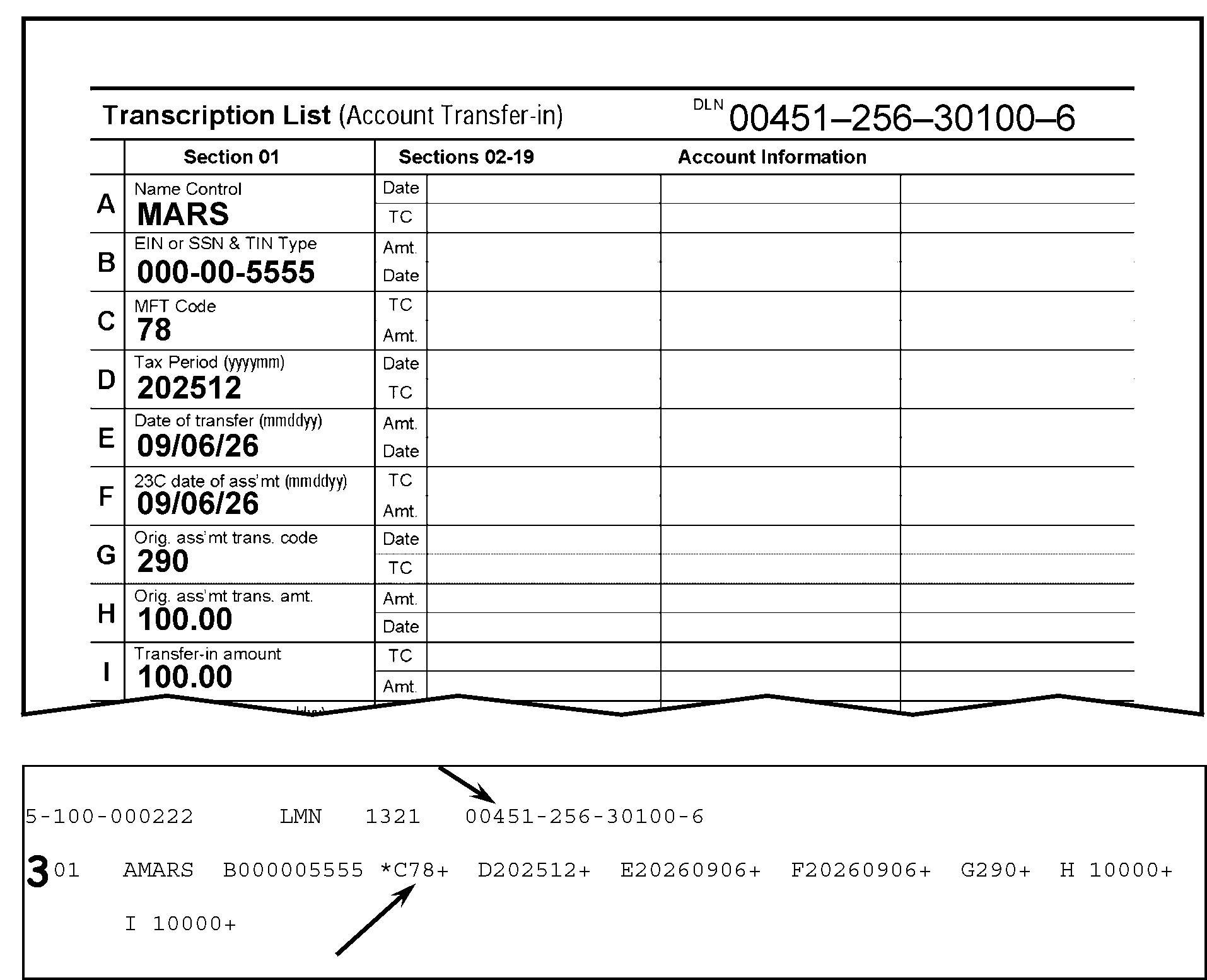
Figure 3.12.21-14 displays parts of the Form 3413, Transcription List (Account Transfer-in), and the error register. The Field 01-C (MFT Code) on the error register and the MFT on the Form 3413 both contain 78, but the form is numbered incorrectly. The third digit in the DLN displays an incorrect tax class of 4; the correct tax class for MFT 78 is 5. other information is provided as follows regarding the Form 3413 and the error register:The DLN on the Form 3413 is 00451-256-30100-6Under Section 01 (Form 3413), the Name Control (Field A) is MARSField B (EIN or SSN and TIN Type) is 000-00-5555Field C (MFT Code) is 78Field D (Tax Period) is 202512Field E (Date of Transfer) is 09/06/26Field F (23C Date of Assessment) also is 09/06/26Field G (Original Assessment Code) is 290Field H (Original Assessment Transaction Amount) is 100.00Field I (Transfer-in Amount) also is 100.00The error register portion displays Section 01, Fields A through IA downward arrow points to the third digit on the DLN on the register (a 4), to show that the tax class in DLN 00451-256-30100-6 is incorrect. The correct tax class for MFT 78 is 5.A upward arrow points to the Field C entry on the register, showing the 78An asterisk (*) is to the left of Field C on the registerThe edited 3 to the left of Section 01 informs the ISRP operator the record must be rejected for renumberingAll of the other fields on the error register correctly contain the same data as displayed on the Form 3413No other changes are needed to this record
Please click here for the text description of the image.
MFT TAX CLASS Valid Section Presence 01 1 01, 02-19, 30-33, 36, 40 02 3 01, 02-19, 20-23, 30-33, 36 03 4 01, 02-19, 30-33, 36, 37-39 04 1 01, 02-19, 30-33 05 2 01, 02-19, 20-23, 30-33, 36 06 2 01, 02-19, 30-33, 36 07 3 01, 02-19, 30-33, 36 08 1 01, 02-19, 20-23, 30-33, 36 09 7 01, 02-19, 30-33, 36, 40 10 8 01, 02-19, 30-33, 36, 41, 42-46 11 1 01, 02-19, 30-33, 36, 40 12 1 01, 02-19, 30-33, 36, 40 13 3 01, 02-19, 30-33, 36 14 1 01, 02-19, 30-33, 36, 40 15 2 01, 02-19, 30-33 16 1 01, 02-19, 30-33, 36 17 1 01, 02-19, 20-23, 30-33, 36 29 2 01, 02-19, 30-33, 36, 37 30, 31 2 01, 02-19, 20-23, 30-33, 36 33 3 01, 02-19, 20-23, 30-33, 36 34 3 01, 02-19, 20-23, 30-33, 36 35, 65 2 01, 02-19, 20-23, 30-33, 36 36 4 01, 02-19, 30-33, 36 37 4 01, 02-19, 30-33, 36 40 4 01, 02-19, 30-33, 36 43 4 01, 02-19, 30-33, 36 44 4 01, 02-19, 30-33, 36 46 3 01, 02-19, 20-23, 30-33 47 4 01, 02-19, 30-33, 36 49 4 01, 02-19, 30-33, 36-39 50 4 01, 02-19, 30-33, 36-39 51 5 01, 02-19, 30-33, 36 52 5 01, 02-19, 30-33, 36 55 2 01, 02-19, 30-33, 36 58 4 01, 02-19, 30-33, 36 60 4 01, 02-19, 30-33, 36 61 4 01, 02-19, 30-33, 36, 37-39 62 4 01, 02-19, 30-33, 36 63 4 01, 02-19, 30-33, 36 64 4 01, 02-19, 30-33, 36 65 2 01, 02-19, 20-23, 30-33, 36 67 4 01, 02-19, 30-33, 36 74 4 01, 02-19, 30-33, 36, 37-39 75 4 01, 02-19, 30-33, 36, 37-39 76 4 01, 02-19, 30-33, 36, 37-39 77 5 01, 02-19, 30-33, 36 78 5 01, 02-19, 30-33, 36 79 4 01, 02-19, 30-33, 36, 37-39 82 2 01, 02-19, 30-33 83 3 01, 02-19, 30-33 85 3 01, 02-19, 20-23, 30-33 86 3 01, 02-19, 20-23, 30-33 -
If the document was numbered incorrectly, reject the document for renumbering, using Action Code 3.
-
If the MFT was transcribed incorrectly and the MFT on the document is compatible with the tax class in the DLN, correct Field 01-C.
Reminder:
If necessary, use the procedures in IRM 3.12.21.4.2.4(3) above to identify the originator (to whom the Form 4227 (and document) should be sent for research and correction).
-
IF THE MFT IS CORRECTED TO 03, 50, OR 61 ON A DOC CODE 51 RECORD, BE SURE THE ABSTRACT REQUIREMENTS OF SECTIONS 36-39 ARE MET BY ADDING SECTIONS IF NECESSARY. (See Table IRM 3.12.21.4.2.8.)
-
IF THE ABSTRACT REQUIREMENTS ARE NOT IN THE SECTION 36-39 REJECT, USE ACTION CODE 3. (See Figure 3.12.21-15.)
Figure 3.12.21-15
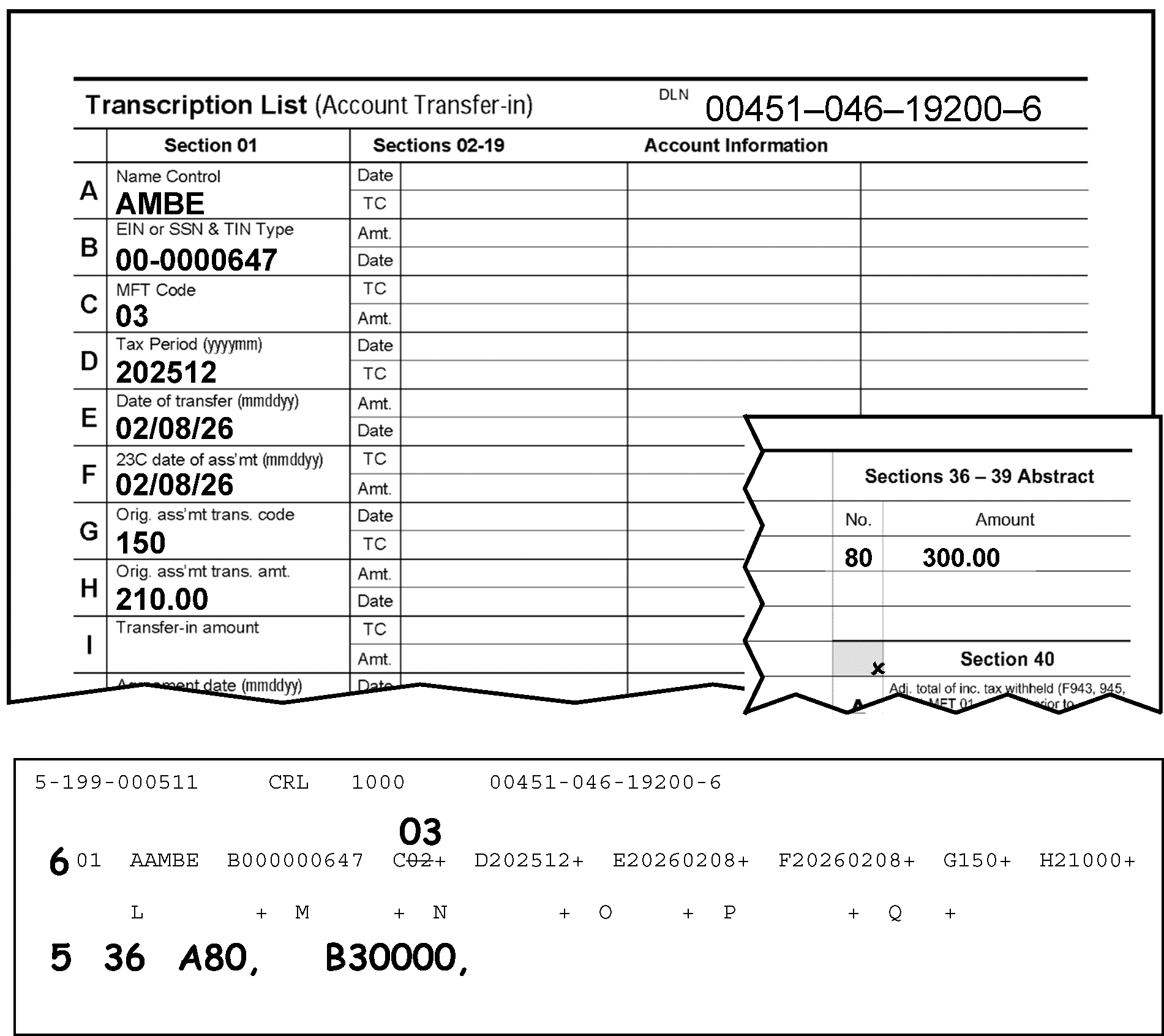
Figure 3.12.21.15 displays two Sections of the Form 3413, Transcription List (Accounts Transfer-in), and a part of the error register. Figure 3.12.21-15 provides an example of an error requiring the addition of Abstract requirements in the Section 36 - 39. The figure contains a the top half of Form 3413, the error register part displaying Section 01, and a small part of the Form 3413 displaying Section 36 - 39 with Abstract information on Page 2 (Form 3413). This figure provides an example where the Abstract requirements were omitted from the record. Details regarding this figure are provided as follows:The DLN on the Form 3413 is 00451-046-19200-6.Under Section 01 (Form 3413), the Name Control (Field A) is AMBE.Field B (EIN or SSN and TIN Type) is 00-0000647.Field C (MFT Code) is 03.Field D (Tax Period) is 202512.Field E (Date of Transfer) is 02/08/26.Field F (23C Date of Assessment) also is 02/08/26.Field G (Original Assessment Code) is 150.Field H (Original Assessment Transaction Amount) is 210.00 (two hundred ten dollars and zero cents).Also present is a portion/insert of Sections 36 - 39 Abstract (Page 2, Form 3413).The number 80 is listed under the No. (number) column of Sections 36 - 39.To the right of the No. (number) column is 300.00 (three-hundred dollars) is listed under the Amount column.The error register displays Section 01, Fields A through Q. An edited Action Code (AC) 6 is to the left of the Section 01. The transcribed entry 02 in Field 01-C is lined out and 03 is edited above it. In the area beneath Section 01 (Fields A through Q) on the register, are the edited literals 5 (for Action Code 5), 36, (for Section 36), A80, and B30000, to inform the ISRP operator that Section 36, Field A and Field B on the document contain entries and they must be added to the transcribed record. ISRP transcribers must make the (MFT) change to Field 01-C in Section 01 and add Section 36 to the transcribed record: specifically, adding 80 to Field A, and 30000 (three hundred dollars and zero cents to Field B).All other fields on the error register correctly contain the same data as displayed on the Form 3413, and no other changes are needed to this record.
Please click here for the text description of the image.
3.12.21.4.2.7 (01-01-2025)
Field 01-D - Tax Period (Validity Checks)
-
The Tax Period is found in Item D (Section 01), Page 1, Form 3413. It is also located in the Tax Period box on the upper left part of the Form 3552 (to the right of the MFT box).
-
This field MUST be present, contain six digits, and be all numeric.
-
It is edited in YYYYMM format. The first four positions represent the year, and the last two positions represent the month of the tax period.
-
The month in the tax period must be 01 through 12.
Exception:
MFT 52 (Form 706) is valid with a tax period of 000000.
-
MFTs 58, 60, 61, 62, 63, and 64 use the tax period beginning date as the tax period. All other MFTs use the tax period ending date as the tax period with the exception of MFT 52 (see IRM 3.12.21.4.2.7(4) above).
-
Field 01-D (Tax Period) and Field 01-C (Master File Tax Account Code) will appear invalid if EITHER of the following conditions (as displayed in the table below) are not correct:
CONSISTENCY CHECK: MFT CODE AND TAX PERIOD
Field 01-C (MFT CODE) will appear invalid if: AND Field 01-D (TAX PERIOD): Field 01-D will appear invalid if MFT is 30 or 31 The tax period is before 196212. Field 01-D will appear invalid if MFT is 29 The tax period is before 197512. Field 01-D will appear invalid if MFT is 55 The tax period is before 197512. Field 01-D will appear invalid if MFT is 35 The tax period is before 201412 (also note the following conditions): * Valid for Tax Period 201812 and prior * Invalid for Tax Years 201912 and later * PRN 692 and Transaction Code TC-240 or TC-241 or TC-290 or TC-291 must be present Field 01-D will appear invalid if MFT is 43 The tax period is before 201512. Field 01-D will appear invalid if MFT is 65 The tax period is before 201412. Field 01-D will appear invalid if MFT is 82 The tax period is before 201712. Field 01-D will appear invalid if MFT is 83 The tax period is before 201712. -
Field 01-D (Tax Period) will appear invalid, along with Fields 20A-E or I (Transaction Code), if the tax period is other than 197810 through 198011 and the transaction code is 63X. 63X equals 630, 632, 636, and 637 (for MFT 02, 05, 30, 31, 33, and 34 only). (See Figure 3.12.21-16.)
Figure 3.12.21-16
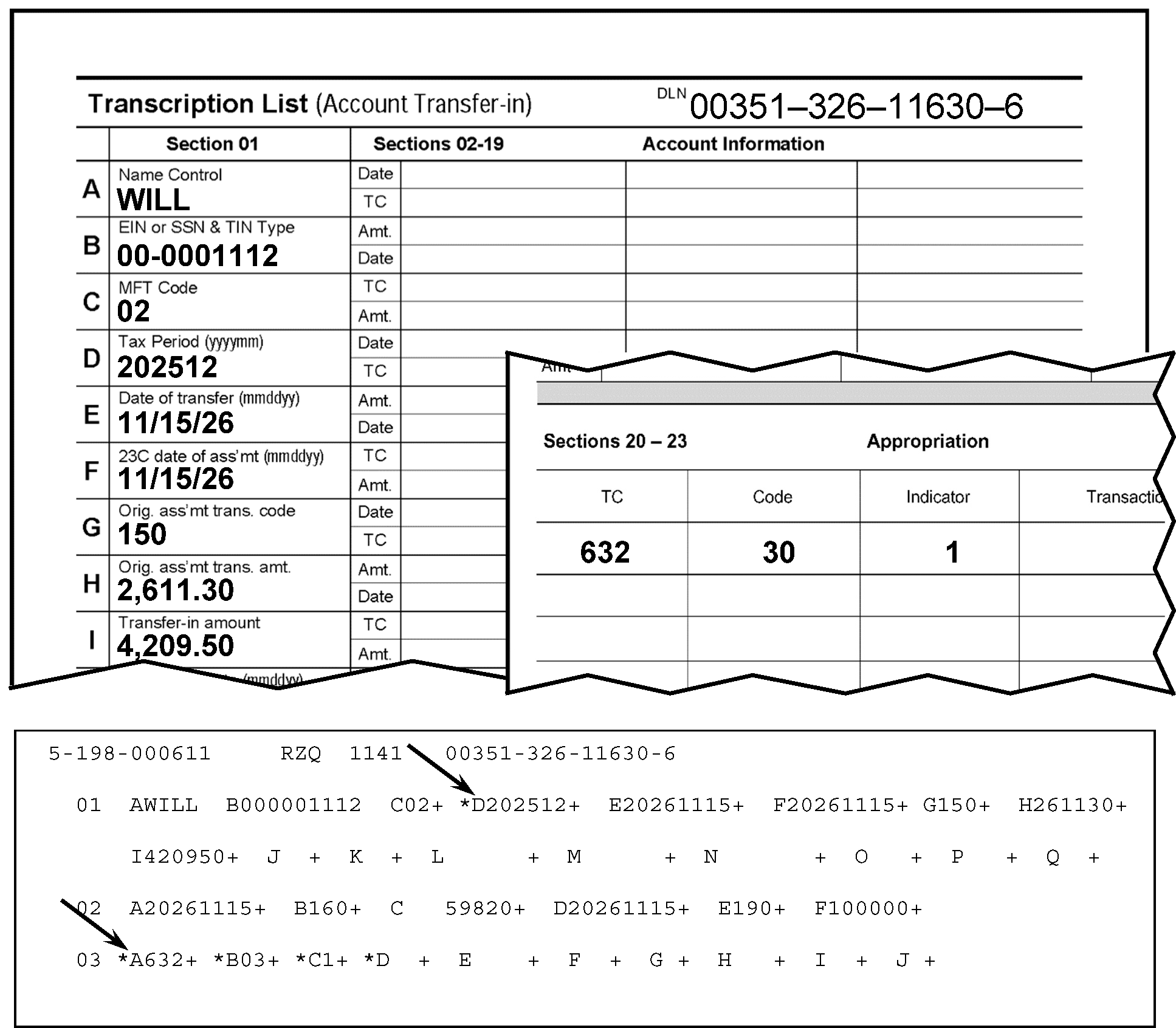
Figure 3.12.21-16 illustrates how Field 01-D, Tax Period, is invalid when the tax period is other than 197810 through 198011, and the transaction code is 632. In this case, the Tax Period shown in Field 01-D is 202512.The DLN on the Form 3413 is 00351-326-11630-6.Under Section 01 (Form 3413), the Name Control (Field A) is WILL.Field B (EIN or SSN and TIN Type) is 00-0001112.Field C (MFT Code) is 02.Field D (Tax Period) is 202512.Field E (Date of Transfer) is 11/15/26.Field F (23C Date of Assessment) also is 11/15/26.Field G (Original Assessment Code) is 150.Field H (Original Assessment Transaction Amount) is 2,611.30.Field I (Transfer-in Amount) is 4,209.50.Also present is a portion/insert showing both Sections 20 - 23 and Appropriation (displaying 4 columns: TC (Transaction Code), Code (MFT Code), Indicator, and Transaction Amount from Page 2, Form 3413).Transaction Code 632 is listed under the TC column of Sections 20 - 23.MFT Code 30 is listed under the Code column of Sections 20 - 23.The number 1 is listed under the Indicator (Appropriation) column of Sections 20 - 23. NOTE: There is NO Transaction Amount listed on this figure.The error register part is listed beneath the two cutoff parts of the Form 3413.The error register displays three sections: Section 01, Fields A through X; Section 02, Fields A through F; and Section 03, Fields A through I.A downward arrow points to the Field D (Tax Period) in Section 01 (of the error register), displaying 202512, shown here with an asterisk (*) immediately to the left of the (Field) D.A second downward arrow points to the 632 in Section 03, Field A (Transaction Code), to indicate this Transaction is not valid for this tax period. Section 03 has 4 fields in error (with asterisks (*)): Field 03-A (Transaction Date), Field 03-B (Transaction Code), Field 03-C (Transaction Amount), and Field 03-D (Transaction Date). There is NO other data for this transaction.
Please click here for the text description of the image.
.
-
Field 01-D (Tax Period), Field 01-C (Master File Tax Account Code), AND Field 01-M (Reference Number), will appear invalid if EITHER of the following conditions (as displayed in the table below) are not correct:
CONSISTENCY CHECKS: TAX PERIOD, MFT CODE, AND REFERENCE NUMBER
Field 01-D (Tax Period): Field 01-C (MFT): And Field 01-M (Reference Number): The tax period is prior to 198909 The MFT Code is not 29 The Reference Number is 686 (See Figure 3.12.21-17). Confirmed 09032021. The tax period is prior to 199012 The MFT is 13 The Reference Number is 649. Confirmed 09032021. The tax period is prior to 199012 The MFT is 13 The Reference Number is 678 The tax period is prior to 199712 The MFT is 55 The Reference Number is 627. Confirmed 09032021. The tax period is prior to 200209 The MFT is 13 or MFT 55 The Reference Number is 708 or 709. Confirmed 09032021. The tax period is prior to 200705 The MFT is 30 The Reference Number is 687. Confirmed 09032021. The tax period is prior to 201512 The MFT is 01, 02, 03, 04, 05, 07, 09, 10, 11, 12, 14, 15, 16, 31, 33, 34, 37, 38, 39, 40, 41, 42, 43, 44, 50, 51, 52, 60, 63, 64, 77 OR 78 The Reference Number is 687. Confirmed 09032021. The tax period is prior to 200912 The MFT is 30 The Reference Number is 677 or 706. Confirmed 09032021. The tax period is prior to 201003 The MFT is 46 The Reference Number is greater than 291 and less than 296. Confirmed 0903 and 09172021. The tax period is prior to 201003 The MFT is either 02, 03, 05, 06, 07 30, 31, 34, 51, 52, 55 The Reference Number is 683. Confirmed 09032021. The tax period is prior to 201003 The MFT is either 30 or 31 The Reference Number is 700. Confirmed 09032021. The tax period is prior to 201003 The MFT is either 30 or 31 The Reference Number is 710. Confirmed 09032021. The tax period is not equal to or within 201112 through 202203 The MFT is 01 The Reference Number is 290; or, Confirmed 09032021. The tax period is not equal to or within 201112 through 202212 The MFT is either****11 or 14 The Reference Number is 290. Confirmed 09032021. The tax period is prior to 201409 The MFT is 79 The Reference Number is 290 or 298. Confirmed 09202021. The tax period is prior to 201612. The MFT is 13. The Reference Number is 700 or 710. Confirmed 09032021. The tax period is prior to 201701 (and month (MM) of Tax Period is not 03, 06, 09, or 12) The MFT is 13. The Reference Number is 519. Confirmed 09032021. The tax period is prior to 201701 The MFT is BMF MFT 05 The Reference Number is 519 The tax period is before 201801 The MFT is 13 The Reference Number is 693. Confirmed 09032021. The tax period is before 201801 The MFT is 13 The Reference Number is 694. Confirmed 09032021. -
Figure 3.12.21-17
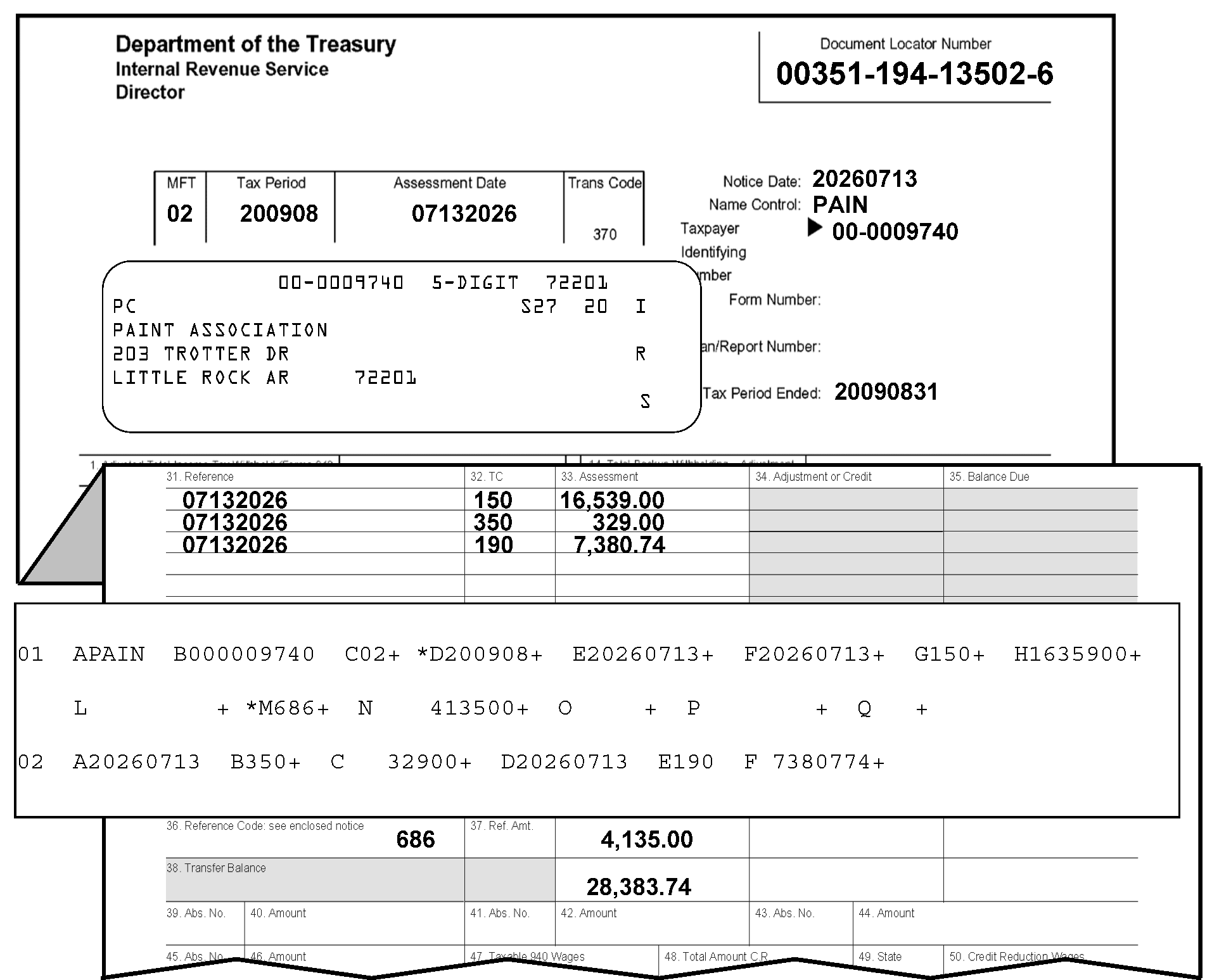
Figure 3.12.21-17 displays parts of a Form 3552 (Prompt Assessment Billing Assembly) and an error register. Figure 3.12.21-17 provides an example of an invalid record for this MFT and Reference Number. The Tax Period (Field 01-D) is 200908, the MFT Code is 02, and Reference Number is 686. Specific details regarding this illustration are provided as follows:In the upper left corner of the Form 3552 are three organization headings listed vertically: Department of the Treasury, Internal Revenue Service and Director, respectivelyIn the upper right corner opposite those three headings is the Document Locator Number box, with the document locator number, 00351-194-13502-6.About two lines beneath that information is a single box with four conjoined boxes marked as MFT, Tax Period, Assessment Date and Trans Code. Immediately to the right of this four-part box are three rows, in vertical order, marked Notice Date, Name Control and Taxpayer Identifying Number respectively.The MFT is 02The Tax Period is 200908The Assessment Date is 07132026The Trans Code is 370Immediately to the right of the Trans Code box are the Notice Date, the Name Control, and the Taxpayer Identifying Number, in vertical sequence to one another, respectively.The Notice Date is 20260713The Name Control is PAIN, andThe Taxpayer Identifying Number is 00-0009740 A preprinted label is on the following line contains the taxpayer information box with five lines of printed text; the first line displays, in label format, the following items in the following order:The TIN is printed in the top middle part of the taxpayer information box (00-0009740)On that same line, to the right of the TIN are the literals 5-DIGIT, followed by two spaces, followed by 72201 (the ZIP code)On the following line, are the literals PC, S27 and 20 (not in close proximity to one another)The third of the taxpayer information box is the taxpayer's name: Paint AssociationThe fourth line of the taxpayer information box displays the taxpayer's street address: 203 Trotter DriveThe fifth line of the taxpayer information box displays the taxpayer's city, state and zip code: Little Rock AR 72201Flushed with the right margin of the taxpayer information box are the letters, IRS, displayed vertically (alternating with spaces between the letters)To the right of the taxpayer information box are three more items: Form Number, Plan/Report Number and Tax Period Ended, in vertical order, respectivelyOf the three, only the Tax Period Ended displays an entry: 20090831Immediately beneath this information, the Form 3552 is folded to display the following three columns with three rows of date and money amount information.The three columns are Item 31, Reference, Item 32, TC (for transaction code), and Item 33, Assessment.The first row of information beneath the three columns displays 07132026, 150, and 16,539.00, respectively.The second row of information displays 07132026, 350, and 329.00, respectively.The third row of information displays 07132026, 190, and 7,380.74, respectively.Directly beneath these three rows of information, is an error register portion displaying Section 01, Fields A through X, and Section 02, Fields A through F.Field D (200908) and Field M (686) of Section 01 contain asterisks; (*) because they are in error. The tax period is NOT prior to 198909, the Reference Number is 686, the MFT is 02 (Field C, Section 01).Also present beneath the error register insert part is the bottom part of the Form 3552, displaying Item 36 (Reference Code see enclosed notice) and Item 37 (Ref. Amount). The Reference Code in Item 36 is 686, and Item 37 Reference Amt. is blank.To the right of Item 37 are two assessment dollar amounts (located under the Assessment Column/Item 33).The amount located to the right of Item 37 and under the Assessment Column/Item 33 is $4,135.00 and directly beneath that amount is (the total amount) of $28,383.74.There are no other entries or edit marks displayed on Figure 3.12.21-17.
Please click here for the text description of the image.
-
-
Field 01-D (Tax Period), Field 01-C (Master File Tax Account Code), Field 01-G (Transaction Code), AND Field 01-M (Reference Number), will appear invalid (along with the Transaction Codes) if EITHER of the following conditions (as displayed in the table below) are not correct:
CONSISTENCY CHECKS: REFERENCE NUMBER, TRANSACTION CODE, MFT, AND TAX PERIOD
Field 01-M (REFERENCE NUMBER): Field 01-G (TRANSACTION CODE): Field 01-C (MFT): Field 01-D (Tax Period): If the Reference Number is 692****AND The Transaction Code in Section 01 is TC-240 or TC-290 AND the Transaction Code in Section 02-19 EITHER is blank, 190, 240, 241, 290 and/or 291, AND The MFT is 35 AND The Tax Period is equal to or before 201812. Confirmed 09272021. If the Reference Number is 692 AND The Transaction Code in Section 01 is TC-240 or TC-290 AND the Transaction Code in Section 02-19 EITHER is blank, 190, 240, 241, 290 and/or 291, AND The MFT is 65 AND The Tax Period is equal to or before 201812. Confirmed 09272021. If the Reference Number is EITHER700OR****710 The Transaction Code in Section 01 EITHER is 240 or 290 AND the Transaction Code in Section 02-19 EITHER is blank, TC-190 or TC 240 or TC 241 and/or TC-29X through 30X The MFT is 55 The tax period is prior to 201003. Confirmed 09032021 If the Reference Number is 707 The Transaction Code in Section 01 EITHER is TC-240 or TC-290 AND the Transaction Code in Section 02-19 EITHER is blank, TC-190 or TC- 240 or TC- 241, TC-290 and/or TC-291 The MFT is BMF MFT 05 The tax period is prior to 201701 Confirmed 09032021 If the Reference Number is 707 The Transaction Code in Section 01 EITHER is TC-240 or TC-290 AND the Transaction Code in Section 02-19 EITHER is blank, TC-190 or TC- 240 or TC- 241, TC-290 and/or TC-291 The MFT is IMF MFT 30 The tax period is prior to 201701 Confirmed 09032021. If the Reference Number is 707 The Transaction Code in Section 01 EITHER is TC-240 or TC-290 AND the Transaction Code in Section 02-19 EITHER is blank, TC-190 or TC- 240 or TC-241, TC-290 and/or TC-291 The MFT is IMF MFT 31 The tax period is prior to 201701. (Confirmed 09032021.) -
FORM 3552 ONLY (displaying TC-767 and other TCs): Field 01-C (Master File Tax Account Code), Field 01-D (Tax Period), along with the Transaction Codes will appear invalid if EITHER of the following conditions (as displayed in the table below) are not correct:
CONSISTENCY CHECKS (FORM 3552): TC-767, MFT, TAX PERIOD AND TRANSACTION CODE
FORMAT CODE (for Form 3552) TRANSACTION CODE: AND Field 01-C (MFT): AND Field 01-D (Tax Period): AND TRANSACTION CODE): Form 3552 (Format Code 325 or 326) IF Transaction Code in Section 02-19 is equal to 767****AND MFT Code is 01, AND The Tax Period EITHER is 202003, 202006, 202009, OR 202012, or greater than 202105 AND Transaction Code in Section 01 is 150, 290, 294, 298, 300, 304 or 308 AND the Transaction Code in Sections 02-19 EITHER is blank, 150, 290, 291, 294, 295, 298, 299, 300, 301, 304, 305, 308, and/or 309. (CONFIRMED 06262023.) Form 3552 (Format Code 325 or 326) OR, IF Transaction Code in Section 02-19 is equal to 767****AND The MFT is EITHER****09, 11, or 14****AND The Tax Period IS 202012, or greater than 202111 AND Transaction Code in Section 01 is 150, 290, 294, 298, 300, 304 or 308 AND the Transaction Code in Sections 02-19 EITHER is blank, 150, 290, 291, 294, 295, 298, 299, 300, 301, 304, 305, 308, and/or 309. (CONFIRMED 06262023.) -
FORM 3413 ONLY (displaying TC-766 or TC-767 and other TCs): and Reference Numbers 280, 296, or 299): Field 01-D (Tax Period), Field 01-C (Master File Tax Account Code), Field 01-M (Reference Number), along with the Transaction Codes will appear invalid if EITHER of the following conditions (as displayed in the table below) are not correct:
CONSISTENCY CHECKS (FORM 3413): TC-766 OR TC-767, TAX PERIOD, MFT, TRANSACTION CODE, REFERENCE NUMBER
FORMAT CODE (for Form 3413) TRANSACTION CODE: Field 01-D (TAX PERIOD) Field 01-C (MFT) TRANSACTION CODE Field 01-M (REFERENCE NUMBER) Form 3413 (Format Code 025 or 026) IF Transaction Code in Section 02-19 is equal to 766 or 767****AND Tax Period is EITHER 202003, 202006, 202009, OR 202012 AND MFT Code is 01, AND Transaction Code in Section 01 is EITHER, 150, 290, 294, 298, 300, 304 or 308, AND Transaction Code in Section 02-19 EITHER is blank, 150, 290, 291, 294, 295, 298, 299, 300, 301, 304, 305, 308 and/or 309 AND Reference Number equals 280, 296, or 299 (Form 3413 (Format Code 025 or 026)) OR IF Transaction Code in Section 02-19 is equal to 766 or 767****AND Tax Period is 202012 AND the MFT is EITHER****09, 11, or 14****AND The Transaction Code in Section 01 is EITHER, 150, 290, 294, 298, 300, 304, or 308, AND Transaction Code in Section 02-19****EITHER is blank, 150, 290, 291, 294, 295, 298, 299, 300, 301, 304, 305, 308, and/or 309, AND Reference Number equals 280, 296, or 299. -
FORM 3413 ONLY (displaying TC-766 or TC-767 and other TCs) and Reference Numbers 271 or 276), Field 01-C (Master File Tax Account Code), Field 01-D (Tax Period), Field 01-M (Reference Number), along with the Transaction Codes, will appear invalid if EITHER of the following conditions (as displayed in the table below) are not correct:
CONSISTENCY CHECKS (FORM 3413): TC-766 OR TC-767, MFT, TAX PERIOD, REFERENCE NUMBER, TRANSACTION CODE
FORMAT CODE (for Form 3413) TRANSACTION CODE: Field 01-C (MFT) Field 01-D (TAX PERIOD) Field 01-M (REFERENCE NUMBER) TRANSACTION CODE Form 3413 (Format Code 025 or 026), AND Transaction Code in Section 02-19 is equal to 766 or 767****AND MFT Code is 01, AND Tax Period is greater than or equal to 202106, AND, Reference Number equals 271 or 276 AND, The Transaction Code in Section 01 is EITHER, 150, 290, 294, 298, 300, 304, or 308, AND Transaction Code in Section 02-19****EITHER is blank, 150, 290, 291, 294, 295, 298, 299, 300, 301, 304, 305, 308, and/or 309. Confirmed 06262023. OR, Form 3413 (Format Code 025 or 026), AND IF Transaction Code in Section 02-19 is equal to 766 or 767, AND The MFT is EITHER****09, 11, or 14****AND The Tax Period is greater than or equal to 202112, AND Reference Number equals 271 or 276, AND, The Transaction Code in Section 01 is EITHER, 150, 290, 294, 298, 300, 304, or 308, AND Transaction Code in Section 02-19****EITHER is blank, 150, 290, 291, 294, 295, 298, 299, 300, 301, 304, 305, 308, and/or 309. (Confirmed 06262023.) -
Field 01-M (Reference Number), Field 01-N (Reference Number Amount), Field 01-G (Transaction Code) AND Field 01-H (Transaction Amount) will appear invalid if EITHER of the following conditions (as displayed in the table below) are NOT correct:
CONSISTENCY CHECK: REFERENCE NUMBER, REFERENCE AMOUNT, TRANSACTION CODE, TRANSACTION AMOUNT
Field 01-M (Reference Number) Field 01-N (Reference Number Amount) Field 01-G (Transaction Code) Field 01-H (Transaction Amount) IF Reference Number is 722 OR 723 AND The Reference Number Amount is less than or equal to zero, AND Transaction Code in Section 01 is 160 OR Transaction Code in Section 02-19 is 160, AND Transaction Amount is greater than zero (0). (CONFIRMED 01282022.) RE: FOOTNOTE: REFERENCE NUMBERS 722 OR 723 (PARAGRAPH (13) ABOVE)
REFERENCE NUMBERS SPECIAL TO THIS PROCESS (EXAM) 722 OR 723 * The rule is that TC 240 with PRN 722 or 723 AND TC 160 cannot both be positive amounts. * PRN 722 replaced the TC 160 so if PRN 722 or 723 is a net positive amount then the net TC 160/161/166/167 must be $0 if TC 160/161/166/167 was previously assessed. * Also, for accounts transfer purposes you would not be transferring the TC 160 with the PRN 722/723. * Only the PRN 722 or 723 would be transferred in this situation. -
Field 01-M (Reference Number) , Field 01-C (Master File Tax Account Code), Field 01-G (Transaction Code) AND Field 01-H (Transaction Amount) will appear invalid if EITHER of the following conditions (as displayed in the table below) are NOT correct:
CONSISTENCY CHECKS: REFERENCE NUMBER, MFT CODE, TRANSACTION CODE, TRANSACTION AMOUNT
Field 01-M (REFERENCE NUMBER) Field 01-C (MFT Code) Field 01-G (Transaction Code) Field 01-H (Transaction Amount) If Reference Number is 722 AND The MFT Code equals 02, 06 OR 07, AND Transaction Code in Section 01 is TC 290 or TC 300 AND the Transaction Amount equals zero (0), AND, the Transaction Code in Section 02-19 is 240 or 241 OR the Transaction Code in Section 02-19 is 290, 291, 300 and/or 301 AND the Transaction Amount equals zero (0), See also Special (Footnote table below for 722, Second Row)). (CONFIRMED 01282022.)Valid for all tax periods. OR IF Reference Number is 723 AND The MFT Code equals 02 or 06 AND Transaction Code in Section 01 is TC 290 or TC 300 AND the Transaction Amount equals zero (0), AND, the Transaction Code in Section 02-19 is 240 or 241 OR the Transaction Code in Section 02-19 is 290, 291, 300 and/or TC 301 AND the Transaction Amount equals zero (0), See also Special (Footnote table below for 723, Third Row)). (CONFIRMED 01282022)Valid for all tax periods. RE: FOOTNOTE: REFERENCE NUMBERS 722 OR 723 (PARAGRAPH (14) ABOVE)
REFERENCE NUMBERS SPECIAL TO THIS PROCESS (EXAM) 722 - AND The MFT Code equals 02, 06 OR 07, AND (Paragraph (14); Second Row (table)) * The TC 240/241 PRN 722 amount can be any amount ($0, positive, or negative). * Also, PRN 722 and 723 cannot both be net positives and present on an account. OR 723 - AND The MFT Code equals 02 or 06 AND(Paragraph (14); Third Row (table)) * The TC 240/241 PRN 722 amount can be any amount ($0, positive, or negative). * Also, PRN 722 and 723 cannot both be net positives and present on an account. -
Field 01-M (Reference Number), Field 01-C (MFT Code), AND Field 01-G (Transaction Code) will appear invalid if EITHER of the following conditions (as displayed in the table below) are NOT correct:
CONSISTENCY CHECKS: REFERENCE NUMBER, MFT CODE, TRANSACTION CODE
Field 01-M (REFERENCE NUMBER) Field 01-C (MFT Code) Field 01-G (Transaction Code) IF Reference Number is 724****AND MFT Code is 05, AND Transaction Code in Section 01 is 160 OR Transaction Code in Section 02-19 is 160. (CONFIRMED 01282022.) RE: FOOTNOTE: REFERENCE NUMBER 724 (PARAGRAPH (15) ABOVE)
REFERENCE NUMBER SPECIAL TO THIS PROCESS (EXAM) IF Reference Number is 724 AND MFT Code is 05, AND Transaction Code in Section 01 is 160 OR Transaction Code in Section 02-19 is 160 * PRN 724 is not related to TC 160. * It does not need to be present on the module. -
Field 01-M (Reference Number), Field 01-C (Master File Tax Account Code), Field 01-D (Tax Period), AND Field 01-G (Transaction Code) will appear invalid if EITHER of the following conditions (as displayed in the table below) are NOT correct:
CONSISTENCY CHECK: REFERENCE NUMBER, MFT, TAX PERIOD, TRANSACTION CODE
Field 01-M (Reference Number) Field 01-C (MFT Code) Field 01-D (Tax Period) Field-01 G (Transaction Code) IF Reference Number is 724, AND MFT Code is MFT 02, OR MFT 05, OR MFT 06, AND Tax Period is equal to or greater than 201712, AND Transaction Code in Section 01 is TC 290 or TC 300 AND Transaction Code in Section 02-19 is blank, 240, 241, 290, 291, 300 and/or 301. (CONFIRMED 01282022.) If Reference Number is 793 AND MFT Code is MFT 30 or MFT 31 AND Tax Period is equal to or greater than 202101 AND Transaction Code in Section 01 is TC 290 or TC 300 AND Transaction Code in Section 02-19 is blank, 240, 241, 290, 291,300 and 301. (Confirmed 05242023.) -
Field 01-D (Tax Period), will appear invalid, along with Field 01-M (Reference Number) if EITHER of the following conditions (as displayed in the table below) are not correct:
CONSISTENCY CHECK: TAX PERIOD AND REFERENCE NUMBER
Field 01-D (Tax Period): AND Field 01-M (Reference Number): Prior to 201006 The Reference Number is 682 Prior to 198709 The Reference Number is 685 Confirmed 09032021 Prior to 201006 The Reference Number is 780 or 781 Confirmed 09082021 -
Field 01-M (Reference Number), Field 01-C (Master File Tax Account Code), AND Field 01-N (Reference Number Amount), will appear invalid if EITHER of the following conditions (as displayed in the table below) are not correct:
CONSISTENCY CHECK: REFERENCE NUMBER, MFT, REFERENCE NUMBER AMOUNT
Field 01-M (Reference Number): Field 01-C (MFT): And Field 01-N (Reference Number Amount): Reference Number is 528 MFT is 55 Reference Number Amount is greater than $10,000. Confirmed 09082021. -
Field 01-M (Reference Number), Field 01-C (Master File Tax Account Code), Field 01-N (Reference Number Amount) and Field 01-D (Tax Period), will appear invalid if EITHER of the following conditions (as displayed in the table below) are not correct:
CONSISTENCY CHECK: REFERENCE NUMBER, MFT, REFERENCE NUMBER AMOUNT, TAX PERIOD
Field 01-M (Reference Number): Field 01-C (MFT): Field 01-N (Reference Number Amount): Field 01-D (Tax Period): When Reference Number is 658 AND MFT Code is 13 Reference Number Amount can't exceed $5,000.00 * The Tax Period can't be prior to 199812, OR * the Month of Tax Period can't be other than 12. CONFIRMED 09022021. -
Field 01-M (Reference Number), Field 01-N (Reference Number Amount) and Field 01-D (Tax Period), will appear invalid if EITHER of the following conditions (as displayed in the table below) are not correct:
CONSISTENCY CHECK - REFERENCE NUMBER, REFERENCE NUMBER AMOUNT, AND TAX PERIOD
Field 01-M (Reference Number): Field 01-N (Reference Number Amount): Field 01-D (Tax Period): If Reference Number is 678. The dollar amount can't be greater than $50,000.00. * The Tax Period is earlier than 198512, OR * the Month of Tax Period can't be other than "12" . CONFIRMED 09142021. -
Field 01-M (Reference Number), Field 01-C (Master File Tax Account Code), Field 01-D (Tax Period), and Field 01-N (Reference Number Amount), will appear invalid if EITHER of the following conditions (as displayed in the table below) are not correct:
CONSISTENCY CHECK - REFERENCE NUMBER, MFT, TAX PERIOD OR REFERENCE NUMBER AMOUNT
Field 01-M (Reference Number): Field 01-C (MFT): Field 01-D (Tax Period): Field 01-N (Reference Number Amount): If Reference Number is 663, MFT is 13, AND the Tax Period is before 200008, OR the Reference Number Amount is greater than $50,000, ALL three fields i.e., Fields 01-M, 01-C, and 01-D OR Fields 01-M, 01-C, and 01-N will appear invalid. CONFIRMED 09022021. -
Field 01-M (Reference Number), Field 01-C (Master File Tax Account Code), and Field 01-D (Tax Period), along with the Transaction Code (TC), will appear invalid if EITHER of the following conditions (as displayed in the table below) are not correct:
CONSISTENCY CHECKS: REFERENCE NUMBER, MFT, TRANSACTION CODE, AND TAX PERIOD
Field 01-M (Reference Number): Field 01-C (MFT): TRANSACTION CODE (TC) Field 01-D (Tax Period): IF the Reference Number is 700 the MFT is 55 The Transaction Code in Section 01 is EITHER TC-240 or TC-290 AND Section 02-19 is blank, TC-190, 240 or 241 and/or 29X or 30X If the tax period is equal to or greater than 201003. (Confirmed 09272021.) IF the Reference Number is 710 the MFT is 55, The Transaction Code in Section 01 is EITHER TC-240 or TC-290 AND Section 02-19 is blank, TC-190, 240 or 241 and/or 29X or 30X If the tax period is equal to or greater than 201003. (Confirmed 09272021,) IF the Reference Number is 682 the MFT is EITHER****02, 05, 06, or 34 The Transaction Code in Section 01 is EITHER, 290, 294, 298, 300, 304, or 308, AND Transaction Code in Section 02-19****EITHER is blank, 240, 241, 290, 291, 294, 295, 298, 299, 300, 301, 304, 305, 308, and/or 309 Tax Period is equal to or greater than 201712. (Confirmed 09012021.) IF the Reference Number is 793 the MFT is EITHER****30 or 31 (Tax Class 2) The Transaction Code in Section 01 is EITHER, 290 and/or 300, AND Transaction Code in Section 02-19****EITHER is blank, 240, 241, 290, 291, 300 and/or 301. Tax Period is equal to or greater than 202101. (Confirmed 05312023.) IF the Reference Number is 794 the MFT is EITHER****05 or 52 (Tax Class 2) The Transaction Code in Section 01 is EITHER, 290 and/or 300, AND Transaction Code in Section 02-19****EITHER is blank, 240, 241, 290, 291, 300 and/or 301. Tax Period is equal to or greater than 201501. (Confirmed 02212024.) -
Field 40-M, Qualified Small Business Credit Amount (Form 8974: Form 941, 943 and 944), Field 01-C (Tax Period), and the Transaction Code(s) will appear “invalid” if all the following conditions are NOT met:
CONSISTENCY CHECKS: FIELD 40-M AMOUNT, MFT, TAX PERIOD, AND TRANSACTION CODE
FIELD 40-M Field 01-C (MFT): Field 01-D (Tax Period): TRANSACTION CODE (TC) IF the Qualified Small Business Credit Amount does NOT equal zero (0) AND The MFT is 01 AND The Tax Period is greater than 201605, AND The Transaction Code in Section 01 is EITHER 290, 294, 298, 300, 304, or 308, AND the Transaction Code in Section 02-19 is EITHER blank, 290, 291, 294, 295, 298, 299, 300, 301, 304, 305, 308, and/or 309. OR, IF the Qualified Small Business Credit Amount does NOT equal zero (0) AND The MFT Code equals MFT 11 or MFT 14, AND The Tax Period is greater than 201711, AND The Transaction Code in Section 01 is EITHER 290, 294, 298, 300, 304, or 308, AND the Transaction Code in Section 02-19 is EITHER blank, 290, 291, 294, 295, 298, 299, 300, 301, 304, 305, 308, and/or 309. -
Field 01-D (Tax Period), Field 01-C (Master File Tax Account Code), Field 01-G (Transaction Code), AND Field 01-M (Reference Number), will appear invalid (along with the Transaction Codes) if EITHER of the following conditions (as displayed in the table below) are not correct:
CONSISTENCY CHECKS: REFERENCE NUMBER, TRANSACTION CODE, MFT, AND TAX PERIOD
Field 01-M (REFERENCE NUMBER): Field 01-C (MFT): Field 01-G (TRANSACTION CODE): Field 01-D (Tax Period): 714 or 715 or 716 or 717 or 718, AND 13, AND Transaction Code of Section 01 EITHER is 240, 241, or 290, and the Transaction Code of Section 02-19 EITHER is Blank, 240, 241, 290 and/or 291, AND Any Tax Period 714 or 715 or 716 or 717 or 718, AND OR 55, AND Transaction Code of Section 01 EITHER is 240, 241, or 290, and the Transaction Code of Section 02-19 EITHER is Blank, 240, 241, 290 and/or 291, AND Any Tax Period (Confirmed 09192024) 786 or 787 or 788 or 789 or 790 or 791 or 792, AND 31, AND Transaction Code of Section 01 EITHER is 290, 294, 298, 300, 304, or 308, AND the Transaction Code of Section 02-19 EITHER is Blank, 240, 241, 290, 291, 294, 295, 298, 299, 300, 301, 304, 305, 308, and/or 309 , AND Any Tax Period (Confirmed 09192024) able
3.12.21.4.2.8 (01-01-2026)
Field 01-D - Tax Period (Correction Procedures)
-
Correct as follows:
-
Compare the register with the document.
-
Correct any transcription errors.
-
If the document is correct as transcribed, reject the record with Action Code 3.
-
Attach Form 4227, Intra-SC Reject or Routing Slip.
-
Notate invalid tax period, and route to the Accounting function (for contact with originator for research and/or correction).
Reminder:
Use the procedures in Paragraph (2) below to identify the originator (to whom the Form 4227 (and document) should be sent for research and correction).
-
-
IMPORTANT: Use the procedures in the table below to identify the originator (to whom the Form 4227 (and document) should be sent for research and correction).
If Originator Prepared Form 3413 (Transcription List (Account Transfer-In)): If Originator Prepared Form 3552 (Prompt Assessment Billing Assembly): If Originator Prepared Form 12810 (Account Transfer Request Checklist): 1. Go to Page 1 (Form 3413): 2. Find the following (originator’s) information in the lower-left corner of the Form 3413. 3. "Name and Date Prepared (mmddyy)." 4. "Telephone Number" . 5. Prepare the Form 4227, Intra-SC Reject or Routing Slip with the notation invalid tax period described in IRM 3.12.21.4.2.8(1)5) above. 6. Attach Form 4227 to the (transaction) document, and send them to the originator for missing information, research and/or correction. 7. Send them to the originator for missing information, research and/or correction. 1. Go to Page 1 (Form 3552): 2. Find the following (originator’s) “IDRS Number” in the upper-right portion of the Form 3552 (under the Document Locator Number). 3. Prepare the Form 4227, Intra-SC Reject or Routing Slip with the notation invalid tax period described in IRM 3.12.21.4.2.8(1)5) above. 4. Attach Form 4227 to the (transaction) document. 5. Send them to the originator for missing information, research and/or correction. 1. Go to top of page (Form 12810): 2. Find (originator’s) “IDRS Number” in the upper-right portion of the Form 12810 (under the "DLN" , "Unit" , and "Stop Number" ). 3. Use the "Unit" or "Stop Number" if IDRS Number not there. 4. Prepare the Form 4227, Intra-SC Reject or Routing Slip with the notation invalid tax period described in IRM 3.12.21.4.2.8(1)5) above. 5. Attach Form 4227 to the (transaction) document. 6. Send them to the originator for missing information, research and/or correction. -
The tax period can't be later than the current processing month plus one year or earlier than the beginning tax period indicated in the table found in Exhibit 3.12.21-1 (Valid Tax Periods) for the specific MFT being processed.
MFT-CD BMFTX/PRD END TX/PD EARLIEST DATE ALLOWED MM-LIMITS 01 196203 YYYY12 TAX-PRD minus 2 months 3, 6, 9,12 02 196112 YYYY12 TAX-PRD minus 11 months 1-12 03 196203 YYYY12 TAX-PRD minus 2 months 3,6,9,12 04 196203 199412 TAX-PRD minus 2 months 3,6,9,12 05/06 196112 YYYY12 TAX-PRD minus 11 months 1-12 07 198712 YYYY12 TAX-PRD minus 11 months 12 08 200412 YYYY12 TAX-PRD minus 11 months 1-12 09 196203 197512 TAX-PRD minus 2 months 3,6,9,12 09 197612 YYYY12 TAX-PRD minus 11 months 12 10/11 196112 YYYY12 TAX-PRD minus 11 months 12 12 198512 YYYY12 TAX-PRD minus 11 months 12 #13 198012 YYYY12 TAX-PRD minus 11 months 12 14 200612 YYYY12 TAX-PRD minus 11 months 12 15 199012 YYYY12 TAX-PRD minus 11 months 12 16 199412 YYYY12 TAX-PRD minus 11 months 12 17 200512 YYYY12 TAX-PRD minus 11 months 1-12 33 196112 200611 TAX-PRD minus 11 months 1-12 34 196112 YYYY12 TAX-PRD minus 11 months 1-12 35, 65 (IMF) 201412 YYYY12 TAX-PRD minus 11 months 1-12 36 197012 YYYY12 TAX-PRD minus 11 months 1-12 37 197001 198712 TAX-PRD minus 11 months 1-12 37 198812 YYYY12 TAX-PRD minus 11 months 12 40 200401 YYYY12 TAX-PRD minus 11 months 1-12 43 201512 YYYY12 TAX-PRD minus 11 months 1-12 44 197001 YYYY12 TAX-PRD minus 11 months 1-12 46 198412 YYYY12 TAX-PRD minus 11 months 1-12 47 200007 YYYY12 TAX-PRD minus 11 months 1-12 49 200007 YYYY12 TAX-PRD minus 11 months 1-12 50 197001 YYYY12 TAX-PRD minus 11 months 1-12 51 196112 197012 TAX-PRD minus 11 months 12 51 197103 198112 TAX-PRD minus 2 months 3,6,9,12 51 198212 YYYY12 TAX-PRD minus 11 months 12 52 000000 000000 12/01/1961 58 197007 198009 TAX-PRD 1-12 \*60 195607 YYYY12 TAX-PRD 1-12 \*61 196206 198706 TAX-PRD 1-12 \*62 196206 198006 TAX-PRD 1-12 \*63 196206 YYYY12 TAX-PRD 1-12 \*64 196206 YYYY12 TAX-PRD minus 1 month 1-12 65 (IMF) 201412 YYYY12 TAX-PRD minus 11 months 1-12 67 197012 YYYY12 TAX-PRD minus 11 months 1-12 74 198412 YYYY12 TAX-PRD minus 11 months 1-12 75 197412 YYYY12 TAX-PRD minus 11 months 1-12 76 198412 YYYY12 TAX-PRD minus 11 months 1-12 77/78 198612 YYYY12 TAX-PRD minus 11 months 12 79 201409 YYYY12 TAX-PRD minus 11 months 1-12 82 (IMF) 201712 YYYY12 TAX-PRD minus 11 months 1-12 83 201712 YYYY12 TAX-PRD minus 11 months 1-12 85/86 198412 YYYY12 TAX-PRD minus 11 months 1-12 -
IMPORTANT: The following "bullets" provide other information on certain items displayed in the above-referenced table (i.e., note asterisked (*) and pound-signed (#) references):
Note:
Day in EARLIEST-DATE-ALLOWED is 01. YYYY in TAX-PRD is equal to YEAR of PROCESS-DATE plus 1 year.
-
* Bypass generating EARLIEST-DATE-ALLOWED on correction passes
-
# Month range for MFT-CD 13 with Reference Numbers 519, 565, 613, 643, 644, 648, 650, 655, 656, 657, 661, 656, 657, 661, 665, 676, 677, 693 694, 700, 701, 702, 703, 704, 705, or 710 is 01 through 12.
-
# MFT-CD 13 has to be calendar year with Reference Number 628.
-
3.12.21.4.2.9 (01-01-2016)
Field 01-E - Date of Transfer (also known as "Transfer-In Date" )---Validity Checks
-
The Date of Transfer is found in Item E (Section 01), Page 1, Form 3413.
-
This is an eight-digit field which MUST be present and must be NUMERIC.
-
It is edited in YYYYMMDD format. The month (fifth and sixth digits) must be 01-12 and the day (seventh and eighth digits) must be 01-31).
-
On BMF documents-the date may not be later than the current date, earlier than the tax period beginning nor earlier than 1961-12-01.
-
On IMF documents-the date may not be later than the current date, earlier than the tax period beginning nor earlier than 1962-12-01.
-
On IRAF documents-the date may not be later than the current date, earlier than the tax period beginning date nor earlier than 1976-01-01.
-
For all MFTs -the transfer in date can't be earlier than the earliest date allowed for the individual MFT (see IRM 3.12.21.4.2.8 for table).
3.12.21.4.2.10 (01-01-2016)
Field 01-E - Date of Transfer (also known as "Transfer-In Date" ) (Correction Procedures)
-
Compare the document with the register. Correct any transcription errors.
-
If correct as transcribed, determine the valid date from Form 3413 or Form 3552 and enter the result in Field 01-E.
-
If there is no date on the document, enter the same date as in Field 01-F, 23C Date (Date of Assessment/Transaction Date).
3.12.21.4.2.11 (01-01-2023)
Field 01-F - 23-C Date of Assessment (also known as "Transaction Date" )---Validity Checks
-
The 23C Date or Date of Assessment is found in Item F (Section 01), Page 1, Form 3413. It is also located under the Reference column (Line 30) of the Form 3552.
-
This field is the 23C date of Field 01-G, Original Assessment Transaction Code.
-
This field is an eight-digit field which must be numeric.
-
It is edited in YYYYMMDD format. The month (fifth and sixth digits) must be 01-12 and the day (seventh and eighth digits) must be 01-31.
-
The transaction date may not be later than the current processing date, not earlier than the tax period beginning date and not earlier than the earliest date valid for the master file and MFT being processed. (See table in IRM 3.12.21.4.2.8 for earliest date allowed by MFT.)
-
BMF- can't be earlier than 1961-12-01 (i.e., December 1, 1961).
-
IMF- can't be earlier than 1962-12-01 (i.e., December 1, 1962).
-
IRAF- can't be earlier than 1976-01-01 (i.e., January 1, 1976).
-
-
For BMF only- the transaction date may be earlier than the tax period on the correction run for MFTs 51, 58, 60, 61, 62, 63 and 64. If the date is correct, enter Action Code 7 to clear the register. For other BMF MFT Codes, see correction procedures under IRM 3.12.21.4.2.12.
-
Both the transaction code and the transaction date must be present. If one is missing, Fields 01-F, 23-C Date of Assessment (Transaction Date), 01-G, Original Assessment Transaction Code, and 01-H, Original Assessment Transaction Amount, will appear invalid. See Figure 3.12.21-18.
Figure 3.12.21-18
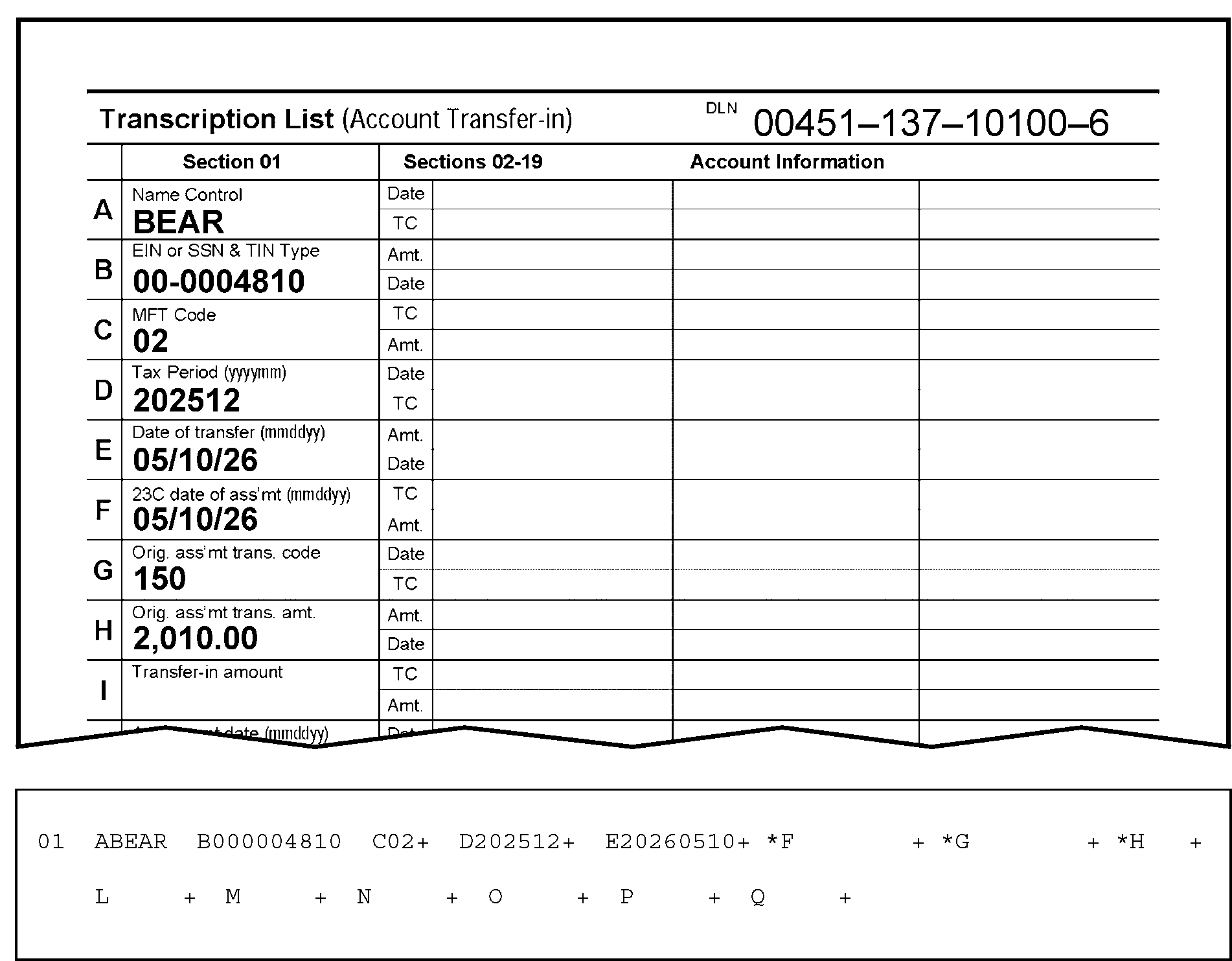
Figure 3.12.21-18 displays a part of the Form 3413, Transcription List (Account Transfer-in), and Section 01 of an error register portion. Fields A through Q. This figure is an example showing all three fields appear invalid if either the Date of Assessment, the Transaction Code and the Transaction Amount are missing. In this example, Fields 01-F (23 C--Date of Assessment/Transaction Date), Field 01-G (Original Assessment Transaction Code), and Field 01-H (Original Assessment Transaction Amount) are blank and contain asterisks (*). Details of Figure 3.12.21-18 are provided as follows:The first line beneath the form title and the DLN information displays the column headings Section 01, Sections 02 - 19, and Account Information. Account Information title heads the third column, and the fourth column, to the right of Account Information, displays no header. Only the first column, Section 01, displays the taxpayer information in Fields A through H, as follows:The DLN of this document (Form 3413) is 00451-137-10100-6.The Form 3413 contains four (4) columns with the following headings: Section 01, Section 02 - 19, and two (2) Account Information columns (only one is marked with the heading Account Information).Section 01, Fields A through I, contain the following information:Field A) Name Control, shows the Name Control BEAR.Field B) EIN or SSN and TIN Type, displays the EIN 00-0004810.Field C) MFT Code, displays the MFT 02. Field D) Tax Period, displays tax period 202512.Field E) Date of Transfer, shows 05/10/26 as the date of transfer.Field F) 23C Date of Assessment), shows 05/10/26 as date of assessment.Field G) Original Assessment Transaction Code is 150Field H) Original Assessment Transaction Amount is $2,010.00.Field I) Transfer-in Amount is blank.The three (3) other columns to the left of Section 01, entitled as Section 02 - 19 and Account Information, and the rows beneath those headings contain NO processing or taxpayer information.Directly beneath this part of the Form 3413 is a portion of the paper error register, displaying Section 01, Fields A through Q.Fields F, G and H on the register are all blank, but contain asterisks (*) because they appear invalid when the required information is missing.
Please click here for the text description of the image.
3.12.21.4.2.12 (01-01-2026)
Field 01-F - 23-C--Date of Assessment (also known as "Transaction Date" ) (Correction Procedures)
-
Compare the document with the register. Correct any transcription errors.
-
If BMF MFT Code is other than 51, 58, 60, 61, 62, 63 or 64, reject, using Action Code 3, and notate on Form 4227, "Trans. Date is prior to tax period" .
-
Route the Form 4227 to the Accounting function (for contact with the originator for research and/or correction).
Reminder:
Use the procedures in Paragraph (7) below to identify the originator (to whom the Form 4227 (and document) should be sent for research and correction).
-
If the date is correct as transcribed and Field 01-F is in error, determine the correct date or tax period. Enter the information on the register with Action Code 6.
-
If the correct data can't be determined, reject the register with Action Code 3. Attach Form 4227 and notate "invalid or missing Assessment date" .
Reminder:
Use the procedures in Paragraph (7) below to identify the originator (to whom the Form 4227 (and document) should be sent for research and correction).
-
Route the Form 4227 to the Accounting function (for contact with the originator for research and/or correction).
-
IMPORTANT: Use the procedures in the table below to identify the originator (to whom the Form 4227 (and document) should be sent for research and correction).
If Originator Prepared Form 3413 (Transcription List (Account Transfer-In)): If Originator Prepared Form 3552 (Prompt Assessment Billing Assembly): If Originator Prepared Form 12810 (Account Transfer Request Checklist): 1. Go to Page 1 (Form 3413): 2. Find the following (originator’s) information in the lower-left corner of the Form 3413. 3. "Name and Date Prepared (mmddyy)." 4. "Telephone Number" . 5. Prepare the Form 4227, Intra-SC Reject or Routing Slip with the notation Trans. Date is prior to tax period OR invalid or missing Assessment date described in IRM 3.12.21.4.2.12(3) through (6), above. 6. Attach Form 4227 to the (transaction) document, and send them to the originator for missing information, research and/or correction. 7. Send them to the originator for missing information, research and/or correction. 1. Go to Page 1 (Form 3552): 2. Find the following (originator’s) “IDRS Number” in the upper-right portion of the Form 3552 (under the Document Locator Number). 3. Prepare the Form 4227, Intra-SC Reject or Routing Slip with the notation Trans. Date is prior to tax period OR invalid or missing Assessment date described in IRM 3.12.21.4.2.12(3) through (6), above. 4. Attach Form 4227 to the (transaction) document. 5. Send them to the originator for missing information, research and/or correction. 1. Go to top of page (Form 12810): 2. Find (originator’s) “IDRS Number” in the upper-right portion of the Form 12810 (under the "DLN" , "Unit" , and "Stop Number" ). 3. Use the "Unit" or "Stop Number" if IDRS Number not there. 4. Prepare the Form 4227, Intra-SC Reject or Routing Slip with the notation Trans. Date is prior to tax period OR invalid or missing Assessment date described in IRM 3.12.21.4.2.12(3) through (6), above. 5. Attach Form 4227 to the (transaction) document. 6. Send them to the originator for missing information, research and/or correction.
3.12.21.4.2.13 (01-01-2026)
Field 01-G - Original Assessment Transaction Code (or, "Transaction Code of Original Assessment" )
-
The Original Assessment Transaction Code is found in Item G (Section 01), Page 1, Form 3413. It is also located under the TC (Transaction Code) column (Line 31) of the Form 3552.
-
This field will appear invalid if it is not one of the codes shown in the correct chart Exhibit 3.12.21-5, Valid IMF Transaction Code Table, through Exhibit 3.12.21-7, BMF Valid Transaction Code Table.
-
This field will appear invalid if it does not contain a Transaction Code that is valid for the doc code and MFT being processed.
-
Compare the document with the register.
-
Correct any transcription errors (NUMERIC)
Note:
The Original Assessment Transaction Code is found in Item G (Section 01), Page 1, Form 3413.
-
If the document is correct as transcribed and a valid transaction code can't be determined, reject the document with Action Code 3.
-
Attach Form 4227, Intra-SC Reject or Routing Slip, and notate "01-G (Original Assessment Transaction Code) invalid" .
-
Route the Form 4227 to the Accounting function (for contact with the originator for research and/or correction).
Reminder:
Use the procedures in Paragraph (10) below to identify the originator (to whom the Form 4227 (and document) should be sent for research and correction).
-
-
Fields 01-G and 01-H will both display asterisks (*) if there is an entry in Field 01-I and Field 01-H is blank. Enter the original transaction amount from Form 3413, in Field 01-H. If the amount can't be determined, reject the document with Action Code 3. Prepare Form 4227, and notate on it, 01-G cannot be determined. Attach the Form 4227 to the document and route it to the Accounting function (for contact with the originator for research and/or correction).
Reminder:
Use the procedures in Paragraph (10) below to identify the originator (to whom the Form 4227 (and document) should be sent for research and correction).
-
Fields 01-G and 01-J will both display asterisks if there is an entry in Field 01-J, and Field 01-G is not 300. (Figure 3.12.21-19.) If Field 01-G is other than 300, reject the document with Action Code 3. Prepare Form 4227, and notate on it, 01-G not 300. Attach the Form 4227 to the document and route it to the Accounting function (for contact with the originator for research and/or correction).
Reminder:
Use the procedures in Paragraph (10) below to identify the originator (to whom the Form 4227 (and document) should be sent for research and correction).
Figure 3.12.21-19
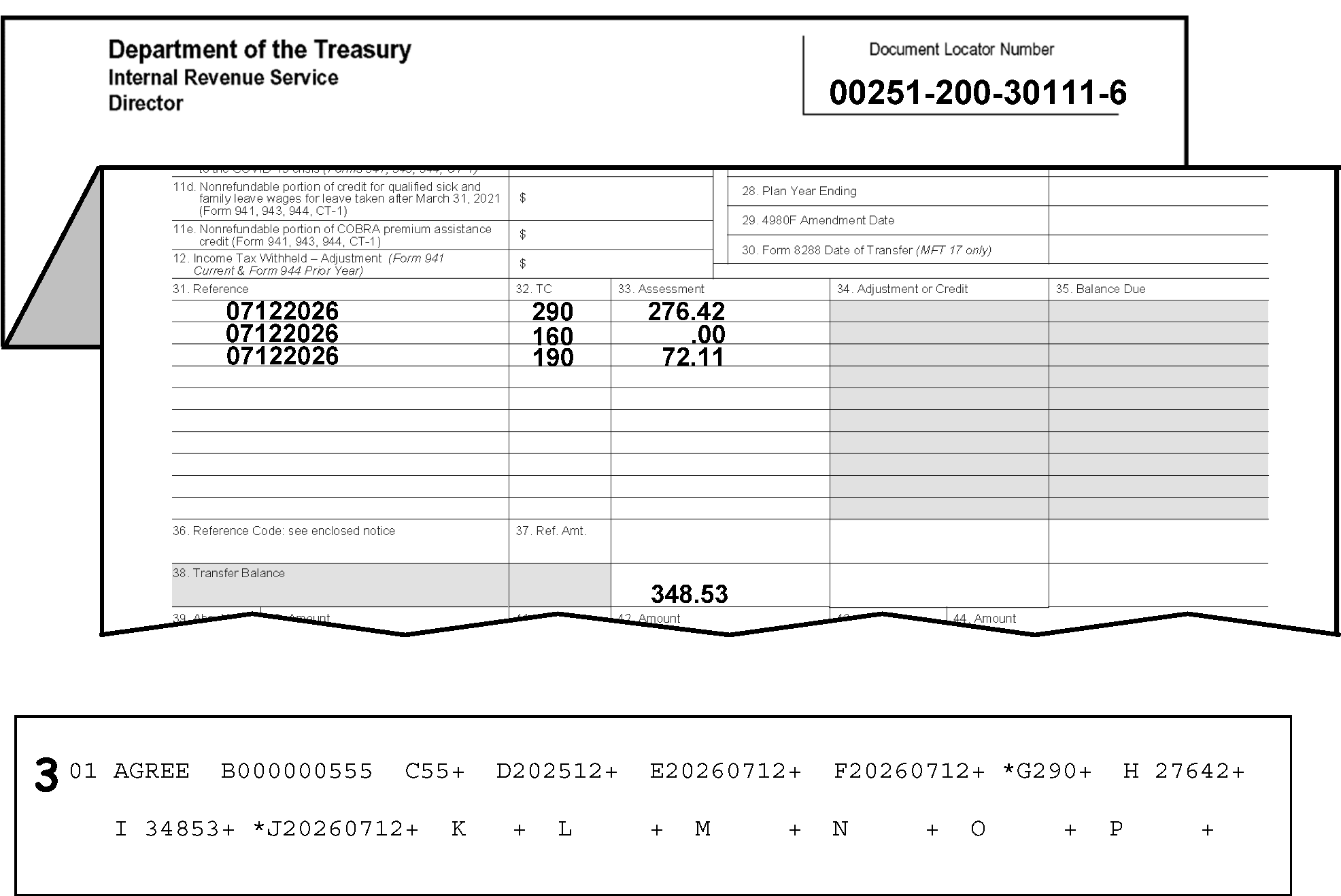
Figure 3.12.21-19 displays a folded part of the Form 3552, Prompt Assessment Billing Assembly, and an error register portion. Figure 3.12.21-19 provides an example showing the Field 01-G (Original Assessment Transaction Code) and Field 01-J (Agreement Date), displaying asterisks (*) when there is an entry in Field 01-J and Field 01-G is NOT a TC 300 (Additional Tax Assessment by Examination or Appeals).The DLN of this document is Form 3552 00251-200-30111-6Immediately beneath this information, the Form 3552 is folded to display the following three columns with three rows of information.The three columns are Item 31, Reference, Item 32, TC (for transaction code), and Item 33, Assessment, respectively.The first row of information beneath the three columns displays 07122026, 290, and 276.42, respectivelyThe second row displays 07122026, 160, and .00, respectivelyThe third row displays 07122026, 190, and 72.11, respectivelyFourteen rows down, under the Assessment column, is 348.53 (the Transfer-in Amount; it also is the grand total of the previous three line amounts).Directly beneath the Form 3552 (and the above-referenced rows of information) is a part of the error register displaying Section 01, Fields A through PA 3 is edited to the left of Section 01 to inform the ISRP operator to reject this documentField A (Section 01) on the error register displays the name control (GREE)Field B displays the TIN (000-00-0555)Field C displays the MFT Code (55)Field D displays the Tax Period (202512)Field E displays the Date of Transfer (20260712)Field F displays the 23C Date of Assessment (20260712)Field G displays the Original Assessment Transaction Code of (290)Field H displays the Original Assessment Transaction Amount of (27642)Field I displays the Transfer in Amount of (34853)Field J displays the Agreement Date (20260712)Field G and Field J (Section 01) on the error register both display asterisks (*) if there is an entry in Field 01-J and Field 01-G is not a TC 300 (Additional Tax Assessment by Examination or Appeals).Fields I through Q of Section 01 (on the error register) contain no entriesThere are no other entries or edit marks are displayed on Figure 3.12.21-19
Please click here for the text description of the image.
-
Field 01-G will asterisk if the MFT is 12, Field 40-H is present and the transaction code is other than 150. (See Figure 3.12.21-20.) Correct as follows:
-
Compare the register with the document.
-
Correct any transcription errors.
-
If the document is correct as transcribed, reject the record with Action Code 3.
-
Attach Form 4227 and notate "TC 150 missing MFT 12 with Line 8 amount present."
Reminder:
Use the procedures in Paragraph (10) below to identify the originator (to whom the Form 4227 (and document) should be sent for research and correction).
Figure 3.12.21-20
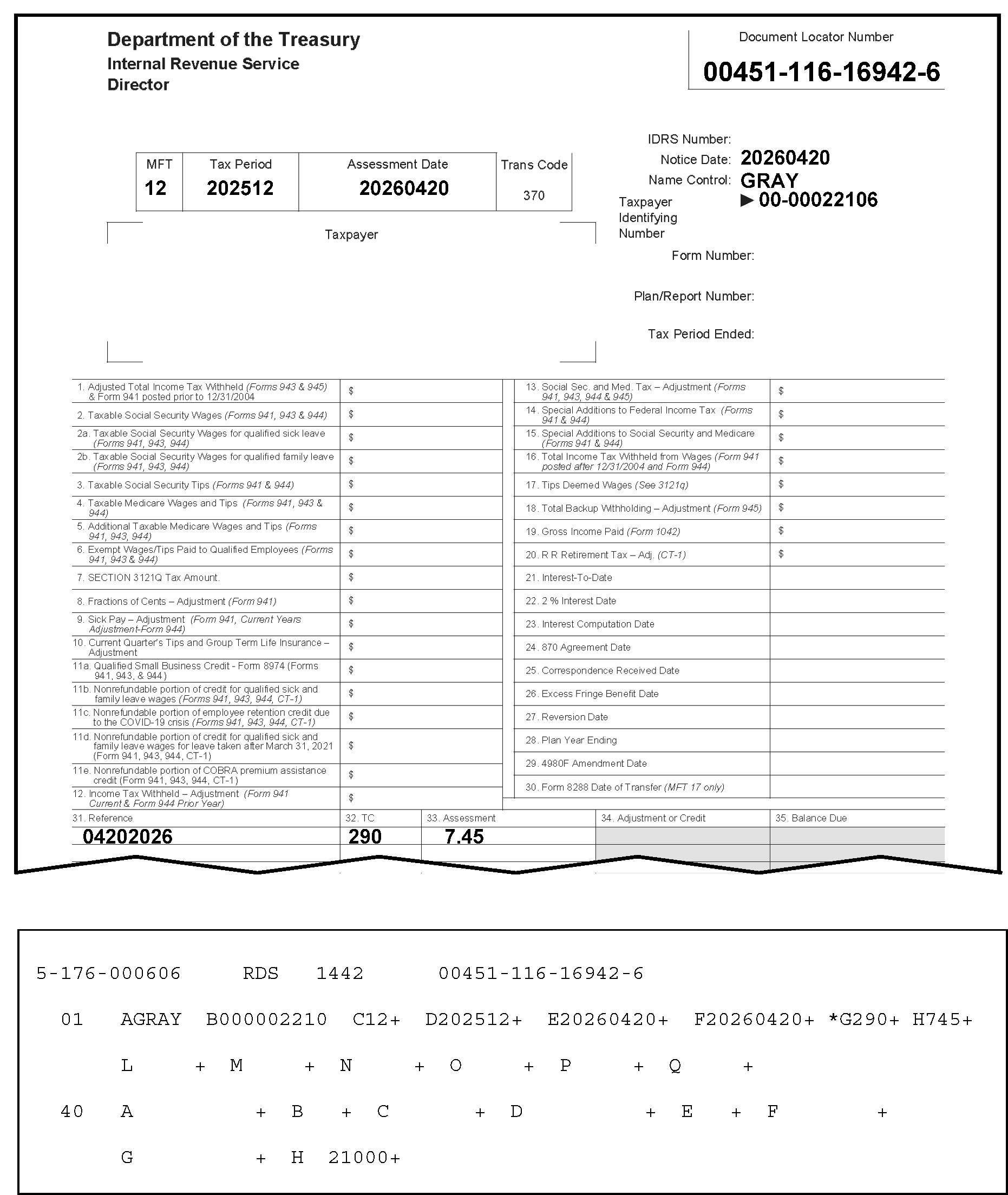
Figure 3.12.21-20 displays a part of a Form 3552 and an error register portion. Figure 3.12.21-20 displays an example showing that Field 01-G will asterisk if the MFT is 12, Field 40-H (Fractions of Cents) is present, and the transaction code is other than 150. Details are displayed as follows for Figure 3.12.21-20:In the upper left corner of the Form 3552 are three organization headings listed vertically: Department of the Treasury, Internal Revenue Service and Director, respectivelyIn the upper right corner opposite those three headings is the Document Locator Number box, with the document locator number, 00451-116-16942-6.About two lines beneath that information is a single box with four conjoined boxes marked as MFT, Tax Period, Assessment Date and Trans Code. Immediately to the right of this four-part box are three rows, in vertical order, marked Notice Date, Name Control and Taxpayer Identifying Number respectively.The MFT is 12The Tax Period is 202512The Assessment Date is 20260420The pre-printed Trans Code on the form is 370The Notice Date is 20260420The Name Control is GRAYThe Taxpayer Identifying Number on the form is 00-00022106Immediately beneath this Form 3552 information, a part of the error register, displaying Section 01 (Fields A through X) and Section 40 (Field A through H) is superimposed over the middle of the Form 3552 to display the following register informationAt the top of the error register (first line) are the following four pieces of information: 2-176-000606, RDS, 1442, and 00451-116-16942-6 (Document Locator Number).Field A (Section 01) on the error register displays the name control (GRAY).Field B on the register displays the TIN (000-00-2210; NOT the ten-digit EIN shown on the form).Field C displays the MFT Code (12).Field D displays the Tax Period (202512)Field E displays the Date of Transfer (20260420).Field F displays the 23C Date of Assessment (20260420).Field G contains an asterisk (*) and displays the Original Assessment Transaction Code of 290.Field H displays the Original Assessment Transaction Amount of 745 (seven dollars and forty-five cents).No other fields in Section 01 contain entries.Section 40 of the error register displays Field A though Field H.Only Field 40-H displays an entry 21000 (two hundred ten dollars and zero cents).The Form 3552 displays entries under the following three columns: Item 31, Reference, Item 32, TC (for transaction code), and Item 33, Assessment:The row of information beneath the three columns displays 04202026, 290, and 7.45 (seven dollars and forty-five cents), respectivelyThere are no other entries or edit marks are displayed on Figure 3.12.21-20
Please click here for the text description of the image.
-
-
Field 01-G will appear invalid along with Fields 01-H, Original Assessment Transaction Amount, Field 01-M, Reference Number and Field 01-N, Reference Amount if the information contained in those fields does not match the information contained in the table below.
MFT is 13 or 55*
MFT-CD 01-M REFERENCE NUMBER 01-N REFERENCE NUMBER AMT 01-G TRANS CD SECTION 01 01-H TRANS AMOUNT SECTION 01 55 527, 528 Greater than 0 240 0 55 Present (exclude 527, 528) Greater than 0 290 0 13 Present Greater than 0 240 0 13 Present (exclude 662, 663) Greater than 0 290 or 241 0 55 Not Present 0 402 0 or positive 13 Not Present 0 240 or 402 0 or positive 13 Not Present 0 241 0 or negative MFT is 02, 05, 51, 52, 30, 31
01-M REFERENCE NUMBER 01-N REFERENCE NUMBER AMT 01-G TRANS CD SECTION 01 01-H TRANS AMOUNT SECTION 01 Present greater than 290 Positive or 0 (not blank) 0 Present greater than 300 Positive or 0 (not blank) 0 -
Compare the document with the register. Correct any transcription errors.
-
If the document is correct as transcribed, reject the record with Action Code 3.
-
-
IMPORTANT: The following "bullets" provide other information on certain items contained in the above-referenced tables:
-
* MFTs 13 or 55: If Fields 01-M and 01-N are present, there must be a TC 290 in Field 01-G and NO amount in Field 01-H.
-
** MFTs 02, 05, 30, 31, 51, or 52: If Fields 01-M and 01-N are present, there must be either a TC 290 in Field 01-G and NO amount in Field 01-H, or a TC 300 in Field 01-G with or without an amount in Field 01-H.
-
-
Fields 01-G and 01-H will appear invalid if the transaction code is 150, the transaction amount is greater than 0 (zero), and the MFT is 06, 36, 37 (with a tax period later than 198711), or 67. Reject the register with Action Code 3. Attach Form 4227, notating, Transaction Code 150 transaction amount greater than 0 (zero), and route the Form 4227 to the Accounting function (for contact with the originator for research and/or correction).
Reminder:
Use the procedures in Paragraph (10) below to identify the originator (to whom the Form 4227 (and document) should be sent for research and correction).
-
IMPORTANT: Use the procedures in the table below to identify the originator (to whom the Form 4227 (and document) should be sent for research and correction).
If Originator Prepared Form 3413 (Transcription List (Account Transfer-In)): If Originator Prepared Form 3552 (Prompt Assessment Billing Assembly): If Originator Prepared Form 12810 (Account Transfer Request Checklist): 1. Go to Page 1 (Form 3413): 2. Find the following (originator’s) information in the lower-left corner of the Form 3413. 3. "Name and Date Prepared (mmddyy)." 4. "Telephone Number" . 5. Prepare the Form 4227, Intra-SC Reject or Routing Slip with the appropriate notation described in IRM 3.12.21.4.2.13(3) through (9), above. 6. Attach Form 4227 to the (transaction) document, and send them to the originator for missing information, research and/or correction. 7. Send them to the originator for missing information, research and/or correction. 1. Go to Page 1 (Form 3552): 2. Find the following (originator’s) “IDRS Number” in the upper-right portion of the Form 3552 (under the Document Locator Number). 3. Prepare the Form 4227, Intra-SC Reject or Routing Slip with the appropriate notation described in IRM 3.12.21.4.2.13(3) through (9), above. 4. Attach Form 4227 to the (transaction) document. 5. Send them to the originator for missing information, research and/or correction. 1. Go to top of page (Form 12810): 2. Find (originator’s) “IDRS Number” in the upper-right portion of the Form 12810 (under the "DLN" , "Unit" , and "Stop Number" ). 3. Use the "Unit" or "Stop Number" if IDRS Number not there. 4. Prepare the Form 4227, Intra-SC Reject or Routing Slip with the appropriate notation described in IRM 3.12.21.4.2.13(3) through (9), above. 5. Attach Form 4227 to the (transaction) document. 6. Send them to the originator for missing information, research and/or correction.
3.12.21.4.2.14 (01-01-2026)
Field 01-H - Original Assessment Transaction Amount (or, "Transaction Amount" )
-
The Original Assessment Transaction Amount is found in Item H (Section 01), Page 1, Form 3413. It is also located under the Assessment column (Line 32) of the Form 3552.
-
This field must be all numeric.
-
The debit (+) or credit (-) amount that displays in this field must be compatible with Field 01-G (Transaction Code). See Exhibit 3.12.21-5, Valid IMF Transaction Code Table, through Exhibit 3.12.21-7, BMF Valid Transaction Code Table, for the valid debit and credit transaction codes.
-
If there is an entry in Field 01-H, there must be an entry in Field 01-G.
-
This field cannot display as a credit (-) unless Field 01-G contains TC 430. TC 430 is only valid for IMF, MFT 30, Doc Code 52.
-
Fields 01-G and 01-H will appear invalid if the transaction code is 150, the transaction amount is greater than 0 (zero), and the MFT is 06, 36, 37 (with a tax period later than 198711), or 67. Reject the register with Action Code 3. Attach Form 4227, notating, Transaction Code 150 transaction amount greater than 0 (zero), and route the Form 4227 to the Accounting function (for contact with the originator for research and/or correction).
Reminder:
Follow the table/procedures in IRM 3.12.21.4.2.13(10), above, to identify the originator (to whom the Form 4227 (and document) should be sent for research and correction).
3.12.21.4.2.15 (01-01-2026)
Field 01-I - Transfer-in Amount (also known as "Balance Transferred-In" or "Primary-Trans-PJ (pre-journalized) - Amount" )
-
The Transfer-In Amount is found in Item I (Section 01), Page 1, Form 3413.
-
This field must be all numeric.
-
This field can't be changed. If there is a transcription error in the money amount, reject the document with Action Code 3 to be reinput.
Note:
Attach Form 4227, Intra-SC Reject or Routing Slip, notating, Transfer-in amount not transcribed correctly, and route the Form 4227 to the Accounting function (for contact with the originator for research and/or correction).
Reminder:
Follow the table/procedures in IRM 3.12.21.4.2.13(10), above, to identify the originator (to whom the Form 4227 (and document) should be sent for research and correction).
-
If the Doc Code is 51, Field 01-I must be a debit (signed positive) or zero.
-
If the Doc Code is 52, Field 01-I must be zero.
-
If Field 01-I underprints, see IRM 3.12.21.12.1.
3.12.21.4.2.16 (01-01-2026)
Field 01-J - Agreement Date (also known as, "870 Agreement Date" )-DOC Code 51 only
-
The Agreement Date is found in Item J (Section 01), Page 1, Form 3413. It is located on Line 23 of the Form 3552 (it is displayed as the "870 Agreement Date" ).
-
This field is invalid with Doc Code 52.
-
This date is entered from Form 3552 and Form 3413 (Doc Code 51 only) to provide the master file with the correct interest computation date.
-
This date must be in YYYYMMDD format. The month (fifth and sixth digits) must be 01-12 and the day (seventh and eighth digits) must be 01-31.
-
The date may not be later than the current processing date or earlier than the following dates:
-
1970-01-01 (i.e., January 1, 1970) for IMF and BMF on initial input or 1962-01-01 (i.e., January 1, 1962) for BMF and 1962-12-01 (i.e., December 1, 1962) for IMF on error correction run.
-
1976-01-01 (i.e., January 1, 1976) for IRAF on both initial input and error correction run.
-
-
If an invalid 870 date is present on Form 3552 and a valid date is not available from the attachments, reject the document, using Action Code 3. Attach Form 4227, notating "invalid 870 date" . Route to Accounting for correction.
Reminder:
Follow the table/procedures in IRM 3.12.21.4.2.13(10), above, to identify the originator (to whom the Form 4227 (and document) should be sent for research and correction).
-
If an agreement date is present in Field 01-J, then Field 01-G must have a TC 300, 304 or 308. If Field 01-G is other than TC 300, 304 or 308 remove the agreement date in Field 01-J.
3.12.21.4.2.17 (01-01-2026)
Field 01-K---TIN Type
-
This field must contain a "0" (Zero) when the MFT (Field 01-C) contains an SSN (Social Security Number) or remain blank when it contains an EIN (Employer Identification Number).
Note:
If incorrect or missing, compare against the TIN Type found in Item B (Section 01), Page 1 ("EIN or SSN and TIN Type" ), Form 3413, and correct Field 01-K.
-
If the MFT is 29, 30, 31, 35, 51, 52, 55, 65, 82 then the TIN Type should be "0" (SSN).
-
If the MFT is 17, 50, 58, 76, or 78, the TIN Type can be either "0" (for SSN) or blank (for EIN).
Reminder:
The TIN Type will not be correctable for all MFT Codes. MFT 51, MFT 52; IMF and IMF/IRAF: use SSN versus EIN.
-
Delete entry in Field 01-K if invalid.
3.12.21.4.2.18 (01-01-2026)
Field 01-L - Correspondence Received Date
-
The Correspondence Received Date is found in Item K (Section 01), Page 1, Form 3413. It is located on Line 25 of the Form 3552.
-
The Correspondence Received Date must be in YYYYMMDD format and must be all numeric. It may not be later than the current processing date nor earlier than 1962-12-01 (December 1, 1962) for IMF, 1961-12-01 (December 1, 1961) for BMF, or 1976-01-01 (January 1, 1976) for IRAF. It can't be earlier than the earliest date allowed.
-
If the date was transcribed incorrectly, correct using Action Code 6.
-
If a valid correspondence received date can't be located, reject the document with Action Code 3. Attach Form 4227, notating “invalid correspondence received date”.
Reminder:
Follow the table/procedures in IRM 3.12.21.4.2.13(10) to identify the originator (to whom the Form 4227 (and document) should be sent for research and correction).
3.12.21.4.2.19 (01-01-2026)
Fields 01-M and 01-N - Reference Number and Reference Number Amount
-
The Reference Number must be a three-digit numeric field. This data is necessary to allow the automatic transfer of certain civil penalties, using Doc Code 51 or 52 into MFTs 02, 05, 13, 30, 31, 51, 52, and 55.
Note:
The Reference Number and Reference Number Amount are found under Item M and Item N (Section 01), respectively, Page 1, Form 3413 (Doc Code 52). The Reference Number and Reference Number Amount are found under Line 36 (Reference Number) and Line 37 (Reference Number Amount) respectively, Page 1, Form 3552 (Doc Code 51). On the Form 3552, the "Reference Number" is referred to as "Ref. (Reference) Code"
-
Fields 01-M and 01-N are invalid for IRAF (MFT 29).
-
If present, reject the document with Action Code 3.
-
Attach Form 4227, Intra SC-Reject or Routing Slip, notating "Reference Number and amount not valid on IRAF" .
-
Route to Accounting for contact with the originator for research and correction.
-
-
IMPORTANT: Follow the procedures in the table below to identify the originator (to whom the Form 4227 (and document) should be sent for research and correction).
If Originator Prepared Form 3413 (Transcription List (Account Transfer-In)): If Originator Prepared Form 3552 (Prompt Assessment Billing Assembly): If Originator Prepared Form 12810 (Account Transfer Request Checklist): 1. Go to Page 1 (Form 3413): 2. Find the following (originator’s) information in the lower-left corner of the Form 3413. 3. "Name and Date Prepared (mmddyy)." 4. "Telephone Number" . 5. Prepare the Form 4227, Intra-SC Reject or Routing Slip with the appropriate notation described in IRM 3.12.21.4.2.19. 6. Attach Form 4227 to the (transaction) document, and send them to the originator for missing information, research and/or correction. 7. Send them to the originator for missing information, research and/or correction. 1. Go to Page 1 (Form 3552): 2. Find the following (originator’s) “IDRS Number” in the upper-right portion of the Form 3552 (under the Document Locator Number). 3. Prepare the Form 4227, Intra-SC Reject or Routing Slip with the appropriate notation described in IRM 3.12.21.4.2.19. 4. Attach Form 4227 to the (transaction) document. 5. Send them to the originator for missing information, research and/or correction. 1. Go to top of page (Form 12810): 2. Find (originator’s) “IDRS Number” in the upper-right portion of the Form 12810 (under the "DLN" , "Unit" , and "Stop Number" ). 3. Use the "Unit" or "Stop Number" if IDRS Number not there. 4. Prepare the Form 4227, Intra-SC Reject or Routing Slip with the appropriate notation described in IRM 3.12.21.4.2.19. 5. Attach Form 4227 to the (transaction) document. 6. Send them to the originator for missing information, research and/or correction. -
Field 01-M, Reference Number, if present, must be a three-digit numeric field. See the table below for valid MFTs and Reference Numbers.
-
Compare the document and the register and correct any transcription errors.
-
If Field 01-C (MFT Code) and/or Field 01-M (Reference Number) display asterisks (*) if they are invalid (such as, in “error”):
-
If in "error" , do as follows:
-
Compare the document and the register against the valid Reference Numbers and MFTs in the table below.
-
If the Reference Number in Field 01-M is not listed in the table below:
-
Reject the record, using Action Code 3.
-
Prepare Form 4227, Intra-SC Reject and Routing Slip.
-
Notate on the 4227, "Reference Number is not valid" .
-
Attach the 4227 to the document and route them to Accounting (for contact with the originator for research and/or correction).
Reminder:
Follow the table/procedures in IRM 3.12.21.4.2.19(3) to identify the originator (to whom the Form 4227 (and document) should be sent for research and correction).
MFT-AND-REFERENCE-NUM-TABLE
REFERENCE-NUM MFT-CD DOC-CD 198 12 51, 52 253 30 51 255 through 258 30 51 260 30 51 262 30 51 271 01, 09, 11, 14 51,52 276 01, 09, 11, 14 51,52 280 01, 09, 11, 14 51,52 281 through 282 12 51 290 01, 11, 14 51, 52 292 through 295 46 51 296 01, 09, 11, 14 51, 52 299 01, 09, 11, 14 51, 52 324 40 51, 52 330 through 333 08 51, 52 330 through 333 02, 12 51 331 through 332 30 51 334 30 51 336 30 51 338 30 51 346 40 51, 52 350 40 51, 52 352 through 357 40 51, 52 359 through 363 40 51, 52 369 40 51\. 52 375 through 377 40 51, 52 391 13, 55 51, 52 411 13, 55 51, 52 438 03 51, 52 500 through 510 13, 55 51 511 13, 55 51, 52 512 through 518 13, 55 51 519 13 51, 52 520 through 526 13, 55 51 527 through 528 55 51, 52 530 13, 55 51, 52 531 13, 55 51, 52 533 13, 55 51, 52 535 13, 55 51, 52 537 13, 55 51, 52 547 through 548 13, 55 51 549, 550 13, 55 51, 52 551 13, 55 51, 52 559 through 562 13, 55 51, 52 581 13, 55 51, 52 589 13, 55 51, 52 598 13, 55 51, 52 599 13, 55 51, 52 600 through 657 13, 55 51 627 55 52 658 13 51, 52 658 through 660 55 51 661 13, 55 51 662 through 663 13 51, 52 662 through 673 55 51 674 through 677 13, 55 51 678 \\\* 13 51 680 01 through 05, 06, 07, 09 through 12, 14, 16, 30, 31, 33, 34, 37, 44, 50, 51, 52, 60, 63, 64, 77, 78 51, 52 681 02, 05, 06, 30, 31, 51, 52 51, 52 682 02, 05, 06, 34, 51, 52 51, 52 683 02, 03, 05, 06, 07, 30, 31, 34, 51, 52, 55 51, 52 685 02, 30, 31 51, 52 686 \* 01 through 05, 06, 07, 09 through 12, 14, 16, 30, 31, 33, 34, 37, 44, 50, 51, 52, 60, 63, 64, 77, 78 51, 52 687 01 through 05, 07, 09 through 12, 14, 15, 16, 30, 31, 33, 34, 37, 44, 50 through 52, 60, 63, 64, 77, 78 51, 52 689 \\ 37, 44, 46, 67, 85, 86 51 692 \\\\ 35, 65 51, 52 693 13 51, 52 694 13 51, 52 700 13, 30, 31, 55 51, 52 701 13 51, 52 702 13, 55 51, 52 703 13, 55 51, 52 704 13, 55 51, 52 705 13 51, 52 706 13, 55 51 707 05, 30, 31 51, 52 708, 709 13, 55 51 710 13, 30, 31, 55 51, 52 711 13, 55 51, 52 714 13, 55 51, 52 715 13, 55 51, 52 716 13, 55 51, 52 717 13, 55 51, 52 718 13, 55 51, 52 722 02, 06, 07 51, 52 723 02, 06 51, 52 724 02, 05, 06 51, 52 780, 781 ALL 51, 52 786 through 792 02, 30, 31 51 786 through 790, 792 06 51, 52 793 30, 31 51, 52 794 05, 52 51, 52 870, 871, 872 37 51, 52 SOURCE: FSP 1.35.04.06 ; Process 3.1.2.8.1.1.1.5.7.3.2.1: Procedures 1., 1.1, 1.1.1, 1.1.1.1, and 1.1.1.1.1.
Reminder:
This table matches the MFT/REF-NUM/TAX-PRD CONSISTENCY TABLE FOR DP-ADJUSTMENTS (FSP NO.: 1.05.19.01).
-
-
The following Footnote Legends Table provides information on Reference Numbers contained in the above-referenced MFT-Reference Number-Doc Code Table.
FOOTNOTE LEGENDS FOR THE ABOVE MFT REFERENCE NUMBER AND DOC CODE TABLE
REFERENCE NUMBERS LEGEND/DESCRIPTIONS 686 \* DOC Code 52 will be valid for Reference Number 686 for 200101 processing. 689 \\ Reference Number 689 valid only with TC 240 678 \\\* Reference Number 678 is valid for calendar year Tax Periods 198512 and subsequent. It must be Month 12. It is invalid for amounts greater than $50,000. If any of these requirements are not met, Fields 01-D (Tax Period), Field 01-M (Reference Number), and Field 01-N (Reference Number Amount) will appear invalid (for example, in "error" ). 692 \\\\ When Reference Number 692 is present with MFT 35: (1) it’s only valid for Tax Period 201812 and prior; (2) Invalid for Tax Years 201912 and subsequent, and (3) Transaction Codes TC-240 or TC-241 TC-290 or TC-291 must be present. If any of these requirements are not met, Fields 01-D, 01-M and 01-N will appear invalid (for example, in "error" . -
The following "bullets" provide other information on items contained in these instructions and the MFT-REFERENCE-NUMBER-DOC CODE Table.
-
IF Field 01-M (Reference Number) is 680, 681, 682, 685, 686, or 689, then Transaction Code (TC) field(s) must contain either TC-290, 294, 298, 300, 304, 308, or 402; or TC-291, 295, 299, 301, or 309 must appear in the correct TC field in Sections 02-19. (TC 291, 295, 299, 301, or 309). They may appear in Section 02-19, but are not needed. (Their associated Transaction Amounts must be negative.)
-
IF NOT, Field 01-D (Tax Period), Field 0 1-M (Reference Number), Field 01-N (Reference Number Amount) or the correct Transaction Code (TC) and Amount Fields in Sections 02-19 will display asterisks (*) and appear "invalid" (for example, in "error" ).
-
-
CORRECTION PROCEDURES (Field 01-M):
-
Compare the document and the register.
-
If the Reference Number is invalid or was transcribed incorrectly, correct with Action Code 6.
-
If the document was correctly transcribed, but the Reference Number (Field 01-M) or Reference Number Amount (Field 01-N) is missing, reject the record with Action Code 3.
-
Attach Form 4227, notating (depending on the missing item), Reference Number (or Reference Number Amount) is missing..
-
Return to Accounting (for contact with the originator for research and/or correction).
Reminder:
Follow the table/procedures in IRM 3.12.21.4.2.19(3), above, to identify the originator (to whom the Form 4227 (and document) should be sent for research and correction).
-
-
Field 01-N, Reference Number Amount, is a numeric field not to exceed 13 digits. If there is a Reference Number present and no Reference Number Amount, search the document and attachments for a valid reference amount.
-
If a Reference Number Amount one is found, enter it in Field 01-N.
-
If a valid reference amount can't be found, reject the document with Action Code 3.
-
Notate on Form 4227, "Reference Number Amount missing or incorrect" .
-
Attach the 4227 to the document and route to Accounting (for contact with the originator for research and/or correction).
Reminder:
Follow the table/procedures in IRM 3.12.21.4.2.19(3), above, to identify the originator (to whom the Form 4227 (and document) should be sent for research and correction).
-
-
IMPORTANT: The original Field 01-N (Reference Number Amount) is a positive number. If correction is made on Field 01-N, it can be a negative number.
-
If there is a Reference Number Amount (Field 01-N) present and no Reference Number (Field 01-M), search the document and attachments for a valid Reference Number.
Note:
You may also consult either the MFT-Reference-Number Table (in this subsection) or Exhibit 3.12.21-8 (Reference Numbers) to confirm the valid MFT/Reference Number information.
-
If a Reference Number is found, enter it in Field 01-M.
-
If one is not found, use the table above to determine the correct Reference Number and enter in Field 01-M.
-
If you can't readily determine the correct Reference Number, use your local procedures to correct the problem.
-
-
IMPORTANT: If there is a Reference Number (Field 01-M), there must be a Reference Number Amount (Field 01-N). If either is present, they must both be present.
-
**If there is a Reference Number or Reference Number Amount, there must be both.**Field 01-N, Reference Number Amount, is a numeric not to exceed 13 digits. If there is a Reference Number present and no Reference Number Amount, search the document and attachments for a valid reference amount.
-
If a Reference Number Amount is found, enter it in Field 01-N.
-
If a valid reference amount can't be found, reject the document with Action Code 3.
-
Notate on Form 4227, "Reference Number Amount missing or incorrect" .
-
Attach the 4227 to the document and route to Accounting (for contact with the originator for research and/or correction).
Reminder:
Follow the table/procedures in IRM 3.12.21.4.2.19(3) to identify the originator (to whom the Form 4227 (and document) should be sent for research and correction).
-
-
If there is a Reference Number Amount (Field 01-N) present and no Reference Number, search the document and attachments for a valid Reference Number.
Note:
You may also consult either the MFT-Reference-Number Table (in this subsection) or Exhibit 3.12.21-8 (Reference Numbers) to confirm the valid MFT/Reference Number information.
-
If a Reference Number is found, enter it in Field 01-M.
-
If one is not found, use the MFT-AND-REFERENCE-NUM-TABLE above to determine the correct Reference Number and enter in Field 01-M.
-
If you can't readily determine the correct Reference Number, use your local procedures to correct the problem.
-
-
We listed Reference Numbers (with their Process Specifications as used in Consistency Checks) in Paragraph (15) through Paragraph (53) of this subsection.
-
Reference Numbers appear in this subsection/text according to their Functional Specifications Package (FSP) process/procedures order.
-
Distinguish which is the correct one you’re looking for by their Tax Periods, MFTs, and other distinguishing information.
-
Pay careful attention, since some Reference Numbers data may appear to be duplicates, but their MFTs and valid Tax Periods will vary.
-
We provided each Reference Number IRM procedures according to their Process Specifications order in an effort to eliminate any possible confusion.
-
-
Reference Number 290:
-
If Reference Number is 290,
-
MFT-CD is 01, AND
-
Tax Period must be equal to or within 201112 through 202203
-
If the transcribed fields do not meet the criteria as described above, the Reference Number, MFT, and Tax Period fields will appear invalid (such as, set to “error”).
-
Source: Functional Specifications Package (FSP) Process 3.1.2.8.1.1.1.5.7.3.2.9; Procedures 1. and 1.1.
-
-
Reference Number 290:
-
If Reference Number is 290,
-
MFT-CD is 11 or 14, AND
-
Tax Period must be equal to or within 201112 through 202212
-
If the transcribed fields do not meet the criteria as described above, the Reference Number, MFT, and Tax Period fields will appear invalid (such as, set to “error”).
-
Source: FSP Process 3.1.2.8.1.1.1.5.7.3.2.9; Procedures 1. and 1.1, and 1.1.1.
-
-
Reference Number is greater than 291 and less than 296:
-
If Reference Number is greater than 291 and less than 296, AND
-
MFT-CD is 46, AND
-
Tax Period is before 201003
-
If the transcribed fields do not meet the criteria described above, the Reference Number, MFT, and Tax Period fields will appear invalid (such as, set to “error”).
-
Source: FSP Process 3.1.2.8.1.1.1.5.7.3.2.9; Procedures 2. and 2.1.
-
-
Reference Number 519:
-
If Reference Number is 519,
-
MFT CD is 13, AND
-
the Tax Period is before 12/31/16 (December 31, 2016), AND
-
Month of Tax Period is not 03, 06, 09 or 12.
-
If the transcribed fields do not meet the criteria described above, the If the transcribed fields do not meet the criteria described above, the Reference Number, MFT, and Tax Period fields will appear invalid (such as, set to “error”).
-
Source: FSP Process 3.1.2.8.1.1.1.5.7.3.2.9; Procedures 3. and 3.1.
-
-
Reference Number 627:
-
If Reference Number is 627,
-
MFT-CD is 55. AND
-
Tax Period is before 199712,
-
If the transcribed fields do not meet the criteria described above, the Reference Number, MFT, and Tax Period fields will appear invalid (such as, set to “error”).
-
Source: FSP Process 3.1.2.8.1.1.1.5.7.3.2.9; Procedures 4. and 4.1.
-
-
Reference Number 649:
-
If Reference Number is 649,
-
MFT-CD is 13, AND
-
Tax Period is before 199012,
-
If the transcribed fields do not meet the criteria described above, the Reference Number, MFT, and Tax Period fields will appear invalid (such as, set to “error”).
-
Source: FSP Process 3.1.2.8.1.1.1.5.7.3.2.9; Procedures 5. and 5.1.
-
-
Reference Number 677 or 706:
-
If Reference Number is 677 or 706, AND
-
Tax Period is before 200912
-
If the transcribed fields do not meet the criteria described above, the Reference Number and Tax Period fields will appear invalid (such as, set to “error”).
-
Source: FSP Process 3.1.2.8.1.1.1.5.7.3.2.9; Procedures 6. and 6.1.
-
-
Reference Number 682:
-
If Reference Number is 682, AND
-
MFT-CD is either 02, 05, 06 or 34, AND
-
Tax Period is equal to or greater than 201712, AND
-
Transaction Code of Section 01 is 290, 294, 298, 300, 304, or 308, AND
-
Transaction Code of Section 02 is blank, 240, 241, 290, 291, 294, 295, 298, 299, 300, 301, 304, 305, 308 and/or 309
-
If the transcribed fields do not meet the criteria described above, the Reference Number, MFT, and Tax Period fields, along with the Transaction Code(s), will appear invalid (such as, set to “error”).
-
Source: Unified Work Request (UWR) 243633.
-
Source: FSP Process 3.1.2.8.1.1.1.5.7.3.2.9; Procedures 7. and 7.1.
-
-
Reference Number 683:
-
If Reference Number is 683, AND
-
MFT-CD is 02 or 03 or 05 or 06 or 07 or 30 or 31 or 34 or 51 or 52 or 55, AND
-
Tax Period is before 201003.
-
If the transcribed fields do not meet the criteria described above, the Reference Number, MFT, and Tax Period fields will appear invalid (such as, set to “error”).
-
Source: FSP Process 3.1.2.8.1.1.1.5.7.3.2.9; Procedures 8. and 8.1.
-
-
Reference Number 685:
-
If the Reference Number is 685, AND
-
Tax Period is before 198709
-
If the transcribed fields do not meet the criteria described above, the Reference Number and Tax Period fields will appear invalid (such as, set to “error”).
-
Source: FSP Process 3.1.2.8.1.1.1.5.7.3.2.9; Procedures 9. and 9.1.
-
-
Reference Number 686:
-
If IMF (such as, the MASTERFILE-SYSTEM-ID-CODE = 1), AND
-
MFT-CD is not 29,
-
the Reference Number is 686, AND
-
Tax Period is before 198909
-
If the transcribed fields do not meet the criteria described above, the Reference Number, MFT, and Tax Period fields will appear invalid (such as, set to “error”).
-
Source: FSP Process 3.1.2.8.1.1.1.5.7.3.2.9; Procedures 10. and 10.1. and 10.1.1
-
-
Reference Number 687:
-
If Reference Number is 687,
-
MFT CD is 30, AND
-
Tax Period is before 200705,
-
If the transcribed fields do not meet the criteria described above, the Reference Number, MFT, and Tax Period fields will appear invalid (such as, set to “error”).
-
Source: FSP Process 3.1.2.8.1.1.1.5.7.3.2.9; Procedures 11. and 11.1.
-
-
Reference Number 687:
-
If Reference Number is 687, AND
-
MFT CD is either 01, 02, 03, 04, 05, 07, 09, 10, 11, 12, 14, 15, 16, 31, 33, 34, 37, 38, 39, 40, 41, 42, 43, 44, 50, 51, 52, 60, 63, 64, 77 or 78, AND
-
The Tax Period is before 201512,
-
If the transcribed fields do not meet the criteria described above, the Reference Number, MFT, and Tax Period fields will appear invalid (such as, set to “error”).
-
Source: FSP Process 3.1.2.8.1.1.1.5.7.3.2.9; Procedures 11.1.1 and 11.1.1.1.
-
-
Reference Number 692:
-
IMF MFT 35 or IMF MFT 65 with TC 240 is only valid with Field 01-M , EXCEPT:
-
When Reference Number 692 is present with MFT 35 or MFT 65, AND
-
For Tax Period 201812 and prior, AND
-
Transaction Code in Section 01 is TC-240 or TC-290 AND Transaction Code in Section 02-19 is blank, 190, 240, 241, 290, and/or 291.
Caution:
IMPORTANT: Transaction Code TC-240 or TC-241 or TC-290 or TC-291 MUST be present.
Exception:
IMF MFT 35 or IMF MFT 65 with TC 240 is Invalid for Tax Years 201912 and later.
-
If the transcribed fields do not meet the criteria described above, the Reference Number, MFT, and Tax Period fields, along with the Transaction Code(s), will appear invalid (such as, set to “error”).
-
Source: FSP Process 3.1.2.8.1.1.1.5.7.3.2.9; Procedures 12. and 12.1. and 12.2.
.
-
-
Reference Number 693:
-
If Reference Number is 693,
-
MFT is 13, AND
-
The Tax Period is before 201801.
-
If the transcribed fields do not meet the criteria described above, the Reference Number, MFT, and Tax Period fields will appear invalid (such as, set to “error”).
-
Source: FSP Process 3.1.2.8.1.1.1.5.7.3.2.9; Procedures 13. and 13.1.
.
-
-
Reference Number 694:
-
If Reference Number is 694,
-
MFT is 13, AND
-
If Tax Period is before 201801.
-
If the transcribed fields do not meet the criteria described above, the Reference Number, MFT and Tax Period fields will appear invalid (such as, set to “error”).
-
Source: FSP Process 3.1.2.8.1.1.1.5.7.3.2.9; Procedures 14. and 14.1.
.
-
-
Reference Numbers 700 or 710:
-
If Reference Number is 700 or 710,
-
MFT is 13, AND
-
The Tax Period is before 201612,
-
If the transcribed fields do not meet the criteria described above, the Reference Number, MFT, and Tax Period fields will appear invalid (such as, set to “error”)
-
Source: FSP Process 3.1.2.8.1.1.1.5.7.3.2.9; Procedures 15. and 15.1.
.
-
-
Reference Number 700:
-
If Reference Number is 700,
-
MFT is 30 or 31, AND
-
If Tax Period is before 201003.
-
If the transcribed fields do not meet the criteria described above, the Reference Number, MFT, and Tax Period fields will appear invalid (such as, set to “error”)
-
Source: FSP Process 3.1.2.8.1.1.1.5.7.3.2.9; Procedures 16. and 16.1.
.
-
-
Reference Numbers 700 or 710:
-
If Reference Number is 700 or 710,
-
MFT is 55, AND
-
The Tax Period is equal to or greater than 201003, AND
-
Transaction Code in Section 01 is 240 or 290 AND Transaction Code in Section 02-19 is blank, 190, 240, 241, and/or 29X through 30X.
-
If the transcribed fields do not meet the criteria described above, the Reference Number, MFT and Tax Period fields, along with the Transaction Code(s), will appear invalid (such as, set to “error”)
-
Source: FSP Process 3.1.2.8.1.1.1.5.7.3.2.9; Procedures 17. and 17.1.
.
-
-
Reference Number 707::
-
If Reference Number is 707,
-
MFT is 05, 30, or 31, AND
-
The Tax Period is equal to or greater than 201701, AND
-
Transaction Code in Section 01 is 240 (IMF only) or 290 AND Transaction Code in Section 02-19 is blank, 190, 240, 241, 290 and/or 291.
-
If the transcribed fields do not meet the criteria described above, the Reference Number, MFT, and Tax Period fields, along with the Transaction Code(s), will appear invalid (such as, set to “error”)
Caution:
IMPORTANT: Transaction Codes TC-240 or TC-241 or TC-290 or TC-291 must be present
-
Source: FSP Process 3.1.2.8.1.1.1.5.7.3.2.9; Procedures 18. and 18.1.
-
See MFT-and-Reference Number-Table below.
-
-
Reference Number 708 or 709::
-
If Reference Number is 708 or 709, AND
-
MFT is 13 or 55, AND
-
Tax Period is before 200209,
-
If the transcribed fields do not meet the criteria described above, the Reference Number, MFT, and Tax Period fields will appear invalid (such as, set to “error”)
-
Source: FSP Process 3.1.2.8.1.1.1.5.7.3.2.9; Procedures 19. and 19.1.
-
-
Reference Number 710::
-
If Reference Number is 710, AND
-
MFT is 30 or 31, AND
-
Tax Period is before 201003.
-
If the transcribed fields do not meet the criteria described above, the Reference Number, MFT, and Tax Period fields will appear invalid (such as, set to “error”)
-
Source: FSP Process 3.1.2.8.1.1.1.5.7.3.2.9; Procedures 20. and 20.1.
-
-
Reference Number 780 or 781::
-
If Reference Number is 780 or 781, AND
-
Tax Period is before 201006.
-
If the transcribed fields do not meet the criteria described above, the Reference Number and Tax Period fields will appear invalid (such as, set to “error”)
-
Source: FSP Process 3.1.2.8.1.1.1.5.7.3.2.9; Procedures 21. and 21.1.
-
-
Reference Number 528:
-
If Reference Number is 528,
-
MFT is 55, AND
-
The Reference Number Amount is greater than $10,000,
-
If the transcribed fields do not meet the criteria described above, the MFT, the Reference Number and the Reference Number Amount fields will appear invalid (such as, set to “error”)
-
Source: FSP Process 3.1.2.8.1.1.1.5.7.3.2.10; Procedures 1. and 1.1.
-
-
Reference Number 658:
-
If Reference Number is 658, AND
-
MFT is 13, AND
-
Tax Period is before 199812, OR
-
Month of Tax Period is not 12, OR
-
Reference Number Amount is greater than $5,000
-
If the transcribed fields do not meet the criteria described above, the Reference Number, MFT, Reference Number Amount, and Tax Period fields will appear invalid (such as, set to “error”)
-
Source: FSP Process 3.1.2.8.1.1.1.5.7.3.2.10; Procedures 2. and 2.1.
-
-
Reference Number 663:
-
If Reference Number is 663, AND
-
MFT is 13, AND
-
Tax Period is before 200008, OR
-
Reference Number Amount is greater than $50,000,
-
If the transcribed fields are not according to the criteria described above, the Reference Number, MFT, Reference Number Amount, and Tax Period fields will appear invalid (such as, set to “error”)
-
Source: FSP Process 3.1.2.8.1.1.1.5.7.3.2.10; Procedures 3. and 3.1.
-
-
Reference Number 678:
-
If Reference Number is 678, AND
-
MFT is 13, AND
-
Tax Period is before 198512, OR
-
Month of Tax Period is not 12, OR
-
Reference Number Amount is greater than $50,000
-
If the transcribed fields do not meet the criteria described above, the MFT, Tax Period, Reference Number, and Reference Number Amount fields will appear invalid (such as, set to “error”)
-
Source: FSP Process 3.1.2.8.1.1.1.5.7.3.2.10; Procedures 4. and 4.1.
-
-
Reference Number (See Note below.) (FORM 3552 ONLY) :
-
If FORMAT CODE (325 or 326) equals "Form 3552", AND
-
Transaction Code in Section 02-19 equals TC-767,
-
MFT is 01, AND
-
Tax Period is 202003, 202006, 202009 or 202012, OR greater than 202105 OR
-
MFT is 09, 11, or 14, AND,
-
Tax Period is 202012, OR greater than 202111 AND,
-
Transaction Code (TC) in Section 01 is 150, 290, 294, 298, 300, 304 or 308, AND Transaction Code in Section 02-19 is blank, 150, 290, 291, 294, 295, 298, 299, 300, 301, 304, 305, 308, and/or 309.
-
If the transcribed fields are not according to the criteria described above, the Tax Period, MFT, and Transaction Code fields will appear invalid (such as, set to “error”)
-
Source: FSP Process 3.1.2.8.1.1.1.5.7.3.2.11; Procedures 1. and 1.1.
Note:
TO PROGRAMMERS: Although listed under this FSP Process, please note that this (Form 3552) item contained NO Reference Number.
-
-
Reference Number 280, 296, or 299 (FORM 3413 ONLY) :
-
If FORMAT CODE (025 or 026) equals "Form 3413",
-
Transaction Code in Section 02-19 equals TC-766 or TC-767,
-
MFT is 01, AND
-
Tax Period is 202003, 202006, 202009 or 202012, OR,
-
MFT is EITHER MFT 09, MFT 11 or MFT 14, AND
-
Tax Period is 202012, AND,
-
Transaction Code (TC) in Section 01 is 150, 290, 294, 298, 300, 304 or 308, AND Transaction Code in Section 02-19 is blank, 150, 290, 291, 294, 295, 298, 299, 300, 301, 304, 305, 308, and/or 309, AND
-
Reference Number is 280, 296, or 299.
-
If the transcribed fields are not according to the criteria described above, the Tax Period, MFT, Reference Number, and Transaction Code fields will appear invalid (such as, set to “error”)
-
Source: FSP Process 3.1.2.8.1.1.1.5.7.3.2.11; Procedures 1.2. and 1.2.1.
-
-
Reference Number 271 or 276 (FORM 3413 ONLY) beginning Calendar Year 2023):
-
MFT is MFT 01 AND
-
Tax Period is greater than or equal to 202106 OR
-
MFT is EITHER 09, 11, or 14 AND
-
Tax Period is greater than or equal to 202112, AND
-
The Reference Number is 271 or 276 AND
-
Transaction Code (TC) in Section 01 is 150, 290, 294, 298, 300, 304, 308 AND Transaction Code is Section 02-19 is blank 150, 290, 291, 294, 295, 298, 299, 300, 301, 304, 308 and/or 309.
-
If the transcribed fields are not according to the criteria described above, the Tax Period, MFT, Reference Number, and Transaction Code fields will appear invalid (such as set to "error"
-
Source: FSP Process 3.1.2.8.1.1.15.7.3.2.11; Procedures 2. and 2.1
-
-
Penalty Reference Number (PRN) 722 or 723 (beginning Calendar Year 2022):
-
If the Reference Number is 722 OR 723, AND
-
The Reference Number Amount is less than or equal to zero (0), AND
-
The Transaction Code in Section 01 is 160 (Manually Computed Failure to File (FTF) Penalty) AND the Transaction Code in Section 02-19 is 160, AND
-
The Transaction Amount is greater than zero (0).
-
If the transcribed fields do not meet the criteria as described above, the Reference Number, MFT, Transaction Code, and Transaction Amount fields will appear invalid (such as, set to “error”)
-
Sources: Unified Work Request (UWR) 243206 and
-
FSP Process 3.1.2.8.1.1.1.5.7.3.2.11; Procedures 2. and 2.1.
-
-
Penalty Reference Number (PRN) 722 or 723 (beginning Calendar Year 2022):
-
If the Reference Number is 722, AND
-
The MFT is 02 (Corporate Returns) or 06 (Partnership Returns) or 07 (REMIC (Form 1066)), OR
-
The Reference Number is 723, AND
-
The MFT is 02 (Corporate Returns) or 06 (Partnership Returns), AND
-
The Transaction Code in Section 01 is 290 or 300 AND
-
Transaction Amount equals zero (0), AND
-
The Transaction Code in Section 02-19 is blank, 240, or 241 OR
-
The Transaction Code in Section 02-19 is 290, 291, 300 and/or 301, AND
-
Transaction Amount equals zero (0)
-
(Valid for all Tax Periods)
-
If the transcribed fields are not according to the criteria described above, the Reference Number, MFT, Transaction Code(s), and Transaction Amount fields will appear invalid (such as, set to “error”)
-
Sources: Unified Work Request (UWR) 243206 AND
-
FSP Process 3.1.2.8.1.1.1.5.7.3.2.11; Procedures 2.2 and 2.2.1 and 2.2.1.1.
-
-
Penalty Reference Number (PRN) 724 (beginning Calendar Year 2022):
-
If Reference Number is 724, AND
-
MFT is 05 (Trust Returns), AND
-
Transaction Code in Section 01 is 160 (Manually Computed Failure to File (FTF) Penalty) AND Transaction Code in Section 02-19 is 160.
-
(Valid for all Tax Periods)
-
If the transcribed fields do not meet the criteria as described above, the Reference Number, MFT, Transaction Code, and Transaction Amount fields will appear invalid (such as, set to “error”)
-
Sources: Unified Work Request (UWR) 243206 AND
-
FSP Process 3.1.2.8.1.1.1.5.7.3.2.11; Procedure 3.
-
-
Penalty Reference Number (PRN) 724 (beginning Calendar Year 2022):
-
If the Reference Number is 724, AND
-
MFT is 02 (Corporate Returns), 05 (Trust Returns), or 06 (Partnership Returns), AND
-
The Tax Period is equal to or greater than 201712, AND
-
The Transaction Code in Section 01 is 290 or 300 AND
-
The Transaction Code in Section 02-19 is blank, 240, 241, 290, 291, 300, and/or 301.
-
If the transcribed fields do not meet the criteria as described above, the Reference Number, MFT, Transaction Code, and Transaction Amount fields will appear invalid (such as, set to “error”)
-
Sources: Unified Work Request (UWR) 243206 AND
-
FSP Process 3.1.2.8.1.1.1.5.7.3.2.11; Procedures 3.1 and 3.1.1.
-
-
Reference Number 793 (beginning with Calendar Year 2023):
-
If the Reference Number is 793 AND
-
MFT is 30 or 31 (Individual IncomeTax Returns), AND
-
The Tax Period is equal to or greater than 202101 AND,
-
The Transaction Code in Section 01 is 290 and/or 300 , AND
-
The Transaction Code in Section 02-19 is blank 240, 241, 290, 291, 300 and/or 301
-
If the transcribed fields do not meet the criteria as described above, the Reference Number, MFT, Transaction Code and Transaction Amount fields will appear invalid (such as set to "error" )
-
Sources: Unified Work Request (UWR) 375652, AND
-
FSP Process 3.1.2.8.1.1.1.5.7.3.2.9; Procedures 22. and 22.1.
-
-
Reference Number 794 (beginning with Calendar Year 2024) :
-
If the Reference Number is 794 AND
-
MFT is 05 (Tax Class 2) or 52 (Tax Class 5), AND
-
The Tax Period is equal to or greater than 201501, AND,
-
The Transaction Code in Section 01 is 290 and/or 300, AND
-
The Transaction Code in Section 02-19 is blank 240, 241, 290, 291, 300 and/or 301
-
If the transcribed fields do not meet the criteria as described above, the Reference Number, MFT, Transaction Code and Transaction Amount fields will appear invalid (such as set to "error" ).
-
Sources: Unified Work Request (UWR) 866291, AND
-
FSP Process 3.1.2.8.1.1.1.5.7.3.2.9; Procedures 23. and 23.1.
-
-
Reference Numbers 680 or 681 or 686 or 780 or 781 or 786 or 787 or 788 or 789 or 790 or 792.
-
If the Reference Number is 680 or 681 or 686 or 780 or 781 or 786 or 787 or 788 or 789 or 790 or 792 AND
-
MFT equals MFT 06 AND
-
Transaction Code in Section 01 is 290, 294, 298, 300, 304, and/or 308, AND
-
Transaction Code in Section 02-19 is blank, 240, 241, 246, 247, 290, 291, 294, 295, 298, 299, 300, 301, 302, 304, 305, 308 and/or 309.
-
If ALL of the above conditions are NOT met, then Reference Code (Field 01-M), MFT Code (Field 01-C), and Transaction Code will appear invalid (such as set to "error" ).
Caution:
Although listed (originally) as January 1, 2024, the programmers confirmed this change was implemented July 1, 2024.
-
Source: Unified Work Request (UWR) 974687.
-
-
Reference Numbers 786 or 787 or 788 or 789 or 790 or 791 or 792 (beginning with Calendar Year 2025).
-
Adds MFT 31 to table and/or chart as valid for use with Reference Numbers 786 through 792.
-
MFT 31 joins MFTs 02 and 30 as valid for use with the above-listed Reference Numbers.
-
All are valid for use with Doc Code 51.
-
Source: Unified Work Request (UWR) 865530.
Note:
UWR 865530 implementation allows manual assessments to post with those Reference Numbers to prevent Unpostables, work stoppages, inaccurate financial statements and notices.
-
-
Reference Numbers 714 or 715 or 716 or 717 or 718 (beginning with Calendar Year 2025):
-
The MFT EITHER is MFT 13 or MFT 55.
-
If the MFT is MFT 13, and,
-
The Transaction Code of Section 01 EITHER is Transaction Code 240, 241, or 290, and
-
The Transaction Code of Section 02 - 19 EITHER is blank, 240, 241, 290 and/or 291.
-
These Reference Numbers are valid for all Tax Periods.
-
Procedures are listed in Paragraph (24).
-
Source: FSP No.: 1:35:04:06 (JGMF); Process 3.1.2.8.1.1.1.5.7.3.2.11; Procedures 3 and 3.1.
-
Source: Unified Work Request (UWR) 865530.
-
If the MFT is MFT 55, and
-
The Transaction Code of Section 01 EITHER is Transaction Code of Section 01 EITHER is 240 or 290, and
-
The Transaction Code of Section 02 - 19 EITHER is blank, 240, 241, 290 and/or 291.
-
These Reference Numbers are valid for all Tax Periods.
-
Procedures are listed in Paragraph (24).
-
Source: FSP No.: 1:35:04:06 (JGMF); Process 3.1.2.8.1.1.1.5.7.3.2.11; Procedures 3 and 3.1.
-
Source: Unified Work Request (UWR) 865530.
-
If the Reference Number is 786 or 787 or 788 or 789 or 790 or 791 or 792, and
-
The MFT is MFT 31, and
-
The Transaction Code of Section 01 is 290, 294, 298, 300, 304, or 308, and
-
The Transaction Code of Section 02 - 19 is blank, 240, 241, 290, 291, 294, 295, 298, 299, 300, 301, 304, 305, 308, and/or 309.
-
These are valid for all Tax Periods.
-
3.12.21.4.2.20 (01-01-2026)
Field 01-O - 2% Interest Date
-
The 2% Interest Date is not valid for MFTs 29, 30, and 55.
Note:
The 2% Interest Date is found in Item L (Section 01), Page 1, Form 3413. It is located on Line 22 of the Form 3552.
-
The 2% Interest Date is not a required field.
-
If the 2% Interest Date is present on Form 3552, TC 340 (Section 02 through 16) and the Interest-To-Date (Field 01-P) must also be present. If the required fields are not present, reject the register using Action Code 3. Attach Form 4227 to the document, notating, "interest-to date missing" , and route to the originator for research and/or correction.
Reminder:
Follow the table/procedures in IRM 3.12.21.4.2.20(7) below to identify the originator (to whom the Form 4227 (and document) should be sent for research and correction).
-
The 2% Interest Date must be numeric and in YYYYMMDD format.
-
The 2% Interest Date may not be earlier than 1991-01-01 (i.e., January 1, 1991), nor may it be later than the current processing date.
-
TC 340/341 must be present for Sections 30 through 33.
-
If the date was transcribed incorrectly, correct using Action Code 6.
-
If the correct 2% Interest date can't be determined, reject, using Action Code 3. Attach Form 4227 to the document, notating, "2% interest to date can't be determined" , and route to the originator for research and/or correction (see IRM 3.12.21.4.2.20(7), below).
-
-
IMPORTANT: Follow the procedures in the table below to identify the originator (to whom the Form 4227 (and document) should be sent for research and correction).
If Originator Prepared Form 3413 (Transcription List (Account Transfer-In)): If Originator Prepared Form 3552 (Prompt Assessment Billing Assembly): If Originator Prepared Form 12810 (Account Transfer Request Checklist): 1. Go to Page 1 (Form 3413): 2. Find the following (originator’s) information in the lower-left corner of the Form 3413. 3. "Name and Date Prepared (mmddyy)." 4. "Telephone Number" . 5. Prepare the Form 4227, Intra-SC Reject or Routing Slip with the appropriate notation described in IRM 3.12.21.4.2.20. 6. Attach Form 4227 to the (transaction) document, and send them to the originator for missing information, research and/or correction. 7. Send them to the originator for missing information, research and/or correction. 1. Go to Page 1 (Form 3552): 2. Find the following (originator’s) “IDRS Number” in the upper-right portion of the Form 3552 (under the Document Locator Number). 3. Prepare the Form 4227, Intra-SC Reject or Routing Slip with the appropriate notation described in IRM 3.12.21.4.2.20. 4. Attach Form 4227 to the (transaction) document. 5. Send them to the originator for missing information, research and/or correction. 1. Go to top of page (Form 12810): 2. Find (originator’s) “IDRS Number” in the upper-right portion of the Form 12810 (under the "DLN" , "Unit" , and "Stop Number" ). 3. Use the "Unit" or "Stop Number" if IDRS Number not there. 4. Prepare the Form 4227, Intra-SC Reject or Routing Slip with the appropriate notation described in IRM 3.12.21.4.2.20. 5. Attach Form 4227 to the (transaction) document. 6. Send them to the originator for missing information, research and/or correction. -
See IRM 3.12.21.4.2.23 for more information regarding validity checks and if Large Corporate Underpayment (LCU) interest (i.e., additional 2 percent interest) is applicable.
3.12.21.4.2.21 (01-01-2026)
Field 01-P - Interest-To-Date (Form 3552 only)
-
The Interest-to-Date is located on Line 21 of the Form 3552.
-
Only one Interest-To-Date can be present.
-
This field must be all numeric and in YYYYMMDD format.
-
Month must be in the range of 1 through 12.
-
Month/Day configuration must be valid in the Month-Day-Table.
-
If the date is not valid or it has been transcribed incorrectly, correct with Action Code 6.
-
If the date is not valid and it has been transcribed correctly, reject, using Action Code 3. Attach Form 4227, notating, "interest-to date is not valid" ,to the document and route to the originator for research and/or correction.
Reminder:
Follow the table/procedures in IRM 3.12.21.4.2.20(7) to identify the originator (to whom the Form 4227 (and document) should be sent for research and correction).
-
See IRM 3.12.21.4.2.23 for more information regarding validity checks and Interest-to-Date.
3.12.21.4.2.22 (01-01-2026)
Field 01-Q - Interest Computation Date (Form 3552) BMF/IMF
-
The Interest Computation Date is located on Line 23 of the Form 3552.
-
If an Interest Computation Date is present, one of the following Transaction Codes (TCs) 294, 295, 298, 304, 308, and/or 309 must be present. Only one transaction must be present with the following exceptions:
-
A TC 294 or TC 298 can be present with or without TC 290. If any other TC is present with TC 290, Field 01-Q will asterisk.
-
A TC 304 or TC 308 can be present with or without TC 300. If any other TC is present with TC 300, Field 01-Q will asterisk.
-
-
Transaction codes may appear in Field 01-G or in Sections 02 through 19.
-
Invalid Conditions:
Note:
Not valid for IRAF (MFT 29).
-
If the Interest Computation Date (Field 01-Q) is present, but none of these transaction codes is present, Field 01-Q will display asterisks (set to "error" ).
-
If the Interest Computation Date (Field 01-Q) is present, and more than one of these transaction codes is present, Field 01-Q and all corresponding transaction code fields will display asterisks (*).
-
If the Interest Computation Date is present with either a TC 294 or 298, and more than one TC 290 or any TC 300 is present in Section 01-19, Field 01-Q and all corresponding transaction codes will asterisk.
-
If the Interest Computation Date is present with either a TC 304 or 308, and more than one TC 300 or any TC 290 is present in Section 01-19, Field 01-Q and all corresponding transaction codes will asterisk.
-
If the Interest Computation Date (Field 01-Q) contains NO entry, and any Transaction Code (294, 295, 298, 299, 304, 308, or 309) is present in Sections 01-19, Field 01-Q and all corresponding transaction codes will asterisk.
-
-
Correction Procedures:
-
Compare the document and the register.
-
If the date is invalid and/or was transcribed incorrectly, correct with Action Code 6.
-
If the date is transcribed correctly, verify that a valid transaction code was entered.
-
If the document was correctly transcribed, but, the Computation Date or Transaction Code is invalid, reject the record with Action Code 3.
-
Prepare Form 4227, notating, "Computation date or Transaction code invalid" .
-
Attach 4227 to the document and route to the originator for research and/or correction.
Reminder:
Follow the table/procedures in IRM 3.12.21.4.2.20(7) to identify the originator (to whom the Form 4227 (and document) should be sent for research and correction).
-
-
See IRM 3.12.21.4.2.23 below for more information regarding validity checks and the Interest Computation Date. Also refer to correction procedures in IRM 3.12.21.5.2.2 (Section 02-19 -Fields B, E, and H-Transaction Codes).
3.12.21.4.2.23 (01-01-2016)
Field Validity - Interest Computation Date, Interest-to-Date and 2% Interest Date
-
Each of these fields must be all numeric and in YYYYMMDD format. Except for MFT 52, the Interest Computation Dates are invalid when the Year of the Interest to Date or Interest Computation Date is earlier than the Year of the Tax Period or later than the Year of the Process Date. (For MFT 52 Only, the Interest-to-Date and Interest-Computation-Date are invalid when Date is after the Process Date, or Date is before December 1, 1961 (12/01/1961).)
-
The MM must be 01 through 12. The DD must be 01 through 31. If the month is February, then numerics 30 and 31 are invalid. If the other 2% interest rate applies, the 2% "Interest Date" must be present with Field 01-Q.
Note:
The 2% "Interest Date" is entered only if Large Corporate Underpayment (LCU) interest (i.e., additional 2% interest) is applicable.
3.12.21.4.2.24 (01-01-2017)
Field 01-R, Plan/Report Number (MFT 46/74/76/85/86 ONLY) (also known as "Report Number" ) (BMF Only)
-
The Plan/Report Number can only be present with MFT Code 46, 74, 76, 85, or 86 and vice versa. This applies to BMF only. If the MFT is not 46, 74, 76, 85, or 86, Field 01-R and Field 01-C (Master File Tax Account (MFT) Code) will asterisk.
Note:
The Plan/Report Number is found in Item R (Section 01), Page 1, Form 3413. It is located in the upper right part of the Form 3552, beneath the Name Control, Taxpayer Identification Number, and Form Number information.
-
If the Plan/Report Number is present, but the MFT is not 46, 74, 76, 85, or 86, Field 01-R and Field 01-C (Master File Tax Account (MFT) Code) will asterisk.
-
The MFT 46, 85, or 86 Plan/Report Number must not be in the range of 001-199, 200-299, 400-499, 600-699, 800-899; and for the MFT Code 74 the report must not be in the range of 100-199, 300-399, 500-599, 700-799, or 900-999.
-
The MFT 76 Plan/Report Number must not be in the range 000-999.
3.12.21.4.2.25 (01-01-2022)
Field 01-S, Excess Fringe Benefit Year (also known as "Excess Fringe Benefit-Date" ) (BMF ONLY)
-
The Excess Fringe Benefit Year is found in Item U (Section 01), Page 1, Form 3413. This is also located on Line 26 ("Excess Fringe Benefit-Date" ) of Form 3552.
-
The following EXCESS-FRINGE-BENEFIT-Date field, if present, should be validated, using the following guidelines:
-
Valid for BMF Only.
-
MFT-CD must be 76.
-
Excess-FRINGE-BENEFIT-DATE must be numeric and in the range 1 through 12.
-
Month/Day configuration must be valid in the Month-Day-Table.
-
If EXCESS-FRINGE-BENEFIT-DATE is before 01/01/1969 or is after the process date, it will be invalid.
-
-
If the EXCESS-FRINGE-BENEFIT-Date is not present, BUT:
-
the Abstract Number 201 is in Section 36 through 39,
-
Transaction Code 150 is in Section 01 through 15,
-
Master File System Code is "2" (BMF),
-
the Format Code equals Form 3552 (i.e., "325" , "326" , or "347" ), and,
-
MFT equals 76,
-
If the EXCESS-FRINGE-BENEFIT-Date is not present, BUT the conditions described in (a) through (e) (above) are.
-
Then Field 01-S will appear invalid.
Note:
Field 01-S will appear invalid (also) if the EXCESS-FRINGE-BENEFIT-Date is present, BUT the conditions described in (a) through (e) (above) are not.
-
3.12.21.4.2.26 (01-01-2022)
Field 01-T, REVERSION DATE/DATE OF TRANSFER (Valid for BMF Only)
-
The Reversion Date is found in Item O (Section 01), Page 1, Form 3413. It is located on Line 27 ("Reversion Date" ) of the Form 3552.
-
The following Reversion Date/Date of Transfer field, if present, should be validated, using the following guidelines:
-
Valid for BMF Only.
-
MFT-CD must be 76 or 17 (Date of Transfer).
-
REVERSION-DATE/DATE OF TRANSFER must be numeric.
-
Month of REVERSION-DATE/DATE OF TRANSFER must be in the range of 1 through 12.
-
Month/day configuration must be in the MONTH-DAY-TABLE.
Note:
See FSP 1.35.04.06; Page 4.3-ACTRFR-19 (Data Stores) for the MONTH-DAY-TABLE, for information regarding Normal Year and Leap Year data. Any employee familiar with the twelve months of the year and the number of days in each month (including Leap Year) knows this MONTH-DAY Table information already.
-
MFT 76 (REVERSION-DATE) can't be before 12/31/1984 (i.e., December 31, 1984).
-
MFT 17 (DATE OF TRANSFER) can't be before 12/31/2005 (i.e., December 31, 2005).
-
-
If the Reversion Date is not present, BUT:
-
the Abstract Number 204 is in Section 36 through 39,
-
Transaction Code 150 is in Section 01 through 15,
-
Master File System Code is "2" (BMF),
-
The Format Code equals Form 3552 (i.e., "325" , "326" , or "347" ), and,
-
MFT equals 76,
-
Then Field 01-T will appear invalid.
Note:
Field 01-T will appear invalid (also) if the Reversion Date/Date of Transfer is present, BUT the conditions described in (a) through (e) (above) are not.
-
3.12.21.4.2.27 (01-01-2022)
Field 01-U, PLAN-YEAR-ENDING DATE (Valid for BMF Only)
-
The Plan Year Ending Date is found in Item S (Section 01), Page 1, Form 3413. It is located on Line 28 ("Plan Year Ending" ) of the Form 3552.
-
The following PLAN-YEAR-ENDING field, if present, should be validated, using the following guidelines:
-
Valid for BMF Only.
-
MFT-CD must be 76 or 74.
-
PLAN-YEAR-ENDING must be numeric.
-
Month of PLAN-YEAR-ENDING must be in the range of 1 through 12.
-
PLAN-YEAR-ENDING can't be before 198412 (i.e., December 1984) for MFT 76 and can't be before 199101 (i.e., January 1991) for MFT 74.
-
-
If the Plan Year Ending Date is not present, BUT:
-
the Abstract Number is (either) 163, or 226, or 205 in Section 36 through 39, and
-
Transaction Code 150 is in Section 01 through 15, and
-
Master File System Code is "2" (BMF), and
-
the Format Code equals Form 3552 (i.e., "325" , "326" , or "347" ), and
-
MFT equals 76,
-
Then Field 01-U will appear invalid.
Note:
Field 01-U will appear invalid (also) if the Plan Year Ending Date is present, BUT the conditions described in (a) through (e) (above) are not.
-
3.12.21.4.2.28 (01-01-2022)
Field 01-V, 4980 F-AMENDMENT-DT (Valid for BMF Only)
-
The 4980F Amendment Date is found in Item V (Section 01), Page 1, Form 3413. It is located on Line 29 ("4890F Amendment Date" ) of the Form 3552.
-
The following 4980 F-AMENDMENT-DT field, if present, should be validated, using the following guidelines:
-
Valid for BMF - MFT-CD must be 76.
-
4980 F-AMENDMENT-DT must be numeric.
-
Month of 4980 F-AMENDMENT-DT must be in the range of 1 through 12.
-
Month/day configuration must be in the MONTH-DAY-TABLE.
-
If 4980 F-AMENDMENT-DT can’t be before 12/31/1984 (i.e., December 31, 1984).
-
-
If the 4980F Amendment Date is not present, BUT:
-
the Abstract Number is 228 in Section 36 through 39, and
-
Transaction Code 150 is in Section 01 through 15, and
-
Master File System Code is "2" (BMF), and
-
the Format Code equals Form 3552 (i.e., "325" , "326" , or "347" ), and
-
MFT equals 76,
-
Then Field 01-V will appear invalid.
Note:
Field 01-V will appear invalid (also) if the 4980F Amendment Date is present, BUT the conditions described in (a) through (e) (above) are not.
-
3.12.21.4.2.29 (01-01-2016)
Field 01-W, F8288 Transfer Date (also referred to previously as "DATE-OF-TRANSFER" )
-
The Form 8288 Transfer Date is found in Item T (Section 01), Page 1, Form 3413. It is located on Line 30 ("Form 8288 Date of Transfer (MFT 17 only)" of the Form 3552.
-
The following DATE-OF-TRANSFER FIELD, if present, should be validated, using the following guidelines:
-
MFT-CD must be 17.
-
DATE-OF-TRANSFER must be numeric.
-
Month must be in the range of 1 through 12.
-
Month/ Day configuration must be in the MONTH-DAY-TABLE.
-
Transfer Date can't be before 12/31/2005 (i.e., December 31, 2005).
-
3.12.21.4.2.30 (01-01-2016)
Field 01-X - BMF TIN (Form 3552 Only)
-
The BMF TIN (Taxpayer Identification Number) MUST contain 9 digits and MUST always be displayed with a Q/P/J (Quick, Prompt, Jeopardy) 240 Assessment when inputting a Form 2859 for civil penalty 240 Reference Number 618 into Automated Manual Assessments (AMAs). Correct any transcription errors.
Note:
Require the BMF TIN from the "Remarks" section of the Form 2859 and display the information on the Form 3552. ISRP must transcribe the BMF TIN to display on IDRS.
-
It can't be all zeroes (0) or all nines (9).
-
IMF (Individual Master File) and IRAF (Individual Retirement Account File) documents will contain social security numbers (SSNs).
Note:
The IRAF (as a separate Master File) was retired in 2004. All references to "MFT 29" are what were previously referred to as IRAF.
-
BMF documents will have a 9-digit taxpayer identification number which can be a Social Security Number (SSN) or an Employer Identification Number (EIN).
-
SSNs-MFT 51 (Form 709, United States Gift Tax Return), and MFT 52 (Form 706, U.S. Estate Tax Return), will always have an SSN.
-
MFTs 46, 58, and 78 with a TIN Type (Field 01-K) of "0" will have an SSN. (See Figure 3.12.21-12.) If the TIN Type is blank, the TIN is an EIN.
-
EINs-must be all numeric and the first two digits may not be 00, 07 through 09, 17 through 19, 28, 29, 49, 78, 79, or 89.
-
3.12.21.5 (01-01-2016)
Section 02 Through 19
- This section provides descriptions of the fields and correction procedures for Sections 02 through 19 of the register.
3.12.21.5.1 (01-01-2023)
Sections 02 Through 19 - Fields A Through I Description
-
Listed below are the fields contained in Sections 02-19: Transaction Date, Transaction Code, and Transactions Amount.
-
The alpha field designators, field lengths (maximum length for variable fields) and field titles are shown below.
Field Field Length (+/−) Field Title 02-19A/D/G 8 Transaction Date 02-19B/E/H 3 Transaction Code 02-19C/F/I 12 +/− Transaction Amount -
Each subcategory (within sections 02 through 19) consists of a group of three (3) items:
-
Each group consists of a Transaction Code, a Transaction Date and a Transaction Amount.
-
A group is considered significant when at least one (1) field in the group is present.
-
The document will appear on the error register if all 3 required fields (such as, Transaction Code, Transaction Date and Transaction Amount) in one (1) group are not present.
-
The document will appear on the error register if all the required fields in a group are not present when one field is present.
-
-
When deleting a section, move the data to the smallest numbered section available and delete the highest.
-
On the error register, edit the data from the current field to the correct corresponding field(s) in the smallest numbered section available.
-
Enter an Action Code "6" to the left of that section to alert ISRP operators this information is being added to the section.
-
Enter an Action Code "4" to the left of the (higher numbered) section from which the data was moved. This will inform ISRP operators to delete the section.
(See Figure 3.12.21-21.)
Note:
For Form 3552ONLY Sections 02-16 are valid.
Figure 3.12.21-21
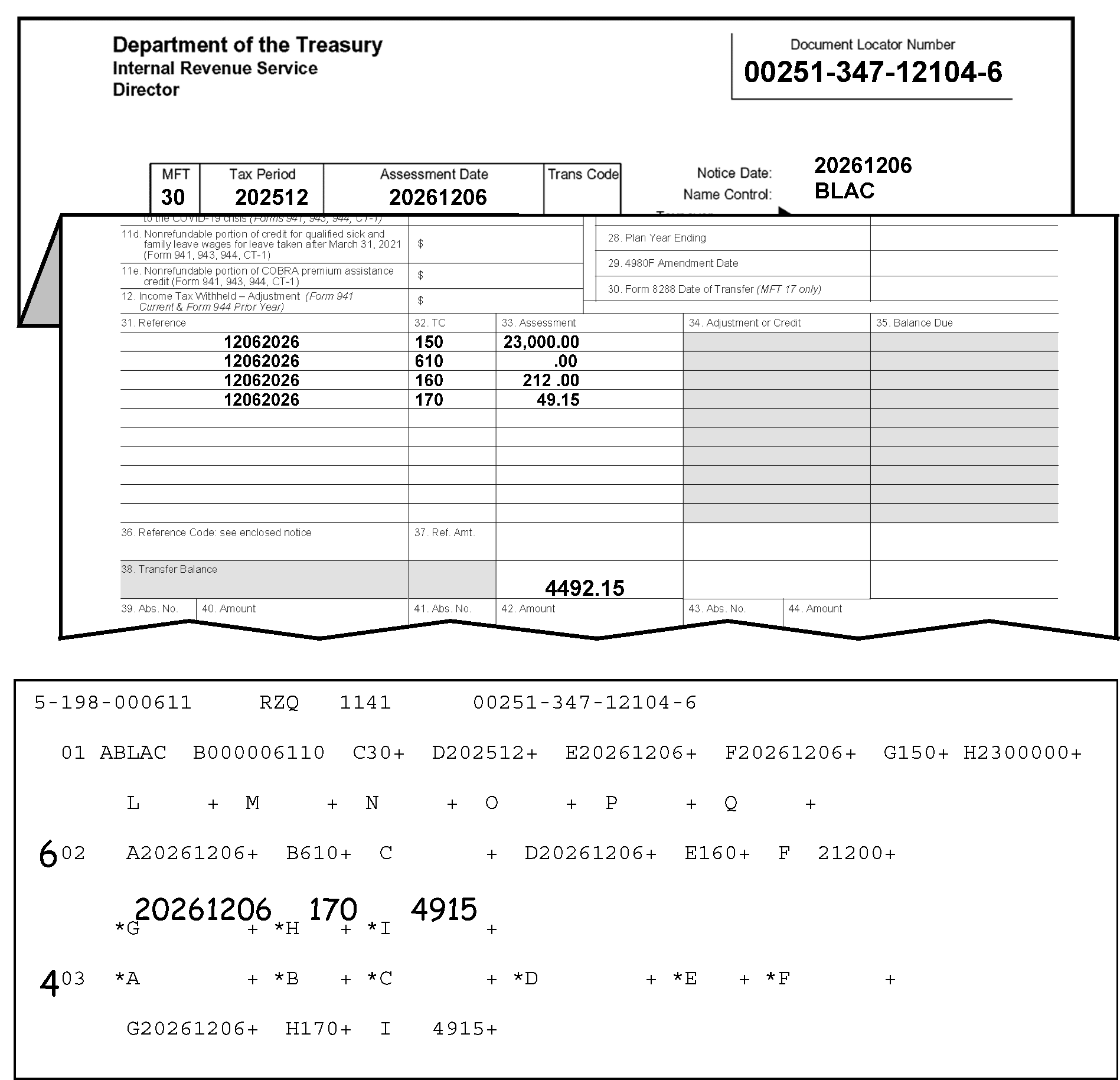
Figure 3.12.21-21 displays a part of the Form 3552, Prompt Assessment Billing Assembly, and an error register portion. Figure 3.12.21-21 shows the data in Section 03 is being transferred from Fields 03-G (Transaction Date), 03-H (Transaction Date), and 03-I (Transaction Amount) to the equivalent Fields G, H and I, respectively, in Section 02. The transaction date, transaction code, and transaction amount, respectively, are being moved from their Section 03 fields to the equivalent fields in Section 02. 20261206 will be transferred to the date field (i.e., from Field 03-G to Field 02-G), 170 will be transferred to the transaction code field (i.e., from Field 03-H to Field 02-H), and 4915 (as in forty-nine dollars and fifteen cents) will be transferred to the transaction amount field in Section 02 (i.e., from Field 03-I to Field 02-I). An Action Code 6 is entered (in the margin) to the left of Section 02, and an Action Code 4 is entered (in the margin) to the left of Section 03, informing the ISRP transcriber inputting the corrections that the data is Section 03 is to be transferred to Section 02 and Section 03 must be deleted after the data transfer.In the upper left corner of the Form 3552 are three organization headings listed vertically: Department of the Treasury, Internal Revenue Service and Director, respectivelyIn the upper right corner opposite those three headings is the Document Locator Number box, with the document locator number, 00251-347-12104-6.About two lines beneath that information is a single box with four conjoined boxes marked as MFT, Tax Period, Assessment Date and Trans Code. Immediately to the right of this four-part box are three rows, in vertical order, marked Notice Date, Name Control and Taxpayer Identifying Number respectively.The MFT is 30The Tax Period is 202512The Assessment Date is 20261206The Trans Code box (to the right of the Assessment Date box) is blankThe Notice Date is 20261206The Name Control is BLACImmediately beneath this information, the Form 3552 was folded to reveal the part of the Form 3552 with the columns under Item 31 (Reference), Item 32 ((TC) as in Transaction Code), and Item 33 (Assessment). The following four (4) rows of information are contained as follows on the Form 3552:The first row of information beneath the three columns displays 12062025, 150, and 23,000.00 (twenty-three thousand dollars and zero cents), respectivelyThe second row displays 12062026, 610, and .00 (zero cents), respectivelyThe third row displays 12062026, 160, and 212.00 (two-hundred twelve dollars and zero cents), respectively.The fourth row displays 12062026, 170, and 49.15 (forty-nine dollars and fifteen cents), respectivelyOn the bottom row of the Assessment column (to the right of the Transfer Balance) is 4,492.15 (four thousand four hundred ninety-two dollars and fifteen cents).Immediately beneath this Form 3552 information is a part of the error register, displaying Section 01 (Fields A through Q) and Section 02 (Field A through I) and Section 03 (Field A through Field I).At the top of the error register (first line) are the following four items: 2-198-000611, RZQ, 1141, and 00251-347-12104-6 (Document Locator Number)Field A (Section 01) on the error register displays the name control (BLAC)Field B displays the SSN (000006110)Field C displays the MFT Code (30)Field D displays the Tax Period (202512)Field E displays the Date of Transfer (20261206)Field F displays the 23C Date of Assessment (20261206)Field G displays the Original Assessment Transaction Code of (150)Field H displays the Original Assessment Transaction Amount of (2300000)No other fields in Section 01 contain entriesAn Action Code (AC) 6 is edited to the left of Section 02 to inform the ISRP operator that information in Section 02 must be changed. Section 02 displays the following entries:Field A (Section 02) on the error register displays the Transaction Date (20261206)Field B displays the Transaction Code (610)Field C displays the Transaction Amount is blankField D displays the Transaction Date (20261206)Field E displays the Transaction Code (160)Field F displays the Transaction Amount (21200)The following literals are edited above the blank Fields G, H, and I, informing the ISRP operator to add the correct Transaction Date, Transaction Code, and Transaction Amount, respectively, to Section 02 of the record: 20261206, 170, 4915 (forty-nine dollars and fifteen cents).An Action Code (AC) 4 is edited to the left of Section 03 to inform the ISRP operator Section 03 is to be deleted from the recordCurrently, the Section 03 contains the following entries:Fields A through F (Section 03) are blank and display no entriesField G (Section 03) on the error register contains Transaction Date of (20261206)Field H displays a Transaction Code of (170)Field H displays the Original Assessment Transaction Amount of (4915 (forty-nine dollars and fifteen cents)).Using Action Code 6, items currently displayed in Fields G, H and I (Section 3) will be transcribed (moved) to the (currently blank) Fields G, H and I in Section 02Using Action Code 4, the ISRP operator will move those items from Section 03 to Section 02 and delete Section 03 after transferring the data to Section 02.There are no other entries or edit marks are displayed on Figure 3.12.21-21
Please click here for the text description of the image.
-
3.12.21.5.2 (01-01-2016)
Correction Procedures-Sections 02-19
- This section describes field validity criteria and correction procedures for all fields in Section 02-19.
3.12.21.5.2.1 (01-01-2026)
Section 02-19 - Fields A, D, and G - Transaction Date
-
The Transaction Date, if present, is an eight-digit, all numeric field.
-
The Month of the Transaction Date must be in the range of 01 through 12.
-
The transaction date may not be later than the current processing date and not earlier than the earliest date allowed.
-
On the correction run, a date earlier than the earliest date allowed is valid, but it can't be before the following dates.
-
For BMF-1961-12-01 (i.e., December 1, 1961)
-
For IMF-1962-12-01 (i.e., December 1, 1962)
-
For IRAF-1976-01-01 (RAW PASS), 1962-12-01 (CORR)
Note:
The Individual Retirement Account File (as a separate Master File) was retired in 2004. All references to "MFT 29" are what were previously referred to as IRAF.
-
-
If the date is blank and the Transaction Code (TC) is a penalty or additional tax, use the date from Field 01-F (23-C Date of Assessment or "Transaction Date" ).
-
IMPORTANT: A Transaction Code (TC) 150 (i.e., "Tax Assessment Return" OR"Entity Created by a TC 150" ) and a TC 300 ("Examination Tax Assessment" ) must never be on the same assessment. If an assessment (on the paper Error Register) includes BOTH a TC 150 and a TC 300, do as follows:
-
Reject the document, using Action Code 3.
-
Attach Form 4227, notating, "includes a TC 150 and a TC 300" , and attach it to the document.
-
Route the document (with the Form 4227) to Accounting for correction.
Reminder:
Follow the table/procedures in IRM 3.12.21.5.2.1(9) below to identify the originator (to whom the Form 4227 (and document) should be sent for research and correction).
-
-
If, after comparing the error register against the input document, a valid transaction date can't be determined:
-
Prepare Form 4227, "Intra SC-Reject or Routing Slip" .
-
Notate on the 4227, "Invalid transaction date" , and attach the Form 4227 to the document.
-
Reject the document, using Action Code 3, and route the document (with the Form 4227) to the originator for correction.
Exception:
BMF MFTs 51, 58, 60, 61, 62, 63, and 64 have no restrictions on the earliest valid date on the correction run. Use Action Code 7 to clear the register.
Reminder:
Follow the table/procedures in IRM 3.12.21.5.2.1(9) below to identify the originator (to whom the Form 4227 (and document) should be sent for research and correction).
-
-
If all Transaction Dates were correctly input from the document and are valid for the allowable dates listed in Paragraph (4) above, use Action Code 7 to clear the register.
-
IMPORTANT: Follow the procedures in the table below to identify the originator (to whom the Form 4227 (and document) should be sent for research and correction).
If Originator Prepared Form 3413 (Transcription List (Account Transfer-In)): If Originator Prepared Form 3552 (Prompt Assessment Billing Assembly): If Originator Prepared Form 12810 (Account Transfer Request Checklist): 1. Go to Page 1 (Form 3413): 2. Find the following (originator’s) information in the lower-left corner of the Form 3413. 3. "Name and Date Prepared (mmddyy)." 4. "Telephone Number" . 5. Prepare the Form 4227, Intra-SC Reject or Routing Slip with the appropriate notation described in IRM 3.12.21.5.2.1. 6. Attach Form 4227 to the (transaction) document, and send them to the originator for missing information, research and/or correction. 7. Send them to the originator for missing information, research and/or correction. 1. Go to Page 1 (Form 3552): 2. Find the following (originator’s) “IDRS Number” in the upper-right portion of the Form 3552 (under the Document Locator Number). 3. Prepare the Form 4227, Intra-SC Reject or Routing Slip with the appropriate notation described in IRM 3.12.21.5.2.1. 4. Attach Form 4227 to the (transaction) document. 5. Send them to the originator for missing information, research and/or correction. 1. Go to top of page (Form 12810): 2. Find (originator’s) “IDRS Number” in the upper-right portion of the Form 12810 (under the "DLN" , "Unit" , and "Stop Number" ). 3. Use the "Unit" or "Stop Number" if IDRS Number not there. 4. Prepare the Form 4227, Intra-SC Reject or Routing Slip with the appropriate notation described in IRM 3.12.21.5.2.1. 5. Attach Form 4227 to the (transaction) document. 6. Send them to the originator for missing information, research and/or correction.
3.12.21.5.2.2 (01-01-2026)
Section 02-19 - Fields B, E, and H - Transaction Codes
-
These fields will be invalid if they do not contain a transaction code (TC) such as valid for the doc code, MFT, and section number being processed. See Exhibit 3.12.21-5, Valid IMF Transaction Code Table, through Exhibit 3.12.21-7, BMF Valid Transaction Code Table.
-
Compare the document and the register.
-
Correct any transcription errors.
-
-
Fields B, E, or H will appear invalid if more than one TC 150 is present in the document. Correct as follows:
-
Compare the document and the register.
-
Correct any transcription errors.
-
If the document is correct as transcribed, reject the record, using Action Code 3.
-
Notate on Form 4227, "two TC 150s present" .
-
Attach 4227 to the document and route to Accounting for research and/or correction.
Reminder:
Follow the table/procedures in IRM 3.12.21.5.2.2(5) below to identify the originator (to whom the Form 4227 (and document) should be sent for research and correction).
-
-
The transaction codes and their corresponding transaction amount must be compatible.
-
For every transaction code 402 there must be a corresponding TC 400 with the transaction date and transaction amount of the same value. Correct as follows:
-
Compare the document and the register.
-
Correct any transcription errors.
-
If the document is correct as transcribed, reject the record, using Action Code 3.
-
Prepare Form 4227, notating, "TC 402 without TC 400 Present" .
-
Attach 4227 to the document and route to Accounting for research and/or correction.
Reminder:
Follow the table/procedures in IRM 3.12.21.5.2.2(5) below to identify the originator (to whom the Form 4227 (and document) should be sent for research and correction).
-
-
IMPORTANT: Follow the procedures in the table below to identify the originator (to whom the Form 4227 (and document) should be sent for research and correction).
If Originator Prepared Form 3413 (Transcription List (Account Transfer-In)): If Originator Prepared Form 3552 (Prompt Assessment Billing Assembly): If Originator Prepared Form 12810 (Account Transfer Request Checklist): 1. Go to Page 1 (Form 3413): 2. Find the following (originator’s) information in the lower-left corner of the Form 3413. 3. "Name and Date Prepared (mmddyy)." 4. "Telephone Number" . 5. Prepare the Form 4227, Intra-SC Reject or Routing Slip with the appropriate notation described in IRM 3.12.21.5.2.2. 6. Attach Form 4227 to the (transaction) document, and send them to the originator for missing information, research and/or correction. 7. Send them to the originator for missing information, research and/or correction. 1. Go to Page 1 (Form 3552): 2. Find the following (originator’s) “IDRS Number” in the upper-right portion of the Form 3552 (under the Document Locator Number). 3. Prepare the Form 4227, Intra-SC Reject or Routing Slip with the appropriate notation described in IRM 3.12.21.5.2.2. 4. Attach Form 4227 to the (transaction) document. 5. Send them to the originator for missing information, research and/or correction. 1. Go to top of page (Form 12810): 2. Find (originator’s) “IDRS Number” in the upper-right portion of the Form 12810 (under the "DLN" , "Unit" , and "Stop Number" ). 3. Use the "Unit" or "Stop Number" if IDRS Number not there. 4. Prepare the Form 4227, Intra-SC Reject or Routing Slip with the appropriate notation described in IRM 3.12.21.5.2.2. 5. Attach Form 4227 to the (transaction) document. 6. Send them to the originator for missing information, research and/or correction. -
If TCs 630, 632, 636, or 637 appear in this section, move the TCs to section 20 per the requirements for that section.
-
If Fields A, B and C have entries, Fields D, E and F are blank, and Fields G, H, and I have entries, an asterisk will print before the blank fields. Correct by moving the data, leaving no blank intervening fields or sections. (See Figure 3.12.21-22.) Move entries from Fields G, H, and I into Fields D, E, and F, and delete Fields G, H, and I.
-
If IMF record and TC 450 is present and tax period is 197512 or later, this is an invalid condition.
Figure 3.12.21-22
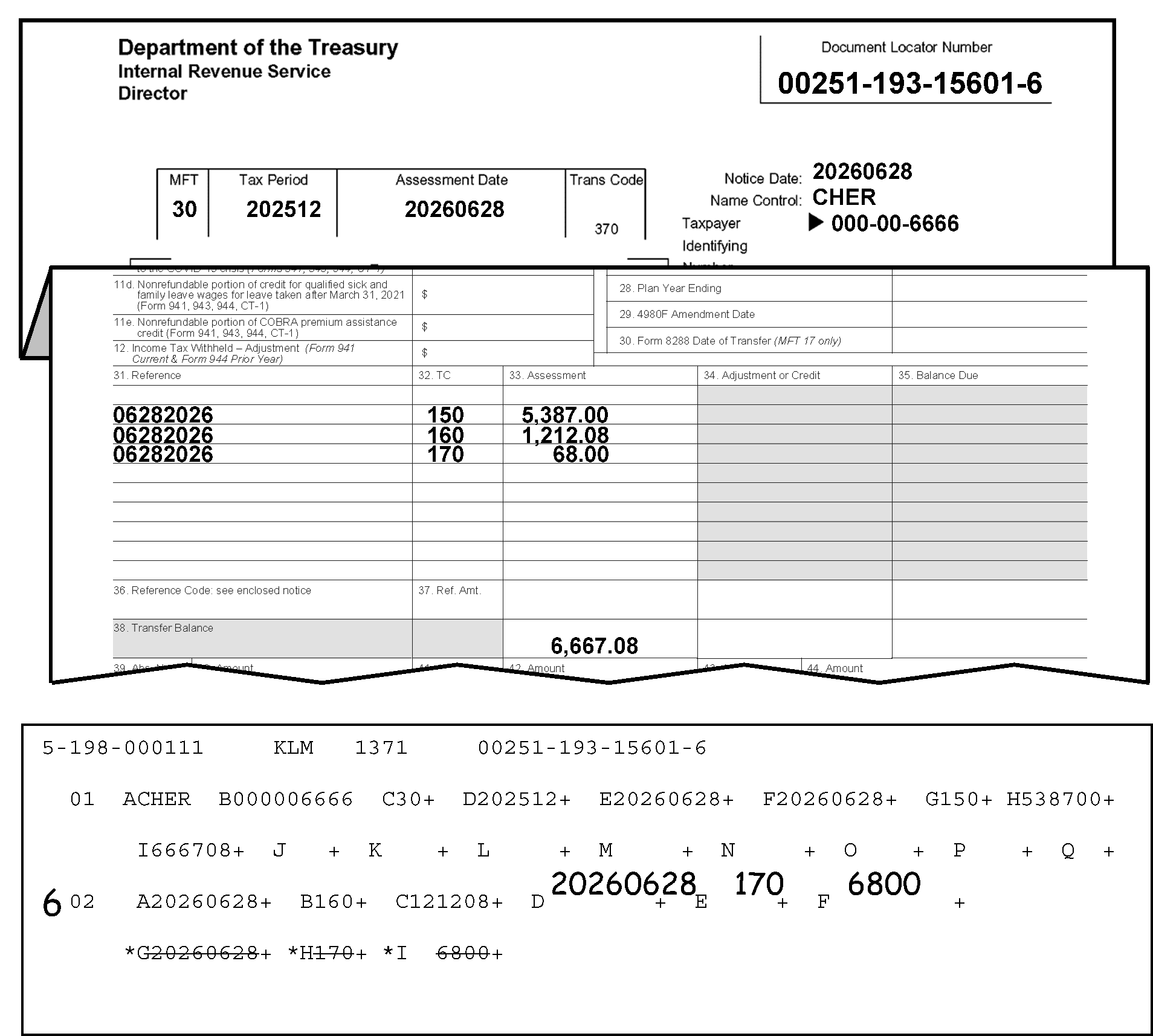
Figure 3.12.21-22 includes a display of a Form 3552 and an of the error register portion to provide an example demonstrating what is meant by NOT leaving intervening blank fields within a section. Details regarding what is shown in Figure 3.12.21-22 are provided as follows: Figure 3.12.21-22 shows a register with entries in Section 02, Fields A, B, C, G, H, and I, BUT Fields D, E, and F are blank. Correct the register by moving the entries from Fields G, H, and I into Fields D, E, and F, respectively. This figure displays the data moved FROM Fields G, H, and I TO Fields D, E, and F, which are 20260628 (date), 170 (transaction code), and 6800 (the transaction amount is sixty-eight dollars and zero cents), respectively. An Action Code 6 is entered in the margin to the left of Section 02, alerting the ISRP data transcriber to make the corrections as directed in Section 02, deleting Fields G, H, and I, and leaving no blank intervening fields in Section 02.In the upper left corner of the Form 3552 are three organization headings listed vertically: Department of the Treasury, Internal Revenue Service and Director, respectivelyIn the upper right corner opposite those three headings is the Document Locator Number box, with the document locator number, 00251-193-15601-6. Two lines beneath that information is a single box with four conjoined boxes marked as MFT, Tax Period, Assessment Date and Trans Code. Immediately to the right of this four-part box are three rows, in vertical order, marked Notice Date, Name Control and Taxpayer Identifying Number respectively. The MFT is 30 The Tax Period is 202512 The Assessment Date is 20260628 The Trans Code is 370 The Notice Date is 20260628 Beneath the Notice Date, the Name Control is CHER Beneath the Name Control, the Taxpayer Identifying Number is 000-000-6666Immediately beneath this information, the Form 3552 was folded to reveal the part of the Form 3552 with the columns under Item 31 (Reference), Item 32 ((TC) as in Transaction Code), and Item 33 (Assessment). The following four (4) rows of information are contained under the above-listed columns as follows on the Form 3552:The first row displays 06282026, 150, and 5,387.00 (five thousand, three hundred eighty-seven dollars and zero cents), respectivelyThe second row displays 06282026, 160, and 1,212.08 (one thousand, two-hundred twelve dollars and eight cents), respectivelyThe third row displays 06282026, 170, and 68.00 (sixty-eight dollars and zero cents), respectivelyOn the bottom row of the Assessment column (to the right of the Transfer Balance) is 6,667.08 (six thousand, six hundred, sixty-seven dollars and eight cents).Immediately beneath this Form 3552 is a part of the error register, displaying Section 01 (Fields A through Q) and Section 02 (Field A through I)At the top of the error register (first line) are the following four items: 2-198-000111, KLM, 1371, and 00251-193-15601-6 (Document Locator Number)Field A (Section 01) on the error register displays the name control (CHER)Field B displays the SSN (000006666)Field C displays the MFT Code (30)Field D displays the Tax Period (202512)Field E displays the Date of Transfer (20260628)Field F displays the 23C Date of Assessment (20260628)Field G displays the Original Assessment Transaction Code of (150)Field H displays the Original Assessment Transaction Amount of (538700 (five thousand, three hundred eighty-seven dollars and zero cents)).Field I displays the Transfer-in Amount of (666708 (six thousand, six hundred sixty-seven dollars and eight cents)).Field J through Field Q (Section 01) contain no entriesA 6 is edited to the left of Section 02 to inform the ISRP operator that information in Section 02 must be changed. Section 02 currently displays the following entries:Field A (Section 02) on the error register displays the Transaction Date (20260628)Field B displays the Transaction Code (160)Field C displays the Transaction Amount 121208 (one thousand, two-hundred twelve dollars and eight cents).The literals 20260628 are edited above the blank Field D (Transaction Date) in Section 02 of the error register.The literals 170 are edited above the blank Field E (Transaction Code) in Section 02 of the error register.The literals 6800 are edited above the blank Field F (Transaction Amount) in Section 02 of the error register. Lines are drawn through the following three entries in Section 02 of the error register (to be moved to the three blank fields preceding them::Field G, Transaction Date (Section 02) the entry 20260628, on the error register.Field H, Transaction Code (Section 02) the entry 170, on the error register.Field I (eye), Transaction Amount (Section 02) the entry 6800 (sixty-eight dollars and zero cents), on the error register.Using Action Code 6, ISRP will move the (lined-through) entries currently in Section 02: FROM Fields G, H and I, TO (the currently blank) Fields D, E and F (also in Section 02) respectively. Since Fields D, E, and F are blank no blank, intervening fields can be In the record. ISRP operators will move the data FROM Fields G, H, and I TO Fields D, E, and FFields G, H, and I should be blank after ISRP moves that data to Fields D, E, and F.There are no other entries or edit marks displayed on Figure 3.12.21-22.
Please click here for the text description of the image.
-
If there is any TC 340/341 in Sections 02-19, dated 01/01/1991 (i.e., January 1, 1991) or later, there must be an equal number of TC 340/341s in Sections 30-33. If they are not present in an equal number, all TC 340/341 in Sections 02-19 and 30-33 and their related date and money amount fields will asterisk if the date is after 01/01/1991. Compare the register to the document and if you can determine the problem, correct. If not, reject to the originator for resolution, using Action Code 3. Attach Form 4227 and send to originator, notating, "please verify transaction codes" .
Note:
For Form 3413 only.
Reminder:
Follow the table/procedures in IRM 3.12.21.5.2.2(5) above to identify the originator (to whom the Form 4227 (and document) should be sent for research and correction).
-
The Interest Computation Date (Field 01-Q) is checked against Transaction Codes 290, 294, 295, 298, 299, 300, 304, 308, 309 in Sections 01 through 19.
Note:
This applies only to Form 3552 (Doc Code 51) and BMF and IMF. The program will bypass this check if the Interest Computation Date (Field 01-Q) is invalid.
-
When Transaction Codes 290, 295, 298, 299, 300, 304, 308, 309 are present in Sections 01 through 19, the Interest Computation Date (Field 01-Q) must be present. If any of Transaction Codes 294, 295, 298, 299, 304, 308, and 309 are present, but Field 01-Q (Interest Computation Date) contains no entry, Fields B, E, H (Sections 01-19), and Field 01-Q will error code. To correct:
-
Compare the document (Form 3552) and register.
-
Correct any transcription errors.
-
If the document is correct as transcribed, reject the record, using Action Code 3.
-
Notate on Form 4227, "Transaction Codes (TCs) are present without an Interest Computation Date" .
-
Attach 4227 to the document and route to Accounting for research and correction.
Reminder:
Follow the table/procedures in IRM 3.12.21.5.2.2(5) above to identify the originator (to whom the Form 4227 (and document) should be sent for research and correction).
-
-
If a TC 290 or TC 300 is present with none of the Transaction Codes (TCs) 294, 295, 298, 299, 304, 308 and 309 Fields B, E, H, Field 01-Q (the Interest Computation Date) and all of the corresponding TC fields will error code. To correct:
-
Compare the document (Form 3552) and the register.
-
Correct any transcription errors.
-
If the document is correct as transcribed, reject the record, using Action Code 3.
-
Notate on Form 4227, "Needs one of the following (TC 294, 295, 298, 299, 304, 308, or 309) present with TC 290 or TC 300" .
-
Attach 4227 to the document and route to Accounting for research and correction.
Reminder:
Follow the table/procedures in IRM 3.12.21.5.2.2(5) above to identify the originator (to whom the Form 4227 (and document) should be sent for research and correction).
-
-
If more than one of these transaction codes (294, 295, 298, 299, 304, 308 and 309) are present, Field 01-Q and the corresponding TC fields will error code. To correct:
-
Compare the document and the register.
-
Correct any transcription errors.
-
If the document is correct as transcribed, reject the record, using Action Code 3.
-
Notate on Form 4227, "Interest Computation Date is present with more than one of the Transaction Codes (TCs 294, 295, 298, 299, 304, 308, and 309)" .
-
Attach 4227 to the document and route to Accounting for research and correction.
Reminder:
Follow the table/procedures in IRM 3.12.21.5.2.2(5) above to identify the originator (to whom the Form 4227 (and document) should be sent for research and correction).
-
-
If a TC 294 or TC 298 is present with more than one TC 290 (or any TC 300) in Section 01 through 19, Field 01-Q, and the corresponding transaction code fields will error code. To correct:
-
Compare the document (Form 3552) and the register.
-
Correct any transcription errors.
-
If the document is correct as transcribed, reject the record, using Action Code 3.
-
Notate on Form 4227, "TC 294 or TC 298 is present with more than one TC 290 (or (any) TC 300)" .
-
Attach 4227 to the document and route to Accounting for research and correction.
Reminder:
Follow the table/procedures in IRM 3.12.21.5.2.2(5) above to identify the originator (to whom the Form 4227 (and document) should be sent for research and correction).
-
-
If a TC 304 or TC 308 is present with more than one TC 300 (or any TC 290) in Section 01 through 19, Field 01-Q, and the corresponding transaction code fields will error code. To correct:
-
Compare the document (Form 3552) and the register.
-
Correct any transcription errors.
-
If the document is correct as transcribed, reject the record, using Action Code 3.
-
Notate on Form 4227, "TC 294 or TC 298 is present with more than one TC 290 (or (any) TC 300)" .
-
Attach 4227 to the document and route to Accounting for research and correction.
Reminder:
Follow the table/procedures in IRM 3.12.21.5.2.2(5) above to identify the originator (to whom the Form 4227 (and document) should be sent for research and correction).
-
-
If any Transaction Code 294, 295, 298, 299, 304, 308, OR 309 is present in Section 01 - 19, but the Interest Computation Date (Field 01-Q) is NOT present, Field 01-Q and the corresponding transaction code fields will error code. To correct:
-
Compare the document (Form 3552) and the register.
-
Correct any transcription errors.
-
If the document is correct as transcribed, reject the record, using Action Code 3.
-
Notate on Form 4227, "Transaction Codes are present without an Interest Computation Date" .
-
Attach 4227 to the document and route to Accounting for research and correction.
Reminder:
Follow the table/procedures in IRM 3.12.21.5.2.2(5) above to identify the originator (to whom the Form 4227 (and document) should be sent for research and correction).
-
-
The program will check Credit Transaction Codes 291, 295, 299, 301, 309 (Sections 02-19) against Debit Transaction Codes 290, 294, 295, 298, 299, 300, 304, 308, 309 in Sections 01 through 19 for valid Tax Liability/Carryback combinations.
Note:
This applies only to Form 3552 (Doc Code 51) and BMF and IMF. The program will bypass this check if IRAF (MFT 29), if any Transaction Code Error Indicators in Sections 01 through 19 are set, if the Interest Computation Date 01-Q is invalid, or if the Computer Date Error Indicator is set.
-
If more than one of these (credit) transaction codes (291, 295, 299, 301, and 309) is present, the corresponding TC fields will error code. To correct:
-
Compare the document and the register.
-
Correct any transcription errors.
-
If the document is correct as transcribed, reject the record, using Action Code 3,
-
Notate on Form 4227, "More than one of the credit transaction codes (TCs) is present" .
-
Attach 4227 to the document and route to Accounting for research and correction.
Reminder:
Follow the table/procedures in IRM 3.12.21.5.2.2(5) above to identify the originator (to whom the Form 4227 (and document) should be sent for research and correction).
-
-
There must be one debit TC for every credit TC. If none, or more than one of these debit TCs 290, 294, 298, 300, and 308 is present, the credit TC and all corresponding (debit) TC fields will error code. To correct:
-
Compare the document and the register.
-
Correct any transcription errors.
-
If the document is correct as transcribed, reject the record, using Action Code 3.
-
If none of the debit TCs is present, notate on Form 4227, "None of the debit TCs is present" .
-
If there are more than one of the debit transaction codes present, notate on Form 4227, "More than one of the debit TCs are present" .
-
Attach 4227 to the document and route to Accounting for research and correction.
Reminder:
Follow the table/procedures in IRM 3.12.21.5.2.2(5) above to identify the originator (to whom the Form 4227 (and document) should be sent for research and correction).
-
-
If Transaction Code 298 is present for IMF, it will error code if used with other tax and interest transaction codes. Otherwise, it is the same as a TC 290.
-
Compare the document and the register.
-
Correct any transcription errors.
-
If the document is correct as transcribed, reject the record, using Action Code 3.
-
If none of the debit transaction codes are present, notate on Form 4227, "TC 298 is present for IMF with other tax and interest TCs" .
-
Attach 4227 to the document and route to Accounting for research and/or correction.
Reminder:
Follow the table/procedures in IRM 3.12.21.5.2.2(5) above to identify the originator (to whom the Form 4227 (and document) should be sent for research and correction).
`
-
-
If any transaction code combination is not found in the Tax Liability Carryback Transaction Code Table (see below), both the credit and debit will error code. To correct:
-
Compare the document (Form 3552) and the register.
-
Correct any transcription errors.
-
If the document is correct as transcribed, reject the record, using Action Code 3.
-
Notate on Form 4227, "Combination is not found in the Tax Liability Carryback Transaction Code Table" .
-
Attach 4227 to the document and route to Accounting for research and correction.
Reminder:
Follow the table/procedures in IRM 3.12.21.5.2.2(5) above to identify the originator (to whom the Form 4227 (and document) should be sent for research and correction).
Tax Liability Carryback Transaction Code Table - Debit Transaction Code with Credit Transaction Code
(Debit) (Credit) 290 295 290 299 294 291 298 291 300 309 308 301 -
3.12.21.5.2.3 (01-01-2026)
Section 02-19 - Fields C, F, and I - Transaction Amount
-
These fields will be invalid if the amount is signed positive and the related transaction code is not a debit or if the amount is signed negative and the related transaction code is not a credit.
-
Compare the document and the register. Correct any transcription errors.
-
If the document is correct as transcribed, reject the record, using Action Code 3.
-
Notate on Form 4227, "Transaction Amount error" .
-
Attach 4227 to the document and route to Accounting for research and correction.
Reminder:
Follow the table/procedures in IRM 3.12.21.5.2.2(5) above to identify the originator (to whom the Form 4227 (and document) should be sent for research and correction).
3.12.21.6 (01-01-2016)
Sections 20 Through 23 - Form 3413
- This section provides descriptions of the fields and correction procedures for Section 20 through 23 (Form 3413).
3.12.21.6.1 (01-01-2016)
Sections 20 Through 23 - Fields A Through L Description
-
Listed below are the fields contained in Sections 20 through 23.
-
The alpha-field designator, field length (maximum length for variable fields) and the field title is shown below:
Field Field Length (+/−) Field Title 20-23A/E/I 3 Transaction Code 20-23B/F/J 2 Appropriation Code 20-23C/G/K 1 Appropriation Indicator 20-23D/H/L 12 +/− Transaction Amount -
Sections 20 through 23 contain transaction codes, appropriation codes, appropriation indicators and transaction amounts. The valid MFT codes for Form 3413 are 02, 05, 08, 17, 30, 31, 33, 34, 35, 46, 65, 85, and 86.
-
For each transaction, the transaction code, appropriation code, and the transaction amount must be present.
-
This section will appear invalid if a significant group of fields follows an insignificant (blank) group of fields or if the first group of fields is not present.
3.12.21.6.2 (01-01-2016)
Correction Procedures - Sections 20 Through 23
- This section provides descriptions of the fields and correction procedures for Section 20 through 23 of the register.
3.12.21.6.2.1 (01-01-2026)
Section 20 Through 23 - Fields A, E, and I - Transaction Codes
-
The valid debit codes are TC 632 and TC 637.
-
The valid credit codes are TC 630 and TC 636.
-
TC 630 and TC 632 are valid only for Doc Code 51 and 52, MFT 02, 05, 08, 17, 30, 31, 33, 34, 46, 85, and 86.
-
TC 636 and TC 637 are valid only for Doc Code 52, MFT 02, 05, 08, 30, 31, 33, 34, 46, 85, and 86.
-
The transaction code fields will appear invalid, along with the appropriation code fields, if the transaction code is 630 or 636 and the appropriation code is other than 02 or the transaction code is 632 or 637 and the appropriation code are other than 03. (See Figure 3.12.21-23.)
Figure 3.12.21-23
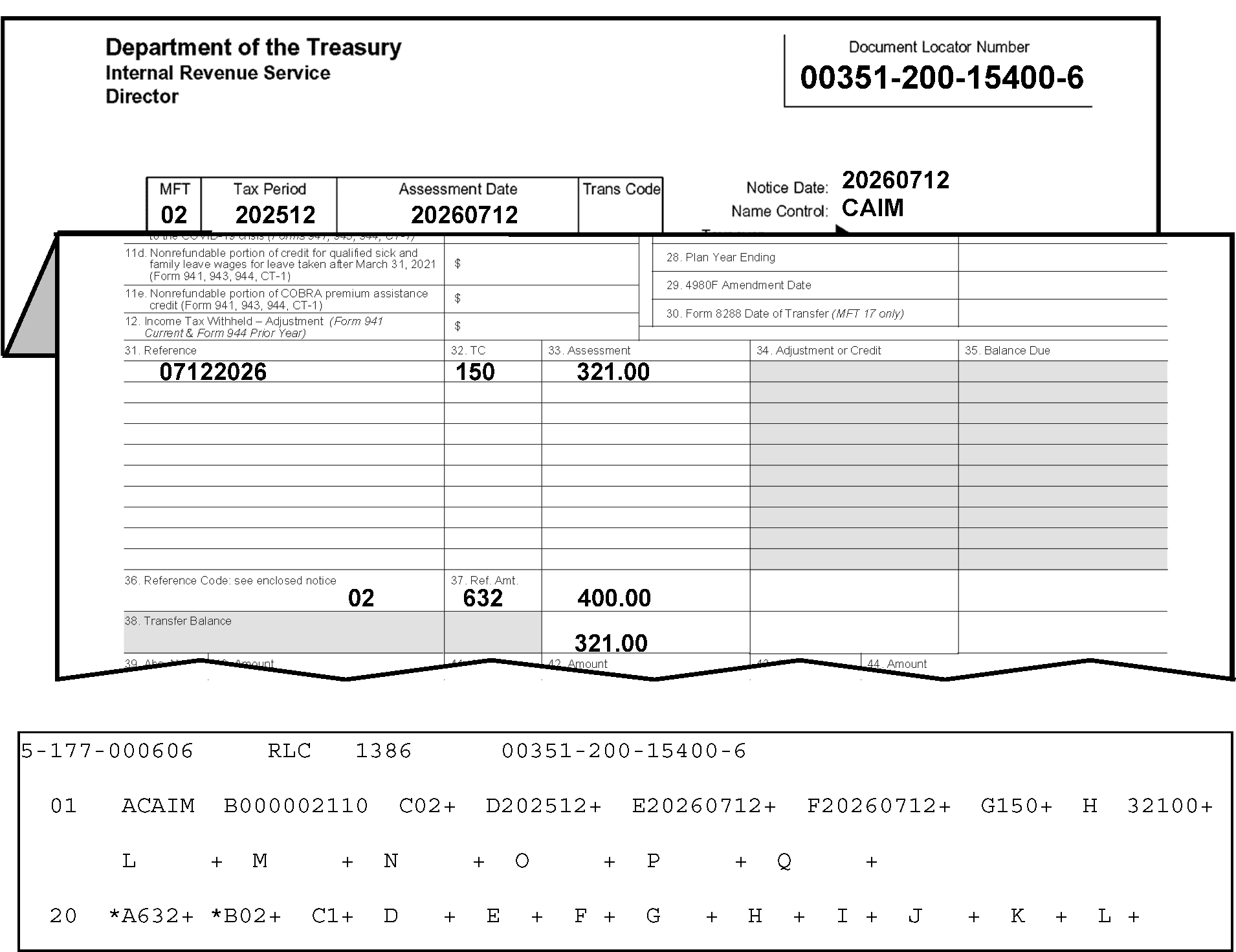
Figure 3.12.21-23 displays portions of a Form 3552 and an error register for an example of the scenario described in Paragraph (5), above. The Transaction Code (Field 20-A) and Appropriation Code (Field 20-B) are both invalid (shown here with asterisks (*) for each field) when the Transaction Code is 632 and the Appropriation Code is other than 03. Details of what is displayed in Figure 3.12.21-23 are provided below:In the upper left corner of the Form 3552 are three organization headings listed vertically: Department of the Treasury, Internal Revenue Service and Director, respectivelyIn the upper right corner opposite those three headings is the Document Locator Number box, with the document locator number, 00351-200-15400-6. Two lines beneath that information is a single box with four conjoined boxes marked as MFT, Tax Period, Assessment Date and Trans Code. Immediately to the right of this four-part box are three rows, in vertical order, marked Notice Date, Name Control and Taxpayer Identifying Number respectively. The MFT is 02 The Tax Period is 202512 The Assessment Date is 20260712 The Trans Code is blank The Notice Date is 20260712 Beneath the Notice Date, the Name Control is CAIM Beneath the Name Control, the Taxpayer Identifying Number is 000-000-2110 (NOTE: Although this information is obstructed on this example, it is displayed below on the error register portion.)Immediately beneath this information, the Form 3552 is folded to reveal five columns of data: Item 31 (Reference), Item 32 ((TC) as in Transaction Code), Item 33 (Assessment), Item 34 (Adjustment or Credit), and Item 35 (Balance Due). PLEASE NOTE: Item 34 (Adjustment or Credit), and Item 35 (Balance Due). are shaded columns and contain NO entries. The Form 3552 columns contains the following entries (by rows):First row (Items 31, 32 and 33) list as follows: (Reference (date)) 07122026, TC 150, and Transaction Amount of 321.00 (three hundred twenty-one dollars and zero cents), respectively. Ten rows beneath that row are Items 37 Reference Code (see enclosed notice)), Item 38 Ref. Amt. (for Reference Amount), and Transaction Amount. Entries in each of these boxes are 02 (Reference Code), 632 (Ref Amt.) and an Assessment amount of 400.00 (four-hundred dollars and zero cents) in the third column, respectively. (It’s flushed with the column amounts above it in the first row.). Directly beneath the above-listed 400.00 is a Transfer Balance Amount of 321.00 (three hundred twenty-one dollars and zero cents). To its left are a shaded Transfer Balance box (Item 38) and a second, smaller unmarked blank box.The second entry is ten rows beneath the first row and displays 02 (Appropriate Code, which is edited under the Reference column, 632, under the Ref. Amt. column, and 400.00; is under the Assessment column, respectively.The third entry on the Form 3552 is located on the bottom row of the Assessment column (two columns to the right of the Transfer Balance) is 321.00Immediately beneath the Form 3552 is an error register portion, displaying Section 01 (Fields A through Q) and Section 20 (Fields A through L)At the top of the error register (first line) are the following four items: 2-177-000606, RLC, 1386, and 00351-200-15400-6 (Document Locator Number)Field A (Section 01) on the error register displays the name control (CAIM)Field B displays the SSN (000002110)Field C displays the MFT Code (02)Field D displays the Tax Period (202512)Field E displays the Date of Transfer (20260712)Field F displays the 23C Date of Assessment (20260712)Field G displays the Original Assessment Transaction Code of (150)Field H displays the Original Assessment Transaction Amount of (32100 (three hundred twenty-one dollars and zero cents)No other entries are displayed in Fields L through Q) Section 01, but Section 20 (Fields A through L) display the following:Field A (Transaction Code on the error register displays an asterisk (*) and the TC 632.Field B (Appropriation Code) displays an asterisk (*) and an 02 (are invalid because the Transaction Code is 632 and the Appropriate Code is other than 03.Field C (Appropriation Indicator) displays a 1.There are no other entries or edit marks displayed on Figure 3.12.21-23.
Please click here for the text description of the image.
-
Compare the document with the register.
-
Correct any transcription errors.
-
If the transaction code is 630 or 636, change Field 20B/F/J to 02.
-
If the transaction code is 632 or 637, change Field 20B/F/J to 03.
-
If there is a notation on the document NOT to alter any information, reject with Action Code 3.
-
Prepare Form 4227 and notate "Doc not to be altered (per doc notation); validate Transaction Code and Appropriate Code"
-
Attach 4227 to the document and route to originator for research and correction.
Reminder:
Follow the table/procedures in IRM 3.12.21.6.2.1(12) below to identify the originator (to whom the Form 4227 (and document) should be sent for research and correction).
-
-
The transaction code fields will appear invalid along with the tax period field (Field 01-D) if the transaction code is TC 630 or TC 632 and MFT is 46, 85, or 86 and tax period is before 198412 (i.e., December 1984).
-
The transaction code fields will appear invalid along with the tax period field (Field 01-D) if the transaction code is TC 630 or TC 632, the MFT is 08, and tax period is before 200412 (i.e., December 2004).
-
The transaction code fields will appear invalid along with the tax period field (Field 01-D) if the transaction code is TC 630 or TC 632, the MFT is 17 and the tax period is before 200512 (i.e., December 2005).
-
The transaction code fields will appear invalid along with the tax period field (Field 01-D) if the transaction code is TC 630 or TC 632, the MFT is 17 and the tax period is before 197810 (i.e., October 1978) or after 198011 (i.e., November 1980).
-
The transaction code fields will appear invalid, along with the tax period field (Field 01-D) if the transaction code is TC 636 or 637, the tax period is before 197810 (i.e., October 1978) or after 198011 (i.e., November 1980).
-
The transaction code fields and the Appropriations Code fields will appear invalid, if the transaction code is TC 630, TC 632, TC 636, or TC 637, the Appropriations Code is present, and the Doc Code is 52.
-
Compare the document with the register.
-
Correct any transcription errors.
-
If the tax period was transcribed correctly and is invalid, reject the register with Action Code 3.
-
Notate on Form 4227; "Tax Period invalid with Transaction Code and Appropriation Code" .
-
Return to originator for correction.
Reminder:
Follow the table/procedures in IRM 3.12.21.6.2.1(12) below to identify the originator (to whom the Form 4227 (and document) should be sent for research and correction).
-
-
IMPORTANT: Follow the procedures in the table below to identify the originator (to whom the Form 4227 (and document) should be sent for research and correction).
If Originator Prepared Form 3413 (Transcription List (Account Transfer-In)): If Originator Prepared Form 3552 (Prompt Assessment Billing Assembly): If Originator Prepared Form 12810 (Account Transfer Request Checklist): 1. Go to Page 1 (Form 3413): 2. Find the following (originator’s) information in the lower-left corner of the Form 3413. 3. "Name and Date Prepared (mmddyy)." 4. "Telephone Number" . 5. Prepare the Form 4227, Intra-SC Reject or Routing Slip with the appropriate notation described in IRM 3.12.21.6.2.1. 6. Attach Form 4227 to the (transaction) document, and send them to the originator for missing information, research and/or correction. 7. Send them to the originator for missing information, research and/or correction. 1. Go to Page 1 (Form 3552): 2. Find the following (originator’s) “IDRS Number” in the upper-right portion of the Form 3552 (under the Document Locator Number). 3. Prepare the Form 4227, Intra-SC Reject or Routing Slip with the appropriate notation described in IRM 3.12.21.6.2.1. 4. Attach Form 4227 to the (transaction) document. 5. Send them to the originator for missing information, research and/or correction. 1. Go to top of page (Form 12810): 2. Find (originator’s) “IDRS Number” in the upper-right portion of the Form 12810 (under the "DLN" , "Unit" , and "Stop Number" ). 3. Use the "Unit" or "Stop Number" if IDRS Number not there. 4. Prepare the Form 4227, Intra-SC Reject or Routing Slip with the appropriate notation described in IRM 3.12.21.6.2.1. 5. Attach Form 4227 to the (transaction) document. 6. Send them to the originator for missing information, research and/or correction. -
If any transaction code valid for Sections 02-19 is input in Section 20, move the transaction code to the correct section.
3.12.21.6.2.2 (01-01-2016)
Sections 20 Through 23 - Fields B, F, and J - Appropriation Codes
-
The valid appropriation codes are 02 and 03.
-
Appropriation Code 02 or 03 must be present when the transaction code field is present.
-
If an appropriation code is not present or is invalid, enter 02 for a credit or 03 for a debit.
3.12.21.6.2.3 (01-01-2016)
Sections 20 Through 23 - Fields C, G, and K - Appropriation Indicator
-
This field may be "1" or blank when the related fields are present.
-
If the indicator is blank, the transaction amount will be included in the math verification for the "CGA" field.
-
If the appropriation Indicator is "1" , the transaction amount will not be included in the math verification.
3.12.21.6.2.4 (01-01-2026)
Sections 20 Through 23 - Fields D, H, and L - Transaction Amounts
-
This field must be present for each appropriation transaction code.
-
The amount is included for math error computation when the related Appropriation Indicator is blank and excluded when the indicator is "1" .
-
The transaction amount must match (debit or credit) the related transaction code.
-
If the transaction amount does not match (debit or credit) the related transaction code, do as follows:
-
Compare the document and the register. Correct any transcription errors.
-
If the document is correct as transcribed, reject the record, using Action Code 3.
-
Notate on Form 4227, "Transaction Amount does not match the related transaction code" .
-
Return to originator for research and corrections.
Reminder:
Follow the table/procedures in IRM 3.12.21.6.2.1(12) above to identify the originator (to whom the Form 4227 (and document) should be sent for research and correction).
-
3.12.21.7 (01-01-2016)
Sections 30 Through 33 (Valid only for Form 3413)
- This section provides descriptions of the fields and correction procedures for Section 30 through 33 (Fields A through I) of the register.
3.12.21.7.1 (01-01-2016)
Sections 30 - Through 33 Procedures - Fields A Through I Description
-
Listed below are fields contained in Sections 30 through 33.
-
The alpha field designator, field length (maximum length for variable fields) and the field title is shown below:
Field Field Length Field Title 30-33A/D/G 8 Status/Interest-to-Date 30-33B/E/H 3 Status Transaction Code 30-33C/F/I 8 Statute Extension Date -
These sections are valid only for Form 3413. If present for Form 3552, the sections will be coded extraneous.
-
Sections 30 through 33 contain Status Dates/Interest-To-Dates, Status Transaction Codes, and Statute Extension Dates.
-
Sections 30 through 33, Fields A, D, and G, Status Date/Interest-To-Date (formerly titled, "Status Transaction Date" ) have been serving a dual purpose since January 1, 1993.
-
If the corresponding Transaction Code (Sections 30 through 33, Fields B, E, or H) is 340 or 341, the field must contain an Interest-To-Date. Refer to IRM 3.12.21.7.2.2 for correction procedures.
-
If the corresponding Transaction Code is other than 340 or 341, the field will contain a Status Date. Refer to IRM 3.12.21.7.2.1 for correction procedures.
-
3.12.21.7.2 (01-01-2016)
Correction Procedures - Sections 30 Through 33
- This section provides descriptions of the fields and correction procedures for Section 30 through 33 (Fields A, D, and G (Status Transaction) of the register).
3.12.21.7.2.1 (01-01-2026)
Sections 30 Through 33 - Fields A, D, and G - Status/Interest-To-Dates
-
This field must be all numeric and in YYYYMMDD format. The month must be 01-12, and the day must be 01-31.
-
The Interest-To-Date is a required field when Transaction Codes 340 or 341 are present in Sections 30 through 33.
-
If a Transaction Code 340 or 341 is present with a transaction date of 1991-01-01 (i.e., January 1, 1991) or later, a corresponding transaction code entry must be present in Section 02-19. The Section 02-19 entry will include an amount. They must be in the same physical order in both sections. If any of the required fields are missing, all present fields in those sections will be error coded, so that they may be corrected.
-
Correct as follows:
-
Compare the document and the register.
-
If the date was incorrectly transcribed, correct it, using Action Code 6.
-
If the correct Interest-To-Date can't be determined, reject using Action Code 3.
-
Prepare Form 4227, Intra-SC Reject or Routing Slip.
-
Notate on Form 4227, "Interest-to-Date can't be determined" .
-
Attach 4227 to document and route to originator for research and/or correction.
Reminder:
Follow the table/procedures in IRM 3.12.21.7.2.1(5) below to identify the originator (to whom the Form 4227 (and document) should be sent for research and correction).
-
If Transaction Code (TC) 340 (Restricted Interest Assessment) or TC-341 (Restricted Interest Abatement) is present and the Interest-To-Date is missing, reject using Action Code 3.
-
Prepare a Form 4227 and notate "invalid transaction date" .
-
Attach 4227 to document and route to originator for research and/or correction.
Reminder:
Follow the table/procedures in IRM 3.12.21.7.2.1(5) below to identify the originator (to whom the Form 4227 (and document) should be sent for research and correction).
-
If Transaction Code 340 or TC-341 is present in Sections 30 through 33, but the required identical entry (as stated in paragraph (3) above) is missing, reject using Action Code 3.
-
Notate on Form 4227, "TC 340/341 present, but, required transaction fields not present" .
-
Attach 4227 to document and route to originator for research and/or correction.
Reminder:
Follow the table/procedures in IRM 3.12.21.7.2.1(5) below to identify the originator (to whom the Form 4227 (and document) should be sent for research and correction).
-
-
IMPORTANT: Follow the procedures in the table below to identify the originator (to whom the Form 4227 (and document) should be sent for research and correction).
If Originator Prepared Form 3413 (Transcription List (Account Transfer-In)): If Originator Prepared Form 3552 (Prompt Assessment Billing Assembly): If Originator Prepared Form 12810 (Account Transfer Request Checklist): 1. Go to Page 1 (Form 3413): 2. Find the following (originator’s) information in the lower-left corner of the Form 3413. 3. "Name and Date Prepared (mmddyy)." 4. "Telephone Number" . 5. Prepare the Form 4227, Intra-SC Reject or Routing Slip with the appropriate notation described in IRM 3.12.21.7.2.1. 6. Attach Form 4227 to the (transaction) document, and send them to the originator for missing information, research and/or correction. 7. Send them to the originator for missing information, research and/or correction. 1. Go to Page 1 (Form 3552): 2. Find the following (originator’s) “IDRS Number” in the upper-right portion of the Form 3552 (under the Document Locator Number). 3. Prepare the Form 4227, Intra-SC Reject or Routing Slip with the appropriate notation described in IRM 3.12.21.7.2.1. 4. Attach Form 4227 to the (transaction) document. 5. Send them to the originator for missing information, research and/or correction. 1. Go to top of page (Form 12810): 2. Find (originator’s) “IDRS Number” in the upper-right portion of the Form 12810 (under the "DLN" , "Unit" , and "Stop Number" ). 3. Use the "Unit" or "Stop Number" if IDRS Number not there. 4. Prepare the Form 4227, Intra-SC Reject or Routing Slip with the appropriate notation described in IRM 3.12.21.7.2.1. 5. Attach Form 4227 to the (transaction) document. 6. Send them to the originator for missing information, research and/or correction.
3.12.21.7.2.2 (01-01-2026)
Sections 30 Through 33 - Fields B, E, and H - Status Transaction Codes
-
These fields are invalid if not one of the status transaction codes listed in Exhibit 3.12.21-5, Valid IMF Transaction Code Table, through Exhibit 3.12.21-7, BMF Valid Transaction Code Table. Certain codes are valid with certain MFT codes only as set forth in the applicable chart. If a transaction code is present, there must also be a status date.
-
Fields E and H may be blank but must be present if their corresponding status date is present. If the transaction code in the input document is invalid, correct as follows:
-
Reject the record with Action Code 3.
-
Prepare Form 4227 for contact with the preparer.
-
Notate on Form 4227: "Fields E and H are blank, but corresponding Status Date is present" .
-
Attach 4227 to document and route to preparer for correction.
Reminder:
Follow the table/procedures in IRM 3.12.21.7.2.1(5) above to identify the originator (to whom the Form 4227 (and document) should be sent for research and correction).
-
-
TC 912 and TC 914 are valid only when both are present and only when they are present an equal number of times.
-
TC 916 and TC 917 are valid only when both are present and only when they are present an equal number of times.
-
TC 550, TC 560 and TC 564 are valid only once per document. If TC 550, TC 560 and TC 564 occur more than once in Sections 30 through 33, the duplicate transaction codes will appear invalid.
-
TC 560 and TC 564 are not valid on the same record. If this occurs all the TC 560 and TC 564 will appear invalid.
-
TC 550, TC 560, and TC 564 are not valid for IRAF (MFT 29).
-
Correct as follows:
-
Compare the document with the register.
-
Correct any transcription errors.
-
If the document is correct as transcribed and the data on the input document is incorrect, reject the record with Action Code 3.
-
Prepare Form 4227 for contact with the originator.
-
Notate on Form 4227, "data on input document is incorrect" and route to the originator.
Reminder:
Follow the table/procedures in IRM 3.12.21.7.2.1(5) above to identify the originator (to whom the Form 4227 (and document) should be sent for research and correction).
-
-
If the Transaction Code (TC) is TC-340 (Restricted Interest Assessment) or TC-341 (Restricted Interest Abatement), a corresponding Interest-To-Date must also be present.
-
If the Interest-To-Date is missing, reject with Action Code 3.
-
Prepare Form 4227 for contact with the originator.
-
Notate on Form 4227, "data on input document is incorrect" and route to originator.
Reminder:
Follow the table/procedures in IRM 3.12.21.7.2.1(5) above to identify the originator (to whom the Form 4227 (and document) should be sent for research and correction).
-
-
If the Transaction Code is 340 or 341, a TC 340 or 341 must exist in the same physical order in Sections 02 through 19.
-
If not in the same physical order (disregarding TCs other than 340/341 in sections 02-19 and 30-33), reject using Action Code 3.
-
Prepare Form 4227 for contact with the originator.
-
Notate on Form 4227, "TC 340 or 341 not in same physical order in Sections 02 through 19" and route to originator.
Reminder:
Follow the table/procedures in IRM 3.12.21.7.2.1(5) above to identify the originator (to whom the Form 4227 (and document) should be sent for research and correction).
-
3.12.21.7.2.3 (01-01-2026)
Sections 30 Through 33 - Fields C, F, and I - Statute Extension Dates (BMF and IMF only)
-
The format for these fields is YYYYMMDD.
-
The date must also meet the validity checks relative to month and day presented for the Status Transaction Dates, good until year 2099.
-
A date must be present if the corresponding Status Transaction Code is 468, 469, 550, 560, or 564. These fields must be blank for all other status transaction codes. These Transaction Codes will be valid until year 2099.
-
The Statute Extension Date must be later than the Status Date. A date must be associated with TC 550, TC 560, TC564, or TC 460.
Exception:
Retention Register cases with TC 460 (Doc. Code 52) must leave the Statute Extension Date blank; the system will automatically fill in with the correct Statute Extension Date.
Caution:
Account Transfers cases with TC 460 (Doc. Code 51) must include the Statute Extension Date.
-
This information is not valid for IRAF (MFT 29).
-
Correct as follows:
-
Compare the document with the register.
-
Correct any transcription errors.
-
If the document is correct as transcribed and the data on the input document is incorrect, reject the document with Action Code 3.
-
Prepare Form 4227 for contact with the originator.
-
Notate on Form 4227, "data on input document is incorrect" and route to the originator.
Reminder:
Follow the table/procedures in IRM 3.12.21.7.2.1(5) above to identify the originator (to whom the Form 4227 (and document) should be sent for research and correction).
-
3.12.21.7.2.4 (01-01-2016)
Sections 30 Through 33 - Missing Field Groups
-
If Fields A and B are printed, Fields D and E are blank, and Fields G and H are printed; an asterisk is printed before Fields D and E.
-
Correct by entering the data, leaving no blank intervening fields or sections.
3.12.21.8 (01-01-2016)
Sections 36 Through 39
- This section provides descriptions of the fields and correction procedures for Section 36 through 39 of the register.
3.12.21.8.1 (01-01-2016)
Sections 36 Through 39 - Fields A Through F Description
-
Listed below are the fields contained in Sections 36 through 39.
-
The alpha-field designator, field length (maximum length for variable fields) and the field titles are shown below:
Field Field Length (+/−) Field Title 36-39A/C/E/G\* 3 Abstract Number 36-39B/D/F/H\* 12 +/− Abstract Amount -
Sections 36 through 39 contain Abstract/IRS Numbers and Abstract Amounts.
-
Section 36 is valid for all master files.
-
Section 37 is valid for BMF, MFT 03, 50, 61, and IRAF, MFT 29, 74, 76, 49.
-
Section 38 is valid with MFT code 03, 50, and 61,74, 76, 49.
-
Section 39 is valid only with MFTs 03 and 61, 74, 76, 49.
Note:
Fields 36-39/G and 36-39/H of Section 01 are valid for Form 3552****only.
3.12.21.8.2 (01-01-2016)
Correction Procedures - Sections 36 Through 39
- This section contains correction procedures for Sections 36 through 39.
3.12.21.8.2.1 (01-01-2026)
Sections 36 Through 39 - Fields A, C, E, and G - Abstract/IRS Numbers
-
An Asterisk is printed before the field if the Abstract/IRS Number is invalid. The valid Abstract/IRS Numbers are listed as follows:
MFT-CD Abstract/IRS Number 02 330 through 333 03 009 through 024, 026 through 098, 101 through 125, 133, 136, 140, 291, 303 through 310, 322 through 324, 326 through 329, 340 through 390, 392 through 398, 411 through 437 12 330, 333 29 160, 162, 194, 195, 233, 235, 236, 237 34 330 through 333 44 330 through 333 49 163, 164 50 151 through 154, 182, 183, 213, 214, 215, 216, 234, 237, 238, 240 61 001 through 009, 013 through 035, 040 74 165, 167, 169 75 165 76 159, 161, 163, 164, 165, 167, 169, 200, 201, 203 through 205, 206, 209, 224 through 228, 237, 450, 451, 452. 77 218 78 217 All MFTs except 15, 46, 77, 78, 85, 86 221, 222 Note:
* MFT 03 - Abstract Number 125 is valid for Tax Period 200803 and after. MFT 29 - Abstract Numbers 235 or 236 are valid for Tax Periods 200012 (i.e., December 2000) and greater. Abstract 237 is valid for Tax Period 200412 (i.e., December 2004) and after. MFT 50 - Abstract Numbers 151-154 can't appear on the same record as 214, 182, 183. If this occurs, all Abstract Number fields that contain 214, 151-154, 182 or 183 will appear invalid. For Raw Processing, Abstract Numbers 182 and 183 (TC 150) may not appear on the same record. Abstract 234 is valid for Tax Period 199902 (i.e., February 1999) and greater. MFT 50 - Abstract Numbers 215 and 216 are valid for Tax Periods 201712 (December 2017) and later. (See Figure 3.12.21-24.)
Figure 3.12.21-24
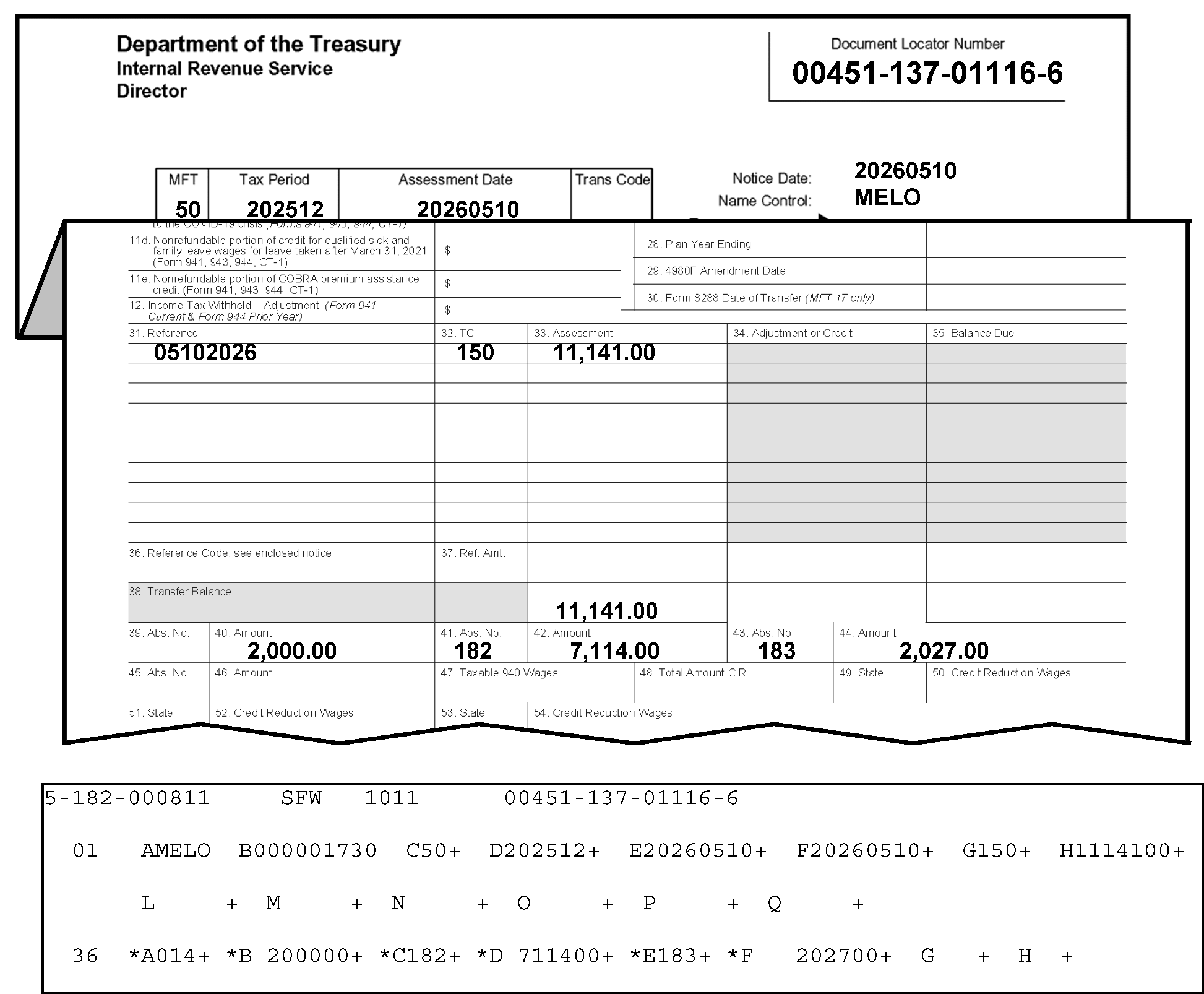
Figure 3.12.21-24 displays portions of a Form 3552 and an error register for an example of Abstract Numbers 182 and 183 on the same record. The error register shows Section 36 with asterisks printed before Fields A, C, E (Abstract/IRS Number) and B, D, F (Transaction Amount) when the Abstract/IRS Numbers are invalid. For MFT 50, Abstract Numbers 182 and 183 (TC 150) may not appear on the same record, so the Fields A, C, E will asterisk (*), along with their respective transaction amounts. other details describing this figure are provided as follows:In the upper left corner of the Form 3552 are three organization headings listed vertically: Department of the Treasury, Internal Revenue Service and Director, respectivelyIn the upper right corner opposite those three headings is the Document Locator Number box, with the document locator number, 00451-137-01116-6. Two lines beneath that information is a single box with four conjoined boxes marked as MFT, Tax Period, Assessment Date and Trans Code. Immediately to the right of this four-part box are three rows, in vertical order, marked Notice Date, Name Control and Taxpayer Identifying Number respectively. The MFT is 50 The Tax Period is 202512 The Assessment Date is 20260510 The Trans Code is blank The Notice Date is 20260510 Beneath the Notice Date, the Name Control is MELO Beneath the Name Control, the Taxpayer Identifying Number is 000-000-1730 (NOTE: Although this information is obstructed here, on this example, it is displayed below on the error register.)Immediately beneath this information, the (folded) Form 3552 reveals the Form 3552 portion displaying columns under Item 31 (Reference), Item 32 ((TC) as in Transaction Code), and Item 33 (Assessment). The following Form 3552 information is contained under the above-listed columns as follows:The first row displays 05102026, 150, and 11,141.00 (Eleven thousand, one hundred forty-one dollars and zero cents), under Items 31, 32, and 33, respectivelyThe second entry on the Form 3552 is located thirteen lines down to the bottom row of the Assessment column (to the right of the Transfer Balance) is 11,141.00 (Eleven thousand, one hundred forty-one dollars and zero cents).Next Row: Left to right, Item 40 (Amount), 2,000.00 (Two thousand dollars and zero cents); Item 41 (Abstract Number), 182; Item 42 (Amount), 7,114.00 (Seven thousand one hundred fourteen dollars and zero cents), Item 43 (Abstract Number), 183 and Item 44 (Amount), 2,027.00 (Two thousand twenty-seven dollars and zero cents), respectivelyAlthough there are no other Form 3552 entries, immediately beneath this form an error register portion displaying Section 01 (Fields A through Q) and Section 34 (Field A through H)At the top of the error register (first line) are the following four items: 2-182-000811, SFW, 1011, and 00451-137-01116-6 (Document Locator Number)The part of the error register displayed on this figure contains Section 01 (Fields A through Q) and Section 36 (Fields through H):Field A (Section 01) on the error register displays the name control (MELO)Field B displays the SSN (000001730)Field C displays the MFT Code (50)Field D displays the Tax Period (202512)Field E displays the Date of Transfer (20260510)Field F displays the 23C Date of Assessment (20260510)Field G displays the Original Assessment Transaction Code of (150)Field H displays the Original Assessment Transaction Amount of (11141100 (Eleven thousand, one hundred forty-one dollars and zero cents))No other entries are displayed under Section 01, but Section 36 (Fields A through H) follows Section 01 on this figure.Section 36 on the error register displays the following fields:Field A displays an asterisk (*) and the Abstract/IRS Number is 014.Field B displays an asterisk (*) and the Abstract Amount is 200000 (Two thousand dollars and zero cents).Field C displays an asterisk (*) and the Abstract/IRS Number is 182.Field D displays an asterisk (*) and the Abstract Amount is 711400 (Seven thousand one hundred fourteen dollars and zero cents).Field E displays an asterisk (*) and the Abstract/IRS Number is 183.Field F displays an asterisk (*) and the Abstract Amount is 202700 (Two thousand twenty-seven dollars and zero cents).IMPORTANT: All Abstract/IRS Numbers and their (respective) amounts will appear invalid (displaying asterisks (*)) on the error register because Abstract Numbers 182 and 183 must not appear on the same record.After Field F (Section 36), there are no other entries displayed on Figure 3.12.21-24
Please click here for the text description of the image.
-
Determine the correct Abstract/IRS Number from the Form 3413 or Form 3552 and correct transcription errors.
-
When there is no Abstract/IRS Number available on the input form, or the correct one can't be determined, from attachments or the table above, use the following Abstract/IRS numbers:
-
For MFT Code 03, use abstract number 080.
-
For MFT Code 29, use abstract number 160 or 162.
-
For MFT Code 50, use abstract number 151.
-
For MFT Code 61, use abstract number 006.
-
-
When the Abstract/IRS Numbers can't be determined (for MFTs listed in the table other than the four listed in Paragraph (3), above), do as follows:
-
Reject, using Action Code 3.
-
Prepare Form 4227, Intra-SC Reject or Routing Slip.
-
Notate on 4227, “Abstract amount blank/missing”, and route to the originator for research and/or correction.
Reminder:
Follow the table/procedures in IRM 3.12.21.8.2.1(9) below to identify the originator (to whom the Form 4227 (and document) should be sent for research and correction).
-
-
Abstract numbers 221 and 222 may appear only once in a record and if one is present, the other must be present. If the abstract number is 221 or 222 the abstract amount must be greater than 0 or both the abstract number and the abstract amount will appear invalid.
-
If the Abstract Number is 221 or 222 the transaction code must be 340 or 341 or the Abstract Number field will appear invalid.
-
When there is a Net Tax Assessment associated with Transaction Codes 15X, 29X or 30X in Sections 01-19, there must be a valid abstract number other than 221 and 222.
-
When Abstract is 227 there must a Transaction Code 290 or 300 in Section 01-19.
-
IMPORTANT: Follow the procedures in the table below to identify the originator (to whom the Form 4227 (and document) should be sent for research and correction).
If Originator Prepared Form 3413 (Transcription List (Account Transfer-In)): If Originator Prepared Form 3552 (Prompt Assessment Billing Assembly): If Originator Prepared Form 12810 (Account Transfer Request Checklist): 1. Go to Page 1 (Form 3413): 2. Find the following (originator’s) information in the lower-left corner of the Form 3413. 3. "Name and Date Prepared (mmddyy)." 4. "Telephone Number" . 5. Prepare the Form 4227, Intra-SC Reject or Routing Slip with the appropriate notation described in IRM 3.12.21.8.2.1. 6. Attach Form 4227 to the (transaction) document, and send them to the originator for missing information, research and/or correction. 7. Send them to the originator for missing information, research and/or correction. 1. Go to Page 1 (Form 3552): 2. Find the following (originator’s) “IDRS Number” in the upper-right portion of the Form 3552 (under the Document Locator Number). 3. Prepare the Form 4227, Intra-SC Reject or Routing Slip with the appropriate notation described in IRM 3.12.21.8.2.1. 4. Attach Form 4227 to the (transaction) document. 5. Send them to the originator for missing information, research and/or correction. 1. Go to top of page (Form 12810): 2. Find (originator’s) “IDRS Number” in the upper-right portion of the Form 12810 (under the "DLN" , "Unit" , and "Stop Number" ). 3. Use the "Unit" or "Stop Number" if IDRS Number not there. 4. Prepare the Form 4227, Intra-SC Reject or Routing Slip with the appropriate notation described in IRM 3.12.21.8.2.1. 5. Attach Form 4227 to the (transaction) document. 6. Send them to the originator for missing information, research and/or correction.
3.12.21.8.2.2 (01-01-2026)
Sections 36 Through 39 - Fields B, D, F, and H - Abstract Amount
-
These fields must be all numeric and have corresponding Abstract/IRS numbers.
-
Determine the correct abstract amount from the input document and correct the error register.
-
If the correct amount can't be determined, reject using Action Code 3. Attach Form 4227 to the document, for contact with the originator; notate, "Abstract amount blank/missing" .
Reminder:
Follow the table/procedures in IRM 3.12.21.8.2.1(9) above to identify the originator (to whom the Form 4227 (and document) should be sent for research and correction).
3.12.21.8.2.3 (01-01-2016)
Sections 36 Through 39 - Missing Field Groups
-
Both items, abstract number and abstract amount must be present for each transaction group.
-
An insignificant group (both items missing) indicates no further information in the section.
-
Use Action Code 6 to fill or blank fields. Delete any unnecessary fields to the right of the last significant field.
3.12.21.9 (01-01-2022)
Section 40 - Doc Code 51 Only
- This section contains field descriptions, correction procedures and related information for Section 40 (Document Code 51 only).
3.12.21.9.1 (01-01-2024)
Section 40 - Fields A through Z Descriptions
-
Listed below are the fields contained in Section 40.
-
The alpha-field designator, field length (maximum length for variable fields) and the field title is shown below.
Field Field Length (+/−) Field Title 40-A 13 + Adj. total of inc. tax withheld (Form 943, Form 945, and Form 941--MFT 01- posted prior to 12/31/2004). 40-B 13 + Taxable Social Security Wages (Form 941, Form 943, Form 944 and Form 945) (This is also referred to in the programming document as , Taxable FICA Wages Paid Amount) 40-C 13 +/- Taxable Social Security Wages for qualified sick leave (Form 941, 943, 944) 40-D 13 +/- Taxable Social Security Wages for qualified family leave (Form 941, 943, 944) 40-E 13 + Taxable Social Security Tips (Form 941 and Form 944) (In the program, this is Taxable Tips Reported Amount.) 40-F 13 + Taxable Medicare Wages and Tips (Form 941 and Form 944) (In program specifications this is Taxable Hospital Insurance Benefits Wages.) 40-G 13 +/- Additional Taxable Medicare Wages and Tips (Form 941, Form 943 , Form 944 & Form 1041 ) 40-H 13 +/- Exempt Wages/Tips Paid to Qualified Employees (Form 941, Form 943, and Form 944) (The program specifications calls this Qualified Employer Exempt Wage/Tip Paid Amount) 40-I 13 +/- Section 3121Q Taxable Amount 40-J 13 +/- Fractions of Cents (Form 941) 40-K 13 +/- Current Quarter's Sick Pay Amount (Form 941) Form 944 Current Year's Adjustment (Programming specifications refer to this as CURR-QTR's - Sick Pay (Form 941) Form 944 Current yrs. Adj.) 40-L 13 +/- Current Quarter's Tips and Group Term Insurance Adjustment (Program specifications refer to this as, CURR-QTR- Tips and Group Term Life Insurance Adjustment.) 40-M 13 +/- Qualified Small Business Credit - Form 8974 (Form 941, Form 943, and 944) 40-N 13 +/- Nonrefundable portion of credit for qualified sick and family leave wages (Form 941, 943, 944, CT-1) 40-O 13 +/- Nonrefundable portion of employee retention credit due to the COVID-19 crisis (Form 941, 943, 944, CT-1) 40-P 13 +/- Nonrefundable portion of credit for qualified sick and family leave wages for leave taken after March 31, 2021 (Form 941, 943, 944, CT-1) 40-Q 13 +/- Nonrefundable portion of COBRA premium assistance credit (Form 941, 943, 944, CT-1) 40-R 13 +/- Income Tax Withheld Adj. (Form 941 (Current Year), Form 944 (Prior Year) (Program specifications refer to this as, Income Tax Withholding - Adjustment. (Form 941 (Current Year), (Form 944 (Prior Year). 40-S 13 +/- SS and Med. Tax - Adj. (Form 941, Form 943, Form 944 and Form 945) (Program specifications refer to this as Social Security and Medicare Tax - Adjustment (Form 941, Form 943, Form 944 and Form 945.) 40-T 13 +/- Special Additions to Federal Income Tax (Form 941 and Form 944) 40-U 13 +/- Special Additions to Social Security and Medicare Tax (Form 941 and Form 944) 40-V 13 +/- Total Income Tax Withheld from wages (Form 941 and Form 944) posted after 12/31/2004 40-W 13 + Tips Deemed Wages (Sec 3121g) 40-X 13 +/- Total Backup Withhold Adj. (Form 945) 40-Y 13 + Gross Income Paid (Form 1042) 40-Z 13 +/- RR Retirement Tax Adj (Form CT-1)
3.12.21.9.2 (01-01-2024)
Section 40 - Field Requirements - Fields A through Z
-
If there is a field within Section 40 that is not valid for the MFT being processed, the individual field will asterisk. Use the following chart to validate the MFT and Section 40 field presence.
Section 40 and MFT Code Table
Field MFT Code 40-A 01, 11, 16 40-B 01, 11, 14, 16 40-C 01, 09, 11, 14 40-D 01, 09, 11, 14 40-E 01, 14 40-F 01, 14 40-G 01, 11, 14, 16 40-H 01, 11, 14 40-I 01 40-J 01 40-K 01,14 40-L 01 40-M 01, 11, 14 40-N 01, 09, 11, 14 40-O 01, 09, 11, 14 40-P 01, 09, 11, 14 40-Q 01, 09, 11, 14 40-R 01,14 40-S 01, 11, 14,16 40-T 01,14 40-U 01,14 40-V 01,14 40-W 01,14 40-X 16 40-Y 12 40-Z 09 -
If Section 40 is present, the MFT must be 01, 09, 11, 12, 14 or 16 on the Raw Data Run. It is not required on the correction run.
-
If the input document is a Form 3413 and the tax class is "1" , this section should be present. If the section is not present or the required elements in the section are not present, review the input document and any attachments for the missing data.
-
If the required data is found, enter the data on the register using Action Code 6.
-
If the data is not found, enter Action Code 7 to the left of section 01.
Note:
If more than an occasional Form 3413 is received without this information, refer this matter to the error correction supervisor, who will contact his/her counterpart in the correct Function, in the Accounting Branch, to ensure the correct preparation of the Form 3413 in the future.
-
-
Section 40 is valid when Field 01-G, Original Assessment Transaction Code, is 150, 290, 294, 298, 300, 304, or 308.
-
IMPORTANT: The program is set up to validate the credit transaction codes against the debit transaction codes. If any of the following combinations in the following Tax Liability Carryback table is not found, then both the credit and debit transaction codes will be set to error. To correct:
-
Compare the input document against the correct field on the register.
-
Correct transcription errors, if any.
-
Using the table below, compare the correct Debit/Credit combinations.
-
If the required data is found, enter the data on the register, using Action Code 6.
-
If the data is not found, enter Action Code 7 to the left of the section.
Tax Liability Carryback Table - Debit Transaction Code with Credit Transaction Code
Debit Credit 290 295 290 299 294 291 298 291 300 309 308 301 -
-
This section is not valid with doc code 52 records. An extraneous section (#) will result if any data is present in Section 40. If the doc code is 52, delete Section 40 with Action Code 4.
3.12.21.9.2.1 (01-01-2026)
Section 40 - Field Requirements - Fields A Through Z
-
Field 40-A--Adjustment Total of Income Tax Withheld (Form 943, Form 945, and Form 941 - MFT 01---posted prior to 12/31/2004):
-
This information is found under Item A (Section 40), Page 2 (Form 3413); also, Line 1, Page 1 (Form 3552).
-
This field is valid for MFT 01,11, and 16.
-
IMPORTANT: On original input, this field, plus Field 40-B, Taxable Social Security Wages, and Field 40-V, Total Income Tax Withheld, must equal the net of all transaction codes 29X and 30X. If, after checking, there are NO invalid or Math Error conditions, Clear with Action Code 7.
Note:
See also IRM 3.12.21.9.2, Correction Procedures - Section 40.
-
-
Field 40-B-Taxable Social Security Wages (Form 941, Form 943, Form 944 and Form 945):
-
This information is found under Item B (Section 40), Page 2 (Form 3413); also, Line 2, Page 1 (Form 3552).
-
This field is valid for MFT 01, 11, 14, and 16.
-
If, after checking, there are NO invalid or Math Error conditions, Clear with Action Code 7.
Note:
Beginning in January 2026 (for Field 40-B only), this field will accept "blanks" and "zeroes" (0) as valid entries (in addition to amounts greater than zero).
-
-
Field 40-C, Taxable Social Security Wages for qualified sick leave (Form 941, Form 943, Form 944):
-
This information is found under Item C (Section 40), Page 2 (Form 3413); also, Line 2a, Page 1 (Form 3552).
-
This field is valid for MFT 01, 09, 11, and 14.
-
If the doc code is 51, MFT is 01, 09, 11, or 14, and Field 40-C equals zero, Field 40-C will appear invalid. If, after checking, there are NO invalid or Math Error conditions, Clear with Action Code 7.
-
-
Field 40-D, Taxable Social Security Wages for qualified family leave (Form 941, Form 943, Form 944):
-
This information is found under Item D (Section 40), Page 2 (Form 3413); also, Line 2b, Page 1 (Form 3552)):
-
This field is valid for MFT 01, 09, 11 and 14.
-
If the doc code is 51, MFT is 01, 09, 11, or 14, and Field 40-D equals zero, Field 40-D will appear invalid. If, after checking, there are NO invalid or Math Error conditions, Clear with Action Code 7.
-
-
Field 40-E-Taxable Social Security Tips (Form 941 and Form 944):
-
This information is found under Item E (Section 40), Page 2 (Form 3413); also, Line 3, Page 1 (Form 3552).
-
This field is valid for MFT 01 and 14.
-
If invalid on another MFT, delete Field 40-E.
-
-
Field 40-F-Taxable Medicare Wages and Tips (Form 941 and Form 944):
-
This information is found under Item F (Section 40), Page 2 (Form 3413); also, Line 4, Page 1 (Form 3552):
-
This field is only valid with MFT 01 and 14.
-
If Field 40-F is different from the amount on the form, strike through the entry on the register. Edit the correct amount above it and correct with Action Code 6.
-
If Field 40-F is correct as entered, accept with Action Code 7.
-
If invalid on another MFT, delete Field 40-F.
-
-
Field 40-G-Additional Taxable Medicare Wages and Tips (Form 941, Form 943, Form 944, and Form 1041). NOTE: This field is only valid with MFT 01 (Form 941), MFT 11 (Form 943), MFT 14 (Form 944), and MFT 16 (Form 945).
-
This information is found under Item G (Section 40), Page 2 (Form 3413); also, Line 5, Page 1 (:Form 3552):
-
This field is only valid with MFT 01 (Form 941), MFT 11 (Form 943), MFT 14 (Form 944), and MFT 16 (Form 945).
-
If Field 40-G is different from the amount on the form, strike through the entry on the register. Edit the correct amount above it and correct with Action Code 6.
-
If Field 40-G is correct as entered, accept with Action Code 7.
-
If invalid on another MFT, deleted Field 40-G.
-
-
Field 40-H--Exempt Wages/Tips Paid to Qualified Employees (Form 941, Form 943, and Form 944):
-
This information is found under Item H (Section 40), Page 2 (Form 3413); also, Line 6, Page 1 (Form 3552).
-
This field is only valid with MFT 01 (Form 941), MFT 11 (Form 943), and MFT 14 (Form 944).
-
If Field 40-H is different from the amount on the form, strike through the entry on the register. Edit the correct amount above it and correct with Action Code 6.
-
If Field 40-H is correct as entered, accept with Action Code 7.
-
If invalid on another MFT, delete Field 40-H.
-
-
Field 40-I--Section 3121Q Tax Amount:
-
This information is found on Item I (Section 40), Page 2 (Form 3413); also, Line 7 ("SECTION 3121Q Tax Amount." ) (Form 3552).
-
This field is only valid with MFT 01 (Form 941).
-
If invalid on another MFT, delete Field 40-I.
-
-
Field 40-J--Fractions of Cents - Adjustment (Form 941):
-
This information is found under Item J (Section 40), Page 2 (Form 3413); also, Line 8, Page 1 (Form 3552).
-
This field is only valid with MFT 01.
Note:
Currently, the program does not accept this item with MFT 14 (Form 944).
-
If Field 40-J is different from the amount on the form, strike through the entry on the register. Edit the correct amount above it and correct with Action Code 6.
-
If Field 40-J is correct as entered, accept with Action Code 7.
-
If an amount is present in this field for MFT 11, use Action Code 7 to accept taxpayer information.
-
If invalid on another MFT, delete Field 40-J.
-
REMINDER: This field is not valid for MFT 14. If Field 40-J was deleted on Raw but continues to loop with an asterisk (*), reject with Action Code 3. Attach Form 4227, notating, "Fraction of Cents - Adjustment is not valid for MFT 14 (Form 944)" , and route Form 4227 and document to originator for research and correction.
-
-
Field 40-K--Current Quarter's Sick Pay (Form 941); Current Year's Adjustments (Form 944):
-
This information is found under Item K (Section 40), Page 2 (Form 3413); also, Line 9, Page 1 (Form 3552), displayed as Sick Pay Adjustment (Form 941); Current Year’s Adjustments (Form 944).
-
This field is valid with MFT 01 and 14.
-
If invalid on another MFT, delete Field 40-K.
Note:
Field 40-K is positive and negative for Form 3552 ONLY.
-
-
Field 40-L--Current Quarter's Tips and Group Term Insurance Adjustment:
-
This information is found under Item L (Section 40), Page 2 (Form 3413); also, Line 10, Page 1 (Form 3552).
-
This field is only valid with doc code 51, MFT 01 (01 only prior to 199412).
-
If invalid on another MFT, delete Field 40-L.
Note:
Field 40-L is positive and negative for Form 3552 and Form 3413.
-
-
Field 40-M--Qualified Small Business Credit - Form 8974(Form 941, Form 943 and Form 944):
-
This information is found under Item M (Section 40), Page 2, Form 3413; also, Line 11a, Page 1, Form 3552, displayed as Qualified Small Business Credit - Form 8974 (Forms 941, 943 & 944).
-
This field is valid for MFT 01, MFT 11, and MFT 14.
-
Valid tax periods are 201712 and later.
-
Valid transaction codes are 29X/30X.
-
If invalid on another MFT, delete Field 40-M.
Caution:
IRM 3.12.21.4.2.7(23) describes procedures regarding the computation of Field 40-M. Field 40-M, Field 01-C (MFT), Field 01-D (Tax Period) and the Transaction Codes will appear invalid if the conditions described in the table under (23) are NOT met.
-
-
Field 40-N, Nonrefundable portion of credit for qualified sick and family leave wages (Form 941, Form 943, Form 944, Form CT-1):
-
This information is found under Item N (Section 40), Page 2 (Form 3413); also, Line 11b, Page 1 (Form 3552).
-
This field is valid for MFT 01, MFT 09, MFT 11, and MFT 14.
-
If invalid on another MFT, delete Field 40-N.
-
-
Field 40-O, Nonrefundable portion of employee retention credit due to the COVID-19 crisis (Form 941, Form 943, Form 944, Form CT-1):
-
This information is found under Item O (Section 40), Page 2 (Form 3413); also, Line 11c, Page 1 (Form 3552).
-
This field is valid for MFT 01, MFT 09, MFT 11, and MFT 14.
-
If invalid on another MFT, delete Field 40-O.
-
-
Field 40-P, Nonrefundable portion of credit for qualified sick and family leave wages for leave taken after March 31, 2021 (Form 941, Form 943, Form 944, Form CT-1):
-
This information is found under Item P (Section 40), Page 2 (Form 3413); also, Line 11d, Page 1 (Form 3552)).
-
This field is valid for MFT 01, MFT 09, MFT 11, and MFT 14.
-
If invalid on another MFT, delete Field 40-P.
-
-
Field 40-Q, Nonrefundable portion of COBRA premium assistance credit (Form 941, Form 943, Form 944, Form CT-1):
-
This information is found under Item Q (Section 40), Page 2 (Form 3413); also, Line 11e, Page 1 (Form 3552):
-
This field is valid for MFT 01, MFT 09, MFT 11, and MFT 14.
-
If invalid on another MFT, delete Field 40-Q.
-
-
Field 40-R--Income Tax Withheld Adjustment (Form 941; Current Year), Form 944 (Prior Year):
-
This information is found under Item R (Section 40), Page 2 (Form 3413); also, Line 12, Page 1 (Form 3552 ):
-
This field is valid for MFT 01 and 14.
-
If invalid on another MFT, delete Field 40-R.
-
-
Field 40-S--SS and Med. Tax- Adj.; (Form 941, Form 943, Form 944 and Form 945) (i.e., Social Security and Medicare Tax - Adjustment (Form 941, Form 943, Form 944 and Form 945):
-
This information is found under Item S (Section 40), Page 2, (Form 3413); also, Line 13, Page 1 (Form 3552), displayed as "Social Sec. and Med. Tax - Adjustment (Forms 941, 943, 944 & 945)" .
-
This field is valid for MFT 01,11,14 and 16.
-
If invalid on another MFT, delete Field 40-S.
Note:
Field 40-S is positive and negative for Form 3552 ONLY.
-
-
Field 40-T--Special Addition to Federal Income Tax (Form 941 and Form 944):
-
This information is found under Item T (Section 40), Page 2 (Form 3413); also, Line 14, Page 1 (Form 3552):
-
This field is valid for MFT 01 and 14.
-
If invalid on another MFT, delete Field 40-T.
-
-
Field 40-U---Special Additions to Soc. Sec. and Med. Tax (Form 941 and Form 944):
-
This information is found under Item U (Section 40), Page 2 (Form 3413); also, Line 15, Page 1 (Form 3552):
-
This field is valid for MFT 01 and 14.
-
If invalid on another MFT, delete Field 40-U.
-
-
Field 40-V---Total Income Tax Withheld from Wages (Form 941 and Form 944) posted after 12/31/2004:
-
This information is found under Item V (Section 40), Page 2 (Form 3413); also, Line 16, Page 1 (Form 3552).
-
This field is valid for MFT 01 and 14.
-
If invalid on another MFT, delete Field 40-V.
-
-
Field 40-W---Tips Deemed Wages (Sec. 3121q):
-
This information is found under Item W (Section 40), Page 2 (Form 3413); also, Line 17, Page 1 (Form 3552):
-
This field is valid for MFT 01 and 14
-
If invalid on another MFT, delete Field 40-W.
-
-
Field 40-X---Total Backup Withholding - Adjustment (Form 945):
-
This information is found under Item X (Section 40), Page 2 (Form 3413); also, Line 18, Page 1 (Form 3552):
-
This field is valid for MFT 16.
-
If invalid on another MFT, delete Field 40-X.
-
-
Field 40-Y---Gross Income Paid (Form 1042):
-
This information is found under Item Y (Section 40), Page 2 (Form 3413); also, Line 19, Page 1 (Form 3552):
-
This field is valid for MFT 12
-
If invalid on another MFT, delete Field 40-Y.
-
-
Field 40-Z---RR Retirement Tax Adjustment (Form CT-1):
-
This information is found under Item Z (Section 40), Page 2 (Form 3413); also, Line 20, Page 1 (Form 3552).
-
This field is valid for MFT 09.
-
This field must be blank for all other MFTs. If invalid on another MFT, delete Field 40-Z.
-
3.12.21.10 (01-01-2016)
Section 41 - Form 3552 only
- This section contains correction procedures and related information for Section 41 (Form 3552 only).
3.12.21.10.1 (01-01-2026)
Section 41 - Fields A Through H Description
-
Listed below are the fields contained in Section 41.
-
The alpha-field designator, field length (maximum length for variable fields) and the field title is shown below:
Field Field Length (+/−) Field Title 41-A 13 + Total Taxable Form 940 Wages 41-A 13 + Total Taxable Form 940 Wages Computer 41-B 13 + Total Amount Credit Reduction 41-B 13 + Total Amount Credit Reduction Computer 41-C 2 State Code 41-D 12 + Credit Reduction Wages 41-E 2 State Code 41-F 12 + Credit Reduction Wages 41-G 2 State Code 41-H 12 + Credit Reduction Wages -
Section 41 must be present for Form 3552, Doc Code 51, if the tax class is 8, the MFT is 10 and there is either a TC 150, 29X or 30X. (See Figure 3.12.21-25.)
Figure 3.12.21-25
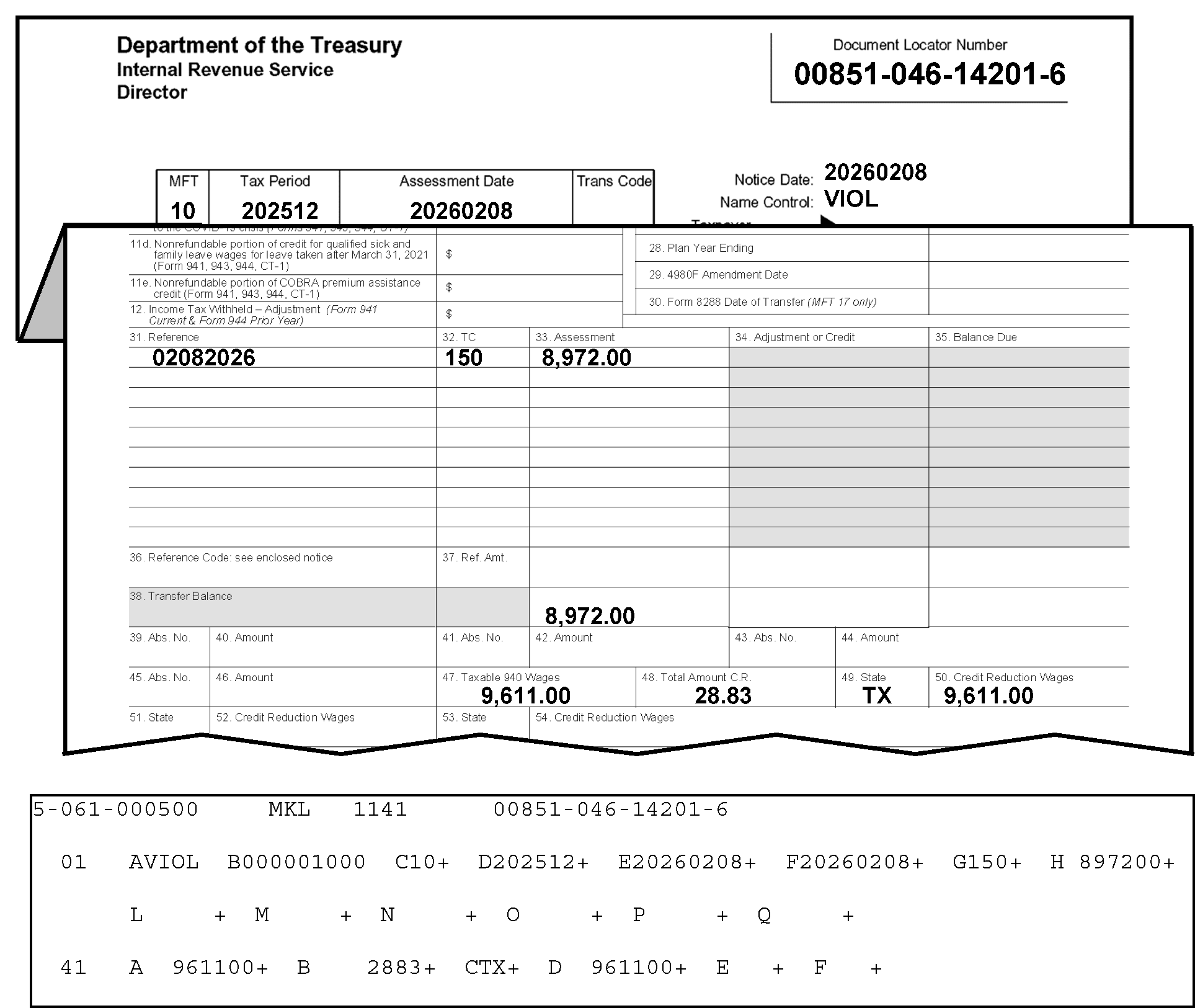
Figure 3.12.21-25 includes portions of a Form 3552 and an error register. This figure provides an example illustrating that Section 41 must be present for Form 3552, Doc Code 51, if the tax class is 8, the MFT is 10 and there is either a TC 150, 29X, or 30X. In this illustration, the Tax Class is 8, the Doc Code is 51, the MFT is 10, and the Transaction Code is 150. The Form 3552 contains the Taxable 940 wages (Line 47); Total Amount CR (Credit Reduction); Line 48, State Code (Line 49), and Credit Reduction Wages (Line 50), all of which should have appeared in Section 41 in Fields 41-A, 41-B, 41-C, and 41-D, respectively. other information regarding Figure 3.12.21-25 is provided as follows:In the upper left corner of the Form 3552 are three organization headings listed vertically: Department of the Treasury, Internal Revenue Service and Director, respectivelyIn the upper right corner opposite those three headings is the Document Locator Number box, with the document locator number, 00851-046-14201-6. Two lines beneath that information is a single box with four conjoined boxes marked as MFT, Tax Period, Assessment Date and Trans Code. Immediately to the right of this four-part box are three rows, in vertical order, marked Notice Date, Name Control and Taxpayer Identifying Number respectively. The MFT is 10 The Tax Period is 202512 The Assessment Date is 20260208 The Trans Code is blank The Notice Date is 20260208 Beneath the Notice Date, the Name Control is VIOL Beneath the Name Control, the Taxpayer Identifying Number is 000-000-1000 (NOTE: Although obstructed on this example, this information is displayed on the error register below.)Immediately beneath this information, the Form 3552 was folded to reveal the part of the Form 3552 with the columns under Item 31 (Reference), Item 32 ((TC) as in Transaction Code), and Item 33 (Assessment). The following Form 3552 information is contained under the above-listed columns as follows:The first row displays 02082026, 150, and 8,972.00 (Eight thousand nine hundred seventy-two dollars and zero cents) for Items 31, 32, and 33, respectivelyThe second entry on the Form 3552 is located thirteen lines down to the bottom row of the Assessment column (and, to the right of the Transfer Balance) is 8,972.00 (Eight thousand nine hundred seventy-two dollars and zero cents).Two rows beneath that are the following entries: Item 47, Taxable 940 Wages (9,611.00 (Nine thousand six hundred eleven dollars and zero cents)); Item 48, Total Amount Credit Reduction (28.83 (Twenty-eight dollars and 83 cents)); Item 49, State Code (TX); and Item 50, Credit Reduction Wages (9,611.00 (Nine thousand, six hundred eleven and zero cents))There are no more entries on the Form 3552.Immediately beneath this Form 3552 is an error register portion, displaying Section 01 (Fields A through Q) and Section 34 (Field A through H)At the top of the error register (first line) are the following four items: 2-061-000500, MKL, 1141, and 00851-046-14201-6 (Document Locator Number)The error register portion displayed on this figure contains Section 01, Fields A through Q) and Section 41, Fields A through F, which display the following:Field A (Section 01) on the error register displays the name control (VIOL)Field B displays the SSN 000001000)Field C displays the MFT Code 10)Field D displays the Tax Period, 202512)Field E displays the Date of Transfer, 20260208)Field F displays the 23C Date of Assessment 20260208)Field G displays the Original Assessment Transaction Code of 150)Field H displays the Original Assessment Transaction Amount of 897200 (Eight thousand nine hundred seventy-two dollars and zero cents))No other entries are displayed under Section 01, but Section 41 (Fields A through F) follows Section 01 on this figure.Section 41 on the error register displays the following fields:Field A, Total Taxable 940 Wages, is 961100 (Nine thousand, six hundred eleven and zero cents)).Field B, Total Amount Credit Reduction, is 2883 (Twenty-eight dollars and 83 cents).Field C, State Code, is TX (Texas).Field D, Credit Reduction Wages, is 961100 (Nine thousand, six hundred eleven and zero cents).There are no other entries or edit marks displayed on Figure 3.12.21-25.
Please click here for the text description of the image.
-
This section must not be present for Form 3413.
-
If an amount is present in Field 41-A, Total Taxable 940 Wages, there must be an entry in Field 41-C, State Code. Search the document for the valid entries for these fields. If valid entries can't be located, reject the document with Action Code 3.
Note:
The "Taxable Total Wages" and the "State Code" information may be located in the bottom part of Form 3552.
Note:
If a State Code can't be found and you are rejecting the document, issue a Form 4227 (Intra-SC Reject or Routing Slip) and notate on the form "need valid entry for Field 41-C (State Code)" . Attach the Form 4227 to the document and route to the originator for research and correction.
Reminder:
Follow the table/procedures in IRM 3.12.21.10.1(8) below to identify the originator (to whom the Form 4227 (and document) should be sent for research and correction).
-
A state code may not occur more than once per document.
-
There can be no spaces between groups of state codes and wages. Missing fields will appear invalid. Move the data to fill the spaces.
-
IMPORTANT: Follow the procedures in the table below to identify the originator (to whom the Form 4227 (and document) should be sent for research and correction).
If Originator Prepared Form 3413 (Transcription List (Account Transfer-In)): If Originator Prepared Form 3552 (Prompt Assessment Billing Assembly): If Originator Prepared Form 12810 (Account Transfer Request Checklist): 1. Go to Page 1 (Form 3413): 2. Find the following (originator’s) information in the lower-left corner of the Form 3413. 3. "Name and Date Prepared (mmddyy)." 4. "Telephone Number" . 5. Prepare the Form 4227, Intra-SC Reject or Routing Slip with the appropriate notation described in IRM 3.12.21.10.1(5). 6. Attach Form 4227 to the (transaction) document, and send them to the originator for missing information, research and/or correction. 7. Send them to the originator for missing information, research and/or correction. 1. Go to Page 1 (Form 3552): 2. Find the following (originator’s) “IDRS Number” in the upper-right portion of the Form 3552 (under the Document Locator Number). 3. Prepare the Form 4227, Intra-SC Reject or Routing Slip with the appropriate notation described in IRM 3.12.21.10.1(5). 4. Attach Form 4227 to the (transaction) document. 5. Send them to the originator for missing information, research and/or correction. 1. Go to top of page (Form 12810): 2. Find (originator’s) “IDRS Number” in the upper-right portion of the Form 12810 (under the "DLN" , "Unit" , and "Stop Number" ). 3. Use the "Unit" or "Stop Number" if IDRS Number not there. 4. Prepare the Form 4227, Intra-SC Reject or Routing Slip with the appropriate notation described in IRM 3.12.21.10.1(5). 5. Attach Form 4227 to the (transaction) document. 6. Send them to the originator for missing information, research and/or correction.
3.12.21.10.2 (01-01-2026)
Correction Procedures - Section 41
-
Field 01-G, Transaction Code, and Field 41-C, State Code, will appear invalid if the MFT is 10 and the transaction code in section 01 is other than 150. (See Figure 3.12.21-26.)
Figure 3.12.21-26
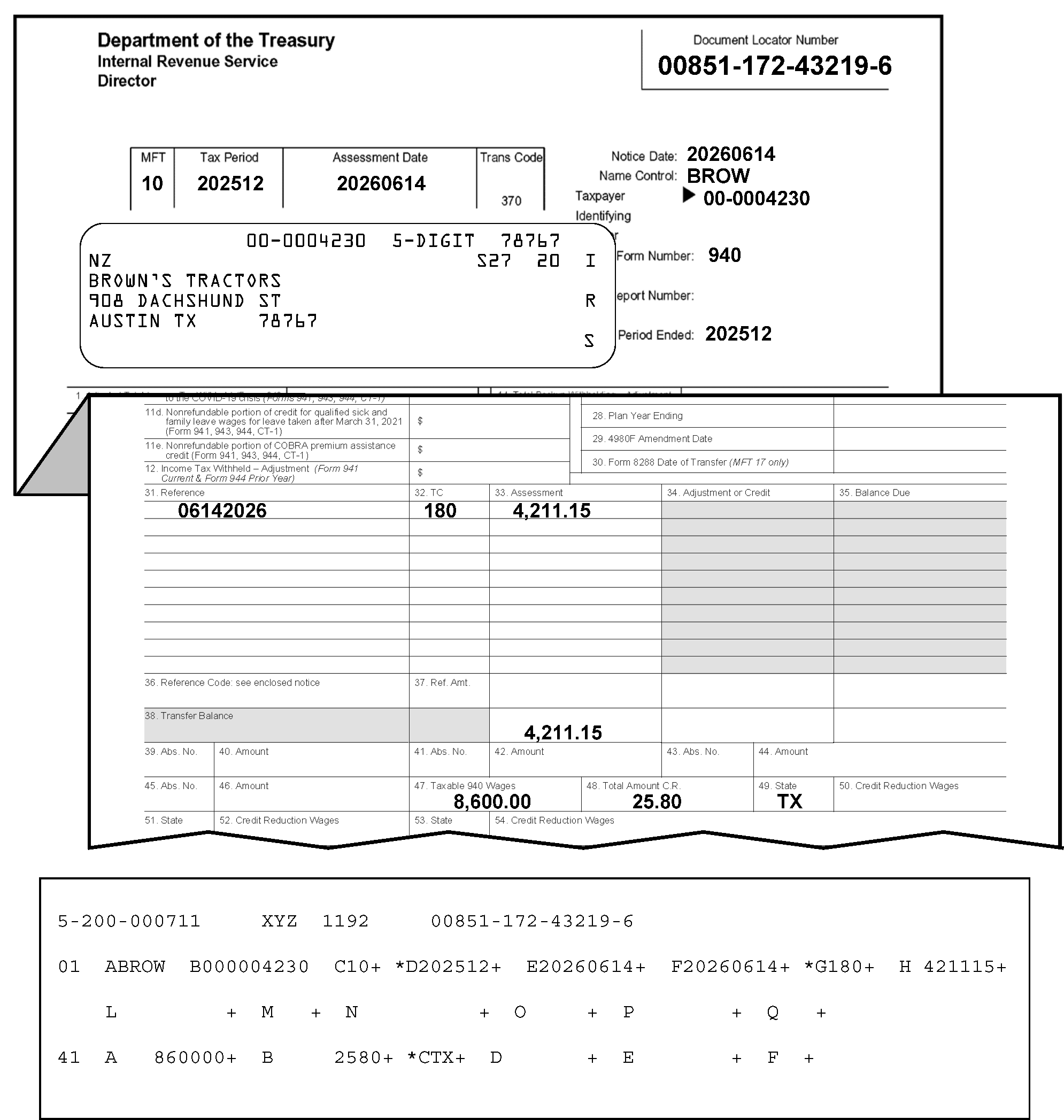
Figure 3.12.21-26 displays portions of a Form 3552 and an error register. This figure provides an example of the Field 01-D (Tax Period), Field 01-G (Transaction Code), and Field 41-C (State Code) appearing invalid if the MFT is 10 and the transaction code in Section 01 is other than 150 (Return Filed and Tax Liability Assessed). Other information regarding Figure 3.12.21-26 is provided below as follows:In the upper left corner of the Form 3552 are three organization headings listed vertically: Department of the Treasury, Internal Revenue Service and Director, respectivelyIn the upper right corner opposite those three headings is the Document Locator Number box, with the document locator number, 00851-172-43219-6. Two lines beneath that information is a single box with four conjoined boxes marked as MFT, Tax Period, Assessment Date and Trans Code, respectively. Immediately to the right of this four-part box are three rows, in vertical order, marked Notice Date, Name Control and Taxpayer Identifying Number, respectively. The MFT is 10 The Tax Period is 202512 The Assessment Date is 20260614 The Trans Code is a pre-printed 370 (Account Transfer-in). The Notice Date is 20260614 Beneath the Notice Date, the Name Control is BROW Beneath the Name Control, the Taxpayer Identifying Number is 000-000-4230 The Plan/Report Number field is blank. The Tax Period Ended is 202512Immediately beneath this information, the Form 3552 was folded, revealing a Form 3552 portion with the columns under Item 31 (Reference), Item 32 ((TC) as in Transaction Code), and Item 33 (Assessment). The following Form 3552 information is contained under the above-listed columns as follows:The first row displays 06142026, 180 (one-hundred eighty), and 4,211.15 (Four thousand, two-hundred eleven dollars and 15 cents), respectivelyThe second entry on the Form 3552 is located sixteen lines down to the bottom row of the Assessment column (to the right of the Transfer Balance); that figure (also) is 4,211.15 (Four thousand, two-hundred eleven dollars and 15 cents).Two rows beneath that are the following entries: Item 47, Taxable 940 Wages, 8,600.00 (Eight thousand, six-hundred dollars and zero cents); Item 48, Total Amount Credit Reduction, 25.80 (Twenty-five dollars and 80 cents); and Item 49, State Code (TX (Texas)). There are no other entries on the Form 3552.Beneath the Form 3552 is an error register portion containing the following entries; displaying Section 01 (Fields A through Q) and Section 41 (Field A through H)At the top of the error register (first line) are the following four items: 2-200-000711, XYZ, 1192, and 00851-172-43219-6 (Document Locator Number)The part of the error register displayed on this figure contains Section 01, Fields A through Q) and Section 41, Fields A through F, which display the following:Field A (Section 01) on the error register displays the name control (BROW)Field B displays the SSN (000004230)Field C displays the MFT Code (10)Field D displays an asterisk (*) with the Tax Period of 202512.Field E displays the Date of Transfer (20260614)Field F displays the 23C Date of Assessment (20260614)Field G displays an asterisk (*) with the Original Assessment Transaction Code of 180 (one-hundred eighty).Field H displays the Original Assessment Transaction Amount of 4,211.15 (Four thousand, two-hundred eleven dollars and 15 cents).No other entries are displayed under Section 01, but Section 41 (Fields A through F) is as follows:Field A, Total Taxable 940 Wages, (860000 (or, Eight thousand, six-hundred dollars and zero cents).Field B, Total Amount Credit Reduction, 2580 (Twenty-five dollars and 80 cents). Field C, State Code displays an asterisk (*) and contains state abbreviation of TX (Texas).There are no other entries or edit marks displayed on Figure 3.12.21-26.
Please click here for the text description of the image.
-
Compare the document with the register and correct any transcription errors.
Note:
The Section 41 data (i.e., "Taxable 940 Wages" , "Total Amount C. R. (Credit Reduction)" , "State Code" and "Credit Reduction" ) may be found in the bottom part of the Form 3552.
-
If correct as transcribed, and the transaction code is other than 150, reject with Action Code 3. Notate on Form 4227, "Must have TC 150 when Credit Reduction data is present" .
Reminder:
Follow the table/procedures in IRM 3.12.21.10.2(4) below to identify the originator (to whom the Form 4227 (and document) should be sent for research and correction).
-
IMPORTANT: Follow the procedures in the table below to identify the originator (to whom the Form 4227 (and document) should be sent for research and correction).
If Originator Prepared Form 3413 (Transcription List (Account Transfer-In)): If Originator Prepared Form 3552 (Prompt Assessment Billing Assembly): If Originator Prepared Form 12810 (Account Transfer Request Checklist): 1. Go to Page 1 (Form 3413): 2. Find the following (originator’s) information in the lower-left corner of the Form 3413. 3. "Name and Date Prepared (mmddyy)." 4. "Telephone Number" . 5. Prepare the Form 4227, Intra-SC Reject or Routing Slip with the appropriate notation described in IRM 3.12.21.10.2(2) through (13). 6. Attach Form 4227 to the (transaction) document, and send them to the originator for missing information, research and/or correction. 7. Send them to the originator for missing information, research and/or correction. 1. Go to Page 1 (Form 3552): 2. Find the following (originator’s) “IDRS Number” in the upper-right portion of the Form 3552 (under the Document Locator Number). 3. Prepare the Form 4227, Intra-SC Reject or Routing Slip with the appropriate notation described in IRM 3.12.21.10.2(2) through (13). 4. Attach Form 4227 to the (transaction) document. 5. Send them to the originator for missing information, research and/or correction. 1. Go to top of page (Form 12810): 2. Find (originator’s) “IDRS Number” in the upper-right portion of the Form 12810 (under the "DLN" , "Unit" , and "Stop Number" ). 3. Use the "Unit" or "Stop Number" if IDRS Number not there. 4. Prepare the Form 4227, Intra-SC Reject or Routing Slip with the appropriate notation described in IRM 3.12.21.10.2(2) through (13). 5. Attach Form 4227 to the (transaction) document. 6. Send them to the originator for missing information, research and/or correction. -
If the transaction code is 150, Section 41 will asterisk (*) as missing if the MFT is 10, Doc Code 51, Form 3552, Tax Class 8 and Section 41 is blank. (See Figure 3.12.21-27.)
Figure 3.12.21-27
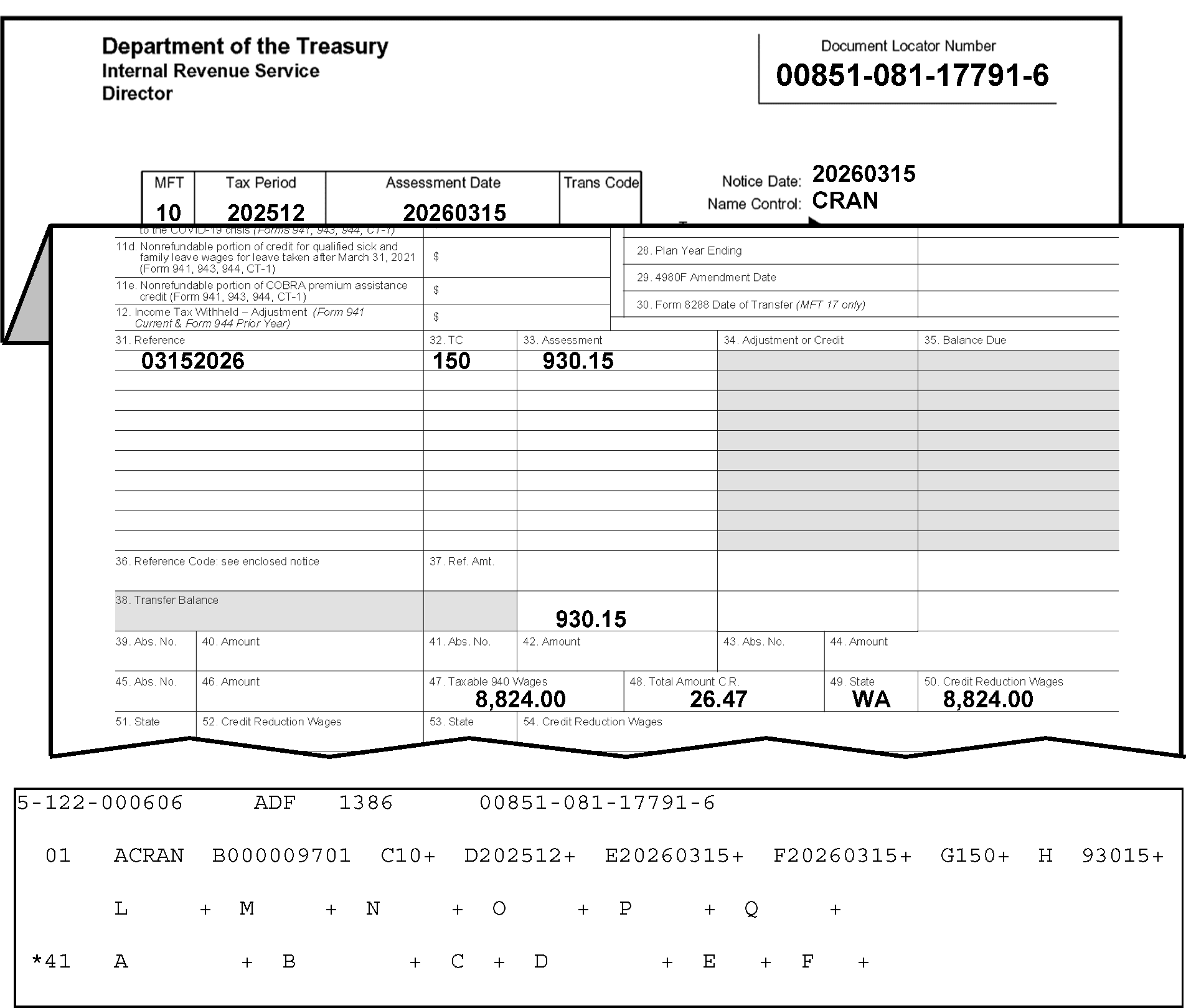
Figure 3.12.21-27 displays portions of a Form 3552 and an error register, illustrating how Section 41 will asterisk (*) as missing if the transaction code is 150 (i.e., Return Filed and Tax Liability Assessed), the MFT is 10, the Doc Code is 51, the Tax Class is 8, and the Section 41 is blank. Figure 3.12.21-27 contains the following items:In the upper left corner of the Form 3552 are three organization headings listed vertically: Department of the Treasury, Internal Revenue Service and Director, respectivelyIn the upper right corner opposite those three headings is the Document Locator Number (DLN) box, with DLN 00851-081-17791-6. Two lines beneath that information is a single box with four conjoined boxes, namely: MFT, Tax Period, Assessment Date and Trans Code. Immediately to the right of this four-part box are three rows, in vertical order, marked as Notice Date, Name Control and Taxpayer Identifying Number respectively. The MFT entry is 10 The Tax Period entry is 202512 The Assessment Date entry is 20260315 The Trans Code entry is not shown. The Notice Date is 20260315 Beneath the Notice Date, the Name Control is CRANImmediately beneath this information, the Form 3552 folded, revealing the columns under Item 31 (Reference), Item 32 ((TC) as in Transaction Code), and Item 33 (Assessment). The Form 3552 information (columns) lists as follows:The first row displays 03152026, 150 (One-hundred fifty), and 930.15 (Nine-hundred thirty dollars and 15 cents) in Items 31, 32, and 33, respectivelyThe second entry on the Form 3552 is located thirteen lines down to the bottom row of the Assessment column (to the right of the Transfer Balance (Line 38)); that figure (also) is 930.15 (Nine-hundred thirty dollars and 15 cents).Two rows beneath that are the following entries: Item 47, Taxable 940 Wages, 8,824.00 (Eight thousand, eight hundred twenty-four dollars and zero cents); Item 48, Total Amount Credit Reduction, 26.47 (Twenty-six dollars and forty-seven cents); Item 49, State Code, WA (for the state of Washington); and Item 50, Credit Reduction Wages, 8,824.00 (Eight thousand, eight-hundred twenty-four dollars and zero cents), respectively. There are no other entries on the Form 3552.Beneath the Form 3552 is an error register portion with the following entries: Section 01 (Fields A through Q) and Section 41 (Field A through F)At the top of the error register (first line) are the following four items: 2-122-000606, ADF, 1386, and 00851-081-17791-6 (Document Locator Number)The part of the error register displayed on this figure contains Section 01, Fields A through Q) and Section 41, Fields A through F, fields displaying as follows:Field A (Section 01) on the error register displays the name control (CRAN)Field B displays the SSN (000009701)Field C displays the MFT Code (10)Field D displays the Tax Period of 202512.Field E displays the Date of Transfer (20260315)Field F displays the 23C Date of Assessment (20260315)Field G displays an asterisk (*) with the Original Assessment Transaction Code of 150 (one-hundred fifty).Field H displays the Original Assessment Transaction Amount of 93015 (Nine-hundred thirty dollars and 15 cents).No other entries are displayed under Section 01, but Section 41 follows this section on the error register.Section 41 displays with an asterisk (*) to its left, informing the tax examiner (and ISRP) that MFT 10 is present, but Section 41 is missing (i.e., there are NO field entries in Section 41).There are no other entries or edit marks displayed in Section 41 and no other entries are displayed for Figure 3.12.21-27.
Please click here for the text description of the image.
-
Compare the document with the register.
-
If the data is present on the document for Section 41 (in addition to the other items listed in Paragraph (4) above), correct the register with Action Code 6.
Note:
The Section 41 data (i.e., Taxable 940 Wages, Total Amount C. R. (Credit Reduction), State Code and Credit Reduction, may be found in the bottom part of the Form 3552).
-
If Section 41 data is not present on the document, verify that MFT (Field 01-C), is correct. If so, reject with Action Code 3.
-
Prepare Form 4227 with the notation, "MFT is 10, but Section 41 is blank" or "Credit Reduction Data required" .
-
Attach 4227 to the document and route to the originator for research and/or correction.
Reminder:
Follow the table/procedures in IRM 3.12.21.10.2(4) above to identify the originator (to whom the Form 4227 (and document) should be sent for research and correction).
-
-
Compare the data on the document and the register against Exhibit 3.12.21-9, Credit Reduction Chart. If the Credit Reduction data (either) is NOT valid OR is not valid for the correct year:
-
Reject with Action Code 3.
-
Prepare Form 4227 with the notation, "Credit Reduction Data is not valid" or "Credit Reduction Data is not valid for the correct year" .
-
Attach 4227 to the document and route to originator for research and/or correction.
Reminder:
Follow the table/procedures in IRM 3.12.21.10.2(4) above to identify the originator (to whom the Form 4227 (and document) should be sent for research and correction).
-
-
Section 41 will appear on the register as extraneous (#) if the MFT is other than 10 and there is data present in Section 41. See Figure 3.12.21-28.
Figure 3.12.21-28
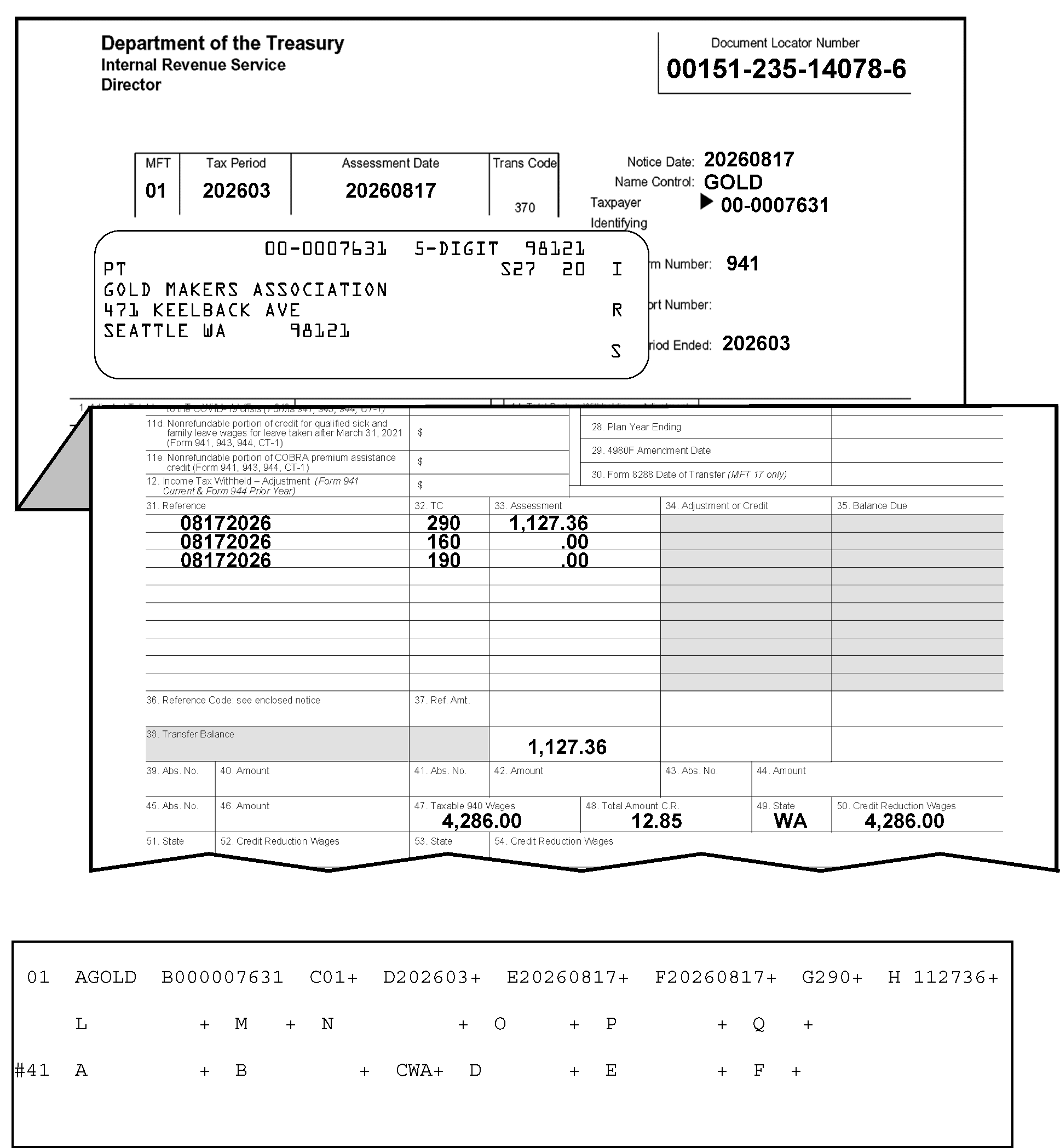
Figure 3.12.21-28 shows portions of a Form 3552 (including an IRS label) and an error register, depicting how Section 41 will appear on the register as an extraneous (#) section if the MFT is OTHER THAN 10 and there is data present in Section 41. A pound sign (#) located to the left of Section 41 with all fields blank except Field 41-C (State Code), which contains “WA” (Code for Washington). Other information regarding on Figure 3.12.21-28 is displayed as follows:In the upper left corner of the Form 3552 are three organization headings listed vertically: Department of the Treasury, Internal Revenue Service and Director, respectivelyIn the upper right corner (opposite those three headings) is the Document Locator Number (DLN) box, with the DLN 00151-235-14078-6. Two lines beneath that information is a single box with four conjoined boxes marked as MFT, Tax Period, Assessment Date and Trans Code. Immediately to the right of this four-part box are three rows, in vertical order: Notice Date, Name Control and Taxpayer Identifying Number, respectively. The MFT entry is 01 The Tax Period entry is 202603 The Assessment Date entry is 20260817 The Trans Code entry is a preprinted 370 (Account Transfer-in).Beneath the four-part box is an IRS label containing a taxpayer information box with five lines of printed text; the first line displays, in label format, the TIN (00-0007631), the literal 5-DIGIT and 98121The second line of the taxpayer information box displays the check digit, PT (flushed with left margin of the box), S27 and 20The third line of the taxpayer information box displays the taxpayer's name: Gold Makers AssociationThe fourth line of the taxpayer information box displays the taxpayer's street address: 471 Keelback AvenueThe fifth line of the taxpayer information box displays the taxpayer's city, state and zip code: Seattle WA 98121Flushed with the right margin of the taxpayer information box are the letters, IRS, displayed vertically (alternating with spaces between the letters)To the right of the taxpayer information box are six items: Notice Date, Name Control; Taxpayer Identifying Number; Form Number, Plan/Report Number and Tax Period Ended The Notice Date is 20260817 Beneath the Notice Date, the Name Control is GOLD The Taxpayer Identifying Number is 00-0007631 The Form Number is 941 The Plan/Report Number is blank. The Tax Period Ended is 202603Immediately beneath this information, the Form 3552 was folded to reveal the part of the Form 3552 with the columns under Item 31 (Reference), Item 32 ((TC) as in Transaction Code), and Item 33 (Assessment). The following lists three rows of data under the above-listed columns as follows:The first row displays 08172026, 290, and 1,127.36 (One thousand, one hundred twenty-seven dollars and 36 cents), respectively.The second row displays 08172026, 160, and 0.00 (zero dollars and cents), respectively.The third row displays 08172026, 190, and 0.00 (zero dollars and cents, also), respectively.The fourth entry is located down at the bottom row of the Assessment column (to the right of the Transfer Balance); and that figure (also) is 1,127.36 (One thousand, one hundred twenty-seven dollars and 36 cents).Two rows beneath that are the following entries: Item 47, Taxable 940 Wages, 4,286.00 (Four thousand, two hundred eighty-six dollars and zero cents); Item 48, Total Amount Credit Reduction, 12.85 (Twelve dollars and eighty-five cents); Item 49, State Code, WA (for the state of Washington); and Item 50, Credit Reduction Wages, 4,286.00 (Four thousand, two hundred eighty-six dollars and zero cents).The following entries apply to the error register; super-imposed across the Form 3552 is a part of the error register, displaying Section 01 (Fields A through Q) and Section 41 (Field A through F)The strip/part of the error register is displayed across this figure, with Section 01 (Fields A through Q) and Section 41 (Fields A through F), and display as follows:Field A (Section 01) on the error register displays the name control (GOLD)Field B displays the SSN (000007631)Field C displays the MFT Code (01)Field D displays the Tax Period of 202603.Field E displays the Date of Transfer (20260817)Field F displays the 23C Date of Assessment (20260817)Field G displays the Original Assessment Transaction Code, 290Field H displays the Original Assessment Transaction Amount, 112736 (One thousand, one hundred twenty-seven dollars and 36 cents).No other entries are displayed under Section 01, but Section 41 follows this section on the error register.Section 41 is shown with a pound sign (#) to its left and all fields are blank except Field 41-C (State Code), which contains WA on Form 941 (MFT 01). Section 41 will appear on the register as an extraneous (#) section if the MFT is other than 10 and there is data present in Section 41.There are no other entries or edit marks displayed in Section 41 and no other entries are displayed for Figure 3.12.21-28.
Please click here for the text description of the image.
-
Compare the document with the register and correct any transcription errors.
Note:
The Section 41 data (i.e., Taxable 940 Wages, Total Amount C. R. (Credit Reduction), State Code and Credit Reduction may be found in the bottom part of the Form 3552.
-
If the MFT is other than 10, delete Section 41 with Action Code 4.
-
-
If Field 01-G is 150, and there is an entry in Field 41-A and 41-B, a valid Credit Reduction State and Credit Reduction Wages must be present. If missing:
-
Reject with Action Code 3 and enter the state code from entity in Field 41-C.
-
Notate on Form 4227, "Must have credit reduction state and/or wages amount."
-
Attach 4227 to document and route to originator for research and correction.
Reminder:
Follow the table/procedures in IRM 3.12.21.10.2(4) above to identify the originator (to whom the Form 4227 (and document) should be sent for research and correction).
-
-
Field 41-B, Total Credit Reduction, is computed using the sum of Credit Reduction Wages in Sections 41-46, multiplied by the percentage shown for each state in Exhibit 3.12.21-9. This field will underprint if a math error exists. See Figure 3.12.21-29.
Figure 3.12.21-29
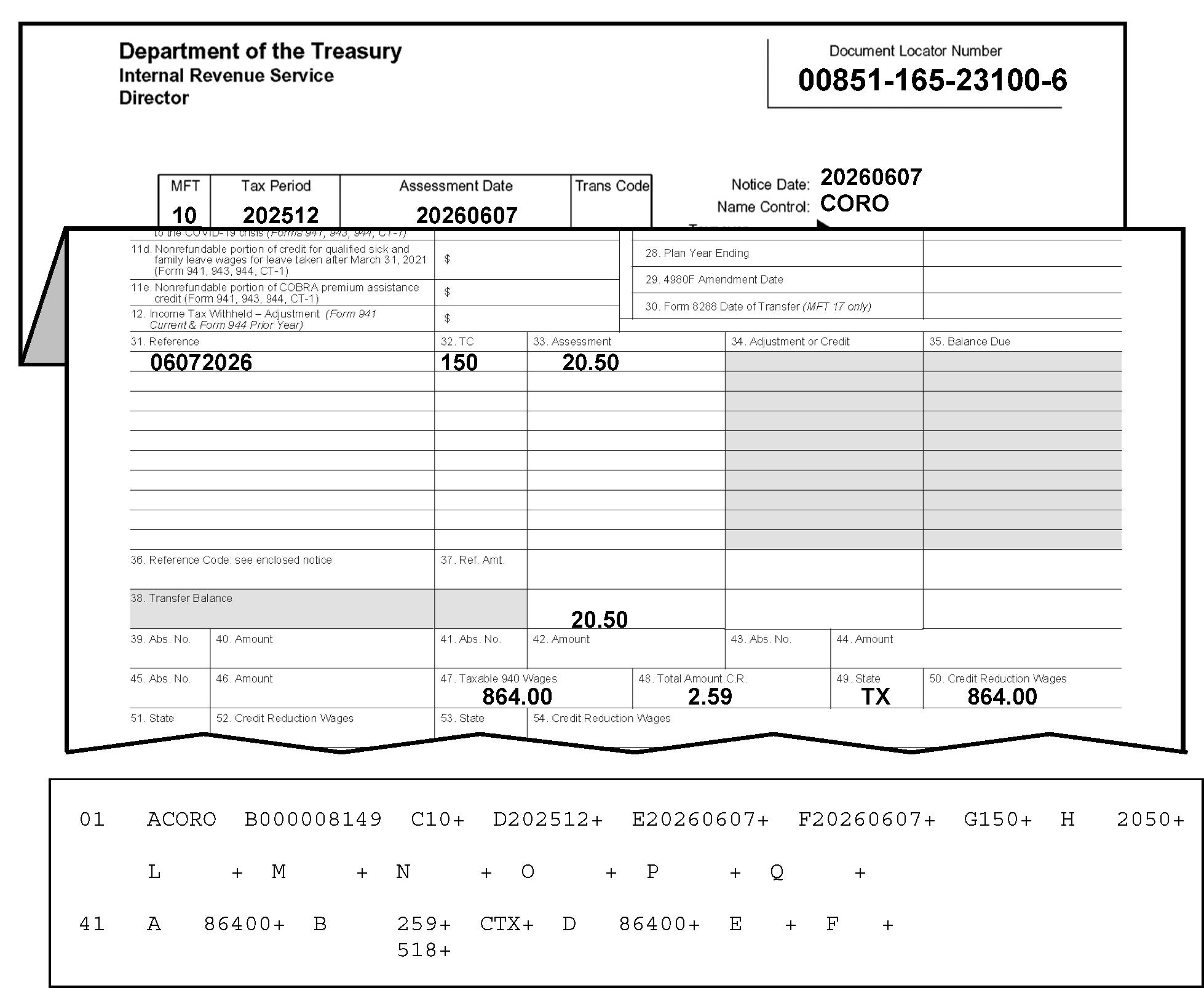
Figure 3.12.21-29 displays portions of a Form 3552 and the error register. showing Field 41-B underprinting. Field 41-B, Total Credit Reduction, is computed using the sum of Credit Reduction Wages in Sections 41-46, multiplied by the percentage shown for each state. Field 41-B will underprint if a math error exists. The Field 41-B displays $2.59 (Two dollars and 59 cents) as the Total Credit Reduction amount. Beneath that amount is the computer (underprint) amount of $5.18 (Five dollars and 18 cents). A discrepancy therefore, exists, between the computer's amount and the transcribed amount (Form 3552 versus the computer's computation). other information regarding the Figure 3.12.21-29 is provided as follows:In the upper left corner of the Form 3552 are three organization headings listed vertically: Department of the Treasury, Internal Revenue Service and Director, respectivelyIn the upper right corner opposite those three headings is the Document Locator Number (DLN) box, with the DLN 00851-165-23100-6. Two lines beneath that information is a single box with four conjoined boxes: MFT, Tax Period, Assessment Date and Trans Code. Immediately to the right of this four-part box are three rows, in vertical order, marked Notice Date, Name Control and Taxpayer Identifying Number respectively. The MFT entry is 10 The Tax Period entry is 202512 The Assessment Date entry is 20260607 The Trans Code entry is not displayed.To the right of the taxpayer information box are the following items: Notice Date and Name Control The Notice Date is 20260607 The Name Control is COROImmediately beneath this data grouping, the Form 3552 was folded to reveal the part of the Form 3552 with the columns under Item 31 (Reference), Item 32 ((TC) as in Transaction Code), and Item 33 (Assessment). The following lists data under the above-listed columns as follows:The first row displays 06072026, 150, and 20.50 (Twenty dollars and fifty cents), respectivelyThe second row entry is located 16 rows down to the bottom row of the Assessment column (and to the right of the Transfer Balance); and that amount is (also) displayed as 20.50Two rows beneath that are the following entries: Item 47, Taxable 940 Wages, 864.00 (Eight hundred sixty-four dollars and zero cents); Item 48, Total Amount Credit Reduction, 2.59 (Two dollars and 59 cents); Item 49, State Code (TX for the state of Texas); and Item 50, Credit Reduction Wages, 864.00 (Eight hundred sixty-four dollars and zero cents).The following entries apply to the error register part beneath the Form 3552, displaying Section 01 (Fields A through Q) and Section 41 (Field A through F)Section 01 (Fields A through Q) displays as follows:Field A (Section 01) on the error register displays the name control (CORO)Field B displays the SSN (000008149)Field C displays the MFT Code (10)Field D displays an asterisk (*) with the Tax Period of 202512.Field E displays the Date of Transfer (20260607)Field F displays the 23C Date of Assessment (20260607)Field G displays the Original Assessment Transaction Code of 150Field H displays the Original Assessment Transaction Amount of 2050 (for $20.50)No other entries are displayed under Section 01, but Section 41 follows this section on the error register and displays as follows:Field A, Total Taxable 940 Wages, is 86400 (Eight hundred sixty-four dollars and zero cents).Field B, Total Amount Credit Reduction, contains 259 (for $2.59) and, directly beneath Field 41-B is an underprinted amount of 518 (for $5.18) to inform us that the computer's math/amount is different from the taxpayer's amount.Field C, State Code, contains TX (i.e., the state code for Texas)Field D, Credit Reduction Wages, is 86400 (Eight hundred sixty-four dollars and zero cents).There are no other entries or edit marks displayed in Section 41 and no other entries are displayed for Figure 3.12.21-29.
Please click here for the text description of the image.
-
Compare the document with the register and correct any transcription errors.
-
If correct as transcribed, reject with Action Code 3, and bring up underprint in Field 41-B.
-
Prepare Form 4227 with the notation, "Credit Reduction amount incorrect" .
-
Attach Form 4227 to the document and route them to the originator for research and/or correction.
Reminder:
Follow the table/procedures in IRM 3.12.21.10.2(4) above to identify the originator (to whom the Form 4227 (and document) should be sent for research and correction).
-
IMPORTANT: Also read information in "Note" below.
Note:
If Field 41-B underprints, check to see if the amounts in Field 41-B and Field 41-D are in each other's field. Field 41-D will always be larger than Field 41-B. If they are, switch Field 41-B and Field 41-D. If Field 41-B re-underprints, either reject or send to Accounting.
-
-
If Field 41-B underprints and a State Code Field has an invalid credit reduction state, see Exhibit 3.12.21-9, Credit Reduction Chart, to correct any transcription errors.
-
If unable to determine the Credit Reduction State, reject with Action Code 3.
-
Prepare Form 4227, notating, "Credit Reduction state invalid" .
-
Attach Form 4227 to the document and route them to the originator for research and/or correction.
Reminder:
Follow the table/procedures in IRM 3.12.21.10.2(4) above to identify the originator (to whom the Form 4227 (and document) should be sent for research and correction).
-
-
The State Code field and Credit reduction Wages field will appear invalid if a valid credit reduction state is in the State Code field, a TC 150 is in Section 01, and the Credit Reduction Wages field is blank. See Figure 3.12.21-30.
Figure 3.12.21-30
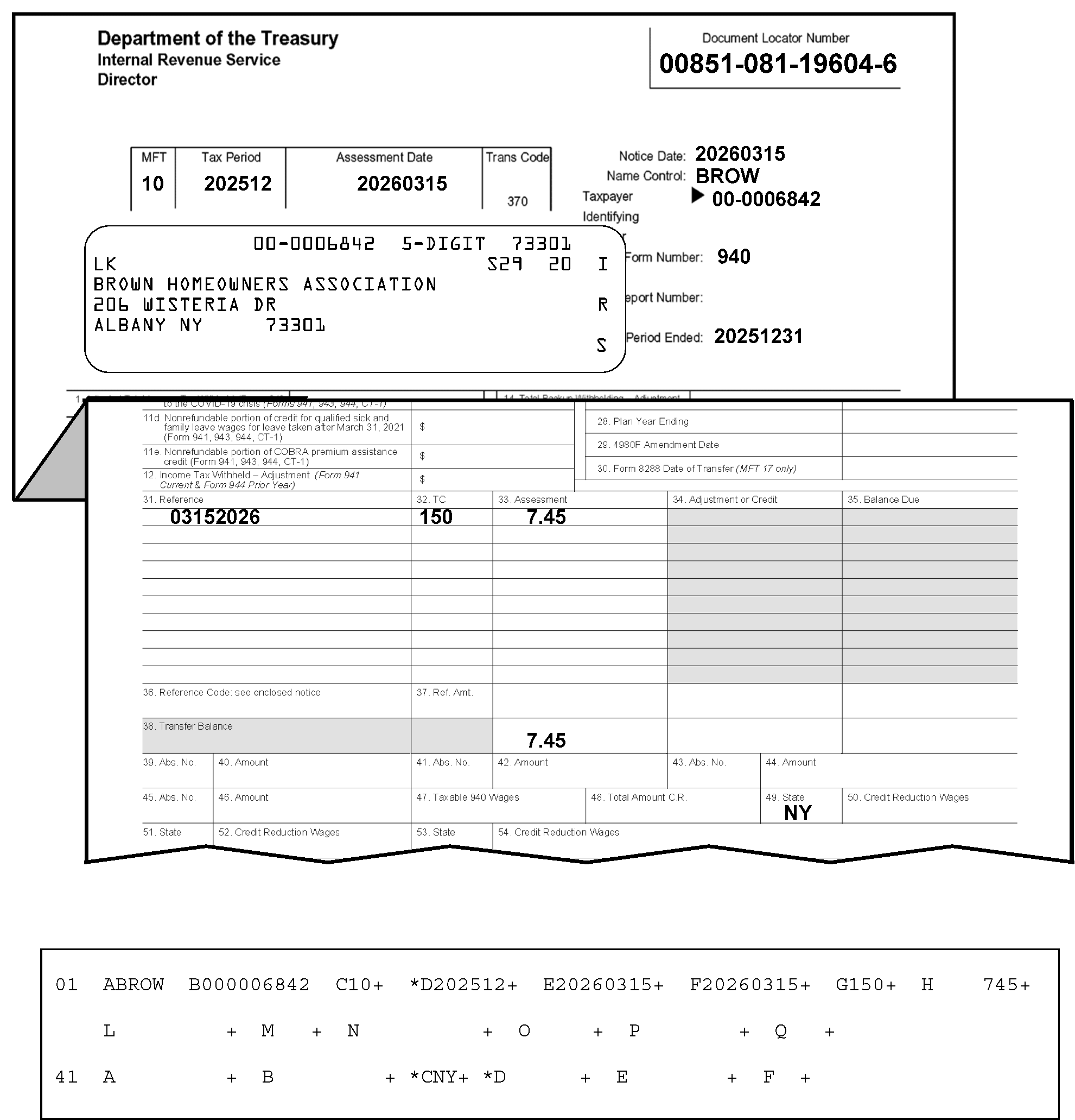
Figure 3.12.21-30 displays portions of a Form 3552 and an error register. On the register, the State Code field and Credit Reduction Wages field will appear invalid if a valid credit reduction state is in the State Code field (Field 41-C on the error register), a TC150 is in Section 01 and the Credit Reduction Wages field (Field 41-D) is blank. In this instance, The TC 150 amount is $7.45 (Field 01-H), the State Code field (Field 41-C contains NY (for state of New York), and the Credit Reduction Wages field is blank. Other information regarding Figure 3.12.21-30 is provided as follows:In the upper left corner of the Form 3552 are three organization headings listed vertically: Department of the Treasury, Internal Revenue Service and Director, respectivelyIn the upper right corner opposite those three headings is the Document Locator Number box, with the document locator number, 00851-081-19604-6. Two lines beneath that information is a single box with four conjoined boxes marked as MFT, Tax Period, Assessment Date and Trans Code. Immediately to the right of this four-part box are three rows, in vertical order, marked Notice Date, Name Control and Taxpayer Identifying Number respectively. The MFT entry is 10 The Tax Period entry is 202512 The Assessment Date entry is 20260315 The Trans Code entry is a preprinted TC 370.Beneath the four-part box is an IRS label taxpayer information box with five lines of printed text. The first line displays, in label format, the TIN (00-0006842), the literal, 5-DIGIT and the ZIP Code 73301, respectively.The taxpayer information box second line displays the check digit, LK (flushed with left margin of the box), then S29 and 20 are to its right, on the right side of the IRS label.The third line of the label’s taxpayer information box displays the taxpayer's name: Brown Homeowners' AssociationThe fourth line of the label’s taxpayer information box displays the taxpayer's street address: 206 Wisteria DriveThe fifth line of the label’s taxpayer information box displays the taxpayer's city, state and zip code: Albany, NY 73301Flushed with the right margin of the taxpayer information box are the letters, IRS, displayed vertically (alternating with spaces between the letters).To the right of the label’s taxpayer information box are three items: Form Number, Plan/Report Number and Tax Period Ended The Notice Date is 20260315 The Name Control is BROW The Notice Date is 00-0006842Beneath the above-three items, and to the right of the taxpayer information box are three more items, entitled: Form Number, Plan/Report Number and Tax Period Ended, listed in vertical order.The Form Number displays an entry: 940.The Plan/Report Number contains NO entry.The Tax Period Ended displays an entry: 20261231.Immediately beneath this information, the Form 3552 was folded to reveal the part of the Form 3552 with the columns under Item 31 (Reference), Item 32 (TC) as in Transaction Code, and Item 33 (Assessment). The following lists three rows of data under the above-listed columns as follows:The first row displays 03152026, 150, and 7.45 (Seven dollars and 45 cents), respectivelyThe second entry is located down at the bottom row of the Assessment column (to the right of the Transfer Balance); and that figure (also) is 7.45 (Seven dollars and 45 cents).Two rows beneath that is a sole State Code entry (Item 49, NY (i.e., New York); state code or abbreviation for the state of New York).No other entries are present on the Form 3552; error register follows this.The following entries describe the part of the error register displayed beneath the Form 3552 (i.e., Section 01 (Fields A through Q) and Section 41, Field A through F).Section 01 (Fields A through Q) displays as follows:Field A (Section 01), on the error register displays the name control (BROW)Field B displays the SSN (000006842).Field C displays the MFT Code (10)Field D displays an asterisk (*) with the Tax Period of 202512.Field E displays the Date of Transfer, 20260315.Field F displays the 23C Date of Assessment (20260315).Field G displays the Original Assessment Transaction Code 150.Field H displays the Original Assessment Transaction Amount, 745 (Seven dollars and 45 cents)No other entries are displayed under Section 01, but Section 41 follows this section on the error register.Section 41 displays as follows:Field A, Total Taxable 940 Wages, is blank.Field B, Total Amount Credit Reduction, is blank.Field C, State Code, contains NY (state code for New York).Field D, Credit Reduction Wages, is blank, but Fields 41C and 41D display asterisks (*)..There are no other entries or edit marks displayed in Section 41 and no other entries are displayed for Figure 3.12.21-30.
Please click here for the text description of the image.
-
Compare the document with the register and correct any transcription errors.
-
If correct as transcribed, search the document for valid credit reduction wages.
-
If you can't determine the valid credit reduction wages, reject the record with Action Code 3.
-
Prepare Form 4227 with notation, "Credit Reduction info not determined" .
-
Attach Form 4227 to the document and route to the originator for missing information.
Reminder:
Follow the table/procedures in IRM 3.12.21.10.2(4) above to identify the originator (to whom the Form 4227 (and document) should be sent for research and correction).
-
-
The State Code field and associated significant (greater than zero) Credit Reduction Wages field will error code if Transaction Code 150 is not present in Section 01. (See Figure 3.12.21-31.)
Figure 3.12.21-31
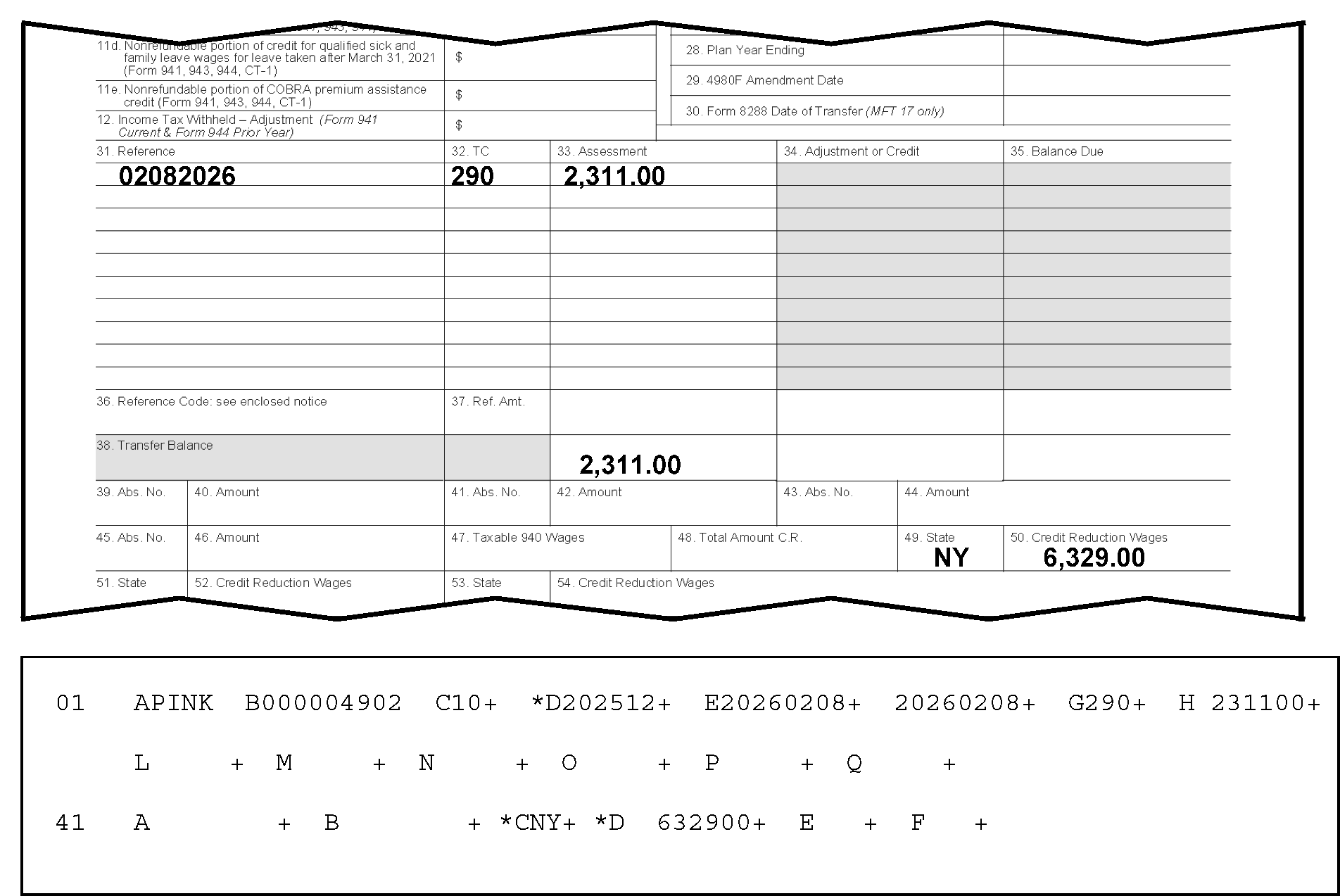
Figure 3.12.21-31 displays portions of a Form 3552 and an error register. This figure provides an example of an error caused if a valid State Code is in the State Code field and (the associated) Credit Reduction Wages field is blank, and the Transaction Code 150 (Return Filed and Tax Liability Assessed) is not present in Section 01. Other information regarding Figure 3.12.21-31 is provided as follows:This figure displays information from the lower half of the Form 3552, containing column data under Item 31 (Reference), Item 32 (TC) as in Transaction Code, and Item 33 (Assessment). The following lists three rows of data under the above-listed columns as follows:The first row displays 02082026, 290 (Additional Tax Assessment), and 2,311.00 (Two Thousand, three-hundred eleven dollars and zero cents), respectivelyThe second entry is located 16 lines down at the bottom row of the Assessment column (to the right of the Transfer Balance, Line 34); and that figure (also) is 2,311.00 (Two Thousand, three-hundred eleven dollars and zero cents).Two rows beneath that is a sole State Code entry (Item 49, NY (i.e., state code or abbreviation for the state of New York) and the Credit Reduction Wages (Item 50), which is $6,329.00 (Six thousand, three hundred twenty-nine dollars and zero cents).No other entries are present on the Form 3552 (see error register details, below).The following describes the error register items displayed in Figure 3.12.21-31, located beneath the Form 3552 (i.e., Section 01 (Fields A through Q) and Section 41, Field A through F).Section 01 (Fields A through Q) displays as follows:Field A (Section 01), on the error register displays the name control (PINK)Field B displays the SSN (000004902)Field C displays the MFT Code (10)Field D displays an asterisk (*) with the Tax Period of 202512.Field E displays the Date of Transfer (20260208)Field F displays the 23C Date of Assessment (20260208)Field G displays the Original Assessment Transaction Code of 290 (Additional Tax Assessment).Field H displays the Original Assessment Transaction Amount of 231100 (Two thousand, three hundred eleven dollars and zero cents).No other entries are displayed under Section 01, but Section 41 follows Section 01 in this error register display.Section 41 fields display as follows:Field A, Total Taxable 940 Wages, is blank.Field B, Total Amount Credit Reduction, is blank.Field C, State Code, is asterisked (*) and contains NY (state code for New York).Field D, Credit Reduction Wages, is asterisked (*) and contains 632900 (Six thousand, three hundred twenty-nine dollars and zero cents).There are no other entries or edit marks displayed in Section 41 and no other entries are displayed for Figure 3.12.21-31.
Please click here for the text description of the image.
-
Compare the document with the register and correct any transcription errors.
-
If the document is correct as transcribed, reject the record with Action Code 3.
-
Prepare Form 4227 with notation, "Credit Reduction wages without TC 150" .
-
Route 4227 to documentation and send to the originator.
Reminder:
Follow the table/procedures in IRM 3.12.21.10.2(4) above to identify the originator (to whom the Form 4227 (and document) should be sent for research and correction).
-
-
Field 01-D, Tax Period, State Code field, and Credit Reduction Wages field (greater than zero) will appear invalid when there is no TC 150 in Section 01 and Credit Reduction Wages field is present; the State Code field is blank and Credit Reduction Wages field is present or an invalid credit reduction state for the tax period is present. See Figure 3.12.21-32.
Figure 3.12.21-32
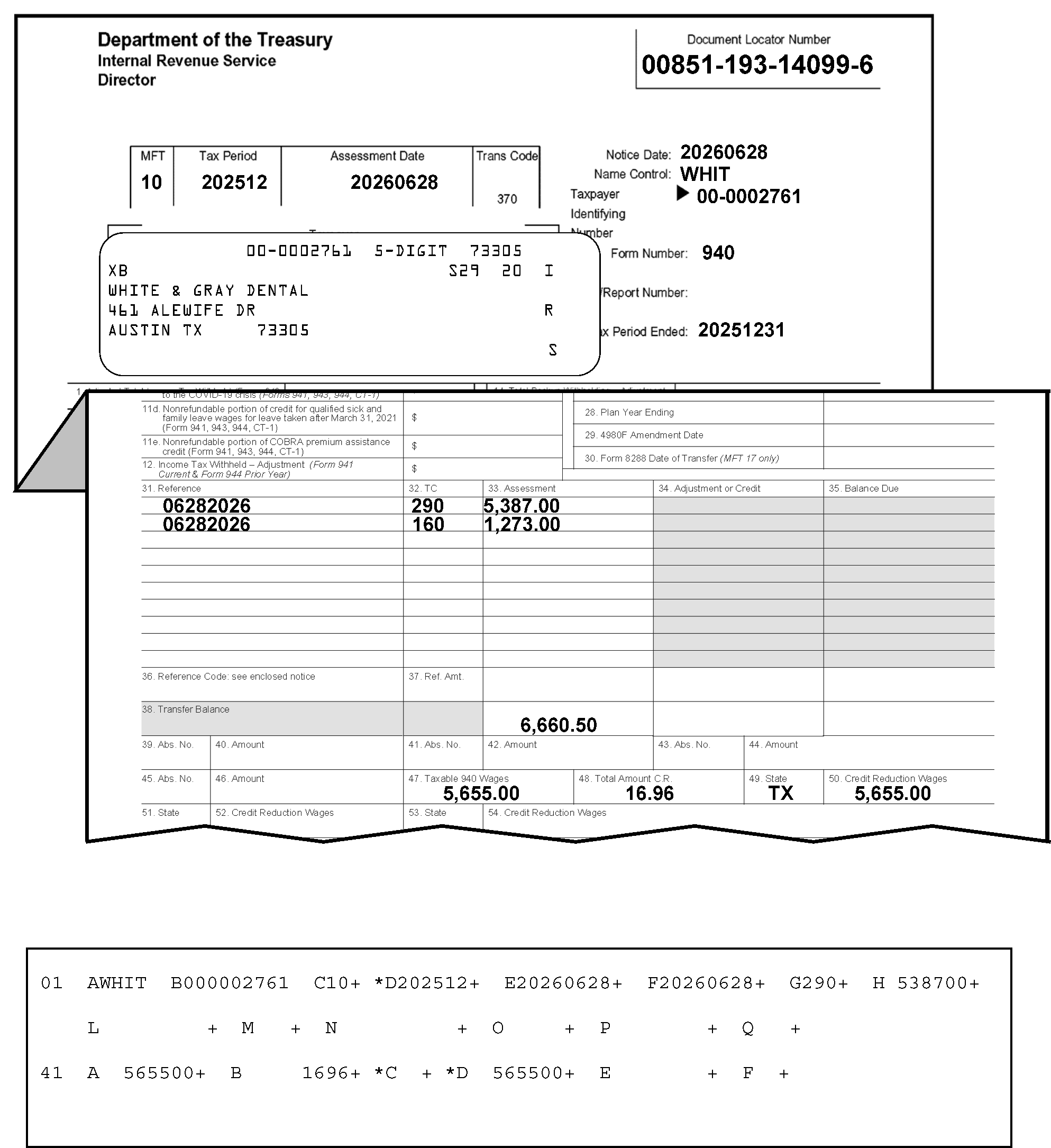
Figure 3.12.21-32 displays portions of a Form 3552 and an error register. This Figure shows that Field 01-D, Tax Period, Field 41-C, State Code, and Field 41-D, Credit Reduction Wages (greater than zero) will appear invalid when there is no TC 150 (Return Filed and Tax Liability Assessed) in Section 01 and the Credit Reduction Wages field is present; the State Code field is blank and Credit Reduction Wages field is present or an invalid credit reduction state for the tax period is present. Field 01-D, Field 41-C, and Field 41-D all contain asterisks to denote an invalid condition. In this illustration. Transaction Codes 290 (Additional Tax Assessment) and 160 (Manually Computed Failure to File Penalty) appear on the Form 3552 (not a TC 150). Other information regarding Figure 3.12.21-32 is provided as follows:In the upper left corner of the Form 3552 are three organization headings listed vertically: Department of the Treasury, Internal Revenue Service and Director, respectivelyIn the upper right corner opposite those three headings is the Document Locator Number box, with the document locator number, 00851-193-14099-6. Two lines beneath that information is a single box with four conjoined boxes marked as MFT, Tax Period, Assessment Date and Trans Code. Immediately to the right of this four-part box are three rows, in vertical order, marked Notice Date, Name Control and Taxpayer Identifying Number respectively. The MFT entry is 10 The Tax Period entry is 202512 The Assessment Date entry is 20260628 The Trans Code entry is a preprinted 370 (Account Transfer-in).Beneath the four-part box is an IRS label taxpayer information box with five lines of printed text.The first line displays, in label format, the TIN (00-0002761), the literal, 5-DIGIT and the ZIP Code 73305The second line of the IRS label taxpayer information box displays the check digit, XB (flushed with left margin of the box), S29 and 20 (both are located to the right of the check digit and the right edge of the label).The third line of the IRS label taxpayer information box displays the taxpayer's name: White and Grey DentalThe fourth line of the IRS label taxpayer information box displays the taxpayer's street address: 461 Alewife DriveThe fifth line of the IRS label taxpayer information box displays the taxpayer's city, state and zip code: Austin, TX 73305Flushed with the right margin of the IRS label taxpayer information box are the letters, IRS, displayed vertically (alternating with spaces between the letters)To the right of the taxpayer information box are three items: Notice Date, Name Control and Taxpayer Identifying Number The Notice Date is 20260628 The Name Control is WHIT The Notice Date is 00-0002761Beneath the above-three items, and to the right of the taxpayer information box are three more items, entitled: Form Number, Plan/Report Number and Tax Period Ended, listed in vertical order.The Form Number displays an entry: 940.The Plan/Report Number contains NO entry.The Tax Period Ended displays the entry 20251231.Immediately beneath this information, the Form 3552 was folded to reveal the part of the Form 3552 with the columns under Item 31 (Reference), Item 32(TC) as in Transaction Code), and Item 33 (Assessment). The following lists three rows of data under the above-listed columns as follows:The first row displays 06282026, 290 (Additional Tax Assessment), and 5.387.00 (Five thousand, three hundred eighty-seven dollars and zero cents), respectively.The second row displays 06282026, 160 (Manually Computed Failure to File Penalty), and 1,273.00 (One thousand, two hundred seventy-three dollars and zero cents), respectivelyThe third entry is located 13 rows down at the bottom row of the Assessment column (and to the right of the Transfer Balance); 6,660.50 (Six thousand, six hundred sixty dollars and fifty cents).Two rows beneath that Item 47, Taxable 940 Wages, 5,655.00 (Five thousand, six hundred fifty-five dollars and zero cents); Item 48, Total Amount Credit Reduction (or, C. R.), 16.96 (sixteen dollars and 96 cents); and Item 49, State CodeTX; state code for Texas)No other entries are present on the Form 3552, but a part of the error register follows this.The following entries describe the error register portion displayed beneath the Form 3552 (i.e., Section 01 (Fields A through Q) and Section 41, Field A through F).Section 01 (Fields A through Q) displays as follows:Field A (Section 01), displays the name control (WHIT)Field B displays the SSN (000002761)Field C displays the MFT Code (10)Field D displays an asterisk (*) with the Tax Period of 202512.Field E displays the Date of Transfer, 20260628.Field F displays the 23C Date of Assessment (20260628)Field G displays the Original Assessment Transaction Code of 290 (Additional Tax Assessment).Field H displays the Original Assessment Transaction Amount of 538700 (Five thousand, three hundred eighty-seven dollars and zero cents).No other entries are displayed under Section 01, but Section 41 on the error register displays as follows:Field A, Total Taxable 940 Wages, contains 565500 (i.e., Five thousand, six hundred fifty-five dollars and zero cents).Field B, Total Amount Credit Reduction, contains 1696 i.e., Sixteen dollars and 96 cents).Field C, State Code, displays an asterisk (*) but is blank (i.e., contains no entry).Field D, Credit Reduction Wages, displays an asterisk (*) and contains the entry 565500 (i.e., Five thousand, six hundred fifty-five dollars and zero cents).There are no other entries or edit marks displayed in Section 41 and no other entries are displayed for Figure 3.12.21-32.
Please click here for the text description of the image.
-
Compare the document with the register and correct any transcription errors.
-
If the document is correct as transcribed, reject with Action Code 3.
-
Prepare Form 4227either with notation, "Credit Reduction wages without TC 150 and other Credit Reduction information" . or"Invalid credit reduction state for the tax period is present without TC 150" .
-
Attach 4227 to the document and route to the originator for research and correction.
Reminder:
Follow the table/procedures in IRM 3.12.21.10.2(4) above to identify the originator (to whom the Form 4227 (and document) should be sent for research and correction).
-
3.12.21.11 (01-01-2016)
Sections 42 Through 46 -Form 3552 only
- This section contains correction procedures and related information for use with Sections 42 through 46 (for Form 3552 only).
3.12.21.11.1 (01-01-2016)
Sections 42 Through 46 - Fields A Through T Description
-
Listed below are the fields contained in Sections 42 through 46.
-
The alpha-field designators, field lengths (maximum length for variable fields) and the field titles are shown below.
Field Field Length (+/−) Field Title 42-46A 2 State Code 42-46B 12 + Credit Reduction Wages 42-46C 2 State Code 42-46D 12 + Credit Reduction Wages 42-46E 2 State Code 42-46F 12 + Credit Reduction Wages 42-46G 2 State Code 42-46H 12 + Credit Reduction Wages 42-46I 2 State Code 42-46J 12 + Credit Reduction Wages 42-46K 2 State Code 42-46L 12 + Credit Reduction Wages 42-46M 2 State Code 42-46N 12 + Credit Reduction Wages 42-46O 2 State Code 42-46P 12 + Credit Reduction Wages 42-46Q 2 State Code 42-46R 12 + Credit Reduction Wages 42-46S 2 State Code 42-46T 12 + Credit Reduction Wages -
A state code may not occur more than once per document.
-
There can be no missing fields between groups of state codes and wages. Missing fields will appear invalid. Move the data to fill the spaces.
3.12.21.11.2 (01-01-2016)
Correction Procedures -Sections 42 Through 46
- This section contains validity information and procedures for use in correcting Sections 42 through 46.
3.12.21.11.2.1 (01-01-2026)
Sections 42 Through 46 - State Code Fields
-
The valid State Codes are AK, AL, AR, AZ, CA, CO, CT, DC, DE, FL, GA, HI, IA, ID, IL, IN, KS, KY, LA, MA, MD, ME, MI, MN, MO, MS, MT, NC, ND, NE, NH, NJ, NY, NM, NV, NY, OH, OK, OR, PA, PR, RI, SC, SD, TN, TX, UT, VA, VI, VT, WA, WI, WV, and WY.
-
The State Code field and Credit Reduction Wages field will appear invalid if the State Code field (see Exhibit 3.12.21-9) is blank and the Credit Reduction Wages field is present.
-
Compare the document with the register. Correct any transcription errors.
-
If the document is correct as transcribed, reject the record with Action Code 3. Attach Form 4227 to the document and send it to the originator with notation, "Credit Reduction wages present; State Code blank" .
Reminder:
Follow the table/procedures in IRM 3.12.21.11.2.1(3) below to identify the originator (to whom the Form 4227 (and document) should be sent for research and correction).
Note:
The Section 42 data (i.e., "State Code" and "Credit Reduction" fields are found in the bottom part of the Form 3552.)
-
-
IMPORTANT: Follow the procedures in the table below to identify the originator (to whom the Form 4227 (and document) should be sent for research and correction).
If Originator Prepared Form 3413 (Transcription List (Account Transfer-In)): If Originator Prepared Form 3552 (Prompt Assessment Billing Assembly): If Originator Prepared Form 12810 (Account Transfer Request Checklist): 1. Go to Page 1 (Form 3413): 2. Find the following (originator’s) information in the lower-left corner of the Form 3413. 3. "Name and Date Prepared (mmddyy)." 4. "Telephone Number" . 5. Prepare the Form 4227, Intra-SC Reject or Routing Slip with the appropriate notation described in IRM 3.12.21.11.2.1. 6. Attach Form 4227 to the (transaction) document, and send them to the originator for missing information, research and/or correction. 7. Send them to the originator for missing information, research and/or correction. 1. Go to Page 1 (Form 3552): 2. Find the following (originator’s) “IDRS Number” in the upper-right portion of the Form 3552 (under the Document Locator Number). 3. Prepare the Form 4227, Intra-SC Reject or Routing Slip with the appropriate notation described in IRM 3.12.21.11.2.1. 4. Attach Form 4227 to the (transaction) document. 5. Send them to the originator for missing information, research and/or correction. 1. Go to top of page (Form 12810): 2. Find (originator’s) “IDRS Number” in the upper-right portion of the Form 12810 (under the "DLN" , "Unit" , and "Stop Number" ). 3. Use the "Unit" or "Stop Number" if IDRS Number not there. 4. Prepare the Form 4227, Intra-SC Reject or Routing Slip with the appropriate notation described in IRM 3.12.21.11.2.1. 5. Attach Form 4227 to the (transaction) document. 6. Send them to the originator for missing information, research and/or correction.
3.12.21.11.3 (01-01-2026)
Sections 42 Through 46 - Credit Reduction Wages Fields
-
The State Code field and Credit Reduction Wages field will appear invalid if a valid credit reduction state (see Exhibit 3.12.21-9) is in the State Code field and the Credit Reduction Wages field is blank.
-
Compare the document with the register. Correct any transcription errors.
-
If the document is correct as transcribed, reject the record with Action Code 3.
-
Attach Form 4227 (to the document) with notation, "State Code field present; Credit Reduction Wages blank" .
-
Route the document to the originator for research and correction.
Reminder:
Follow the table/procedures in IRM 3.12.21.11.2.1(3) above to identify the originator (to whom the Form 4227 (and document) should be sent for research and correction).
3.12.21.12 (01-01-2016)
Math Errors
-
This section contains information and procedures for use with correcting math errors.
-
Balance Transferred In-Field 01-I - Underprint - See IRM 3.12.21.12.1
-
Abstract Math Error Net Assessment-Sections 36-39 See IRM 3.12.21.12.2 and IRM 3.12.21.12.3
-
TC 29X-30X Net CGA-Math Error See IRM 3.12.21.12.4
-
3.12.21.12.1 (01-01-2026)
Balance Transferred-In - Field 01-I - Underprint Amount
-
A math error is indicated by printing the computer-generated amount (CGA) under Field 01-I on the register.
-
Compare all the amount fields in Sections 01-19 and Reference Amount on the register with the input document. Sections 20-23 are also included in the computation when the Appropriation Indicator is blank. This sum must equal Field 01-I.
-
If a transcription error is found, correct the register with Action Code 6.
Note:
FIELD 01-I, BALANCE TRANSFERRED IN, MAY NOT BE CHANGED.
-
If no transcription error is found in the amount fields, determine if the transaction codes agree with the sign accompanying the amount fields. Both the transaction code field and the amount field will appear invalid if the transaction code does not agree with the sign of the transaction amount field. The valid transaction codes for BMF, IMF and IRAF are listed in the Exhibits at the end of this IRM.
-
If the sign of the transaction amount is in error, correct the register by entering a comma (,) for debit or a pound sign (#) for credit as field breakers.
-
If the transaction code is in error, determine the correct code and correct the register.
-
-
If the document has been prepared from an attached transcript, examine the transcript to determine if an error has been made in the preparation of the document.
Note:
IF TC 402 IS ON THE Form 3413 IN SECTION 01, MAKE THE PROPER CHANGES TO CORRECT THE PROBLEM.
-
When any of the following transaction codes are invalid for the doc code being processed, they may be converted to the following equivalent valid transaction code.
TC Convert To TC Convert To 163 160 673 670 166 160 706 700 167 161 716 710 176 170 736 730 177 171 756 700 186 180 768 764 196 190 776 770 197 191 777 771 (BMF) 238 234 796 790 239 235 806 800 246 240 807 802 276 270 836 830 277 271 842 841 286 280 846 840 336 340 or 190 856 850 337 341 876 850 386, 388,389 Do not add 606 600 896 820 613 610 897 822 663 660 666 700 667 820 -
If no change is to be made to an amount, an amount sign, or transaction code, or if an amount is added and there is still a math error, reject the document, using Action Code 3.
-
Prepare Form 4227 and notate as follows: "Math error continues to appear; no obvious correction found" .
-
Attach 4227 to document and route to originator for research and/or correction.
Reminder:
Follow the table/procedures in IRM 3.12.21.12.1(8) below to identify the originator (to whom the Form 4227 (and document) should be sent for research and correction).
-
-
IMPORTANT: Follow the procedures in the table below to identify the originator (to whom the Form 4227 (and document) should be sent for research and correction).
If Originator Prepared Form 3413 (Transcription List (Account Transfer-In)): If Originator Prepared Form 3552 (Prompt Assessment Billing Assembly): If Originator Prepared Form 12810 (Account Tr Request Checklist): 1. Go to Page 1 (Form 3413): 2. Find the following (originator’s) information in the lower-left corner of the Form 3413. 3. "Name and Date Prepared (mmddyy)." 4. "Telephone Number" . 5. Prepare the Form 4227, Intra-SC Reject or Routing Slip with the appropriate notation described in IRM 3.12.21.12.1. 6. Attach Form 4227 to the (transaction) document, and send them to the originator for missing information, research and/or correction. 7. Send them to the originator for missing information, research and/or correction. 1. Go to Page 1 (Form 3552): 2. Find the following (originator’s) “IDRS Number” in the upper-right portion of the Form 3552 (under the Document Locator Number). 3. Prepare the Form 4227, Intra-SC Reject or Routing Slip with the appropriate notation described in IRM 3.12.21.12.1. 4. Attach Form 4227 to the (transaction) document. 5. Send them to the originator for missing information, research and/or correction. 1. Go to top of page (Form 12810): 2. Find (originator’s) “IDRS Number” in the upper-right portion of the Form 12810 (under the "DLN" , "Unit" , and "Stop Number" ). 3. Use the "Unit" or "Stop Number" if IDRS Number not there. 4. Prepare the Form 4227, Intra-SC Reject or Routing Slip with the appropriate notation described in IRM 3.12.21.12.1. 5. Attach Form 4227 to the (transaction) document. 6. Send them to the originator for missing information, research and/or correction.
3.12.21.12.2 (01-01-2023)
Abstract Math Error Net Assessment - Sections 36-39
-
An Abstract Math Error will be located under the last Section present of the register.
-
This math check is performed only if the Doc Code is 51, the MFT is 03, 29, 50, 61, 76, 77, or 78 and TC 15X, TC 29X or TC 30X is present in sections 01-19. Also refer to Exhibit 3.12.21-10 (TC 150 Abstract versus Tax Period Table) and Exhibit 3.12.21-11 (TC 290-30X Abstract versus Tax Period Table) and see Figure 3.12.21-33 for other information.
-
The computation is the sum of all the abstract amounts contained in Sections 36 through 39 except those amounts associated with Abstract Numbers 221 and 222.
-
An abstract amount error is indicated by printing the computer-generated net tax assessment amount, which is the sum of all TC 15X, 29X and 30X amounts in Sections 01-19, on the math error line of the register.
Figure 3.12.21-33
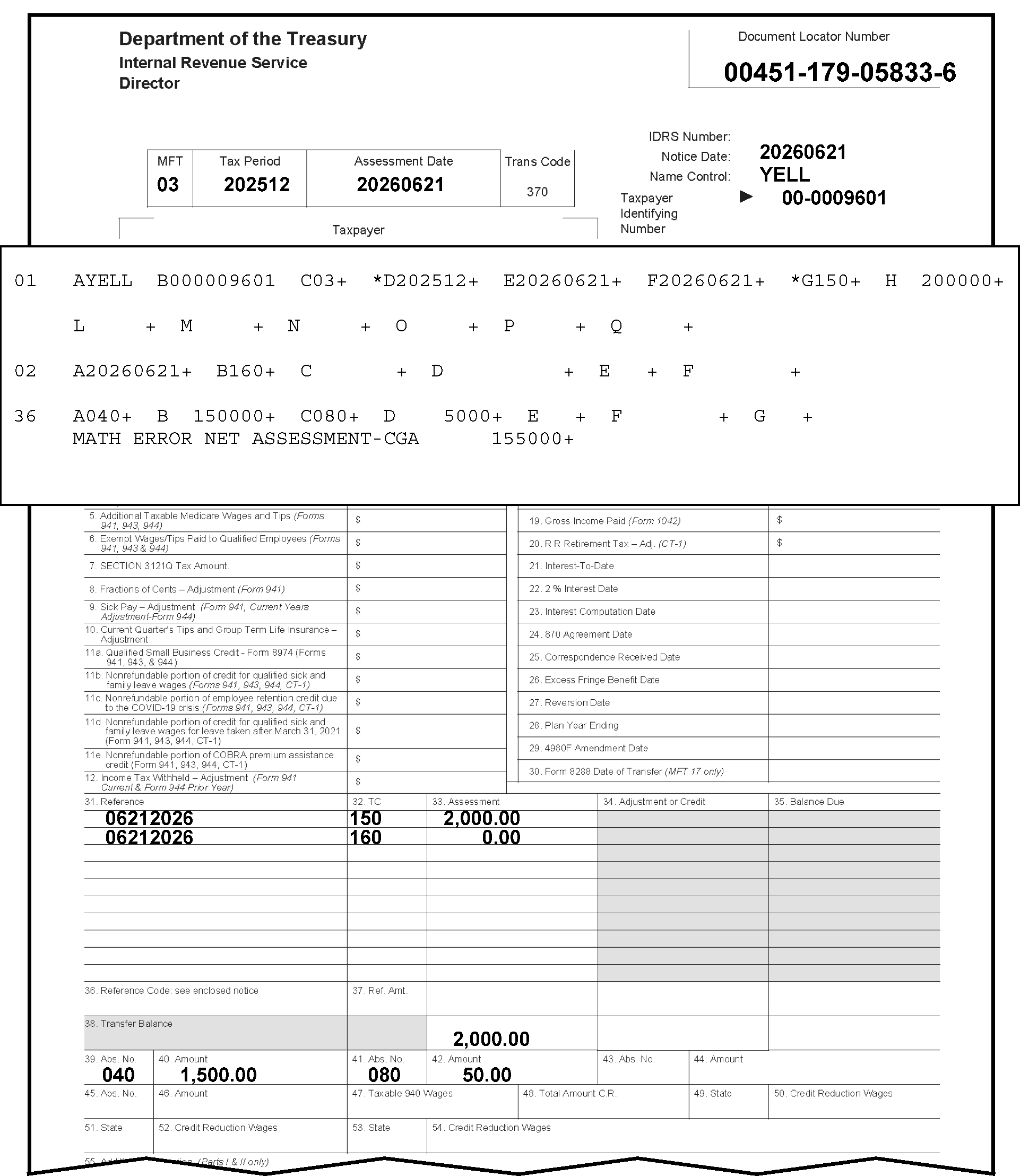
Figure 3.12.21-33 provides an example of an Abstract Math Error Net Assessment - CGA. This illustration contains a Form 3552 with an error register section displaying data from Sections 01, 02, and 36. Other information regarding Figure 3.12.21-33 are displayed on the Form 3552 and error register as follows: In the upper left corner of the Form 3552 are three organization headings listed vertically: Department of the Treasury, Internal Revenue Service and Director, respectivelyIn the upper right corner opposite those three headings is the Document Locator Number box, with the document locator number, 00451-179-05833-6. Two lines beneath that information is a single box with four conjoined boxes marked as MFT, Tax Period, Assessment Date and Trans Code. Immediately to the right of this four-part box are three rows, in vertical order, marked Notice Date, Name Control and Taxpayer Identifying Number respectively. The MFT entry is 03 The Tax Period entry is 202512 The Assessment Date entry is 20260621 The Trans Code entry is 370.To the right of the four conjoined boxes are the following three items, listed vertically: Notice Date, Name Control and Taxpayer Identifying Number The Notice Date is 20250621 The Name Control is YELL. The Taxpayer Identifying Number is 00-0009601.Located beneath this top part of the Form 3552 is a part of the error register, followed by the remaining part of the Form 3552. The part of the error register displays the following: Section 01 (Fields A through Q), Section 02 (Fields A through F), and Section 36 (Field A through H).The first line of the error register for Figure 3.12.21-33 displays the following fields in Section 01:Field A (Section 01) displays the name control, YELL.Field B displays the EIN, 00-0009601.Field C displays the MFT Code (03)Field D displays an asterisk (*) with the Tax Period of 202512.Field E displays the Date of Transfer, 20260621.Field F displays the 23C Date of Assessment, 20260621.Field G displays an asterisk (*) with the Original Assessment Transaction Code 150 (i.e., Return Filed and Tax Liability Assessed).Field H displays the Original Assessment Transaction Amount of $2,000.00 (Two thousand dollars and zero cents)No other entries are displayed under Section 01, but Section 36 (Fields A through F) displays as follows:Field A (Section 36) displays the Abstract/IRS Number 040 (zero four zero).Field B displays the Abstract Amount 150000 (One thousand, five-hundred dollars and zero cents).Field C (Section 36) displays the Abstract/IRS Number 080.Field D displays the Abstract Amount 5000.The last text on the error register part is the literal, MATH ERROR NET ASSESSMENT-CGA 155000There are no other entries or edit marks displayed on this part of the error register.Immediately beneath the error register is the remaining part of the Form 3552, with the columns under Item 31 (Reference), Item 32(TC) as in Transaction Code), and Item 33 (Assessment). The following lists three rows of data under the above-listed columns as follows:The first row displays 06212026, 150, and 2.000.00 (Two thousand dollars and zero cents), respectively.The second row displays 06212026, 160 (TC160, Manually Computed Failure to File Penalty), and 0.00 (zero dollars and cents), respectively.The third entry is located 13 rows down at the bottom row of the Assessment column (to the right of the Transfer Balance); and that figure is (also) 2,000.00 (two thousand dollars).Two rows beneath that Item 39, Abstract Number, 040 (zero four zero); Item 40, Abstract Amount, 1,500.00; Item 41, Abstract Number, 080 (zero eight zero); and, Item 42, Abstract Amount; 50.00 (Fifty dollars and zero cents).The remainder of form is blank, and NO other entries are present on the Form 3552, nor are displayed for Figure 3.12.21-33.
Please click here for the text description of the image.
-
If the Net Tax Assessment Computer-Generated Amount is greater than zero (0), Sections 36-39 must contain an abstract amount other than those associated with Abstract Numbers 221 and 222.
3.12.21.12.3 (01-01-2026)
Abstract Math Error Net Assessment - Sections 36-39 (Correction Procedures)
-
Compare the document with the register. Correct any transcription errors.
-
This math check is performed only if the Doc Code is 51, the MFT is 03, 29, 50, 61, 76, 77 or 78 and TC 15X, TC 29X or TC 30X is present in sections 01-19. Also refer to Exhibit 3.12.21-10 (TC 150 Abstract Versus Tax Period Table), Exhibit 3.12.21-11 (TC 290-30X Abstract Versus Tax Period Table) and Figure 3.12.21-33 for more information.
-
If the document was transcribed correctly or there are no abstract numbers and amounts present, add section 36 to the register, using the following abstract numbers, for the Net Tax Assessment Amount.
-
Use Abstract 080 for Form 720, Quarterly Federal Excise Tax Return.
-
Use Abstract 006 for Form 11, Special Tax Return and Application for Registry.
-
Use Abstract 151 for Form 4720, Return of Certain Excise Taxes on Charities and Other Persons Under Chapters 41 and 42 of the IRC.
-
Use Abstract 160 for Form 5329, Additional Taxes on Qualified Plans (Including IRAs) and Other Tax-Favored Accounts.
-
-
If the abstract amounts are present in Sections 36-39 and do not equal the net tax assessment, reject, using Action Code 3. Attach Form 4227 and send to Accounting for contact with the originator. Notate as follows: "Abstract amounts do not equal net tax assessment" .
Reminder:
Follow the table/procedures in IRM 3.12.21.12.1(8) above to identify the originator (to whom the Form 4227 (and document) should be sent for research and correction).
3.12.21.12.4 (01-01-2023)
TC 29X/30X Net-CGA - Math Error
-
A TC 29X/30X Net-CGA Math Error will be located under the last section present on the register. (See Figure 3.12.21-34.) Also refer to Exhibit 3.12.21-10 (TC 150 Abstract versus Tax Period Table) and Exhibit 3.12.21-11 (TC 290-30X Abstract versus Tax Period Table) for more information.
Figure 3.12.21-34
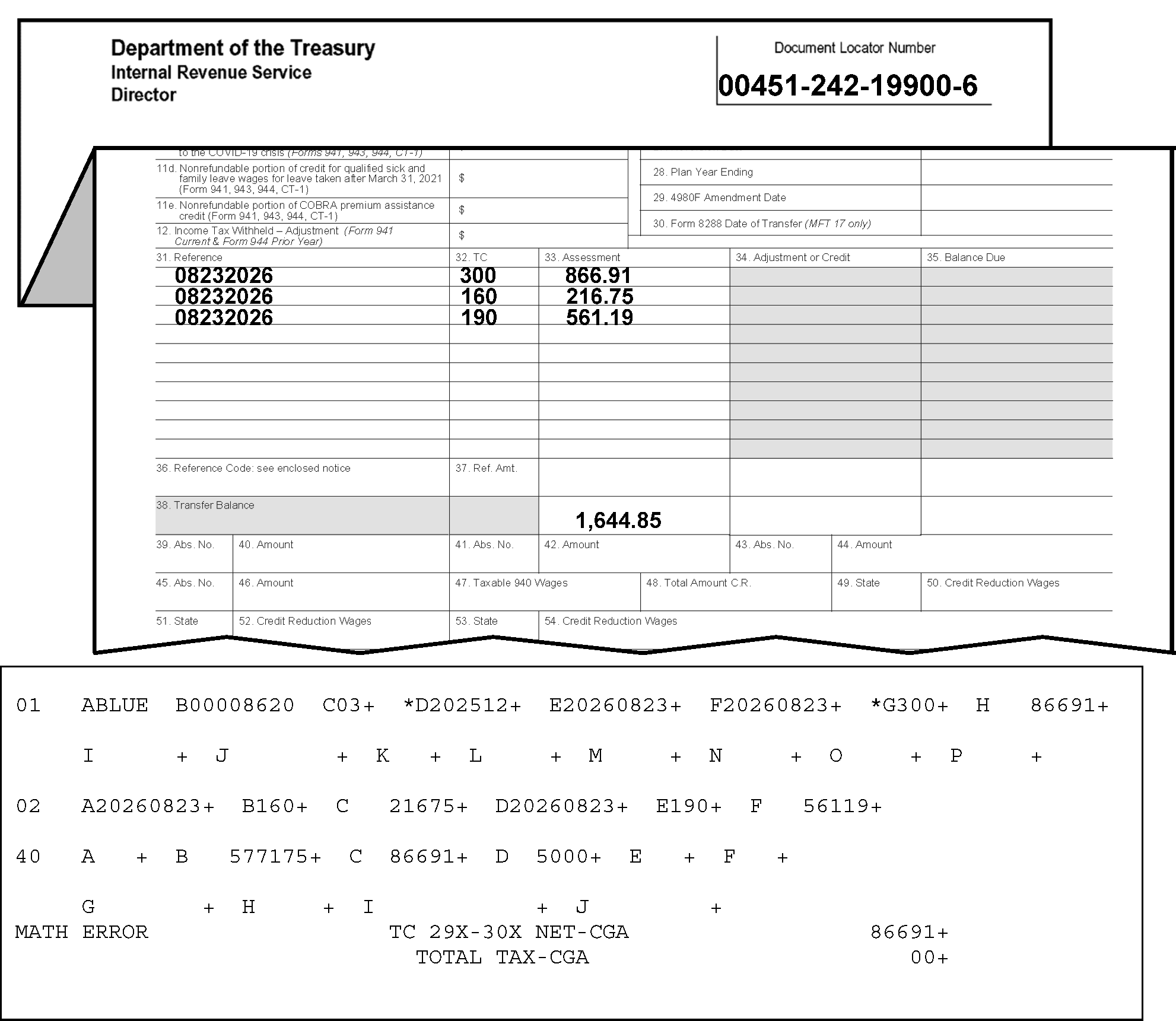
Figure 3.12.21-34 provides an illustration displaying a TC 29X/30X Net-CGA-Math Error. Figure 3.12.21-34 contains portions of a Form 3552 and an error register displaying data from Sections 01, 02, and 40. The items displayed on the Form 3552 and error register portion are described as follows:In the upper left corner of the Form 3552 are three organization headings listed vertically: Department of the Treasury, Internal Revenue Service and Director, respectivelyIn the upper right corner opposite those three headings is the Document Locator Number box, with the document locator number, 00451-242-19900-6.Immediately beneath the top part of the Form 3552, is a section of the form with the following columns: Item 31 (Reference), Item 32 (TC) as in Transaction Code, and Item 33 (Assessment). The following lists three rows of data under the above-referenced columns as follows:The first row displays 08232026, 300 (TC 300, Additional Tax Assessment by Examination or Appeals), and 866.91 (Eight hundred sixty-six dollars and 91 cents), respectivelyThe second row displays 08232026, 160 (TC 160, Manually Computed Failure to File Penalty), and 216.75 (Two hundred sixteen dollars and 75 cents), respectively.The third row displays 08232026, 190 (TC 190, Manually Assessed Interest Transferred In), and 561.19 (Five hundred sixty-one dollars and 19 cents), respectivelyThe fourth row is an entry located 16 rows down at the bottom row of the Assessment column (to the right of the Transfer Balance); and that figure is 1,644.85 (One thousand, Six hundred Forty-four dollars and 85 cents).Although there are no other entries for the Form 3552; thus, the error register fields are provided as follows:Below is an error register portion displaying data from Section 01, Section 02, and Section 40.The error register’s first line displays the following fields and entries for Section 01:Field A (Section 01) displays the Name Control, BLUE.Field B displays the SSN, 000008620.Field C displays the MFT Code (03)Field D displays an asterisk (*) with the Tax Period of 202512.Field E displays the Date of Transfer, 20260823.Field F displays the 23C Date of Assessment, 20260823.Field G displays an asterisk (*) with the Original Assessment Transaction Code, 300 (TC 300, Additional Tax Assessment by Examination or Appeals).Field H displays the Original Assessment Transaction Amount of $866.91 (Eight hundred Sixty-six dollars and 91 cents).No other entries are displayed under Section 01, BUTSection 02 (Fields A through F) displays as follows:Field A displays the Transaction Date 20260823.Field B displays the Transaction Code 160 (TC 160, Manually Computed Failure to File Penalty).Field C displays the Transaction Amount 21675 (Two hundred sixteen dollars and 75 cents).Field D displays the Transaction Date 20260823.Field E displays the Transaction Code 190 (TC 190, Manually Assessed Interest Transferred In).Field F displays the Transaction Amount 56119 (Five hundred sixty-one and nineteen cents).No other entries are displayed under Section 02, BUTSection 40 (Fields A through J) displays as follows:Field A displays the Adjusted Total of Income Tax Withheld (Form 943, Form 945, and Form 941 - MFT 01 - posted prior to 12/31/2004): Field A is blank.Field B displays the Taxable Social Security Wages (Form 941, Form 943, Form 944 and Form 945) (also known as Taxable FICA Wages Paid): Field B amount is 577175 (Five thousand, Seven hundred seventy-one dollars and 75 cents).Field C displays the Taxable Social Security Tips (Form 941 and Form 944); Field C amount is 86691 (Eight hundred, Sixty-six dollars and 91 cents).Field D displays the Taxable Medicare Wages and Tips (from Form 941)5000 (Fifty dollars and zero cents).The following items were generated beneath Section 40 for Figure 3.12.21-34:Flush with the left margin of the error register is the following text/literal: MATH ERRORAlso centered following Section 40 was the following text/literal: TC 29X-30X NET-CGACenter beneath the above-referenced message was the following text/literal: TOTAL TAX---CGAAlso centered following Section 40 was the following text/literal:Flush with the right margin tabbed following the of the error register is the following text/literal: MATH ERRORFlush with the left margin of the error register is the following text/literal: MATH ERROR was the following money amount: 86691 (Eight hundred, Sixty-six dollars and 91 cents).Flushed with the left margin of the error register is the following text/literal: TOTAL TAX---CGA was the following money amount: 00 (zero dollars and cents).There are no other entries or edit marks displayed on the error register, the Form 3552, nor for Figure 3.12.21-34.
Please click here for the text description of the image.
-
The computation of TC 29X/30X Net-CGA is the sum of all Transaction Codes 29X and 30X in Sections 01 through 19. The Total Tax-CGA is the sum of Fields 40-M, Total Income Tax Withheld, 40-J, Adjusted Total Social Security Tax, and 40-O, Adjusted Total Backup Withholding.
-
Compare the document with the register. Correct any transcription errors with Action Code 6.
-
Raw input only: If the document is correct as transcribed, clear the register with Action Code 7.
Note:
If more than an occasional Form 3552 is received without this information, refer this matter to the Error Correction supervisor who will contact his/her counterpart in the Account Transfer Function, Accounting Branch, to ensure the correct preparation of Form 3552 in the future.
-
Exhibit 3.12.21-1
Valid Tax Periods
| MFT-CD | BMFTX/PRD | END TX/PD | EARLIEST DATE ALLOWED | MM-LIMITS |
|---|---|---|---|---|
| 01 | 196203 | YYYY12 | TAX-PRD minus 2 months | 3, 6, 9, 12 |
| 02 | 196112 | YYYY12 | TAX-PRD minus 11 months | 1-12 |
| 03 | 196203 | YYYY12 | TAX-PRD minus 2 months | 3, 6, 9, 12 |
| 04 | 196203 | 199412 | TAX-PRD minus 2 months | 3, 6, 9, 12 |
| 05/06 | 196112 | YYYY12 | TAX-PRD minus 11 months | 1-12 |
| 07 | 198712 | YYYY12 | TAX-PRD minus 11 months | 12 |
| 08 | 200412 | YYYY12 | TAX-PRD minus 11 months | 1-12 |
| 09 | 196203 | 197512 | TAX-PRD minus 2 months | 3, 6, 9, 12 |
| 09 | 197612 | YYYY12 | TAX-PRD minus 11 months | 12 |
| 10/11 | 196112 | YYYY12 | TAX-PRD minus 11 months | 12 |
| 12 | 198512 | YYYY12 | TAX-PRD minus 11 months | 12 |
| 13 # | 198012 | YYYY12 | TAX-PRD minus 11 months | 12 |
| 14 | 200612 | YYYY12 | TAX-PRD minus 11 months | 12 |
| 15 | 199012 | YYYY12 | TAX-PRD minus 11 months | 12 |
| 16 | 199412 | YYYY12 | TAX-PRD minus 11 months | 12 |
| 17 | 200512 | YYYY12 | TAX-PRD minus 11 months | 1-12 |
| 33 | 196112 | 200611 | TAX-PRD minus 11 months | 1-12 |
| 34 | 196112 | YYYY12 | TAX-PRD minus 11 months | 1-12 |
| 35, 65 | 201412 | YYYY12 | TAX-PRD minus 11 months | 1-12 |
| 36 | 197012 | YYYY12 | TAX-PRD minus 11 months | 1-12 |
| 37 | 197001 | 198712 | TAX-PRD minus 11 months | 1-12 |
| 37 | 198812 | YYYY12 | TAX-PRD minus 11 months | 12 |
| 40 | 200401 | YYYY12 | TAX-PRD minus 11 months | 1-12 |
| 43 | 201512 | YYYY12 | TAX-PRD minus 11 months | 12 |
| 44 | 197001 | YYYY12 | TAX-PRD minus 11 months | 1-12 |
| 46 | 198412 | YYYY12 | TAX-PRD minus 11 months | 1-12 |
| 47 | 200007 | YYYY12 | TAX-PRD minus 11 months | 1-12 |
| 49 | 200007 | YYYY12 | TAX-PRD minus 11 months | 1-12 |
| 50 | 197001 | YYYY12 | TAX-PRD minus 11 months | 1-12 |
| 51 | 196112 | 197012 | TAX-PRD minus 11 months | 12 |
| 51 | 197103 | 198112 | TAX-PRD minus 2 months | 3, 6, 9, 12 |
| 51 | 198212 | YYYY12 | TAX-PRD minus 11 months | 12 |
| 52 | 000000 | 000000 | 12/01/1961 | |
| 58 | 197007 | 198009 | TAX-PRD | 1-12 |
| 60 \* | 195607 | YYYY12 | TAX-PRD | 1-12 |
| 61 \* | 196206 | 198706 | TAX-PRD | 1-12 |
| 62 \* | 196206 | 198006 | TAX-PRD | 1-12 |
| 63 \* | 196206 | YYYY12 | TAX-PRD | 1-12 |
| 64 \* | 196206 | YYYY12 | TAX-PRD minus 1 month | 1-12 |
| 65 | 201412 | YYYY12 | TAX-PRD minus 11 months | 1-12 |
| 67 | 197012 | YYYY12 | TAX-PRD minus 11 months | 1-12 |
| 74 | 198412 | YYYY12 | TAX-PRD minus 11 months | 1-12 |
| 75 | 1974 | YYYY12 | TAX-PRD minus 11 months | 1-12 |
| 76 | 198412 | YYYY12 | TAX-PRD minus 11 months | 1-12 |
| 77/78 | 198612 | YYYY12 | TAX-PRD minus 11 months | 12 |
| 79 | 201409 | YYYY12 | TAX-PRD minus 11 months | 1-12 |
| 82 | 201712 | YYYY12 | TAX-PRD minus 11 months | 1-12 |
| 83 | 201712 | YYYY12 | TAX-PRD minus 11 months | 1-12 |
| 85/86 | 198412 | YYYY12 | TAX-PRD minus 11 months | 1-12 |
The following "bullets" are footnotes to various items contained in the above-referenced table:
-
* Bypass generating EARLIEST-DATE-ALLOWED on correction passes.
-
# Month range for MFT-CD 13 with Reference Number 519, 565, 613, 643, 644, 648, 650, 655, 656, 657, 661, 665, 676, 677; 693, 694, 700-705, or 710 is 01 through 12.
-
MFT-CD 13 has to be calendar year with Reference Number 628.
Note:
Day in EARLIEST-DATE-ALLOWED is 01. YYYY in TX-PRD is equal to YEAR of PROCESS-DATE plus 1 year.
Exhibit 3.12.21-2
Form 3413 Section and Field Indicators
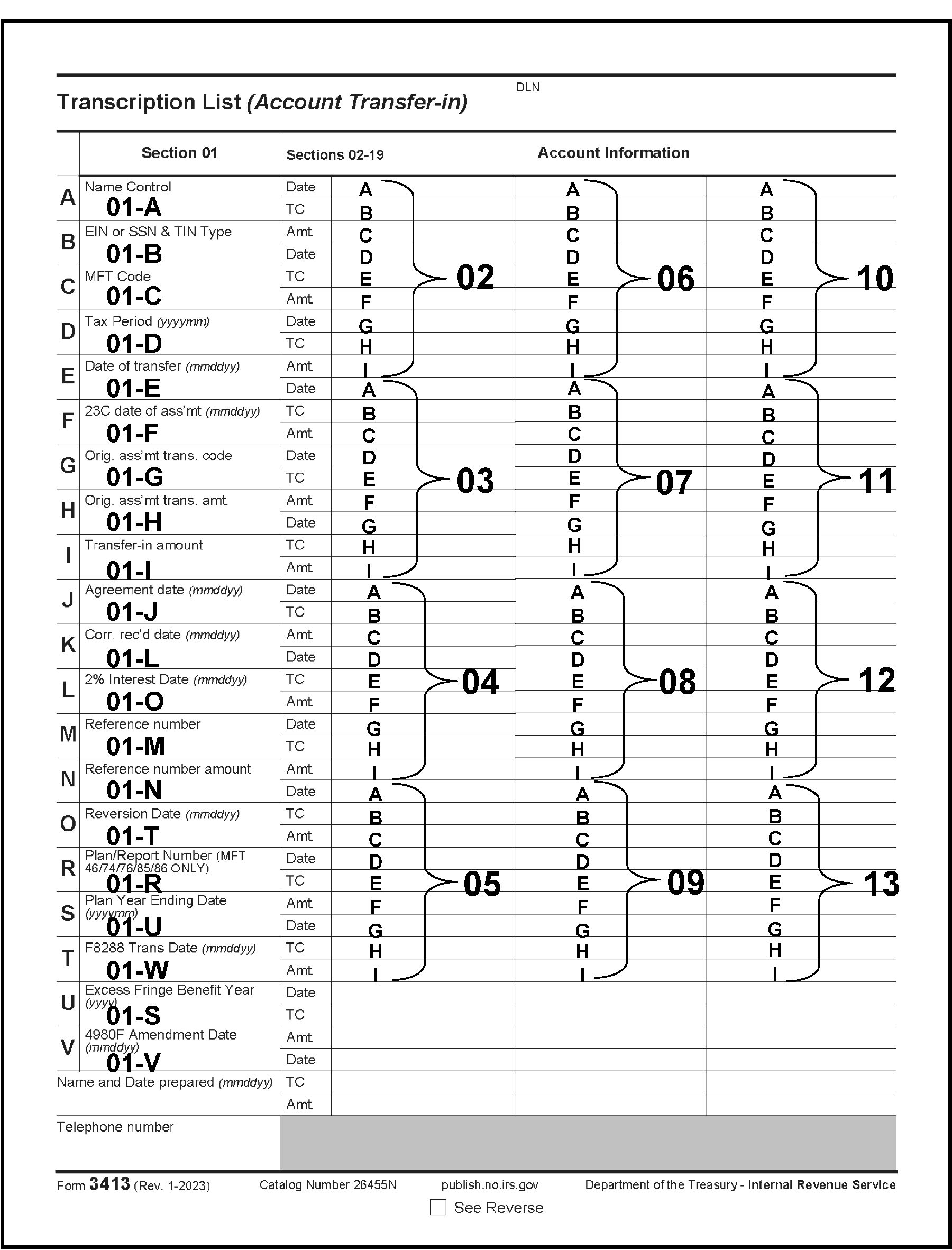
This Exhibit displays all the section and field indicators for the Form 3413.
Please click here for the text description of the image.
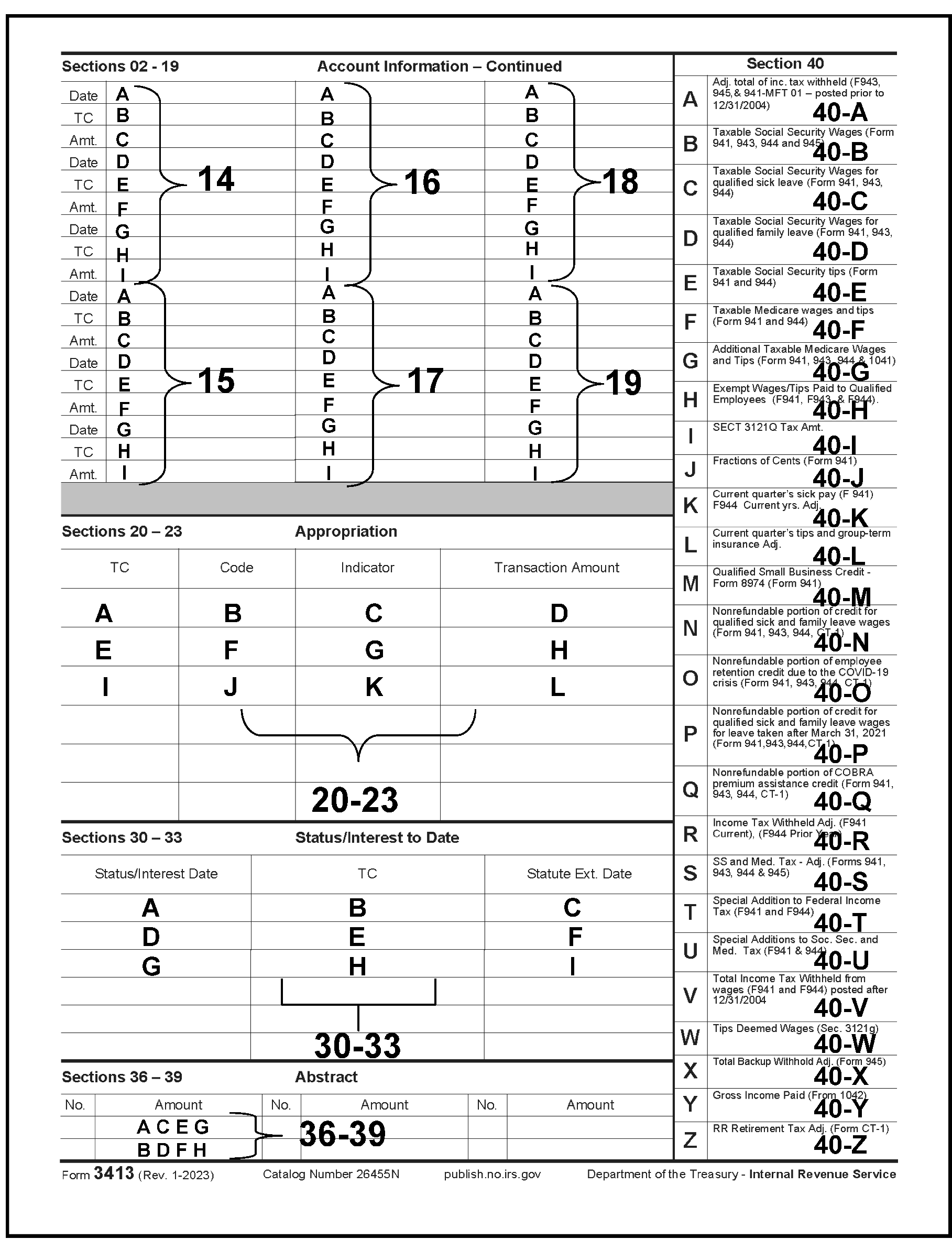
This Exhibit displays all the section and field indicators for the Form 3413.
Please click here for the text description of the image.
Exhibit 3.12.21-3
Form 3552 Section and Field Indicators
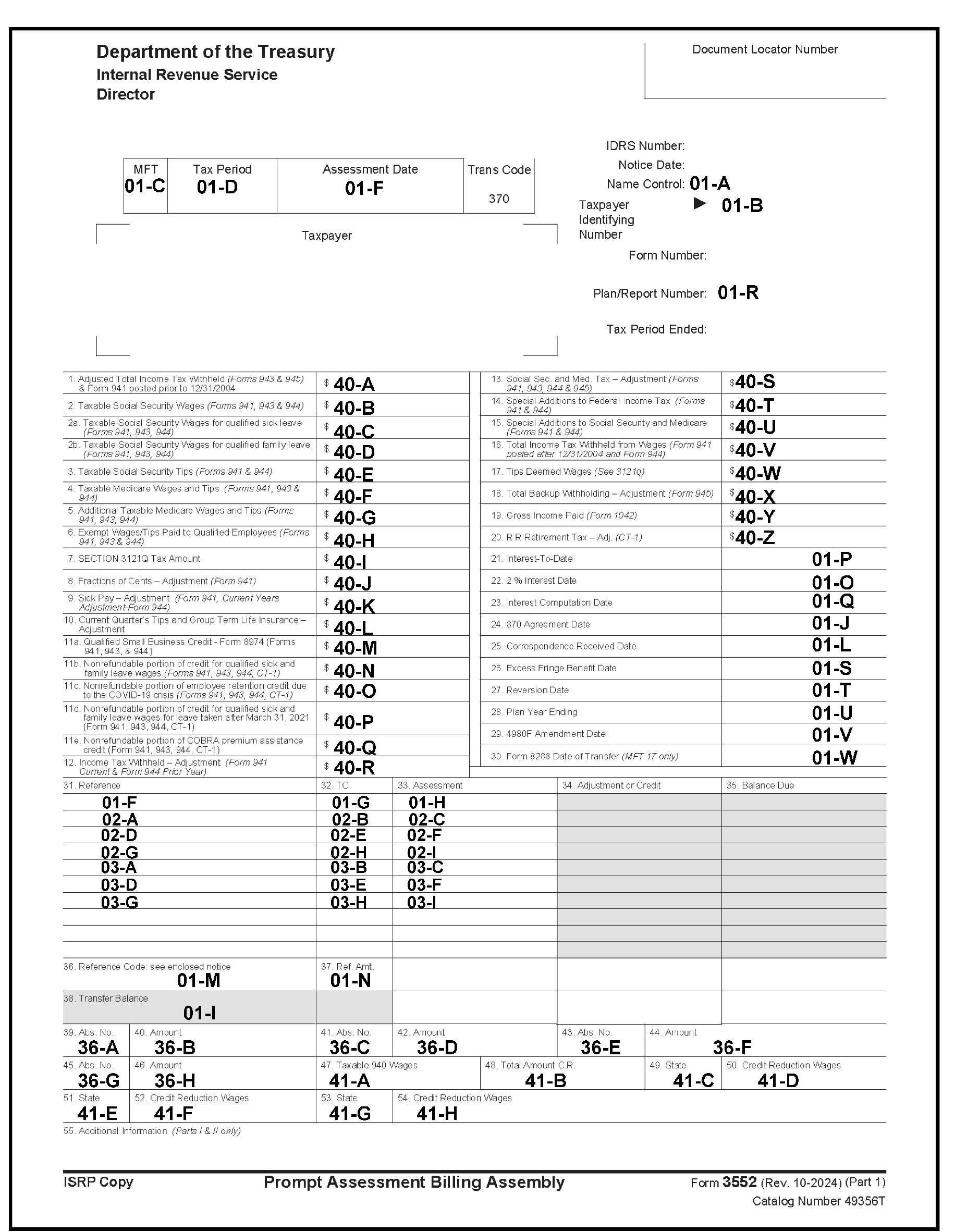
This Exhibit displays all the section and field indicators for the Form 3552.
Please click here for the text description of the image.
Exhibit 3.12.21-4
MFT and Tax Class Chart
BMF MFT/Tax Class Chart
| BMF MFT | FORM | TAX CLASS | BMF MFT | FORM | TAX CLASS |
|---|---|---|---|---|---|
| 01 | 941 | 1 | 46 | 8038 | 3 |
| 02 | 1120 | 3 | 46 | 8038-CP | 3 |
| 03 | 720 | 4 | 46 | 8038-G | 3 |
| 04 | 942 | 1 | 46 | 8038-GC | 3 |
| 05 | 1041 | 2 | 46 | 8038-T | 3 |
| 06 | 1065 | 2 | 46 | 8328 | 3 |
| 07 | 1066 | 3 | 47 | 8871 | 4 |
| 08 | 8804 | 1 | 49 | 8872 | 4 |
| 08 | 8813 | 1 | 50 | 4720 | 4 |
| 09 | CT-1 | 7 | 51 | 709 | 5 |
| 10 | 940 | 8 | 52 | 706 | 5 |
| 11 | 943 | 1 | 58 | 4638 | 4 |
| 12 | 1042 | 1 | 60 | 2290 | 4 |
| 13 | 8278 | 3 | 61 | 11 | 4 |
| 14 | 944 | 1 | 62 | 11-B | 4 |
| 15 | 8752 | 2 | 63 | 11-C | 4 |
| 16 | 945 | 1 | 64 | 730 | 4 |
| 17 | 8288 | 1 | 67 | 990 | 4 |
| 33 | 990C | 3 | 74 | 5500 | 4 |
| 34 | 990T | 3 | 75 | 8955-SSA | 4 |
| 35 | \----- | 2 | 76 | 5330 | 4 |
| 36 | 1041A | 4 | 77 | 706-GS(T) | 5 |
| 37 | 5227 | 4 | 78 | 706-GS(D) | 5 |
| 40 | 8849 | 4 | 83 | \---- | 2 |
| 43 | 8849 | 4 | 85 | 8038-B | 3 |
| 43 | \----- | 4 | 86 | 8038-TC | 3 |
| 44 | 990PF | 4 |
IMF MFT/Tax Class Chart
| IMF MFT | FORM | TAX CLASS | IRMF MFT | FORM | TAX CLASS |
|---|---|---|---|---|---|
| 30/31 | 1040 | 2 | 29 | 5329 | 0 |
| 30/31 | 1040-A | 2 | |||
| 30/31 | 1040-NR | 2 | |||
| 30/31 | 1040-SS | 2 | |||
| 30/31 | 1040-PR | 2 | |||
| 30/31 | 1040-ES | 2 | |||
| 30/31 | 1040-EZ | 2 | |||
| 30/31 | 8278 | 2 | |||
| 35/65 | \------- | 2 | |||
| 55 | 8278 (IMF) | 2 | |||
| 65 | \------- | 2 | |||
| 82 | \------- | 2 |
Exhibit 3.12.21-5
Valid IMF Transaction Code Table
Valid IMF TRANS-CD
| DB(+) | CR(-) | SECTION | DOC-CD | VALID MFT-CD |
|---|---|---|---|---|
| 150 | 01 | 51, 52 | 30, 31 | |
| 150 | 02-19 | 51, 52 | 30, 31, 55 | |
| 160 | 01 | 51, 52 | 30, 31 | |
| 160 | 02-19 | 51, 52 | 30, 31, 55 | |
| 161 | 02-19 | 51, 52 | 30, 31, 55 | |
| 166 | 167 | 02-19 | 52 | 30, 31, 55 |
| 170 | 01 | 51, 52 | 30, 31 | |
| 170 | 02-19 | 51, 52 | 30, 31, 55 | |
| 171 | 02-19 | 51, 52 | 30, 31, 55 | |
| 176 | 177 | 02-19 | 52 | 30, 31, 55 |
| 190 | 191 | 02-19 | 51, 52 | 30, 31, 35, 55, 65, 82 |
| 196 | 197 | 02-19 | 52 | 30, 31, 35, 55, 65 |
| 200 | 201 | 02-19 | 51, 52 | 30, 31, 55 |
| 240 | 01 | 51, 52 | 30, 31, 35 | |
| 240 | 241 | 02-19 | 51, 52 | 30, 31, 35, 55, 65 |
| 270 | 01 | 51, 52 | 30, 31, 82 | |
| 270 | 02-19 | 51, 52 | 30, 31, 55, 82 | |
| 271 | 02-19 | 51, 52 | 30, 31, 55, 82 | |
| 272 | 30-33 | 51, 52 | 30, 31, 55 | |
| 276 | 277 | 02-19 | 52 | 30, 31, 55 |
| 280 | 01 | 51, 52 | 30, 31, 65, 82 | |
| 280 | 02-19 | 51, 52 | 30, 31, 35, 55, 65, 82 | |
| 281 | 02-19 | 51, 52 | 30, 31, 55, 82 | |
| 286 | 02-19 | 52 | 30, 31, 55 | |
| 290 | 01 | 51, 52 | 30, 31, 35, 55, 82 | |
| 290 | 291 | 02-19 | 51, 52 | 30, 31, 35, 55, 65, 82 |
| 294 | 01 | 51, 52 | 30, 31 | |
| 294 | 02-19 | 51, 52 | 30, 31 | |
| 295 | 02-19 | 51, 52 | 30, 31, 55 | |
| 298 | 01 | 51, 52 | 30, 31, 82 | |
| 298 | 02-19 | 51, 52 | 30\. 31, 55, 82 | |
| 299 | 02-19 | 51, 52 | 30, 31, 55, 82 | |
| 299 | 02-19 | 51, 52 | 30, 31, 55, 82 | |
| 300 | 01 | 51, 52 | 30, 31, 35, 65 | |
| 300 | 02-19 | 51, 52 | 30, 31, 35, 55, 65 | |
| 301 | 02-19 | 51, 52 | 30, 31, 35, 55, 65 | |
| 304 | 01 | 51, 52 | 30, 31 | |
| 304 | 02-19 | 51, 52 | 30, 31, 55 | |
| 305 | 02-19 | 51, 52 | 30, 31, 55 | |
| 308 | 01 | 51, 52 | 30, 31 | |
| 308 | 02-19 | 51, 52 | 30, 31, 55 | |
| 309 | 02-19 | 51, 52 | 30, 31, 55 | |
| 310 | 311 | 02-19 | 51, 52 | 30, 31, 55 |
Exhibit (Cont. 1) - Valid IMF TRANS-CD
| DB(+) | CR(-) | SECTION | DOC-CD | VALID MFT-CD |
|---|---|---|---|---|
| 320 | 01 | 51, 52 | 30, 31 | |
| 320 | 321 | 02-19 | 51, 52 | 30, 31, 55 |
| 336 | 337 | 02-19 | 52 | 30, 31, 35, 55, 65 |
| 340 | 341 | 02-19 | 51, 52 | 30, 31, 35, 55, 65, 82 |
| 340 | 341 | 30-33 | 51, 52 | 30, 31, 35, 55, 65, 82 |
| 342 | 30-33 | 51, 52 | 30, 31, 35, 55, 65 | |
| 350 | 01 | 51, 52 | 30, 31 | |
| 350 | 02-19 | 51, 52 | 30, 31, 55 | |
| 351 | 02-19 | 51, 52 | 30, 31, 55 | |
| 360 | 01 | 51, 52 | 30, 31, 35, 65, 82 | |
| 360 | 02-19 | 51, 52 | 30, 31, 35, 55, 65, 82 | |
| 361 | 02-19 | 51, 52 | 30, 31, 35, 55, 82 | |
| 380 | 02-19 | 51, 52 | 30, 31, 55 | |
| 386 | 02-19 | 52 | 30, 31, 55 | |
| 388 | 01 | 52 | 30, 31 | |
| 388 | 02-19 | 52 | 30, 31, 55 | |
| 389 | 02-19 | 52 | 30, 31, 55 | |
| 400 | 02-19 | 52 | 30, 31, 35, 55, 65, 82 | |
| 402 | 01 | 51 | 30, 31, 35, 55, 65, 82 | |
| 402 | 02-19 | 52 | 30, 31, 35, 55, 65, 82 | |
| 420 | 421 | 30-33 | 52 | 30, 31, 55 |
| 422 | 423 | 30-33 | 52 | 30, 31, 55 |
| 424 | 30-33 | 52 | 30, 55 | |
| 425 | 30-33 | 52 | 30, 31, 55 | |
| 430 | 01 | 52 | 30 | |
| 430 | 02-19 | 51, 52 | 30, 55 | |
| 450 | 01 | 51, 52 | 30, 31 | |
| 450 | 451 | 02-19 | 52 | 30, 31, 55 |
| 460 | 30-33 | 51, 52 | 30, 31, 55 | |
| 462 | 30-33 | 52 | 30, 31, 55 | |
| 470 | 30-33 | 51, 52 | 30, 31, 55 | |
| 471 | 472 | 30-33 | 51, 52 | 30, 31, 35, 55, 65 |
| 473 | 30-33 | 51, 52 | 30, 31, 55 | |
| 474 | 475 | 30-33 | 51, 52 | 30, 55 |
| 480 | 481 | 30-33 | 51, 52 | 30, 31, 55 |
| 482 | 483 | 30-33 | 51, 52 | 30, 31, 55 |
| 490 | 496 | 30-33 | 51, 52 | 30, 31, 55 |
| 500 | 502 | 30-33 | 51, 52 | 30, 31, 55 |
Exhibit (Cont. 2) - Valid IMF TRANS-CD
| DB(+) | CR(-) | SECTION | DOC-CD | VALID MFT-CD |
|---|---|---|---|---|
| 510 | 516 | 30-33 | 51, 52 | 30, 31, 55 |
| 517 | 30-33 | 51, 52 | 30, 31, 55 | |
| 520 | 521 | 30-33 | 51, 52 | 30, 31, 55 |
| 522 | 30-33 | 51, 52 | 30, 31, 55 | |
| 530 | 30-33 | 51, 52 | 30, 31, 55 | |
| 531 | 532 | 30-33 | 51, 52 | 30, 31, 55 |
| 535 | 534 | 02-19 | 51, 52 | 30, 31, 55 |
| 537 | 30-33 | 51, 52 | 30, 31, 55 | |
| 540 | 542 | 30-33 | 51, 52 | 30, 31, 55 |
| 550 | 560 | 30-33 | 51, 52 | 30, 31, 55 |
| 570 | 571 | 30-33 | 51, 52 | 30, 31, 35, 55, 65 |
| 572 | 30-33 | 51, 52 | 30, 31, 55 | |
| 576 | 577 | 02-19 | 51, 52 | 30, 31, 55 |
| 582 | 583 | 30-33 | 51, 52 | 30, 31, 55 |
| 590 | 30-33 | 51, 52 | 30, 55 | |
| 591 | 592 | 30-33 | 51, 52 | 30, 55 |
| 593 | 594 | 30-33 | 51, 52 | 30, 55 |
| 595 | 30-33 | 51, 52 | 30, 55 | |
| 599 | 30-33 | 51, 52 | 30, 55 | |
| 600 | 02-19 | 51, 52 | 30, 31, 55 | |
| 607 | 606 | 02-19 | 52 | 30, 31, 55 |
| 609 | 608 | 02-19 | 52 | 30, 31, 55 |
| 611 | 610 | 02-19 | 51, 52 | 30, 31, 55 |
| 612 | 02-19 | 51, 52 | 30, 31, 55 | |
| 632 \* | 630 | 20-23 | 51, 52 | 30, 31, 82 |
| 637 \* | 636 | 20-23 | 52 | 30, 31, 82 |
| 641 | 640 | 02-19 | 51, 52 | 30, 31, 35, 55, 65 |
| 642 | 02-19 | 51, 52 | 30, 31, 35, 55, 65 | |
| 661 | 660 | 02-19 | 51, 52 | 30, 31, 55 |
| 662 | 02-19 | 51, 52 | 30, 31, 55 | |
| 667 | 666 | 02-19 | 52 | 30, 31, 55 |
| 671 | 670 | 02-19 | 51, 52 | 30, 31, 35, 55, 65 |
| 672 | 02-19 | 51, 52 | 30, 31, 35, 55, 65 | |
| 681 | 680 | 02-19 | 51, 52 | 30, 31, 35, 55, 65 |
| 682 | 02-19 | 51, 52 | 30, 31, 35, 55, 65 | |
| 691 | 690 | 02-19 | 51, 52 | 30, 31, 35, 55, 65 |
| 692 | 694 | 02-19 | 51, 52 | 30, 31, 35, 55, 65 |
| 695 | 02-19 | 51, 52 | 30, 31, 35, 55, 65 | |
| 701 | 700 | 02-19 | 51, 52 | 30, 31, 35, 55, 65 |
Note:
Section 20-23 is marked as extraneous when Section is present with MFT Code 55.
Exhibit (Cont. 3) - Valid IMF TRANS-CD
| DB(+) | CR(-) | SECTION | DOC-CD | VALID MFT-CD |
|---|---|---|---|---|
| 702 | 02-19 | 51, 52 | 30, 31, 35, 55, 65 | |
| 706 | 02-19 | 52 | 30, 31, 55, 65 | |
| 710 | 02-19 | 51, 52 | 30, 55 | |
| 712 | 02-19 | 51, 52 | 30, 55 | |
| 716 | 02-19 | 52 | 30, 55 | |
| 721 | 720 | 02-19 | 51, 52 | 30, 31, 35, 55, 65 |
| 722 | 02-19 | 51, 52 | 30, 31, 35, 55, 65 | |
| 731 | 730 | 02-19 | 51, 52 | 30, 31, 35, 55, 65 |
| 732 | 02-19 | 51, 52 | 30, 31, 55, 65 | |
| 736 | 02-19 | 52 | 30, 31, 55 | |
| 740 | 02-19 | 51, 52 | 30, 31, 35, 55, 65 | |
| 742 | 02-19 | 51, 52 | 30, 31, 35, 55, 65 | |
| 760 | 02-19 | 51, 52 | 30, 31, 35, 55, 65 | |
| 762 | 02-19 | 51, 52 | 30, 31, 35, 55, 65 | |
| 765 | 764 | 02-19 | 51, 52 | 30, 31, 55 |
| 767 | 766 | 02-19 | 51, 52 | 30, 31, 55, 65, 82 |
| 768 | 02-19 | 52 | 30, 31, 55 | |
| 770 | 02-19 | 51, 52 | 30, 31, 35, 55, 65 | |
| 772 | 02-19 | 51, 52 | 30, 31, 35, 55, 65, 82 | |
| 777 | 776 | 02-19 | 52 | 30, 31, 55, 65 |
| 780 | 781 | 30-33 | 51, 52 | 30, 31, 55 |
| 782 | 30-33 | 51, 52 | 30, 31, 55 | |
| 783 | 784 | 30-33 | 51, 52 | 30, 31, 55 |
| 788 | 30-33 | 51, 52 | 30, 31, 55 | |
| 800 | 02-19 | 51, 52 | 30, 31, 55 | |
| 802 | 02-19 | 51, 52 | 30, 31, 55 | |
| 807 | 806 | 02-19 | 52 | 30, 31, 55 |
| 820 | 821 | 02-19 | 51, 52 | 30, 31, 35, 55, 65 |
| 822 | 02-19 | 51, 52 | 30, 31, 35, 55, 65 | |
| 824 | 02-19 | 51, 52 | 30, 31, 35, 55, 65 | |
| 826 | 02-19 | 52 | 30, 31, 55, 65 | |
| 830 | 832 | 02-19 | 51, 52 | 30, 55 |
| 836 | 02-19 | 52 | 30, 55 | |
| 840 | 841 | 02-19 | 51, 52 | 30, 31, 35, 55, 65 |
| 843 | 02-19 | 51, 52 | 30, 31, 35, 55, 65 | |
| 844 | 845 | 30-33 | 51, 52 | 30, 31, 55, 65 |
| 846 | 02-19 | 52 | 30, 31, 55, 65 | |
| 850 | 851 | 02-19 | 51, 52 | 30, 31, 35, 55, 65 |
| 852 | 02-19 | 51, 52 | 30, 31, 35, 55, 65 | |
| 856 | 859 | 02-19 | 52 | 30, 31, 55 |
Exhibit (Cont. 4) - Valid IMF TRANS-CD
| DB(+) | CR(-) | SECTION | DOC-CD | VALID MFT-CD |
|---|---|---|---|---|
| 876 | 02-19 | 52 | 30, 31, 55 | |
| 890 | 892 | 02-19 | 51, 52 | 30, 31, 35, 55, 65 |
| 896 | 02-19 | 52 | 30, 31, 55 | |
| 912 | 914 | 30-33 | 51, 52 | 30, 31, 55 |
| 915 | 30-33 | 52 | 30, 31, 55 | |
| 916 | 917 | 30-33 | 51, 52 | 30, 31, 55 |
| 930 | 932 | 30-33 | 52 | 30, 31, 55 |
| 940 | 942 | 30-33 | 51, 52 | 30, 31, 55 |
| 960 | 961 | 30-33 | 51, 52 | 30, 31, 55 |
| 962 | 30-33 | 51, 52 | 30, 31, 55 | |
| 976 | 02-19 | 51, 52 | 30, 31, 55 | |
| 977 | 02-19 | 51, 52 | 30, 31, 55 |
Exhibit 3.12.21-6
IRAF Valid Transaction Codes
IRAF Valid TRANS-CD
| DB(+) | CR(-) | SECTION | DOC-CD | VALID MFT-CD |
|---|---|---|---|---|
| 150 | 01 | 51, 52 | 29 | |
| 150 | 151 | 02-19 | 51, 52 | 29 |
| 160 | 01 | 51, 52 | 29 | |
| 160 | 161 | 02-19 | 51, 52 | 29 |
| 190 | 191 | 02-19 | 51, 52 | 29 |
| 200 | 201 | 02-19 | 51, 52 | 29 |
| 234 | 01 | 51, 52 | 29 | |
| 234 | 02-19 | 51, 52 | 29 | |
| 235 | 02-19 | 51, 52 | 29 | |
| 240 | 241 | 02-19 | 51, 52 | 29 |
| 270 | 01 | 51, 52 | 29 | |
| 270 | 02-19 | 51, 52 | 29 | |
| 271 | 02-19 | 51, 52 | 29 | |
| 272 | 30-33 | 51, 52 | 29 | |
| 280 | 01 | 51, 52 | 29 | |
| 280 | 281 | 02-19 | 51, 52 | 29 |
| 290 | 01 | 51, 52 | 29 | |
| 290 | 291 | 02-19 | 51, 52 | 29 |
| 300 | 01 | 51, 52 | 29 | |
| 300 | 301 | 02-19 | 51, 52 | 29 |
| 320 | 01 | 51, 52 | 29 | |
| 320 | 321 | 02-19 | 51, 52 | 29 |
| 340 | 341 | 02-19 | 51, 52 | 29 |
| 340 | 341 | 30-33 | 51, 52 | 29 |
| 342 | 30-33 | 51, 52 | 29 | |
| 350 | 01 | 51, 52 | 29 | |
| 350 | 351 | 02-19 | 51, 52 | 29 |
| 360 | 01 | 51, 52 | 29 | |
| 360 | 361 | 02-19 | 51, 52 | 29 |
| 370 | 02-19 | 51, 52 | 29 | |
| 380 | 02-19 | 51, 52 | 29 | |
| 402 | 01 | 51, 52 | 29 | |
| 402 | 400 | 02-19 | 51, 52 | 29 |
| 422 | 423 | 30-33 | 51, 52 | 29 |
| 450 | 01 | 51, 52 | 29 | |
| 450 | 451 | 02-19 | 51, 52 | 29 |
| 460 | 462 | 30-33 | 51, 52 | 29 |
| 470 | 471 | 30-33 | 51, 52 | 29 |
| 472 | 473 | 30-33 | 51, 52 | 29 |
| 472 | 473 | 30-33 | 51, 52 | 29 |
| 474 | 475 | 30-33 | 51, 52 | 29 |
| 480 | 481 | 30-33 | 51, 52 | 29 |
| 482 | 483 | 30-33 | 51, 52 | 29 |
| 520 | 521 | 30-33 | 51, 52 | 29 |
| 522 | 530 | 30-33 | 51, 52 | 29 |
Exhibit (Cont. 1) - IRAF TRANS-CD
| DB(+) | CR(-) | SECTION | DOC-CD | VALID MFT-CD |
|---|---|---|---|---|
| 531 | 532 | 30-33 | 51, 52 | 29 |
| 537 | 540 | 30-33 | 51, 52 | 29 |
| 542 | 30-33 | 51, 52 | 29 | |
| 570 | 571 | 30-33 | 51, 52 | 29 |
| 572 | 30-33 | 51, 52 | 29 | |
| 590 | 591 | 30-33 | 51, 52 | 29 |
| 592 | 593 | 30-33 | 51, 52 | 29 |
| 594 | 595 | 30-33 | 51, 52 | 29 |
| 599 | 30-33 | 51, 52 | 29 | |
| 600 | 02-19 | 51, 52 | 29 | |
| 641 | 640 | 02-19 | 51, 52 | 29 |
| 642 | 02-19 | 51, 52 | 29 | |
| 671 | 670 | 02-19 | 51, 52 | 29 |
| 672 | 02-19 | 51, 52 | 29 | |
| 681 | 680 | 02-19 | 51, 52 | 29 |
| 682 | 02-19 | 51, 52 | 29 | |
| 695 | 694 | 02-19 | 51, 52 | 29 |
| 700 | 02-19 | 51, 52 | 29 | |
| 702 | 02-19 | 51, 52 | 29 | |
| 721 | 720 | 02-19 | 51, 52 | 29 |
| 722 | 02-19 | 51, 52 | 29 | |
| 730 | 02-19 | 51, 52 | 29 | |
| 732 | 02-19 | 51, 52 | 29 | |
| 740 | 02-19 | 51, 52 | 29 | |
| 742 | 02-19 | 51, 52 | 29 | |
| 760 | 02-19 | 51, 52 | 29 | |
| 762 | 02-19 | 51, 52 | 29 | |
| 770 | 02-19 | 51, 52 | 29 | |
| 772 | 02-19 | 51, 52 | 29 | |
| 780 | 781 | 30-33 | 51, 52 | 29 |
| 782 | 30-33 | 51, 52 | 29 | |
| 788 | 30-33 | 51, 52 | 29 | |
| 790 | 02-19 | 51, 52 | 29 | |
| 792 | 02-19 | 51, 52 | 29 | |
| 820 | 02-19 | 51, 52 | 29 | |
| 822 | 02-19 | 51, 52 | 29 | |
| 840 | 841 | 02-19 | 51, 52 | 29 |
| 843 | 02-19 | 51, 52 | 29 | |
| 844 | 845 | 30-33 | 51, 52 | 29 |
| 850 | 02-19 | 51, 52 | 29 | |
| 852 | 02-19 | 51, 52 | 29 | |
| 912 | 914 | 30-33 | 51, 52 | 29 |
| 960 | 961 | 30-33 | 51, 52 | 29 |
| 976 | 977 | 30-33 | 51, 52 | 29 |
| 999 | 30-33 | 51, 52 | 29 |
Exhibit 3.12.21-7
BMF Valid Transaction Code Table
BMF Valid TRANS-CD
| DB(+) | CR(-) | SECTION | DOC-CD | VALID MFT-CD |
|---|---|---|---|---|
| 150 | 01 | 51 | ALL --(except 13, 43, 61, 74, 75, 79, 83) | |
| 150 | 01 | 52 | ALL - ---(except 13, 17, 43, 61, 74, 75, 79, 83) | |
| 150 | 02-19 | 51, 52 | ALL - ---(except 43, 61, 74, 75, 79, 83) | |
| 157 | 30-33 | 51, 52 | ALL - ---(except 17, 40, 46, 47, 49, 74, 75, 76, 77, 78, 83, 85, 86) | |
| 160 | 01 | 51, 52 | ALL - ---(except 12, 13, 40, 43, 46, 47, 49, 74, 75, 79, 83, 85, 86) | |
| 160 | 02-19 | 51, 52 | ALL - ---(except 40, 43, 46, 47, 49, 74, 75, 79, 83, 85, 86) | |
| 161 | 02-19 | 51 | ALL - (except 40, 43, 46, 47, 49, 74, 75, 79, 83, 85, 86) | |
| 161 | 02-19 | 52 | ALL - (except 40, 43, 46, 47, 49, 74, 75, 77, 78, 79, 83, 85, 86) | |
| 166 | 167 | 02-19 | 52 | ALL - (except 17, 40, 43, 46, 47, 49, 74, 75, 76, 79, 83, 85, 86) |
| 170 | 01 | 51 | 02, 05, 06, 08, 17, 33, 34, 43, 44 | |
| 170 | 01 | 52 | 02, 05, 06, 08, 33, 34, 43, 44 | |
| 170 | 02-19 | 51 | 02, 05, 06, 08, 17, 33, 34, 43, 44 | |
| 170 | 02-19 | 52 | 02, 05, 06, 08, 33, 34, 43, 44 | |
| 171 | 02-19 | 51 | ALL - (except 07, 17, 40, 46, 47, 49, 74, 75, 76, 77, 78, 79, 83, 85, 86) | |
| 171 | 02-19 | 52 | ALL - (except 05, 07, 17, 40, 46, 47, 49, 74, 75, 76, 77, 78, 79, 83, 85, 86) | |
| 176 | 177 | 02-19 | 52 | ALL - ---(except 07, 17, 40, 43, 46, 47, 49, 74, 75, 76, 77, 78, 79, 85, 86) |
| 180 | 01 | 51, 52 | 01, 03, 09, 10, 11, 14, 16 43, 83 | |
| 180 | 181 | 02-19 | 51, 52 | ALL - (except 07, 17, 40, 43, 46, 47, 49, 74, 75, 76, 77, 78, 79, 83, 85, 86) |
| 186 | 187 | 02-19 | 52 | ALL - (except 07, 17, 40, 43, 46, 47, 49, 74, 75, 76, 77, 78, 79, 85, 86) |
| 190 | 191 | 02-19 | 51, 52 | ALL - (except 79, 83) |
| 196 | 197 | 02-19 | 52 | ALL - (except 16, 83) |
| 234 | 01 | 51, 52 | 36, 44, 67, 83 | |
| 234 | 235 | 02-19 | 51, 52 | ALL - ---(except 16, 36, 40, 44, 46, 74, 75, 76, 77, 78, 83, 85, 86) |
| 238 | 239 | 02-19 | 52 | ALL - ---(except 17, 40, 43, 46, 47, 49, 74, 75, 76, 77, 78, 79, 83, 85, 86) |
| 240 | 01 | 51 | 13, 17, 40, 46, 74, 75, 76, 83, 85, 86 | |
| 240 | 01 | 52 | 13, 40, 46, 74, 75, 76, 83, 85, 86 | |
| 241 | 01 | 51 | 17, 46, 74, 75, 76, 83 | |
| 241 | 01 | 52 | 13, 17, 40, 46, 74, 75, 76, 83 | |
| 240 | 241 | 02-19 | 51, 52 | ALL - (except 47, 49, 79, 83) |
| 246 | 02-19 | 51 | 74 | |
| 246 | 02-19 | 52 | 05, 06, 07, 74 | |
| 247 | 02-19 | 51 | 74 | |
| 247 | 02-19 | 52 | 06, 07, 08, 40, 74 |
Exhibit (Cont. 1) BMF Valid TRANS-CD
| DB(+) | CR(-) | SECTION | DOC-CD | VALID MFT-CD |
|---|---|---|---|---|
| 270 | 01 | 51, 52 | ALL - ---(except 12, 13, 43, 47, 49, 79, 85, 86) | |
| 270 | 02-19 | 51, 52 | ALL - ---(except 43, 46, 47, 49, 79, 85, 86) | |
| 271 | 02-19 | 51 | ALL - ---(except 43, 47, 49, 75, 78, 79, 85, 86) | |
| 271 | 02-19 | 52 | ALL---(except 43, 47, 49, 75, 79, 85, 86) | |
| 272 | 30-33 | 51, 52 | ALL - ---(except 17, 40, 47, 49, 75, 85, 86) | |
| 276 | 02-19 | 52 | ALL - ---(except 17, 40, 43, 47, 49, 75, 79, 85. 86) | |
| 277 | 02-19 | 52 | ALL - ---(except 17, 43, 47, 49, 75, 79, 85, 86) | |
| 280 | 01 | 51, 52 | ALL- ---(except 12, 13, 43, 47, 49, 79, 85, 86) | |
| 280 | 02-19 | 51, 52 | ALL - ---(except 46, 47, 49, 79, 85, 86) | |
| 281 | 02-19 | 51, 52 | ALL - ---(except 47, 49, 75, 79, 85, 86) | |
| 286 | 02-19 | 52 | ALL - ---(except 17, 43, 47, 49, 75, 79, 85, 86) | |
| 290 | 01 | 51, 52 | ALL ---(except 43, 75) | |
| 290 | 02-19 | 51, 52 | ALL ---(except 75) | |
| 291 | 02-19 | 51, 52 | ALL - --(except 47, 49, 75, 79) |
Exhibit 3.12.21-7 (Cont. 2) BMF TRANS-CD
| DB(+) | CR(-) | SECTION | DOC-CD | VALID MFT-CD |
|---|---|---|---|---|
| 294 | 01 | 51, 52 | ALL - ---(except 12, 13, 43, 47, 49, 75, 77, 78, 79, 83) | |
| 294 | 02-19 | 51, 52 | ALL---(except 43, 46, 47, 49, 74, 75, 76, 77, 78, 79, 83, 85, 86) | |
| 295 | 01 | 51 | 10, 15, 17, 40, 74, 76 | |
| 295 | 01 | 52 | 15, 17, 40, 74, 76 | |
| 295 | 02-19 | 51, 52 | ALL ---(except 43, 47, 49, 74, 75, 76, 77, 78, 79, 85, 86) | |
| 298 | 01 | 51, 52 | ALL - ---(except 12, 13, 43, 47, 49, 75) | |
| 298 | 02-19 | 51, 52 | ALL - ---(except 43, 46, 47, 49, 75, 79 85, 86) | |
| 299 | 01 | 51 | 10, 15, 17, 40, 74, 76 | |
| 299 | 01 | 52 | 15, 17, 40, 74, 76 | |
| 299 | 02-19 | 51, 52 | ALL - ---(except 43, 47, 49, 75, 79) | |
| 300 | 01 | 51, 52 | ALL - ---(except 13, 43, 75, 79, 83) | |
| 300 | 02-19 | 51, 52 | ALL ---(except 75, 79, 83) | |
| 301 | 01 | 51 | 10, 15, 17, 40, 46, 74, 76, 83, 85, 86) | |
| 301 | 01 | 52 | 15, 17, 40, 46, 74, 76, 83, 85, 86) | |
| 301 | 02-19 | 51, 52 | ALL - ---(except 47, 49, 75, 79, 83) | |
| 304 | 01 | 51, 52 | ALL - ---(except 12, 13, 43, 47, 49, 75, 77, 78, 79, 83) | |
| 305 | 01 | 51 | 10, 15, 17, 40, 74, 76 | |
| 305 | 01 | 52 | 15, 17, 40, 74, 76 | |
| 304 | 305 | 02-19 | 51, 52 | ALL - ---(except 43, 46, 47, 49, 75, 77, 78, 79, 83, 85, 86) |
| 308 | 01 | 51, 52 | ALL- ---(except 12, 13, 43, 47, 49, 75, 79, 83) | |
| 308 | 02-19 | 51, 52 | ALL - ---(except 43, 46, 47, 49, 75, 79, 83, 85, 86) | |
| 309 | 01 | 51 | 10, 15, 17, 40, 74, 76 | |
| 309 | 01 | 52 | 15, 17, 40, 74, 76 | |
| 309 | 02-19 | 51, 52 | ALL - ---(except 43, 47, 49, 75, 79, 83) | |
| 320 | 01 | 51, 52 | ALL - ---(except 12, 13, 43, 47, 49, 75, 79, 83) | |
| 321 | 01 | 51, 52 | 15, 17, 40, 46, 74, 76, 83, 85, 86 | |
| 320 | 321 | 02-19 | 51, 52 | ALL - ---(except 43, 47, 49, 75, 79, 83) |
| 336 | 337 | 02-19 | 52 | ALL - ---(except 17, 47, 49, 75, 79, 83, 85, 86) |
| 340 | 02-19 | 51 | ALL - ---(except 47, 49, 79) | |
| 340 | 02-19 | 52 | ALL - ---(except 17, 47, 49, 79) | |
| 340 | 30-33 | 51 | ALL - ---(except 43, 45, 47, 49, 85, 86) | |
| 340 | 30-33 | 52 | ALL - ---(except 17, 43, 45, 47, 49) | |
| 341 | 02-19 | 51, 52 | ALL - ---(except 47, 49, 79) | |
| 341 | 30-33 | 51, 52 | ALL - -----(except 43, 45, 47, 49) | |
| 342 | 30-33 | 51, 52 | ALL - ---(except 17, 43, 47, 49, 75, 83) | |
| 350 | 01 | 51, 52 | ALL - ---(except 12, 13, 43, 46, 47, 49, 75, 79, 83, 85, 86) | |
| 350 | 02-19 | 51, 52 | ALL - ---(except 46, 47, 49, 75, 83, 85, 86) | |
| 351 | 01 | 51, 52 | 15, 17, 40, 46, 74, 76, 83, 85, 86 | |
| 351 | 02-19 | 51, 52 | ALL - ---(except 43, 47, 49, 75, 79, 83) | |
| 360 | 01 | 51, 52 | ALL - (except 12, 13, 46, 47, 49, 75, 85, 86) | |
| 360 | 02-19 | 51, 52 | ALL - (except 46, 47, 49, 75, 85, 86) | |
| 361 | 02-19 | 51, 52 | ALL - ---(except 43, 46, 47, 49, 75, 79, 85, 86) | |
| 380 | 02-19 | 51 | ALL - ---(except 43, 47, 49, 75, 79, 83) | |
| 380 | 02-19 | 52 | ALL - ---(except 17, 43, 47, 49, 75, 79, 83) | |
| 386 | 02-19 | 52 | ALL - ---(except 17, 43, 46, 47, 49, 75, 79, 85, 86) | |
| 388 | 01 | 52 | ALL- ---(except 12, 13, 17, 46, 47, 49, 83, 85, 86) | |
| 388 | 389 | 02-19 | 52 | ALL - ---(except 17, 43, 46, 47, 49, 75, 79, 83, 85, 86) |
| 402 | 01 | 51 | ALL - ---(except 43, 47, 49, 79, 85, 86) | |
| 402 | 400 | 02-19 | 51 | 08, 17, 40, 43, 46, 74, 75, 76, 85, 86 |
| 402 | 400 | 02-19 | 52 | ALL - ---(except 17, 47, 49, 79) |
| 420 | 30-33 | 52 | ALL- ---(except 17, 43, 45, 47, 49, 75, 77, 78, 83) | |
| 421 | 30-33 | 52 | ALL- ---(except 17, 43, 45, 46, 47, 49, 83, 85, 86) | |
| 422 | 423 | 30-33 | 52 | ALL- ---(except 17, 40, 43, 45, 46, 47, 49, 75, 77, 78, 83, 85, 86) |
| 424 | 30-33 | 52 | ALL- ---(except 17, 43, 45, 47, 49, 75, 83) | |
| 431 | 02-19 | 52 | ALL- ---(except 77, 78, 83) |
Exhibit 3.12.21-7 (Cont. 3) BMF TRANS-CD
| DB(+) | CR(-) | SECTION | DOC-CD | VALID MFT-CD |
|---|---|---|---|---|
| 450 | 01 | 51, 52 | ALL - ---(except 12, 13, 43, 46, 47, 49, 76, 79, 83, 85, 86) | |
| 451 | 01 | 51, 52 | 15, 17, 40, 74, 76 | |
| 450 | 451 | 02-19 | 51, 52 | ALL - ---(except 43, 46, 47, 49, 75, 79, 83, 85, 86) |
| 460 | 462 | 30-33 | 51, 52 | ALL - ----(except 40, 43, 46, 47, 49, 75, 83. 85, 86) |
| 468 | 469 | 30-33 | 51, 52 | ALL - ---(except 14, 17, 40, 43, 45, 46, 47, 49, 74, 75, 76, 77, 78, 83, 85, 86) |
| 470 | 30-33 | 51, 52 | ALL - ---(except 43, 45, 47, 49, 75, 83) | |
| 471 | 30-33 | 51, 52 | ALL - ---(except 43, 45, 47, 49, 75) | |
| 472 | 30-33 | 51, 52 | ALL - ---(except 17, 43, 46, 47, 49, 75, 83, 85, 86) | |
| 473 | 474 | 30-33 | 51, 52 | ALL ---(except 17, 40, 43, 45, 46, 47, 49, 75, 77, 78, 83, 85, 86) |
| 475 | 30, 33 | 52 | ALL ---(except 17, 40, 43, 45, 46, 47, 49, 74, 75, 76, 77, 78, 83, 85, 86) | |
| 478 | 30, 33 | 52 | ALL ---(except 17, 40, 43, 45, 46, 47, 49, 74, 75, 76, 77, 78, 83, 85, 86) | |
| 480 | 481 | 30-33 | 51, 52 | ALL ---(except 17, 43, 45, 46, 47, 49, 75, 83, 85, 86) |
| 482 | 483 | 30-33 | 51, 52 | ALL ---(except 17, 43, 45, 46, 47, 49, 75, 83, 85, 86) |
| 488 | 489 | 30-33 | 51, 52 | ALL ---(except 17, 43, 45, 46, 47, 49, 75, 77, 78, 83, 85, 86) |
| 520 | 521 | 30-33 | 51, 52 | ALL ---(except 17, 43, 45, 46, 47, 49, 75, 83, 85, 86) |
| 522 | 30-33 | 51, 52 | ALL ---(except 17, 43, 45, 46, 47, 49, 75, 83, 85, 86) | |
| 530 | 30-33 | 51, 52 | ALL ---(except 17, 43, 45, 46, 47, 49, 75, 83, 85, 86) | |
| 531 | 532 | 30-33 | 51, 52 | ALL ---(except 17, 43, 45, 46, 47, 49, 75, 83, 85, 86) |
| 535 | 534 | 02-19 | 51, 52 | ALL - ---(except 17, 43, 46, 47, 49, 75, 79, 83, 85, 86) |
| 537 | 30-33 | 51 | ALL ---(except 17, 43, 45, 46, 47, 49, 75, 77, 78, 83, 85, 86) | |
| 537 | 30-33 | 52 | ALL ---(except 17, 43, 45, 46, 47, 49, 75, 83, 85, 86) | |
| 550 | 30-33 | 51, 52 | ALL ---(except 17, 40, 43, 45, 46, 47, 49, 75, 83, 85, 86) | |
| 560 | 30-33 | 51, 52 | ALL ---(except 17, 43, 45, 46, 47, 49, 75, 83, 85, 86) | |
| 564 | 30-33 | 51, 52 | ALL ---(except 77, 78, 83) | |
| 570 | 571 | 30-33 | 51, 52 | ALL ---(except 43, 83) |
| 572 | 30-33 | 51, 52 | ALL ---(except 17, 43, 47, 49) | |
| 582 | 583 | 30-33 | 51, 52 | ALL ---(except 17, 43, 46, 47, 49, 75, 83, 85, 86) |
| 590 | 01 | 51 | 47, 49, 74, 76 | |
| 590 | 01 | 52 | ALL ---(except 12, 17, 40, 43, 46, 75, 77, 78, 79, 83, 85, 86) | |
| 590 | 30 -33 | 51, 52 | ALL ---(except 17, 40, 43, 46, 75, 77, 78, 83, 85, 86) | |
| 591 | 592 | 30 -33 | 51, 52 | ALL ---(except 17, 40, 43, 46, 75, 77, 78, 83, 85, 86) |
| 593 | 30-33 | 51, 52 | ALL ---(except 17, 43, 46, 75, 77, 78, 83, 85, 86) | |
| 594 | 30-33 | 51, 52 | ALL ---(except 17, 40, 43, 46, 75, 77, 78, 83, 85, 86) | |
| 595 | 596 | 30-33 | 51, 52 | ALL ---(except 17, 43, 46, 75, 77, 78, 83, 85, 86) |
| 597 | 598 | 30-33 | 51, 52 | ALL ---(except 17, 43, 46, 75, 77, 78, 83, 85, 86) |
| 599 | 30-33 | 51, 52 | ALL ---(except 17, 40, 43, 75, 77, 78, 83) | |
| 600 | 02-19 | 51, 52 | ALL - ---(except 17, 43, 46, 47, 49, 75, 79, 83, 85, 86) | |
| 607 | 606 | 02-19 | 52 | ALL - ---(except 17, 43, 46, 47, 49, 75, 79, 83, 85, 86) |
| 609 | 608 | 02-19 | 52 | ALL - ---(except 17, 43, 46, 47, 49, 75, 79, 83, 85, 86) |
| 610 | 02-19 | 51 | ALL - ---(except 40, 43, 47, 49, 74, 79, 83) | |
| 610 | 02-19 | 52 | ALL - ---(except 17, 40, 43, 47, 49, 74, 79, 83) | |
| 611 | 02-19 | 51, 52 | ALL - ---(except 17, 40, 46, 43, 46, 47, 49, 74, 75, 79, 83, 85, 86) | |
| 612 | 02-19 | 51 | ALL - ---(except 43, 44, 47, 49, 61, 75, 76, 83, 85, 86) | |
| 612 | 02-19 | 52 | ALL - ---(except 17, 43, 44, 47, 49, 61, 75, 76, 83, 85, 86) | |
| 621 | 620 | 02-19 | 51, 52 | All - ---(except 17, 40, 46, 47, 49, 77, 78, 79, 83, 85, 86) |
| 622 | 02-19 | 51, 52 | All ---(except 17, 40, 46, 47, 49, 77, 78, 83, 85, 86) | |
| 632 | 630 | 20-23 | 51, 52 | 02, 05, 08, 17, 33, 34, 46, 83 |
| 637 | 636 | 20-23 | 52 | 02, 05, 33, 34, 83 |
| 640 | 02-19 | 51, 52 | ALL - ---(except 46, 47, 49, 75, 83, 85, 86) | |
| 641 | 02-19 | 51, 52 | ALL - ---(except 17, 46, 47, 49, 75, 83, 85, 86) | |
| 642 | 02-19 | 51, 52 | All - ---(except 46, 47, 49, 75, 83, 85, 86) | |
| 650 | 02-19 | 51, 52 | ALL---(except 02, 17, 33, 40, 46, 47, 49, 74, 75, 76, 77, 78, 83, 85, 86) | |
| 651 | 02-19 | 51, 52 | ALL - ---(except 17, 40, 46, 47, 49, 74, 75, 76, 77, 78, 83, 85, 86) | |
| 652 | 02-19 | 51, 52 | ALL - ---(except 17, 40, 46, 47, 49, 74, 75, 76, 77, 78, 83, 85, 86) | |
| 661 | 660 | 02-19 | 51, 52 | ALL - ---(except 17, 40, 46, 47, 49, 74, 75, 76, 77, 78, 83, 85, 86) |
| 662 | 02-19 | 51, 52 | ALL - ---(except 17, 40, 46, 47, 49, 74, 76, 77, 78, 83, 85, 86) | |
| 666 | 667 | 02-19 | 52 | 06, 08 |
| 670 | 02-19 | 51, 52 | ALL - ---(except 46, 75, 83, 85, 86) | |
| 671 | 02-19 | 51, 52 | ALL - ---(except 17, 46, 47, 49, 75, 83, 85, 86) | |
| 672 | 02-19 | 51, 52 | ALL - ---(except 46, 47, 49, 75, 83, 85, 86) | |
| 679 | 678 | 02-19 | 51, 52 | ALL - ---(except 17, 43, 46, 47, 49, 74, 75, 76, 77, 78, 83, 85, 86) |
| 681 | 680 | 02-19 | 51, 52 | ALL - ---(except 46, 47, 49, 83, 85, 86) |
| 682 | 02-19 | 51, 52 | ALL - ---(except 46, 47, 49, 75, 83, 85, 86) | |
| 691 | 690 | 02-19 | 51, 52 | ALL - ---(except 17, 46, 47, 49, 85, 86) |
| 692 | 02-19 | 51, 52 | ALL - ---(except 17, 46, 47, 49, 83, 85, 86) | |
| 695 | 694 | 02-19 | 51, 52 | ALL - ---(except 47, 49, 83) |
| 701 | 700 | 02-19 | 51, 52 | ALL - ---(except 46, 47, 49, 83, 85, 86) |
| 702 | 02-19 | 51, 52 | ALL - ---(except 46, 47, 49, 83, 85, 86) | |
| 706 | 02-19 | 52 | ALL - ---(except 17, 43, 46, 47, 49, 83, 85, 86) | |
| 712 | 710 | 02-19 | 51, 52 | ALL - ---(except 46, 47, 49, 77, 78, 83, 85, 86) |
| 716 | 02-19 | 52 | ALL - ---(except 17, 43, 46, 47, 49, 77, 78, 83, 85, 86) | |
| 721 | 720 | 02-19 | 51 | ALL - ---(except 17, 46, 47, 49, 75, 83, 85, 86) |
| 721 | 720 | 02-19 | 52 | ALL - ---(except 17, 46, 47, 49, 75, 77, 78, 83, 85, 86) |
| 722 | 02-19 | 51 | ALL - ---(except 17, 46, 47, 49, 75, 83, 85, 86) | |
| 722 | 02-19 | 52 | ALL - ---(except 17, 46, 47, 49, 75, 77, 78, 83, 85, 86) | |
| 731 | 730 | 02-19 | 51 | ALL - ---(except 17, 46, 47, 49, 83, 85, 86) |
| 731 | 730 | 02-19 | 52 | ALL - ---(except 17, 46, 47, 49, 77, 78, 83, 85, 86) |
| 732 | 02-19 | 51 | ALL---(except 17, 46, 47, 49, 83, 85, 86) | |
| 732 | 02-19 | 52 | ALL - ---(except 17, 46, 47, 49, 77, 78, 83, 85, 86) | |
| 736 | 02-19 | 52 | ALL - ---(except 17, 43, 46, 47, 49, 77, 78, 83, 85, 86) | |
| 740 | 02-19 | 51 | ALL - ---(except 43, 46, 47, 49, 75, 83, 85, 86) | |
| 740 | 02-19 | 52 | ALL - ---(except 43, 46, 47, 49, 75, 77, 78, 83, 85, 86) | |
| 742 | 02-19 | 51 | ALL - ---(except 43, 46, 47, 49, 75, 83, 85, 86) | |
| 742 | 02-19 | 52 | ALL - ---(except 43, 46, 47, 49, 75, 77, 78, 83, 85, 86) | |
| 756 | 02-19 | 52 | ALL - ---(except 17, 43, 46, 47, 49, 75, 77, 78, 83, 85, 86) | |
| \` | 760 | 02-19 | 51 | ALL - ---(except 43, 46, 47, 49, 78, 83, 85, 86) |
| 760 | 02-19 | 52 | ALL - ---(except 17, 43, 46, 47, 49, 77, 78, 83, 85, 86) | |
| 762 | 02-19 | 51 | ALL - ---(except 43, 46, 47, 49, 78, 83, 85, 86) | |
| 762 | 02-19 | 52 | ALL - ---(except 17, 43, 46, 47, 49, 77, 78, 83, 85, 86) | |
| 766 | 02-19 | 51, 52 | ALL - ---(except 17, 43, 47, 49, 75, 77, 78, 85, 86) | |
| 767 | 02-19 | 51, 52 | ALL - ---(except 17, 43, 47, 49, 75, 77, 78, 83\*, 85, 86) | |
| 770 | 02-19 | 51 | ALL - ---(except 43, 47, 49, 75, 83, 85, 86) | |
| 770 | 02-19 | 52 | ALL ---(except 17, 43, 47, 49, 75, 77, 78, 83, 85, 86) | |
| 771 | 02-19 | 51 | ALL ---(except 17, 43, 46, 47, 49, 75, 83, 85, 86) | |
| 771 | 02-19 | 52 | ALL ---(except 17, 43, 46, 47, 49, 75, 77, 78, 83, 85, 86) | |
| 772 | 02-19 | 51 | ALL-- ---(except 43, 47, 49, 75) | |
| 772 | 02-19 | 52 | ALL-- ---(except 17, 43, 47, 49, 75, 77, 78) | |
| 777 | 776 | 02-19 | 52 | ALL ---(except 17, 43, 47, 49, 75, 83, 85, 86) |
| 780 | 781 | 30-33 | 51, 52 | ALL ---(except 17, 43, 46, 47, 49, 75, 83, 85, 86) |
| 782 | 30-33 | 51, 52 | ALL ---(except 17, 43, 46, 47. 49, 75, 83, 85, 86) | |
| 788 | 30-33 | 51, 52 | ALL ---(except 17, 43, 46, 47, 49, 75, 83, 85, 86) | |
| 792 | 790 | 02-19 | 51, 52 | ALL ---(except 43, 46, 47, 49, 83, 85, 86) |
| 796 | 02-19 | 52 | ALL ---(except 17, 43, 46, 47, 49, 75, 83, 85, 86) | |
| 802 | 800 | 02-19 | 51 | 05, 08, 17, 75 |
| 802 | 800 | 02-19 | 52 | 05, 75 |
| 806 | 02-19 | 52 | 05 | |
| 807 | 02-19 | 51 | 05, 08, 17 | |
| 807 | 02-19 | 52 | 05 | |
| 820 | 821 | 02-19 | 51, 52 | ALL ---(except 43, 46, 47, 49, 83, 85, 86) |
| 822 | 02-19 | 51, 52 | ALL ---(except 43, 46, 47, 49, 83, 85, 86) | |
| 824 | 02-19 | 51, 52 | ALL ---(except 17, 43, 46, 47, 49, 83, 85, 86) | |
| 826 | 02-19 | 52 | ALL ---(except 17, 43, 46, 47, 49, 75, 77, 78, 83, 85, 86) | |
| 830 | 832 | 02-19 | 51, 52 | ALL ---(except 17, 43, 46, 47, 49, 77, 78, 83, 85, 86) |
| 836 | 02-19 | 52 | ALL ---(except 17, 43, 46, 47, 49, 75, 77, 78, 83, 85, 86) | |
| 840 | 841 | 02-19 | 51 | ALL ---(except 17, 43, 46, 47, 49, 78, 83, 85, 86) |
| 840 | 841 | 02-19 | 52 | ALL ---(except 17, 43, 46, 47, 49, 77, 78, 83, 85, 86) |
| 842 | 02-19 | 51 | ALL ---(except 17, 43, 46, 47, 49, 78, 83, 85, 86) | |
| 842 | 02-19 | 52 | ALL ---(except 17, 43, 46, 47, 49, 77, 78, 83, 85, 86) | |
| 843 | 02-19 | 51 | ALL ---(except 17, 43, 46, 47, 49, 83, 85, 86) | |
| 843 | 02-19 | 52 | ALL ---(except 17, 43, 46, 47, 49, 77, 78, 83, 85, 86) | |
| 844 | 30-33 | 51 | ALL ---(except 17, 43, 46, 47, 49, 75, 83, 85, 86) | |
| 844 | 30-33 | 52 | ALL ---(except 17, 43, 46, 47, 49, 75, 77, 78, 83, 85, 86) | |
| 845 | 30-33 | 51, 52 | ALL ---(except 17, 43, 46, 47, 49, 75, 83, 85, 86) | |
| 846 | 02-19 | 52 | ALL ---(except 17, 43, 46, 47, 49, 75, 83, 85, 86) | |
| 850 | 851 | 02-19 | 51, 52 | ALL ---(except 17, 43, 46, 47, 49, 83, 85, 86) |
| 852 | 02-19 | 51 | ALL ---(except 17, 43, 46, 47, 49, 77, 78, 83, 85, 86) | |
| 852 | 02-19 | 52 | ALL ---(except 17, 43, 46, 47, 49, 83, 85, 86) | |
| 856 | 02-19 | 52 | ALL ---(except 17, 43, 46, 47, 49, 75, 83, 85, 86) | |
| 912 | 914 | 30-33 | 51, 52 | ALL ---(except 17, 43, 46, 75, 83, 85, 86) |
| 930 | 932 | 30-33 | 52 | ALL ---(except 17, 40, 43, 47, 49, 74, 75, 76, 83) |
| 940 | 30-33 | 51, 52 | ALL ---(except 17, 40, 43, 46, 47, 49, 74, 75, 76, 77, 78, 83, 85, 86) | |
| 942 | 30-33 | 51, 52 | ALL ---(except 17, 40, 43, 46, 47, 49, 74, 75, 76, 77, 78, 83, 85, 86) | |
| 946 | 30-33 | 52 | ALL ---(except 17, 40, 43, 46, 47, 49, 74, 75, 76, 77, 78, 83, 85, 86) | |
| 960 | 961 | 30-33 | 51, 52 | ALL ---(except 43, 46, 47, 49, 75, 83, 85, 86) |
| 976 | 02-19 | 51, 52 | ALL ---(except 17, 40, 43, 46, 75, 83, 85, 86) |
Exhibit 3.12.21-8
REFERENCE NUMBERS
| REFERENCE-NUM | MFT-CD | DOC-CD |
|---|---|---|
| 198 | 12 | 51, 52 |
| 253 | 30 | 51 |
| 255 through 258 | 30 | 51 |
| 260 | 30 | 51 |
| 262 | 30 | 51 |
| 271 | 01, 09, 11, 14 | 51, 52 |
| 276 | 01, 09, 11, 14 | 51, 52 |
| 280 | 01, 09, 11, 14 | 51, 52 |
| 281 through 282 | 12 | 51 |
| 290 | 01, 11, 14 | 51, 52 |
| 292 through 295 | 46 | 51 |
| 296 | 01, 09, 11, 14 | 51, 52 |
| 299 | 01, 09, 11, 14 | 51, 52 |
| 324 | 40 | 51, 52 |
| 330 through 333 | 08 | 51, 52 |
| 330 through 333 | 02, 12 | 51 |
| 331 through 332 | 30 | 51 |
| 334 | 30 | 51 |
| 336 | 30 | 51 |
| 338 | 30 | 51 |
| 346 | 40 | 51, 52 |
| 350 | 40 | 51, 52 |
| 352 through 357 | 40 | 51, 52 |
| 359 through 363 | 40 | 51, 52 |
| 369 | 40 | 51\. 52 |
| 375 through 377 | 40 | 51, 52 |
| 391 | 13, 55 | 51, 52 |
| 411 | 13, 55 | 51, 52 |
| 438 | 03 | 51, 52 |
| 500 through 510 | 13, 55 | 51 |
| 511 | 13, 55 | 51, 52 |
| 512 through 518 | 13, 55 | 51 |
| 519 | 13 | 51, 52 |
| 520 through 526 | 13, 55 | 51 |
| 527 through 528 | 55 | 51, 52 |
| 530 | 13, 55 | 51, 52 |
| 531 | 13, 55 | 51, 52 |
| 533 | 13, 55 | 51, 52 |
| 535 | 13, 55 | 51, 52 |
| 537 | 13, 55 | 51, 52 |
| 547 through 548 | 13, 55 | 51 |
| 549, 550 | 13, 55 | 51, 52 |
| 551 | 13, 55 | 51, 52 |
| 559 through 562 | 13, 55 | 51, 52 |
| 581 | 13, 55 | 51, 52 |
| 589 | 13, 55 | 51, 52 |
| 598 | 13, 55 | 51, 52 |
| 599 | 13, 55 | 51, 52 |
| 600 through 657 | 13, 55 | 51 |
| 627 | 55 | 52 |
| 658 | 13 | 51, 52 |
| 658 through 660 | 55 | 51 |
| 661 | 13, 55 | 51 |
| 662 through 663 | 13 | 51, 52 |
| 662 through 673 | 55 | 51 |
| 674 through 677 | 13, 55 | 51 |
| 678 \\\* | 13 | 51 |
| 680 | 01 through 05, 06, 07, 09 through 12, 14, 16, 30, 31, 33, 34, 37, 44, 50, 51, 52, 60, 63, 64, 77, 78 | 51, 52 |
| 681 | 02, 05, 06, 30, 31, 51, 52 | 51, 52 |
| 682 | 02, 05, 06, 34, 51, 52 | 51, 52 |
| 683 | 02, 03, 05, 06, 07, 30, 31, 34, 51, 52, 55 | 51, 52 |
| 685 | 02, 30, 31 | 51, 52 |
| 686 \* | 01 through 05, 06, 07, 09 through 12, 14, 16, 30, 31, 33, 34, 37, 44, 50, 51, 52, 60, 63, 64, 77, 78 | 51, 52 |
| 687 | 01 through 05, 07, 09 through 12, 14, 16, 30, 31, 33, 34, 37, 44, 50 through 52, 60, 63, 64, 77, 78 | 51, 52 |
| 689 \\ | 37, 44, 46, 67, 85, 86 | 51 |
| 692 \\\\ | 35, 65 | 51, 52 |
| 693 | 13 | 51, 52 |
| 694 | 13 | 51, 52 |
| 700 | 13, 30, 31, 55 | 51, 52 |
| 701 | 13 | 51, 52 |
| 702 | 13, 55 | 51, 52 |
| 703 | 13, 55 | 51, 52 |
| 704 | 13, 55 | 51, 52 |
| 705 | 13 | 51, 52 |
| 706 | 13, 55 | 51 |
| 707 | 05, 30, 31 | 51, 52 |
| 708, 709 | 13, 55 | 51 |
| 710 | 13, 30, 31, 55 | 51, 52 |
| 711 | 13, 55 | 51, 52 |
| 714 | 13, 55 | 51, 52 |
| 715 | 13, 55 | 51, 52 |
| 716 | 13, 55 | 51, 52 |
| 717 | 13, 55 | 51, 52 |
| 718 | 13, 55 | 51, 52 |
| 722 | 02, 06, 07 | 51, 52 |
| 723 | 02, 06 | 51, 52 |
| 724 | 02, 05, 06 | 51, 52 |
| 780, 781 | ALL | 51, 52 |
| 786 through 792 | 02, 30, 31 | 51 |
| 786 through 790, 792 | 06 | 51, 52 |
| 793 | 30, 31 | 51, 52 |
| 794 | 05, 52 | 51, 52 |
| 870, 871, 872 | 37 | 51, 52 |
The following "bullet" items are footnotes providing added information regarding the error fields, amounts or transactions associated with the Exhibit 3.12.21-8, Reference Numbers:
-
The original O1-N is a Positive Number. If a correction is made on O1-N, it can be a negative.
-
*DOC Code 52 will be valid for Reference Number 686 for 200101 processing.
-
** Reference Number 689 valid only with TC 240
-
If Field 01-M is 680, 681, 682, 685, 686, or 689, then Field 01-G must contain either TC-290, 294, 298, 300, 304, 308 or 402; or TC-291, 295, 299, 301, or 309 must appear in the correct TC field in Sections 02-19. (TC-291, 295, 299, 301 or 309. May appear in Section 02-19 but are not required. Their associated Transaction Amounts must be negative).
-
If not, Field 01-D, Field 01-M, Field 01-N or the correct TC and Amount Fields in Sections 02-19 will appear invalid.
-
***Reference Code 678 is valid for calendar year Tax Periods 198512 and subsequent. It must be month "12" . It is invalid for amounts greater than $50,000. If any of these requirements are not met, Fields 01-D, 01-M and 01-N will appear invalid.
-
****When Reference Code 692 is present with MFT 35, (1) it’s only valid for Tax Period 201812 and prior; (2) invalid for Tax Years 201912 and subsequent, and (3) Transaction Codes TC-240 or TC-241 or TC-290 or TC-291 must be present. If any of these requirements are not met, Fields 01-D, 01-M and 01-N will appear invalid.
Note:
This table matches the MFT/REF-NUM/TAX-PRD CONSISTENCY TABLE FOR DP-ADJUSTMENTS (FSP NO.: 1.05.19.01).
Exhibit 3.12.21-9
Credit Reduction Chart
For more information (update the data for 2023 and subsequent), which are available at IRM 21.7.3.4.10, entitled, Credit Reduction States, in IRM 21.7.3, Business Tax Returns and Non-Master File Accounts, Unemployment Taxes.
| AR | AZ | CA | CT | DE | DC | FL | GA | IL | IA | IN | KY | LA | ME | MI | MN | MO | NC | NJ | NV | NY | OH | PA | PR | RI | SC | TX | VA | VT | VI | WA | WI | WV | |
|---|---|---|---|---|---|---|---|---|---|---|---|---|---|---|---|---|---|---|---|---|---|---|---|---|---|---|---|---|---|---|---|---|---|
| 1974 | \- | \- | .003 | \- | \- | \- | \- | \- | \- | \- | \- | \- | \- | \- | \- | \- | \- | \- | \- | \- | \- | \- | \- | \- | \- | \- | \- | \- | \- | \- | \- | \- | |
| 1976 | \- | \- | \- | \- | \- | \- | \- | \- | \- | \- | \- | \- | \- | \- | \- | \- | \- | \- | \- | \- | \- | \- | \- | \- | \- | \- | \- | .003 | \- | .003 | \- | \- | |
| 1977 | \- | \- | \- | \- | .003 | \- | \- | \- | \- | \- | \- | \- | \- | \- | \- | \- | \- | \- | \- | \- | \- | \- | \- | \- | \- | \- | \- | \- | \- | \- | \- | \- | |
| 1978 | \- | \- | \- | \- | \- | \- | \- | \- | \- | \- | \- | \- | \- | \- | \- | \- | \- | \- | \- | \- | \- | \- | \- | .003 | \- | \- | \- | \- | \- | \- | \- | \- | |
| 1979 | \- | \- | \- | .003 | \- | \- | \- | \- | \- | \- | \- | \- | \- | \- | \- | \- | \- | \- | \- | \- | .003 | \- | \- | \- | \- | \- | \- | \- | \- | \- | \- | ||
| 1980 | \- | \- | .007 | .006 | .006 | \- | \- | .003 | \- | \- | \- | \- | .003 | \- | \- | \- | \- | .003 | \- | \- | \- | .006 | .003 | .006 | \- | \- | \- | .006 | .003 | \- | \- | \- | |
| 1981 | \- | \- | .007 | .006 | .006 | \- | \- | .006 | \- | \- | \- | \- | .006 | \- | \- | \- | \- | .006 | \- | \- | \- | .006 | .006 | .006 | \- | \- | \- | .006 | .006 | \- | \- | \- | |
| 1982 | .003 | \- | .007 | .006 | .006 | \- | \- | .006 | \- | \- | \- | \- | .009 | .003 | .003 | \- | \- | .006 | \- | \- | .003 | .006 | .006 | .006 | \- | \- | \- | .006 | .006 | \- | \- | .003 | |
| 1983 | .006 | \- | .007 | .006 | .011 | \- | \- | .007 | \- | \- | .003 | \- | \- | .006 | .006 | \- | \- | .006 | \- | \- | .006 | .007 | .006 | .006 | \- | \- | \- | .006 | .006 | \- | \- | .006 | |
| 1984 | \- | \- | .007 | \- | .011 | \- | \- | .008 | .003 | \- | \- | .003 | \- | .007 | .008 | \- | \- | .006 | \- | \- | .007 | .008 | .006 | \- | \- | .003 | \- | .006 | .009 | \- | \- | .007 | |
| 1985 | \- | \- | .007 | \- | \- | \- | \- | .009 | \- | \- | \- | .006 | \- | \- | .006 | \- | \- | \- | \- | \- | .008 | .009 | .006 | \- | \- | \- | \- | .006 | .012 | \- | \- | .008 | |
| 1986 | \- | \- | \- | \- | \- | \- | \- | .012 | \- | \- | \- | .009 | \- | \- | \- | \- | \- | \- | \- | \- | .011 | .012 | \- | \- | \- | \- | \- | \- | \- | \- | \- | .011 | |
| 1987 | \- | \- | \- | \- | \- | \- | \- | \- | \- | \- | \- | \- | \- | \- | \- | \- | \- | \- | \- | \- | \- | .015 | \- | \- | \- | \- | \- | \- | \- | \- | \- | \- | |
| 1991 | \- | \- | \- | \- | \- | \- | \- | \- | \- | \- | \- | \- | .008 | \-008 | \- | \- | \- | \- | \- | \- | \- | \- | \- | \- | \- | \- | \- | \- | \- | \- | \- | \- | |
| 1992 | \- | \- | \- | \- | \- | \- | \- | \- | \- | \- | \- | \- | \- | .011 | \- | \- | \- | \- | \- | \- | \- | \- | \- | \- | \- | \- | \- | \- | \- | \- | \- | \- | |
| 2004 | \- | \- | \- | \- | \- | \- | \- | \- | \- | \- | \- | .011 | \- | \- | .003 | \- | \- | \- | \- | \- | \- | \- | \- | \- | \- | ||||||||
| 2005 | \- | \- | \- | \- | \- | \- | \- | \- | \- | \- | \- | \- | \- | \- | \- | \- | \- | \- | \- | .006 | \- | \- | \- | \- | \- | \- | \- | \- | \- | \- | \- | \- | |
| 2009 | \- | \- | \- | \- | \- | \- | \- | \- | \- | \- | \- | \- | 003 | \- | \- | \- | \- | \- | \- | \- | \- | \- | \- | \- | \- | \- | \- | \- | \- | \- | \- | ||
| 2010 | \- | \- | \- | \- | \- | \- | \- | 003 | \- | \- | \- | 006 | \- | \- | \- | \- | \- | \- | \- | \- | \- | 003 | \- | \- | \- | \- | \- | \- | \- | ||||
| 2011 | .003 | .003 | .003 | \- | \- | .003 | .003 | .003 | .006 | .003 | \- | \- | .009 | .003 | .003 | .003 | .003 | .003 | .003 | .003 | .003 | \- | .003 | \- | \- | .003 | \- | .003 | .003 | \- | |||
| 2012 | .006 | .003 | .006 | .006 | .003 | .006 | .006 | .009 | .006 | .006 | .006 | .006 | .006 | .006 | .006 | .006 | .003 | .015 | .006 | ||||||||||||||
| 2013 | .009 | .009 | .009 | .006 | .009 | .012 | .009 | .009 | .009 | .009 | .009 | .009 | .012 | .009 | |||||||||||||||||||
| 2014 | .012 | .017 | .015 | .012 | .012 | .012 | .012 | .012 | |||||||||||||||||||||||||
| 2015 | .015 | .021 | .015 | .015 | |||||||||||||||||||||||||||||
| 2016 | .018 | .018 | |||||||||||||||||||||||||||||||
| 2017 | .021 | .021 | |||||||||||||||||||||||||||||||
| 2018 | .024 | ||||||||||||||||||||||||||||||||
| 2019 | .027 | ||||||||||||||||||||||||||||||||
| 2020 | ,030 | ||||||||||||||||||||||||||||||||
| 2021 | .033 | ||||||||||||||||||||||||||||||||
| 2022 | .003 | .003 | .003 | .003 | .036 | ||||||||||||||||||||||||||||
| 2023 | .006 | .006 | .039 | ||||||||||||||||||||||||||||||
| 2024 | .009 | .009 | .042 |
NO CREDIT REDUCTION STATES FOR 1988, 1989, 1990, 1993 THROUGH 2003, and 2006 THROUGH 2008.
The valid state codes are: AK, AL, AR, AZ, CA, CO, CT, DC, DE, FL, GA, HI, IA, ID, IL, IN, KS, KY, LA, MA, MD, ME, MI, MN, MO, MS, MT, NE, NC, ND, NH, NJ, NY, NM, NV, OH, OK, OR, PA, PR, RI, SC, SD, TN, TX, UT, VA, VI, VT, WA, WI, WV, WY
For more information, refer to http://core.publish.no.irs.gov/forms/public/pdf/f940\_schedule\_a--2015-00-00.pdf
For more information (update the data for 2017 and subsequent), which are available at IRM 21.7.3.4.10, refer to http://serp.enterprise.irs.gov/databases/irm.dr/current/21.dr/21.7.dr/21.7.3.dr/21.7.3.4.10.htm.
Exhibit 3.12.21-10
TC 150 Abstract Versus Tax Period Table
D=Debits, C=Credits, X=both, 1 through 4=quarters (see NOTE at end of the tables)
| ABST-NUM | 009 | 010 | 011 | 012 | 013 | 014 | 015 | 016 | 017 | 018 | 019 | 020 | 021 | 022 | 023 | 024 | 025 | 026 | 027 |
|---|---|---|---|---|---|---|---|---|---|---|---|---|---|---|---|---|---|---|---|
| 1962 | D | D | D | D | X | D | D | D | D | D | X | D | D | X | |||||
| 1963 | D | D | D | D | X | D | D | D | D | D | X | D | D | X | |||||
| 1964 | D | D | D | D | X | D | D | D | D | D | X | D | D | X | |||||
| 1965 | D | D | D | D | X | D | D | D | D | D | X | D | D | X | |||||
| 1966 | D | D | D | D | X | D | D | D | D | D | X | D | D | X | |||||
| 1967 | C | D | X | X | |||||||||||||||
| 1968 | C | D | X | X | |||||||||||||||
| 1969 | C | D | X | X | |||||||||||||||
| 1970 | X | C | X | X | 3X | ||||||||||||||
| 1971 | X | C | X | X | X | ||||||||||||||
| 1972 | X | C | X | X | X | ||||||||||||||
| 1973 | X | C | X | X | X | ||||||||||||||
| 1974 | X | C | X | X | X | ||||||||||||||
| 1975 | X | C | X | X | X | ||||||||||||||
| 1976 | X | C | X | X | X | ||||||||||||||
| 1977 | X | C | X | X | X | ||||||||||||||
| 1978 | X | C | X | X | X | ||||||||||||||
| 1979 | X | C | X | X | X | ||||||||||||||
| 1980 | X | C | X | X | X3 | ||||||||||||||
| 1981 | C | C | X | X | C | ||||||||||||||
| 1982 | X | C | X | X | 3X | ||||||||||||||
| 1983 | X | C | X | X | X | ||||||||||||||
| 1984 | X | C | X | X | X | ||||||||||||||
| 1985 | X | C | X | X | X | ||||||||||||||
| 1986 | X | C | X | X | X | ||||||||||||||
| 1987 | X | X | X | X | X | X | |||||||||||||
| 1988 | 2D2 | X | C | X | X | X | X | ||||||||||||
| 1989 | 1D1 | X | C | X | X | X | X | X | |||||||||||
| 1990 | 1D1 | X | C | X | X | X | X | 1X1 | X | X | X | X | |||||||
| 1991 | X | C | X | X | X | X | 2X2 | X | X | X | X | ||||||||
| 1992 | X | C | X | X | X | X | 1X2 | X | X | X | X | ||||||||
| 1993 | X | C | X | X | X2 | X | 1X2 | X2 | X | X | X | ||||||||
| 1994 | X | C | X | X | X | 1X2 | X | X | X | ||||||||||
| 1995 | X | C | X | X | X | 1X2 | X | X | X | ||||||||||
| 1996 | X | C | X | X | X | 1X2 | X | X | X | ||||||||||
| 1997 | X | C | X | X | X | 1X2 | X | X | X | ||||||||||
| 1998 | X | C | X | X | X | 1X2 | X | X | X | ||||||||||
| 1999 | X | C | X | X | X | 1X2 | X | X | X | ||||||||||
| 2000 | X | C | X | X | X | 1X2 | X | X | X | ||||||||||
| 2001 | X | C | X | X | X | 1X2 | X | X | X | ||||||||||
| 2002 | X | C | X | X | X | 1X2 | X | X | X | ||||||||||
| 2003 | X | C | X | X | X | 1X2 | X | X | X | ||||||||||
| 2004 | X | C | X | X | X | 1X2 | X | X | X | ||||||||||
| 2005 | X | C | X | X | X | 1X2 | X | X | X | ||||||||||
| 2006 | X | C | X | X | 2X | X | 1X2 | 2X | X | X | X | ||||||||
| 2007 | X | C | X | X | X | X | 1X2 | X | X | X | X | ||||||||
| 2008 | X | C | X | X | X | X | 1X2 | X | X | X | X | ||||||||
| 2009 | X | C | X | X | X | X | 1X2 | X | X | X | X | ||||||||
| 2010 | X | C | X | X | X | X | 1X2 | X | X | X | X |
D=Debits, C=Credits, X=both, 1 through 4=quarters (see NOTE at end of the tables)
| ABST-NUM | 028 | 029 | 030 | 031 | 032 | 033 | 034 | 035 | 036 | 037 | 038 | 039 | 040 | 041 | 042 | 043 | 044 | 045 | 046 |
|---|---|---|---|---|---|---|---|---|---|---|---|---|---|---|---|---|---|---|---|
| 1962 | D | X | X | D | X | X | X | X | X | X | X | D | X | D | X | ||||
| 1963 | D | X | X | D | X | X | X | X | X | X | X | D | X | D | X | ||||
| 1964 | D | X | X | D | X | X | X | X | X | X | X | D | X | D | X | ||||
| 1965 | D | X | X | D | X | X | X | X | X | X | X | D | X | D | X | ||||
| 1966 | D | X | X | X | D | X | X | X | X | X | X | X | D | X | D | X | |||
| 1967 | X | X | X | D | C | C | C | C | C | X | C | C | X | ||||||
| 1968 | X | X | X | D | C | C | C | C | C | X | C | C | X | ||||||
| 1969 | X | X | X | D | C | C | C | C | C | X | C | C | X | ||||||
| 1970 | 3X | X | X | X | D | C | C | C | C | C | X | C | C | X | |||||
| 1971 | X | X | X | X | D | C | C | C | C | C | X | C | C | X | |||||
| 1972 | X | X | X | X | C | C | C | C | C | X | C | C | X | ||||||
| 1973 | X | X | X | X | C | C | C | C | C | X | C | C | X | ||||||
| 1974 | X | X | X | X | C | C | C | C | C | X | C | C | X | ||||||
| 1975 | X | X | X | X | C | C | C | C | C | X | C | C | X | ||||||
| 1976 | X | X | X | X | C | C | C | C | C | X | C | C | X | ||||||
| 1977 | X | X | X | X | C | C | C | C | C | X | C | C | X | ||||||
| 1978 | X | X | X | X | C | C | C | 2X | C | X | C | C | X | ||||||
| 1979 | X | X | X | X | X | X | X | X | 3X | X | C | X | X | ||||||
| 1980 | X3 | X | X | X | X | X | X | X | X | X | C | X | X | ||||||
| 1981 | C | X | X | X | X | X | X | X | X | X | C | X | X | ||||||
| 1982 | 3X | X | X | X | X | X | X | X | X | X | C | X | X | ||||||
| 1983 | X | X | X | X | X | X | X | X | X | X | X | C | X | X | |||||
| 1984 | X | X | X | X | X | X | X | X | X | X | X | 2X | X | X | |||||
| 1985 | X | X | X | X | X | X | X | X | X | X | X | X | X | X | |||||
| 1986 | X | X | X | X | X | X | X | X | X | X | X | X | X | X | |||||
| 1987 | X | X | X | X | X | X | X | X | X | X | X | X | X | X | |||||
| 1988 | X | X | X | X | X | X | X | X | X | X | X | X | X | X | |||||
| 1989 | X | X | X | X | X | X | X | X | X | X | X | X | X | X | |||||
| 1990 | X | X | X | X | X | X | X | X | X | X | X | X | X | X | X | ||||
| 1991 | X | X | X | X | C | X | X | X | X | X | X | X | X | X | C | ||||
| 1992 | X | X | X | X | C | X | X | X | X | X | X | X | X | X | C | ||||
| 1993 | X | X | X | X | C | X | X | X | X | X | X | X | X | X | C | ||||
| 1994 | X | X | X | X | C | X | X | X | X | X | X | X | X | X | C | ||||
| 1995 | X | X | X | X | C | X | X | X | X | X | X | X | X | X | C | ||||
| 1996 | X | X | X | X | C | X | X | X | X | X | X | X | X | X | C | ||||
| 1997 | X | X | X | X | C | X | X | X | X | X | X | X | X | X | C | ||||
| 1998 | X | X | X | X | C | X | 3X | X | X | X | X | X | X | X | X | C | |||
| 1999 | X | X | X | X | C | X | X | X | X | X | X | X | X | X | X | C | |||
| 2000 | X | X | X | X | C | C | X | X | X | X | X | X | X | X | X | C | |||
| 2001 | X | X | X | X | C | C | X | X | X | X | X | X | X | X | X | C | |||
| 2002 | X | X | X | X | C | C | X | X | X | X | X | X | X | X | X | C | |||
| 2003 | X | X | X | X | C | C | X | X | X | X | X | X | X | X | X | C | |||
| 2004 | X | X | X | X | C | C | X | X | X | X | X | X | X | X | X | C | |||
| 2005 | X | X | X | X | C | C | X | X | X | X | X | X | X | X | X | C | |||
| 2006 | X | X | X | X | C | C | X | X | X | X | X | X | X | X | X | C | |||
| 2007 | X | X | X | X | C | C | X | X | X | X | X | X | X | X | X | C | |||
| 2008 | X | X | X | X | C | C | X | X | X | X | X | X | X | X | X | C | |||
| 2009 | X | X | X | X | C | C | X | X | X | X | X | X | X | X | X | C | |||
| 2009 | X | X | X | X | C | C | X | X | X | X | X | X | X | X | X | C | |||
| 2009 | X | X | X | X | C | C | X | X | X | X | X | X | X | X | X | C | |||
| 2010 | X | X | X | X | C | C | X | X | X | X | X | X | X | X | X | C |
D=Debits, C=Credits, X=both, 1 through 4=quarters (see NOTE at end of the tables)
| ABST-NUM | 047 | 048 | 049 | 050 | 051 | 052 | 053 | 054 | 055 | 056 | 057 | 058 | 059 | 060 | 061 | 062 | 063 | 064 | 065 |
|---|---|---|---|---|---|---|---|---|---|---|---|---|---|---|---|---|---|---|---|
| 1962 | D | D | X | X | X | D | |||||||||||||
| 1963 | D | D | X | X | X | D | |||||||||||||
| 1964 | D | D | X | X | X | D | |||||||||||||
| 1965 | D | D | X | X | X | D | |||||||||||||
| 1966 | D | X | D | X | X | X | C | D | |||||||||||
| 1967 | X | D | X | X | X | C | |||||||||||||
| 1968 | D | X | X | X | C | ||||||||||||||
| 1969 | X | D | X | X | X | C | |||||||||||||
| 1970 | X | D | X | X | X | C | |||||||||||||
| 1971 | X | X | D | X | X | X | C | ||||||||||||
| 1972 | X | X | D | X | X | X | C | ||||||||||||
| 1973 | X | X | D | X | X | X | C | ||||||||||||
| 1974 | X | X | D | X | X | X | C | ||||||||||||
| 1975 | X | X | D1 | X | X | X | C | ||||||||||||
| 1976 | X | X | X | X | X | C | |||||||||||||
| 1977 | X | X | X | X | X | C | |||||||||||||
| 1978 | X | X | X | X | X | C | |||||||||||||
| 1979 | X | X | X | X | X | C | |||||||||||||
| 1980 | X | X | X | X4 | X | X | X | 4X | |||||||||||
| 1981 | X | X | X | X | X | 2X | 2X | X | X | X | X | ||||||||
| 1982 | X | X | X | X | X | X | X | X | X | X | X | ||||||||
| 1983 | X1 | X | X | X | X | X | X | 4C | X | X | X1 | X | 2D2 | ||||||
| 1984 | C | X | X | X | X | X | X | C | X | 1D1 | X | X | C | X | |||||
| 1985 | C | X | X | X | X | X3 | X3 | C | X | X | X | C | X | ||||||
| 1986 | C | X | X | X | X | C | C | C | X | 2X | 2X | X | X | C | X | ||||
| 1987 | C | X | X | X | X | X | X | C | X | X | X | X | X | C | X | ||||
| 1988 | C | X | X4C | X | X | X | X | C | X4C | X | X | X | X | X | C | X | 1X1 | ||
| 1989 | C | X | C | X | X2C | X | X | C | C | X | X | X | X | X | C | X | |||
| 1990 | C | X | C | X | C | X | X | C | X | X | X | X | X | C | X | ||||
| 1991 | C | C | C3 | C | X | X | X | C3 | X | X | X | X | X | C | X | 1X1 | |||
| 1992 | C | C | X | C1 | X | X | X | X | X | X | X | C | X | ||||||
| 1993 | C | C | X | X | X | X | X | X | X | X | C | X | 3X3 | ||||||
| 1994 | C | C | X | X | X | X | X | X | X | X | C | X | |||||||
| 1995 | C | C | X | X | X | X | X | X | X | X | C | X | |||||||
| 1996 | C | C | X | X | X | X | X | X | X | X | C | X | |||||||
| 1997 | C | C | X | X | X | X | X | X | X | X | C | X | |||||||
| 1998 | C | C | X | X | X | X | X | X | X | X | C | X | |||||||
| 1999 | C | C | X | X | X | X | X | X | X | C | C | X | |||||||
| 2000 | C | C | X | X | X | X | X | X | X | C | C | X | |||||||
| 2001 | C | C | X | X | X | X | X | X | X | C | C | X | |||||||
| 2002 | C | C | X | X | X | X | X | X | X | C | C | X | |||||||
| 2003 | C | C | X | X | X | X | X | X | X | C | C | X | |||||||
| 2004 | C | C | X | X | X | X4 | X4 | X | X | C | C | X | |||||||
| 2005 | C | C | X | X | X | X | X | C | C | X | |||||||||
| 2006 | C | C | X | X | X | X | X | C | C | X | |||||||||
| 2007 | C | C | X | X | X | X | X | C | C | X | |||||||||
| 2008 | C | C | X | X | X | X | X | C | C | X | |||||||||
| 2009 | C | C | X | X | X | X | X | C | C | X | |||||||||
| 2010 | C | C | X | X | X | X | X | C | C | X |
D=Debits, C=Credits, X=both, 1 through 4=quarters (see NOTE at end of the tables)
| ABST-NUM | 066 | 067 | 068 | 069 | 070 | 071 | 072 | 073 | 074 | 075 | 076 | 077 | 078 | 079 | 080 | 081 | 082 | 083 | 084 |
|---|---|---|---|---|---|---|---|---|---|---|---|---|---|---|---|---|---|---|---|
| 1962 | X | X | X | X | |||||||||||||||
| 1963 | X | X | X | X | |||||||||||||||
| 1964 | X | X | X | X | |||||||||||||||
| 1965 | X | X | X | X | |||||||||||||||
| 1966 | X | X | X | X | |||||||||||||||
| 1967 | X | X | X | X | |||||||||||||||
| 1968 | X | X | X | X | |||||||||||||||
| 1969 | X | X | X | X | |||||||||||||||
| 1970 | X | X | X | 3X | X | ||||||||||||||
| 1971 | X | X | X | X | X | ||||||||||||||
| 1972 | X | X | X | X | X | ||||||||||||||
| 1973 | X | X | X | X | X | ||||||||||||||
| 1974 | X | X | X | X | X | ||||||||||||||
| 1975 | X | X | X | X | X | ||||||||||||||
| 1976 | X | X | X | X | X | ||||||||||||||
| 1977 | X | X | X | X | X | ||||||||||||||
| 1978 | X | X | X | X | X | ||||||||||||||
| 1979 | X | X | X | X | X | ||||||||||||||
| 1980 | X | X | X | X3 | X | ||||||||||||||
| 1981 | X | X | X | C | X | ||||||||||||||
| 1982 | X | X | X | XX | X | ||||||||||||||
| 1983 | X | X | X | X | X | ||||||||||||||
| 1984 | X | C | C | X | X | ||||||||||||||
| 1985 | X | C | C | X | X | ||||||||||||||
| 1986 | X | C | C | X | X | ||||||||||||||
| 1987 | X | C | C | X | X | ||||||||||||||
| 1988 | X | 1X1 | C | X | X | X | X | X | X | X | X | X | X | X | X | X | X | X | |
| 1989 | X | C | X | X | X | X | X | X | X | X | X | X | X | X | X | X | X | ||
| 1990 | X | C | X | C | X | C | C | C | C | C | X | C | X | X | X | X | X | ||
| 1991 | X | 1X1 | C | X | 1X1 | X | 1X1 | C | C | C | C | X | X | X | X | X | X | X | X |
| 1992 | X | C | X | X | C | C | C | C | X | X | X | X | X | X | X | X | |||
| 1993 | X | 3X3 | C | X | 3X3 | X | 3X3 | X | X | X | X | X | X | X | X | X | X | X | X |
| 1994 | X | C | X | X | X | X | X | X | X | X | X | X | X | X | X | X | |||
| 1995 | X | C | X | X | X | X | X | X | X | X | X | X | X | X | X | X | |||
| 1996 | X | C | X | X | X | X | X | X | X | X | X | X | X | X | X | X | |||
| 1997 | X | C | X | X | X | X | X | X | X | X | X | X | X3 | X3 | X3 | X3 | |||
| 1998 | X | C | X | X | X | X | X | X | X | X | X | X | |||||||
| 1999 | X | C | X | X | X | X | X | X | X | X | X | X | |||||||
| 2000 | C | C | C | X | X | X | X | X | X | X | X | X | |||||||
| 2001 | C | C | C | X | X | X | X | X | X | X | X | X | |||||||
| 2002 | C | C | C | X | X | X | X | X | X | X | X | X | |||||||
| 2003 | C | C | C | X | X | X | X | X | X | X | X | X | |||||||
| 2004 | C | C | C | X | X4 | X4 | X4 | X4 | X | X | X | X | |||||||
| 2005 | C | C | C | X | X | X | X | X | |||||||||||
| 2006 | C | C | C | X | X | X | X | X | |||||||||||
| 2007 | C | C | C | X | X | X | X | X | |||||||||||
| 2008 | C | C | C | X | X | X | X | X | |||||||||||
| 2009 | C | C | C | X | X | X | X | X | |||||||||||
| 2010 | C | C | C | X | X | X | X | X |
D=Debits, C=Credits, X=both, 1 through 4=quarters (see NOTE at end of the tables)
| ABST-NUM | 085 | 086 | 087 | 088 | 089 | 090 | 091 | 092 | 093 | 094 | 095 | 096 | 097 | 098 | 099 | 100 | 101 | 102 | 103 | 104 |
|---|---|---|---|---|---|---|---|---|---|---|---|---|---|---|---|---|---|---|---|---|
| 1962 | ||||||||||||||||||||
| 1963 | ||||||||||||||||||||
| 1964 | ||||||||||||||||||||
| 1965 | ||||||||||||||||||||
| 1966 | ||||||||||||||||||||
| 1967 | ||||||||||||||||||||
| 1968 | ||||||||||||||||||||
| 1969 | ||||||||||||||||||||
| 1970 | ||||||||||||||||||||
| 1971 | ||||||||||||||||||||
| 1972 | ||||||||||||||||||||
| 1973 | ||||||||||||||||||||
| 1974 | ||||||||||||||||||||
| 1975 | ||||||||||||||||||||
| 1976 | ||||||||||||||||||||
| 1977 | ||||||||||||||||||||
| 1978 | ||||||||||||||||||||
| 1979 | ||||||||||||||||||||
| 1980 | ||||||||||||||||||||
| 1981 | ||||||||||||||||||||
| 1982 | ||||||||||||||||||||
| 1983 | ||||||||||||||||||||
| 1984 | ||||||||||||||||||||
| 1985 | ||||||||||||||||||||
| 1986 | ||||||||||||||||||||
| 1987 | ||||||||||||||||||||
| 1988 | 2X2 | 2X2 | 2X2 | |||||||||||||||||
| 1989 | C | C | C | |||||||||||||||||
| 1990 | C | C | C | |||||||||||||||||
| 1991 | 1X1 | 1X1 | 1X1 | X | X | X | X | X | ||||||||||||
| 1992 | X | X | X | X | X | |||||||||||||||
| 1993 | 3X3 | 3X3 | 3X3 | 4X4 | 3X4 | X2 | X2 | X | X2 | X2 | X | 4X | ||||||||
| 1994 | 1X2 | X | X | X | ||||||||||||||||
| 1995 | 3X4 | X | X | X | ||||||||||||||||
| 1996 | 1X1 | X | X | X | ||||||||||||||||
| 1997 | 1X1 | X | 2X3 | 2X3 | 4X | X | X | 4X | ||||||||||||
| 1998 | X | X | X | X | X | 3X4 | ||||||||||||||
| 1999 | X | X | X | X | X | |||||||||||||||
| 2000 | X | X | X | X | X | |||||||||||||||
| 2001 | X | X | X | X | X | |||||||||||||||
| 2002 | X | X | X | X | ||||||||||||||||
| 2003 | X | X | X | X | X | |||||||||||||||
| 2004 | X | X | X | x | x1 | |||||||||||||||
| 2005 | X | X | X | x | ||||||||||||||||
| 2006 | X | X | X | x | 1X | |||||||||||||||
| 2007 | X | X | X | x | X | |||||||||||||||
| 2008 | X | X | X | x | X | |||||||||||||||
| 2009 | X | X | X | x | X | |||||||||||||||
| 2010 | X | X | X | x | X |
D=Debits, C=Credits, X=both, 1 through 4=quarters (see NOTE at end of the tables)
| ABST-NUM | 105 | 106 | 107 | 108 | 109 | 110 | 111 | 112 | 113 | 114 | 115 | 116 | 117 | 118 | 119 | 120 | 121 | 122 | 123 |
|---|---|---|---|---|---|---|---|---|---|---|---|---|---|---|---|---|---|---|---|
| 1962 | |||||||||||||||||||
| 1963 | |||||||||||||||||||
| 1964 | |||||||||||||||||||
| 1965 | |||||||||||||||||||
| 1966 | |||||||||||||||||||
| 1967 | |||||||||||||||||||
| 1968 | |||||||||||||||||||
| 1969 | |||||||||||||||||||
| 1970 | |||||||||||||||||||
| 1971 | |||||||||||||||||||
| 1972 | |||||||||||||||||||
| 1973 | |||||||||||||||||||
| 1974 | |||||||||||||||||||
| 1975 | |||||||||||||||||||
| 1976 | |||||||||||||||||||
| 1977 | |||||||||||||||||||
| 1978 | |||||||||||||||||||
| 1979 | |||||||||||||||||||
| 1980 | |||||||||||||||||||
| 1981 | |||||||||||||||||||
| 1982 | |||||||||||||||||||
| 1983 | |||||||||||||||||||
| 1984 | |||||||||||||||||||
| 1985 | |||||||||||||||||||
| 1986 | |||||||||||||||||||
| 1987 | |||||||||||||||||||
| 1988 | |||||||||||||||||||
| 1989 | |||||||||||||||||||
| 1990 | |||||||||||||||||||
| 1991 | |||||||||||||||||||
| 1992 | |||||||||||||||||||
| 1993 | |||||||||||||||||||
| 1994 | |||||||||||||||||||
| 1995 | |||||||||||||||||||
| 1996 | |||||||||||||||||||
| 1997 | |||||||||||||||||||
| 1998 | |||||||||||||||||||
| 1999 | |||||||||||||||||||
| 2000 | |||||||||||||||||||
| 2001 | |||||||||||||||||||
| 2002 | |||||||||||||||||||
| 2003 | |||||||||||||||||||
| 2004 | |||||||||||||||||||
| 2005 | 4X | 2X | 4X | 4X | 4X | 1X | 1X | 1X | 1X | 4X | |||||||||
| 2006 | X | X | X | 1X | 1X | X | X | 4X | 1X | X | X | X | X | 4X | X | 4X | 4X | 4X | 4X |
| 2007 | X | X | X | X | X | X | X | X | X | X | X | X | X | X | X | X | X | X | X |
| 2008 | X | X | X | X | X | X | X | X | X | X | X | X | X | X | X | X | X | X | X |
| 2009 | x | x | x | x | x | x | x | x | x | x | x | x | x | X | x | x | x | x | x |
| 2010 | X | X | X | X | X | X | X | X | X | X | X | X | X | X | X | X | X | X | X |
D=Debits, C=Credits, X=both, 1 through 4=quarters (see NOTE at end of the tables)
| ABST-NUM | 124 | 125 | 140 | |||||||||||||||||
|---|---|---|---|---|---|---|---|---|---|---|---|---|---|---|---|---|---|---|---|---|
| 1962 | ||||||||||||||||||||
| 1963 | ||||||||||||||||||||
| 1964 | ||||||||||||||||||||
| 1965 | ||||||||||||||||||||
| 1966 | ||||||||||||||||||||
| 1967 | ||||||||||||||||||||
| 1968 | ||||||||||||||||||||
| 1969 | ||||||||||||||||||||
| 1970 | ||||||||||||||||||||
| 1971 | ||||||||||||||||||||
| 1972 | ||||||||||||||||||||
| 1973 | ||||||||||||||||||||
| 1974 | ||||||||||||||||||||
| 1975 | ||||||||||||||||||||
| 1976 | ||||||||||||||||||||
| 1977 | ||||||||||||||||||||
| 1978 | ||||||||||||||||||||
| 1979 | ||||||||||||||||||||
| 1980 | ||||||||||||||||||||
| 1981 | ||||||||||||||||||||
| 1982 | ||||||||||||||||||||
| 1983 | ||||||||||||||||||||
| 1984 | ||||||||||||||||||||
| 1985 | ||||||||||||||||||||
| 1986 | ||||||||||||||||||||
| 1987 | ||||||||||||||||||||
| 1988 | ||||||||||||||||||||
| 1989 | ||||||||||||||||||||
| 1990 | ||||||||||||||||||||
| 1991 | ||||||||||||||||||||
| 1992 | ||||||||||||||||||||
| 1993 | ||||||||||||||||||||
| 1994 | ||||||||||||||||||||
| 1995 | ||||||||||||||||||||
| 1996 | ||||||||||||||||||||
| 1997 | ||||||||||||||||||||
| 1998 | ||||||||||||||||||||
| 1999 | ||||||||||||||||||||
| 2000 | ||||||||||||||||||||
| 2001 | ||||||||||||||||||||
| 2002 | ||||||||||||||||||||
| 2003 | ||||||||||||||||||||
| 2004 | ||||||||||||||||||||
| 2005 | ||||||||||||||||||||
| 2006 | 4X | |||||||||||||||||||
| 2007 | X | |||||||||||||||||||
| 2008 | X | 1X | ||||||||||||||||||
| 2009 | X | X | ||||||||||||||||||
| 2010 | 3X4 |
D=Debits, C=Credits, X=both, 1 through 4=quarters (see NOTE at end of the tables)
| ABST-NUM | 303 | 304 | 305 | 306 | 307 | 308 | 309 | 310 | 322 | 323 | 324 | 326 | 327 | 328 | 329 | 340 | 341 | 342 | 343 | 344 |
|---|---|---|---|---|---|---|---|---|---|---|---|---|---|---|---|---|---|---|---|---|
| 1962 | ||||||||||||||||||||
| 1963 | ||||||||||||||||||||
| 1964 | ||||||||||||||||||||
| 1965 | ||||||||||||||||||||
| 1966 | ||||||||||||||||||||
| 1967 | ||||||||||||||||||||
| 1968 | ||||||||||||||||||||
| 1969 | ||||||||||||||||||||
| 1970 | ||||||||||||||||||||
| 1971 | ||||||||||||||||||||
| 1972 | ||||||||||||||||||||
| 1973 | ||||||||||||||||||||
| 1974 | ||||||||||||||||||||
| 1975 | ||||||||||||||||||||
| 1976 | ||||||||||||||||||||
| 1977 | ||||||||||||||||||||
| 1978 | ||||||||||||||||||||
| 1979 | ||||||||||||||||||||
| 1980 | ||||||||||||||||||||
| 1981 | ||||||||||||||||||||
| 1982 | ||||||||||||||||||||
| 1983 | ||||||||||||||||||||
| 1984 | ||||||||||||||||||||
| 1985 | ||||||||||||||||||||
| 1986 | ||||||||||||||||||||
| 1987 | ||||||||||||||||||||
| 1988 | ||||||||||||||||||||
| 1989 | ||||||||||||||||||||
| 1990 | ||||||||||||||||||||
| 1991 | ||||||||||||||||||||
| 1992 | ||||||||||||||||||||
| 1993 | ||||||||||||||||||||
| 1994 | ||||||||||||||||||||
| 1995 | ||||||||||||||||||||
| 1996 | ||||||||||||||||||||
| 1997 | ||||||||||||||||||||
| 1998 | ||||||||||||||||||||
| 1999 | ||||||||||||||||||||
| 2000 | ||||||||||||||||||||
| 2001 | 4X | 4X | 4X | 4X | 4X | 4X | 4X | 4X | 4X | 4X | 4X | |||||||||
| 2002 | X | X | X | X | X | X | X | X | X | X | X | |||||||||
| 2003 | X | X | X | X | X | X | X | X | X | X | X | |||||||||
| 2004 | X | X | X | X | X | X | X | X | X | X | X | |||||||||
| 2005 | 4X | X | X | X | X | X | X | X | X | X | X | X | ||||||||
| 2006 | 2X | 1X | 1X | 4X | 2X | X | 1X | 2X | X | X | X | X | X | X | X | X | X | X | 2X | X |
| 2007 | X | X | X | X | X | X | X | X | X | X | X | X | X | X | X | X | X | X | X | X |
| 2008 | X | X | X | X | X | X | X | X | X | X | X | X | X | X | X | X | X | X | X | X |
| 2009 | X | X | X | X | X | X | X | X | X | X | X | X | X | X | X | X | X | X | X | X |
| 2010 | X | X | X | X3 | X | X | X | X | X | X | X | X | X | X | X | X | X | X | X |
D=Debits, C=Credits, X=both, 1 through 4=quarters (see NOTE at end of the tables)
| ABST-NUM | 345 | 346 | 347 | 348 | 349 | 350 | 351 | 352 | 353 | 354 | 355 | 356 | 357 | 358 | 359 | 360 | 361 | 362 | 363 |
|---|---|---|---|---|---|---|---|---|---|---|---|---|---|---|---|---|---|---|---|
| 1962 | |||||||||||||||||||
| 1963 | |||||||||||||||||||
| 1964 | |||||||||||||||||||
| 1965 | |||||||||||||||||||
| 1966 | |||||||||||||||||||
| 1967 | |||||||||||||||||||
| 1968 | |||||||||||||||||||
| 1969 | |||||||||||||||||||
| 1970 | |||||||||||||||||||
| 1971 | |||||||||||||||||||
| 1972 | |||||||||||||||||||
| 1973 | |||||||||||||||||||
| 1974 | |||||||||||||||||||
| 1975 | |||||||||||||||||||
| 1976 | |||||||||||||||||||
| 1977 | |||||||||||||||||||
| 1978 | |||||||||||||||||||
| 1979 | |||||||||||||||||||
| 1980 | |||||||||||||||||||
| 1981 | |||||||||||||||||||
| 1982 | |||||||||||||||||||
| 1983 | |||||||||||||||||||
| 1984 | |||||||||||||||||||
| 1985 | |||||||||||||||||||
| 1986 | |||||||||||||||||||
| 1987 | |||||||||||||||||||
| 1988 | |||||||||||||||||||
| 1989 | |||||||||||||||||||
| 1990 | |||||||||||||||||||
| 1991 | |||||||||||||||||||
| 1992 | |||||||||||||||||||
| 1993 | |||||||||||||||||||
| 1994 | |||||||||||||||||||
| 1995 | |||||||||||||||||||
| 1996 | |||||||||||||||||||
| 1997 | |||||||||||||||||||
| 1998 | |||||||||||||||||||
| 1999 | |||||||||||||||||||
| 2000 | |||||||||||||||||||
| 2001 | 4X | 4X | 4X | 4X | 4X | 4X | 4X | 4X | 4X | 4X | 4X | 4X | 4X | 4X | 4X | 4X | 4X | 4X | 4X |
| 2002 | X | X | X | X | X | X | X | X | X | X | X | X | X | X | X | X | X | X | X |
| 2003 | X | X | X | X | X | X | X | X | X | X | X | X | X | X | X | X | X | X | X |
| 2004 | X | X | X | X | X | X | X | X | X | X | X | X | X | X | X | X | X | X | X |
| 2005 | X | X | X | X | X | X | X | X | X | X | X | X | X | X | X | X | X | X | X |
| 2006 | X | X | X | X | X | X | X | X | X | X | X | X | X | X | X | X | X | X | X |
| 2007 | X | X | X | X | X | X | X | X | X | X | X | X | X | X | X | X | X | X | X |
| 2008 | X | X | X | X | X | X | X | X | X | X | X | X | X | X | X | X | X | X | X |
| 2009 | X | X | X | X | X | X | X | X | X | X | X | X | X | X | X | X | X | X | X |
| 2010 | X | X | X | X | X | X | X | X | X | X | X | X | X | X | X | X | X | X | X |
D=Debits, C=Credits, X=both, 1 through 4=quarters (see NOTE at end of the tables)
| ABST-NUM | 364 | 365 | 366 | 367 | 368 | 369 | 370 | 371 | 372 | 373 | 374 | 375 | 376 | 377 | 378 | 379 | 380 | 381 | 382 |
|---|---|---|---|---|---|---|---|---|---|---|---|---|---|---|---|---|---|---|---|
| 1962 | |||||||||||||||||||
| 1963 | |||||||||||||||||||
| 1964 | |||||||||||||||||||
| 1965 | |||||||||||||||||||
| 1966 | |||||||||||||||||||
| 1967 | |||||||||||||||||||
| 1968 | |||||||||||||||||||
| 1969 | |||||||||||||||||||
| 1970 | |||||||||||||||||||
| 1971 | |||||||||||||||||||
| 1972 | |||||||||||||||||||
| 1973 | |||||||||||||||||||
| 1974 | |||||||||||||||||||
| 1975 | |||||||||||||||||||
| 1976 | |||||||||||||||||||
| 1977 | |||||||||||||||||||
| 1978 | |||||||||||||||||||
| 1979 | |||||||||||||||||||
| 1980 | |||||||||||||||||||
| 1981 | |||||||||||||||||||
| 1982 | |||||||||||||||||||
| 1983 | |||||||||||||||||||
| 1984 | |||||||||||||||||||
| 1985 | |||||||||||||||||||
| 1986 | |||||||||||||||||||
| 1987 | |||||||||||||||||||
| 1988 | |||||||||||||||||||
| 1989 | |||||||||||||||||||
| 1990 | |||||||||||||||||||
| 1991 | |||||||||||||||||||
| 1992 | |||||||||||||||||||
| 1993 | |||||||||||||||||||
| 1994 | |||||||||||||||||||
| 1995 | |||||||||||||||||||
| 1996 | |||||||||||||||||||
| 1997 | |||||||||||||||||||
| 1998 | |||||||||||||||||||
| 1999 | |||||||||||||||||||
| 2000 | |||||||||||||||||||
| 2001 | 4X | 4X | 4X | 4X | 4X | 4X | 4X | 4X | 4X | 4X | 4X | 4X | 4X | 4X | 4X | 4X | 4X | 4X | |
| 2002 | X | X | X | X | X | X | X | X | X | X | X | X | X | X | X | X | X | X | |
| 2003 | X | X | X | X | X | X | X | X | X | X | X | X | X | X | X | X | X | X | |
| 2004 | X | X | X | X | X | X | X | X | X | X | X | X | X | X | X | X | X | X | |
| 2005 | X | X | X | X | X | X | X | X | X | X | X | X | X | X | X | X | X | X | |
| 2006 | X | X | X | X | X | X | X | X | 2X | X | X | X | X | X | X | X | X | X | X |
| 2007 | X | X | X | X | X | X | X | X | X | X | X | X | X | X | X | X | X | X | X |
| 2008 | X | X | X | X | X | X | X | X | X | X | X | X | X | X | X | X | X | X | X |
| 2009 | X | X | X | X | X | X | X | X | X | X | X | X | X | X | X | X | X | X | X |
| 2010 | X | X | X | X | X | X | X | X | X | X | X | X | X | X | X | X | X | X | X |
D=Debits, C=Credits, X=both, 1 through 4=quarters (see NOTE at end of the tables)
| ABST-NUM | 383 | 384 | 385 | 386 | 387 | 388 | 389 | 390 | 392 | 393 | 394 | 395 | 396 | 397 | 398 | 411 | 412 | 413 | 414 |
|---|---|---|---|---|---|---|---|---|---|---|---|---|---|---|---|---|---|---|---|
| 1962 | |||||||||||||||||||
| 1963 | |||||||||||||||||||
| 1964 | |||||||||||||||||||
| 1965 | |||||||||||||||||||
| 1966 | |||||||||||||||||||
| 1967 | |||||||||||||||||||
| 1968 | |||||||||||||||||||
| 1969 | |||||||||||||||||||
| 1970 | |||||||||||||||||||
| 1971 | |||||||||||||||||||
| 1972 | |||||||||||||||||||
| 1973 | |||||||||||||||||||
| 1974 | |||||||||||||||||||
| 1975 | |||||||||||||||||||
| 1976 | |||||||||||||||||||
| 1977 | |||||||||||||||||||
| 1978 | |||||||||||||||||||
| 1979 | |||||||||||||||||||
| 1980 | |||||||||||||||||||
| 1981 | |||||||||||||||||||
| 1982 | |||||||||||||||||||
| 1983 | |||||||||||||||||||
| 1984 | |||||||||||||||||||
| 1985 | |||||||||||||||||||
| 1986 | |||||||||||||||||||
| 1987 | |||||||||||||||||||
| 1988 | |||||||||||||||||||
| 1989 | |||||||||||||||||||
| 1990 | |||||||||||||||||||
| 1991 | |||||||||||||||||||
| 1992 | |||||||||||||||||||
| 1993 | |||||||||||||||||||
| 1994 | |||||||||||||||||||
| 1995 | |||||||||||||||||||
| 1996 | |||||||||||||||||||
| 1997 | |||||||||||||||||||
| 1998 | |||||||||||||||||||
| 1999 | |||||||||||||||||||
| 2000 | |||||||||||||||||||
| 2001 | 4X | 4X | 4X | 4X | 4X | 4X | 4X | ||||||||||||
| 2002 | X | X | X | X | X | X | X | ||||||||||||
| 2003 | X | X | X | X | X | X | X | ||||||||||||
| 2004 | X | X | X | X | 4X | 4X | 4X | X | 4X | 4X | 4X | X | X | ||||||
| 2005 | X | X | X | X | X | X | 2X | X | X | X | X | X | X | X | |||||
| 2006 | X | X | X | X | X | X | X | X | X | X | X | X | 1X | X | X | 2X | 2X | 2X | 2X |
| 2007 | X | X | X | X | X | X | X | X | X | X | X | X | X | X | X | X | X | X | X |
| 2008 | X | X | X | X | X | X | X | X | X | X | X | X | X | X | X | X | X | X | X |
| 2009 | X | X | X | X | X | X | X | X | X | X | X | X | X | X | X | X | X | X | X |
| 2010 | X | X | X | X | X | X3 | X | X3 | X | X | X | X | X | X | X | X | X | X | X |
D=Debits, C=Credits, X=both, 1 through 4=quarters (see NOTE at end of the tables)
| ABST-NUM | 415 | 416 | 417 | 418 | 419 | 420 | 421 | 422 | 423 | 424 | 425 | 426 | 427 | 428 | 429 | 430 | 431 | 432 | 433 |
|---|---|---|---|---|---|---|---|---|---|---|---|---|---|---|---|---|---|---|---|
| 1962 | |||||||||||||||||||
| 1963 | |||||||||||||||||||
| 1964 | |||||||||||||||||||
| 1965 | |||||||||||||||||||
| 1966 | |||||||||||||||||||
| 1967 | |||||||||||||||||||
| 1968 | |||||||||||||||||||
| 1969 | |||||||||||||||||||
| 1970 | |||||||||||||||||||
| 1971 | |||||||||||||||||||
| 1972 | |||||||||||||||||||
| 1973 | |||||||||||||||||||
| 1974 | |||||||||||||||||||
| 1975 | |||||||||||||||||||
| 1976 | |||||||||||||||||||
| 1977 | |||||||||||||||||||
| 1978 | |||||||||||||||||||
| 1979 | |||||||||||||||||||
| 1980 | |||||||||||||||||||
| 1981 | |||||||||||||||||||
| 1982 | |||||||||||||||||||
| 1983 | |||||||||||||||||||
| 1984 | |||||||||||||||||||
| 1985 | |||||||||||||||||||
| 1986 | |||||||||||||||||||
| 1987 | |||||||||||||||||||
| 1988 | |||||||||||||||||||
| 1989 | |||||||||||||||||||
| 1990 | |||||||||||||||||||
| 1991 | |||||||||||||||||||
| 1992 | |||||||||||||||||||
| 1993 | |||||||||||||||||||
| 1994 | |||||||||||||||||||
| 1995 | |||||||||||||||||||
| 1996 | |||||||||||||||||||
| 1997 | |||||||||||||||||||
| 1998 | |||||||||||||||||||
| 1999 | |||||||||||||||||||
| 2000 | |||||||||||||||||||
| 2001 | |||||||||||||||||||
| 2002 | |||||||||||||||||||
| 2003 | |||||||||||||||||||
| 2004 | |||||||||||||||||||
| 2005 | 4X | ||||||||||||||||||
| 2006 | 2X | 2X | 4X | 4X | 4X | 4X | 4X | 4X | 4X | 4X | 4X | 4X | 4X | 4X | 4X | 4X | 4X | 4X | X |
| 2007 | X | X | X | X | X | X | X | X | X | X | X | X | X | X | X | X | X | X | X |
| 2008 | X | X | X | X | X | X | X | X | X | X | X | X | X | X | X | X | X | X | X |
| 2009 | X | X | X | X | X | X | X | X | X | X | X | X | X | X | X | X | X | X | X |
| 2010 | X | X | X | X | X | X | X | X | X | X | X | X3 | X3 | X3 | X3 | X3 | X3 | X3 | X |
D=Debits, C=Credits, X=both, 1 through 4=quarters (see NOTE at end of the tables)
| ABST-NUM | 434 | 435 | 436 | 437 | |||||||||||||||||
|---|---|---|---|---|---|---|---|---|---|---|---|---|---|---|---|---|---|---|---|---|---|
| 1962 | |||||||||||||||||||||
| 1963 | |||||||||||||||||||||
| 1964 | |||||||||||||||||||||
| 1965 | |||||||||||||||||||||
| 1966 | |||||||||||||||||||||
| 1967 | |||||||||||||||||||||
| 1968 | |||||||||||||||||||||
| 1969 | |||||||||||||||||||||
| 1970 | |||||||||||||||||||||
| 1971 | |||||||||||||||||||||
| 1972 | |||||||||||||||||||||
| 1973 | |||||||||||||||||||||
| 1974 | |||||||||||||||||||||
| 1975 | |||||||||||||||||||||
| 1976 | |||||||||||||||||||||
| 1977 | |||||||||||||||||||||
| 1978 | |||||||||||||||||||||
| 1979 | |||||||||||||||||||||
| 1980 | |||||||||||||||||||||
| 1981 | |||||||||||||||||||||
| 1982 | |||||||||||||||||||||
| 1983 | |||||||||||||||||||||
| 1984 | |||||||||||||||||||||
| 1985 | |||||||||||||||||||||
| 1986 | |||||||||||||||||||||
| 1987 | |||||||||||||||||||||
| 1988 | |||||||||||||||||||||
| 1989 | |||||||||||||||||||||
| 1990 | |||||||||||||||||||||
| 1991 | |||||||||||||||||||||
| 1992 | |||||||||||||||||||||
| 1993 | |||||||||||||||||||||
| 1994 | |||||||||||||||||||||
| 1995 | |||||||||||||||||||||
| 1996 | |||||||||||||||||||||
| 1997 | |||||||||||||||||||||
| 1998 | |||||||||||||||||||||
| 1999 | |||||||||||||||||||||
| 2000 | |||||||||||||||||||||
| 2001 | |||||||||||||||||||||
| 2002 | |||||||||||||||||||||
| 2003 | |||||||||||||||||||||
| 2004 | |||||||||||||||||||||
| 2005 | 4X | ||||||||||||||||||||
| 2006 | X | ||||||||||||||||||||
| 2007 | X | ||||||||||||||||||||
| 2008 | X | 4X | 4X | 4X | |||||||||||||||||
| 2009 | X | X | X | X | |||||||||||||||||
| 2010 | X | X | X3 | X3 |
Note:
X or C or D without numbers= applies to all 4 quarters
2D = Debit Starting in 2nd quarter and Ending in last quarter
D3 = Debit Starting in 1st quarter and Ending in 3rd quarter
2C2 = Credit for 2nd quarter ONLY
2X3 = Debit And Credit STARTING in 2nd quarter and ENDING in 3rd quarter
X3C = Debit/Credit THROUGH 2nd quarter, Credit STARTING in 3rd quarter
Exhibit 3.12.21-11
TC 290-30X Abstracts Versus Tax Period Table
| ABST-NUM | TRANS-CD 29X/30X |
|---|---|
| 009 | 196203 through 196612 |
| 010 | 196203 through 196612, > 198712 |
| 011 | 198806 through 199003 |
| 012 | 196203 through 196612 |
| 013 | 196203 through 196612, >2012?? |
| 014 | \> 197006 |
| 015 | \> 196112 |
| 016 | \> 196112 |
| 017 | \> 196112 |
| 018 | \> 196112 |
| 019 | \> 196112 |
| 020 | \> 196112 |
| 021 | \> 196112 |
| 022 | \> 196112 |
| 023 | \> 196112 |
| 024 | \> 196112 |
| 026 | \> 196112 |
| 027 | \> 197006 |
| 028 | \> 197006 |
| 029 | 196203 through 196612, > 198912 |
| 030 | \> 196512 |
| 031 | \> 198212 |
| 032 | \> 196112 |
| 033 | \> 196112 |
| 034 | \> 196112 |
| 035 | 199809 and after |
| 036 | 196203 through 196612, > 197812 |
| 037 | 196203 through 196612, > 197812 |
| 038 | 196203 through 196612, > 197812 |
| 039 | 196203 through 196612, > 197712 |
| 040 | 196203 through 196612, > 197906 |
| 041 | \> 196112 |
| 042 | \>198409, 196203 through 196612 |
| 043 | 196203 through 196612 |
| 044 | 196203 through 196612, >197406 |
| 045 | \>196112 |
| 046 | \>196112 |
| 047 | 196203 through 196612 |
| 048 | \>196512 |
| 049 | \> 197106 |
| 050 | 198003 through 198812 |
| 051 | \>198009 |
| 052 | 198103 through 198903 |
| 053 | 198106 through 199512 |
| 054 | 198106 through 199512 |
| 055 | 198312 through 198912 |
| 056 | 198403 through 199109 |
| 057 | \> 198309 |
| 058 | 196203 through 200412 |
| 059 | 196203 through 200412 |
| 060 | \>196112 |
| 061 | \> 196112 |
| 062 | \> 196112 |
| 063 | \> 196512 |
| 064 | \> 196112 |
| 065 | 198803, 199103, 199309 |
| 066 | \> 196112 |
| 067 | 196203 through 198803, 199103, 199309 |
| 068 | \> 196112 |
| 069 | \> 197006 |
| 070 | 198803 through 199103, 199309 |
| 071 | 198803 through 199512 |
| 072 | 198803 through 199103, 199309 |
| 073 | 198803 through 200412 |
| 074 | 198803 through 200412 |
| 075 | 198803 through 200412 |
| 076 | 198803 through 200412 |
| 077 | 198803 through 199512 |
| 078 | 198803 through 199912 |
| 079 | 199103, 199106 |
| 080 | \> 196112 |
| 081 | \> 198712 |
| 082 | \> 198712 |
| 083 | \> 198712 |
| 084 | \> 198712 |
| 085 | 198806, 199103, 199309 |
| 086 | 198806, 199103, 199309 |
| 087 | 198806, 199103, 199309, 199509 through 199603, 199703 |
| 088 | 199312 through 199406 |
| 090 | 199103 through 199912 |
| 091 | 199103 through 199912 |
| 092 | \> 199012 |
| 093 | 199103 through 199912 |
| 094 | 199103 through 199912 |
| 095 | 199706 through 199709 |
| 096 | 199706 through 199709 |
| 097 | 199712 and after |
| 098 | 199303 through 199312 |
| 101 | 199312 through 199912 |
| 102 | 199712 through 200403 |
| 103 | 199809 through 199812 |
| 104 | \> 200512 |
| 105 | \> 200509 |
| 106 | \> 200503 |
| 107 | \> 200509 |
| 108 | \> 200512 |
| 109 | \> 200512 |
| 110 | \> 200509 |
| 111 | \> 200509 |
| 112 | \> 200609 |
| 113 | \> 200512 |
| 114 | \> 200412 |
| 115 | \> 200412 |
| 116 | \> 200412 |
| 117 | \> 200412 |
| 118 | \> 200609 |
| 119 | \> 200509 |
| 120 | \> 200609 |
| 121 | \>200609 |
| 122 | \>200609 |
| 123 | \>200609 |
| 124 | \>200609 |
| 125 | \>200712 |
| 140 | \>201006 |
| 303 | \>200603 |
| 304 | \>200512 |
| 305 | \>200512 |
| 306 | \>200609 |
| 307 | 200604 through 201211 |
| 308 | \>200509 |
| 309 | \>200512 |
| 310 | \>200603 |
| 322 | \>200109 |
| 323 | \>200109 |
| 324 | \>200109 |
| 326 | \>200109 |
| 327 | \>200109 |
| 328 | \>200109 |
| 329 | \>200109 |
| 340 | \>200109 |
| 341 | \>200109 |
| 342 | \>200109 |
| 343 | \>200603 |
| 344 | \>200109 |
| 345 | \>200109 |
| 346 | \>200109 |
| 347 | \>200109 |
| 348 | \>200109 |
| 349 | \>200109 |
| 350 | \>200109 |
| 351 | \>200109 |
| 352 | \>200109 |
| 353 | \>200109 |
| 354 | \>200109 |
| 355 | \>200109 |
| 356 | \>200109 |
| 357 | \>200109 |
| 358 | \>200109 |
| 359 | \>200109 |
| 360 | \>200109 |
| 361 | \>200109 |
| 362 | \>200109 |
| 363 | \>200109 |
| 364 | \>200109 |
| 365 | \>200109 |
| 366 | \>200109 |
| 367 | \>200109 |
| 368 | \>200109 |
| 369 | \>200109 |
| 370 | \>200109 |
| 371 | \>200109 |
| 372 | \>200603 |
| 373 | \>200109 |
| 374 | \>200109 |
| 375 | \>200109 |
| 376 | \>200109 |
| 377 | \>200109 |
| 378 | \>200109 |
| 379 | \>200109 |
| 380 | \>200109 |
| 381 | \>200109 |
| 382 | \>200109 |
| 383 | \>200109 |
| 384 | \>200109 |
| 385 | \>200109 |
| 386 | \>200109 |
| 387 | \>200409 |
| 388 | 200410 through 201211 |
| 389 | \>200503 |
| 390 | 200410 through 201211 |
| 392 | \>200109 |
| 393 | \>200409 through 201211 |
| 394 | \>200409 through 201211 |
| 395 | \>200409 |
| 396 | \>200512 |
| 397 | \>200109 |
| 398 | \>200109 |
| 411 | \>200603 |
| 412 | \>200603 |
| 413 | \>200603 |
| 414 | \>200603 |
| 415 | \>200603 |
| 416 | \>200603 |
| 417 | \>200609 |
| 418 | \>200609 |
| 419 | \>200609 |
| 420 | \>200609 |
| 421 | \>200609 |
| 422 | \>200609 |
| 423 | \>200609 |
| 424 | \>200609 |
| 425 | \>200609 |
| 426 | 200610 through 201211 |
| 427 | 200610 through 201211 |
| 428 | 200610 through 201211 |
| 429 | 200610 through 201211 |
| 430 | 200610 through 201211 |
| 431 | 200610 through 201211 |
| 432 | 200610 through 201211 |
| 433 | \>200509 |
| 434 | \>200509 |
| 435 | \>200806 |
| 436 | 200810 through 201211 |
| 437 | 200810 through 201211 |
Exhibit 3.12.21-12
Valid Section Presence
| MFT | TAX CLASS | Valid Section Presence |
|---|---|---|
| 01 | 1 | 01, 02-19, 30-33, 36, 40 |
| 02 | 3 | 01, 02-19, 20-23, 30-33, 36 |
| 03 | 4 | 01, 02-19, 30-33, 36-39 |
| 04 | 1 | 01, 02-19, 30-33, 40 |
| 05 | 2 | 01, 02-19, 20-23, 30-33,36 |
| 06 | 2 | 01, 02-19, 30-33, 36 |
| 07 | 3 | 01, 02-19, 30-33, 36 |
| 08 | 1 | 01, 02-19, 20-23, 30-33, 36 |
| 09 | 7 | 01, 02-19, 30-33, 36, 40 |
| 10 | 8 | 01, 02-19, 30-33, 36, 41-46 |
| 11 | 1 | 01, 02-19, 30-33, 36, 40 |
| 12 | 1 | 01, 02-19, 30-33, 36, 40 |
| 13 | 3 | 01, 02-19, 30-33, 36 |
| 14 | 1 | 01, 02-19, 30-33, 40 |
| 15 | 2 | 01, 02-19, 30-33 |
| 16 | 1 | 01, 02-19, 30-33, 36, 40 |
| 17 | 1 | 01, 02-19, 30-33, 36 |
| 29 | 0 | 01, 02-19, 30-33, 36, 37 |
| 30 | 2 | 01, 02-19, 20-23, 30-33, 36 |
| 31 | 2 | 01, 02-19, 20-23, 30-33, 36 |
| 33 | 3 | 01, 02-19, 20-23, 30-33,36 |
| 34 | 3 | 01, 02-19, 20-23, 30-33,36 |
| 35, 65 | 2 | 01, 02-19, 20-23, 30-33, 36 |
| 36 | 4 | 01, 02-19, 30-33, 36 |
| 37 | 4 | 01, 02-19, 30-33, 36 |
| 40 | 4 | 01, 02-19, 30-33, 36 |
| 43 | 4 | 01, 02-19, 30-33, 36 |
| 44 | 4 | 01, 02-19, 30-33, 36 |
| 46 | 3 | 01, 02-19, 20-23, 30-33 |
| 47 | 4 | 01, 02-19, 20-23, 30-33 |
| 49 | 4 | 01, 02-19, 20-23, 30-33, 36-39 |
| 50 | 4 | 01, 02-19, 30-33, 36-39 |
| 51 | 5 | 01, 02-19, 30-33, 36 |
| 52 | 5 | 01, 02-19, 30-33, 36 |
| 53 | 5 | 01, 02-19, 30-33, 36 |
| 55 | 2 | 01, 02-19, 30-33, 36 |
| 58 | 5 | 01, 02-19, 30-33, 36 |
| 60 | 4 | 01, 02-19, 30-33, 36 |
| 61 | 4 | 01, 02-19, 30-33, 36, 37-39 |
| 62 | 4 | 01, 02-19, 30-33, 36 |
| 63 | 4 | 01, 02-19, 30-33, 36 |
| 64 | 4 | 01, 02-19, 30-33, 36 |
| 65 | 2 | 01, 02-19, 20-23, 30-33, 36 |
| 67 | 4 | 01, 02-19, 30-33, 36 |
| 74 | 4 | 01, 02-19, 30-33, 36, 37-39 |
| 76 | 4 | 01, 02-19, 30-33, 36, 37-39 |
| 77 | 5 | 01, 02-19, 30-33, 36 |
| 78 | 5 | 01, 02-19, 30-33, 36 |
| 82 | 2 | 01, 02-19, 30-33 |
| 83 | 3 | 01, 02-19, 30-33 |
| 85 | 3 | 01, 02-19, 20-23, 30-33 |
| 86 | 3 | 01, 02-19, 20-23, 30-33 |
Exhibit 3.12.21-13
Tax Liability Carryback Transaction Code Table
Tax Liability Carryback Transaction Code Table - Debit Transaction Code with Credit Transaction Code
| DEBIT | CREDIT |
|---|---|
| 290 | 295 |
| 290 | 299 |
| 294 | 291 |
| 298 | 291 |
| 300 | 309 |
| 308 | 301 |