Internal Revenue Manual § 3.21.111 - Chapter Three and Chapter Four Withholding Returns
3.21.111 Chapter Three and Chapter Four Withholding Returns
Manual Transmittal
September 08, 2025
Purpose
(1) This transmits revised IRM 3.21.111, International Returns and Documents Analysis - Chapter Three and Chapter Four Withholding Returns.
Material Changes
(1) IRM 3.21.111.1.3 Updated title,
(2) IRM 3.21.111.1.5 Added Program Control information,
(3) IRM 3.21.111.5 Added Religious Exemption instructions per IRM consistency,
(4) IRM 3.21.111.7.1 Changed Note to instructions and added conditions for dummying a Form 1042-T,
(5) IRM 3.21.111.7.1.2(2) Corrected missing received date procedures,
(6) IRM 3.21.111.7.1.5(2) Corrected missing EIN procedures,
(7) IRM 3.21.111.7.1.12(4) Revised instructions for Line 1f checkbox,
(8) IRM 3.21.111.8.1.7(1) Added new income codes,
(9) IRM 3.21.111.8.1.18 Added instructions for 7d checkbox on Form 1042-S,
(10) IRM 3.21.111.8.1.21(5) Added table with instructions for no entry or zero,
(11) IRM 3.21.111.8.1.23(3) Corrected missing EIN procedures,
(12) IRM 3.21.111.8.1.28(4) Added “or incorrect” for clarity,
(13) IRM 3.21.111.8.1.28(5) Updated instructions for added clarity,
(14) IRM 3.21.111.8.1.33 Updated Note to not use US to correct,
(15) Exhibit 3.21.111-3 Added new Chapter 3 Status Codes,
(16) IRM 3.21.111 - Revised the Internal Revenue Manual (IRM), where necessary for the following types of Editorial changes:
-
Plain language updates, spelling, grammar, punctuation, and formatting,
-
Updated tax year and/or tax periods for current processing,
-
Updated website addresses, legal references, and IRM references,
-
Updated Glossary definitions.
Effect on Other Documents
IRM 3.21.111, dated November 21, 2024 (effective 01-01-2026), is superseded.
Audience
Taxpayer Services - Ogden Submission Processing Campus (OSPC) - Tax Examiners in Document Perfection Branch
Effective Date
(01-01-2026)
Scott Wallace
Director, Submission Processing
Taxpayer Services
3.21.111.1 (01-01-2024)
Program Scope and Objectives
-
Purpose: The Document Perfection Operation, Code and Edit (C&E) Unit, prepares paper returns for processing by reviewing and editing the documents with specialized processing codes for input through the Integrated Submissions and Remittance Processing (ISRP) System.
-
In addition, Document Perfection forwards any other documents or attachments not related to the processing of the return, to the proper function.
-
Document Perfection is not responsible for the mathematical verification of the return or for checking the validity of the documents being processed.
-
The Chapter Three and Chapter Four Withholding database performs math verification, validity, and consistency checks after the returns and other documents are coded and edited, as prescribed in this Section.
-
-
Audience: Tax examiners in the International Code and Edit Unit, Ogden Submission Processing Center, Taxpayer Services Division (TS) are the primary users of this IRM.
-
Policy Owner: The Director Submission Processing is responsible for the policies in this IRM.
-
Program Owner: The Code and Edit/ERS IMF Section of the Returns Processing Branch of Submission Processing.
-
Primary Stakeholders: Submission Processing (SP) and Large Business and International (LB&I).
3.21.111.1.1 (01-01-2024)
Background
-
This subsection of the Internal Revenue Manual (IRM) provides procedures for reviewing and processing:
-
Form 1042-T, Annual Summary and Transmittal of Forms 1042-S,
-
Form 1042-S, Foreign Person's U.S. Source Income Subject to Withholding,
-
-
This IRM is designed for use by Ogden Code and Edit Tax Examiners.
Note:
Paper Form 1042-T and Form 1042-S are filed at OSPC (Ogden) only. Those erroneously filed at other locations will be forwarded to OSPC daily.
-
The Form 1042-T is processed under:
-
Program Code: 7170X
-
File Source: Payor Master File (PMF)
-
Tax class: 5
-
Master File Transaction (MFT): 88
-
Document Code: 01
-
Document Locator Number (DLN): 60501ddd000-999 - (OSPC paper only)
-
DLN: 29501ddd000–999 (OSPC - filed electronically)
-
Return Due Date: March 15, 2025
-
Extended Return Due Date: May 15, 2025
-
-
The Form 1042-S is processed under:
-
Program Code: 7172X
-
File Source: Information Returns Master File (IRMF)
-
Tax Class: 5
-
MFT: 12
-
Document Code: 02
-
DLN: 60502ddd000-999 - OSPC - Paper ONLY
-
DLN: 29502ddd000-999 (first 100,000 filed *) - OSPC
-
DLN: 81502ddd000-999 (second 100,000 filed*****) - OSPC
-
DLN: 82502ddd000-999 (third 100,000 filed *) - OSPC
-
DLN: 83502ddd000-999 (fourth 100,000 filed *) - OSPC
-
DLN: 84502ddd000-999 (fifth 100,000 filed *) - OSPC
-
DLN: 85502ddd000-999 (sixth 100,000 filed *) - OSPC
-
DLN: 86502ddd000-999 (seventh 100,000 filed *) - OSPC
-
DLN: 87502ddd000-999 (eighth 100,000 filed *) - OSPC
-
DLN: 88502ddd000-999 (ninth 100,000 filed *) - OSPC
Note:
* Indicates files received through Enterprise Computing Center - Martinsburg (ECC-MTB) in one processing day. The DLN will loop if the File Location Code (FLC) is not changed after each 100,000 records found. This DLN's range are the FLCs limited to work processed by the Ogden Submission Processing Campus (OSPC) only. Specific DLNs will be utilized which are unique to Ogden (See list above).
-
Return Due Date: March 15, 2025
-
Extended Return Due Date: May 15, 2025
-
3.21.111.1.2 (01-01-2024)
Authority
-
Authority for these procedures includes the following sections of the Internal Revenue Service (IRC) and their corresponding Treasury Regulations:
-
IRC 1441-1461
-
IRC 1441-1446
-
3.21.111.1.3 (09-08-2025)
Roles and Responsibilities
-
The Director, SP Office monitors operational performance for the Submission Processing campus.
-
The Operations Manager monitors operational performance for the operation.
-
The team manager/lead monitors performance and ensures employees have the tools to perform their duties.
-
The team employees follow the instructions in this IRM and maintain updated IRM procedures.
3.21.111.1.4 (01-01-2024)
Program Management and Review
-
Program Goals: The Code and Edit Section reviews and prepares all paper returns for Data Transcription and/or correspondence.
-
Program Reports: The Monitoring Section under Submission Processing Program Management/Process Assurance monitors the Code and Edit reports.
-
Program Effectiveness: Program effectiveness is measured by the following reviews:
-
Embedded Quality Submission Processing (EQSP)
-
Balanced Measures
-
Managerial Reviews
-
-
Annual Review: This IRM is updated and published annually, after review by affected offices, according to the clearance process established in IRM 1.11.9, Internal Management Documents System, Clearing and Approving the Internal Revenue Manual (IRM).
3.21.111.1.5 (09-08-2025)
Program Controls
- Quality Review is conducted following Embedded Quality Submission Processing (EQSP) procedures in IRM 3.30.30, Embedded Quality for Submission Processing (EQSP) System. The EQSP system provides a method to monitor, measure, and improve the quality of the work throughout Submission Processing. Review data is used to identify trends, problem areas, training needs, and opportunities for improvement. A statistical valid sample size of returns are pulled and input into the EQSP system for review and to ensure IRM guidelines are followed.
3.21.111.1.6 (01-01-2023)
Terms and Acronyms
- See Exhibit 3.21.111-7 for a list of terms and acronyms used within this IRM.
3.21.111.1.7 (01-01-2024)
Related Resources
-
This manual is the main source of information. The Submission Processing Design Center has created additional resources to help tax examiners process Forms 1042-T and 1042-S:
-
Job Aid 2324-002, Coding and Editing BMF Tax Returns, Foreign Addresses (Catalog Number 48747C)
-
Job Aid 2543–702, ERS Chapter Three Withholding (CTW) Forms 1042-T and 1042-S (Catalog Number 49458Q)
-
Job Aid 2544-702, Coding and Editing Chapter Three Withholding Forms 1042-T and 1042-S (Catalog Number 49445N)
-
Document 7475, State and Address Abbreviations, Major City Codes (MCCs), ZIP Codes and Countries
-
3.21.111.2 (03-02-2023)
General Information
- This IRM cannot address every possibility that occurs while perfecting returns or documents. Take taxpayer intent into consideration. Refer issues not addressed in this IRM to the subject matter expert (SME), lead or manager to determine the corrective action.
3.21.111.3 (01-01-2024)
♦IRS Employee Contacts♦
-
The Internal Revenue Service (IRS) Restructuring and Reform Act of 1998, (RRA 98) Section 3705(a), gives identification requirements for all IRS employees working tax related matters.
-
All IRS employees who communicate by telephone, face-to-face, or any other method of correspondence, with taxpayers or their personal representatives on tax related matters, must give (at a minimum) the following information:
-
Telephone Contact: Their title (e.g., Mr., Mrs., Ms., Miss), their last name, and their badge identification (ID card) number. Toll-free employees may also give their location for identification purposes. Treat faxes to taxpayers on tax-related matters as correspondence and include required information.
-
Face-to-Face Contact: Their title (e.g., Mr., Mrs., Ms., Miss), give as appropriate during the conversation, their last name and their badge identification (ID card) number.
-
Correspondence (sent to taxpayer and authorized representatives): A telephone number that taxpayer's can call for answers to questions. In addition, manually generated correspondence must have the employees title (e.g., Mr., Mrs., Ms., Miss), last name, and Integrated Data Retrieval System (IDRS) number, and letter system number which are systemically generated by IDRS. Treat faxes to taxpayers on tax-related matters as correspondence and include the required information.
-
Correspondex letters: specific employee name and telephone number if the employee initiating the correspondence is in the best position to respond to any questions the taxpayer may have or if the taxpayer is being asked to give more case-related information. If the taxpayer does not need to contact a specific employee, the correspondence needs only an IRS telephone number and standard signature.
-
-
When a taxpayer requests to speak with a specific employee who previously worked their inquiry or request, or complains about the level of service previously given, make every attempt to resolve the taxpayers inquiry.
-
Secretaries, receptionists, or other people who answer the telephone in functional offices need to identify themselves and provide their badge identification (ID Card) number only if they are answering telephones routinely used to give tax or account information.
-
It is not necessary to repeat badge identification (ID Card) number on a subsequent contact, when the nature of an employee’s work involves multiple contacts with the same taxpayer and the employee has given the taxpayer (either by telephone or in-person) their badge identification (ID Card) number on the first contact.
3.21.111.3.1 (11-21-2024)
♦Taxpayer Advocate Service (TAS)♦
-
The Taxpayer Advocate Service is an independent organization within the Internal Revenue Service (IRS), led by the National Taxpayer Advocate, that helps taxpayers and protects taxpayer rights. TAS offers free help to taxpayers when a tax problem is causing a financial difficulty, when they’ve tried and been unable to resolve their issue with the IRS, or when they believe an IRS system, process, or procedure just isn't working as it should. TAS strives to ensure that every taxpayer is treated fairly and knows and understands their rights under the Taxpayer Bill of Rights. TAS has at least one taxpayer advocate office located in every state, the District of Columbia, and Puerto Rico.
-
TAS uses Form 12412 , Operations Assistance Request (OAR), to start the OAR process of referring a case to the Taxpayer Services (TS) Division, to affect the resolution of the taxpayer’s problem. For more information, see IRM 13.1.19, Tax Advocate Service, Taxpayer Advocate Case Procedures, Advocating With Operations Assistance Requests (OARs).
-
Refer taxpayers to TAS when the contact meets TAS criteria (see IRM 13.1.7, Taxpayer Advocate Service (TAS) Case Criteria) or when Form 911, Request for Taxpayer Advocate Service Assistance (and Application for Taxpayer Assistance Order), is attached, and steps can’t be taken to resolve the taxpayer’s issue the same day. See IRM 21.1.3.18, Taxpayer Advocate Service (TAS) Guidelines.
-
The definition of "same day resolution" is within 24 hours. The following two situations meet the definition of "same day resolution" :
-
The issue can be resolved within 24 hours.
-
The IRS takes steps within 24 hours to resolve the taxpayer’s issue.
-
-
When making a TAS referral, use Form 911, and forward to TAS following your local procedures.
-
For more information, see IRM 13.1.7, Taxpayer Advocate Service (TAS) Case Criteria and IRM 13.1.7.4 , Exceptions to Taxpayer Advocate Service Criteria, for information on cases that TAS will no longer accept.
3.21.111.3.2 (01-01-2024)
♦TAS Service Level Agreements (SLAs)♦
-
The National Taxpayer Advocate reached agreements with the Commissioners or Chiefs of the Taxpayer Services (TS) Division, Small Business/Self Employed (SB/SE) Division, Tax Exempt Government Entities (TEGE), Criminal Investigation (CI), Independent Office of Appeals and Large Business and International (LB&I), that outline the procedures and responsibilities for processing Taxpayer Advocate Service (TAS) casework when either the statutory or delegated authority to complete case transactions rests outside of TAS. These agreements are known as Service Level Agreements (SLAs).
-
The SLAs are found at TAS Service Level Agreements.
3.21.111.3.3 (01-01-2024)
♦Business Master File (BMF) Identity (ID) Theft♦
-
BMF ID Theft is increasing. If a case is found with attachments or correspondence showing the taxpayer is a victim of ID Theft, give the entire case to the manager/lead.
-
The manager/lead will expedite the case to the Planning and Analysis (P&A) staff for referral to one of the Submission Processing (SP) BMF ID Theft liaisons. The taxpayer must show that they are a victim of ID Theft; do not send cases that are subject to Criminal Investigation (CI), Examination (Exam), or Fraud review.
3.21.111.3.4 (01-03-2023)
♦Correspondence Imaging Inventory (CII) Returns♦
-
Correspondence Imaging Inventory (CII) is an inventory system for scanning Accounts Management (AM) receipts into digital images and working the cases from those images.
Note:
Correspondence Imaging System (CIS) changed to Correspondence Imaging Inventory (CII).
-
CII returns are shown with "CII Image... don't correspond for Signature" stamped below the signature line or annotated on the front of the document.
-
Accounts Management must ensure CII returns are complete for processing. If the CII return is incomplete, void the DLN and return to AM to secure any missing information.
Note:
Don't correspond for missing information on CII returns.
3.21.111.3.5 (01-01-2024)
♦Correspondence♦
-
There are two types of correspondence that Code and Edit may encounter:
-
Correspondence received from taxpayers, and
-
Correspondence issued to taxpayers.
-
3.21.111.3.6 (01-01-2024)
♦Definition of Correspondence from Taxpayers♦
-
Correspondence is all written communications from a taxpayer or their representative, excluding tax returns, whether solicited or unsolicited. This includes:
-
Written communications in response to IRS requests for information or data.
-
Written communications, including annotated notice responses, that provide more information or dispute a notice.
-
A telephone call that results in a written referral or research (Form 4442, Inquiry Referral).
-
-
The key to identifying taxpayer correspondence is to ask the following questions:
-
Is taxpayer waiting for a response from the IRS?
-
Is taxpayer waiting for the IRS to take action?
-
Is taxpayer asking a question?
Note:
A Post-It-Note, Sticky Note, or some other type of note stuck on the return by another function, for example - "Taxpayer (TP) requests penalties be waived" - does not constitute correspondence from the taxpayer.
-
3.21.111.4 (01-01-2024)
♦Routing Guide for Attachments♦
-
Review all attachments to the return before the return can be considered processable.
-
Only detach attachments when specifically instructed.
Note:
Consider a return or document an "original" if it has an original signature or was stamped "Process as Original" .
-
Edit Action Trail(s) (e.g., "2848 DETACHED" ) in the lower left corner going vertically up the side of the return.
-
Edit the name and EIN (if not present) on the detached document. Also, edit the return received date (e.g., Rec’d MM/DD/YY) in the lower left margin of the detached document before routing.
-
-
Follow the general guidelines below written for each attachment:
Document Detach Descriptions/Actions Form 7004, Application for Automatic Extension of Time to File Certain Business Income Tax, Information, and Other Returns Yes/No If the extension is for a different tax period or different form, detach and route to Receipt and Control for re-batch. If the Form 7004 is a photocopy, do not detach. Form 1042, Annual Withholding Tax Return for U.S. Source Income of Foreign Persons No If the return has not been processed, route to Receipt and Control for rebatch. Other Tax Returns (original signature) Yes 1. Edit received date to the detached return. 2. Route to correct function unless specifically directed otherwise. ### Exception: Returns attached to a consolidated return will not be detached. Cover Letters No Leave attached to the original return. 1120-F/FSC No If the return has not been processed, route to Receipt and Control for rebatch.
3.21.111.5 (09-08-2025)
Religious Exemption
-
Counsel issued Notice 2024-18 which established the procedures for taxpayers to notify the Service of their religious exemption from electronic filing of information returns by filing a Form 8508, Application for Waiver from Electronic Filing of Information Returns. Filers must notate “Religious Exemption” at the top of the paper filed returns. Follow procedures below if “Religious Exemption” is notated at the top of the paper filed forms.
If Then Religious Exemption is notated. 1. Notate "RE-TC016" in the upper left margin. 2. Pull the return for research/input of TC 016 by the Code and Edit Research Clerk. -
Follow procedures below for religious exemption research/input of TC 016 on IDRS
If Then CC ENMOD/BMFOLE/IMFOLE displays the religious exemption indicator "RLG-EX IND" as a value of "1" Continue processing the return. No action is required. CC ENMOD/BMFOLE/IMFOLE displays the religious exemption indicator "RLG-EX IND" as a value of blank Input a TC 016 to record a religious exemption on IDRS. CC ENMOD, followed by CC: ENREQ, which becomes CC: BNCHG/INCHG Input a "1" in the "RLG-EX>" field. Continue processing the return.
3.21.111.6 (01-10-2024)
General Processing Procedures
-
General - Enter all edit marks with an erasable, red pen. Never obliterate the original entry on a document when deleting or correcting an entry.
-
Only edit items that will be transcribed, except where the instructions require editing of a non-transcribed item. The following criteria must also be considered when editing a document:
-
A zero, dash, or none must be considered as a significant entry unless otherwise specified for the particular line item.
-
If a money amount must be entered, edit the field in dollars only. When there is no clear separation between dollars and cents, edit a vertical line between dollars and cents (i.e., If the amount was entered as $510.75, edit to $510|75).
-
Edit any misplaced or illegible transcription entry to the proper transcription line (T-Line). A carefully edited arrow (or double arrow) may be used if it will leave no room for doubt as to where the entry belongs.
Note:
The entry may have to be computed from other figures on the return or attachment.
-
Delete any misplaced or extra information from T-Line(s).
-
If numeric line items have alpha characters, convert to numeric (i.e., line has "One," Tax Examiner (TE) will delete the entry and enter "1" ).
-
All entry fields reflect positive amounts. Delete any negative entry.
-
Delete all titles from name lines, such as those listed in the table below:
Title Abbreviation Mister, Misses, Miss Mr., Mrs., Ms. Reverend Rev. Captain, Sergeant, General, etc. Cpt., Sgt., Gen., etc. Doctor Dr. Honorable Hon. Governor Gov.
-
-
If a Form 1042-T or Form 1042-S has been filed on a form, or in a format, that does not exactly match the official IRS form, dummy the information provided to a blank, current year Form 1042-T or Form 1042-S.
-
Only one Income Code may be present on each Form 1042-S. If the Form 1042-S information is filed in a consolidated format (i.e., listing, multiple Income Codes on one form), dummy a Form 1042-S for each Recipient.
-
If two different Form 1042-S are printed on the same piece of paper (one printed on the front page and a different one on the back page), or two on a single page, photocopy and cross out the original(s). Each Form 1042-S must be processed individually and have its own DLN.
3.21.111.6.1 (01-01-2024)
♦Edit Marks♦
-
Edit marks are edited on the return for transcription to the Automated Data Processing (ADP) system through the Integrated Submission and Remittance Processing (ISRP) system. Enter edit marks in brown, red, orange, purple, or green pencil or pen.
-
Only edit items on the return that are for transcription except where specific instructions require editing of a non-transcribed item. Leave lines blank if the entry would be a zero amount unless otherwise instructed.
-
Do not obliterate, alter, or erase the original entry on a return when deleting or correcting an entry. Always exercise care to ensure that the original entry remains legible. Perfected entries provide a legible edit trail for anyone who may work with the return later.
-
Do not re-edit edit marks entered by other areas, such as Collections, Entity or Accounts Management, except to place the marks in the correct area or perfect for legibility.
Exception:
Photocopied Returns.
-
Photocopied Returns - Re-edit or underline any valid, black edit marks. See IRM 3.21.111.3.4, Correspondence Imaging Inventory (CII) Returns.
-
For a description of specific edit marks, see the table below:
Edit Marks Description "X" Deletes tax data or indicates do not transcribe an item. For example, if deleting an original entry, edit an "X" to the left of the entry to delete. Edit the correct entry to the left or above the "X" . "/" (slash) Indicates do not transcribe a form or schedule. "//$" Identifies the beginning and ending of a foreign country code in the entity area. For example, "/EI/" is edited for "Germany" . "c/o" or "%" Indicates an "in-care of" name for transcription. Circle Indicates do not transcribe an entry. Also, deletes entity data or a Received Date. Underline Identifies an entry for transcription (e.g., Name Control, Tax Period). Arrow Indicates the correct placement of a misplaced entry. Use an arrow if the misplaced item is close to the correct line and there is no question where the entry belongs. ### Note: Use a double arrow to identify the same figure for transcription in two different places (along with any required transcription data between the two arrows). Check Mark Indicates that an entry was manually math verified and is correct. Bracket/Parenthesis Indicates a negative numerical amount. ### Note: Code and Edit (C&E) is not required to bracket negative amounts when brackets are preprinted on the form or schedule or when the taxpayer clearly indicates a negative amount with brackets () or "-" sign. Bracket negative amounts when editing negative entries on transcription lines (e.g., computing and entering a line entry, entering a missing line entry). Vertical Line or Decimal Point Indicates the separation of dollars and cents. Zero, Dash, None, or N/A "ZERO" , "DASH" , "NONE" , or "N/A" are valid entries except when specific instructions require editing of an entry. Rocker Indicates the amount paid when drawn under a remittance amount.
3.21.111.6.2 (01-01-2021)
Document Controls
-
Block Control Documents - Each block of documents processed by the Automated Data Processing (ADP) System must have a Block Control Document attached for control and identification purposes.
-
The total number of returns is shown by a circled number for a partial block or blank for a full block of 100.
If Then The block is partial and the number is not shown, Circle one number higher than the last sequence number of the form. Blocks, or unblocked documents which should have been blocked, are received without a Block Control Document, Return the block to the originating area (through Accounting) for correction. -
Form 1332, Block and Selection Record- Used for batch transmittal of Non-Remittance documents (NR).
Note:
Do not circle the total number of documents for an unnumbered block.
3.21.111.6.2.1 (01-01-2023)
Verification of Numbered Blocks of Returns
-
On numbered blocks, compare the first return in the block to the Form 813, Document Register, or Form 1332, Block and Selection Record.
If Then The documents haven't been blocked, ### Note: All documents in a block or a batch must be of the same type. Notify the manager of the discrepancy and follow local Submission Processing Campus procedures for correction. -
The type of document is determined by a specific Tax Class and Document Code,
-
The first eleven digits of the DLN of each document in a block will be the same as the corresponding digits stamped on the face of Form 813 or Form 1332.
If Then There is a difference, Give the block to the manager to reassociate the documents with the correct block control document. It is necessary to check only the DLN of the first document in a block to make the above comparisons of DLNs. -
A document may have two different DLNs stamped on it because of re-blocking.
If Then Multiple DLNs are present, Circle the incorrect DLN. The correct DLN can be determined from Form 813 or Form 1332.
-
-
Blocking Returns and Documents - All returns and documents to be input through ISRP are assembled into blocks of 100 documents or less.
3.21.111.6.3 (04-12-2024)
♦IRM Deviation Procedures♦
- Submit IRM deviations in writing, following instructions from IRM 1.11.2.2.3, When Procedures Deviate from the IRM, and elevate through proper channels for executive approval.
3.21.111.7 (01-01-2024)
Form 1042-T, Annual Summary and Transmittal of Forms 1042-S - General Information
-
Form 1042-T is used to transmit Copy A of paper Form 1042-S. There are several different types of Form 1042-S that may be filed including:
-
Chapter 4, original, pro rata
-
Chapter 4, original, non-pro rata
-
Chapter 4, amended, pro rata
-
Chapter 4, amended, non-pro rata
-
Chapter 4, original, non-pro rata, partnership
-
Chapter 4, amended, non-pro rata, partnership
-
Chapter 4, original, pro rata, partnership
-
Chapter 4, amended, pro rata partnership
-
Chapter 3, original, pro rata
-
Chapter 3, original, non-pro rata
-
Chapter 3, amended, pro rata
-
Chapter 3, amended, non-pro rata
-
Chapter 3, original, non-pro rata, partnership
-
Chapter 3, amended, non-pro rata, partnership
-
Chapter 3, original pro rata partnership
-
Chapter 3, amended, pro rata, partnership
-
-
Form 1042-T is to be filed by the withholding agent responsible for reporting U.S. Source Income to Foreign Person's on Form 1042-S.
-
Because different types of Forms 1042-S can be filed, one Form 1042-T must be submitted for each type of paper Form 1042-S attached. Confirm the type of Form 1042-T indicated matches the type indicated on each of the associated Form(s) 1042-S. (Example: If Form 1042-S, Amended Box is checked, the Form 1042-T, Line 1b, Amended Box must be checked).
-
Withholding agents who are required to file 10 or more Information Returns, partnerships with over 100 partners, and all financial institutions (regardless of number of forms filed) must file electronically.
-
See Training Job Aid 2544-702 for Prior Year Conversion for tax years 2014 - 2022.
-
Form 1042-T and the attached Form(s) 1042-S will be batched and forwarded to Code and Edit.
-
Form 1042-T and Form 1042-S will be edited and envelopes will be destroyed by following classified waste (CW) procedures. The entire batch will be forwarded to numbering.
Note:
Classified waste is documentation containing taxpayer entity or account information that is not part of the case and is not needed for audit trail purposes. Refer to IRM 21.5.1, General Adjustments, for guidance on handling classified waste to prevent inadvertent/unlawful destruction of records.
-
Numbering will stamp the 1042-T unique DLN in the upper right corner of Form 1042-T.
-
The Form 1042-T DLN will be entered on each associated Form 1042-S in the lower left-hand corner.
-
The Form 1042-S unique DLN will be placed in the upper right corner of Form 1042-S.
-
Numbering will forward Form 1042-T and Form 1042-S to ISRP.
-
Form 1042-T must be processed through ISRP before Form 1042-S.
-
DO NOT process any Form 1042-T filed without corresponding Form(s) 1042-S Copy A. Form 1042-T will be destroyed, per local procedures, if no Form(s) 1042-S Copy A are attached.
Note:
See IRM 3.21.111.8, paragraphs (2) and (3), for instructions when Form 1042-S is received with no corresponding Form 1042-T.
3.21.111.7.1 (09-08-2025)
Form 1042-T, Line by Line Editing
-
The following sections provide editing procedures for the Form 1042-T. See Exhibit 3.21.111-1 for Form 1042-T transcription lines.
-
Form 1042-T is used as a transmittal document for Form 1042-S. Form 1042-T must be edited or dummied to match the associated Form 1042-S document as follows:
-
Form 1042-T Line 1a matches Box 3 on all attached Forms 1042-S
-
Form 1042-T Line 1b Amended checkbox matches the Amended checkbox on all attached Forms 1042-S
-
Form 1042-T Line 1c matches Box 15 on all attached Form 1042-S
-
Form 1042-T Line 1e matches Box 7c checkbox on all attached Forms 1042-S
-
Form 1042-T Line 1f matches Box 7d checkbox on all attached Forms 1042-S
-
3.21.111.7.1.1 (01-01-2022)
Tax Year
-
The period for which the withholding agent is submitting the Form 1042-T.
-
If Then Tax year is other than the current year, missing, or incomplete, Research attached forms to determine correct Tax Period and edit the Tax Period (to the left of the pre-printed tax year) in the YYYY format, per the filer's intent. Circle out the preprinted tax year to delete it. Determined from attached forms that Tax Period is other than current year, Remove from current year batch. Forward for batching as prior tax year. ### Note: If necessary, edit the correct tax year in YYYY format to the left of preprinted tax year, and circle the preprinted tax year to delete it. Tax period is a future year, Edit as current year unless removed from an early filed return. Tax year is missing or incomplete and unable to determine, Edit as current year. Note:
If filer has used a prior year form revision, correct all line numbers to conform with current year format. (Unless there are no entries on the lines or taxpayer indicates N/A).
-
3.21.111.7.1.2 (09-08-2025)
Received Date
-
Shows the received date of the Form 1042-T.
-
This is an eight-position field that must be present.
-
Only numeric characters (0-9) are valid.
-
The date must be in MMDDYYYY format.
-
The date must be edited to the bottom left of the form just below the signature area if there is no stamped received date.
If Then Missing, incomplete, or illegible, Research document or attachments for the Received Date and edit. -
-
If the received date is not stamped on the Form 1042-T, determine the date in the following order of priority:
-
The earliest legible postmark date on the envelope,
-
Service Center Automated Mail Processing System (SCAMPS) date,
-
The Revenue Officer's date of signature,
-
The taxpayer's date of signature,
-
The DLN Julian Date minus 10 days,
-
The current date minus 10 days.
Note:
For certified mail, if a postmark is not present, look for a USPS.com Track & Confirm record attached to the return. Use the acceptance date on the record to determine timeliness and follow normal editing procedures. If the USPS.com Track & Confirm record is not attached, no action is required.
-
3.21.111.7.1.3 (01-01-2024)
Line 1a - Chapter Three and Chapter Four Indicator
-
Shows the type of Form 1042-T and corresponding Form(s) 1042-S that the agent is filing.
-
This is a one-position field.
-
The only valid characters are 3 or 4.
If Then If Line 1a is blank and only the Chapter 3 Status Code field has an entry, Edit a 3 in Line 1a ### Note: Forms for 2015 and prior, edit a 3 at the top center of Form 1042–T. If Line 1a is blank and only the Chapter 4 Status Code field has an entry, Edit a 4 in Line 1a. ### Note: Forms for 2015 and prior, edit a 4 at the top center of Form 1042–T. If Line 1a is blank and neither Status Codes fields has an entry, Research the attached 1042-S forms to verify if Line 3 has an entry and edit appropriately. ### Note: Forms for 2015 and prior, edit a 3 or a 4 at the top center of Form 1042–T. If Line 1a is blank and both Status Code fields have entries, Only one field can be checked, research the attached Form(s) 1042-S to verify if Line 3 has 3 or 4. Separate the Chapter 3 and Chapter 4 Form(s) 1042-S and create another Form 1042-T for the Chapter 4 filings. ### Note: Forms for 2015 and prior, edit a 3 or a 4 at the top center of Form 1042–T.
3.21.111.7.1.4 (09-08-2025)
Chapter 3 and Chapter 4 Status Codes
-
Shows the status of the withholding agent under Chapter 3 and Chapter 4.
-
This is a two-position field.
-
Only numeric characters (0-9) and blanks are valid.
-
If unable to determine the correct code from attached documents, continue processing. If other than numeric, "Circle" out.
Note:
See Exhibit 3.21.111-3 for Chapter 3 Status Codes and Exhibit 3.21.111-4 for Chapter 4 Status Codes for illegible characters only.
3.21.111.7.1.5 (09-08-2025)
Employer Identification Number (EIN) - Withholding Agent
-
This is a nine-position field.
-
Only numeric characters (0-9) are valid, however, all 0's or all 9's are invalid characters.
If Then Employer Identification Number (EIN) is missing, invalid, incomplete or illegible, or Social Security Number (SSN) or Individual Taxpayer Identification Number (ITIN) is present, Circle the incorrect entry. Research associated Form(s) 1042-S Box 12a to find Withholding Agent EIN. * Research IDRS to locate valid EIN. * If found, edit the valid EIN to the left of the incorrect taxpayer entry on the Form 1042-T and Forms 1042-S. * If not found, continue processing. ≡ ≡ ≡ ≡ ≡ ≡ ≡ ≡ ≡ ≡ ≡ ≡ ≡ ≡ ≡ ≡ ≡ ≡ ≡ ≡ ≡ ≡ ≡ ≡ ≡ ≡ ≡ ≡ ≡ ≡ ≡ ≡ ≡ ≡ ≡ ≡ ≡ ≡ ≡ ≡ ≡
3.21.111.7.1.6 (01-01-2020)
Withholding Agent Name Line
-
Withholding Agent Name Line - Shows the Withholding Agent Name as established when filing EIN, QI-EIN, WP-EIN, or WT-EIN. This field consists of three line entries.
- This field consists of 40 characters for each line (Name Line 1, Name Line 2 and Name Line 3).
-
Valid characters for name and address fields are:
-
Alpha (A-Z)
-
Numeric (0-9)
-
Blank
-
Ampersand (&)
-
Hyphen (-)
-
Slash (/)
-
Period (.)
-
Comma (,)
-
Apostrophe (')
-
Pound (#)
-
Percent (%)
Note:
The percent (%) sign is used to identify "In Care of" and is valid in the first position only.
-
3.21.111.7.1.7 (01-01-2023)
Withholding Agent's Address
-
Withholding Agent's Address - Shows the withholding agent's address of record. This field consists of entries which identify street, city or town, state, province (if applicable), country (if applicable), and zip or foreign postal code. The withholding agent must have a complete address.
-
Use the Foreign Address Job Aid 2324-002 for address information and to reduce entries to the proper field length, as necessary. The table below lists the field descriptions and lengths.
Note:
The Postal/Zip codes are always the last entry in the address line.
Field Length Street Line 1 - Required field that shows the address of record for the withholding agent. The address must consist of number, street and/or apartment or suite number (P.O. Box if mail is not delivered to a street address). See Document 7475 for guidance on Street Address Abbreviations. ### Note: If both a street address and a P.O. Box are present for a domestic address, circle out P.O. Box. ### Note: If two street addresses are present: 1. Circle out the first street address, 2. Underline the second address. 40 City - Required field which shows the city or town (or other locality name) of the withholding agent. This field is also used to indicate Army Post Office (APO), Fleet Post Office (FPO) or Diplomatic Post Office (DPO). Enter APO/FPO/DPO in this field, if applicable. 40 State (Code) - Required field if withholding agent has a domestic address. If the state name is spelled out, don't edit the two-digit state code. ISRP will enter the two-digit state code. See Document 7475 for guidance on State Code abbreviations. ### Note: If not a U.S. state, territory, or APO/FPO/DPO address, no State Code will be present. 2 Province (Code) - Required field if the withholding agent's country of record is Canada. Only enter a Province Code when the country is Canada. Edit the two-character code from the Province Code table above the name of the Province. See Document 7475 for Canadian Province Codes. 2 Country (Code) - Required field if withholding agent has a foreign address. Edit the two-character code, from the Country Code table. Edit a slash (/) before the country code and a slash (/) and dollar sign ($) after the country code. See Figure 3.21.111-1 for Country Code editing procedures. ### Note: Territories APO, FPO and DPO aren't considered as foreign addresses. If a domestic address is present for the recipient and a Country Code or U.S. is present, don't edit the entry. 2 Foreign Postal/Zip Code - Shows the foreign or domestic zip code for the withholding agent. See Document 7475 for foreign address editing. Valid characters for the Postal/Zip Code field can be Alpha (A-Z), or Numeric (0-9), and may include a hyphen (-). See Job Aid 2543–702 for more information on Zip Code ranges. ### Note: The Zip/Postal Code will always be the last entry in the address line. 5-9 -
Arrow data to the correct position in the series, (i.e., City, Province, Country, Foreign Postal Code).
-
If any of these fields are missing, perfect from attached documents.
-
If foreign address and country name is Kuwait, Gibraltar, Hong Kong, Luxembourg, Malta, Mexico, Monaco, San Marino, Singapore, Panama (City) or Vatican City, edit the country name in the city field position and country code in the country name position.
-
A Foreign Postal Code must be present for all Australian addresses. If the Foreign Postal Code field is blank, edit the field per the table below:
Note:
If Postal Code is blank and the state/territory can't be determined, enter 0000 for the postal code.
Australian State/Territory State Abbreviation Postal Code New South Wales (NSW) and Australian Central Territory (ACT) NSW and ACT 2000 - 2999 Victoria VIC 3000 - 3999 Queensland QLD 4000 - 4999 South Australia SA 5000 - 5799 Western Australia WA 6000 - 6799 Tasmania TAS 7000 - 7499 Northern Territory NT 0800 - 0899 -
European postal systems frequently don't spell out the name of the country, instead, they will use a prefix to the postal code. Listed below are the prefixes frequently used, along with the number of digits allowed for those countries:
Country Name Prefix Length Austria A 4 Belgium B 4 Denmark DK 4 Finland SK 5 France F 5 Germany D 4 or 5 Hungary H 4 Italy I 5 Liechtenstein FL 4 Norway N 4 Sweden S 5 Switzerland CH 4 Figure 3.21.111-1
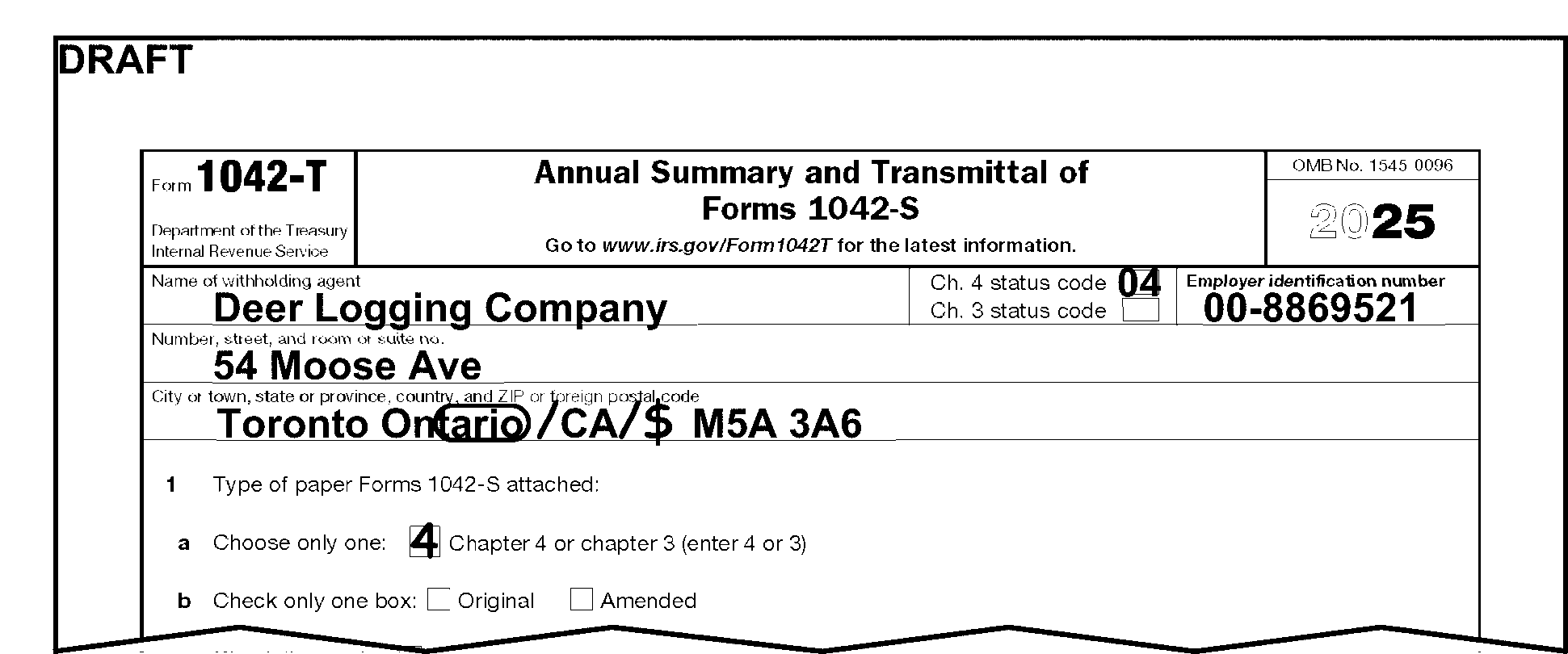
This figure shows the 2025 Form 1042-T, Annual Summary and Transmittal of Forms 1042-S, and illustrates a form filed with a foreign address. The entity section provides guidance for perfecting a foreign address. The tax examiner circled the Province and Country entered by the filer, in this case Ontario CA, and edited the two-digit Province Code (ON) directly after the city. The Country Code CA is entered after the Province Code. A slash(/) was edited before the country code and a slash (/) and dollar sign ( M5A 3A6). The Foreign Postal Code appears after the Country Code. A 4 is edited on Line 1a.
Please click here for the text description of the image.
3.21.111.7.1.8 (01-01-2019)
Line 1b - Original or Amended Checkbox
-
This is a one-position numeric field that must be blank or 1.
-
Edit a 1 to the left of the Amended box if it is checked, otherwise, leave blank.
3.21.111.7.1.9 (01-01-2021)
Pro-rata Basis Reporting Checkbox - Line 1c
-
Pro-rata Reporting - Shows whether the withholding agent is reporting pro-rata withholding on attached Form(s) 1042-S.
-
If the withholding agent checked the box under Line 1c, edit a "1" to the right of the checkbox on Line 1c.
3.21.111.7.1.10 (01-01-2021)
Number of Paper Forms 1042–S - Dotted Line 1d
-
This is a five-position numeric field that must be present.
-
Withholding agents are required to specify the number of paper Form 1042-S they submit via Form 1042-T.
-
Count the number of paper Forms 1042-S attached to Form 1042-T. If the number on Line 1d is incorrect, edit the correct amount.
Note:
Form 1042-T will be destroyed, per local procedures, if no Forms 1042-S are attached.
Reminder:
Only Copy A is valid for processing. Destroy Copies B, C, D and E per classified waste procedures. See 3.21.111.6(7) for definition of classified waste.
3.21.111.7.1.11 (11-20-2020)
Partnership Withholding in Subsequent Year - Checkbox Line 1e
-
This is a one-position field that may or may not be checked.
-
Withholding agents must specify if partnership withholding occurred in subsequent year.
-
If the withholding agent checked box on Line 1e, edit a 1 to the right of the checkbox, otherwise no editing is required.
3.21.111.7.1.12 (09-08-2025)
Qualified Intermediary, Withholding Foreign Partnership, or Withholding Foreign Trust Revising Form 1042-S to a Specific Recipient - Checkbox Line 1f
-
This is a one-position field that may or may not be checked.
-
Identifies when a Qualified Intermediary (QI), Withholding Foreign Partnership (WP), or Withholding Foreign Trust (WT) originally filed a Form 1042-S to report an amount subject to withholding in a withholding rate pool and is reducing the amount reported by the amounts reported on one or more Forms 1042-S issued to one or more specific recipients.
-
If the withholding agent checked box on Line 1f, edit a 1 to the right of the checkbox, otherwise no editing is required.
-
If Box 7d is checked on Form 1042-S and Line 1f of Form 1042-T is not checked, check Line 1f checkbox and edit a 1 to the right of the checkbox.
Note:
When creating a dummy Form 1042-T, check Line 1f checkbox when box 7d is checked on Form 1042-S.
3.21.111.7.1.13 (01-01-2015)
Total Gross Income, Line 2
-
Gross Income - Line 2 - Shows gross income as a total from all associated Form 1042-S. Gross income is the starting point for computing net income and tax withheld.
-
This is a 15-position numeric field that must be present.
-
All amounts must be positive. If editing amount, edit in whole dollars only.
-
If Line 2 is blank (or zero), determine the entry as follows: calculate the Gross Income Paid total by adding the Box 2 amount from each of the attached Form 1042-S.
-
3.21.111.7.1.14 (01-10-2024)
Total Federal Tax Withheld - Lines 3a and 3b
-
Shows the Federal Tax withheld from all associated Form 1042-S for either Chapter 4 or Chapter 3.
-
These are 15-position numeric fields that must be present.
-
All amounts must be positive. If editing amount, edit in whole dollars only.
If Then Both are filled in, Create a Form 1042-T for the Chapter 4 withholding. Separate the attached Form(s) 1042-S according to Chapter 3 or Chapter 4. There will be a Form 1042-T for the Chapter 3 Form(s) 1042-S and a Form 1042-T for all the Chapter 4 Form(s) 1042-S. Form 1042-T, Line 3a is blank, and should have an entry, Calculate the total of Federal Tax Withheld from Boxes 10 (Total withholding credit) and 11 (Tax paid by withholding agent) on all attached Chapter 4 declared Form(s) 1042-S. Box 3 on Form(s) 1042-S will have a 4. Form 1042-T, Line 3b is blank, and should have an entry, Calculate the total Federal Tax Withheld from Boxes 10 (Total withholding credit) and 11 (Tax paid by withholding agent) on all attached Chapter 3 declared Form(s) 1042-S attached. Box 3 on Form(s) 1042-S will have a 3. Form 1042-T, Lines 3a and 3b, and Form 1042-S, Box 7a are blank, Edit a 1 to the left of Box 7b or Box 7c, if it is checked, otherwise, leave blank. All amounts are blank on the attached Form(s) 1042-S. ≡ ≡ ≡ ≡ ≡ ≡ ≡ ≡ ≡ ≡ ≡ ≡ ≡ ≡ ≡ ≡ ≡ ≡ ≡ ≡ ≡ ≡ ≡ ≡ ≡ ≡ ≡ ≡ ≡ ≡ ≡ ≡ ≡ ≡ ≡ ≡ ≡ ≡ ≡ ≡ ≡ ≡ ≡ ≡ ≡ ≡ ≡ ≡
-
3.21.111.7.1.15 (01-01-2019)
Final Return Checkbox
- This is a one-position field that may or may not be present. No editing is required.
3.21.111.7.1.16 (01-10-2024)
Signature Area
-
The withholding agent must sign in the space provided below the perjury statement.
-
Facsimile signature submitted as a rubber stamp, mechanical device, or computer software program is acceptable.
-
Do not question any signature on the return.
-
Presume that the signature on the return, statement or document is the true signature of the person who signed the document.
Note:
≡ ≡ ≡ ≡ ≡ ≡ ≡ ≡ ≡ ≡ ≡ ≡ ≡ ≡ ≡ ≡ ≡ ≡ ≡ ≡ ≡ ≡ ≡ ≡ ≡ ≡ ≡ ≡ ≡ ≡ ≡ ≡
3.21.111.7.2 (01-01-2015)
Preparation of Form 1042-T for Transcription and Routing of Associated Form 1042-S
- Edit Form 1042-T and attached Form(s) 1042-S.
3.21.111.8 (01-01-2024)
Form 1042-S - Foreign Person's U.S. Source Income Subject to Withholding
-
Form 1042-S can be filed on paper if the withholding agent is required to file fewer than 10 information returns and there are 100 partners or less for which data must be reported. However, all financial institutions (regardless of number of forms filed) are required to file electronically. See IRM 3.21.111.7(4).
-
Copy A of the Form 1042-S, for each recipient, must be filed with the Form 1042-T. If multiple copies (Copies B, C, D, and/or E) have been filed, along with Copy A, for a recipient, process ONLY Copy A. Delete all other copies, for that recipient, by lining though each copy.
Note:
If a Form 1042-S (Copies B, C, D, and/or E) is received from a recipient requesting a refund of taxes withheld, refer to lead. Form 1042-S must be returned to the recipient with instructions to file a Form 1040-NR with the Austin Campus.
-
If Copy A of Form 1042-S is received without a corresponding Form 1042-T, create a dummy Form 1042-T.
Note:
Prepare only one Form 1042-T for all the IRS Commissioners issued paper Forms 1042-S, Copy A. In addition, the withholding agents address on the IRS Commissioners Form 1042-S will vary from form to form and perhaps even the Form 1042-T because of the many IRS offices that contribute to the IRS Commissioners Form 1042. See IRM 3.17.79, Accounting Refund Transactions, for more information on Accounting refund practices for Chapter Three Withholding.
-
If only Copy B, C, D, and/or E, is received, do not process. Follow procedures for Classified Waste (CW), see IRM 3.21.111.6(7).
-
For those Form 1042-S that are filed electronically, all money fields are reported in dollars only. However, for those Form 1042-S that are filed on paper, money fields can be reported in dollars only or dollars and cents. If a money amount must be entered, edit the field in dollars. When there is no clear separation between dollars and cents, edit a vertical line between dollars and cents (i.e., If the amount was entered as $510.75, edit to $510|75).
-
If you receive a prior year Form 1042-S you must edit Form 1042-S to conform with the current tax year line numbering sequence (Training Job Aid 2544-702 ). If unable to edit, prepare a dummy Form 1042-S using the current year form.
3.21.111.8.1 (01-01-2015)
Form 1042-S Editing
- Edit Form 1042-S while still associated to Form 1042-T. See Exhibit 3.21.111-2, for Form 1042-S transcription lines.
3.21.111.8.1.1 (01-01-2019)
Tax Year
-
Shows the tax period for which the withholding agent is submitting the Form 1042-S.
-
This is a four-position field that must be present.
-
Only numeric characters are valid.
If Then Prior year revision used to file current year form, Edit current tax year in YYYY format to the left of preprinted tax year. Circle the preprinted tax year to delete it. Determined from attached forms that Tax Period is other than current year, Remove from current year batch. Forward for batching as prior tax year. ### Note: If necessary, edit the correct tax year in YYYY format to the left of preprinted tax year, and circle the preprinted tax year to delete it. Tax year is a future year, Edit as current year unless removed from an early filed return. Tax Year missing, incomplete, illegible, or unable to determine, Edit as current year.
-
3.21.111.8.1.2 (01-01-2022)
Received Date
-
Shows the received date of Form 1042-S.
-
This is an eight-position field that must be present
-
Only numeric characters (0-9) are valid
-
The date must be in MMDDYYYY format
-
The date must be edited to the bottom right corner
Note:
don't edit over entries already present. If a multi pack, all documents require the received date.
If Then Missing, incomplete, illegible, or unable to determine, Research document or attachments for the received date and edit. Two Form 1042-S documents are on one page, Photocopy each document to its own page and cross out the original. Edit received date to the bottom right hand corner.
-
3.21.111.8.1.3 (01-01-2021)
Cross Reference DLN
-
Shows the DLN of the Form 1042-T transmitting record associated with this Form 1042-S. This field is in the bottom left corner of paper Form 1042-S. On electronically filed records the cross-reference DLN is computer generated. See IRM 3.10.37, Campus Main and Work Control - Batching and Numbering.
-
This is a 14-position field that must be present.
-
If missing from paper filed Form 1042-S, research other Form 1042-S within multi-pack to locate Withholding Agent DLN and edit.
Note:
If not found, continue processing.
-
3.21.111.8.1.4 (01-01-2019)
Unique Form Identifier (UFI)
-
Withholding agents must assign a unique identifying number to each Form 1042-S they file.
-
This is a 10-position numeric field where valid values are 0-9.
-
If less than 10 digits are present, completely blank, or clearly has non-numeric values on paper filed Form 1042-S, continue processing.
3.21.111.8.1.5 (01-01-2019)
Amended Checkbox
-
Shows the type of Form(s)1042-S being submitted. The forms have been amended from the original.
-
This is a one-position numeric field that may be blank or 1.
-
Edit a 1 to the left of the Amended box if it is checked, otherwise, leave blank.
3.21.111.8.1.6 (01-01-2019)
Amendment Number
-
Withholding agents filing an amended form must indicate the amendment number (using "1" for the first amendment and increasing sequentially for each subsequent amendment).
-
This is a one-position numeric field that may or may not be present.
-
Blank and numeric characters 1-9 are valid.
3.21.111.8.1.7 (09-08-2025)
Income Code, Box 1
-
Shows the type of income paid to the recipient, see Figure 3.21.111-2, Income Code, Box 1.
-
This is a two-position field.
-
Blanks and numeric characters are valid.
Note:
If only one character is present, precede it with a zero. You may also research the document to determine if the income type is present elsewhere on the document. If an explanation of income type is provided, determine the correct code from the table below:
Income Code Definition 01 Interest paid by U.S. obligors - general 02 Interest paid on real property mortgages 03 Interest paid to controlling foreign corporations 04 Interest paid by foreign corporations 05 Interest on tax-free covenant bonds 06 Dividends paid by U.S. corporations-general 07 Dividends qualifying for direct dividend rate 08 Dividends paid by foreign corporations 09 Capital gains 10 Industrial royalties 11 Motion picture or television copyright royalties 12 Other royalties (for example, copyright, software, broadcasting, endorsement payments) 13 Royalties paid on certain publicly offered securities 14 Real property income and natural resources royalties 15 Pensions, annuities, alimony, and/or insurance premiums 16 Scholarship or fellowship grants 17 Compensation for independent personal services 18 Compensation for dependent personal services 19 Compensation for teaching 20 Compensation during studying and training 22 Interest paid on deposit with a foreign branch of a domestic corporation or partnership 23 Other income 24 Qualified investment entity (QIE) distributions of capital gains 25 Trust distributions subject to IRC 1445 26 Unsevered growing crops and timber distributions by a trust subject to IRC 1445 27 Publicly traded partnership distributions subject to IRC 1446(a) 28 Gambling winnings 29 Deposit interest 30 Original issue discount (OID) 31 Short-term OID 32 Notional principal contract income 33 Substitute payment-interest 34 Substitute payment - dividends 35 Substitute payment - other 36 Capital gains distributions 37 Return of capital 38 Eligible deferred compensation items subject to IRC 877A(d)(1) 39 Distributions from a nongrantor trust subject to IRC 877A(f)(1) 40 Other dividend equivalents under IRC 871(m) 41 Guarantee of indebtedness 42 Earnings as an artist or athlete - no central withholding agreement 43 Earnings as an artist or athlete - central withholding agreement 44 Specified Federal procurement payments 50 Income previously reported under escrow procedure 51 Interest paid on certain actively traded or publicly offered securities 52 Dividends paid on certain actively traded or publicly offered securities 53 Substitute payments-dividends from certain actively traded or publicly offered securities 54 Substitute payments-interest from certain actively traded or publicly offered securities 55 Taxable death benefits on life insurance contracts 56 Dividend equivalents under IRC 871(m) as a result of applying the combined transaction rules 57 Amount realized under IRC 1446(f) 58 Publicly traded partnership distributions - undetermined 59 Consent fees 60 Loan syndication fees 61 Settlement payments
-
-
Correspond if the withholding agent is reporting more than one income code on Form 1042-S. If contact is not possible or there is no reply, delete all income codes but the first.
Exception:
If a Form 1042-S is received from a recipient with a statement attached with a breakdown of amounts related to each specific income code. Create copies to be processed using the following steps:
-
Perfect the income code information to reflect the code not left on the original Form 1042-S. Perfect the rest of the copy and add it to the back of the pack.
-
Edit the "Number of paper Forms 1042-S attached" on the Form 1042-T to reflect the other copies added to the batch.
-
Process the Form 1042-T and the copies of Form 1042-S.
Note:
Follow no-reply procedures until further notice.
Figure 3.21.111-2
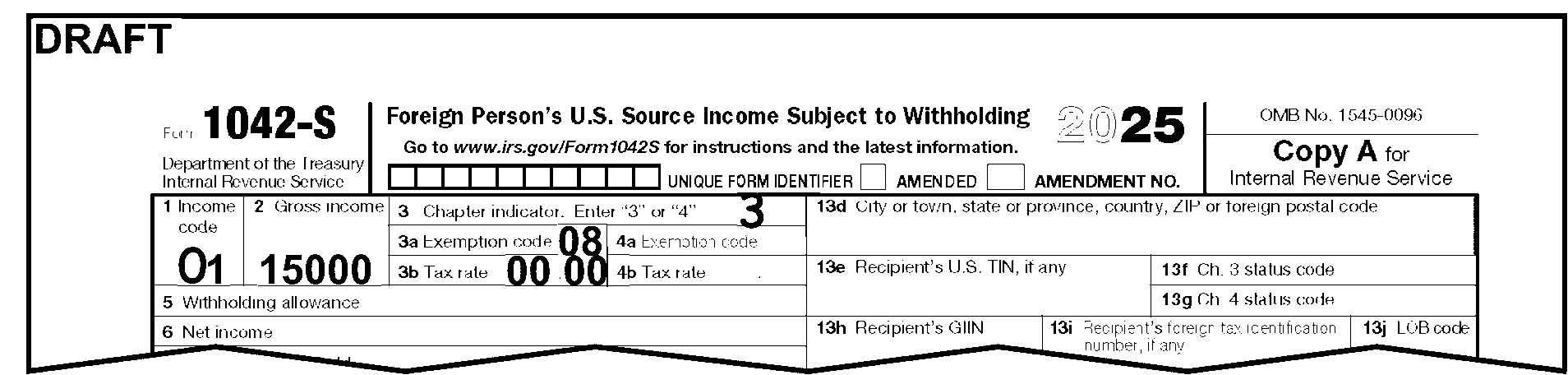
This figure shows the 2025 Form 1042-S, Foreign Person's U.S. Source Income Subject to Withholding, and illustrates the proper editing for Box 1, Income Code. The Income Code 1 was entered by the filer as a single-digit. The tax examiner edited a zero in front of the filer's entry to make the Income Code a two-digit number. The tax examiner also edited a 3 in Box 3.
Please click here for the text description of the image.
-
3.21.111.8.1.8 (01-01-2021)
Gross Income, Box 2
-
Shows the total gross income paid to the recipient.
-
This is a 12-position field.
-
Only numeric characters (0-9) are valid.
-
Enter amount in whole dollars only.
-
If the gross income is less than $1.00 but more than zero, edit 1.
-
If the gross income is negative, X the entry, and edit 1.
-
If the gross income is omitted, take no action and continue processing.
-
3.21.111.8.1.9 (01-10-2024)
Chapter Three or Four Indicator, Box 3
-
Shows whether the withholding agent is filing a Chapter 3 or Chapter 4 Form 1042-S.
-
This is a one-position field.
-
This field will have a 3 or a 4 only.
-
If neither a 3 or a 4 is present, and there is no entry in Box 7a, Federal Tax Withheld, edit a 3 next to this field. See Figure 3.21.111-3. If there is an entry in Box 7a, use the Chapter 4 tax rate box (box 4b) to determine the correct entry. If box 4b is less than 30 percent (30, 30.00, 3000), zero, or blank, edit a 3 next to this field. If box 4b is 30 percent (30, 30.00, 3000), edit a 4 next to this field.
-
If both a 3 and a 4 are present, research the Chapter 4 Tax rate box (box 4b) to determine the correct entry. If box 4b is less than 30 percent (30, 30.00, 3000), zero, or blank, edit a 3 next to it. Circle out the 4. If box 4b is 30 percent (30, 30.00, 3000), edit a 4 next to it. Circle out the 3.
-
If both a 3 and a 4 are present, and you are unable to determine which chapter, please see your lead or manager. They will contact the HQ analyst for further instructions.
Figure 3.21.111-3
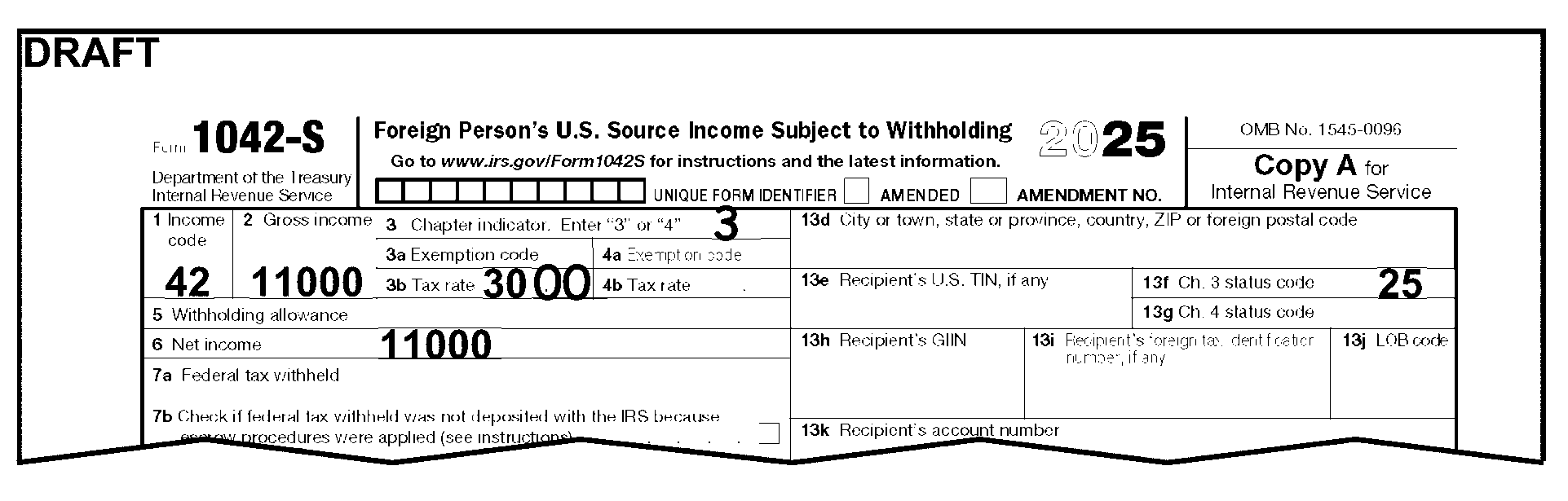
The figure shows the top part of a tax year 2025 Form 1042-S, boxes 1 through 7b and boxes 13e through 13l. Box 1 - Has an entry of 42.Box 2 - Has an entry of 11000.Box 3 - The number 3 is edited in this box.Box 3b - Has an entry of 30 which is corrected by editing 00.Box 6 - Has an entry of 11000.Box 13f - Has an entry of 25.All other boxes are blank.
Please click here for the text description of the image.
3.21.111.8.1.10 (01-01-2024)
Chapter 3 Exemption Code, Box 3a
-
Shows when the withholding agent is applying an exemption from Chapter 3 withholding.
-
This is a two-position field.
-
Only numeric characters (0-9) or blanks are valid.
-
May be filled in if Chapter 4 Checkbox is marked.
-
If only one-digit is present, use the chart below as part of your research to determine the two-digit code. If unable to determine, keep processing.
Code Chapter 3 Exemption Codes 01 Effectively connected income 02 Exempt under IRC 03 Income is not from U.S. sources 04 Exempt under tax treaty 05 Portfolio interest exempt under an IRC 06 QI that assumes primary withholding responsibility 07 WFP or WFT 08 U.S. branch treated as a U.S. person 10 QI represents that income is exempt 11 QSL that assumes primary withholding responsibility 12 Payee subjected to Chapter 4 withholding 22 QDD that assumes primary withholding responsibility 23 Exempt under IRC 897(l) 24 Exempt under IRC 892
3.21.111.8.1.11 (01-01-2018)
Chapter 4 Exemption Code, Box 4a
-
Shows when the withholding agent is applying an exemption from Chapter 4 withholding.
-
This is a two-position field.
-
Only numeric characters (0-9) or blanks are valid.
-
May be filled in if Chapter 3 Checkbox is marked.
-
If only one-digit is present, use the chart below as part of your research to determine the two-digit code. If unable to determine, keep processing.
Code Chapter 4 Exemption Codes 13 Grandfathered payment 14 Effectively connected income 15 Payee not subject to chapter 4 withholding 16 Excluded nonfinancial payment 17 Foreign Entity that assumes primary withholding responsibility 18 U.S. Payees—of participating FFI or registered deemed-compliant FFI 19 Exempt from withholding under IGA 20 Dormant account 21 Other-payment not subject to chapter 4 withholding
3.21.111.8.1.12 (11-21-2024)
Chapter 3 and Chapter 4 Tax Rates, Boxes 3b and 4b
-
Shows the tax rate percentage applicable for the income reported.
-
This is a four-position field.
-
Only numeric characters (0-9) or blanks are valid.
Chapter Three Tax Rate Table
Tax Rate Tax Rate Tax Rate 00.00 10.00 25.00 02.00 12.00 27.50 04.00 12.50 28.00 04.90 14.00 30.00 04.95 15.00 35.00 (Prior to January 1, 2018) 05.00 17.50 37.00 (After January 1, 2018) 07.00 20.00 39.60 (Prior to January 1, 2018) 08.00 21.00 (After January 1, 2018) -
The Chapter 4 Tax Rate is 30 percent and the tax rate under 1446(f) is 10%. If another rate is entered, continue processing.
-
Use the table below to edit both Tax Rate boxes into the correct format.
If Then Percent sign ("%" ) is entered or the word "percent" is present, Circle out "%" sign or the word "percent" (i.e., 15%, circle "%" and edit 1500). The tax rate is spelled out, Convert to a numeric value. (i.e., Fifteen Percent, "X" entry and edit 1500). Only one-digit is present, See tax rate table and edit (i.e., 5% or 5, edit 0500). Only two digits are present, See tax rate table and edit (i.e., 14% or 14, edit 1400). Only three digits are present, See tax rate table and edit (i.e., 9.00, edit 0900). NONE or N/A are present, Circle out entry. If 0, 00 or 000 is present, or blank, Continue processing.
3.21.111.8.1.13 (11-21-2024)
Withholding Allowances, Box 5
-
Shows the amount a withholding agent is paying to a recipient that is not taxable with respect to certain services and scholarship income.
-
This is a 12-position field that may or may not be present.
-
Enter amount in whole dollars only.
-
-
Only numeric characters (0-9) or blanks are valid.
3.21.111.8.1.14 (09-08-2025)
Net Income, Box 6
-
Shows the result of Gross Income, Box 2, less Withholding Allowances, Box 5.
-
This is a 12-position field that may or may not be present.
-
Enter amount in whole dollars only.
-
-
Only numeric characters (0-9) or blanks are valid.
If And Then Box 6, Net Income equals, Box 2, Gross Income, Take no action. Box 6, Net Income is blank, zero (0), dash, or none, Box 5, Withholding Allowances has an amount present, Edit the difference between Box 2, Gross Income and Box 5, Withholding Allowances, in Box 6, Net Income. Box 6, Net Income is present and differs from Box 2, Gross Income, Box 5, Withholding Allowances is blank, Subtract Box 6, Net Income from Box 2, Gross Income, and edit result in Box 5, Withholding Allowances. See Figure 3.21.111–5. Box 6, Net Income is present and differs from Box 2, Gross Income, Box 5, Withholding Allowances is greater than Box 2 or Box 6, Take no action. Box 6, Net Income is blank, zero (0), dash, or none, Box 5, Withholding Allowances is blank, zero (0), dash, or none, Take no action. Figure 3.21.111-4
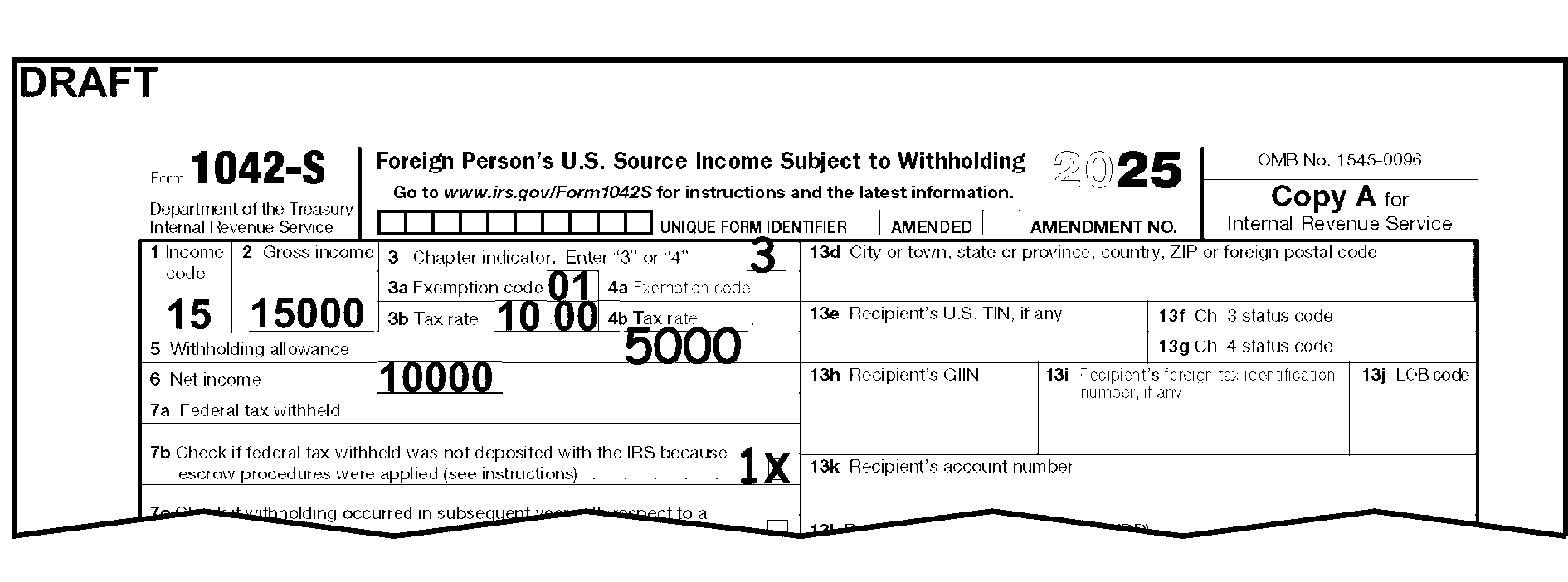
This figure shows the 2025 Form 1042-S, Foreign Person's U.S. Source Income Subject to Withholding, and illustrates the proper computing and editing of Box 5, Withholding allowances. The filer entered an amount in Box 2, Gross Income and Box 6, Net Income. The Income Code in Box 1 is 15. The filer did not make an entry in Box 5. The tax examiner computed the amount for Box 5, Withholding Allowances by subtracting Box 6 from Box 2 and edited the correct amount in Box 5. The tax examiner also edited a 3 in Box 3 and edited a 1 to the left of Box 7b.
Please click here for the text description of the image.
3.21.111.8.1.15 (01-01-2017)
Federal Tax Withheld, Box 7a
-
Shows amount of U.S. tax withheld.
-
This is a 12-position field that may or may not be present.
-
Only numeric characters (0-9) are valid.
-
Enter amount in whole dollars only.
3.21.111.8.1.16 (01-01-2024)
Tax Withheld Not Deposited Because Escrow Procedures Were Applied, Box 7b
-
This is a one-position field that may or may not be checked.
-
Edit a 1 to the left of the checkbox if it is checked, otherwise, leave blank.
3.21.111.8.1.17 (01-01-2021)
Check If Withholding Occurred In Subsequent Year With Respect To A Partnership, Box 7c
-
This is a one-position field that may or may not be checked.
-
Edit a 1 to the left of the checkbox if it is checked, otherwise, leave blank.
3.21.111.8.1.18 (09-08-2025)
Qualified Intermediary, Withholding Foreign Partnership, or Withholding Foreign Trust Revising Form 1042-S to a Specific Recipient, Box 7d
-
This is a one-position field that may or may not be checked.
-
Edit a "1" to the left of the checkbox if it is checked, otherwise, leave blank.
-
If the checkbox is checked, box 1f on Form 1042-T should also checked. If Line 1f is not checked, check Line 1f checkbox and edit a "1" to the right of the checkbox.
3.21.111.8.1.19 (01-01-2015)
Tax Withheld by Other Agents, Box 8
-
Shows the amount of income that has already been subject to withholding by another withholding agent(s). The amount withheld is reported in box 8.
-
This is a 12-position field that may or may not be present.
-
Only numeric characters (0-9) are valid.
-
Enter amount in whole dollars only.
3.21.111.8.1.20 (01-01-2021)
Overwithheld tax repaid to recipient pursuant to adjustment procedures, Box 9
-
Shows an overwithheld tax amount the withholding agent repaid to the recipient during the year following the calendar year of the withholding. The withholding agent will reimburse itself by either reducing, by the amount of tax actually repaid, the amount of any deposit made for a payment period in the calendar year following the calendar year of the withholding, or by reducing the amount it would have been required to withhold on a subsequent payment made to that recipient.
-
This is a 12-position field that may or may not be present.
-
Only numeric characters (0-9) are valid.
-
Enter amount in whole dollars only.
3.21.111.8.1.21 (09-08-2025)
Total Withholding Credit, Box 10
-
Shows the total amount of tax withheld by withholding agents.
-
This is a 12-position field.
-
Only numeric characters (0-9) are valid.
-
Enter amount in whole dollars only.
If And Then Blank, zero (0), dash, or none, An entry appears in box 7a, 8, or 9, Compute: 1. Add amounts from boxes 7a and 8, 2. Subtract the amount from box 9, 3. Enter the total in box 10. Blank, zero (0), dash, or none, Only a single entry appears in either box 7a or 8, * Double arrow the amount to box 10, * X out zero, dash or none, if present.
3.21.111.8.1.22 (01-01-2019)
Tax Paid by Withholding Agent, Box 11
-
Shows the tax paid by the withholding agent from its own funds rather than through withholding from the payment to the recipient.
-
This is a 12-position field that may or may not be present.
-
Only numeric characters (0-9) are valid.
-
Enter amount in whole dollars only.
3.21.111.8.1.23 (09-08-2025)
Withholding Agent's EIN, Box 12a
-
Shows the Employer Identification Number (EIN) of the Withholding Agent, or the QI-EIN, WP-EIN, or WT-EIN of the QI, WP, or WT. Qualified Intermediary's EINs will be in the range of ≡ ≡ ≡ ≡ ≡ ≡ ≡ ≡ ≡ ≡ ≡ ≡ ≡ ≡ ≡ ≡.
-
This is a nine-position field.
-
Only numeric characters (0-9) are valid, however, all 0's or all 9's are invalid characters.
If Then EIN is missing, incomplete or illegible, or SSN or ITIN is present, Circle the incorrect entry. Research associated Form 1042-T and Form 1042-S to find Withholding Agent EIN. * Research IDRS to locate a valid EIN. * If found, edit the valid EIN to the left of the incorrect taxpayer entry on the Form 1042-T and Forms 1042-S. * If not found, continue processing. ≡ ≡ ≡ ≡ ≡ ≡ ≡ ≡ ≡ ≡ ≡ ≡ ≡ ≡ ≡ ≡ ≡ ≡ ≡ ≡ ≡ ≡ ≡ ≡ ≡ ≡ ≡ ≡ ≡ ≡ ≡ ≡ ≡ ≡ ≡ ≡ ≡ ≡ ≡ ≡ ≡ ≡ ≡ ≡ ≡
3.21.111.8.1.24 (01-01-2019)
Withholding Agent's Chapter 3 Status Code, Box 12b
-
Shows the type of withholding agent for Chapter 3 purposes.
-
This is a two-position field.
-
Only numeric characters (0-9) and blanks are valid.
-
If taxpayer enters a single-digit, use Exhibit 3.21.111-3 for Chapter 3 Status Codes as research to determine the two-digit code. If unable to determine, keep processing.
-
If other than numeric, X out.
3.21.111.8.1.25 (01-01-2019)
Withholding Agent's Chapter 4 Status Code, Box 12c
-
Shows the type of withholding agent for Chapter 4 purposes.
-
This is a two-position field.
-
Only numeric characters (0-9) and blanks are valid.
-
If taxpayer enters a single digit, use Exhibit 3.21.111-4 for Chapter 4 Status Codes as research to determine the two-digit code. If unable to determine, keep processing.
-
If other than numeric, X out.
3.21.111.8.1.26 (01-01-2018)
Withholding Agent's Name, Box 12d
-
Shows the Withholding Agent's Name as established when filing for the EIN or QI EIN. This field consists of three line entries.
- This field consists of 40 characters for each line. (Name Line 1, Name Line 2 and Name Line 3).
-
Valid characters for name fields are:
-
Alpha (A-Z)
-
Numeric (0-9)
-
Blank
-
Ampersand (&)
-
Hyphen (-)
-
Slash (/)
-
Period (.)
-
Comma (,)
-
Apostrophe (')
-
Pound (#)
-
Percent (%)
Note:
The percent (%) sign is used to identify in care of and is valid in the first position only.
-
-
If blank or illegible, research the associated Form 1042-T and Form 1042-S for the Withholding Agent’s name. If found, edit the correct name. If not found, continue processing.
3.21.111.8.1.27 (01-01-2016)
Withholding Agent's Global Intermediary Identification Number (GIIN), Box 12e
-
The Global Intermediary Identification Number (GIIN) is the identification number that is assigned for Chapter 4 reporting purposes.
-
This is a 19-position field.
-
May be blank, alpha, numeric and include periods.
3.21.111.8.1.28 (09-08-2025)
Withholding Agent's Country Code, Box 12f
-
The country where the withholding agent is located.
-
This is a two-position field.
-
Must contain alphas.
-
If blank or incorrect, use the correct country code from the agent's address. See Job Aid 2324-002 Country Code chart for correct country codes.
-
If blank or incorrect and the Withholding Agent has a domestic address, the Country Code edited will be US. If a Country Code, or US, is present, leave the entry as is.
3.21.111.8.1.29 (01-01-2016)
Withholding Agent's Foreign Taxpayer Identification Number, Box 12g
-
The Foreign Tax ID number issued to the withholding agent.
-
This is a 22-position field.
-
Valid characters are:
-
Alpha (A-Z)
-
Numeric (0-9)
-
Blank
-
Ampersand (&)
-
Hyphen (-)
-
Slash (/)
-
Period (.)
-
Comma (,)
-
Apostrophe (')
-
Pound (#)
-
3.21.111.8.1.30 (01-01-2023)
Withholding Agent's Address Boxes, 12h and 12i
-
The withholding agent's street address is a required field.
-
The address must consist of a number, street and/or apartment or suite number (P.O. Box if mail is not delivered to a street address). See Document 7475 for Street Abbreviations.
Note:
If both a street address and the P.O. Box are present for a domestic address, circle out P.O. Box.
-
This is a 40-position field.
-
Valid characters for address fields are:
-
Alpha (A-Z)
-
Numeric (0-9)
-
Blank
-
Ampersand (&)
-
Hyphen (-)
-
Slash (/)
-
Period (.)
-
Comma (,)
-
Apostrophe (')
-
Pound (#)
-
-
Valid characters for the Postal/Zip Code field can be Alpha (A-Z), or Numeric (0-9), and may include a hyphen (-). See Job Aid 2543–702 for more information on Zip Code ranges.
-
Invalid characters not on the list will be edited out.
-
If missing or illegible, perfect from attachments.
3.21.111.8.1.31 (11-21-2024)
Withholding Agent's City or Town, Province or State, Country, ZIP or Foreign Postal Code, Box 12i
-
This box shows the withholding agent's address of record. This field consists of entries which identify city or town, state, province (if applicable), country (if applicable) and zip or foreign postal code. The withholding agent must have a complete address.
- The table below lists the field lengths:
Field Length City - Required field which shows the city or town (or another locality name) of the withholding agent. Enter APO/FPO/DPO in this field, if applicable. 40 State (Code) - Required field if withholding agent has a domestic address. If the state name is spelled out, don't edit the two-digit state code. ISRP will enter the two-digit state code. See Document 7475 for State Code abbreviations. See Figure 3.21.111-5 for State Code editing. ### Note: If not a U.S. state, territory, or APO/FPO/DPO address, no State Code will be present. 2 Province (Code) - Required field if the withholding agent's country of record is Canada. Only enter a Province Code when the country is Canada. Edit the two-character code from the Province Code table above the name of the Province. See Document 7475 for Canadian Province Codes. 2 Country (Code) - Required field if withholding agent has a foreign address. Edit the two-character code, from the Country Code table. Edit a slash (/) before the country code and a slash (/) and dollar sign ($) after the country code. See Job Aid 2324-002 for Country Code Table for editing entity/address. See Figure 3.21.111-6 for Country Code editing procedures. ### Note: Territories, APO, FPO and DPO aren't considered as foreign addresses. If a domestic address is present for the recipient, and a Country Code is present, don't edit the entry. 2 Foreign Postal/Zip Code - Shows the foreign postal or domestic zip code for the withholding agent. ### Note: The Zip/Postal Codes are always the last entry in the address line. 5-9 -
Arrow data to the correct position in the series.
-
If any of these fields are missing, perfect from attached documents.
-
If foreign address and country name is Kuwait, Gibraltar, Hong Kong, Luxembourg, Malta, Mexico, Monaco, San Marino, Singapore, Panama (City), or Vatican City, edit the country name in the city field position and country code in the country name position.
-
A Foreign Postal Code must be present for all Australian addresses. If the Foreign Postal Code field is blank, edit the field. See table below:
Note:
If Postal Code is blank and the state/territory can't be determined, enter 0000 for the postal code.
Australian State/Territory State Abbreviation Postal Code New South Wales (NSW) and Australian Central Territory (ACT) NSW and ACT 2000 - 2999 Victoria VIC 3000 - 3999 Queensland QLD 4000 - 4999 South Australia SA 5000 - 5799 Western Australia WA 6000 - 6799 Tasmania TAS 7000 - 7499 Northern Territory NT 0800 - 0899 -
European postal systems frequently don't spell out the name of the country, instead, they use a prefix to the postal code. Listed below are the prefixes frequently used, along with the number of digits allowed for those countries:
Country Name Prefix Length Austria A 4 Belgium B 4 Denmark DK 4 Finland SK 5 France F 5 Germany D 4 or 5 Hungary H 4 Italy I 5 Liechtenstein FL 4 Norway N 4 Sweden S 5 Switzerland CH 4 Figure 3.21.111-5
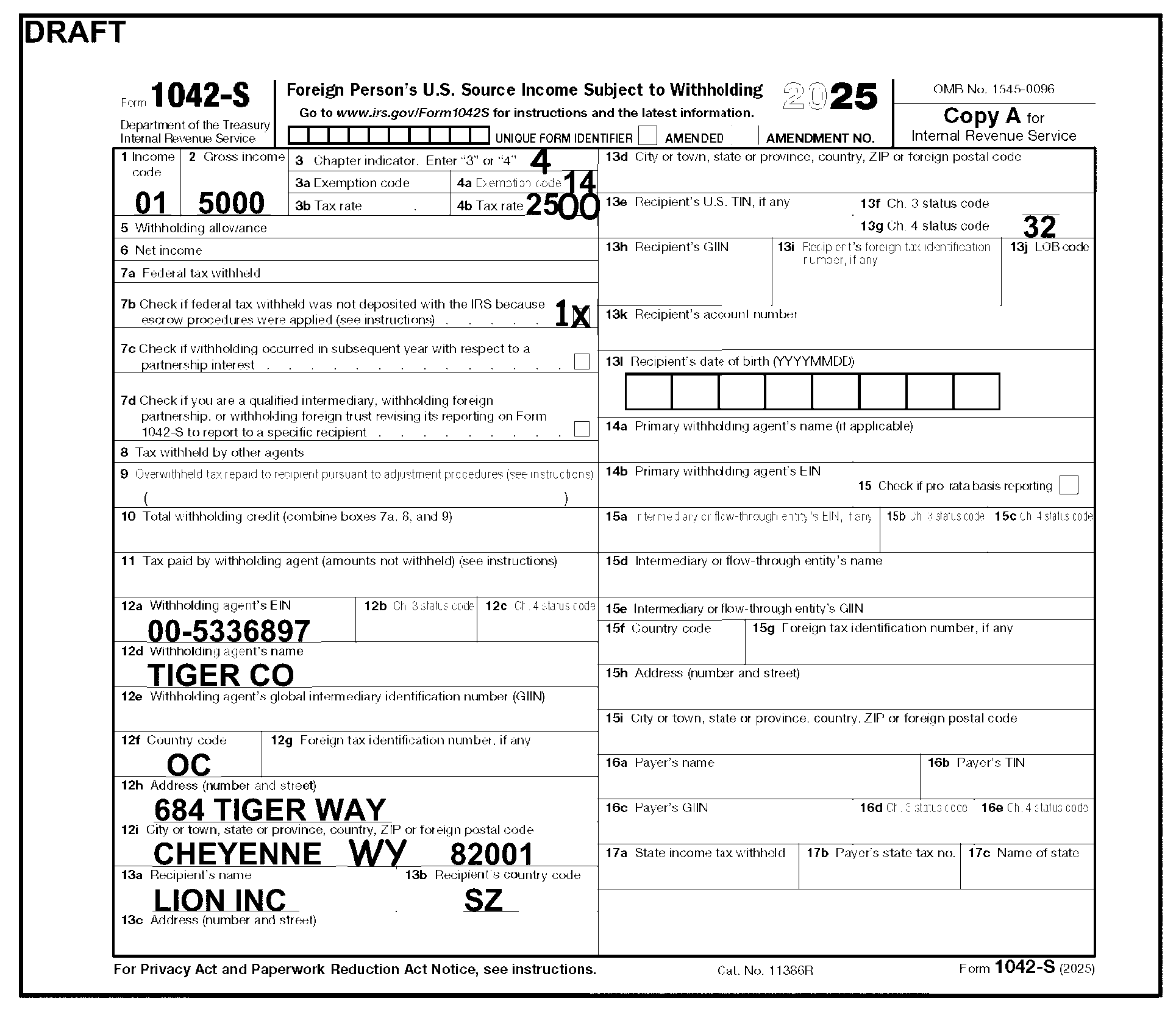
This figure shows a 2025 Form 1042-S, Foreign Person's U.S. Source Income Subject to Withholding, and illustrates the proper editing when a filer has provided incomplete address information. The filer entered a U.S. city in Box 12i and neglected to provide a state name. The tax examiner used Document 7475 for State Code Abbreviations and edited the corresponding two-digit State Code. The tax examiner edited a 4 in Box 3 and perfected the Tax Rate to a four-digit number, by editing two zeros after the 25 entered by the filer. Box 4b now shows an entry of 2500. Tax examiner also edited a 1 to the left of Box 7b because the filer marked the box.
Please click here for the text description of the image.
3.21.111.8.1.32 (01-01-2017)
Recipient Name, Box 13a
-
Shows the Recipient's Name. This field is required and consists of up to three line entries.
-
This field consists of 40-characters for each line (Name Line 1, Name Line 2 and Name Line 3).
-
Valid characters for name fields are:
-
Alpha (A-Z)
-
Numeric (0-9)
-
Blank
-
Ampersand (&)
-
Hyphen (-)
-
Slash (/)
-
Period (.)
-
Comma (,)
-
Apostrophe (')
-
Pound (#)
-
Percent (%)
Note:
The percent (%) sign is used to identify in care of and is valid in the first position only.
-
3.21.111.8.1.33 (09-08-2025)
Recipient's Country Code, Box 13b
-
Shows the recipient's country code of residence for which the tax treaty benefits are based.
Note:
Job Aid 2324-002 has a list of valid country codes. If left blank or incorrect code is used, do not use US to correct.
-
This is a two-position field.
-
Only alpha characters (A-Z) are valid.
-
No editing is required.
3.21.111.8.1.34 (11-21-2024)
Recipient Address, Boxes 13c and 13d
-
Shows the recipients address of record.
-
This field consists of entries which identify street, city or town, state, province (if applicable), country (if applicable) and zip or foreign postal code. Recipient’s address won't be completed when recipient is Unknown or a Withholding Rate Pool.
-
Valid characters for address fields are:
-
Alpha (A-Z)
-
Numeric (0-9)
-
Blank
-
Ampersand (&)
-
Hyphen (-)
-
Slash (/)
-
Period (.)
-
Comma (,)
-
Apostrophe (')
-
Pound (#)
-
-
Invalid characters that are not on the list will be edited out.
-
The table below lists the field lengths:
Field Length Street Line 1 - Required field that shows the address of record for the recipient. The address must consist of number, street and/or apartment or suite number (P.O. Box if mail is not delivered to a street address). See Document 7475 for guidance on Street Abbreviations. ### Note: If both Street address and P.O. Box are present for a domestic address, circle out P.O. Box. 40 City - Required field which shows the city or town (or another locality name) of the Recipient. Enter APO/FPO/DPO in this field, if applicable. 40 State (Code) - Required field if Recipient has a domestic address. If the state name is spelled out, don't edit the two-digit state code. ISRP will enter the two-digit state code. See Document 7475 for State Code abbreviations. ### Note: If not a U.S. State, Territory or APO/FPO/DPO address, no state code will be present. 2 Province (Code) - Required field if the Recipient's address is in Canada. Only enter a Province Code when the country is Canada. Edit the two-character code from the Province Code table above the name of the Province. See Document 7475 for Canadian Province Codes. 2 Country (Code) - Required field if Recipient has a foreign address. Edit the two-character code from the Country Code table above the name of the Country. See Job Aid 2324-002 for editing entity/address information. See Document 7475 for Country Code editing procedures. If Box 13d is blank, and the Country Code can't be determined, leave blank and continue processing. ### Note: Territories, APO, FPO and DPO aren't considered as foreign addresses. If a domestic address is present for the recipient, and a Country Code is present, don't edit the entry. 2 Foreign Postal/Zip Code - Shows the foreign or domestic zip code for the Recipient. ### Note: The Zip/Postal Codes are always the last entry in the address line. 5-9 -
Valid characters for the Postal/Zip Code field can be Alpha (A-Z), or Numeric (0-9), and may include a hyphen (-). See Job Aid 2543–702 for more information on Zip Code ranges.
-
Arrow data to the correct position in the series.
-
If any of these fields are missing, perfect from attached documents.
-
If foreign address and country name is Kuwait, Gibraltar, Hong Kong, Luxembourg, Malta, Mexico, Monaco, San Marino, Singapore, Panama (City) or Vatican City, edit the country name in the city field position and country code in the country name position.
-
A Foreign Postal Code must be present for all Australian addresses. If the Foreign Postal Code field is blank, edit the field. See table below:
Note:
If Postal Code is blank and the state/territory can't be determined, enter 0000 for the postal code.
Australian State/Territory State Abbreviation Postal Code New South Wales (NSW) and Australian Central Territory (ACT) NSW and ACT 2000 - 2999 Victoria VIC 3000 - 3999 Queensland QLD 4000 - 4999 South Australia SA 5000 - 5799 Western Australia WA 6000 - 6799 Tasmania TAS 7000 - 7499 Northern Territory NT 0800 - 0899 -
European postal systems frequently don't spell out the name of the country, instead, they will use a prefix to the postal code. Listed below are the prefixes frequently used along with the number of digits allowed for those countries:
Country Name Prefix Length Austria A 4 Belgium B 4 Denmark DK 4 Finland SK 5 France F 5 Germany D 4 or 5 Italy I 5 Liechtenstein FL 4 Norway N 4 Sweden S 5 Switzerland CH 4 -
If a domestic address has been entered for the recipient in box 13d, and the Country Code is blank, leave blank and continue processing.
Figure 3.21.111-6
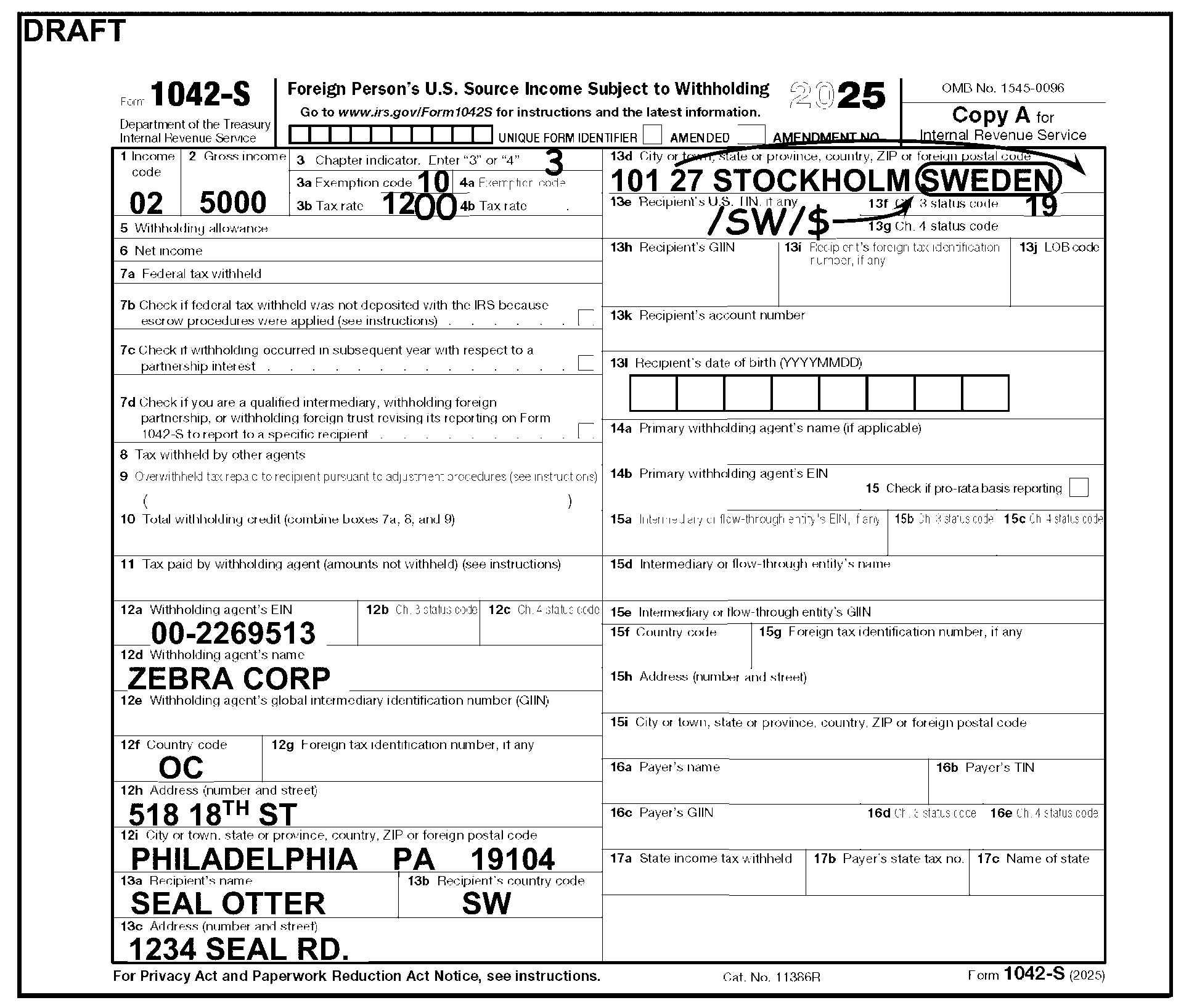
This figure shows a 2025 Form 1042-S, Foreign Person's U.S. Source Income Subject to Withholding, and illustrates proper editing when the filer has entered a country name in an address field. The filer entered Sweden in Box 13d. The tax examiner used Job Aid 2324-002, Coding and Editing BMF Tax Returns, Foreign Addresses (Catalog Number 48747C) to find the correct two-digit code, circled out Sweden and edited the Country Code SW, in the slash/slash/$ format. The tax examiner arrowed the Postal Code to the correct position (behind the Country Code). The tax examiner also perfected the Tax Rate to a four-digit number and entered a 3 in Box 3.
Please click here for the text description of the image.
3.21.111.8.1.35 (11-21-2024)
Recipient's U.S. Taxpayer Identification Number (TIN), Box 13e
-
Shows Recipient's U.S. Taxpayer Identification Number.
-
This is a nine-position field that may or may not be present.
-
Only numeric characters are valid.
-
The Recipient's TIN can be a Social Security Number (SSN) or an IRS Individual Taxpayer Identification Number (ITIN).
-
The Recipient's TIN can't be the same as the Withholding Agent's EIN, Box 12a. If the same number is present in box 13e, delete the entry.
-
If the entry is more or less than nine digits, or repeating digits, delete the entry.
3.21.111.8.1.36 (01-01-2024)
Recipient's Chapter 3 Status Code, Box 13f
-
Shows the type of recipient for the Chapter 3 income being reported by the withholding agent.
-
This is a two-position field.
-
Only numeric characters are valid.
-
If only one character is present, edit a leading zero for transcription purposes (i.e., if "5" has been entered, change it to "05" ).
Note:
See Exhibit 3.21.111-3 for a list of valid Chapter 3 Status Codes and Figure 3.21.111-8 for Chapter 3 Status Code editing.
-
If the Recipient Status Code is missing, limited research may be initiated to determine if the recipient type is present elsewhere on the document:
-
Research the recipient name line, if able to identify recipient type, determine the correct code.
-
If an explanation of recipient type is provided, determine the correct code.
-
If Recipient Status Code can't be determined, continue processing.
Figure 3.21.111-7
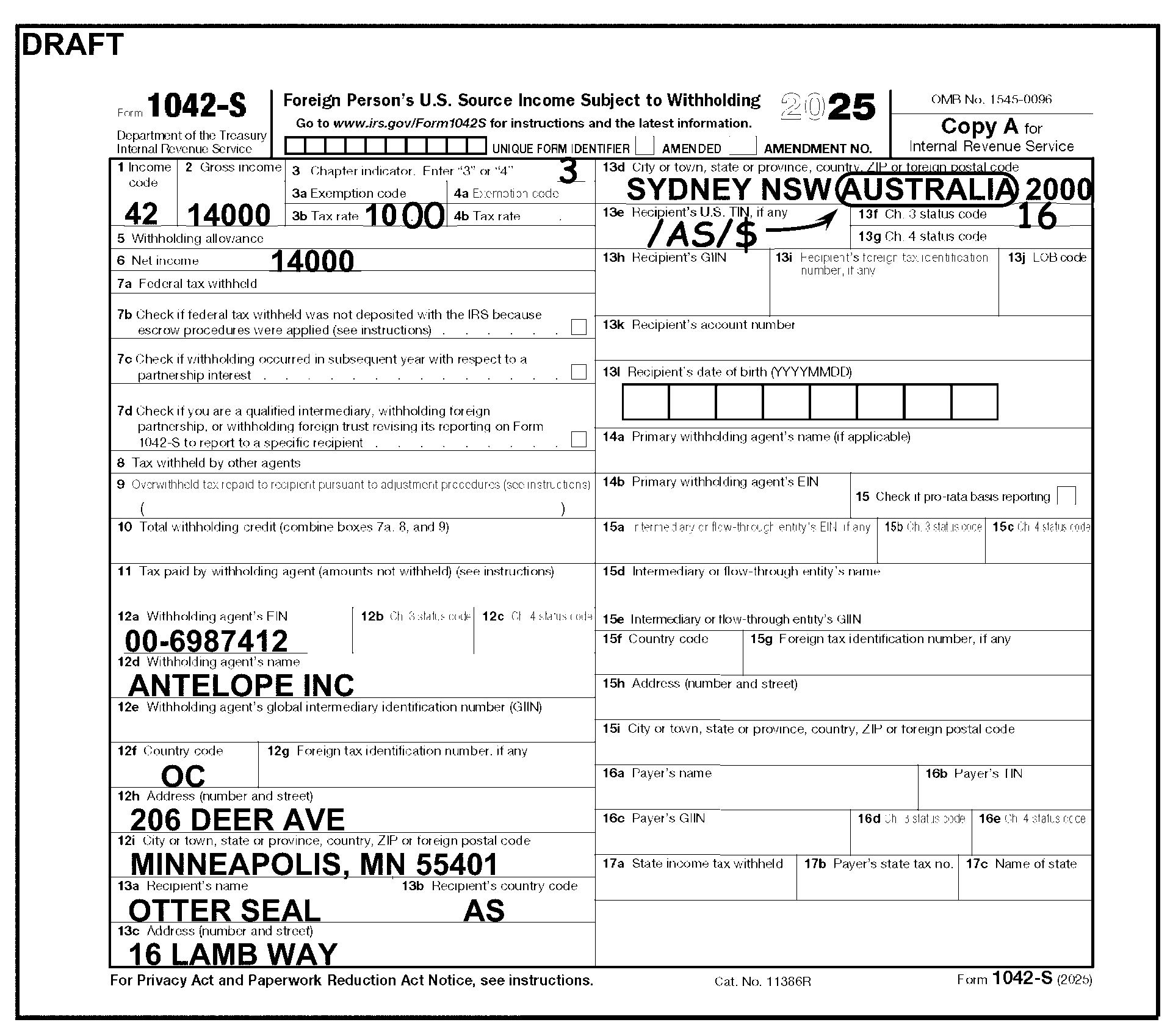
This figure shows the 2025 Form 1042-S, Foreign Person's U.S. Source Income Subject to Withholding, and illustrates the proper coding when Box 13f, Recipient's Chapter 3 Status Code, is blank. The filer hasn't entered a Recipient Code in Box 13f. The tax examiner edited a 3 for the Chapter 3 indicator on Box 3 and 16 for the Recipients Status Code on Box 13f. The tax examiner also perfected the Tax Rate to a four-digit number. The tax examiner used the Country Code Chart for editing entity/address information (Job Aid 2324-002) to find the correct two-digit code, circled out Australia and edited the Country Code AS, in the slash/slash/$ format and arrowed to the correct position (before the Postal Code).
Please click here for the text description of the image.
-
3.21.111.8.1.37 (01-01-2019)
Recipient's Chapter 4 Status Code, Box 13g
-
Shows the type of recipient for the Chapter 4 income being reported by the withholding agent.
-
This is a two-position field.
-
Only numeric characters are valid.
Note:
See Exhibit 3.21.111-4 for a list of valid Chapter 4 Status Codes.
-
If only one digit is present, edit a leading zero for transcription purposes (i.e., if "5" has been entered, change it to "05" ).
-
If the Recipient Code is missing, limited research may be initiated to determine if the recipient type is present elsewhere on the document:
-
Research the recipient name line, if able to identify recipient type, determine the correct code.
-
If an explanation of recipient type is provided, determine the correct code.
-
If Recipient Code can't be determined, continue processing.
-
3.21.111.8.1.38 (01-01-2024)
Recipient's GIIN, Box 13h
-
The Global Intermediary Identification Number (GIIN) is the identification number that is assigned for Chapter 4 reporting purposes.
-
This is a 19-position field.
-
May be blank, alpha, numeric and have periods.
-
No editing is required.
3.21.111.8.1.39 (01-01-2017)
Recipient's Foreign Tax Identifying Number, if any, Box 13i
-
The Recipient's identifying number, used in the country of residence, for tax purposes.
-
This is a 22-position field that may be present.
-
Alpha and/or numeric characters are valid.
3.21.111.8.1.40 (11-21-2024)
LOB Code, Box 13j
-
Withholding agents withholding at a reduced rate based on a treaty claim by an entity will include a limitation on benefits code (LOB code).
-
This is a two-position field that may be present.
-
Only numeric characters (0-9) are valid.
-
If only one digit is present, edit a leading zero for transcription purposes (i.e., if "5" has been entered, change it to "05" ).
LOB Code LOB Treaty Category 02 Government – contracting state/political subdivision/local authority 03 Tax exempt pension trust/Pension fund 04 Tax exempt/Charitable organization 05 Publicly-traded corporation 06 Subsidiary of publicly-traded corporation 07 Company that meets the ownership and base erosion test 08 Company that meets the derivative benefits test 09 Company with an item of income that meets the active trade or business test 10 Discretionary determination 11 Other 12 No LOB article in treaty
3.21.111.8.1.41 (01-01-2017)
Recipient's Account Number, Box 13k
-
Recipient's Account Number is assigned by the withholding agent and is used to identify the recipient's account.
-
This is a 20-position field that may or may not be present.
-
Any character present is valid.
-
No editing is required.
3.21.111.8.1.42 (01-01-2024)
Recipient's Date of Birth, Box 13l
-
The date of birth of the recipient.
-
This is an eight-position field.
-
May be blank, or have numeric values only.
-
Must be in YYYYMMDD format. If date is entered incorrectly, circle out and edit to the right in correct format.
3.21.111.8.1.43 (01-01-2017)
Primary Withholding Agent's Name, Box 14a
-
Provides information regarding a withholding agent, other than the withholding agent reported on Box 12d, that withheld and deposited tax with respect to the income reported.
-
This field consists of 40 characters.
-
Valid characters for name fields are:
-
Alpha (A-Z)
-
Numeric (0-9)
-
Blank
-
Ampersand (&)
-
Hyphen (-)
-
Slash (/)
-
Period (.)
-
Comma (,)
-
Apostrophe (')
-
Pound (#)
-
Percent (%)
-
3.21.111.8.1.44 (01-01-2024)
Primary Withholding Agent's EIN, Box 14b
-
The EIN of the withholding agent identified in box 14a.
Note:
This is another withholding agent, not the withholding agent identified in Box 12a, who actually withheld the tax (reported in box 8).
-
This is a nine-position, all numeric field.
3.21.111.8.1.45 (01-01-2021)
Pro-rata Basis Reporting Checkbox, Box 15
-
Shows pro-rata basis reporting.
-
This is a one-position numeric field that must be blank or 1.
-
Edit a 1 to the left of the Pro-Rata Basis Reporting box if it is checked, otherwise, leave blank.
3.21.111.8.1.46 (01-01-2019)
Intermediary or Flow-through Entity's EIN, Box 15a
-
The EIN of the intermediary or flow-through entity.
-
This is a nine-position, all numeric field.
3.21.111.8.1.47 (01-01-2019)
Intermediary Chapter 3 Status Code, Box 15b
-
Shows the type of intermediary for the Chapter 3 income being reported by the withholding agent.
-
This is a two-position field.
-
Only numeric characters (0-9) and blanks are valid.
-
If only one character is present, edit a leading zero for transcription purposes (i.e., if "5" has been entered, change it to "05" ).
Note:
See Exhibit 3.21.111-3 for a list of valid Chapter 3 Status Codes.
-
If the Intermediary Status Code is missing, limited research may be initiated to determine if the intermediary type is present elsewhere on the document:
-
Research the intermediary name line, if able to identify intermediary type, determine the correct code.
-
If an explanation of intermediary type is provided, determine the correct code.
-
If Intermediary Status Code can't be determined, continue processing.
-
3.21.111.8.1.48 (01-01-2019)
Intermediary Chapter 4 Status Code, Box 15c
-
Shows the type of intermediary for the Chapter 4 income being reported by the withholding agent.
-
This is a two-position field.
-
Only numeric characters (0-9) and blanks are valid.
Note:
See Exhibit 3.21.111-4 for a list of valid Chapter 4 Status Codes.
-
If only one digit is present, edit a leading zero for transcription purposes (i.e., if "5" has been entered, change it to "05" ).
-
If the Intermediary Code is missing, limited research may be initiated to determine if the intermediary type is present elsewhere on the document:
-
Research the intermediary name line, if able to identify intermediary type, determine the correct code.
-
If an explanation of intermediary type is provided, determine the correct code.
-
If Intermediary Code can't be determined, continue processing.
-
3.21.111.8.1.49 (01-01-2017)
Intermediary or Flow-through Entity's Name, Box 15d
-
An intermediary is a person that acts as a custodian, broker, nominee, or otherwise as an agent for another person, regardless of whether that other person is the beneficial owner of the amount paid, a flow-through entity, or another intermediary.
-
A flow-through entity is a legal entity where income "flows through" to investors or owners; that is, the income of the entity is treated as the income of the investors or owners.
-
This field consists of 40 characters for each line (Name Line 1, Name Line 2 and Name Line 3).
-
Valid characters for name fields are:
-
Alpha (A-Z)
-
Numeric (0-9)
-
Blank
-
Ampersand (&)
-
Hyphen (-)
-
Slash (/)
-
Period (.)
-
Comma (,)
-
Apostrophe (')
-
Pound (#)
-
Percent (%)
-
3.21.111.8.1.50 (01-01-2024)
Intermediary or Flow-through Entity's GIIN, Box 15e
-
The Global Intermediary Identification Number (GIIN) is the identification number that is assigned for Chapter 4 reporting purposes.
-
This is a 19-position field.
-
May be blank, alpha, numeric and have periods.
-
No editing is required.
3.21.111.8.1.51 (01-01-2024)
Intermediary or Flow-through Entity's Country Code, Box 15f
-
The country where the intermediary or flow-through entity is located.
-
This is a two-position field.
-
If blank, leave blank.
-
If the Withholding Agent has a domestic address, the Country Code will be blank. If a Country Code, or U.S., is present, leave the entry as is.
-
No editing is required.
3.21.111.8.1.52 (01-01-2017)
Intermediary or Flow-through Entity's Foreign Tax Identification Number, Box 15g
-
This is a 22-position field.
-
Valid characters are:
-
Alpha (A-Z)
-
Numeric (0-9)
-
Blank
-
Ampersand (&)
-
Hyphen (-)
-
Slash (/)
-
Period (.)
-
Comma (,)
-
Apostrophe (')
-
Pound (#)
-
3.21.111.8.1.53 (01-01-2018)
Intermediary's or Flow-through Entity's Name and Address, Boxes 15d, 15h, and 15i
-
Shows the name, address and TIN of an Intermediary or flow-through Entity.
-
This is a 40-position field.
-
Follow editing instructions found in IRM 3.21.111.8.1.34.
3.21.111.8.1.54 (01-01-2017)
Payer's Name, Box 16a
-
A payer is the person for whom the withholding agent acts as an authorized agent and agrees to withhold and report a payment.
-
This is a 40-position field.
-
Valid characters for name fields are:
-
Alpha (A-Z)
-
Numeric (0-9)
-
Blank
-
Ampersand (&)
-
Hyphen (-)
-
Slash (/)
-
Period (.)
-
Comma (,)
-
Apostrophe (')
-
Pound (#)
-
Percent (%)
Note:
The percent (%) sign is used to identify in care of and is valid in the first position only.
-
3.21.111.8.1.55 (01-01-2019)
Payer's TIN, Box 16b
-
The payer's taxpayer identification number.
-
This is a nine-position field.
-
May be blank or have numeric values only.
3.21.111.8.1.56 (01-01-2024)
Payer's GIIN, Box 16c
-
The payer's Global Intermediary Identification Number (GIIN) used to report Chapter 4 withholding.
-
This is a 19-position field.
-
May be blank, alpha, numeric and have periods.
-
No editing is required.
3.21.111.8.1.57 (01-01-2019)
Payer's Chapter 3 Status Code, Box 16d
-
Shows the payer type for Chapter 3 purposes.
-
This is a two-position field.
-
Only numeric characters (0-9) and blanks are valid. See Exhibit 3.21.111-3 for Chapter 3 Status Codes.
-
If taxpayer enters a single digit, use Exhibit 3.21.111-3 for Chapter 3 Status Codes as research to determine the two-digit code. If unable to determine, keep processing.
-
If other than numeric, X out.
3.21.111.8.1.58 (01-01-2019)
Payer's Chapter 4 Status Code, Box 16e
-
Shows the payer type for Chapter 4 purposes.
-
This is a two-position field.
-
Only numeric characters (0-9) and blanks are valid. See Exhibit 3.21.111-4 for Chapter 4 Status Codes.
-
If taxpayer enters a single digit, use Exhibit 3.21.111-4 for Chapter 4 Status Codes as research to determine the two-digit code. If unable to determine, keep processing.
-
If other than numeric, X out.
3.21.111.8.1.59 (01-01-2024)
State Income Tax Withheld, Box 17a
-
The tax withheld for state income tax purposes.
-
This is a 12-position field.
-
May be blank or have numeric values only.
-
Accept the whole dollar amount and ignore the cents.
-
No editing is required.
3.21.111.8.1.60 (01-01-2024)
Payer’s State Tax No., Box 17b
-
The number assigned by the state for reporting withholding.
-
This is a 10-digit field.
-
May be blank or have numeric values only.
-
No editing is required.
3.21.111.8.1.61 (01-01-2024)
Name of State, Box 17c
-
The name of the state that the tax was withheld.
-
This is a two-position field.
-
May be blank or have alphas only.
-
No editing is required.
Exhibit 3.21.111-1
Form 1042-T Transcription Lines
Form 1042-T with transcription lines
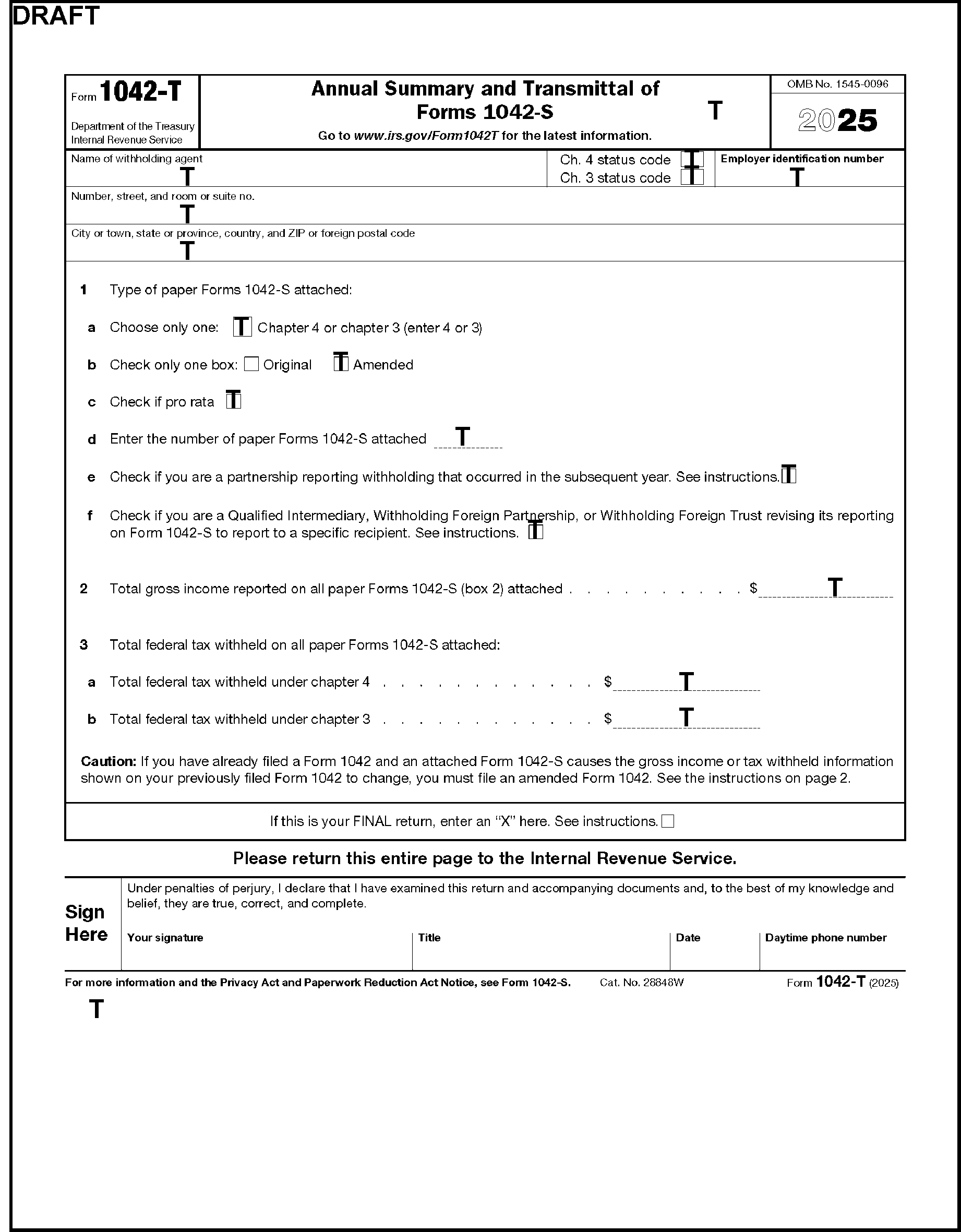
This exhibit displays the 2025 Form 1042-T with Transcription Lines. Transcribe all boxes of the form. The DLN is transcribed from the top, right-hand corner of the form. The tax period is transcribed from the pre-printed year on the form or the tax year edited to the left of the pre-printed year. Transcribe the name, address, and EIN of withholding agent from the entity section of the form. The Amended coding is transcribed from the Amended checkbox to the right of Line 1b. The number of paper forms filed is transcribed from the dotted line to the right of Line 1d. Total Gross Income is transcribed on line 2. Total Tax withheld for Chapter 4 and Chapter 3 is transcribed from the dotted Lines 3a and b, respectively. The Received Date is transcribed from the space above the word Instructions on Line 1e, in the middle of the form.
Please click here for the text description of the image.
Exhibit 3.21.111-2
Form 1042-S Transcription Lines
Form 1042-S with transcription lines
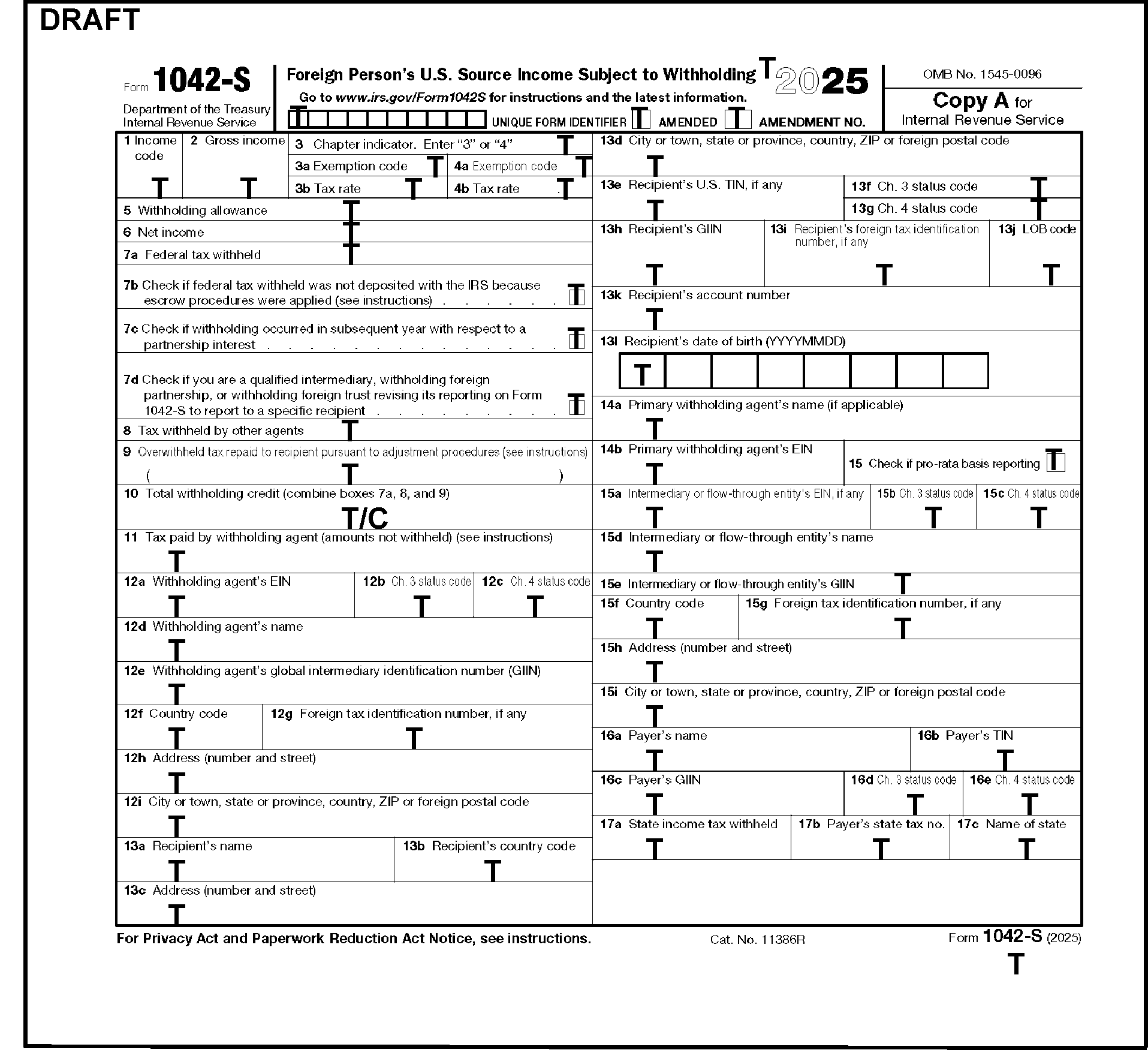
This exhibit displays the 2025 Form 1042-S with Transcription Lines. Transcribe all boxes of the form. Form 1042-S DLN is transcribed from the upper right-hand corner. The tax period is transcribed from the space to the left of the pre-printed year. In addition, the unique form identifier, amended, and amendment no. are transcribed from the space in the upper middle of the form below the pre-printed tax year. The Received Date is transcribed from the lower right-hand corner. The corresponding Form 1042-T DLN is transcribed from the lower left corner of the Form 1042-S.
Please click here for the text description of the image.
Exhibit 3.21.111-3
Chapter 3 Status Codes
| Chapter 3 Status Code | Definition |
|---|---|
| 05 | U.S. branch – treated as U.S. Person |
| 06 | U.S. branch – not treated as U.S. Person |
| 07 | U.S. branch - ECI presumption applied |
| 08 | Partnership other than Withholding Foreign Partnership, Publicly Traded Partnership, or Partnership Qualified Derivatives Dealer (QDD) |
| 09 | Withholding Foreign Partnership |
| 10 | Trust other than Withholding Foreign Trust |
| 11 | Withholding Foreign Trust |
| 12 | Qualified intermediary |
| 13 | Qualified Securities Lender—Qualified Intermediary |
| 14 | Qualified Securities Lender—Other |
| 15 | Corporation |
| 16 | Individual |
| 17 | Estate |
| 18 | Private Foundation |
| 19 | International Organization |
| 20 | Tax Exempt Organization (Section 501(c) entities) |
| 21 | Unknown Recipient ### Note: If Recipient Code is Unknown Recipient, Recipient Name Line 1 must equal "Unknown," |
| 22 | Artist or Athlete |
| 23 | Pension |
| 24 | Foreign Central Bank of Issue |
| 25 | Nonqualified Intermediary |
| 26 | Hybrid entity making Treaty Claim |
| 35 | Qualified Derivatives Dealer |
| 36 | Foreign Government - Integral Part |
| 37 | Foreign Government - Controlled Entity |
| 38 | Publicly Traded Partnership |
| 39 | Disclosing Qualified Intermediary |
| 40 | Partnership QDD |
| 41 | U.S. government entity or tax exempt entity other than section 501(c) entities. |
| Code | Pooled Reporting for Chapter 3 |
|---|---|
| 27 | Withholding Rate Pool – General |
| 28 | Withholding Rate Pool – Exempt Organization |
| 29 | PAI Withholding Rate Pool – General |
| 30 | PAI Withholding Rate Pool – Exempt Organization |
| 31 | Agency Withholding Rate Pool – General |
| 32 | Agency Withholding Rate Pool – Exempt Organization |
Exhibit 3.21.111-4
Chapter 4 Status Codes
| Chapter 4 Status Code | Definition |
|---|---|
| 01 | U.S. Withholding Agent – FI |
| 02 | U.S. Withholding Agent – Other |
| 03 | Territory FI - not treated as U.S. Person |
| 04 | Territory FI - treated as U.S. Person |
| 05 | Participating FFI – Other |
| 06 | Participating FFI – Reporting Model 2 FFI |
| 07 | Registered Deemed-Compliant FFI – Reporting Model 1 FFI |
| 08 | Registered Deemed-Compliant FFI – Sponsored Entity |
| 09 | Registered Deemed-Compliant FFI – Other |
| 10 | Certified Deemed-Compliant FFI – Other |
| 11 | Certified Deemed-Compliant FFI – FFI with Low Value Accounts |
| 12 | Certified Deemed-Compliant FFI – Non-Registering Local Bank |
| 13 | Certified Deemed-Compliant FFI – Sponsored Entity |
| 14 | Certified Deemed-Compliant FFI – Investment Entity that does not maintain financial accounts |
| 15 | Nonparticipating FFI |
| 16 | Owner-Documented FFI |
| 17 | U.S. Branch – treated as U.S. person |
| 18 | U.S. Branch – not treated as U.S. person (reporting under IRC 1471) |
| 19 | Passive NFFE identifying Substantial U.S. Owners |
| 20 | Passive NFFE with no Substantial U.S. Owners |
| 21 | Publicly Traded NFFE or Affiliate of Publicly Traded NFFE |
| 22 | Active NFFE |
| 23 | Individual |
| 24 | Section 501(c) Entities |
| 25 | Excepted Territory NFFE |
| 26 | Excepted NFFE – Other |
| 27 | Exempt Beneficial Owner |
| 28 | Entity Wholly Owned By Exempt Beneficial Owners |
| 29 | Unknown Recipient |
| 30 | Recalcitrant Account Holder |
| 31 | Nonreporting IGA FFI |
| 32 | Direct reporting NFFE |
| 33 | U.S. reportable account |
| 34 | Non–consenting U.S. account |
| 35 | Sponsored direct reporting NFFE |
| 36 | Excepted Inter-affiliate FFI |
| 37 | Undocumented Preexisting Obligation |
| 38 | U.S. Branch - ECI presumption applied |
| 39 | Account Holder of Excluded Financial Account |
| 40 | Passive NFFE reported by FFI |
| 41 | NFFE subject to 1472 withholding |
| 50 | U.S. Withholding Agent—Foreign branch of FI |
| Code | Pooled Reporting for Chapter 4 |
|---|---|
| 42 | Recalcitrant Pool – No U.S. Indicia |
| 43 | Recalcitrant Pool – U.S. Indicia |
| 44 | Recalcitrant Pool – Dormant Account |
| 45 | Recalcitrant Pool – U.S. Persons |
| 46 | Recalcitrant Pool – Passive NFFEs |
| 47 | Nonparticipating FFI Pool |
| 48 | U.S. Payees Pool |
| 49 | QI-Recalcitrant Pool - General |
Exhibit 3.21.111-5
Valid Treaty Rate by Country - All Income Codes
(EXCEPTION: Income Code 50 (Other Income))
Treaty rate by country (Income Code other than 50) Exhibit
| Country Code | Country Name | Valid Percentage Rate |
|---|---|---|
| AS | Australia | 0, 10, 15, 30 |
| AT | Ashmore & Cartier (Territory of Australia) | 0, 10, 15, 30 |
| CK | Cocos (Keeling) Islands (Territory of Australia) | 0, 10, 15, 30 |
| CR | Coral Sea Islands (Territory of Australia) | 0, 10, 15, 30 |
| KT | Christmas Island (Territory of Australia) | 0, 10, 15, 30 |
| NF | Norfolk Island (Territory of Australia) | 0, 10, 15, 30 |
| AU | Austria | 0, 5, 10, 15, 30 |
| BB | Barbados | 0, 5, 12.5, 15, 30 |
| BE | Belgium | 0, 5, 15, 30 |
| CA | Canada | 0, 5, 10, 15, 30 |
| CH | Peoples Republic of China | 0, 10, 30 |
| CY | Cyprus | 0, 5, 10, 15, 30 |
| DA | Denmark | 0, 5, 15, 30 |
| EG | Egypt | 0, 5, 15, 30 |
| EI | Ireland | 0, 5, 15, 30 |
| EN | Estonia | 0, 5, 10, 15, 30 |
| EZ | Czech Republic | 0, 5, 10, 15, 30 |
| FI | Finland | 0, 5, 15, 30 |
| FR | France | 0, 5, 15, 30 |
| FG | French Guiana (Territory of France) | 0, 5, 15, 30 |
| GP | Guadeloupe (Territory of France) | 0, 5, 15, 30 |
| MB | Martinique (Territory of France) | 0, 5, 15, 30 |
| RE | Reunion (Territory of France) | 0, 5, 15, 30 |
| GM | Germany | 0, 5, 15, 30 |
| GR | Greece | 0, 30 |
| IC | Iceland | 0, 5, 15, 30 |
| ID | Indonesia | 0, 10, 15, 30 |
| IN | India | 0, 10, 15, 20, 25, 30 |
| IS | Israel | 0, 10, 12.5, 15, 17.5, 25, 30 |
| IT | Italy | 0, 5, 7, 8, 10, 15, 30 |
| JA | Japan | 0, 10, 15, 30 |
| JM | Jamaica | 0, 10, 12.5, 15, 30 |
| KS | Korea, Republic of (South) | 0, 10, 12, 15, 30 |
| KZ | Kazakhstan | 0, 5, 10, 15, 30 |
| LO | Slovakia (Slovak Republic) | 0, 5, 10, 15, 30 |
| LG | Latvia | 0, 5, 10, 15, 30 |
| LH | Lithuania | 0, 5, 10, 15, 30 |
| LU | Luxembourg | 0, 5, 15, 30 |
| MX | Mexico | 0, 4.9, 5, 10, 15, 30 |
| MO | Morocco | 0, 10, 15, 30 |
| NL | Netherlands | 0, 5, 15, 30 |
| NZ | New Zealand | 0, 10, 15, 30 |
| NO | Norway | 0, 10, 15, 30 |
| PK | Pakistan | 0, 15, 30 |
| RP | Philippines | 0, 15, 20, 25, 30 |
| PL | Poland | 0, 5, 10, 15, 30 |
| PO | Portugal | 0, 5, 10, 15, 30 |
| RO | Romania | 0, 10, 15, 30 |
| RS | Russia (Federation) ### Note: Treaty has been suspended for taxes withheld at the source as of August 16, 2024. | 0, 5, 10, 30 ### Note: Use 0 during the suspension. |
| SF | South Africa | 0, 5, 15, 30 |
| SP | Spain | 0, 5, 8, 10, 15, 30 |
| SW | Sweden | 0, 5, 15, 30 |
| SZ | Switzerland | 0, 5, 15, 30 |
| TH | Thailand | 0, 5, 8, 10, 15, 30 |
| TD | Trinidad & Tobago | 0, 15, 30 |
| TS | Tunisia | 0, 10, 14, 15, 20, 30 |
| TU | Turkey | 0, 5, 10, 15, 20, 30 |
| UK | United Kingdom | 0, 5, 15, 30 |
| VE | Venezuela | 0, 4.95, 5, 10, 15, 30 |
| AJ | Azerbaijan (Commonwealth of Independent States) | 0, 30 |
| AM | Armenia (Commonwealth of Independent States) | 0, 30 |
| BO | Belarus (Commonwealth of Independent States) | 0, 30 |
| GG | Georgia (Commonwealth of Independent States) | 0, 30 |
| KG | Kyrgyzstan (Commonwealth of Independent States) | 0, 30 |
| MD | Moldova (Commonwealth of Independent States) | 0, 30 |
| TI | Tajikistan (Commonwealth of Independent States) | 0, 30 |
| TX | Turkmenistan (Commonwealth of Independent States) | 0, 30 |
| UZ | Uzbekistan (Commonwealth of Independent States) | 0, 30 |
| UP | Ukraine | 0, 5, 10, 15, 28, 30, 35 |
| OC | All Other Countries | 0, 30 |
| Blank | Unknown Country | 0, 30 |
Exhibit 3.21.111-6
Valid Treaty Rate by Country - Income Code 50 (Other Income) ONLY
Treaty rate by country (Income Code 50) Exhibit
| Country Code | Country Name | Valid Percentage Rates |
|---|---|---|
| AS | Australia | 30 |
| AT | Ashmore & Cartier (Territory of Australia) | 30 |
| CK | Cocos Islands (Territory of Australia) | 30 |
| CR | Coral Sea Islands (Territory of Australia) | 30 |
| KT | Christmas Island (Territory of Australia) | 30 |
| NF | Norfolk Islands (Territory of Australia) | 30 |
| AU | Austria | 0 |
| BB | Barbados | 30 |
| BE | Belgium | 30 |
| CA | Canada | 15, 30 |
| CH | Peoples Republic of China | 30 |
| CY | Cyprus | 30 |
| DA | Denmark | 0 |
| EG | Egypt | 30 |
| EI | Ireland | 0 |
| EN | Estonia | 30 |
| EZ | Czech Republic | 0 |
| FI | Finland | 0 |
| GF | French Guiana (Territory of France) | 0 |
| GP | Guadeloupe (Territory of France) | 0 |
| MQ | Martinique (Territory of France) | 0 |
| RE | Reunion (Territory of France) | 0 |
| GM | Germany | 0 |
| GR | Greece | 30 |
| HU | Hungary | 0 |
| IC | Iceland | 30 |
| ID | Indonesia | 30 |
| IN | India | 30 |
| IS | Israel | 30 |
| IT | Italy | 0 |
| JA | Japan | 30 |
| JM | Jamaica | 30 |
| KS | Korea, Republic of (South) | 30 |
| KZ | Kazakhstan | 30 |
| LO | Slovakia (Slovak Republic) | 0 |
| LG | Latvia | 0 |
| LH | Lithuania | 0 |
| LU | Luxembourg | 30 |
| MX | Mexico | 30 |
| MO | Morocco | 30 |
| NL | Netherlands | 0 |
| NZ | New Zealand | 30 |
| NO | Norway | 30 |
| PK | Pakistan | 30 |
| RP | Philippines | 30 |
| PL | Poland | 30 |
| PO | Portugal | 30 |
| RO | Romania | 30 |
| RS | Russia (Federation) | 0 |
| SF | South Africa | 0 |
| SP | Spain | 0 |
| SW | Sweden | 0 |
| SZ | Switzerland | 0 |
| TH | Thailand | 30 |
| TD | Trinidad & Tobago | 30 |
| TS | Tunisia | 0 |
| TU | Turkey | 0 |
| UK | United Kingdom | 0 |
| VE | Venezuela | 30 |
| AJ | Azerbaijan (Commonwealth of Independent States) | 30 |
| AM | Armenia (Commonwealth of Independent States) | 30 |
| BO | Belarus (Commonwealth of Independent States) | 30 |
| GG | Georgia (Commonwealth of Independent States) | 30 |
| KG | Kyrgyzstan (Commonwealth of Independent States) | 30 |
| MD | Moldova (Commonwealth of Independent States) | 30 |
| TI | Tajikistan (Commonwealth of Independent States) | 30 |
| TX | Turkmenistan (Commonwealth of Independent States) | 30 |
| UZ | Uzbekistan (Commonwealth of Independent States) | 30 |
| UP | Ukraine | 0 |
| OC | All Other Countries | 30 |
| Blank | Unknown Country | 30 |
Exhibit 3.21.111-7
Glossary and Acronyms
Glossary
| GLOSSARY | DEFINITION |
|---|---|
| ACTION CODES | Numeric codes edited in the bottom center margin of a return to reject documents and identify the reason the document has been rejected. |
| ACTION TRAIL | A notation in the lower left side margin on page 1 of a return which indicates or explains an action taken. |
| AMENDED RETURN | A return that changes information submitted on a previously filed return. |
| AUDIT CODE | An alpha character edited in the right bottom margin of a return to identify a specific condition for the Examination Operation. |
| BATCH | A group of blocks of documents. A batch can't have more than 20 blocks. |
| BLOCK | A group of up to 100 documents with consecutive DLNs having the same block number (digits 9 through 11 of the DLN). (A block can't have more than 100 documents since the documents are numbered from 00 to 99.) |
| BUSINESS MASTER FILE (BMF) | A magnetic tape file having information about taxpayers filing business returns and related documents. |
| CALENDAR YEAR | A tax year that begins January 1 and ends on December 31. |
| CENTRALIZED AUTHORIZATION FILE (CAF) | Computerized system of records which houses authorization information from Powers of Attorney (POAs), Tax Information Authorizations (TIAs) and estate tax returns. The CAF system has two types of records: 1. Taxpayer records, 2. Representative records. |
| CHECK DIGITS | Two alpha characters used to identify the tax account. |
| CODING | Placing symbols that have specific meanings on returns. These codes direct the computer to perform certain programmed functions. |
| COMPUTER CONDITION CODE (CCC) | A single alpha or numeric character edited on a return which either shows a special condition or directs the computer to take a specific programmed action. CCCs are posted to the Master File. |
| CORRESPONDENCE ACTION SHEETS | Forms used to request information from the taxpayer. Some are mailed to the taxpayer with the return; others generate a letter. |
| CURRENT YEAR RETURN | For processing in 2026, a Current Year Return is a return filed for tax year 2025. |
| DATA | All information reported or coded on forms, schedules, and attachments. |
| DELINQUENT RETURN | A return filed after the due date without an approved extension. |
| DOCUMENT LOCATOR NUMBER | A fourteen-digit number assigned to every return and document input through the Automatic Data Processing (ADP) system. |
| DUMMY | The act of transferring information provided by the taxpayer onto a required transcribed form/schedule. |
| EDITING | Preparing returns and attachments for data entry or other transcription processes by correcting entries and entering edit marks. |
| EMPLOYER IDENTIFICATION NUMBER (EIN) | A nine-digit number that shows the account of a business taxpayer on the Business Master File. |
| ENTRY | Any type of mark entered by, or edited for, the taxpayer. |
| ERROR RESOLUTION SYSTEM (ERS) | A system for the examination and correction of returns rejected due to taxpayer and processing errors. |
| FISCAL YEAR | A tax year which ends on a date other than December 31. |
| FORM | An IRS document identified by a number, e.g., Form 1040. |
| FRIVOLOUS FILER/NON-FILER | Filers and non-filers who use certain types of tax avoidance arguments which aren't supported by law. |
| HARDSHIP | A sign of severe consequences for a taxpayer caused by the normal application of IRS regulations and procedures. Although a determination of hardship is highly subjective, the work leader must be consulted if a particular situation may be considered for referral to the Taxpayer Advocate Service (TAS). |
| INDIVIDUAL MASTER FILE (IMF) | A magnetic tape file having information about taxpayers filing individual income tax returns and related documents. |
| INDIVIDUAL TAXPAYER IDENTIFICATION NUMBER (ITIN) | A unique nine-digit number assigned by the IRS to individuals who must file a U.S. tax return or are listed as a spouse or a dependent and who don't have and can't obtain a valid Social Security Number. Taxpayers obtain an ITIN by filing a Form W-7. |
| INTEGRATED DATA RETRIEVAL SYSTEM | A system that enables employees in the area/territory offices and the campuses to have visual access to certain computer-based information in taxpayer accounts. |
| INTEGRATED SUBMISSION AND REMITTANCE PROCESSING SYSTEM (ISRP) | A computerized system which converts paper tax and information documents and remittances received by the IRS into perfected electronic records of taxpayer data. |
| INTERNATIONAL RETURN | A return on which income is excluded or not reported because of revenues from, payments to, or residence in a foreign country. |
| JULIAN DATE | A calendar date expressed as the number of days since the beginning of the year. For example, February 1 is Julian Date 032. |
| JURAT | The perjury statement required in the signature area of a tax return, form, or schedule. |
| MASTER FILE | A magnetic tape record which has taxpayer accounts. |
| NAME CONTROL | The first four characters of the taxpayer's surname. Also used for dependents, qualifying children, childcare providers, etc. |
| NON-RESIDENT ALIEN (NRA) | An alien individual (not a U.S. citizen), who does not meet either the green card test or the substantial presence test for the calendar year. |
| PERFECTING | Making returns acceptable for data entry through editing procedures. |
| PIPELINE | The areas in the IRS Submission Processing Campus that process a return from the time it is received until the data from the return is entered to an account in the IRS' main computer. These areas include Receipt and Control, Code and Edit, Data Conversion, Error Resolution, Rejects, and Unpostables. |
| POWER OF ATTORNEY (POA) | A form authorizing a representative to perform certain acts on the taxpayer's behalf. |
| PRIMARY TAXPAYER | The taxpayer who is listed first on the name line caption of a joint return, regardless of whether that taxpayer is male or female. |
| PRIOR YEAR RETURN | A return for a tax period prior to the current tax year. |
| PROCESSABLE RETURN | A return which meets all the requirements for ISRP input. |
| RECEIVED DATE | Date the IRS received a return. If the date is unknown and a Received Date is required, there is a prescribed formula for determining the date to edit as the Received Date. (Required on Amended, Fiscal Year, Short Year, Prior Year, and Delinquent Returns.) |
| RE-INPUT DOCUMENT | A document that did not post to the Master File when originally entered and is now being entered again with a Form 3893, Re-Entry Document Control. |
| RETURN | A legal document used by the taxpayer to report income, deductions, and tax liability. |
| RETURN DUE DATE | The date in which the return is due to the Internal Revenue Service. |
| RETURN PROCESSING CODE (RPC) | A single character edited on a return to direct the computer to take specific actions in processing the return. This code does not post to the Master File. |
| SCHEDULE | An IRS document identified by alpha characters or numbers (e.g., Schedule B, Schedule 8812). |
| SECONDARY TAXPAYER | The taxpayer who is listed second on the name line caption of a joint return, regardless of whether that taxpayer is male or female. |
| SECONDARY TAXPAYER IDENTIFICATION NUMBER | The TIN associated with the taxpayer whose name appears second on a joint return. |
| SIGNIFICANT ENTRY | Any positive or negative number or dollar amount other than zero. |
| SOCIAL SECURITY NUMBER | A nine-digit number identifying the account of an individual on the Individual Master File. |
| STATUTE RETURN | A return filed for a Tax Period more than three years prior to the current Tax Period. |
| SUFFIX | Information added at the end of a word, phrase, or series of numbers. For instance, a title may be edited as a suffix to a name as in James Canary, Exec. |
| TAX EXAMINER (TE) STAMP | A rubber stamp with a unique identifying number of the Code and Edit tax examiner working the return. |
| TAX PERIOD | The time covered by a particular return represented by the year and month in which the period ends. For example, 202212 stands for the tax year ending December 31, 2022. |
| TAXPAYER ADVOCATE SERVICE (TAS) | An independent organization within the IRS whose employees assist taxpayers experiencing economic harm, who are seeking help in resolving tax problems that haven't been resolved through normal channels, or who believe than an IRS system or procedure is not working as it should. |
| TAXPAYER IDENTIFICATION NUMBER (TIN) | A nine-digit number which shows the account of an individual or business taxpayer. The TIN may be a Social Security Number (SSN), an Individual Taxpayer Identification Number (ITIN), Adoption Taxpayer Identification Number (ATIN) or an Employer Identification number (EIN). |
| THIRD PARTY DESIGNEE | Person given permission by the taxpayer to discuss their current year return processing issues with the IRS. |
| TRANSACTION CODE (TC) | A three-digit numeric code defining the precise nature of an action posted to the Master File. |
| TRANSCRIPTION | The process of transferring information from documents to a computer-readable form. Also called data conversion, input, and entry. |
| UNPOSTABLES | Data which can't be entered successfully to an account at the Martinsburg Computing Center (MCC) and is returned to the Campus for corrective action. |
| UNPROCESSABLE | A document which can't be perfected for the ADP system, usually because of incomplete information. |
Acronym
| ACRONYM | DEFINITION |
|---|---|
| AKA | Also Known As |
| AP | Approved Paragraph |
| APO | Army Post Office |
| ASED | Assessment Statute Expiration Date |
| AUSPC | Austin Submission Processing Campus |
| BMF | Business Master File |
| BOB | Block Out of Balance |
| CAF | Centralized Authorization File |
| CAS | Correspondence Action Sheet |
| CCC | Computer Condition Code |
| CPA | Certified Public Accountant |
| CY | Calendar Year |
| DECD | Deceased |
| DLN | Document Locator Number |
| EIN | Employer Identification Number |
| ELF | Electronic Filing |
| EQSP | Embedded Quality Submission Processing |
| ERS | Error Resolution System |
| EXEC | Executor |
| FMV | Fair Market Value |
| FPO | Fleet Post Office |
| FRP | Frivolous Return Program |
| FTD | Federal Tax Deposit |
| FTF | Failure to File |
| FTP | Failure to Pay |
| FY | Fiscal Year |
| IDRS | Integrated Data Retrieval System |
| IDT | Identity Theft |
| IMF | Individual Master File |
| IRC | Internal Revenue Code |
| IRM | Internal Revenue Manual |
| IRP | Information Returns Processing |
| IRS | Internal Revenue Service |
| ISRP | Integrated Submission and Remittance Processing System |
| ITIN | Individual Taxpayer Identification Number |
| IVO | Integrity and Verification Operation |
| KCSP | Kansas City Submission Processing Campus |
| MCC | Martinsburg Computing Center |
| MeF | Modernized e-File |
| MFT | Master File Transaction |
| NCOA | National Change of Address |
| NO | National Office |
| NR | No Record |
| NRA | Non-Resident Alien |
| OSPC | Ogden Submission Processing Campus |
| PAO | Process As Original |
| PCD | Program Completion Date |
| PER REP | Personal Representative |
| POA | Power of Attorney |
| PPR | * Personal Property Rental * Payment Plan Request |
| PTIN | Preparer Tax Identification Number |
| PY | Prior Year |
| QDD | Qualified Derivatives Dealer |
| RICS | Return Integrity and Compliance Services |
| RPC | Returns Processing Code |
| RTN | Routing Transit Number |
| SERP | Servicewide Electronic Research Program |
| SPC | * Special Processing Code * Submission Processing Center |
| SFR | Substitute for Return |
| SSN | Social Security Number |
| TAS | Taxpayer Advocate Service |
| TC | Transaction Code |
| TE | Tax Examiner |
| TIN | Taxpayer Identification Number |
| TP | Taxpayer |
| TR | Trustee |
| TY | Tax Year |
| USPS | United States Postal Service |