Internal Revenue Manual § 3.30.50 - Project Pca Production Control Accounting
3.30.50 Project PCA Production Control Accounting
Manual Transmittal
July 28, 2025
Purpose
(1) This transmits revised IRM 3.30.50, Work Planning and Control, Project PCA Production Control Accounting.
Background
This IRM provides procedures for preparing, reviewing and monitoring input to Project PCA through the Totally Automated Personnel System (TAPS), Single Entry Time Reporting (SETR). It also provides procedures for adjustment of Project PCA output data and the update of the Organization, Function, and Program (OFP) Consistency and Project PCA Production Control Accounting Employee Master Files.
Material Changes
(1) IRM 3.30.50.1.3, Roles and Responsibilities - Modified subsection to house existing content previously found in IRM 3.30.50.
(2) IRM 3.30.50.1.4, Program Management and Review - Modified subsection to house existing content previously found in IRM 3.30.50.
(3) IRM 3.30.50.1.5, Program Controls - Modified subsection to house existing content previously found in IRM 3.30.50.
(4) IRM 3.30.50.1.6, Terms and Acronyms - Modified subsection to house existing content previously found in IRM 3.30.50.
(5) IRM 3.30.50.1.7, Related Resources - Modified subsection to house existing content previously found in IRM 3.30.50.
(6) IRM 3.30.50.3.3, Update and Maintain OFP Consistency File - This IRM also incorporates IRM Procedural Update (IPU) 25U0177, dated February 6, 2025, removing Functional Activity Code 4E for OFP combinations in Org Codes 94, 95, 96, 98 (EEO & Diversity Field Services) to comply with an Executive Order.
(7) Throughout: Made editorial changes to clarify, reorganize and remove duplicate content. Added PCA Reports to subsection titles. Incorporated plain language and updated grammar, titles, website addresses and references.
Effect on Other Documents
IRM 3.30.50 dated January 21, 2025, is superseded.
Audience
All operating business units that use Form 3081 to report employee time and use Work Planning & Control to create performance and production reports
Effective Date
(07-28-2025)
James L. Fish
Director, Submission Processing
Taxpayer Services Division
3.30.50.1 (07-28-2025)
Program Scope and Objectives
-
Purpose: Project PCA, Production Control Accounting is the first project in mainframe batch processing that updates the Work Planning and Control (WP&C) performance and cost reports. This project provides employee performance records for the Measured Employees Performance System (MEPS) and maintenance of the campus performance and cost reports. It also processes adjustment hours and volume data for Project PCA reports.
-
Audience: All Organizations within IRS that use WP&C reports to monitor daily and weekly production, schedule, hours and cost.
-
Policy Owner: Director, Submission Processing (SP),Taxpayer Services (TS).
-
Program Owner: Taxpayer Services (TS), Customer Account Services (CAS), Submission Processing (SP), Program Management Process Assurance (PMPA).
-
Primary Stakeholders: Management officials with responsibility for collection of and/or analysis of the data contained in the various WP&C reports created.
3.30.50.1.1 (01-21-2025)
Background
-
This section provides a general description of the system, processing time frames, functional responsibilities, abbreviations, explanation of the interface between Project PCA/MEPS and the Totally Automated Personnel System (TAPS) Single Entry Time Reporting (SETR), and a list of files that are input to Production Control and Performance Reporting (Project PCC).
-
This IRM contains the following procedures:
-
Preparing, reviewing, and monitoring the Form 3081, Employee Time Report input through the Single Entry Time Reporting (SETR).
-
Correcting invalid input data, and reviewing, correcting and adjusting output data.
-
Maintaining and updating the OFP Consistency and Project PCA Production Control Accounting Employee Master Files.
-
-
Cumulative data is retained in three separate time frames:
-
current quarter
-
first prior quarter
-
second prior quarter
-
-
At the start of each new quarter,
-
second prior quarter data is deleted,
-
first prior quarter data is moved to second prior quarter,
-
current quarter data is moved to first prior quarter, and,
-
new current quarter data is collected.
-
-
This system generates information reports. The reports are produced on a weekly schedule as soon as possible after completion of the reporting period.
-
Practices that are personnel-oriented are mentioned in this section only to explain the rationale and possible use of the information listings.
3.30.50.1.2 (07-28-2025)
Authority
-
Management within each Campus environment must communicate security standards contained within IRM 1.4.6, Managers Security Handbook, to employees and establish methods to enforce them. Employees must take required precautions to provide security for the documents, information, and property they handle while performing official duties.
-
It is the responsibility of the user of information from this system to protect Personally Identifiable Information (PII) from unauthorized use, access, disclosure or sharing IRM 10.5.1, Privacy Information Protection and Data Security Policy and Guidance.
-
IRM deviations must be submitted in writing following instructions from IRM 1.11.2.2.3, Internal Management Documents system - Internal Revenue Manual (IRM) Process, IRM Standards, and elevated through the correct channels for executive approval.
-
It is the responsibility of the user of information from this system to protect Personally Identifiable (PII) from unauthorized use, access, disclosure or sharing per IRM 10.5.1, Privacy Information Protection and Data Security Policy and Guidance.
-
Reports and listings should be reviewed by the correct personnel (e.g., Managers, Operations reports function, WP&C Reports Team, etc.).
3.30.50.1.3 (07-28-2025)
Roles and Responsibilities
-
Each of the Directors (Submission Processing, Accounts Management, Compliance Services, etc.) for each campus WP&C appoints a system coordinator to deal with any Project PCA systemic or procedural problems that arise.
-
Submission Processing, Program Management Process Assurance Branch, Monitoring Section is responsible for the information in the IRM. The Monitoring Section makes changes as needed.
3.30.50.1.4 (07-28-2025)
Program Management and Review
-
Program Reports: The daily and weekly program reports provided in the IRM are for correcting invalid time entry input data, and reviewing, correcting and adjusting output data.
-
Program Effectiveness: The program effectiveness is determined by the availability and accuracy of the data of the daily and weekly reports. Reports should be reviewed daily and weekly to evaluate performance, identify anomalies and make timely corrections.
3.30.50.1.5 (07-28-2025)
Program Controls
-
The reports for Project PCA Production Control Accounting are on the Control-D/Web Access server, which has a login program control.
-
It is the responsibility of the user of information from this system to protect Personally Identifiable Information (PII) from unauthorized use, access, disclosure or sharing IRM 10.5.1, Privacy Information Protection and Data Security Policy and Guidance.
3.30.50.1.6 (07-28-2025)
Terms and Acronyms
-
Abbreviations used throughout this IRM are listed below:
Letters Description ABC Alpha-Numeric Block Control BBTS Batch/Block Tracking System CJR Cumulative Job Record DJR Detail Job Record FA Functional Area FUN Function GM General Management GS General Schedule HRS Hours ISRP Integrated Submission and Remittance Processing IPR Individual Performance Report MC PERS Measured Code MS CD Message Code NTEU National Treasury Employees Union OFP Organization Function Program ORG Organization PCA Production Control Accounting PERS Performance Evaluation Reporting System PROG Program QA Quality Assurance QL Quality QN Quantity SES Senior Executive Service SSN Social Security Number TAPS Totally Automated Personnel System TEPS Total Evaluation Reporting System VOL Volume WAE When Actually Employed WG Wage Grade WL Wage Leader WS Wage Supervisor WD Wage Production—Non-managerial WN Wage Production—Manager WP&C Work Planning and Control
3.30.50.1.7 (07-28-2025)
Related Resources
-
The following IRMs contain specific requirements and instructions for each of the Integrated Management Planning and Information System (IMPIS) WP&C component systems.
-
IRM 3.30.18, Reports Teams Instructions for Work Planning and Control,
-
IRM 3.30.19, Production Control and Performance Reporting,
-
IRM 3.30.20, Organization, Function, and Program (OFP) Codes,
-
IRM 3.30.126, Control Data Analysis, and
-
IRM 3.30.127, Workload Scheduling.
-
3.30.50.1.8 (03-25-2014)
Measured Employees Performance System
-
Measured Employees Performance System (MEPS) provides information for the evaluation of GS-08 and below employees on a measured performance plan under Numerical Performance Standards concept as mandated by the National Agreement. In addition MEPS provides Release Recall Listings for all areas of the service where employees are subject to periodic release and recall.
-
The performance standards concept requires employees be told how well they must perform to achieve rating levels 1 through 5 before work is performed.
-
The processing of performance data and the setting of fixed standards by management has been included in MEPS (see IRM 3.43.405).
-
Performance data will be input weekly through TAPS or ISRP. After the completion of the weekly Project PCA runs, performance data which includes Form 3081, Employee Time Report; OFP Consistency File and the Employee Master File will be downloaded to MEPS.
3.30.50.1.9 (10-01-2011)
PCA Input Files
-
In Project PCA, Production and Control Accounting, the following files are input:
Files File # Salary Update Records PCA 01–31 Employee Master File Adjustment Records PCA 01–32 OFP File Update Records PCA 02–31 Form 3081 Correction Records PCA 03–32 Form 3926 Correction Records PCA 03–33 Cum File Adjustment Records PCA 03–34 -
Form 3081 Time Records are input via the Single Entry Time Reporting System (SETR). Refer to IRM 3.30.50.4.4, for the SETR System.
-
The following files will be input via a terminal utilizing a user friendly front-end-processor:
PCA Input Files File # Process Control Records PCA 03–31 SSN Selection Records PCA 07–32 Operations/Section Selection Records PCA 07–33
3.30.50.2 (03-01-2009)
Master/Salary Files and Reports
- This section provides instructions for maintaining and updating Project PCA Master Files and Salary Files and describes the reports which are generated after the updates.
3.30.50.2.1 (03-01-2009)
PCA Employee Master File and Salary File
- The performance and evaluation reports in the system require data that is unique to each employee. An Employee Master File and Employee Salary File are maintained and updated when appropriate. The Employee Master File is used to validate an employee's Social Security Number as it appears in the input data.
3.30.50.2.2 (01-11-2017)
Employee Master File (EMF) (PCA-01-21)
-
The EMF (PCA-01-21) is a file maintained by WP&C Reports Teams that provides Project PCA with important information regarding each employee of Organizations that report to WP&C.
-
Twenty data elements are maintained including Work Status, Social Security Number, Name, Grade and Step, Organization Code, Activity Code, Annual and Hourly Cost Salary data, and other codes needed to generate hours and cost data to PCA and PCC reports.
-
When there is a change to an employee’s data element and a personnel information has been updated in SETR, the EMF will be updated by Employee Master Adjustment Records (PCA-01-32) that are downloaded from SETR. These elements are updated from SF-52 Personnel Actions processed in HR Connect and maintained in SETR history.
-
When an across-the-board Pay Increase becomes effective the Headquarters WP&C Coordinator will work with the HR Connect staff, SETR staff and WP&C Reports Team to coordinate a complete overlay of the EMF after all pay actions have been sent to SETR.
-
An Employee Master File Adjustment Record must be entered to:
-
add a new employee
-
change the work status or other elements for an employee, or
-
place employees in terminate status.
-
-
There are four reports generated that display data pertaining to the Project PCA Master File:
-
Employee Master Adjustments and Analysis Report (PCA–01–42), see Exhibit 3.30.50-2
-
Employee Master Adjustments and Salary Updates Controls Listing (PCA–01–43), see Exhibit 3.30.50-3
-
Employee Master List Report (PCA–01–44), see Exhibit 3.30.50-4
-
Employee Status List Report (PCA–01–45), see Exhibit 3.30.50-5 (Working, Furloughed, Terminated)
-
-
Each week all Operations will provide the servicing WP&C Reports Team with lists of employees that have been Returned to Duty or placed in Non-Work Status if the PAR action has not had the opportunity to be processed in HR Connect. Reports Teams will add the necessary “Change” Work Status records not listed in the SETR EMF update so weekly WP&C information posts correctly.
3.30.50.2.3 (01-11-2017)
Employee Salary File
- The PCA Employee Salary File (PCA-01-22) is maintained but has not been updated since Locality Pay was adopted. Salary data in the Employee Master File used to be maintained by accessing the Salary File and populating the cost categories based upon the Grade and Step recorded in the EMF. PCA-01-31 Salary Update Records were transcribed by ISRP to update the Employee Salary File. When the Employee Salary File was updated the employee salary cost data was updated in the EMF.
3.30.50.2.4 (03-01-2009)
Master Adjustment Record
-
Each Employee Master Adjustment Record must have the following data:
-
Social Security Number—Employee's SSN used as employee identification number.
-
Transaction Code—A for Add, C for Change, or D for Delete.
-
Effective Date—Date (MMDDYYYY) of employee's last personnel action.
-
Type of Last Change —3-digit alpha code assigned by the campus to identify the latest personnel action. (This entry is not necessary if the transaction code is D.)
-
-
In addition to the above, adding new records will require the following data:
-
Work Status Code—identifies the status of the employee and is also used in ranking of employees for release/recall purposes. Data on terminated employees is not used for promotion or release/recall.
Code Description 1 Working 2 Released 3 Terminated -
Employee Name—initials of first and middle name (blank if no middle name) followed by the complete last name.
-
For General Salary employees, enter grade and step as shown below:
GS Step Enter As: 5 6 056 13 7 137 7 10 070 Note:
When a zero appears as the third digit, it indicates step 10.
-
Wage Graded employees—enter the correct grade and step from the Wage Board Conversion Table (see Exhibit 3.30.50-1). Salary must be manually computed and entered.
-
Org Code—the 5-digit code identifying the employee's permanently assigned organization.
-
Functional Area (FA)—enter the correct alpha/numeric code:
Functional Area Title 66 Infrastructure Architecture & Engineering 67 IT Security Engineering 90 IT Certification & Accreditation 91 IT Disaster Recovery 1C Taxpayer Communication & Education 1E Media and Publications, NDC, CPS 1M Taxpayer Advocate Case Processing 2B Submission Processing 2C Account Management / Electronic Correspondence Assistance 2E Electronic Product & Services Support 2G RTC Operations 4A National Headquarters Management & Administration 4B Real Estate & Facilities Management 4D Procurement 4E EEO Field Operations 4K Employment Support Services 4L Treasury Complaint Centers 4Q Statistics of Income 4S Physical Security / Emergency Preparedness 5U IVO Operations 6D Program Integration MTA Organization 7A Compliance Services Management 7B Payment Compliance - Correspondence Collection 7C Automated Collection and Support 7E Tax Reporting Compliance - Document Matching 7F Tax Reporting Compliance - Correspondence Exam 7J Fraud/Bank Secrecy Act 7S Policy & Strategic Planning 9B Production Control Monitoring 9C Information Technology Services 9N IT Management Services 9P ACIO Program Management Office 9K Cybersecurity 9Q IT Executive Oversight 9R IT Application Development 9S IT Enterprise Operations 9T IT Enterprise Network 9U IT ACIO Enterprise Services 9X IT End User Equipment & Services 9Z IT Management -
Funding Code. Enter a one position numeric to identify the employment category as follows:
Code Description 0 — Full Time Permanent 1 — Other than Full Time Permanent (Career/Career-Conditional) 2 — Other than Full Time Permanent (Non-Career/Career-Conditional or Non-IRS Funding) -
Temporary Category Code—(a one position numeric or blank) is an optional code for further breakdown of the Funding Code. A zero or blank indicates no further breakdown and one through nine indicates further breakdown. Temporary Category Codes are assigned locally.
-
Class Code—assign a one position numeric code identifying the career status of the employee:
Code Description 0 Detailed in from outside the campus 1 Permanent (Full Time) 2 Part-time Perms, Seasonal 3 Temporary and Intermittent (career/career conditional) 4 Temporary and Intermittent (non-career/career conditional) 5 Term (funding code based on the campus allocation of funds for Terms) -
Detail Status—assign a one position numeric code identifying detailed employees by the type of detail.
Code Description 0 Not Detailed 1 Detailed within the campus 2 Detailed in from outside the campus -
Special Employment Code—assign one of the following codes if the employee is hired under one of the special employment programs. Leave blank for non-special employment employees.
Code Description 1 Youth Opportunity Program 2 Stay-in-School Program 3 Work Study for Vocational Students 4 Neighborhood Youth Corps 5 Work Study for College Students 6 Work Experience Program for Needy Persons 7 New Careers Program 8 Job Corps -
Saved Rate Indicator—there must be a zero in the field for the record to post. When a record for a new employee is added to the EMF, the zero must be added to the EMF record in SETR. In the past when the PCA-01-22 Employee Salary File was used it showed whether or not an employee's salary was frozen.
Code Description 0 — Salary not frozen - must be present for all EMF records. F — Salary frozen - not used at this time. -
Whenever a matching record on SSN is found with transaction code A, the record will be assigned an unpostable message code on the PCA 0142 (Employee Master Adjustment and Analysis Report).
-
-
If a change C is indicated, then the following four required fields must be entered:
-
Transaction Code
-
Date of Last Change
-
Type of Last Change
-
SSN
Note:
If these four fields are present, then any of the other fields may be entered to transmit the necessary change to the Employee Master File.
-
-
Whenever a matching record is found on SSN with a transaction code of C, the following will occur:
-
All non-blank fields will be updated.
-
A slash (/) in the Special Employment Code field blanks out this field.
-
New salary data from the SETR EMF record updates the Employee Master File if it is present in the EMF record from SETR history.
-
The five salary elements must be entered manually if they are not present in the EMF record from SETR history.
-
A change action unposts if it does not match against the Employee Master File on SSN.
-
-
It may be necessary to change the Work Status Code for an employee who has been released or terminated. To change the code, a new Employee Master Adjustment Record with the correct Work Status Code should be prepared and input during the cycle after the last Form 3081 was posted.
-
If a delete D is entered, then the only elements required are:
-
Transaction Code
-
SSN
-
Effective Date
-
-
A record will delete when a matching SSN is found. When no matching record is found, an unpostable message will appear on the Employee Master Adjustment and Analysis Report (PCA 0142).
-
All delete actions to the Employee Master Adjustment Record should be made before processing the input from Form 3081.
-
The following items are also maintained on the Employee Master File for identification or control purposes:
-
Hourly rate (Regular)—regular hourly salary rate
-
Overtime—overtime hourly rate
-
Night Differential—night differential
-
Sunday Differential—Sunday differential
-
SC Date—date (MMDDYYYY) of latest duty service computation date at the campus.
-
-
The following fields in the Employee Master Adjustment Record are validity checked:
-
Transaction Code
-
Effective Date
-
Type Change
-
SSN
-
Work Status
-
Grade and Step
-
Orgcode
-
Functional Area Code
-
Funding Code
-
Temporary Category Code
-
Class Code
-
Detail Status
-
Special Employment Code
-
Annual Salary
-
Regular Hourly Rate
-
Overtime Hourly Rate
-
Night Differential
-
Sunday Differential
-
Saved Rate Indicator
-
-
Make no adjustment to the EMF when a record has invalid fields.
-
The following salary categories will also be posted to the EMF via Employee Master Adjustment Records:
-
Wage Grade
-
Employees listed without grade/step
-
Grade 000
-
-
When an employee is terminated, data collected for that employee is not used for Individual Performance reporting purposes but may be used to gather historical information. A terminated employee's record remains on the files for nine months. After this period, it is identified on the Employee Master Adjustments and Analysis Report as a record removed from the file.
-
WP&C Reports Teams will review the data supplied for the Employee Master File Adjustment Records for completeness and make corrections to the EMF updates as necessary.
3.30.50.2.5 (03-01-2009)
Employee Master Adjustments and Analysis Report (PCA-01-42)
-
All Employee Master Adjustment Records are printed on the Employee Master Adjustments and Analysis Report, (PCA–01–42) (see Exhibit 3.30.50-2).
-
This report displays a complete list of all Employee Master Adjustment Records. The report is divided into five sections:
-
Invalid Actions
-
Delete Actions
-
Add Actions
-
Removed Actions
-
Change Actions
-
-
Each of these subsections displays all records associated with the specific type of action in SSN sequence.
3.30.50.2.6 (03-01-2009)
Employee Master Adjustment & Salary Updates Control Listing (PCA-01-43)
- The Employee Master Adjustments & Salary Updates Control Listing, (PCA–01–43) (see Exhibit 3.30.50-3), is a statistical compilation of update actions to the Employee Master File.
3.30.50.2.7 (03-01-2009)
Employee Master List Report (PCA-01-44)
- The Employee Master List Report, (PCA–01–44) (see Exhibit 3.30.50-4), is an edited report which displays all elements of Employee Master File Records. Each record is displayed on a separate line and listed in ascending SSN sequence.
3.30.50.2.8 (03-01-2009)
Employee Status List Report (PCA-01-45)
-
The Employee Status List Report, (PCA–01–45) (see Exhibit 3.30.50-5), displays all elements of Employee Master File Records. The report is divided into three sections:
-
working employees,
-
furloughed (released) employees, and
-
terminated employees.
-
-
Each group's records are displayed in employee name sequence.
3.30.50.3 (03-01-2009)
OFP Consistency File and Reports
- This section contains procedures for updating and maintaining the Organization Function Program (OFP) Consistency File (PCA-02-42) and lists reports that are generated after update of the OFP Consistency File.
3.30.50.3.1 (01-21-2025)
Organization Function Program Consistency File (PCA-02-42)
-
Project PCA includes the function of updating and maintaining the OFP Consistency File. This is the OFP Consistency File that the campuses use for work plan related projects.
-
The performance reports in this system require data which depends upon the correctness of the OFP codes input to the system. The OFP Consistency File must be correct, complete, and up-to-date at all times. It is used to validity check, match against input, and plays an important role in the monitoring of campus budget, work schedule, and work plan information.
-
This file can be updated via adds, deletes, or changes. Campuses do not have the capability to add, change or delete parent codes. All parent OFP code adds, deletes or changes must be requested by contacting the Headquarters OFP Coordinator in the Submission Processing Resource Section. The OFP Coordinator for each Campus Directorship will notify the servicing WP&C Reports Team of all updates for parent OFP combinations requested from the Headquarters OFP Coordinator.
-
Campuses can update the third digit of the function code and/or the fifth digit of the program codes locally through ISRP. The OFP Coordinator for each Campus Directorship will provide to the servicing WP&C Reports Team a copy of the F. 5498 to update child level OFP combinations.
3.30.50.3.2 (03-25-2014)
Input to OFP Consistency File
-
The OFPs input to this file should be those that are valid and reportable within campus operations as prescribed in IRM 3.30.20, OFP Codes Overview, and in the Document 5995a database.
-
The OFPs must include:
-
the first two characters of the organization code at the operations level which will be part of the Standardized Master OFP Consistency File (last 3 digits of this code equal 0), and
-
function and program codes
-
-
Records on the OFP Consistency File, which identify a sub-function (e.g., 271), must have a parent function (e.g., 270) posted.
3.30.50.3.3 (01-21-2025)
Update and Maintain OFP Consistency File
-
All changes, additions, and deletions to parent codes for this file are made by the impacted campus viaOrganization Function Program (OFP) Code website. The request will be reviewed/approved by the OFP Coordinator in Submission Processing Resource Section.
-
All changes, additions, and deletions to children function and program codes can be done at campus level. All OFP changes, additions, and deletions for this file should be coordinated with other work plan projects within the campus. There are four possible updates which can be input to the file:
-
Deletes
-
Additions
-
Third digit function level change
-
Fifth digit program level change
-
-
Each time this file is updated, the OFP Consistency File Listing is generated reflecting all data for Organization, Function, and Program numerics and titles plus the associated Functional Area.
-
Contact the SP Resource Section OFP Coordinator for receive a Form 5948 that will be transcribed to update this file.
-
To delete a record or records, enter a D on Form 5948. Each of the following actions can be accomplished via a delete code:
-
delete a unique OFP code,
-
delete all records with a unique Operations-Function,
-
delete all records with a unique Function-Program combination,
-
delete all records with a unique Program code, or
-
delete all records with a unique Function code.
-
-
Prior to deleting/moving a program, check the WP&C Managers Report (PCC-60-40) or Program Analysis Report (PCC–62-40) to see if the program has scheduling (hours, or volume). If scheduling exists, you must first move the scheduling before deleting the program. Do not delete a record with scheduling. If a record has no scheduling, ensure that all sub-programs are deleted along with the primary OFP combinations.
-
For the above delete actions to take place, specific input fields on Form 5948 must be transcribed.
-
For every item a, enter the 2-character Operations code, 3-digit Function code, and 5-digit Program code.
-
For every item b, enter the 2-character Operations code and 3-digit Function code only.
-
For every item c, enter the 3-digit Function code and 5-digit Program code only.
-
For every item d, enter the 5-digit Program code only.
-
For every item e, enter the 3-digit Function code only.
-
-
Some OFPs, that were not used in the OFP Consistency File, are used in the Performance and Cost System. For example, Project PCA reporting for a program could include 3-digit sub-function code (e.g., 231 and 232), but not include parent function code (230) as reported on the Daymast.
-
These other OFP combinations must be added to the OFP Consistency File before the first Service Center Replacement System (SCRS) running of the Daymast.
-
All OFP combinations that are used on Batch and Production Control Records or Unit Production Records must also be added to the OFP Consistency File.
-
If a child function/program failed to post to either SETR or BBTS, check the Missing Parent Functions and Sub-Functions Without Parents List, PCA-02-43, to ensure parents are established. If no parent code is listed, contact your campus OFP Coordinator to establish the parent code if needed. Refer to Exhibit 3.30.50-6.
-
-
To Add an OFP enter an A on Form 5948. The following actions must be accomplished to add to the file:
-
Enter the 2-characterr Operations code, 3-digit Function code, and 5-digit Program code.
-
Enter the respective Organization, Function and Program titles.
-
Enter the correct Functional Area.
FA Organization/Program Codes 1C OFP combinations in Org Codes 15, J1, J2, JA, JB, JC, JD, JE, JF, JG, JH, JJ, JK, JL, JM, JN, K9, KL 1D OFP combinations in Org Code 1E (Media & Publications) 1M OFP combinations in Org Code 13 (Taxpayer Advocate Services) 2B OFP combinations in Org Codes 20, 23, 24, 31, 32, 34, 35, 36, 37 (Submission Processing 20-24, 31, 34-37, 32 ITIN Operations) 2C OFP combinations in Org Codes AW, AY, AZ, B1, B2, B3, B4, B5, B6, B7, B9, BA, BB, BD, BE, C1, C2, C3, C4, C5,C6, C9, CA, CD, CE, D1, D2, D3, D4, D5, D6, D9, DD, DE, E1, E2, E3, E4, E5, E9, ED, EE, (Accounts Management) 2E OFP combinations in Org Codes 1C (Electronic Products Support & Services) 2G OFP combinations in Org 18 (RTC Operations) 4A OFP combinations in Org Codes 14, 16, 91, 92, L1, L2, L4, L5, L6, L7, L8, LA, LB, LC, LD, LF, (CFO, Personnel, AWSS Headquarter Support, Strategic Human Resources) 4B OFP combinations in Org Codes 91, 92, 93, 9A, 9B, 9C, 9D, 9E, 9F, 9G, 9H, 9J, 9K, 9L, 9M, 9N, 9P (Real Estate & Facilities Management) 4D OFP combinations in Org Codes 19, 93 (Procurement) 4K OFP combinations in Org Codes 16, 90, 91, 92, 93, 94, 95 (Employment Support Services, CMLC, Payroll/Personnel Services) 4L OFP combinations in Org Code 97 (TCC Complaint Mega-Center) 4Q OFP combinations in Org Code 12 (SOI) 4S OFP combinations in Org Code 91 (Mission Assurance) 5U OFP combinations in Org Code 18 (Taxpayer Assurance Program) 7A OFP combinations in Org Codes 70,78 (Compliance Services, P&A Staff) 7B OFP combinations in Org Codes 81, 83, 85, 88, 8A, 8B (Collection, Case Processing, Insolvency, Centralized Offer in Compromise, ASFR, Lien Operations) 7C OFP combinations in Org Codes in Org Codes 71, 72, 74, 76 (ACS) 7E OFP combinations in Org Codes 84, 86, 87, 89 (CAWR/FUTA, AUR) 7F OFP combinations in Org Codes 82, 83, 85, 8C, 8D, 8E (Examination, Case Processing, TEFRA, Innocent Spouse, EIC Pre-Certification, Exam Field Support) 7J OFP combinations in Org Code 61 (Currency Transaction Reporting Operation) 7S OFP combinations in Org Code J3 (Policy and Strategic Planning) 9B OFP combinations in Org Code 43 (Production Control Monitoring) 9C OFP combinations in Org Code G1 (Information Technology Services) 9K OFP combinations in Org Code GC (Cybersecurity) 9N OFP combinations in Org Code G1 (IT Management Services) 9P OFP combinations in Org Code GJ (IT ACIO Program Management Office) 9Q OFP combinations in Org Codes G1, G2 9R OFP combinations in Org Codes G1, HS, HT, HU, HV, HW, HY, HZ (IT Application Development) 9S OFP combinations in Org Codes G1, G2, G3, G4, G8, G9, GA, GB, GC, GD, GE, GF, GG, GH, GK, GL, GM, GN, GP (IT Enterprise Operations) 9T OFP combinations in Org Codes H2, HE, HL, HQ, HR (IT Enterprise Network) 9U OFP combinations in Org Codes G2, G4, G5, G6, GD, GT, GU, (IT ACIO Enterprise Serv.) 9X OFP combinations in Org Codes G1, G2, G7, G8, G9, GE (MITS EUES) 9Z OFP combinations in Org Codes G3, GK, GN, GQ, GR, GU, (MITS ACIO for Management) 66 OFP combinations in Org Code GE (Infrastructure Arch & Engineering) 67 OFP combinations in Org Codes GA (Program Level Initiatives) 90 OFP combination in Org Code GR (MITS Certification & Accreditation) 91 OFP combination in Org Code GS (MITS Disaster Recovery) -
-
Use an alpha O Code to make an Organization Level Change on Form 5948. To make this change, enter the 2-character Operations code, as well as any combination of the following:
-
New Operations code, to change an Operations code.
-
New Organization title, to change an Organization title .
-
New Functional Area, to change a Functional Area .
-
-
Use an F code to update the file for a Function level change. The OFP Update Record must have the 3-digit Function code and Function title. This action will change the Function title on all records with this Function code.
If Then the Operations code and Function code are entered only the Function titles with those Operations-Function combinations will be changed. the Program code is entered with the Function code only the Function titles of those records with those Function—Program combinations will be changed -
Use a P Code to update the file for a Program level change. The record must have the 5-digit Program code and Program title. This action will change the Program title for all records with that Program code.
If Then the Function code is also entered it will change the Program titles for those Program-Function combinations. an Operations code is entered it will change the program titles for those Program-Operations combinations. -
To change a specific record, use an S Code. Enter the 2-character Operations code, 3-digit Function code, 5-digit Program code and at least one of the following:
-
Organization Title
-
Function Title
-
Program Title
-
Functional Area
-
-
The program posts this data to an existing record for any non-blank fields in the above categories.
3.30.50.3.4 (03-01-2009)
OFP Consistency File Update Report (PCA-02-41)
-
The OFP Consistency File Update Report, (PCA–02–41), is a two-part summary report.
-
Part 1 of the report (see Exhibit 3.30.50-7) displays invalid and unpostable update actions.
-
Part 2 of the report (see Exhibit 3.30.50-8) displays counts pertaining to the update actions.
-
3.30.50.3.5 (03-01-2009)
OFP Consistency List
-
Two OFP Consistency Lists (see Exhibit 3.30.50-8) display the contents of all records on the updated OFP Consistency File. The lists are:
-
OFP sequence (Organization, Function, Program)
-
POF sequence (Program, Organization, Function)
-
3.30.50.4 (03-01-2009)
Source Documents
-
This section provides instructions for completing, reviewing, editing, numbering, or inputting source documents:
-
Employee Time Record, Form 3081/SETR 3081
-
Form 3081A, Back-Up Sheet
-
3.30.50.4.1 (03-25-2014)
Employee Time Record, Form 3081
-
Data on Form 3081 feeds both Time and Attendance (T&A) with payroll information and WP&C Systems with basic information concerning an employee's time and production.
-
Each employee must complete Form 3081 in accordance with the instructions. The following instructions also must be followed.
-
Volumes must be reported on all programs subject to individual Quality Review as prescribed in IRM 3.43.405. Include each line entry of each program. Example, an employee worked 8 hours regular time and 5 hours overtime on a measured program. The employee must report some volume on both line entries on Form 3081.
-
The volume field (column (g)) on Form 3081 may not contain more than 5 digits. If an employee wishes to report a volume figure of more than 5 digits for an OFP, two line entries must be made on the form. For example: if an individual wishes to report a volume figure of 100,000 and 40 hours for one OFP, two line entries should be made.
HRS VOL 1 20 50,000 2 20 50,000 -
If an employee's regular tour of duty for the reporting period is other than 40 hours, a period code must be entered in column (h) on Form 3081. SETR will automatically generate the period code for all employees when the organization code is validated, except when Period Code 0 is required. Period Code 0 is required if an employee is in furlough status for the whole week, or a Form 3081 quarterly split occurs and there are no hours to be posted for one part of the split. Check the No Hours box in SETR to generate the Period Code 0. The following period codes will be used:
Note:
Except for zero (0), system computed values will override values input by users if there is a discrepancy when the postings are validated against the tour of duty.
Period Code Hours Covered 0 No HRS To WP&C 1 0.1–8.0 2 8.1–16.0 3 16.1–24.0 4 24.1–32.0 5 32.1–39.9 6 40.1–48.0 blank 40.0 exactly -
When 40 regular hours are reported the Period Code entry is left blank.
-
When calculating the regular tour of duty, do not include overtime, compensatory time, Flexitour Credit Hours, or holiday time worked.
-
-
Some examples of other than 40 regular hours are as follows:
-
An employee is working a rotating shift.
-
The reporting period is less than a week, as at the end of a quarter.
-
-
The following table lists the Time Codes used on the Form 3081.
Time Code Description 1 Regular - Any regularly scheduled tour of work performed between 6:00 a.m. and 6:00 p.m. 2 Overtime - All hours of work officially approved as overtime. 3 Night Differential - Any regularly scheduled work performed between 6:00 p.m. and 6:00 a.m. 4 Compensatory Overtime - All hours of work officially approved as compensatory time. 5 Sunday Differential - All work performed within the employee's basic work week during a regularly scheduled tour of duty, any part of which is within the period beginning at midnight Sat. and ending at midnight Sun. Sunday premium is applicable for the entire eight-hour shift. 6 Sunday Night Differential - All work performed which meets the conditions of both Codes 3 and 5. 7 Legal Holiday - Employees actually on duty (on a holiday) on a regular tour of duty must report the work performed in the normal manner but will use Time code 7. 8 Night Overtime Differential - All work performed which meets the conditions of both Codes 2 and 3. 9 Credit Hours - All hours of work officially approved as credit hours under the Alternative Work Schedule program. -
Report time for a legal holiday as shown below:
-
All employees on a regular tour of duty, which includes a legal holiday during the reporting week, (when not actually on duty) must report the hours for the holiday as Function and Program Code 990–59503 and Time Code 1.
-
Those employees actually on duty must use:
Legal Holiday/Sunday/Night Diff (SETR) Function/Program Time Code --- --- 990–59503 1 Program Worked 7 Manager notifies timekeeper thru a closeout/corrected T&A that employee worked on Sunday, is eligible for night differential pay, etc. -
In Pay Period 23 of 1996, the IRS was required to implement Section 101(f) of Public Law 104–208, of the Omnibus Consolidated Appropriations Act, 1997. This section prohibits the payment of Sunday premium pay to employees who do not actually perform work on Sunday. The subject prohibition was expanded to include night differential in Pay Period 09 of 1997.
-
-
Each employee must:
-
verify all entries for accuracy and completeness;
-
submit a completed form to the supervisor on a timely basis as prescribed by local procedures; and
-
provide the required data in the most practicable way, if away from the office.
-
-
Each manager must:
-
get completed forms from all assigned or detailed employees;
-
review all forms for completeness and accuracy and assure that correct SSNs, organization, function, program and time codes are used;
-
review volume figures on all measured employees because these figures are used in employee evaluations; and
-
input data into SETR on a timely basis as prescribed by SETR procedures.
-
3.30.50.4.2 (03-01-2009)
Prepare Form 3081 for Data Conversion
-
Instructions in this section are for emergency purposes only in the event that Single Entry Time Reporting System becomes unavailable.
-
The WP&C Coordinator will:
-
establish cutoffs for receipt of Form 3081s by the WP&C Reports Teams
-
establish the process for numbering forms as prescribed by ISRP procedures
-
-
The numbering function can use the following procedures.
-
Batch the documents into blocks of not more than 100.
-
Attach a Alpha-Numeric Block Control Number to the upper right hand corner of the first document in each block (each Form 3081 is considered a document, i.e., when an employee requires two Form 3081s for the week, they are considered two documents);
-
Number the forms in each block sequentially from 00–99 in the upper left hand corner, using a numbering machine if available; and
-
Deliver the numbered blocks to the Data Conversion Operations.
-
-
Data Conversion Operations must use the following instructions.
-
Process the data using ISRP (Format Code 073) and
-
Key verify all Form 3081s.
-
-
WP&C Reports Teams will make corrections as normal from the Final Error Register Report(s).
3.30.50.4.3 (03-01-2009)
Prepare Form 3081A, Back-Up Sheet
-
Post entries daily.
-
Identify and record all time expended for each day of the calendar week (Sunday through Saturday).
-
If the item is not applicable leave blank.
-
Use a separate line whenever a function or program changes within the week. However, the same line may be continued across if the function and/or program remains unchanged.
-
Below is a description of the items on Form 3081A.
Item Number Description Item 1. Enter first name, middle initial and last name. Item 2. Enter SEID number. Item 3. Enter week ending data. Item 4. Enter Day of the week. Item 5. Enter function. Item 6. Enter program number. Item 7. Enter batch number. Item 8. Enter volume. Item 9. Enter start/stop time. Item 10. Enter conversion time (See table on back of Form 3081).
3.30.50.4.4 (10-01-2011)
Single Entry Time Reporting
-
SETR 3081 is an on-line system that validates Employee Time Report information. The system has many built-in validity checks to reduce the amount of managerial review time. It performs the following:
-
Totals all hours
-
Validates Organization Function Program (OFPs)
-
Checks compatibility of Org Codes, and
-
Verifies employee entity data.
-
-
Single Entry Time Reporting (SETR) is the result of a re-engineering initiative which merged the campus' WP&C (Form 3081) time tracking system with the time and attendance system. SETR operates much like the Auto 3081 program, but there are many enhancements. Refer to the SETR Student Guide and Manager Guide for more information.
-
All employees must be in the Employee Database before their Form 3081 data is input. The SETR 3081 system is updated from HR-Connect:
-
SF–52, Request for Personnel Action,
-
TARS, Time and Attendance Reporting System, and
-
Change T&A Org/AWS Code
-
-
All paperwork for any personnel action (e.g., Return to Duty, Non-Work Status, Reassignments, etc.) must be submitted timely. Timely submission will help to ensure Employee Master File (EMF) updates and minimize error rates on Form 3081s.
Note:
The Form 3081 can be printed via the print option in Web SETR.
-
Information that the employee provided in the prior week for the organization code, SSN, employee name, extension, function and program code(s) is printed on the form without hours and volumes.
-
The current week ending appears on the form.
-
-
The WP&C Reports Teams have the overall responsibility of ensuring the entire campus' Form 3081 data has been input and validated for Week 1 processing and input, validated and signed for Week 2 prior to the scheduled mainframe runs.
-
Numerous phone calls will be required by SETR Representatives or WP&C Reports Team members to units and/or Operations when Form 3081s are not validated timely. Untimely validation causes:
-
more work for WP&C Reports Teams and,
-
error conditions on the WP&C or employee's Individual Performance Report.
-
-
To ensure that all units within an operations area are validated by the local Monday cut off time:
-
Each Operations area should designate an individual to verify and ensure all of their organizations are validated timely. This individual will be that operations contact for the WP&C Reports Team.
-
Submit the name of a primary and an alternate for each operations area to the WP&C Reports Team.
-
Ensure that some type of backup plan is available for day shift personnel to obtain Form 3081 information to validate night shift organization codes.
-
-
Each employee must complete Form 3081 in accordance with the instructions. The following instructions also apply.
-
Record time and volume each day for OFPs on Form 3081A or facsimile.
-
Transfer the total volumes for each program and grand total to the Form 3081 print-out at the end of the reporting period.
-
Add more programs that were worked but not shown on the previous week's Form 3081 print-out, and record the time and volume.
-
Line through OFPs that are not currently valid or highlight the ones that are used (makes it easier for the designated employee to input the information).
-
Route the information to the designated employee for input.
-
-
Action required by designated employee:
-
Input the Form 3081 data into the system daily or weekly depending upon local procedures. Weekly input begins on Tuesday and ends on the cut-off time cob Friday (no data can be input during downloading process time). Corrections may be input and re-validated on Monday by the cut-off.
-
View/print Form 3081s by organization code to detect errors.
-
Initiate the Form 3081 validation process.
If Then errors are found * view/print a Form 3081 Error Report * resolve errors -
Revalidate the Org Code, then store the Form 3081.
-
Contact the operations coordinator if unable to validate Form 3081 by the specified cut off time.
-
Print a Time and Attendance Verification Report for the section. This report can be used to respond to an employee's questions regarding leave, credit hours, comp time, etc.
-
-
Action required by operations coordinator(s):
-
View the Non-Validated Org Code List (before the cut off time and after all necessary actions are taken by the individual areas).
-
Ensure that all Org Codes within the operations have been validated by the specified dead-line on Monday.
-
Contact the WP&C Reports Team personnel and provide them with an approximate time for completion if the functional areas cannot validate timely.
-
-
There is an Operations Time and Attendance Report available for management to review.
Note:
SETR does not alleviate any responsibilities from the unit manager as far as validating volume/hours and OFPs employees are reporting.
-
Action required by Reports Teams:
-
Coordinate with management to establish cut-off times for receipt of Form 3081 from processing and non-processing functions.
-
Continually check the Non-Validated Org Code List for org codes which need validation/re-validation.
-
Contact the operations office for the areas listed on the Non-Validated Org Code List to validate all org codes by the date and time the Form 3081s are due.
-
Research questions and resolve problems that users have.
-
Print the Non-Validated Org Code List to lock out all users and validate the Form 3081 records.
-
Maintain Org Code and Org Structure data.
-
Print the Tape Input Org Code Listing.
-
Correct the errors on the Final Error Register Report(s) and forward to ISRP for reinput.
-
Provide feedback to management regarding the Form 3081 errors and untimely validations.
-
-
The SETR Reports Unit menu contains options to monitor the processing of Form 3081s for all functions. Refer to the Report's Unit Form 3081 User's Guide for input instructions.
-
Non-Validated Org Code List—this option is the means of accounting for all Form 3081s within the campus. A list of all org codes that need to be validated or re-validated is displayed.
-
Validate Employee—this option is used to validate all Form 3081 records.
-
Lock/Unlock SETR Users—this option is used to lock/unlock Level 2, Level 3, Organizations.
-
Org Code Data Entry Screen—allows Reports to query, add, update, and remove current org code information. This screen should be used to input and maintain org code/org structure data.
-
OFP Data Entry Screen—allows Reports to query, add, update, and remove current OFP information. Used by the Reports Teams to resolve questions and problems that users have when inputting an OFP code (e.g., if a valid OFP does not get input to the mainframe in time, Reports Teams can add the record using this option). However, the OFP must be added to the mainframe's run by the time the Form 3081 data is validated on the mainframe to avoid an error.
-
WP&C Exclusion Report—this option is used to view/print a report of all org codes and SSNs which are excluded from the WP&C tape. The flag is in the org code screen.
-
Misc Reports—this option is used to view/print Miscellaneous Reports such as:
MISC REPORTS MENU Option 1: Prior Week's Form 3081 Allows Reports to view and print an individual's Form 3081 from the previous week. This option can be used primarily to review a Form 3081 the day after Form 3081 processing is completed to review errors. Option 2: WP&C Exclusion Report Used to view/print a report of all org codes and SSNs which are excluded from the WP&C tape. The flag is in the org code screen. Option 3: Form 3081/Personnel Org Code Diff List Lists the SSN of the employees who have differences in their Form 3081 assigned org code and their personnel org, plus the FAs for each. Option 4: SETR Employee Count Report Gives the total number of employees on SETR per REG–OFC–ORG Option 5: Print Tape Input Count Listing of the number of Form 3081s by Operation that have been validated and will be included on the mainframe tape. Option 6: Lock/Unlock EMF Report Lists user, date and time when an Organization was unlocked and locked for the current period. Option 7: Unlock Org Report for SETR Lists manager, Level 2, Level 3, Org Code, date and time Org was unlocked for current period. Option 8: No Hours Posted Report Gives a list of OFP codes not used within a certain time frame. Option 9: Pay Period 3081 Listing Allows Reports to view and print the an individual's Form 3081 for the current week. -
Unit's Users Guide—allows Reports to view and print the Reports Unit Form 3081 User Guide.
-
3.30.50.4.5 (03-25-2014)
Obsolete Quality Assurance Review Record, Form 3926
-
The Quality Assurance Review Record Form 3926 is obsolete beginning October 1, 2013.
-
Quality Assurance documents reviewed and documents in error information is input into the MEPS system through Embedded Quality Submission Processing (EQSP).
3.30.50.5 (03-01-2009)
Correcting Invalid Input
- This section provides procedures for correcting records on the Final Error Register Report(s), and adjusting Form 3081 data through the Cum File Adjustment Record.
3.30.50.5.1 (03-25-2014)
Final Error Register Report(s) (PCA-03-43, PCA-03-44, PCA-03-45)
-
The Form 3081 data file (PCA-03-11) from SETR is input into the mainframe system. These records are validity checked, and invalid records are printed on the Final Error Register Report(s), Final Time Error Register Report (PCA–03–43), IPR Adjustment Register (PCA–03–44), and Final No Time Error Register Report (PCA–03–45). The Period Data and Cum File Adjustments Control Listing (PCA-03-41) provides the input counts processed. Since SETR programming validates SSN’s and OFP’s, inconsistent data, for example, mismatch against the Employee Master File on SSN or mismatch against the OFP Consistency File on OFP, no longer appear on Error Registers.
-
The Final Error Register Report(s) (see Exhibit 3.30.50-10) identifies all erroneous conditions detected. The Process Control File will be accessed to determine the time period covered which is associated with the Form 3081 data.
-
If the Period Ending Indicator is a W, the report will be printed for the specific weekly or period ending data.
-
If the Period Ending Indicator is a Q, the report will be printed as a Quarter Ending Report with the specific quarter ending data.
-
-
Input records (Employee Time Report—Form 3081 and the Cum File Adjustment Record) appear on the Final Error Register Report(s) in OFP sequence within SSN.
-
Each record image on the Final Error Register Report(s) has an error code(s) identifying the erroneous condition(s).
-
These codes appear in the right-most portion entitled Error Indicators.
-
More than one error code may appear on the Final Error Register Report(s) for any input.
-
The identifying invalid conditions and error codes that appear on the error register are as follows:
Code Description 1 Inconsistent Organization, Function, and Program code combination. A Hours reported less than allowed by Period Code. B Hours reported more than allowed by Period Code. E When matching against Employee Master File, Employee Time Record doesn't match on SSN; Employee Time Record SSN matches against released or terminated employee; or Adjusted Record doesn't match on SSN. H Attempt to delete a record via an adjusted record and post period data in same pass. I Invalid Adjustment Code combination or more than three types of adjustment records for same SSN, OFP, Grade, Measured Code, and Record Code. J Incorrect grade on Adjustment Record made to the Current Grade File. O Overhead Record with volume greater than 0; or Measured Code equals 2 and the volume, document reviewed, or documents in error does not equal 0; or Measured Code equals 1 and volume is equal to 0. R Documents in Error greater than Documents Reviewed on a Quality Assurance Record. Obsolete - no longer used. V Invalid data on Employee Time Record or Adjustment Record. -
-
Another error condition will be displayed on the Final Error Register Report (PCA-03-45). The error, Employee Master without Time Input (i.e., working employee without time) displays as a literal line entry when such a condition exists.
-
Each report shows an Error Analysis Recap totaling each input in error. It also shows totals of the types of error codes detected as well as a summary of Employee Master without Time Input errors.
-
The period data is applied and the Cum File Adjustment Record appears on the report (Error Code "H" ) if there was an attempt to delete an entire Cum Job Record and post period data to it in the same cycle.
-
Error codes shown on the report identify the conditions which caused the report entry to be printed. All fields in the invalid record should be checked against the source documents.
-
A or B error code conditions cause a dummy record to appear on the report.
-
This dummy print line shows the SSN, Period Ending Date and total valid hours reported for the week. This line is followed by another print line for each line entry on the individual Form 3081.
-
If one of the line entries on Form 3081 contains errors in addition to A or B errors, the entry appears twice on the Final Error Register Report(s).
-
The report should be reviewed against the Employee Time Reports and Employee Correction Time Records prepared to correct the error.
-
-
Correction records must be prepared to correct incorrect Hours or Volume on the Final Error Register Report(s).
-
When entering an amount on the Correction Employee Time Record which will reduce the data in the hours field, place a minus sign above the units position of the amount.
-
A negative value for hours on the Employee Time Correction Record is acceptable only if there are A or B errors detected.
-
When correcting an A or B error, place an asterisk (*) above the entry in the Time Code Error column on the Final Error Register Report(s).
-
-
Correction records are matched against the OFP Consistency File. Records found to contain validity errors or to mismatch on OFP are flagged with unique error codes.
-
Cum File Adjustment Records correct cumulative data only. When these adjustment records are used, prepare the records in accordance with instructions found in IRM 3.30.50.5.2 and coordinate, when necessary, with Project 563 (PCC).
-
Adjustment records are matched against the OFP Consistency File. Any records containing validity errors or to mismatch on OFP are flagged with unique error codes.
-
To correct a line item on the Final Error Register Report(s), locate the source input document (Employee Time Record) and line entries on the document which correspond to the invalid record.
-
Use the correct record code when corrections are made.
Record Code Source Document 3 Employee Time Record 4 Quality Assurance Record - Obsolete -
Make corrections on the Final Error Register Report(s) by crossing out the error field and writing the correct data directly above the field. Make sure all data is copied correctly and placed in the correct columns.
-
The correction records should be transcribed in accordance with the instructions in IRM 3.24.50.
-
A correction record must be transcribed for each record line item on the Final Error Register Report(s) except for non-applicable error code A or B records. Corrections not processed in the current weekly cycle, are input as adjustments in a subsequent cycle.
-
3.30.50.5.2 (10-01-2011)
Create Cum File Adjustment Records
-
Cum File Adjustment Records are used to adjust or substitute values for Hours or Volume on the Current Grade Cum File or the Prior Grade Cum File. Cum File Adjustment Records may be entered in the initial or correction passes, or both in any given cycle.
-
Determine what items in the Current Grade Cum File or Prior Grade Cum File require adjusting. If Hours or Volume are adjusted, a corresponding adjustment may have to be made to the Performance and Cost Reports as outlined in IRM 3.30.19, Production Control and Performance Reporting.
-
Enter data required for the Cum File Adjustment Record on Form 6489, IPR Adjustments (Individual Performance Report (IPR) Adjustments).
-
Form 6489 is completed to adjust Project PCA data.
-
Managers complete the IPR Adjustments form.
-
The IPR Adjustments form is submitted to the Reports Team and distributed to the designated areas as follows:
Number of Copies and Who to Receive. One copy to Reports Team or the designated area responsible for input. One copy to the Data Conversion area responsible for input (Project PCA adjustments only).
-
-
The Reports Team, or designated area responsible for input, returns to managers any Form 6489 that contains records that could not be processed as submitted. Managers are responsible for:
-
Verifying and correcting annotated records.
-
Preparing a new Form 6489 for all records not processed.
-
Discussing discrepancies with the designated area.
-
-
Each Cum File Adjustment Record must have an Organization Code, Function Code, Program Code, SSN, Adjustment Code, Measured Code, Grade Code and Record Code. In addition to these required codes, only those fields being adjusted need to be included.
-
Cum File Adjustment Records are used to adjust specific data criteria on performance file records. They may also be used to add or delete entire records.
-
Use the following Adjustment Codes to adjust a record:
Code Description 1 Reduce to zero all current quarter Hours and Volume on the Current Grade Cum Job Record or Prior Grade Cum Job Record. 2 Establish a new Current Grade Cum Job Record or Prior Grade Cum Job Record for the current quarter. Hours must be present on the Adjustment Record. (Hours and Volume) 3 Substitute values for Hours and Volume on the Current Grade Cum Job Record or Prior Grade Cum Job Record for the current quarter. 4 Add or subtract values for Hours and Volume to the Current Grade Cum Job Record or Prior Grade Cum Job Record for the current quarter. At least one of the above fields must contain data. If subtracting, sign above the low order digit with a "—" . A Reduce to zero all first prior quarter Hours and Volumes fields on the Current Grade Cum Job Record or Prior Grade Cum Job Record. B Establish a new Current Grade Cum Job Record or Prior Grade Cum Job Record for the first quarter. Hours must be present on the Adjustment Record. (Hours and Volume cannot be negative numbers). C Substitute values for Hours and Volume on the Current Grade Cum Job Record or Prior Grade Cum Job Record for the first prior quarter. D Add or subtract values of Hours and Volume to the Current Grade Cum Job Record or Prior Grade Cum Job Record for the first prior quarter. At least one of the above fields must contain data. If subtracting, sign above the low order digit with a "—" . 9 Delete entire Current Grade Cum Job Record or Prior Grade Cum Job Record. -
If more than one adjustment record is input with the same OFP combination, SSN, Measured Code, Grade Code and Record Code only the following Adjustment Code combinations are valid:
Valid Adjustment Code Combinations 1,A 2,C 3,A 4,A 1,C 2,D 3,C 4,C 1,D 3,D 4,D -
When Hours and Volume have been reduced to zeros for the current, and first prior quarters on the Current Grade Cum Job Record or Prior Grade Cum Job Record, the entire record will be deleted.
-
If an Adjustment Record is input with Adjustment Code 9, the following fields should be blank: Hours and Volume.
-
-
When adjusting programs where volume was reported, place a 1 in the PERS Measured Code field. When adjusting programs where no volume was reported, place a 2 in the PERS Measured Code field.
-
Adjustments to Current Grade records should have a Record Code of 1. Adjustments to Prior Grade records should have a Record Code of 2. If a Prior Grade record is being adjusted, the Grade should contain the individual's correct prior grade. A Record code that is not 1 or 2 will be assumed to be a 1.
-
When entering amounts which will reduce cumulative fields, place a minus sign above the units position of the amounts.
-
Sample Adjustments—Volume has been placed on the wrong line of the Form 3081.
- Example: Suppose that the volume has been placed after program 38300 instead of 37700 as shown in the following:
ORG FUN PROG MC HRS VOL 37000 630 38300 — 10 50 37000 420 37700 — 5 -
This results in program 38300 being measured instead of the correct program 37700.
-
To correct this problem, subtract the volume and hours from 38300 with PERS Measured Code 1 and subtract the hours from 37700 with PERS Measured Code 2.
ORG FUN PROG MC HRS VOL 37000 630 38300 1 −10 −50 37000 420 37700 2 −5 -
Then add the hours to 38300 with PERS Measured code 2 and add the volume and hours to 37700 with PERS Measured Code 1.
ORG FUN PROG MC HRS VOL 37000 630 38300 2 +10 37000 420 37700 1 +5 +50 -
Subtract all of the data from the incorrect OFP and add to the correct OFP if data has been charged to the wrong OFP on the Form 3081.
-
-
Adjustment Records may be processed immediately and included with records for the current period or held and processed at a later time. However, the Adjustment Records must be processed within the time frame in which the cumulative data is maintained.
-
Adjustments input on the first week of a new quarter are processed after the cum data has been transferred. Care should be taken to ensure that the proper quarter is adjusted. For example: If it is necessary to adjust the previous week's period data on the first week of a new quarter, the adjustment should be applied to the first prior quarter data fields on the cum job record.
3.30.50.5.3 (03-01-2009)
Period Data and Cum File Adj. Controls Listing (PCA-03-41)
- Period Data and Cum File Adjustments Controls Listing, (PCA–03–41) (see Exhibit 3.30.50-11) is an edited report which displays statistics pertaining to processing actions, input of Employee Time Records, Cum File Adjustment Records, output of Detail Job Records, and Individual Performance Records.
3.30.50.6 (03-01-2009)
Review Adjustment and Information Listings
- This section provides information on various reports/listings which track the posting of Cum File Adjustment Records as well as list those records which reflect invalid input data.
3.30.50.6.1 (03-25-2014)
Obsolete Quality Assurance Error Register Report
-
The Quality Assurance Error Register Report (see Exhibit 3.30.50-12) is obsolete. It did reflect those items which did not post to the Current Grade Cum Job Record because of erroneous Quality Assurance elements or other circumstances. The following messages are displayed to explain error item(s) and the reason for the error:
-
Current Quarter Volume Less Than Documents Reviewed
-
No Current Quarter Production Data on Cum Record
-
No Matching Cum Record
-
1st Prior Volume Less Than Documents Reviewed and Current Quarter Volume Equals 0
-
Attempt to Post QA Data to Non-Working Employee
-
Attempt to Post QA Data to Terminated Employee
-
-
The last two error messages referenced in IRM 3.30.50.6.1(1) above occur only with input of the Employee Time Record and Quality Assurance Record.
3.30.50.6.2 (03-01-2009)
Current Grade to Prior Grade Transfer History Listing (PCA-05-43)
- The Current Grade to Prior Grade Transfer History Listing, (PCA-05-43), (see Exhibit 3.30.50-13) reflects those records which have been transferred from the Current Grade Cum File to the Prior Grade Cum File when an employee's grade is changed on the Employee Master File. This report reflects data from Current, 1st Prior, and 2nd Prior quarters amassed on file for selected Cum Job Records which are being transferred.
3.30.50.6.3 (03-01-2009)
Period Data Posting Error Register (PCA-05-45)
-
The Period Data Posting Error Register, (PCA–05–45), (see Exhibit 3.30.50-14) displays records which did not post to the Current Grade Cum File. Accompanying each item is a specific message explaining why the record did not post. Error conditions displayed are:
-
Working Employee Without SSN Matched Time Detail Job Record (DJR) and Cum Record: Master Record Bypassed
-
Working Employee With SSN Matched Cum Record But Without Time DJR
-
Hours Posting Would Result in Negative Amount in Current Quarter: Valid Fields Posted
-
Attempt to Post Period Data to Non-working Employee
-
3.30.50.6.4 (03-01-2009)
Individual Performance History Adjustment Report (PCA-05-46)
-
The Individual Performance History Adjustment Report, (PCA–05–46), (see Exhibit 3.30.50-15) displays an audit trail of all actions taken to modify data on the Current Grade Cum File and Prior Grade Cum File.
-
This report is in two sections: one for current grade adjustments and one for prior grade adjustments. This report displays message codes (MS CD) and also a message which identifies the disposition of the attempted adjustment:
-
MS CD 1 Cum File Record Added
-
MS CD 2 Cum File Record Deleted
-
MS CD 3 Cum File Record Adjusted
-
MS CD 4 Error—No Action Taken
-
-
The report shows each adjustment that was input into the system, and whether or not it was accepted. When an adjustment is not accepted, an error code prints to identify the invalid condition. This code will appear in the column headed ERR CD on the Individual Performance History Adjustment Report.
-
Error codes and the invalid conditions which they identify on the Current Grade Cum File are as follows:
Error Code Description C An adjustment record with an adjustment code of 2, or B matches an existing Cum Job Record. G Invalid adjustment code combination (see IRM 3.30.50.5.2(8)) or more than \*two types of adjustment records (current, and 1st prior quarters) for the same SSN, OFP, Grade Code, Measured Code, and Record Code. \*We do not adjust 2nd prior quarters anymore. However, the PCA program will accept adjustments (J, K, L, M) for 2nd prior quarters. M Attempt to delete a Cum Job Record and post period data to that same record. N An adjustment record with an adjustment code other than 2, or B does not match a Cum Job Record. R No hours present on input when attempting to create a cum record; or either Hours, Volume, Documents in Error, or Documents Reviewed are negative. S An SSN on the DJR does not find a matching SSN on the Employee Master File. — Adjustment would result in negative amount. -
Prior Grade adjustments are printed on the Adjustment Register after the Current Grade adjustments. Error codes on the Prior Grade Cum File and the invalid conditions which they identify are as follows:
Error Code Description C An adjustment record with an adjustment code of 2, or B matches an existing Prior Grade Cum Job Record. G Invalid adjustment code combination (see IRM 3.30.50.5.2(8)) or more than \*two types of adjustment records (current, and 1st prior quarters) for the same SSN, OFP, Grade Code, Measured Code, and Record Code. \*We do not adjust 2nd prior quarters anymore. However, the PCA program will accept adjustments (J, K, L, M) for 2nd prior quarters . J An adjustment record with an incorrect grade. N An adjustment record with an adjustment code other than 2, or B that does not match a Prior Grade Cum Job Record. R No hours present on input when attempting to create a cum record, or either Hours, Volume, Documents in Error, or Documents Reviewed are negative. S An SSN on the DJR does not find a matching SSN on the Employee Master File. — Adjustment would result in a negative amount.
-
3.30.50.6.5 (03-01-2009)
Cum Files Updates Controls Listing (PCA-05-47)
- The Cum Files Updates Control Listing, (PCA–05–47), (see Exhibit 3.30.50-16) is a control recap summary reflecting all Adjustment Record actions attempted or taken with respect to updating the Current Grade Cum File and the Prior Grade Cum File, or both.
3.30.50.7 (03-25-2014)
Process Control Record (PCA-03-31)
-
The Process Control Record, (PCA–03–31), (see Exhibit 3.30.50-17) is used as a general control record for the system. It contains a variety of dates and processing parameters to dictate the selection of data and reports in the current processing cycle.
-
The input of a Process Control record is mandatory during the initial input of Employee Time Records and optional in all other phases of the system. After a valid Process Control Record is posted to a file (one-record file), it may be updated via the input of another Process Control Record. However, if any field on the record is invalid when input, the particular run in process will abort.
-
The element fields on the Process Control Record are:
Process Control Record Layout
Record Element Name Column Values Period-Ending-Id 1 W(weekly), Q(quarterly) Period-Ending-Date 2–9 Enter (MMDDYYYY) only for W cycle Week-Julian-Date 10–12 Enter (DDD) only if item 2 is entered Qtr-Ending-Date 13–20 Enter (MMDDYYYY) only for Q cycle Julian-Ending-Date 21–23 Enter (DDD) only if item 4 is entered Report-Period-Start-Date 24–31 Beginning date (MMDDYYYY) of a period (quarter) – must correspond to item 9 Report-Period-Ending-Date 32–39 Ending date (MMDDYYYY) of an evaluation period (quarter)– must correspond to item 9 Report-Cum-Ind 49 1–Current quarter only 2–Current and first prior quarters 3–Current, first, and second prior quarters for use in Cum File Leveled Performance Report IPR-Cum-Ind 51 1–Current quarter only 2–Current and first prior quarters 3–Current, first, and second prior quarters 4–First and second prior quarters 5–First prior quarter only Peer-Group-Print-Ind 53 For use in all ISEP and FRISEP operation (no longer used) Print-Space-Code 55 \* Evaluation-Print-Ind 57 \* Br-Print-Ind 59 Print Operations level of Cum File Leveled Performance Report \* Do not print Operations Level of Cum Leveled Performance Report Sect-Print-Ind 60 Print Section level of Cum File Leveled Performance Report \* Do not print Section level of Cum File Leveled Performance Report Org-Print-Ind 61 Print Organization level of Cum File Leveled Performance Report \* Do not print Organization level of Cum File Leveled Performance Report Guidelines-Print-Ind 63 Print forced distribution guideline on IPRs \* Do not print forced distribution guideline IPR-Print-Ind 65 Print working employee's IPR \* Print working and furloughed employee's IPR Note:
Input of an asterisk in columns 55 and 57 is a matter of policy and a blank can not be used instead of an asterisk.
-
If the last day of a quarterly reporting period is Friday, Saturday, or Sunday, prepare only one Form 3081 for the week with a Period Ending Indicator of W, and indicate the correct Saturday date.
-
When inputting the Period Ending Indicator W for Weekly reports or the Quarter Ending Indicator Q, make sure the Julian Date corresponds.
-
The IPR Cum Indicator must be entered on the Process Control record to indicate the number of quarters to be printed on the cum line of the performance reports.
-
The Process Control Record is also used in producing the Cum File Leveled Performance Report.
-
The Operations Print Indicator is used to indicate whether the Operations Level of the Cum File Leveled Performance Report should be printed.
-
The Report Cum Indicator code is used to distinguish which cum figures are to be printed on the Cum File Leveled Performance Report.
-
The Section Print Indicator is used to indicate if the Section level of the report should be printed.
-
The Organization Print Indicator is used to indicate if the Organization level of the report should be printed.
-
3.30.50.8 (03-01-2009)
Performance Reports
- This section provides information about the Performance Reports generated in PCA.
3.30.50.8.1 (03-01-2009)
SSN Selection Record (PCA-07-32)
-
The SSN Selection Record, (PCA–07–32), identifies a specific SSN which is used for selecting all Cumulative Job Records (CJR's) which pertain to that specific SSN from a designated cum file (current or prior grade files). Additionally, the SSN Selection Record may be used to identify individual CJR's which may need to be adjusted. The related performance data identified by the SSN Selection Record is printed on the SSN Selection Data Listing (see IRM 3.30.50.8.3).
-
Coding the SSN Selection Record
-
The SSN Selection Record may be used only when the cum file is in SSN sequence.
-
Enter the SSN for each SSN desired on the SSN Selection Data Listing.
-
Enter C for Current Grade Cum File or P for Prior Grade Cum File in cc 80.
-
3.30.50.8.2 (03-01-2009)
Cum File SSN Selection Error Register Report (PCA-07-41)
-
The Cum File SSN Selection Error Register Report, PCA–07–41, (see Exhibit 3.30.50-18) identifies SSN Selection Records which are either invalid or which are mismatched on SSN. The following error messages are generated:
-
Invalid SSN And File Type
-
Invalid SSN Data
-
Invalid File Type Data
-
SSN Mismatch With Cum File
-
3.30.50.8.3 (03-01-2009)
SSN Selection Data Listing (PCA-07-42)
- The SSN Selection Data Listing, (PCA–07–42), (see Exhibit 3.30.50-19) is an edited report which displays Cumulative Job Records designated by the SSN Selection Record. The listing is divided into Current Grade Cum File and Prior Grade Cum File Sections.
3.30.50.8.4 (03-01-2009)
Cum File Leveled Performance Report (PCA-07-43)
-
The Cum File Leveled Performance Report, (PCA–07–43), (see Exhibit 3.30.50-20) summarizes performance data for selected Branch (Operations), Departments, and/or Organizations. To select which organization levels to print, use the Branch Section Selection Record (IRM 3.30.50.8.5). An option to print or not print any of the three report levels is available by using the Process Control Record. (See IRM 3.30.50.7).
-
A new column has been added to the report called "Measured Code" . The report now displays the data by measured or unmeasured. The codes are "1" for Measured Data and "2" for Unmeasured Data.
Note:
This is referring to how the records are recorded in Project PCA ONLY . It does not necessarily reflect how the data is recorded in MEPS.
3.30.50.8.5 (03-01-2009)
Branch (Operations) Section Selection Record (PCA-07-33)
-
The Branch (Operations) Section Selection Record, (PCA–07–33), is input manually and is used to select which Operations and/or Sections will appear on the Project PCA listings.
-
A maximum of 22 combinations are permitted per record, with a maximum of two records per run. Thus a total of 44 combinations may be entered at one time. Combinations must be entered in ascending sequence.
-
The use of the Branch (Operations) Section Selection Record is mandatory (i.e., no default exists).
-
Coding the Branch (Operations) Section Selection Record—The record title is BR—SEC SELECT.
-
Enter ALL if all operations are desired. The presence of ALL as the first entry suppresses any more entries on that record.
-
Enter the first two characters of the organization followed by a blank when specific operations are desired.
-
Use the first three characters of the organization when specific departments are desired. Specific departments and specific operations may be requested on the same record.
-
Enter all individual operation and department entries in ascending sequence.
-
Enter C on the first record if a second record is being entered.
-
Leave blank on the second of the two records, or on the first if no other record is entered.
-
3.30.50.9 (03-01-2009)
Individual Detail Summary Report (PCA-04-41)
-
The Individual Detail Summary Report,(PCA–04–41), (see Exhibit 3.30.50-21) is sorted in two parts.
-
The first sort is in Detail Branch (Operations) Sequence and lists any employees from another operations area who showed time detailed on their Form 3081 to that organization.
-
The second part is sorted in Assigned Organization Sequence and shows individuals assigned to an organization who indicated on their Form 3081 that they were detailed outside their operations.
-
The report is weekly and does not show cum data.
-
-
The report may be used as a research tool when determining staff hour usage for any given operations area (e.g., should the total hours on the WP&C reflect less/more total period hours than accounted for, check for employees either detailed in or out).
3.30.50.10 (10-01-2012)
Employee Time Report (PCA-04-42)
- The Employee Time Report, (PCA-04-42), displays both hours and cost for the individual employee as reported on the Form 3081 and posted to the weekly WP&C reports.
Exhibit 3.30.50-1
Wage Board Grade and Step Table
The Wage Board Grade and Step Table has been converted to correspond with the grade and step found on the GS Schedule Grade and Step. An employee's data for grade and step from the Wage Board will now be the same digit field that is found on the GS Salary Conversion Card (Exhibit 30(19)0-11). The first two digits denote the grade and the third digit indicates the step (i.e., WG1 step 1 converts to 201 and continues according to the following table).
| Wage Grade | Step | GS Grade | GS Step | Wage Grade | Step | GS Grade | GS Step | |
|---|---|---|---|---|---|---|---|---|
| WG 1 | 1 | 20 | 1 | WG11 | 1 | 30 | 1 | |
| 2 | 20 | 2 | 2 | 30 | 2 | |||
| 3 | 20 | 3 | 3 | 30 | 3 | |||
| 4 | 20 | 4 | 4 | 30 | 4 | |||
| 5 | 20 | 5 | 5 | 30 | 5 | |||
| WG 2 | 1 | 21 | 1 | WG 12 | 1 | 31 | 1 | |
| 2 | 21 | 2 | 2 | 31 | 2 | |||
| 3 | 21 | 3 | 3 | 31 | 3 | |||
| 4 | 21 | 4 | 4 | 31 | 4 | |||
| 5 | 21 | 5 | 5 | 31 | 5 | |||
| WG 3 | 1 | 22 | 1 | WG 13 | 1 | 32 | 1 | |
| 2 | 22 | 2 | 2 | 32 | 2 | |||
| 3 | 22 | 3 | 3 | 32 | 3 | |||
| 4 | 22 | 4 | 4 | 32 | 4 | |||
| 5 | 22 | 5 | 5 | 32 | 5 | |||
| WG 4 | 1 | 23 | 1 | WG 14 | 1 | 33 | 1 | |
| 2 | 23 | 2 | 2 | 33 | 2 | |||
| 3 | 23 | 3 | 3 | 33 | 3 | |||
| 4 | 23 | 4 | 4 | 33 | 4 | |||
| 5 | 23 | 5 | 5 | 33 | 5 | |||
| WG 5 | 1 | 24 | 1 | WG 15 | 1 | 34 | 1 | |
| 2 | 24 | 2 | 2 | 34 | 2 | |||
| 3 | 24 | 3 | 3 | 34 | 3 | |||
| 4 | 24 | 4 | 4 | 34 | 4 | |||
| 5 | 24 | 5 | 5 | 34 | 5 | |||
| WG 6 | 1 | 25 | 1 | WL 1 | 1 | 35 | 1 | |
| 2 | 25 | 2 | 2 | 35 | 2 | |||
| 3 | 25 | 3 | 3 | 35 | 3 | |||
| 4 | 25 | 4 | 4 | 35 | 4 | |||
| 5 | 25 | 5 | 5 | 35 | 5 | |||
| WG 7 | 1 | 26 | 1 | WL 2 | 1 | 36 | 1 | |
| 2 | 26 | 2 | 2 | 36 | 2 | |||
| 3 | 26 | 3 | 3 | 36 | 3 | |||
| 4 | 26 | 4 | 4 | 36 | 4 | |||
| 5 | 26 | 5 | 5 | 36 | 5 | |||
| WG 8 | 1 | 27 | 1 | WL 3 | 1 | 37 | 1 | |
| 2 | 27 | 2 | 2 | 37 | 2 | |||
| 3 | 27 | 3 | 3 | 37 | 3 | |||
| 4 | 27 | 4 | 4 | 37 | 4 | |||
| 5 | 27 | 5 | 5 | 37 | 5 | |||
| WG 9 | 1 | 28 | 1 | WL 4 | 1 | 38 | 1 | |
| 2 | 28 | 2 | 2 | 38 | 2 | |||
| 3 | 28 | 3 | 3 | 38 | 3 | |||
| 4 | 28 | 4 | 4 | 38 | 4 | |||
| 5 | 28 | 5 | 5 | 38 | 5 | |||
| WG 10 | 1 | 29 | 1 | WL 5 | 1 | 39 | 1 | |
| 2 | 29 | 2 | 2 | 39 | 2 | |||
| 3 | 29 | 3 | 3 | 39 | 3 | |||
| 4 | 29 | 4 | 4 | 39 | 4 | |||
| 5 | 29 | 5 | 5 | 39 | 5 |
| Wage Grade | Step | GS Grade | GS Step | Wage Grade | Step | GS Grade | GS Step | |
|---|---|---|---|---|---|---|---|---|
| WL 6 | 1 | 40 | 1 | WS 1 | 1 | 50 | 1 | |
| 2 | 40 | 2 | 2 | 50 | 2 | |||
| 3 | 40 | 3 | 3 | 50 | 3 | |||
| 4 | 40 | 4 | 4 | 50 | 4 | |||
| 5 | 40 | 5 | 5 | 50 | 5 | |||
| WL 7 | 1 | 41 | 1 | WS 2 | 1 | 51 | 1 | |
| 2 | 41 | 2 | 2 | 51 | 2 | |||
| 3 | 41 | 3 | 3 | 51 | 3 | |||
| 4 | 41 | 4 | 4 | 51 | 4 | |||
| 5 | 41 | 5 | 5 | 51 | 5 | |||
| WL 8 | 1 | 42 | 1 | WS 3 | 1 | 52 | 1 | |
| 2 | 42 | 2 | 2 | 52 | 2 | |||
| 3 | 42 | 3 | 3 | 52 | 3 | |||
| 4 | 42 | 4 | 4 | 52 | 4 | |||
| 5 | 42 | 5 | 5 | 52 | 5 | |||
| WL 9 | 1 | 43 | 1 | WS 4 | 1 | 53 | 1 | |
| 2 | 43 | 2 | 2 | 53 | 2 | |||
| 3 | 43 | 3 | 3 | 53 | 3 | |||
| 4 | 43 | 4 | 4 | 53 | 4 | |||
| 5 | 43 | 5 | 5 | 53 | 5 | |||
| WL 10 | 1 | 44 | 1 | WS 5 | 1 | 54 | 1 | |
| 2 | 44 | 2 | 2 | 54 | 2 | |||
| 3 | 44 | 3 | 3 | 54 | 3 | |||
| 4 | 44 | 4 | 4 | 54 | 4 | |||
| 5 | 44 | 5 | 5 | 54 | 5 | |||
| WL 11 | 1 | 45 | 1 | WS 6 | 1 | 55 | 1 | |
| 2 | 45 | 2 | 2 | 55 | 2 | |||
| 3 | 45 | 3 | 3 | 55 | 3 | |||
| 4 | 45 | 4 | 4 | 55 | 4 | |||
| 5 | 45 | 5 | 5 | 55 | 5 | |||
| WL 12 | 1 | 46 | 1 | WS 7 | 1 | 56 | 1 | |
| 2 | 46 | 2 | 2 | 56 | 2 | |||
| 3 | 46 | 3 | 3 | 56 | 3 | |||
| 4 | 46 | 4 | 4 | 56 | 4 | |||
| 5 | 46 | 5 | 5 | 56 | 5 | |||
| WL 13 | 1 | 47 | 1 | WS 8 | 1 | 57 | 1 | |
| 2 | 47 | 2 | 2 | 57 | 2 | |||
| 3 | 47 | 3 | 3 | 57 | 3 | |||
| 4 | 47 | 4 | 4 | 57 | 4 | |||
| 5 | 47 | 5 | 5 | 57 | 5 | |||
| WL 14 | 1 | 48 | 1 | WS 9 | 1 | 58 | 1 | |
| 2 | 48 | 2 | 2 | 58 | 2 | |||
| 3 | 48 | 3 | 3 | 58 | 3 | |||
| 4 | 48 | 4 | 4 | 58 | 4 | |||
| 5 | 48 | 5 | 5 | 58 | 5 | |||
| WL 15 | 1 | 49 | 1 | WS 10 | 1 | 59 | 1 | |
| 2 | 49 | 2 | 2 | 59 | 2 | |||
| 3 | 49 | 3 | 3 | 59 | 3 | |||
| 4 | 49 | 4 | 4 | 59 | 4 | |||
| 5 | 49 | 5 | 5 | 59 | 5 |
| Wage Grade | Step | GS Grade | GS Step | Wage Grade | Step | GS Grade | GS Step | |
|---|---|---|---|---|---|---|---|---|
| WS 11 | 1 | 60 | 1 | WD 2 | 1 | 70 | 1 | |
| 2 | 60 | 2 | 2 | 70 | 2 | |||
| 3 | 60 | 3 | 3 | 70 | 3 | |||
| 4 | 60 | 4 | 4 | 70 | 4 | |||
| 5 | 60 | 5 | 5 | 70 | 5 | |||
| WS 12 | 1 | 61 | 1 | WD 3 | 1 | 71 | 1 | |
| 2 | 61 | 2 | 2 | 71 | 2 | |||
| 3 | 61 | 3 | 3 | 71 | 3 | |||
| 4 | 61 | 4 | 4 | 71 | 4 | |||
| 5 | 61 | 5 | 5 | 71 | 5 | |||
| WS 13 | 1 | 62 | 1 | WD 4 | 1 | 72 | 1 | |
| 2 | 62 | 2 | 2 | 72 | 2 | |||
| 3 | 62 | 3 | 3 | 72 | 3 | |||
| 4 | 62 | 4 | 4 | 72 | 4 | |||
| 5 | 62 | 5 | 5 | 72 | 5 | |||
| WS 14 | 1 | 63 | 1 | WD 5 | 1 | 73 | 1 | |
| 2 | 63 | 2 | 2 | 73 | 2 | |||
| 3 | 63 | 3 | 3 | 73 | 3 | |||
| 4 | 63 | 4 | 4 | 73 | 4 | |||
| 5 | 63 | 5 | 5 | 73 | 5 | |||
| WS 15 | 1 | 64 | 1 | WD 6 | 1 | 74 | 1 | |
| 2 | 64 | 2 | 2 | 74 | 2 | |||
| 3 | 64 | 3 | 3 | 74 | 3 | |||
| 4 | 64 | 4 | 4 | 74 | 4 | |||
| 5 | 64 | 5 | 5 | 74 | 5 | |||
| WS 16 | 1 | 65 | 1 | WD 7 | 1 | 75 | 1 | |
| 2 | 65 | 2 | 2 | 75 | 2 | |||
| 3 | 65 | 3 | 3 | 75 | 3 | |||
| 4 | 65 | 4 | 4 | 75 | 4 | |||
| 5 | 65 | 5 | 5 | 75 | 5 | |||
| WS 17 | 1 | 66 | 1 | WD 8 | 1 | 76 | 1 | |
| 2 | 66 | 2 | 2 | 76 | 2 | |||
| 3 | 66 | 3 | 3 | 76 | 3 | |||
| 4 | 66 | 4 | 4 | 76 | 4 | |||
| 5 | 66 | 5 | 5 | 76 | 5 | |||
| WS 18 | 1 | 67 | 1 | WD 9 | 1 | 77 | 1 | |
| 2 | 67 | 2 | 2 | 77 | 2 | |||
| 3 | 67 | 3 | 3 | 77 | 3 | |||
| 4 | 67 | 4 | 4 | 77 | 4 | |||
| 5 | 67 | 5 | 5 | 77 | 5 | |||
| WS 19 | 1 | 68 | 1 | WD 10 | 1 | 78 | 1 | |
| 2 | 68 | 2 | 2 | 78 | 2 | |||
| 3 | 68 | 3 | 3 | 78 | 3 | |||
| 4 | 68 | 4 | 4 | 78 | 4 | |||
| 5 | 68 | 5 | 5 | 78 | 5 | |||
| WD 1 | 1 | 69 | 1 | WD 11 | 1 | 79 | 1 | |
| 2 | 69 | 2 | 2 | 79 | 2 | |||
| 3 | 69 | 3 | 3 | 79 | 3 | |||
| 4 | 69 | 4 | 4 | 79 | 4 | |||
| 5 | 69 | 5 | 5 | 79 | 5 |
| Wage Grade | Step | GS Grade | GS Step | Wage Grade | Step | GS Grade | GS Step | |
|---|---|---|---|---|---|---|---|---|
| WN 1 | 1 | 80 | 1 | WN 6 | 1 | 30 | 1 | |
| 2 | 80 | 2 | 2 | 30 | 2 | |||
| 3 | 80 | 3 | 3 | 30 | 3 | |||
| 4 | 80 | 4 | 4 | 30 | 4 | |||
| 5 | 80 | 5 | 5 | 30 | 5 | |||
| WN 2 | 1 | 81 | 1 | WN 7 | 1 | 31 | 1 | |
| 2 | 81 | 2 | 2 | 31 | 2 | |||
| 3 | 81 | 3 | 3 | 31 | 3 | |||
| 4 | 81 | 4 | 4 | 31 | 4 | |||
| 5 | 81 | 5 | 5 | 31 | 5 | |||
| WN 3 | 1 | 82 | 1 | WN 8 | 1 | 32 | 1 | |
| 2 | 82 | 2 | 2 | 32 | 2 | |||
| 3 | 82 | 3 | 3 | 32 | 3 | |||
| 4 | 82 | 4 | 4 | 32 | 4 | |||
| 5 | 82 | 5 | 5 | 32 | 5 | |||
| WN 4 | 1 | 83 | 1 | WN 9 | 1 | 33 | 1 | |
| 2 | 83 | 2 | 2 | 33 | 2 | |||
| 3 | 83 | 3 | 3 | 33 | 3 | |||
| 4 | 83 | 4 | 4 | 33 | 4 | |||
| 5 | 83 | 5 | 5 | 33 | 5 | |||
| WN 5 | 1 | 84 | 1 | Special Employee | 89 | 0 | ||
| 2 | 84 | 2 | ||||||
| 3 | 84 | 3 | ||||||
| 4 | 84 | 4 | ||||||
| 5 | 84 | 5 | ||||||
| ### Note: Special Employment Categories are 000. |
Exhibit 3.30.50-2
Employee Master Adjustments and Analysis Report (PCA-01-42)
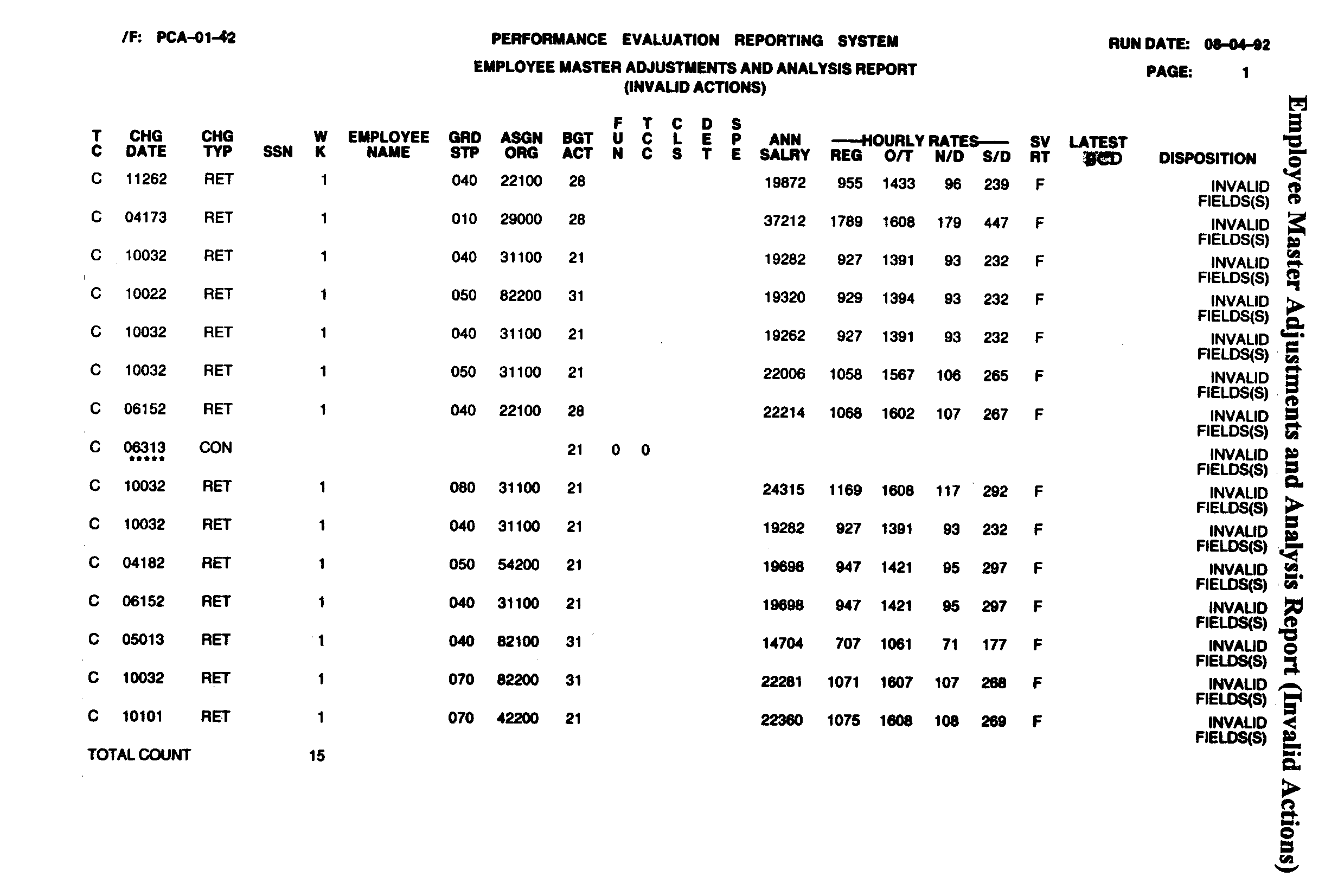
Shown is the Invalid Actions section of the Employee Master Adjustment & Analysis Report. This is a listing of adjustments records where an invalid action was attempted.
Please click here for the text description of the image.
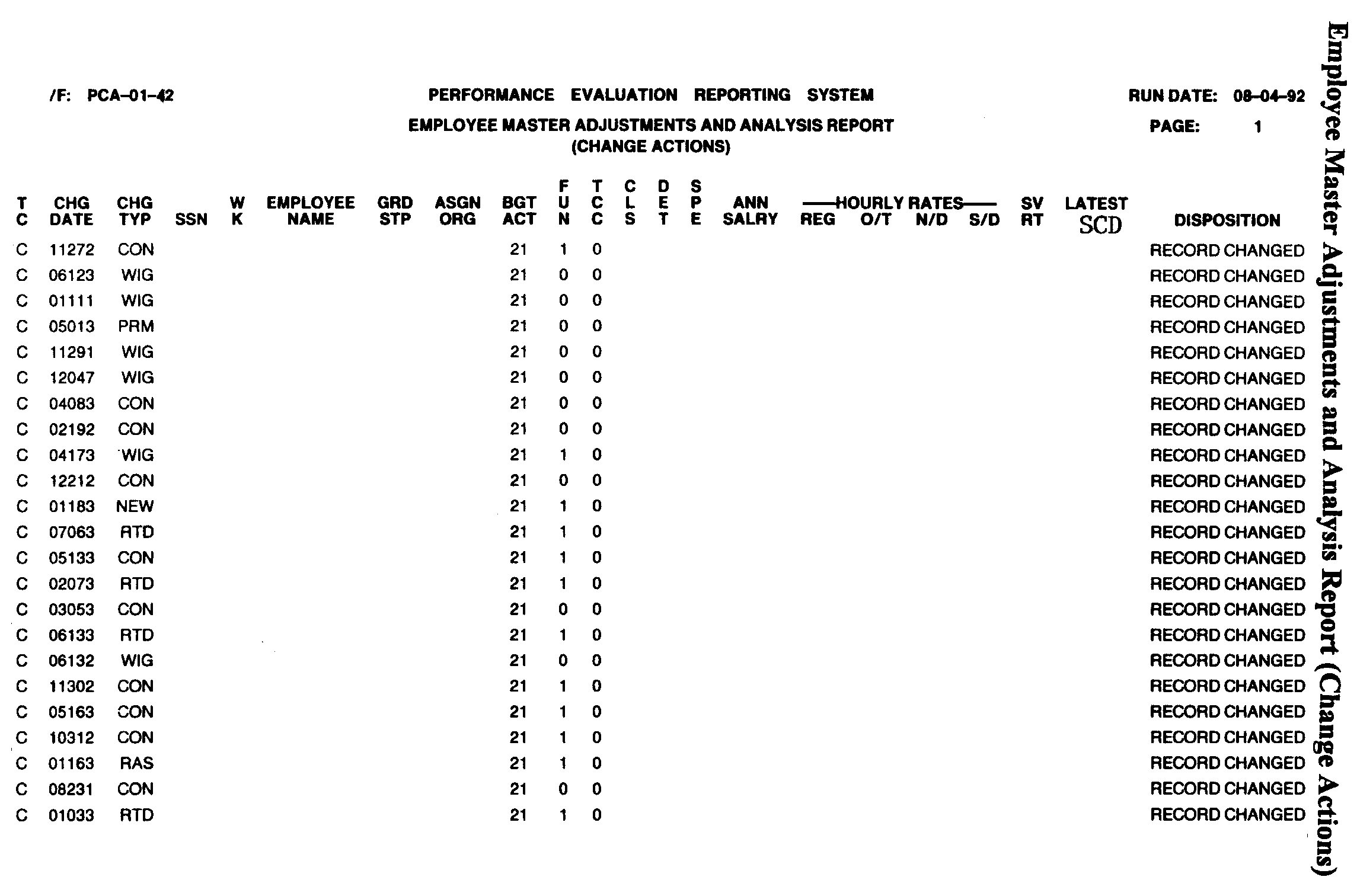
Shown is the Change Actions section of the Employee Master Adjustment & Analysis Report. This is a listing of records where a change was made.
Please click here for the text description of the image.
Exhibit 3.30.50-3
Employee Master Adjustments and Salary Updates Control Listing (PCA-01-43)
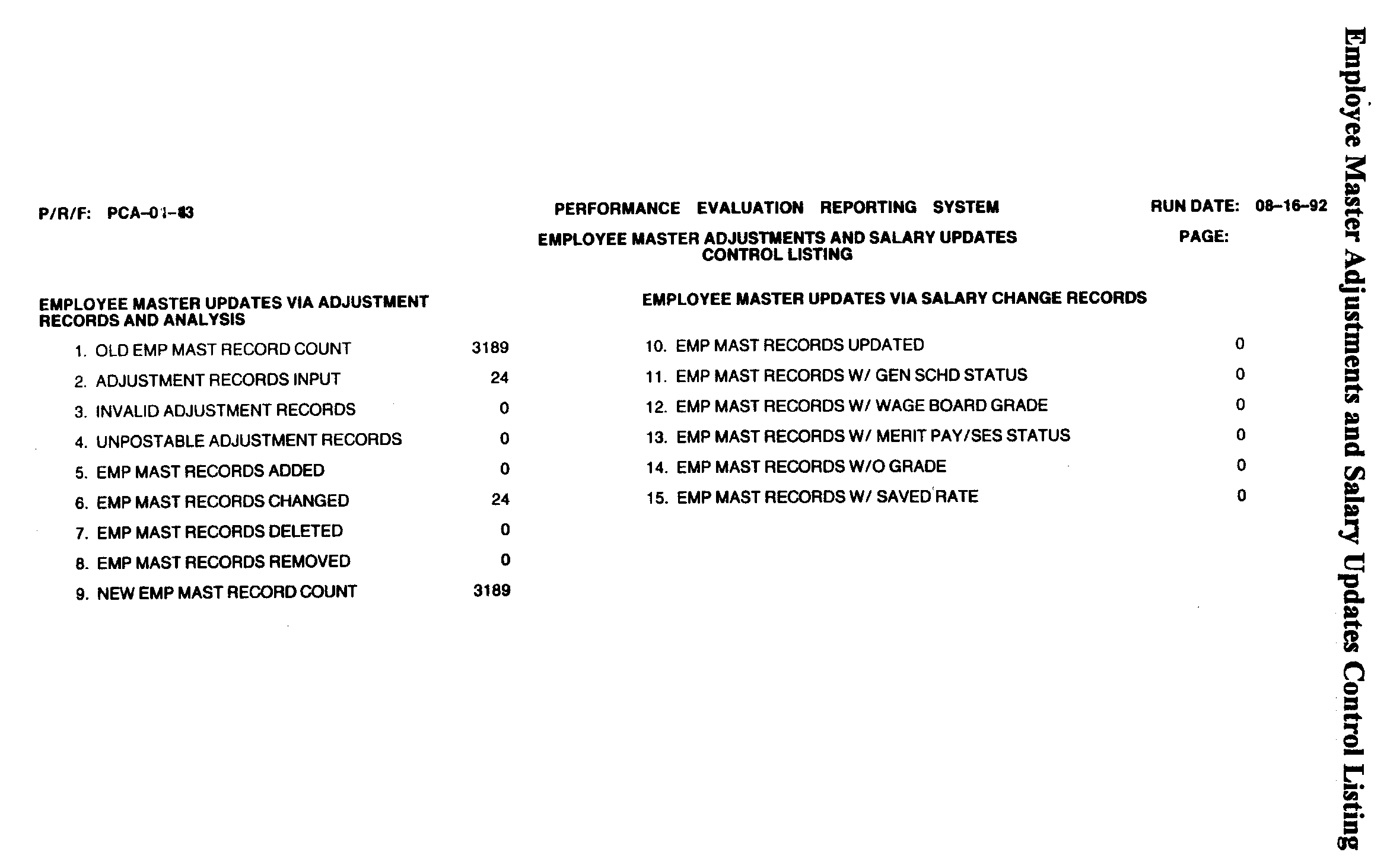
Shown is the Employee Master Adjustments & Salary Updates Control Listing. This report shows the total number records updated on the Employee Master File.
Please click here for the text description of the image.
Exhibit 3.30.50-4
Employee Master List Report (PCA-01-44)
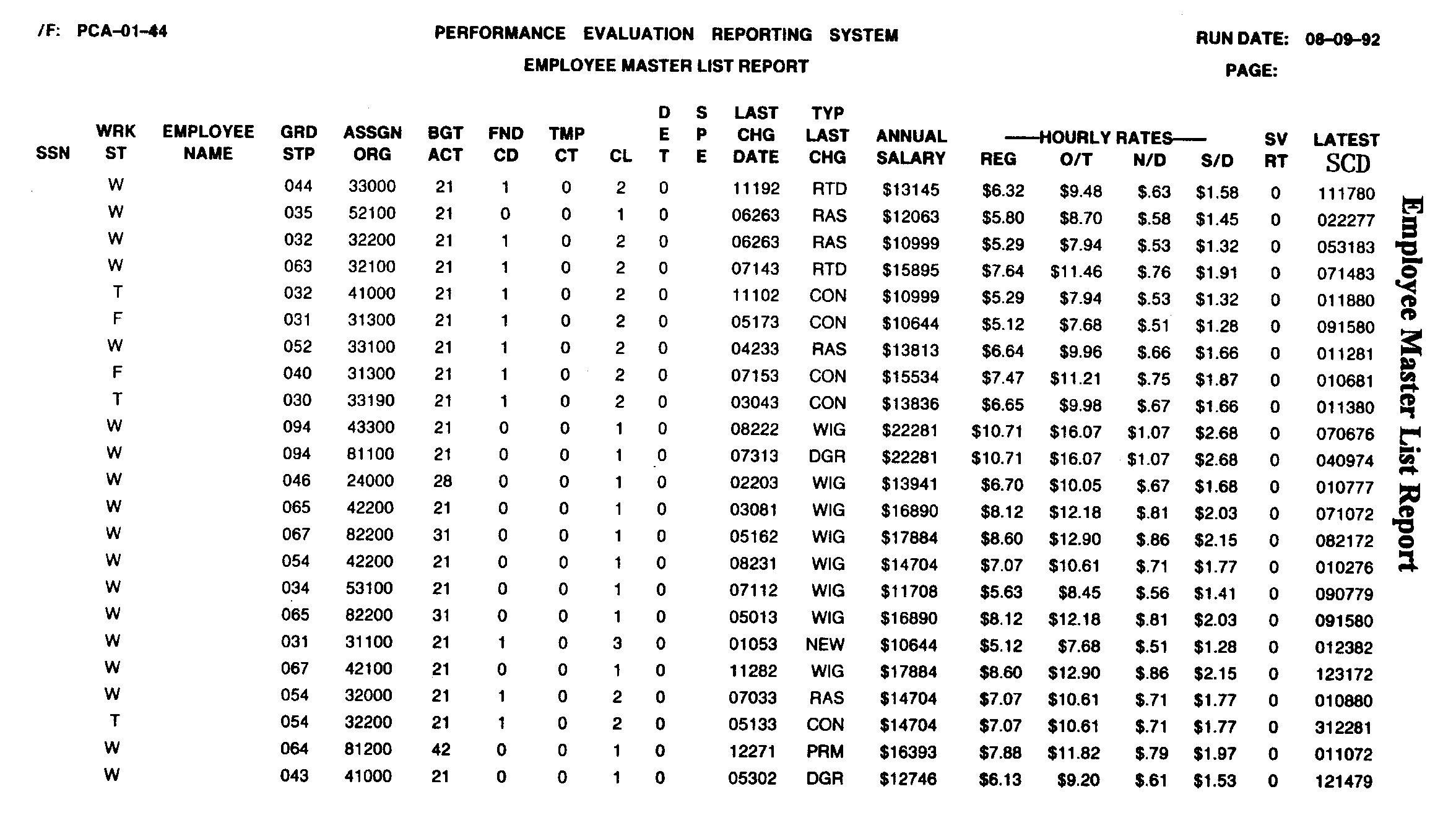
Shown is the Employee Master List Report which is a listing of all Employee Master File records in SSN order. It shows the employee SSN, work status, name, grade and step, organization code, the date of the last change to the record, the type of changed made, annual salary, hourly salary rates, and service computation date (SCD).
Please click here for the text description of the image.
Exhibit 3.30.50-5
Employee Status List Report (PCA-01-45)
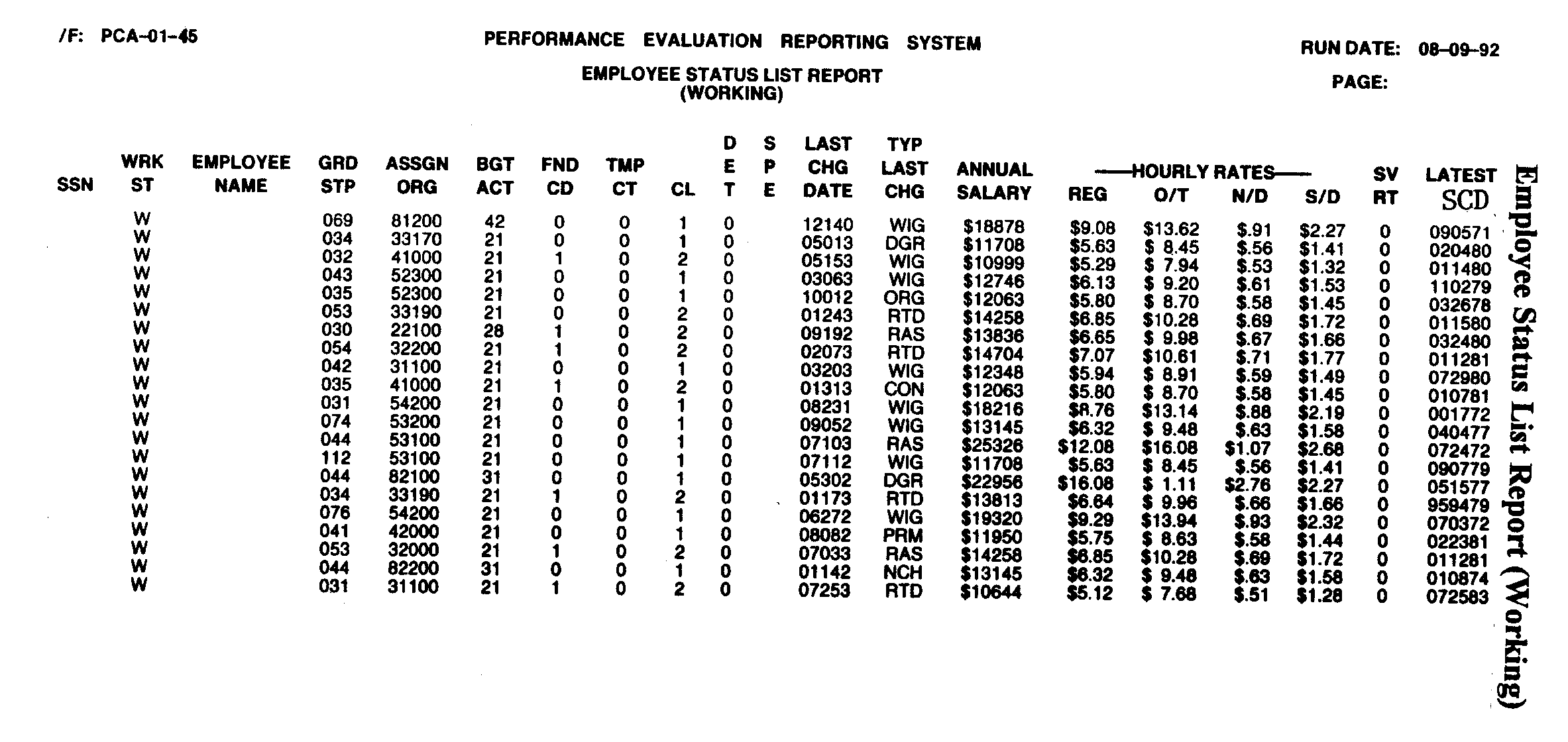
Shown is the Working Section of the Employee Status List Report which list all active employees in name sequence. It shows the employee SSN, work status, name, grade and step, organization code, the date of the last change to the record, the type of changed made, annual salary, hourly salary rates, and service computation date (SCD).
Please click here for the text description of the image.
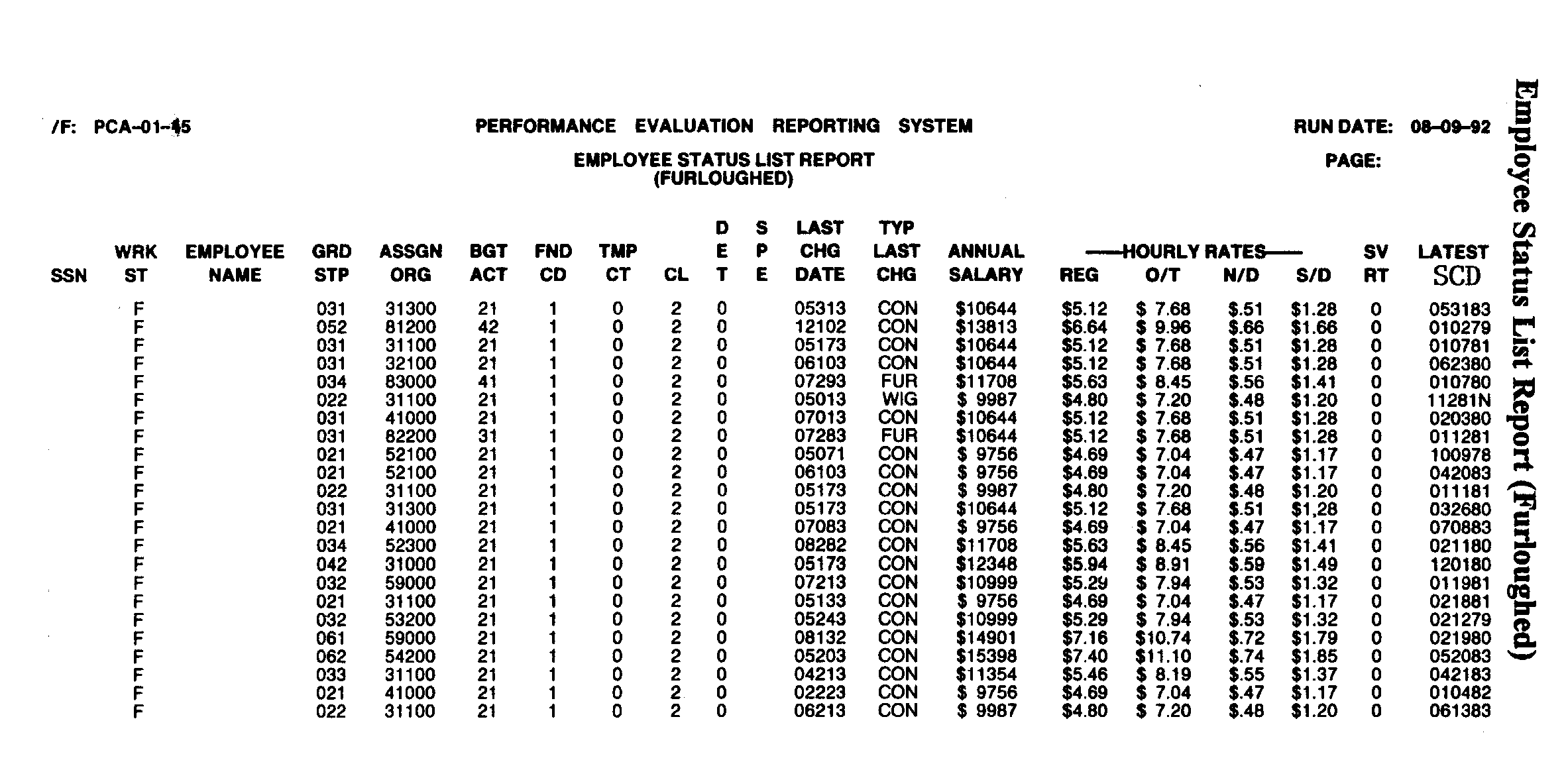
Shown is the Furlough Section of the Employee Status List Report which list all furloughed (released) employees in name sequence. It shows the employee SSN, work status, name, grade and step, organization code, the date of the last change to the record, the type of changed made, annual salary, hourly salary rates, and service computation date (SCD).
Please click here for the text description of the image.
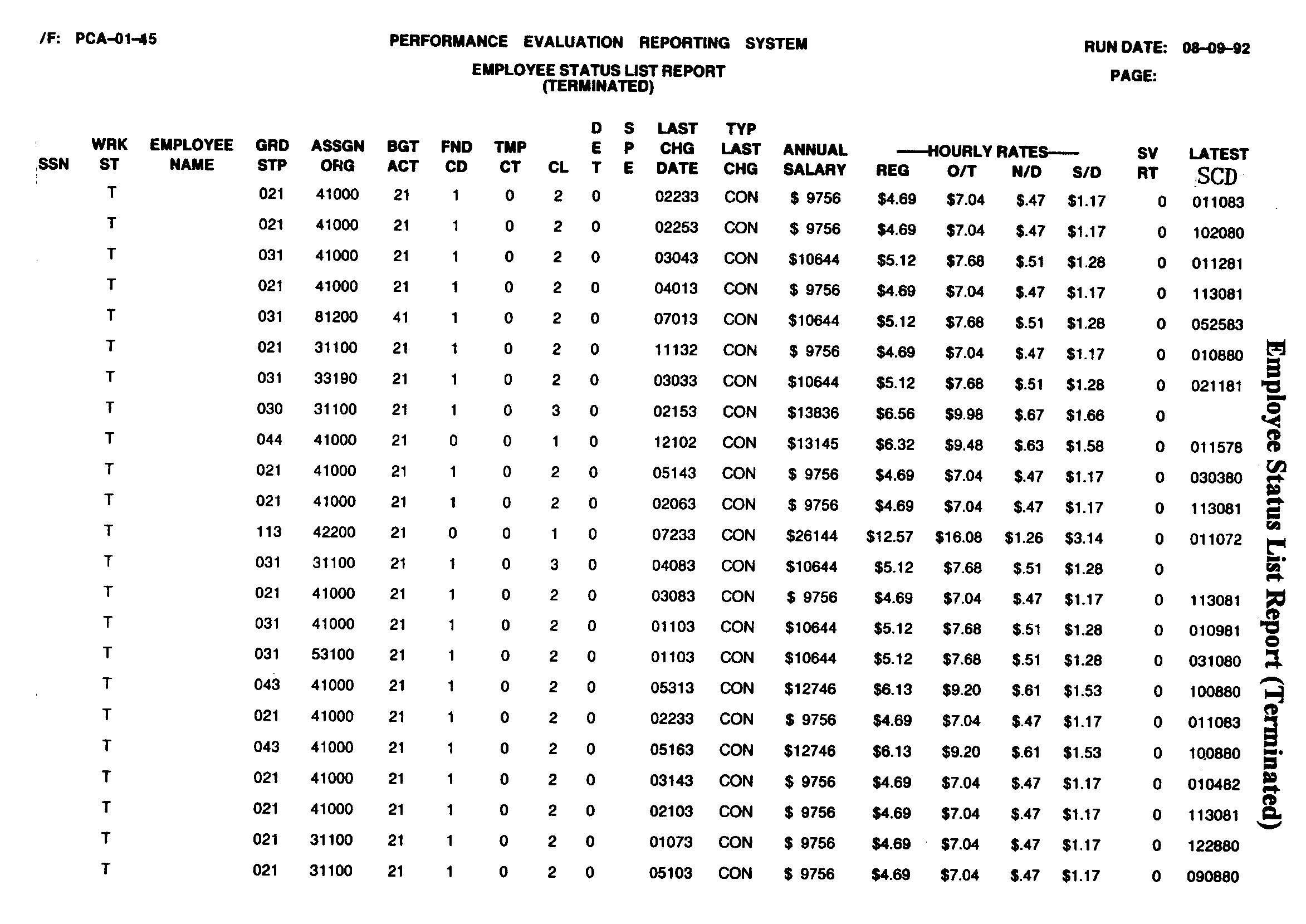
Shown is the Terminated Section of the Employee Status List Report which list all terminated employees in name sequence. It shows the employee SSN, work status, name, grade and step, organization code, the date of the last change to the record, the type of changed made, annual salary, hourly salary rates, and service computation date (SCD).
Please click here for the text description of the image.
Exhibit 3.30.50-6
Missing Parent Functions (PCA-02-43)
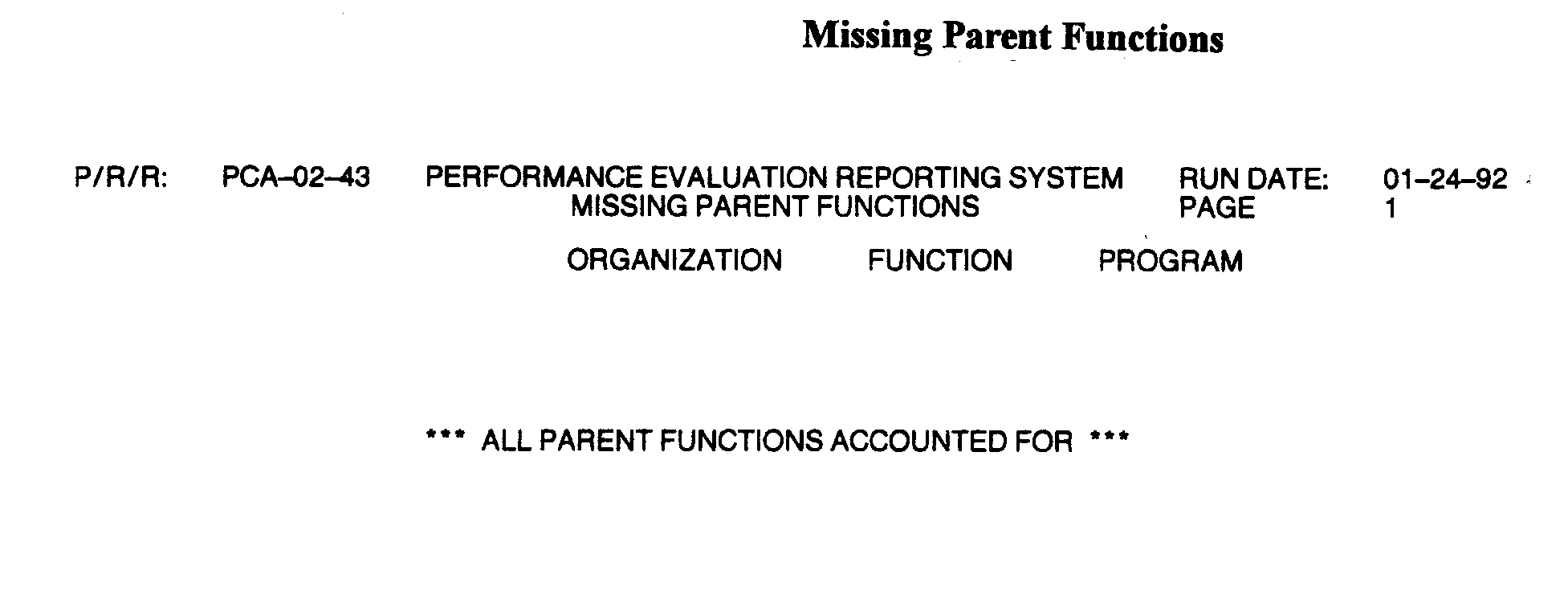
Shown is the Missing Parent Functions Report (PCA-02–43). This is a listing of any OFP code not established in Project PCA. The report shows the organization, function, and program codes.
Please click here for the text description of the image.
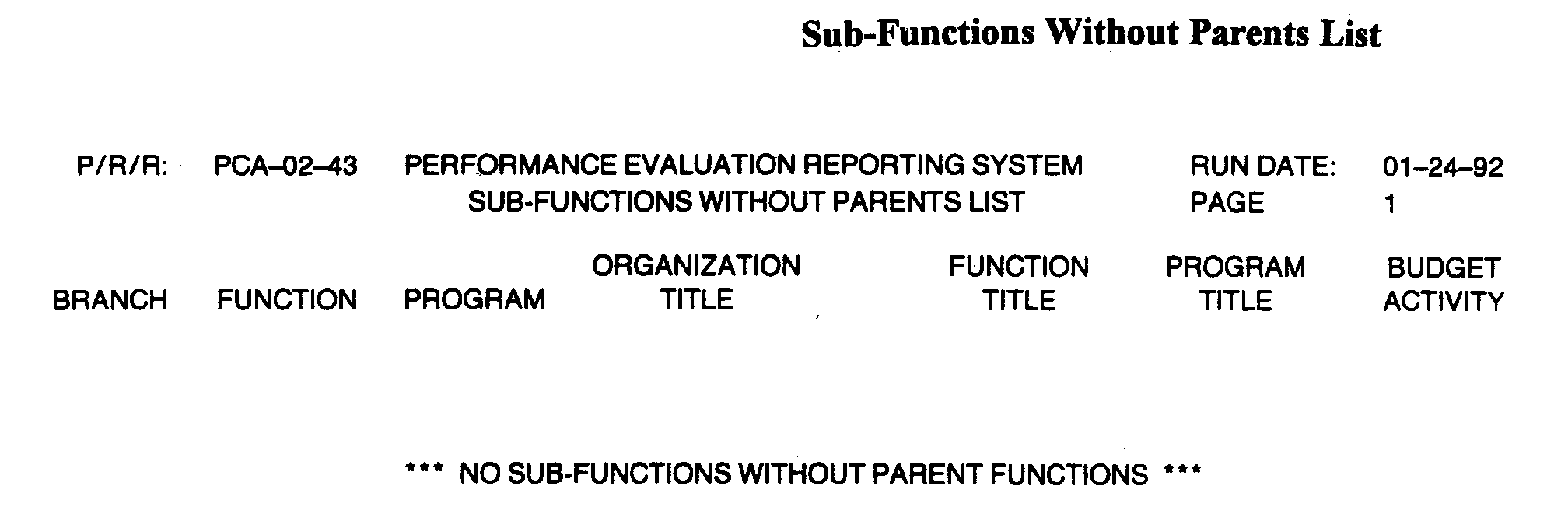
Shown is the Missing Sub-Functions without Parents List . This is a listing of any sub-function code not established in Project PCA. The report shows the branch, function code, program code, organization title, function title, program title, and budget activity for each sub-function without a parent function.
Please click here for the text description of the image.
Exhibit 3.30.50-7
OFP Consistency File Update: Part 1 (PCA-02-41)
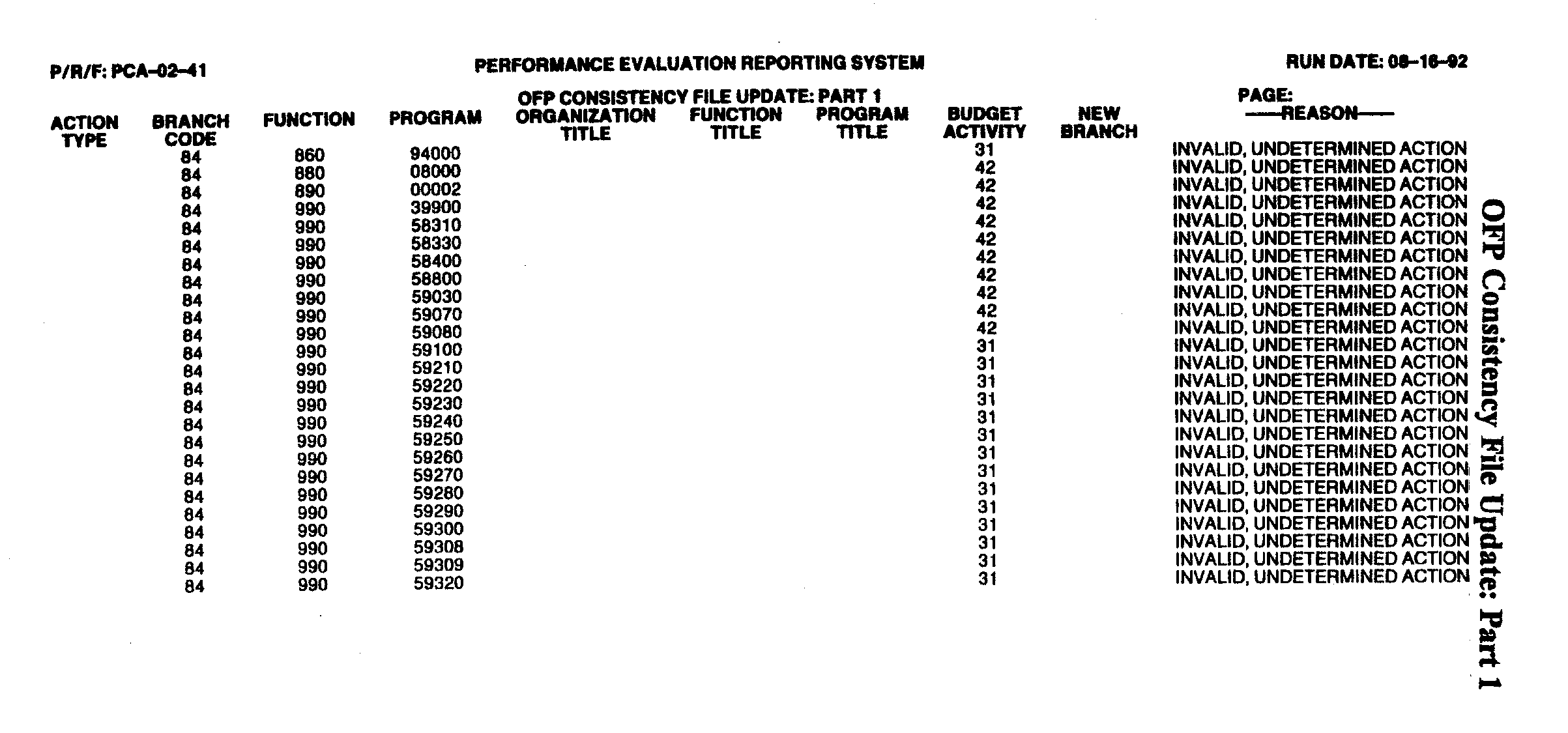
Shown is Part 1 of the OFP Consistency File Update Report. This is a listing of invalid and unpostable update actions . The reports lists the organization, function and program codes along with the organization, function and program titles. It also has the budget activity and reason for each invalid code.
Please click here for the text description of the image.
Exhibit 3.30.50-8
OFP Consistency File Update: Part 2 (PCA-02-41)
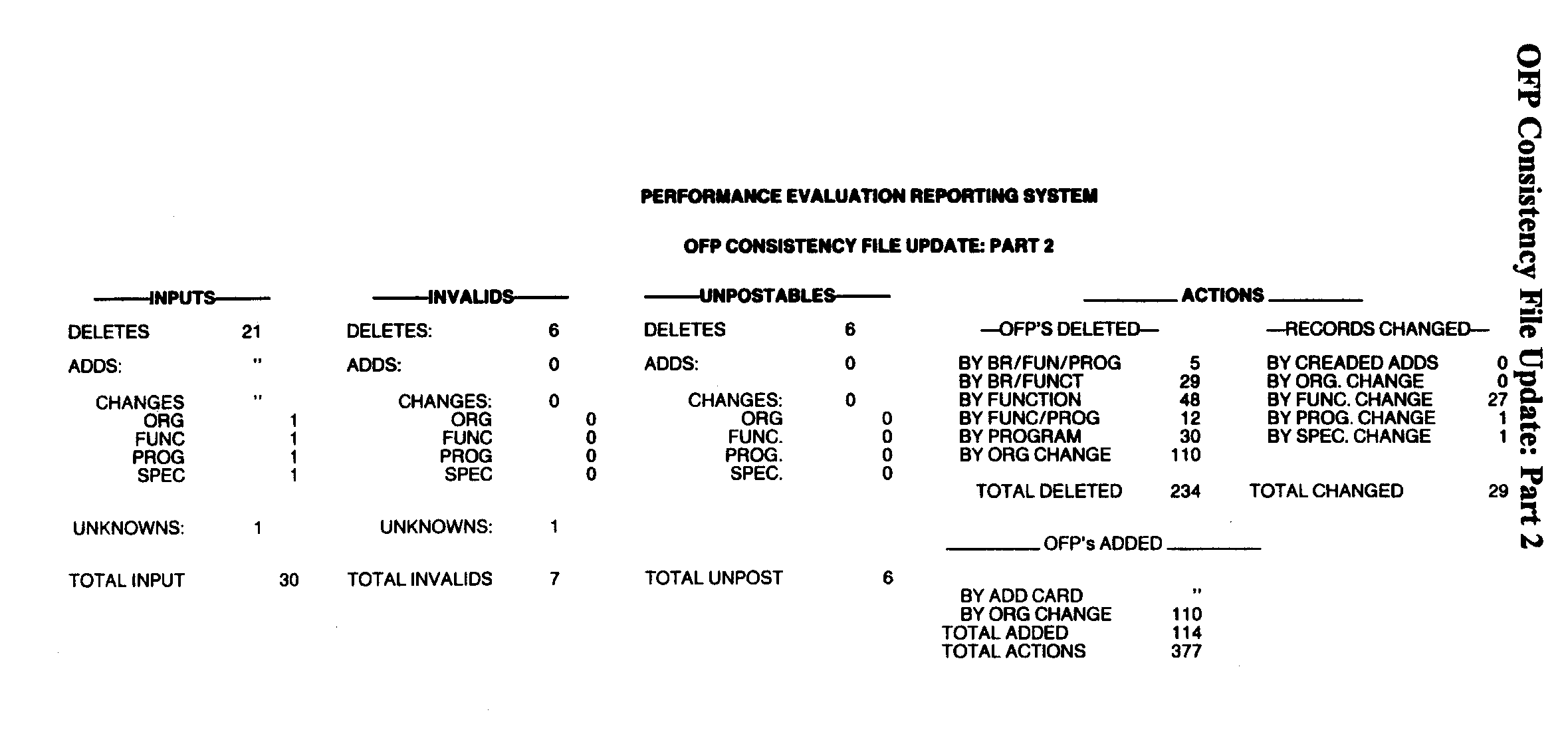
Shown is Part 2 of the OFP Consistency File Update Report. This is a listing of the total number of inputs, invalids, unpostable, and actions taken on the OFP Consistency File.
Please click here for the text description of the image.
Exhibit 3.30.50-9
OFP Consistency List (PCA-02-42)
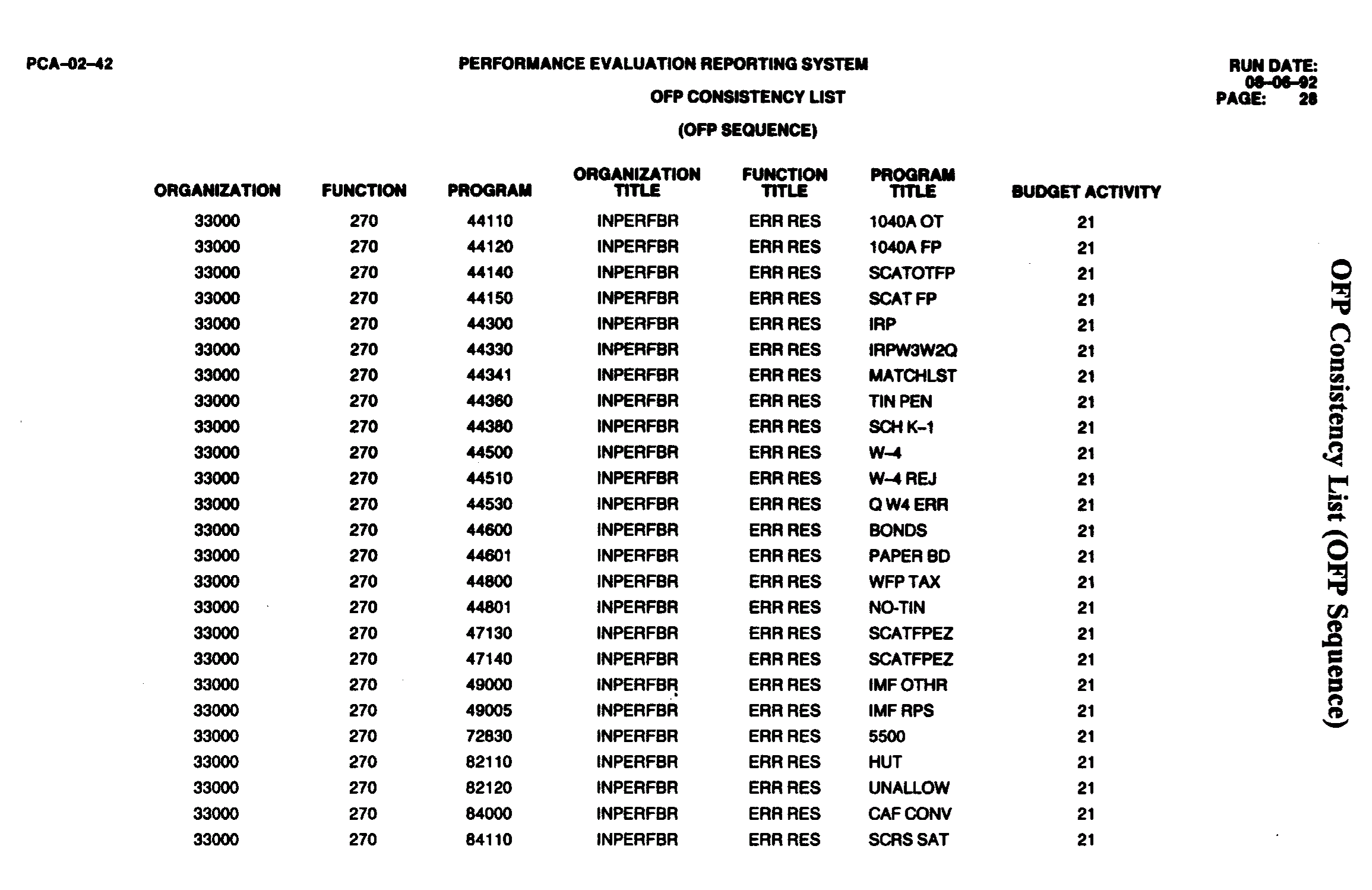
Shown is the OFP Consistency List which lists the organization code, function code, program code, organization title, function title, program title, and budget title for each OFP code in OFP sequence.
Please click here for the text description of the image.
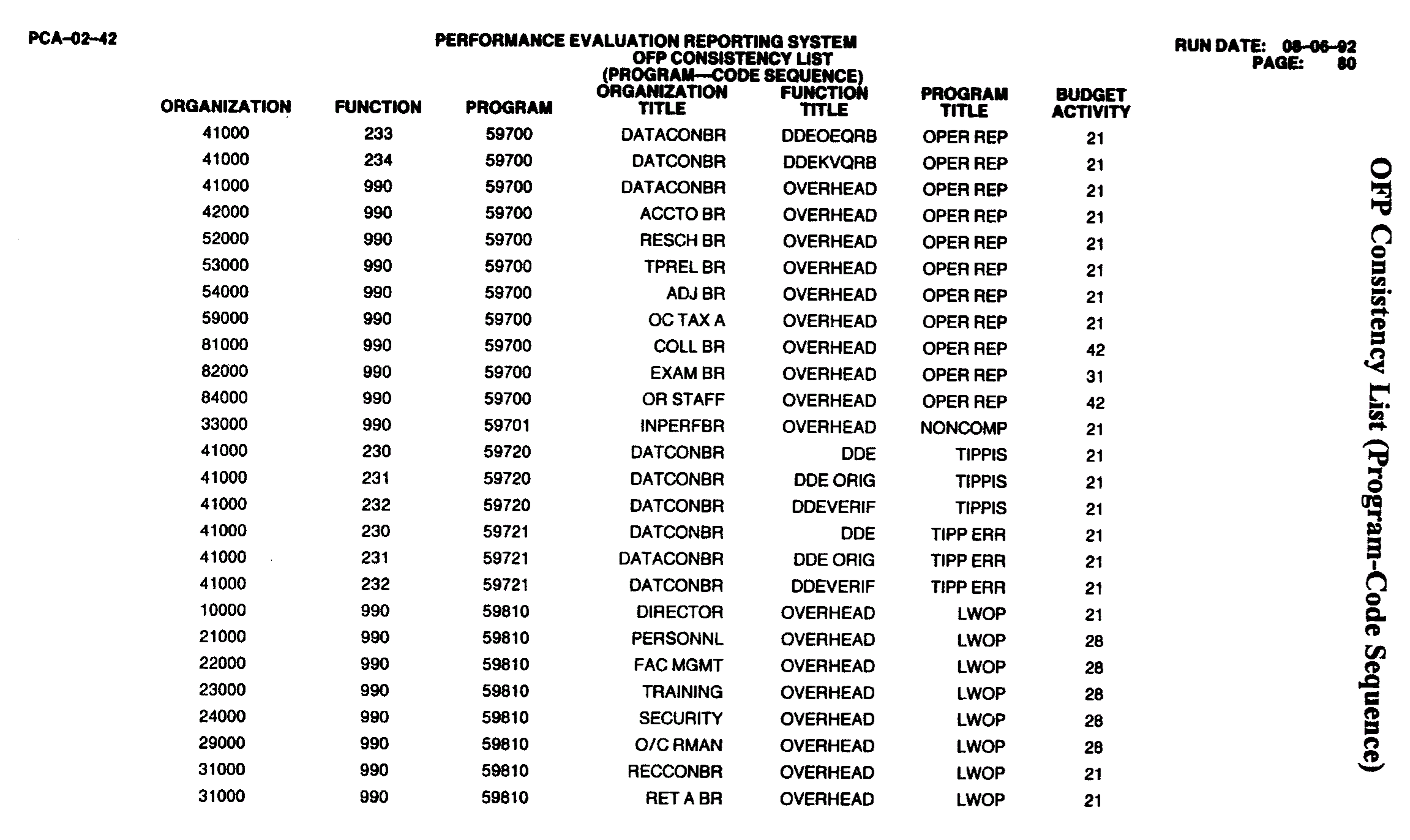
Shown is the OFP Consistency List which lists the organization code, function code, program code, organization title, function title, program title, and budget title for each OFP code in POF sequence.
Please click here for the text description of the image.
Exhibit 3.30.50-10
Final Error Register Report(s)
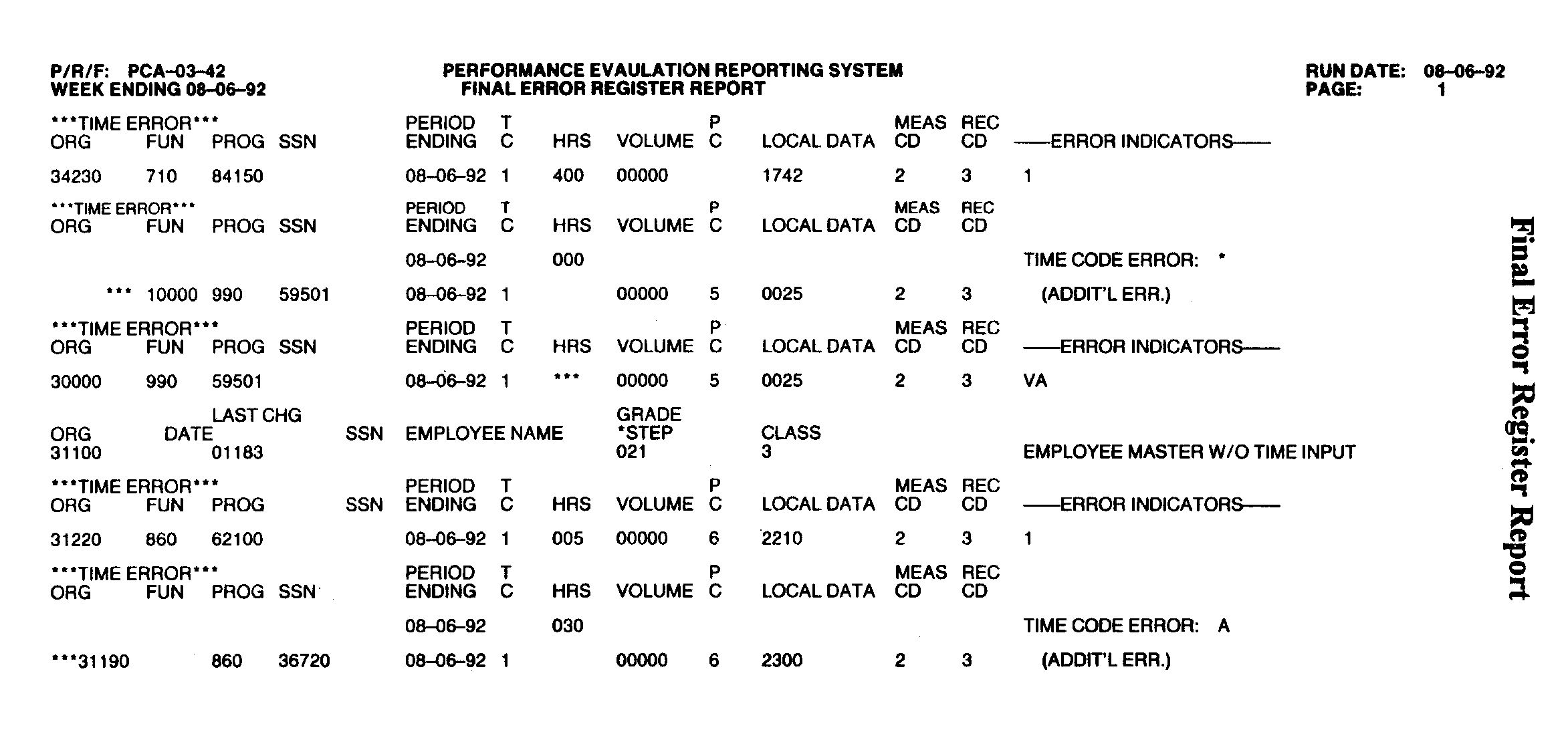
Shown is the Final Error Register Report. This is a listing of error records generated from validity checks of Project PCA. The columns shown are ORG, FUN, PROG, SSN, PERIOD ENDING, TC, HRS, VOLUME, PC, LOCAL DATA, MEAS CD, REC CD, AND ERROR INDICATORS.
Please click here for the text description of the image.
Exhibit 3.30.50-11
Period Data and Cum File Adjustments Control Listing (PCA-03-41)
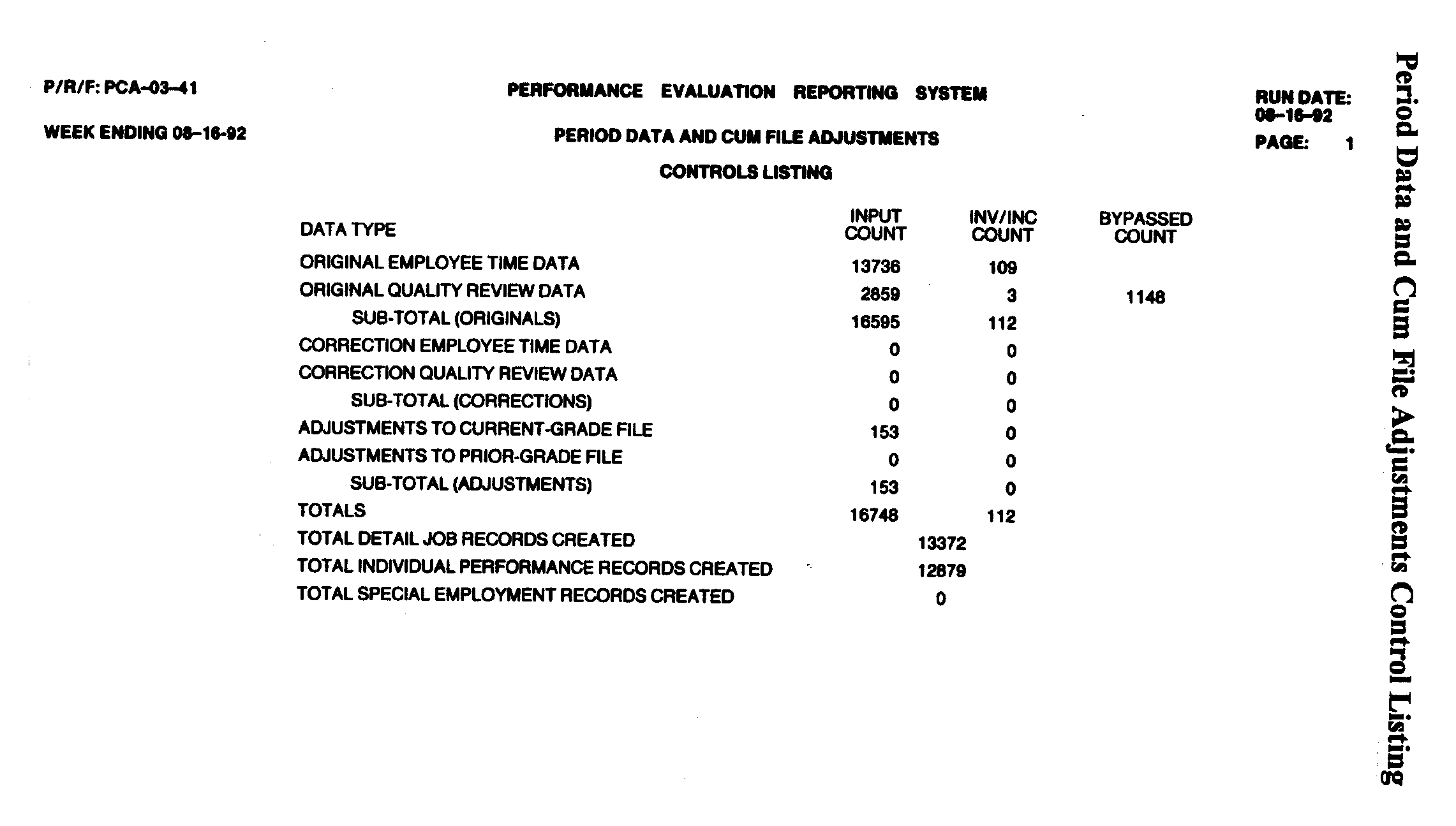
Shown is the Period Data and Cum File Adjustments Control Listing. The report displays statistics pertaining to processing actions. The columns shown on this report are DATA TYPE, INPUT COUNT, INV/INC COUNT AND BYPASSED COUNT.
Please click here for the text description of the image.
Exhibit 3.30.50-12
Obsolete Quality Review Error Register Report
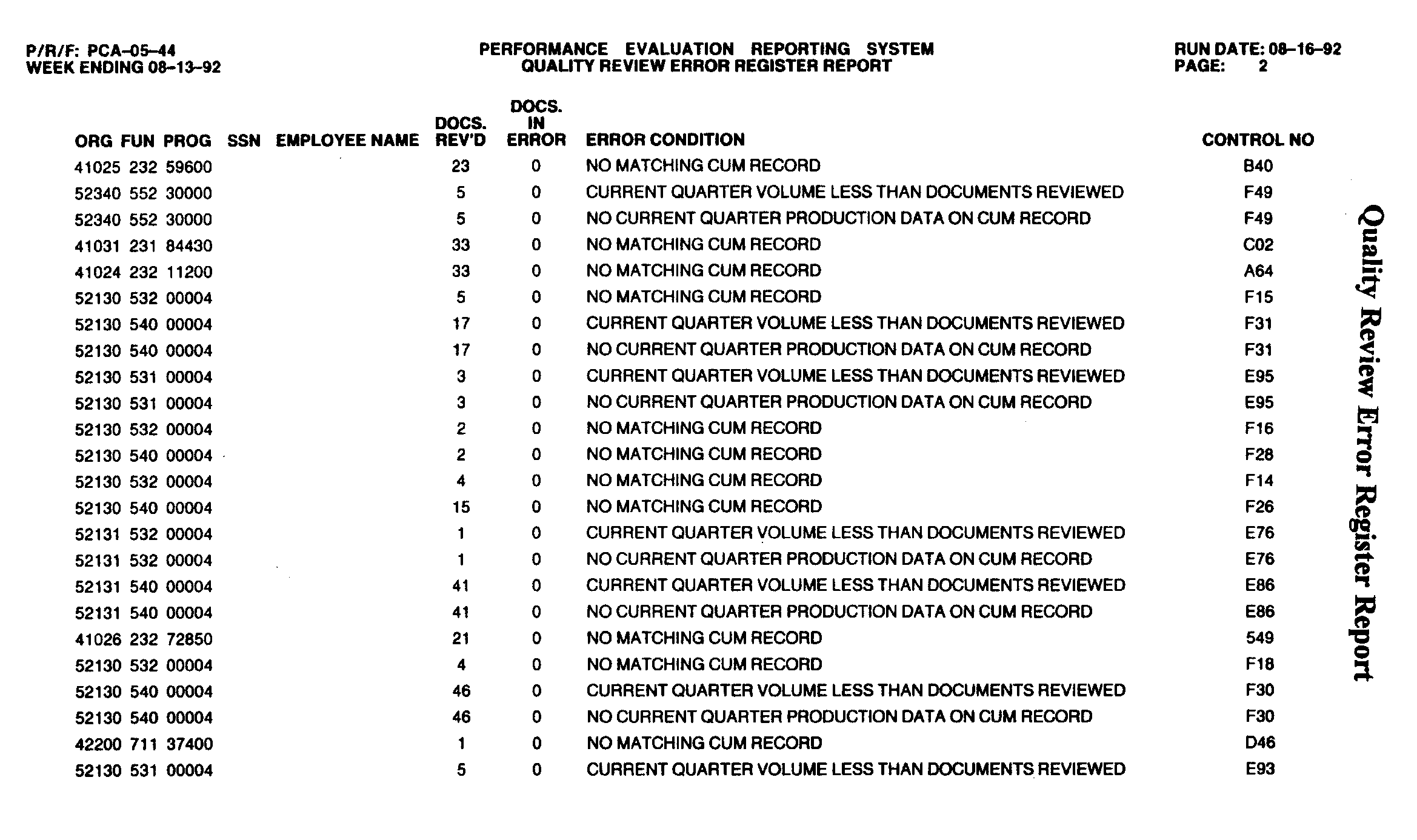
Shown is the obsolete Quality Review Error Report. This is a listing of errors that did not post to the Current Grade Cum Job Record. The report lists organization code, function code, program number, documents received, documents in error, the error condition, and control number of each item.
Please click here for the text description of the image.
Exhibit 3.30.50-13
Current Grade To Prior Grade Transfer History Listing (PCA-05-43)
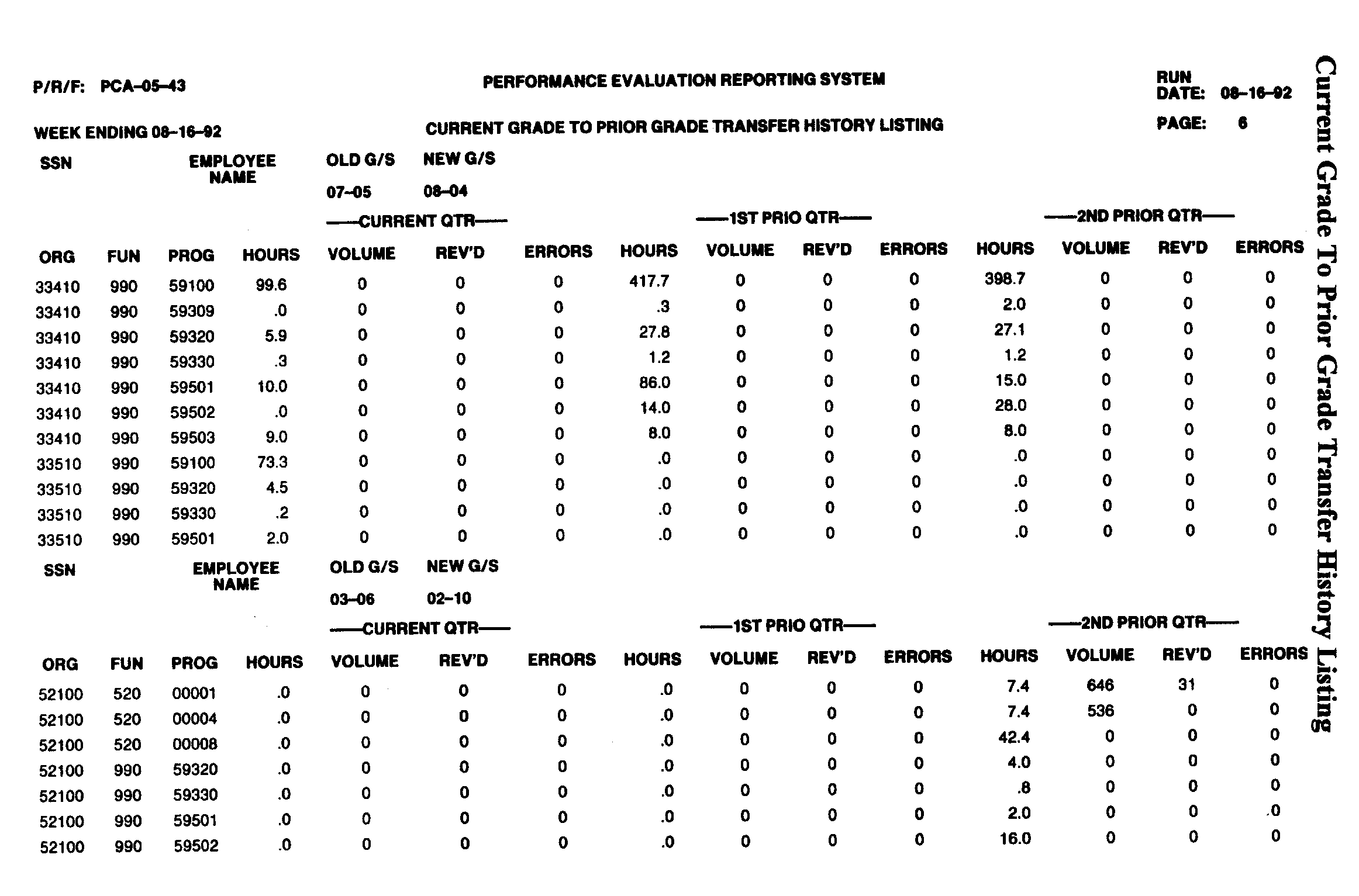
Shown is the Current Grade to Prior Grade Transfer History Listing. This listing shows records which have been transferred from the Current Grade Cum File to the Prior Grade Cum File . The report is broken down by the employee's SSN and Name. It lists the old grade and step with the new grade and step. Under each employee's name is the organization, function, program, hours the employee has for the current, first prior, and second prior quarters.
Please click here for the text description of the image.
Exhibit 3.30.50-14
Period Data Posting Mismatch/Error Register(PCA-05-45)
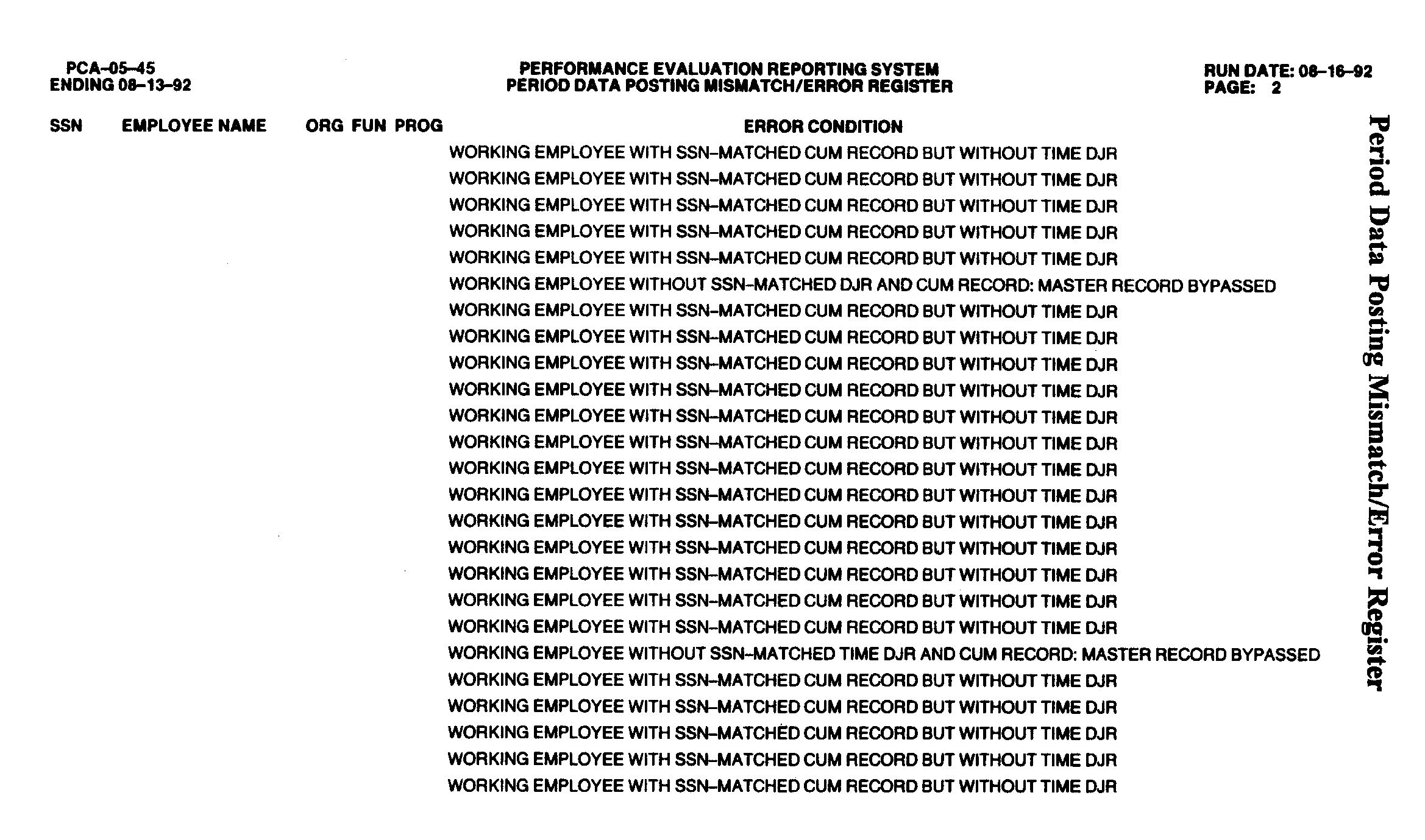
Shown is the Period Data Mismatch/Error Register. This register lists records which did not post to the Current Grade Cum File by SSN, employee name, organization, function, program, and error condition.
Please click here for the text description of the image.
Exhibit 3.30.50-15
Individual Performance History Adjustment Report (PCA-05-46)
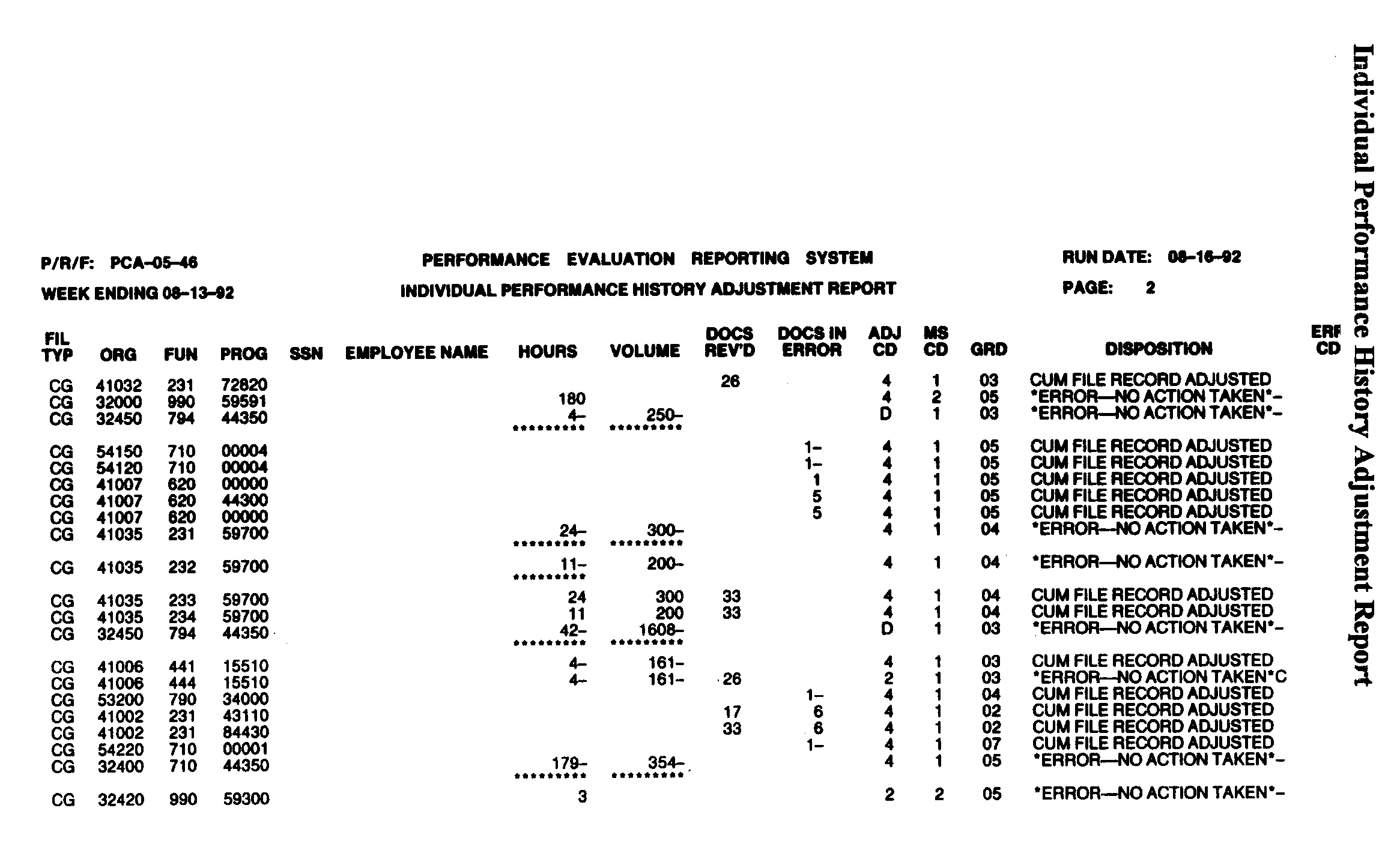
Shown is the Individual Performance History Adjustment Record. This is an audit trail of all actions taken to change data on the Current Grade and Prior Grade Cum Files. It lists the organization, function, program, SSN, employee's name, hours, volume, documents received, adjustment code, employee's grade and disposition.
Please click here for the text description of the image.
Exhibit 3.30.50-16
Cum Files Updates Controls Listing (PCA-05-47)
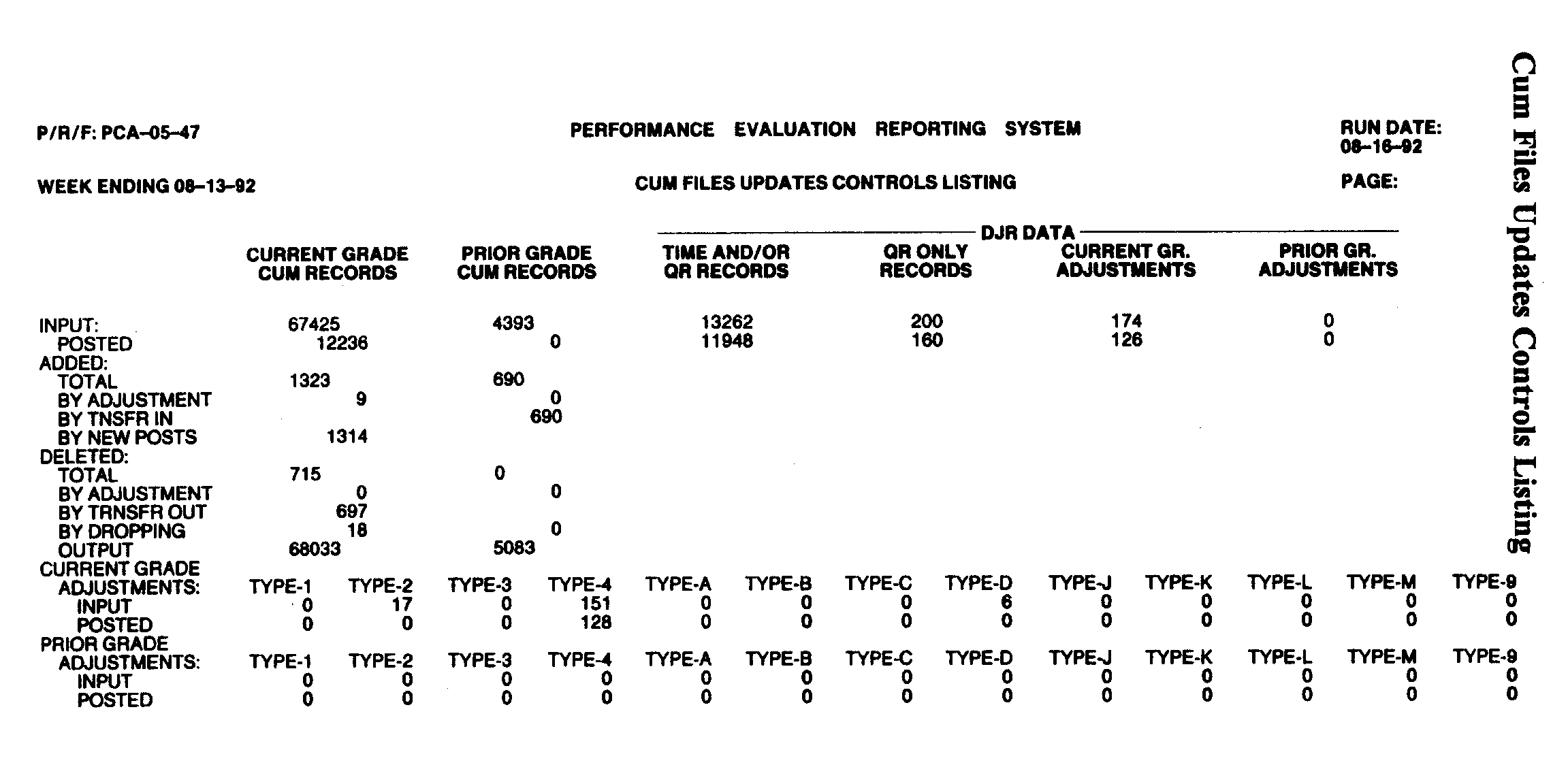
Shown is the Cum Files Updates Controls Listing. This report is a recap summary listing of all actions attempted or taken in updating the Current or Prior Grade Cum Files.
Please click here for the text description of the image.
Exhibit 3.30.50-17
Process Control Record
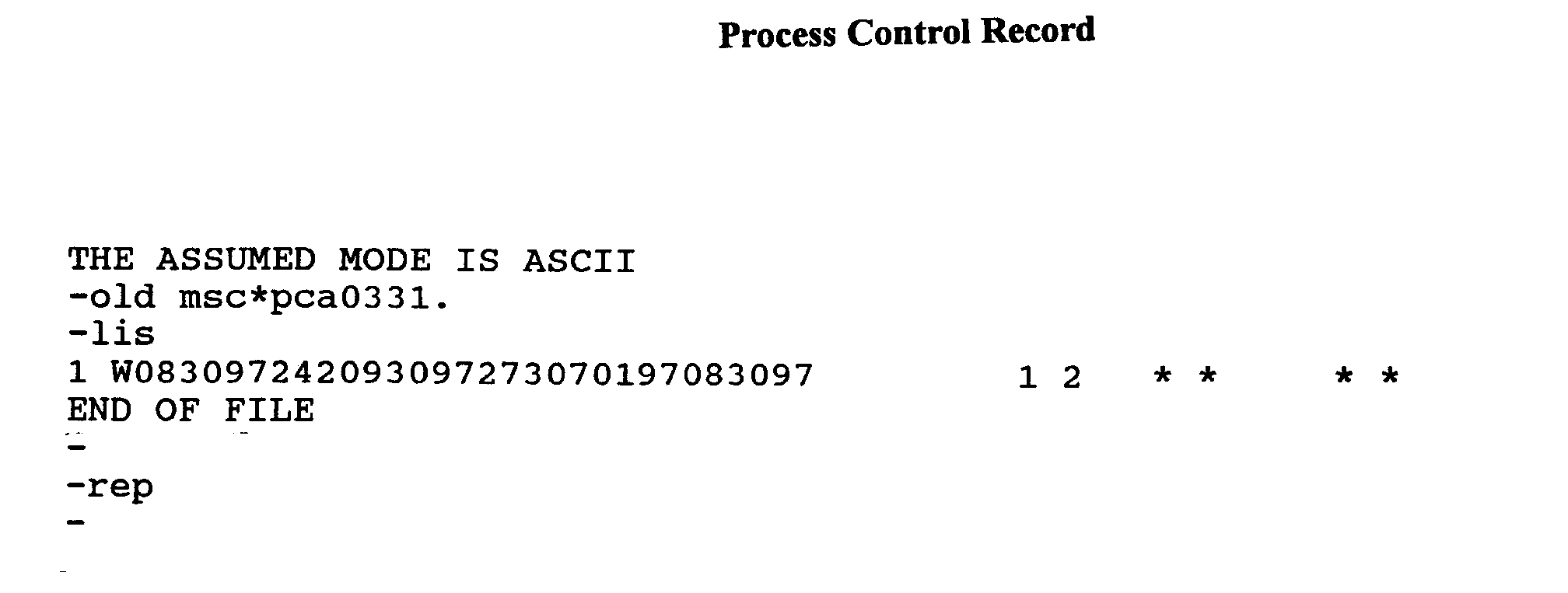
Shown is the Process Control Record. It contains dates and processing parameters.
Please click here for the text description of the image.
Exhibit 3.30.50-18
Cum File SSN Selection Error Register Report
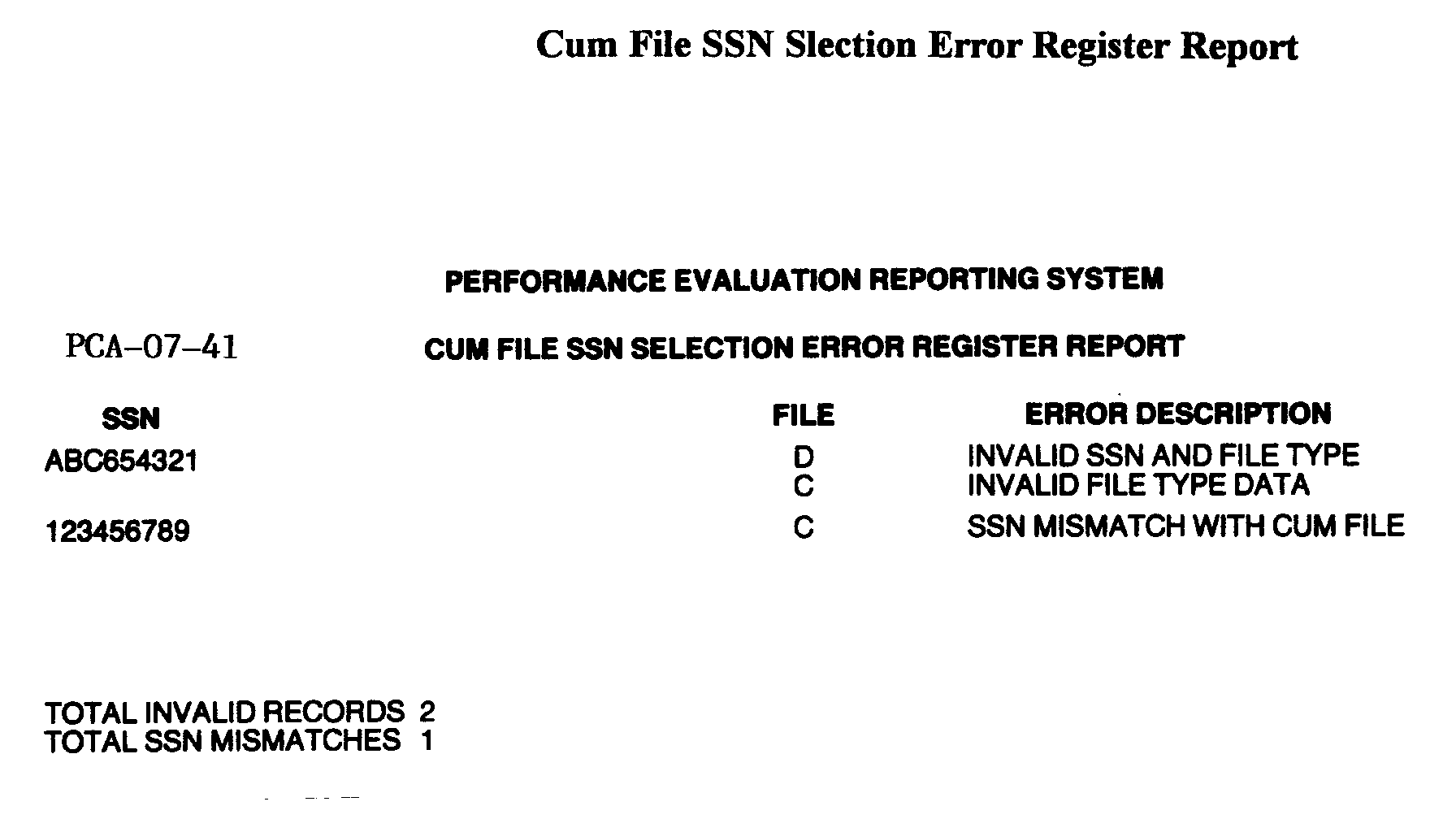
Shown is the Cum File SSN Selection Error Register. This reports lists the invalid SSN, File Type Data, and Error Description for each record where an invalid or mismatched SSN occurred.
Please click here for the text description of the image.
Exhibit 3.30.50-19
Cum File SSN Selection Edited Data Listing (Prior Grade Data Only)
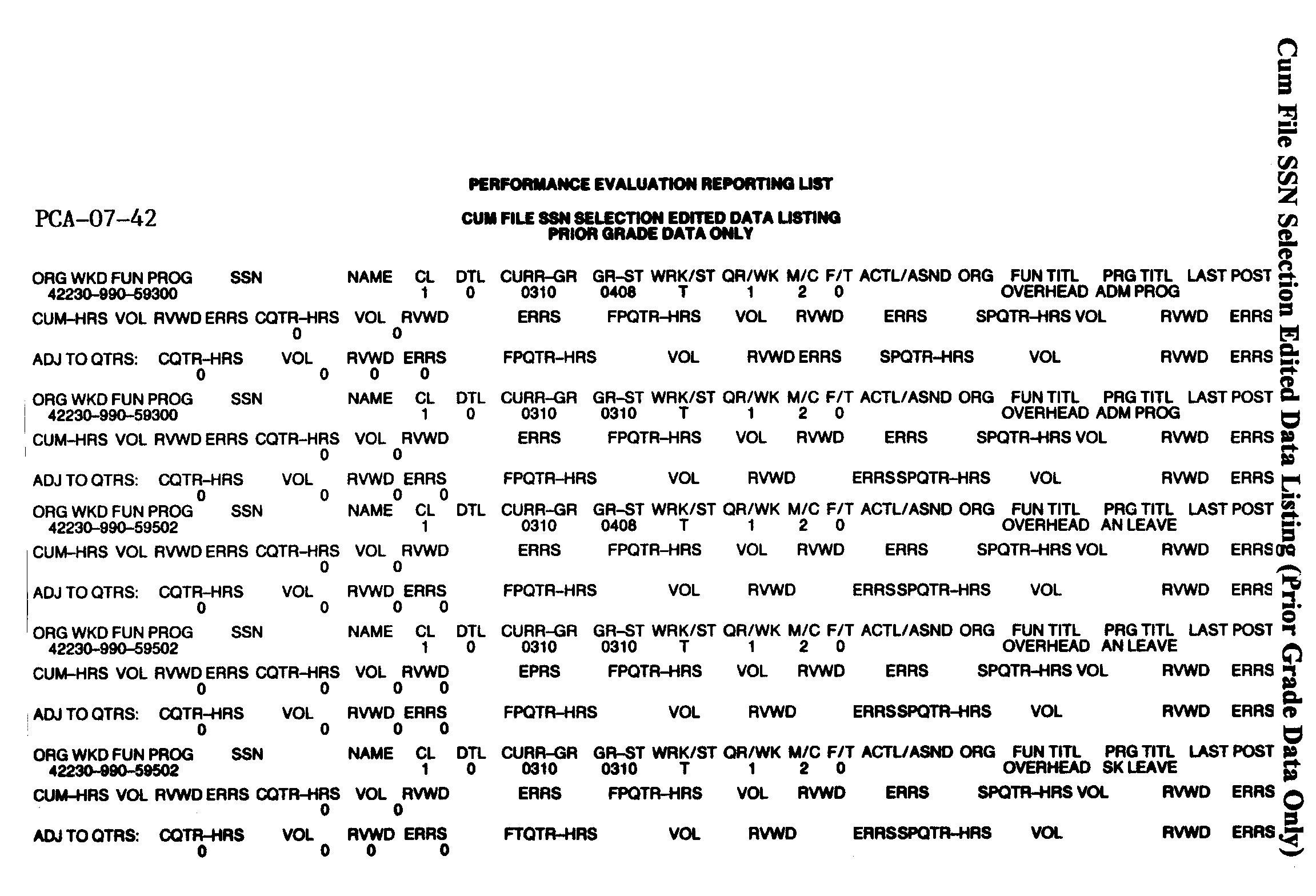
Shown is the Cum File SSN Selection Edited Data Listing for Prior Grade Data Section. This is a listing of cumulative job listings designated by the SSN Selection Record. The first row of columns on this report are ORG WKD FUN PROG, SSN, NAME, CL , DTL, CURR-GR, GR-ST, WRK/ST, QR/WK, M/C, F/T, ACTL/ASND ORG, FUN TITL OVERHEAD, PRG TITL, and LAST POST. The second row of columns on this report are CUM-HRS, VOL, RVWD ERRORS, CQTR-HRS, VOL RVWD, ERRS, FPQTR-HRS, VOL RVWD, ERRS, SPQTR-HRS VOL, RVWD and ERRS. The third row of columns on this report are ADJ TO QTRS:, CQTR-HRS, VOL, RVWD, ERRS, FPQTR-HRS, RVWD, ERRSSPQTR-HRS, VOL, RVWD AND ERRS.
Please click here for the text description of the image.
Exhibit 3.30.50-20
Cum File Leveled Performance Report (PCA-07-43)
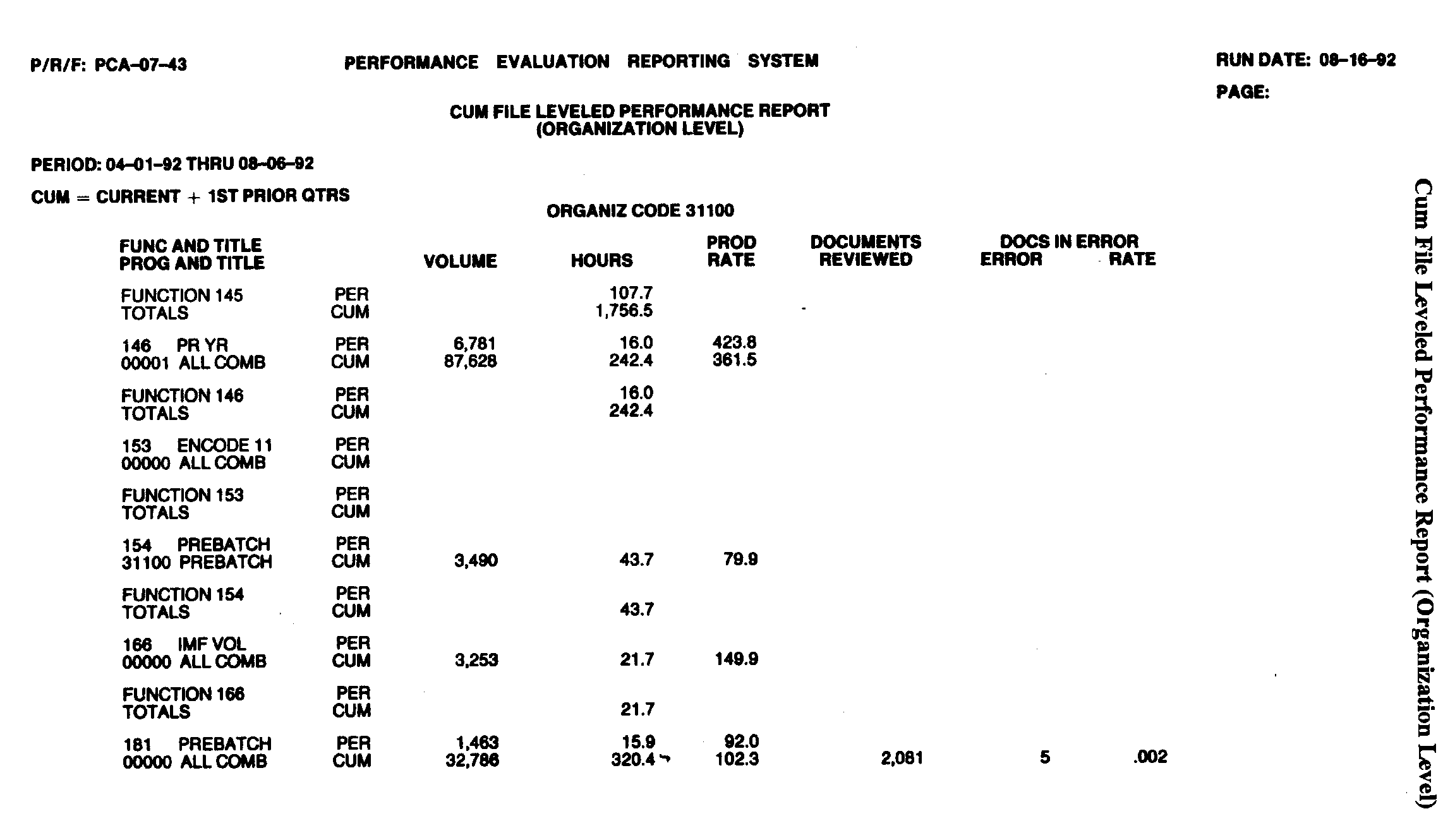
Shown is the Organization Level of the Cum File Leveled Performance Report. The columns on this report are FUNC AND TITLE PROG AND TITLE, VOLUME, HOURS, PROD RATE, DOCUMENTS REVIEWED, DOC IN ERROR and ERROR RATE.
Please click here for the text description of the image.
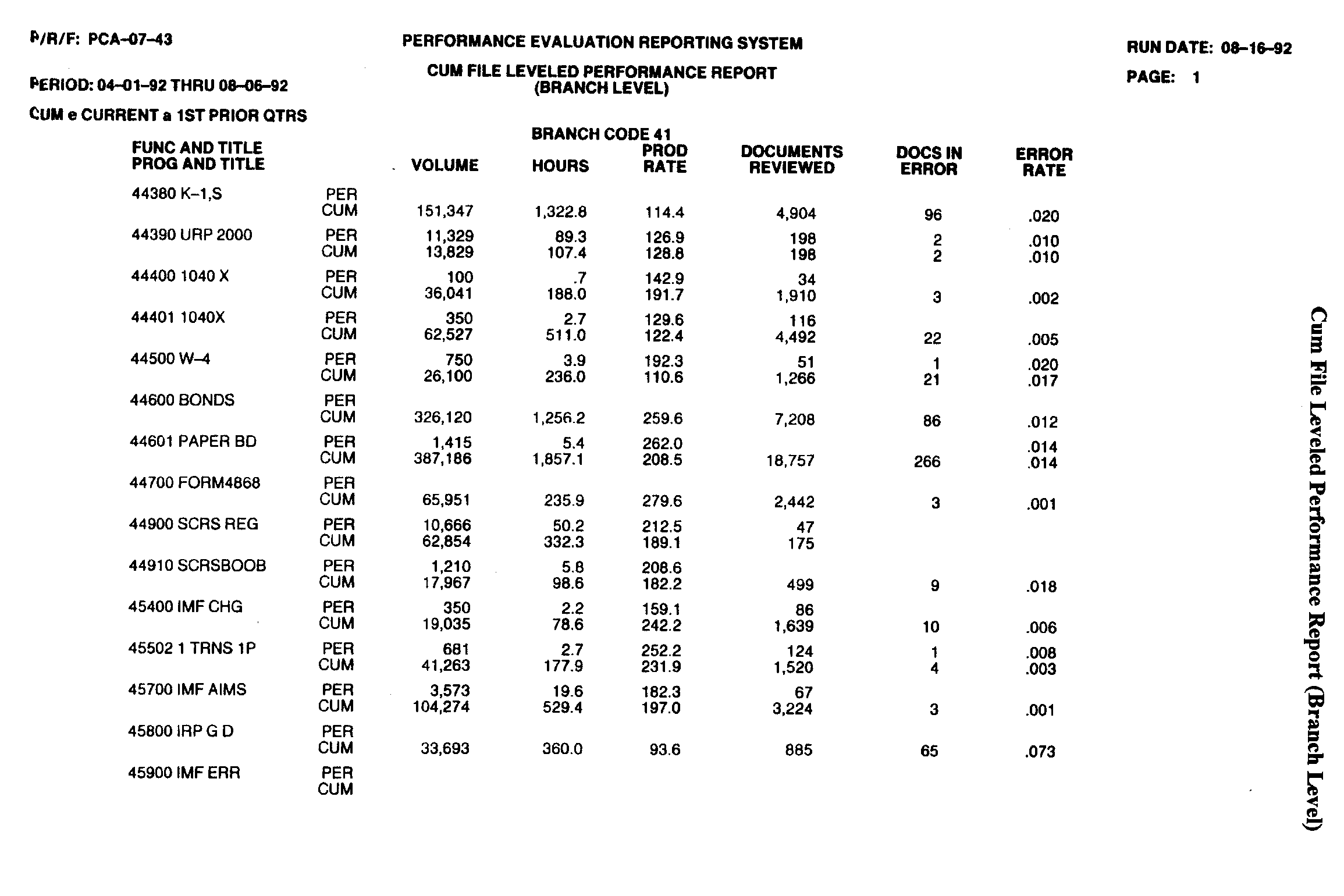
Shown is the Branch Level of the Cum File Leveled Performance Report. The columns on this report are FUNC AND TITLE PROG AND TITLE, VOLUME, HOURS, PROD RATE, DOCUMENTS REVIEWED, DOC IN ERROR and ERROR RATE.
Please click here for the text description of the image.
Exhibit 3.30.50-21
Individual Detail Summary Report (PCA-04-41)
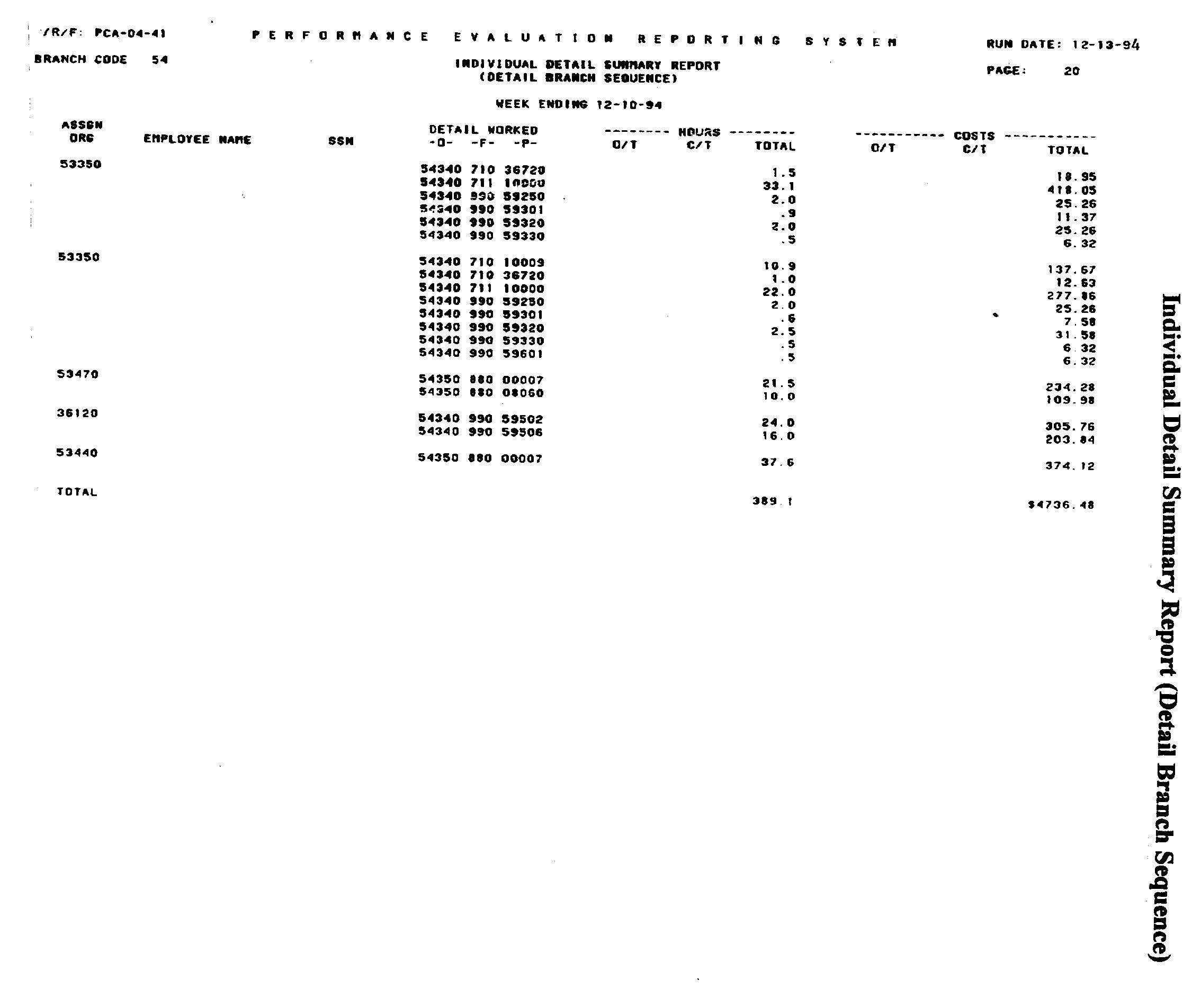
Shown is the Individual Detail Summary Report in Branch Sequence. This is a listing of employees who have shown a detail on their Form 3081. The report lists the employee's assigned organization, name, SSN, the detailed worked and the hours and costs associated with the detail.
Please click here for the text description of the image.
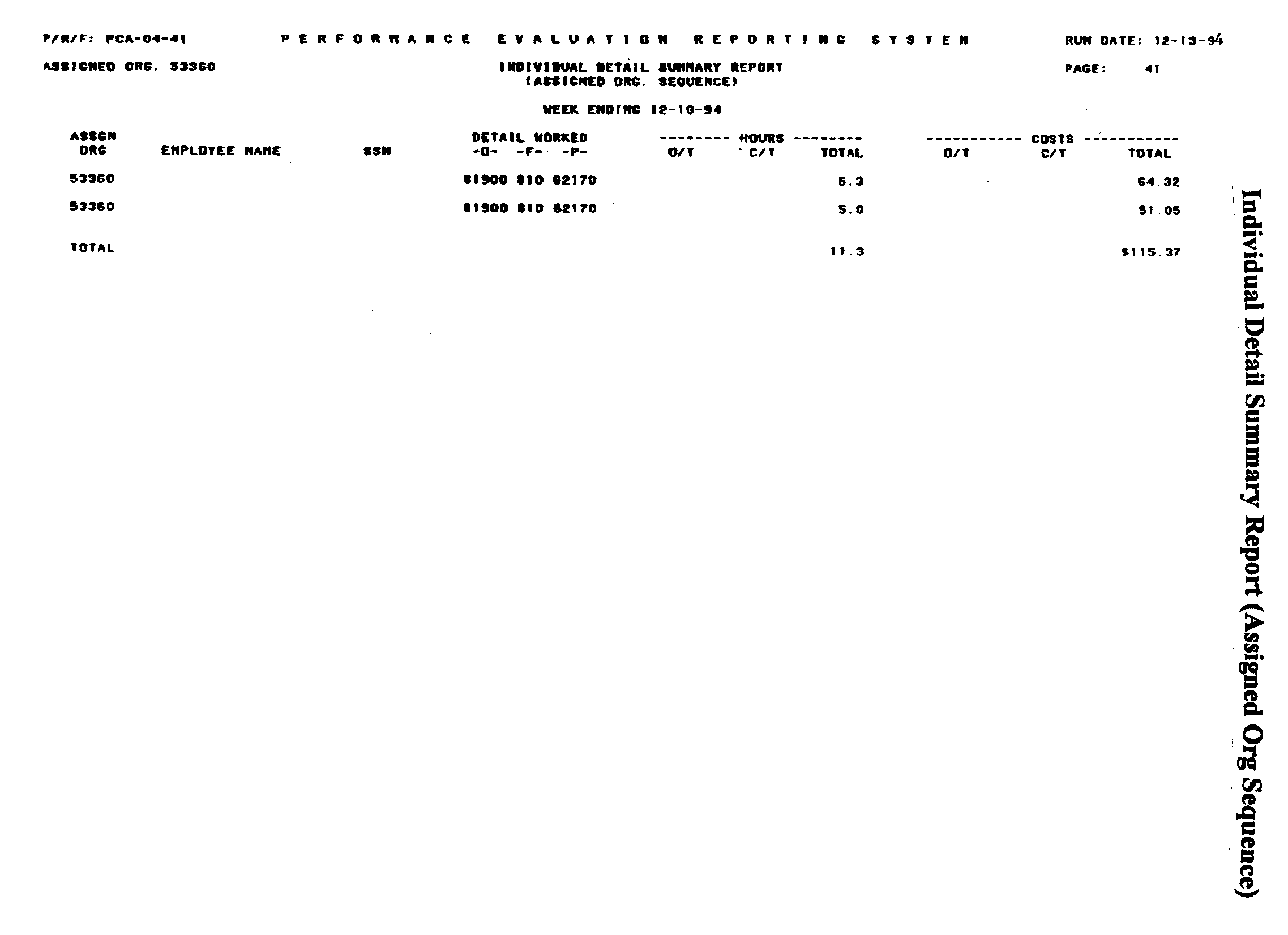
Shown is the Individual Detail Summary Report in Organization Sequence.
Please click here for the text description of the image.